mirror HUMMER H2 2008 User Guide
[x] Cancel search | Manufacturer: HUMMER, Model Year: 2008, Model line: H2, Model: HUMMER H2 2008Pages: 504, PDF Size: 7.12 MB
Page 128 of 504

Automatic Dimming Mirror Operation
O
:Press this button to turn the automatic dimming
feature on or off. The indicator light to the left of
the button will turn on to indicate when the feature is on.
Once the mirror is turned off, it will remain off until it
is turned back on, or until the vehicle is restarted.
Temperature Display
The temperature can be displayed by pressing
the compass/temperature button. Pressing the
compass/temperature button once briey, will toggle
the temperature reading on and off. To alternate
the temperature reading between Fahrenheit and
Celsius, press and hold the compass/temperature
button for approximately four seconds until the
display blinks F and C. Press and release the
compass/temperature button to toggle between the
Fahrenheit and Celsius readings. After approximately
four seconds of inactivity, the display will stop blinking
and display the last selection made.
If an abnormal reading is displayed, for an extended
period of time, please consult your dealer/retailer.
Under certain circumstances, a delay in updating the
temperature is normal.
Compass Operation
Press the compass/temperature button once briey to
turn the compass on or off.
Compass Calibration
The compass may need calibration if the following occurs:
The compass does not display the correct heading
and the compass zone variance is set correctly.
In order to calibrate, CAL must be displayed in the
mirror compass windows. If CAL is not displayed, push
in the compass/temperature button for approximately
eight seconds or until CAL is displayed.
The compass can only be calibrated by driving the
vehicle forward in circles at 5 mph (8 km/h) or less until
the display reads a direction. Do not attempt to
calibrate the compass by driving in reverse.
2-46
Page 129 of 504
Compass Variance
The mirror is set in zone eight upon leaving the factory.
It will be necessary to adjust the compass to
compensate for compass variance if you live outside
zone eight. Under certain circumstances, as during
a long distance cross-country trip, it will be necessary to
adjust for compass variance. Compass variance is
the difference between earth’s magnetic north and true
geographic north. If not adjusted to account for
compass variance, your compass could give false
readings.
To adjust for compass variance:
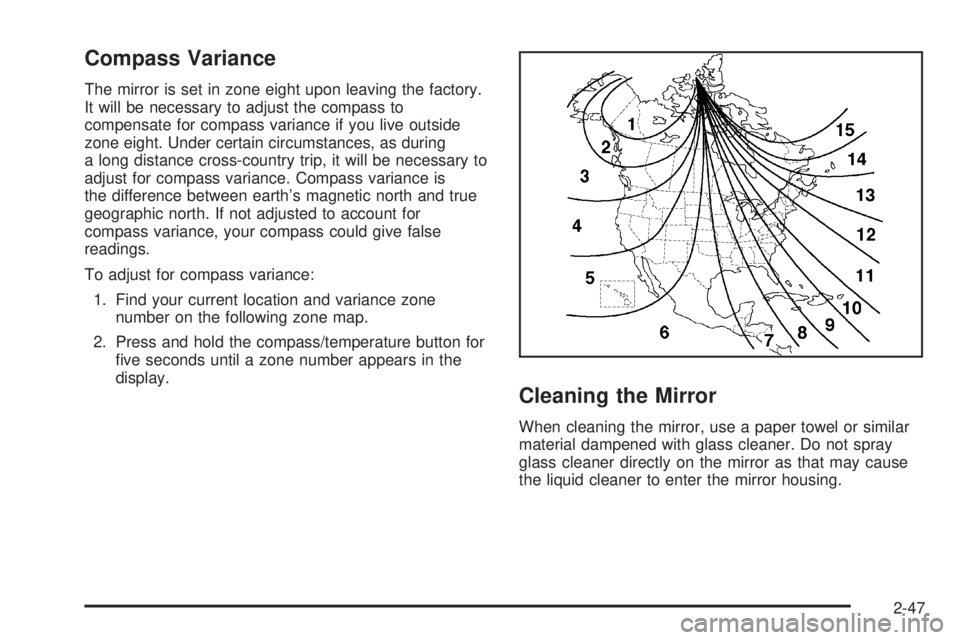
1. Find your current location and variance zone
number on the following zone map.
2. Press and hold the compass/temperature button for
ve seconds until a zone number appears in the
display.
Cleaning the Mirror
When cleaning the mirror, use a paper towel or similar
material dampened with glass cleaner. Do not spray
glass cleaner directly on the mirror as that may cause
the liquid cleaner to enter the mirror housing.
2-47
Page 130 of 504
Outside Power Foldaway Mirrors
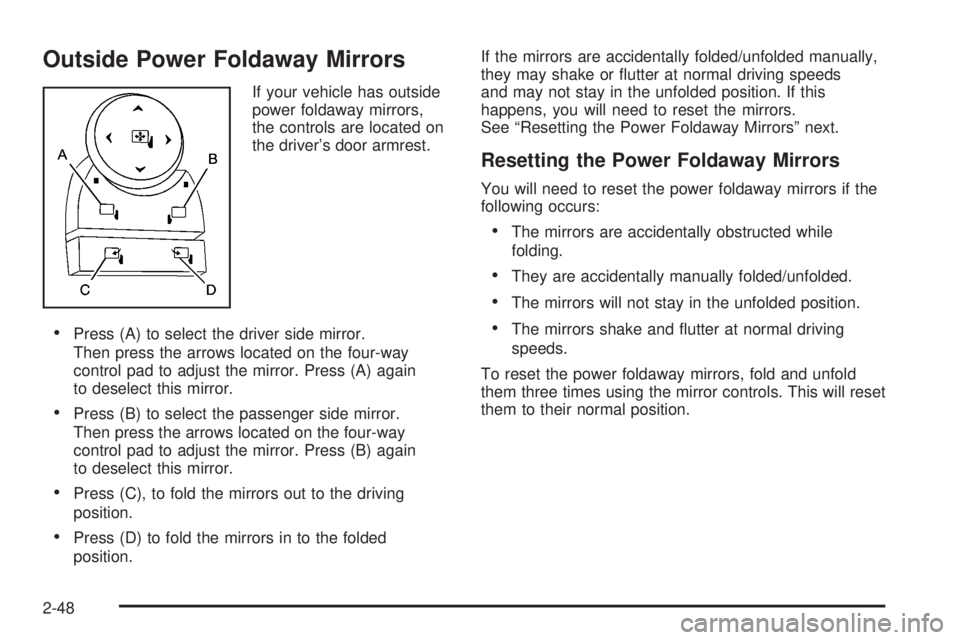
If your vehicle has outside
power foldaway mirrors,
the controls are located on
the driver’s door armrest.
Press (A) to select the driver side mirror.
Then press the arrows located on the four-way
control pad to adjust the mirror. Press (A) again
to deselect this mirror.
Press (B) to select the passenger side mirror.
Then press the arrows located on the four-way
control pad to adjust the mirror. Press (B) again
to deselect this mirror.
Press (C), to fold the mirrors out to the driving
position.
Press (D) to fold the mirrors in to the folded
position.If the mirrors are accidentally folded/unfolded manually,
they may shake or utter at normal driving speeds
and may not stay in the unfolded position. If this
happens, you will need to reset the mirrors.
See “Resetting the Power Foldaway Mirrors” next.
Resetting the Power Foldaway Mirrors
You will need to reset the power foldaway mirrors if the
following occurs:
The mirrors are accidentally obstructed while
folding.
They are accidentally manually folded/unfolded.
The mirrors will not stay in the unfolded position.
The mirrors shake and utter at normal driving
speeds.
To reset the power foldaway mirrors, fold and unfold
them three times using the mirror controls. This will reset
them to their normal position.
2-48
Page 131 of 504
Outside Automatic Dimming Mirror
If the vehicle has this feature, the driver’s outside mirror
adjusts for the glare of the headlamps behind you.
SeeAutomatic Dimming Rearview Mirror with Compass
and Temperature Display on page 2-45.
Park Tilt Mirrors
The vehicle’s outside mirrors can also perform a park tilt
function. This causes the passenger’s and/or driver’s
mirror to tilt to a preselected position when the vehicle is
in REVERSE (R). This feature may be useful in
viewing the curb when parallel parking.
When the vehicle is shifted out of REVERSE (R) and a
short delay has occurred, the passenger’s and/or
driver’s mirror will return to its original position.
To change the preselected tilt position, adjust the
mirrors to the desired position while the vehicle is in
REVERSE (R). When the vehicle is shifted out of
REVERSE (R), this new position is saved in memory as
the tilt position.
This feature can be enabled/disabled through the Driver
Information Center. SeeDIC Vehicle Customization
(With DIC Buttons) on page 3-63for more information.
Outside Convex Mirror
{CAUTION:
A convex mirror can make things (like other
vehicles) look farther away than they really are.
If you cut too sharply into the right lane, you
could hit a vehicle on your right. Check your
inside mirror or glance over your shoulder
before changing lanes.
The passenger side mirror is convex. A convex mirror’s
surface is curved so more can be seen from the
driver seat. It also makes things, like other vehicles,
look farther away than they really are.
Outside Heated Mirrors
The vehicle may have outside heated mirrors which
help clear them of condensation, snow, and ice.
When the rear window defogger button is pressed, the
heated mirrors are also turned on. See “Rear Window
Defogger” underDual Automatic Climate Control System
on page 3-22for more information.
2-49
Page 132 of 504

Object Detection Systems
Rear Vision Camera
Your vehicle may be equipped with a rear vision camera
system. Read this entire section before using the
camera system.
The rear vision camera system is designed to help
the driver when backing up by displaying a view of the
area behind the vehicle. When the driver shifts the
vehicle into REVERSE (R), the video screen will
automatically slide out from the rear view mirror.
Once the driver shifts out of REVERSE (R), the video
screen will slide back into the rear view mirror after
a delay.
If your vehicle does not have a rearview mirror slide-out
video screen, your vehicle may have a navigation
radio system. See the Navigation System manual for
more information on the rear vision camera display
video screen.
Turning the Rear Vision Camera System
On or Off
To turn off the rear vision camera system, do the
following:
1. Shift into (P) PARK.
2. Turn the ignition key to the RUN position.
3. Press the right button on the inside rear view mirror
briey; the right green light indicator will turn off.
The rear camera vision display is now disabled.
To turn on the rear camera vision feature again, press
the right button on the inside rear view mirror briey.
The green light indicator will illuminate. The rear camera
vision system is now enabled and the display will
slide out from the mirror normally.
2-50
Page 133 of 504

Cleaning the Camera Screen
To manually slide out the rear camera screen for
cleaning, do the following:
1. Shift into (P) PARK.
2. Turn the ignition key to the RUN position.
3. Press and hold the right button on the inside rear
view mirror for ve seconds. The display will slide out
from the mirror for 30 seconds; the right green LED
indicator will remain illuminated. The camera screen
will not be on when it slides out of the mirror.
4. If additional time is required for cleaning,
repeat step 3.
To resume normal operation, press the right button
momentarily while the rear camera screen is out or wait
30 seconds for screen to slide back into the mirror.
For more information on the automatic dimming,
compass, and temperature features of the mirror,
seeAutomatic Dimming Rearview Mirror with
Compass and Temperature Display on page 2-45.{CAUTION:
The Rear Vision Camera (RVC) system does
not replace driver vision. RVC does not:
Detect objects that are outside the
camera’s eld of view, below the bumper,
or underneath the vehicle.
Detect children, pedestrians, bicyclists,
or pets.
Do not back the vehicle by only looking at
the rear vision camera screen, or use the
screen during longer, higher speed backing
maneuvers or where there could be
cross-traffic. Your judged distances using the
screen will differ from actual distances.
So if you do not use proper care before
backing up, you could hit a vehicle, child,
pedestrian, bicyclist, or pet, resulting in
vehicle damage, injury, or death. Even though
the vehicle has the RVC system, always check
carefully before backing up by checking
behind and around your vehicle.
2-51
Page 178 of 504
Defogging and Defrosting
Fog on the inside of the windows is a result of high
humidity (moisture) condensing on the cool window
glass. This can be minimized if the climate control
system is used properly. There are two modes to
clear fog or frost from the windshield.
Use the mode up and down arrows to select the
defog or defrost modes.
-(Defog):The defog mode is used to clear the
windows of fog or moisture and warm the passengers.
This mode directs air to the windshield, oor outlets,
and side window vents. When this mode is selected,
the system turns off recirculation and runs the air
conditioning compressor unless the outside temperature
is close to freezing. The recirculation mode cannot
be selected while in the defog mode. Do not drive
the vehicle until all the windows are clear.
0(Defrost):Press this button to remove fog or frost
from the windshield more quickly. This mode directs
a portion of the air to the windshield and side window
vents and some to the oor vents. In this mode, the
system will automatically force outside air into the
vehicle. The recirculation mode cannot be selected while
in the defrost mode. The air conditioning compressor
runs automatically in this setting, unless the outside
temperature is close to freezing. Do not drive the
vehicle until all the windows are clear.
Rear Window Defogger
The rear window defogger uses a warming grid to
remove fog from the rear window.
<(Rear Window Defogger):Press this button to
turn on the rear window defogger. It will automatically
turn off several minutes after it has been activated.
The defogger can also be turned off by pressing
the button again or by turning off the engine. Do not
drive the vehicle until all the windows are clear.
If your vehicle has heated outside rearview mirrors,
the mirrors will heat to help clear fog or frost from the
surface of the mirror when the rear window defog
button is pressed.
Notice:Do not use a razor blade or sharp object
to clear the inside rear window. Do not adhere
anything to the defogger grid lines in the rear glass.
These actions may damage the rear defogger.
Repairs would not be covered by your warranty.
3-28
Page 219 of 504

PARK TILT MIRRORS
If your vehicle has this feature, it allows you to select
whether or not the outside mirror(s) will automatically tilt
down when the vehicle is shifted into REVERSE (R).
SeeOutside Automatic Dimming Mirror on page 2-49
for more information.
Press the customization button until PARK TILT
MIRRORS appears on the DIC display. Press the
set/reset button once to access the settings for this
feature. Then press the customization button to scroll
through the following settings:
OFF (default):Neither outside mirror will be tilted down
when the vehicle is shifted into REVERSE (R).
DRIVER MIRROR:The driver’s outside mirror will be
tilted down when the vehicle is shifted into REVERSE (R).
PASSENGER MIRROR:The passenger’s outside
mirror will be tilted down when the vehicle is shifted
into REVERSE (R).
BOTH MIRRORS:The driver’s and passenger’s outside
mirrors will be tilted down when the vehicle is shifted
into REVERSE (R).
NO CHANGE:No change will be made to this feature.
The current setting will remain.
To select a setting, press the set/reset button while the
desired setting is displayed on the DIC.
EASY EXIT SEAT
If your vehicle has this feature, it allows you to select
your preference for the automatic easy exit seat feature.
SeeMemory Seat and Mirrors on page 1-4for more
information.
Press the customization button until EASY EXIT SEAT
appears on the DIC display. Press the set/reset button
once to access the settings for this feature. Then press
the customization button to scroll through the following
settings:
OFF (default):No automatic seat exit recall will occur.
ON:The driver’s seat will move back when the key
is removed from the ignition.
The automatic easy exit seat movement will only occur
one time after the key is removed from the ignition.
If the automatic movement has already occurred, and
you put the key back in the ignition and remove it again,
the seat will stay in the original exit position, unless a
memory recall took place prior to removing the key
again.
NO CHANGE:No change will be made to this feature.
The current setting will remain.
To select a setting, press the set/reset button while the
desired setting is displayed on the DIC.
3-69
Page 220 of 504

MEMORY SEAT RECALL
If your vehicle has this feature, it allows you to select
your preference for the remote memory seat recall
feature. SeeMemory Seat and Mirrors on page 1-4for
more information.
Press the customization button until MEMORY SEAT
RECALL appears on the DIC display. Press the set/reset
button once to access the settings for this feature.
Then press the customization button to scroll through
the following settings:
OFF (default):No remote memory seat recall will
occur.
ON:The driver’s seat and, on some vehicles, the
outside mirrors will automatically move to the stored
driving position when the unlock button on the Remote
Keyless Entry (RKE) transmitter is pressed. See
“Relearn Remote Key” underDIC Operation and
Displays (Using DIC Buttons) on page 3-49orDIC
Operation and Displays (Using Trip Odometer Reset
Stem) on page 3-54for more information on matching
transmitters to driver ID numbers.
NO CHANGE:No change will be made to this feature.
The current setting will remain.
To select a setting, press the set/reset button while the
desired setting is displayed on the DIC.
REMOTE START
If your vehicle has this feature, it allows you to turn the
remote start off or on. The remote start feature allows you
to start the engine from outside of the vehicle using the
Remote Keyless Entry (RKE) transmitter. SeeRemote
Vehicle Start on page 2-8for more information.
Press the customization button until REMOTE START
appears on the DIC display. Press the set/reset
button once to access the settings for this feature.
Then press the customization button to scroll through
the following settings:
OFF:The remote start feature will be disabled.
ON (default):The remote start feature will be enabled.
NO CHANGE:No change will be made to this
feature. The current setting will remain.
To select a setting, press the set/reset button while the
desired setting is displayed on the DIC.
3-70
Page 281 of 504
While driving on a surface with reduced traction,
try your best to avoid sudden steering, acceleration,
or braking, including reducing vehicle speed by shifting
to a lower gear. Any sudden changes could cause
the tires to slide. You might not realize the surface
is slippery until your vehicle is skidding. Learn to
recognize warning clues — such as enough water,
ice, or packed snow on the road to make a mirrored
surface — and slow down when you have any doubt.
Remember: Any Antilock Brake System (ABS) helps
avoid only the braking skid.
Off-Road Driving
This off-road guide is meant to provide advice for when
you drive your vehicle off paved roads. Also, see
Braking on page 4-3.
The airbag system is designed to work properly under a
wide range of conditions, including off-road usage.
Observe safe driving speeds, especially on rough
terrain. As always, wear your safety belt.
Off-road driving can be great fun. But it does have
some denite hazards. The greatest of these is
the terrain itself.“Off-roading” means you have left the great North
American road system behind. Traffic lanes are not
marked. Curves are not banked. There are no
road signs. Surfaces can be slippery, rough, uphill or
downhill. In short, you have gone right back to nature.
Off-road driving involves some new skills. And that
is why it is very important that you read this guide.
You will nd many driving tips and suggestions. These
will help make your off-road driving safer and more
enjoyable.
Before You Go Off-Roading
There are some things to do before you go out. For
example, be sure to have all necessary maintenance
and service work done. Check to make sure all
underbody shields are properly attached. Remove any
removable side steps. SeeAssist Steps on page 4-32.
Make sure any equipment you may need — rst aid
kit, cell phone, ashlight, etc. — is securely stored in the
vehicle. Be sure you read all the information about
your four-wheel-drive vehicle in this manual. Is there
enough fuel? Is the spare tire fully inated? Are the uid
levels up where they should be? What are the local
laws that apply to off-roading where you will be driving?
If you do not know, you should check with law
enforcement people in the area. Will you be on
someone’s private land? If so, be sure to get the
necessary permission.
4-13