light HUMMER H2 2008 Owner's Manual
[x] Cancel search | Manufacturer: HUMMER, Model Year: 2008, Model line: H2, Model: HUMMER H2 2008Pages: 504, PDF Size: 7.12 MB
Page 109 of 504
If the engine still does not start, and the key appears to
be undamaged, try another ignition key. At this time,
you may also want to check the fuse, seeFuses
and Circuit Breakers on page 5-110. If the engine still
does not start with the other key, your vehicle needs
service. If your vehicle does start, the rst key may be
faulty. See your dealer/retailer who can service the
PASS-Key
®III+ to have a new key made. In an
emergency, contact Roadside Assistance.
It is possible for the PASS-Key
®III+ decoder to learn
the transponder value of a new or replacement key.
Up to 10 keys may be programmed for the vehicle.
The following procedure is for programming additional
keys only. If all the currently programmed keys are
lost or do not operate, you must see your dealer/retailer
or a locksmith who can service PASS-Key
®III+ to
have keys made and programmed to the system.
See your dealer/retailer or a locksmith who can service
PASS-Key
®III+ to get a new key blank that is cut
exactly as the ignition key that operates the system.To program the new additional key:
1. Verify that the new key has a
1stamped on it.
2. Insert the original, already programmed, key in the
ignition and start the engine. If the engine will not
start, see your dealer/retailer for service.
3. After the engine has started, turn the key to
LOCK/OFF, and remove the key.
4. Insert the new key to be programmed and turn it to
the ON/RUN position within ve seconds of turning
the ignition to the LOCK/OFF position in Step 3.
The security light will turn off once the key has been
programmed.
5. Repeat Steps 1 through 4 if additional keys are to
be programmed.
If you lose or damage your PASS-Key
®III+ key, see
your dealer/retailer or a locksmith who can service
PASS-Key
®III+ to have a new key made.
Do not leave the key or device that disarms or
deactivates the theft deterrent system in the vehicle.
2-27
Page 118 of 504
Tow/Haul Mode
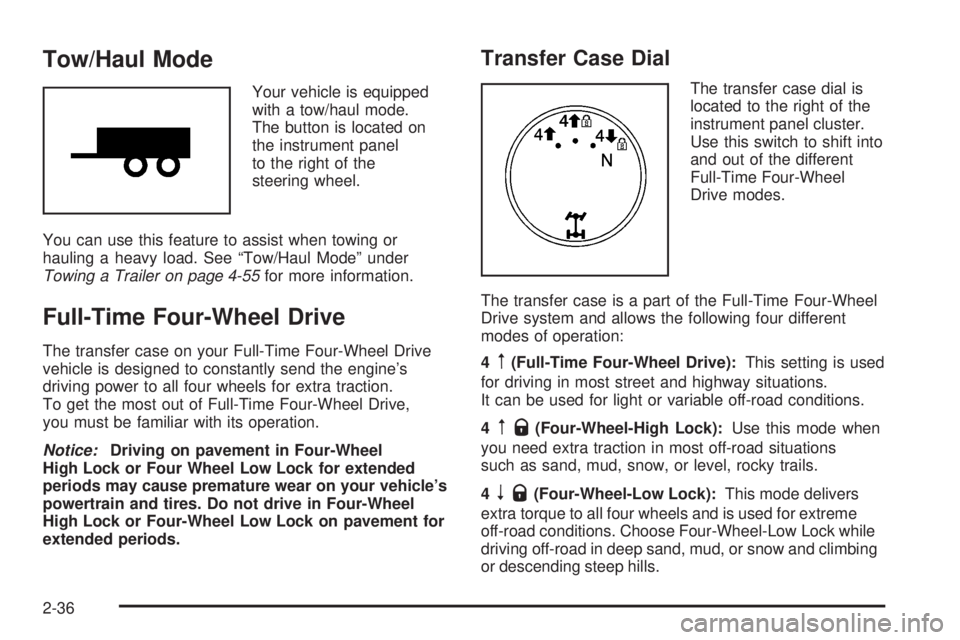
Your vehicle is equipped
with a tow/haul mode.
The button is located on
the instrument panel
to the right of the
steering wheel.
You can use this feature to assist when towing or
hauling a heavy load. See “Tow/Haul Mode” under
Towing a Trailer on page 4-55for more information.
Full-Time Four-Wheel Drive
The transfer case on your Full-Time Four-Wheel Drive
vehicle is designed to constantly send the engine’s
driving power to all four wheels for extra traction.
To get the most out of Full-Time Four-Wheel Drive,
you must be familiar with its operation.
Notice:Driving on pavement in Four-Wheel
High Lock or Four Wheel Low Lock for extended
periods may cause premature wear on your vehicle’s
powertrain and tires. Do not drive in Four-Wheel
High Lock or Four-Wheel Low Lock on pavement for
extended periods.
Transfer Case Dial
The transfer case dial is
located to the right of the
instrument panel cluster.
Use this switch to shift into
and out of the different
Full-Time Four-Wheel
Drive modes.
The transfer case is a part of the Full-Time Four-Wheel
Drive system and allows the following four different
modes of operation:
4
m(Full-Time Four-Wheel Drive):This setting is used
for driving in most street and highway situations.
It can be used for light or variable off-road conditions.
4
mQ(Four-Wheel-High Lock):Use this mode when
you need extra traction in most off-road situations
such as sand, mud, snow, or level, rocky trails.
4
nQ(Four-Wheel-Low Lock):This mode delivers
extra torque to all four wheels and is used for extreme
off-road conditions. Choose Four-Wheel-Low Lock while
driving off-road in deep sand, mud, or snow and climbing
or descending steep hills.
2-36
Page 119 of 504
When in this mode you can also choose to lock the rear
axle for additional traction in extreme off-road situations.
SeeLocking Rear Axle on page 4-6.
Notice:Operating your vehicle in
Four-Wheel-Low Lock above 50 mph (80 km/h) for
any extended period of time could cause damage to
the transfer case. Do not operate your vehicle in
Four-Wheel-Low Lock above 50 mph (80 km/h)
for extended periods.
{CAUTION:
Shifting the transfer case to NEUTRAL can
cause your vehicle to roll even if the
transmission is in PARK (P). You or someone
else could be seriously injured. Be sure to set
the parking brake before placing the transfer
case in NEUTRAL. SeeParking Brake on
page 2-40.N (NEUTRAL):Shift the vehicle’s transfer case to
NEUTRAL only when towing your vehicle. See
Recreational Vehicle Towing on page 4-51orTowing
Your Vehicle on page 4-51for more information.
Indicator lights in the dial shows which mode you are in.
The indicator lights will come on briey when you turn
on the ignition and one will stay on. If the lights do
not come on, take your vehicle to your dealer/retailer
for service. An indicator light will ash while shifting
the transfer case. It will remain on when the shift
is complete. If for some reason the transfer case
cannot make a requested shift, it will return to the last
chosen setting.
If the SERVICE 4WD message stays on, you should
take your vehicle to your dealer/retailer for service.
See “Service 4WD message” underDriver Information
Center (DIC) on page 3-49.
2-37
Page 120 of 504
Shifting between Four-Wheel High and
Four-Wheel-High Lock
With the vehicle traveling less than 40 mph
(64 km/h), turn the dial to the Four-Wheel High or
Four-Wheel-High Lock position. The indicator light on
the dial will ash while shifting. It will remain on
when the shift is complete.
It may be necessary to drive backwards for a short
distance of 25 feet (7.5 m) to get the lock feature
to disengage.
Shifting into Four-Wheel-Low Lock
To shift into Four-Wheel-Low Lock, the ignition must be
in RUN and the vehicle must be stopped or moving
less than 3 mph (5 km/h) with the transmission in
NEUTRAL (N). The preferred method for shifting into
Four-Wheel Low is to have your vehicle moving
1 to 2 mph (1.6 to 3.2 km/h). Turn the dial to the
Four-Wheel-Low Lock position. You must wait for the
Four-Wheel-Low Lock indicator light on the dial to
stop ashing and remain lit before shifting the
transmission in gear.When the transfer case is shifted into Four-Wheel-Low
Lock position a StabiliTrak
®indicator light will come
on to show that the system has been turned off and a
message will show in the DIC. SeeDIC Warnings
and Messages on page 3-56for more information.
Notice:Shifting the transmission into gear before
the indicator light stops ashing could cause
damage to the transfer case. Always wait until the
indicator light stops ashing before putting the
transmission back in gear.
It is normal for your vehicle to have engagement noise
and bump when shifting between Four-Wheel Low
and Four-Wheel High or Four-Wheel-High Lock ranges
or from NEUTRAL with the engine running.
If the Four-Wheel-Low Lock position is selected when
your vehicle is in gear and/or moving, the Four-Wheel
Low Lock indicator light will ash for 15 seconds and not
complete the shift unless your vehicle is moving less
than 3 mph (5 km/h) and the transmission is in
NEUTRAL (N). After 15 seconds the transfer case will
return to the setting last chosen.
2-38
Page 121 of 504
Shifting Out of Four-Wheel Low Lock
To shift from Four-Wheel-Low Lock to Four-Wheel High
or Four-Wheel-High Lock, your vehicle must be
stopped or moving less than 3 mph (5 km/h) with the
transmission in NEUTRAL (N) and the ignition
in RUN. The preferred method for shifting out of
Four-Wheel-Low Lock is to have your vehicle moving
1 to 2 mph (1.6 to 3.2 km/h). Turn the dial to the
Four-Wheel High or Four-Wheel-High Lock position.
You must wait for the Four-Wheel High or
Four-Wheel-High Lock indicator light to stop ashing
and remain lit before shifting your transmission into gear.
It is normal for your vehicle to have engagement
noise and bump when shifting between Four-Wheel Low
and Four-Wheel High or Four-Wheel-High Lock ranges
or from NEUTRAL with the engine running.
If the Four-Wheel High or Four-Wheel-High Lock position
is selected when your vehicle is in gear and/or moving,
the Four-Wheel High or Four-Wheel-High Lock indicator
light will ash for 30 seconds but will not complete the
shift unless your vehicle is moving less than 3 mph
(5 km/h) and the transmission is in NEUTRAL (N).
Notice:Shifting the transmission into gear before
the indicator light stops ashing could cause
damage to the transfer case. Always wait until the
indicator light stops ashing before putting the
transmission back in gear.
Shifting into NEUTRAL
To shift the transfer case to NEUTRAL do the following:
1. Make sure the vehicle is parked so that it will not roll.
2. Set the parking brake and apply the regular brake
pedal. SeeParking Brake on page 2-40
3. Start the vehicle or turn the ignition to ON/RUN.
4. Put the transmission in NEUTRAL (N).
5. Shift the transfer case to Two-Wheel Drive High.
6. Turn the transfer case dial clockwise to NEUTRAL
position. The transfer case will not shift to NEUTRAL
unless this position is held for 10 seconds.
The NEUTRAL light will come on and then the dial
can be slowly released. The dial will be in the
Four-Wheel Low Lock position but the transfer case
will be in NEUTRAL with the NEUTRAL light on.
7. If the engine is running, make sure that the transfer
case is in NEUTRAL (N) by shifting the transmission
to REVERSE (R) for one second, then shift the
transmission to DRIVE (D) for one second.
8. Turn the ignition to ACC/ACCESSORY, which will
turn the engine off.
9. Place the transmission shift lever in PARK (P).
10. Release the parking brake prior to moving
the vehicle.
11. Turn the ignition to LOCK/OFF.
2-39
Page 122 of 504
Shifting Out of NEUTRAL
To shift out of NEUTRAL do the following:
1. Set the parking brake and apply the regular brake
pedal.
2. Shift the transmission to NEUTRAL (N) and turn
the ignition to RUN with the engine off.
3. Turn the transfer case dial to Four-Wheel High,
Four-Wheel High Lock or Four-Wheel Low Lock.
After the transfer case has shifted out of NEUTRAL
the NEUTRAL light will go out.
4. Release the parking brake prior to moving the
vehicle.
Notice:Shifting the transmission into gear before
the requested mode indicator light has stopped
ashing could damage the transfer case. To help
avoid damaging your vehicle, always wait for the
mode indicator lights to stop ashing before shifting
the transmission into gear.
5. Start the engine and shift the transmission to the
desired position.
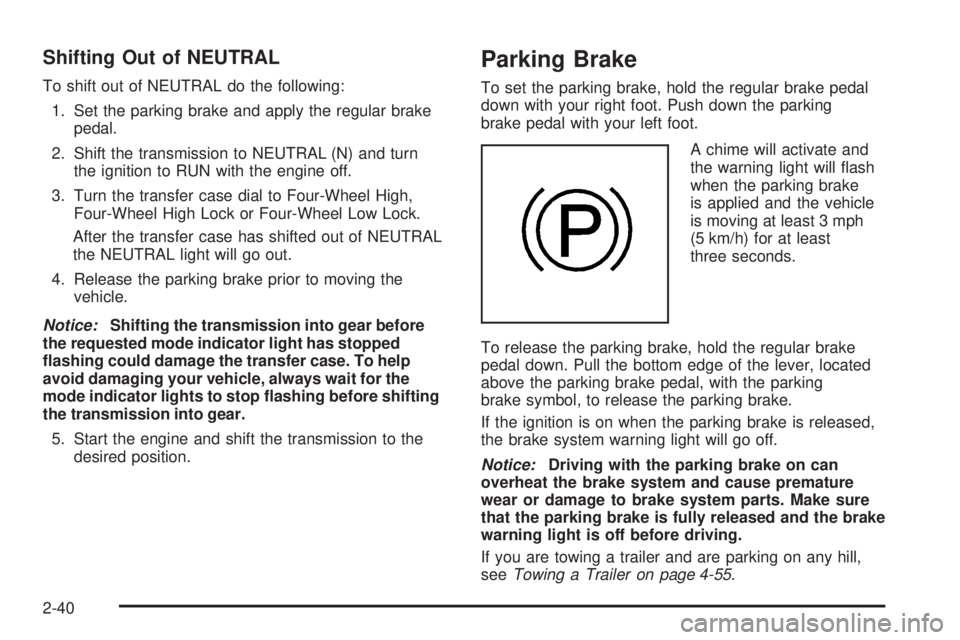
Parking Brake
To set the parking brake, hold the regular brake pedal
down with your right foot. Push down the parking
brake pedal with your left foot.
A chime will activate and
the warning light will ash
when the parking brake
is applied and the vehicle
is moving at least 3 mph
(5 km/h) for at least
three seconds.
To release the parking brake, hold the regular brake
pedal down. Pull the bottom edge of the lever, located
above the parking brake pedal, with the parking
brake symbol, to release the parking brake.
If the ignition is on when the parking brake is released,
the brake system warning light will go off.
Notice:Driving with the parking brake on can
overheat the brake system and cause premature
wear or damage to brake system parts. Make sure
that the parking brake is fully released and the brake
warning light is off before driving.
If you are towing a trailer and are parking on any hill,
seeTowing a Trailer on page 4-55.
2-40
Page 127 of 504
{CAUTION:
Full-time four-wheel drive vehicles with the
transfer case in NEUTRAL will allow the
vehicle to roll, even if the shift lever is in
PARK (P). So, be sure the transfer case is in a
drive gear — not in NEUTRAL. Always set the
parking brake.
Follow the proper steps to be sure your vehicle will not
move. SeeShifting Into PARK (P) on page 2-41.
If you are pulling a trailer, seeTowing a Trailer on
page 4-55.
Mirrors
Automatic Dimming Rearview Mirror
with Compass and Temperature
Display
Your vehicle may have this mirror. When on, an
automatic dimming mirror will dim to the proper level to
minimize glare from lights behind you after dark.
The mirror also includes a dual display in the upper
right corner of the mirror with the compass reading and
the outside temperature.
Yb:Briey press this button to turn the display
on or off.
Your vehicle may also have a Rear Vision Camera.
SeeRear Vision Camera on page 2-50.
2-45
Page 128 of 504

Automatic Dimming Mirror Operation
O
:Press this button to turn the automatic dimming
feature on or off. The indicator light to the left of
the button will turn on to indicate when the feature is on.
Once the mirror is turned off, it will remain off until it
is turned back on, or until the vehicle is restarted.
Temperature Display
The temperature can be displayed by pressing
the compass/temperature button. Pressing the
compass/temperature button once briey, will toggle
the temperature reading on and off. To alternate
the temperature reading between Fahrenheit and
Celsius, press and hold the compass/temperature
button for approximately four seconds until the
display blinks F and C. Press and release the
compass/temperature button to toggle between the
Fahrenheit and Celsius readings. After approximately
four seconds of inactivity, the display will stop blinking
and display the last selection made.
If an abnormal reading is displayed, for an extended
period of time, please consult your dealer/retailer.
Under certain circumstances, a delay in updating the
temperature is normal.
Compass Operation
Press the compass/temperature button once briey to
turn the compass on or off.
Compass Calibration
The compass may need calibration if the following occurs:
The compass does not display the correct heading
and the compass zone variance is set correctly.
In order to calibrate, CAL must be displayed in the
mirror compass windows. If CAL is not displayed, push
in the compass/temperature button for approximately
eight seconds or until CAL is displayed.
The compass can only be calibrated by driving the
vehicle forward in circles at 5 mph (8 km/h) or less until
the display reads a direction. Do not attempt to
calibrate the compass by driving in reverse.
2-46
Page 132 of 504

Object Detection Systems
Rear Vision Camera
Your vehicle may be equipped with a rear vision camera
system. Read this entire section before using the
camera system.
The rear vision camera system is designed to help
the driver when backing up by displaying a view of the
area behind the vehicle. When the driver shifts the
vehicle into REVERSE (R), the video screen will
automatically slide out from the rear view mirror.
Once the driver shifts out of REVERSE (R), the video
screen will slide back into the rear view mirror after
a delay.
If your vehicle does not have a rearview mirror slide-out
video screen, your vehicle may have a navigation
radio system. See the Navigation System manual for
more information on the rear vision camera display
video screen.
Turning the Rear Vision Camera System
On or Off
To turn off the rear vision camera system, do the
following:
1. Shift into (P) PARK.
2. Turn the ignition key to the RUN position.
3. Press the right button on the inside rear view mirror
briey; the right green light indicator will turn off.
The rear camera vision display is now disabled.
To turn on the rear camera vision feature again, press
the right button on the inside rear view mirror briey.
The green light indicator will illuminate. The rear camera
vision system is now enabled and the display will
slide out from the mirror normally.
2-50
Page 135 of 504
Notice:The spare tire extends farther away from
rear of the vehicle than the trailer hitch shown
on rear vision camera display. Your spare tire could
hit an object even though there appears to be
enough distance on the display between the trailer
hitch and objects behind you causing vehicle or
property damage. Do not use this system to judge
the distance between the spare tire and objects
behind you.
When the System Does Not Seem To
Work Properly
The rear vision camera system may not work properly
or display a clear image in the following situations:
In the dark.
When the sun or the beam of headlights is shining
directly into the camera lens.
If ice, snow, mud, or anything else builds up on the
camera lens. Clean the lens, rinse it with water, and
wipe it with a soft cloth.
If the back of the vehicle is in an accident, the
position and mounting angle of the camera may
change or the camera may be affected. Be sure to
have the camera and its position and mounting angle
checked at your dealer.
Extreme high or low temperatures or extreme
temperature changes can affect the image displayed.
OnStar®System
OnStar uses several innovative technologies and live
advisors to provide you with a wide range of safety,
security, information, and convenience services. If your
airbags deploy, the system is designed to make an
automatic call to OnStar Emergency advisors who can
request emergency services be sent to your location.
If you lock your keys in the vehicle, call OnStar at
1-888-4-ONSTAR and they can send a signal to unlock
your doors. If you need roadside assistance, press
the OnStar button and they can contact Roadside
Service for you.
OnStar service is provided to you subject to the
OnStar Terms and Conditions. You may cancel your
OnStar service at any time by contacting OnStar.
2-53