buttons HUMMER H2 2008 Service Manual
[x] Cancel search | Manufacturer: HUMMER, Model Year: 2008, Model line: H2, Model: HUMMER H2 2008Pages: 504, PDF Size: 7.12 MB
Page 233 of 504

When the CD is inserted, the CD symbol displays. As
each new track starts to play, the track number displays.
The CD player can play the smaller 3 inch (8 cm)
single CDs with an adapter ring. Full-size CDs and
the smaller CDs are loaded in the same manner.
Playing a CD (In Either the DVD or
CD Slot)
Insert a CD partway into the slot, label side up. The
player pulls it in and the CD should begin playing
(loading a disc into the system, depending on media
type and format ranges from 5 to 20 seconds for a CD,
and up to 30 seconds for a DVD to begin playing).
If the ignition or radio is turned off, with a CD in
the player, it stays in the player. When the ignition
or radio is turned on, the CD starts playing where
it stopped, if it was the last selected audio source.
The CD is controlled by the buttons on the radio
faceplate or by the RSA unit. SeeRear Seat Audio
(RSA) on page 3-114for more information. The DVD/CD
decks, (upper slot is the DVD deck and the lower slot
is the CD deck) of the radio are compatible with
most audio CDs, CD-R, CD-RW, and MP3s.When a CD is inserted, the text label DVD or CD
symbol displays on the left side of the radio display.
As each new track starts to play, the track number
displays.
The CD player can play the smaller 3 inch (8 cm) single
CDs with an adapter ring. Full-size CDs and the
smaller CDs are loaded in the same manner.
Care of Your CDs and DVDs
If playing a CD-R, the sound quality can be reduced due
to CD-R or CD-RW quality, the method of recording, the
quality of the music that has been recorded, and the way
the CD-R or CD-RW has been handled. Handle them
carefully. Store CD-R(s) or CD-RW(s) in their original
cases or other protective cases and away from direct
sunlight and dust. The CD or DVD player scans the
bottom surface of the disc. If the surface of a CD is
damaged, such as cracked, broken, or scratched, the
CD does not play properly or not at all. Do not touch the
bottom side of a CD while handling it; this could damage
the surface. Pick up CDs by grasping the outer edges or
the edge of the hole and the outer edge.
If the surface of a CD is soiled, take a soft, lint free cloth
or dampen a clean, soft cloth in a mild, neutral detergent
solution mixed with water, and clean it. Make sure the
wiping process starts from the center to the edge.
3-83
Page 238 of 504
Using the DVD Player
The DVD player is controlled by the buttons on the
remote control, or by the RSA system, or by the buttons
on the radio faceplate. See “Remote Control”, under
Rear Seat Entertainment (RSE) System on page 3-105
andRear Seat Audio (RSA) on page 3-114for more
information.
The DVD player is only compatible with DVDs of the
appropriate region code that is printed on the jacket of
most DVDs.
The DVD slot of the radio is compatible with most
audio CDs, CD-R, CD-RW, DVD-Video, DVD-Audio,
DVD-R/RW, DVD+R/RW media along with MP3
and WMA formats.
If an error message displays on the video screen or
the radio, see “DVD Display Error Messages” under,
Rear Seat Entertainment (RSE) System on page 3-105
and “DVD Radio Error Messages” in this section for
more information.
Playing a DVD
DVD/CD AUX (Auxiliary):Press this button to cycle
through DVD, CD, or Auxiliary when listening to the radio.
The DVD/CD text label and a message showing track or
chapter number displays when a disc is in either slot.
Press this button again and the system automatically
searches for an auxiliary input device, such as a portable
audio player. If a portable audio player is not connected,
“No Aux Input Device” displays. If a disc is in both the
DVD slot and the CD slot the DVD/CD AUX button cycles
between the two sources and not indicate “No Aux Input
Device”. If a front auxiliary device is connected, the
DVD/CD AUX button cycles through all available options,
such as: DVD slot, CD slot, Front Auxiliary, and Rear
Auxiliary (if available). See “Using the Auxiliary Input
Jack(s)” later in this section, or “Audio/Video (A/V) Jacks”
under,Rear Seat Entertainment (RSE) System on
page 3-105for more information.
3-88
Page 240 of 504

DVD-V (Video) Display Buttons
Once a DVD-V is inserted, the radio display menu
shows several tag options for DVD playing. Press the
pushbuttons located under any desired tag option during
DVD playback. See the tag options listed after, for
more information.
The rear seat passenger can navigate the DVD-V
menus and controls through the remote control. See
“Remote Control”, underRear Seat Entertainment (RSE)
System on page 3-105for more information. The Video
Screen automatically turns on when the DVD-V is
inserted into the DVD slot.
r/j(Play/Pause):Press either the play or pause
icon displayed on the radio system, to toggle between
pausing or restarting playback of a DVD. If the forward
arrow is showing on display, the system is in pause
mode. If the pause icon is showing on display, the
system is in playback mode. If the DVD screen is off,
press the play button to turn the screen on.
Some DVDs begin playing after the previews have
nished, although there could be a delay of up to
30 seconds. If the DVD does not begin playing the
movie automatically, press the pushbutton located
under the play/pause symbol tag displayed on the radio.
If the DVD still does not play, refer to the on-screen
instructions, if available.
c(Stop):Press this button to stop playing, rewinding,
or fast forwarding a DVD.
r(Enter):Press this button to select the choices
that are highlighted in any menu.
y(Menu):Press this button to access the DVD menu.
The DVD menu is different on every DVD. Use the
pushbuttons located under the navigation arrows to
navigate the cursor through the DVD menu. After making
a selection press this button. This button only operates
when using a DVD.
Nav (Navigate):Press this button to display directional
arrows for navigating through the menus.
q(Return):Press this button to exit the current
active menu and return to the previous menu. This
button operates only when a DVD is playing and a
menu is active.
3-90
Page 241 of 504

DVD-A (Audio) Display Buttons
Once a DVD-A is inserted, radio display menu
shows several tag options for DVD playing. Press the
pushbuttons located under any desired tag option during
DVD playback. See the tag options listed after, for more
information.
The rear seat operator can navigate the DVD-A menus
and controls through the remote control. See “Remote
Control”, underRear Seat Entertainment (RSE) System
on page 3-105for more information. The Video Screen
does not automatically power on when the DVD-A is
inserted into the DVD slot. It must be manually turned on
by the rear seat occupant through the remote control
power button.
r/j(Play/Pause):Press either the play or pause
icon displayed on the radio system, to toggle between
pausing or restarting playback of a DVD. If the forward
arrow is showing on the display, the system is in
pause mode. If the pause icon is showing on the display,
the system is in playback mode.
qGroupr:Press this button to cycle through
musical groupings on the DVD-A disc.Nav (Navigate):Press this button to display directional
arrows for navigating through the menus.
e(Audio Stream):Press this button to cycle through
audio stream formats located on the DVD-A disc.
The video screen shows the audio stream changing.
Inserting a Disc
To play a disc, gently insert the disc, with the label side
up, into the loading slot. The DVD player might not accept
some paper labeled media. The player starts loading the
disc into the system and show “Loading Disc” on the radio
display. At the same time, the radio displays a softkey
menu of option(s). Some discs automatically play the
movie while others default to the softkey menu display,
which requires the Play, Enter, or Navigation softkeys
to be pressed; either by softkey or by the rear seat
passenger using the remote control.
Loading a disc into the system, depending on media
type and format, ranges from 5 to 20 seconds for a CD,
and up to 30 seconds for a DVD.
3-91
Page 245 of 504
Playlists can be changed by using the previous
and next folder buttons, the
f(tune) knob, or the
©SEEK¨arrows. You can also play an MP3 CD-R
or CD-RW that was recorded using no le folders. If
a CD-R or CD-RW contains more than the maximum of
50 folders, 50 playlists, and 255 les, the player lets
you access and navigate up to the maximum, but
all items over the maximum are not accessible.
Root Directory
The root directory of the CD-R or CD-RW is treated as a
folder. If the root directory has compressed audio les,
the directory is displayed as the CD label. All les
contained directly under the root directory are accessed
prior to any root directory folders. However, playlists (Px)
are always be accessed before root folders or les.
If a disc contains both uncompressed CD audio (.CDA)
and MP3 les, a folder under the root directory called
CD access all of the CD audio tracks on the disc.
Empty Directory or Folder
If a root directory or a folder exists somewhere in the le
structure that contains only folders/subfolders and no
compressed les directly beneath them, the player
advances to the next folder in the le structure that
contains compressed audio les. The empty folder
does not display.
No Folder
When the CD contains only compressed les, the les
are located under the root folder. The
Sc(previous)
and next
cTfolder functions do not display on a
CD that was recorded without folders or playlists.
When the CD contains only playlists and compressed
audio les, but no folders, all les are located under the
root folder. The folder down and the folder up buttons
search playlists (Px) rst and then go to the root folder.
Order of Play
Tracks recorded to the CD-R or CD-RW are played in
the following order:
Play begins from the rst track in the rst playlist
and continues sequentially through all tracks in
each playlist. When the last track of the last playlist
has played, play continues from the rst track of
the rst playlist.
Play begins from the rst track in the rst folder and
continues sequentially through all tracks in each
folder. When the last track of the last folder has
played, play continues from the rst track of the
rst folder.
When play enters a new folder, the display does not
automatically show the new folder name unless you have
chosen the folder mode as the default display. The new
track name displays.
3-95
Page 248 of 504
To change from playback by artist to playback by album,
press the pushbutton located below the Sort By label.
From the sort screen, push one of the buttons below the
album button. Press the pushbutton below the back label
to return to the main music navigator screen. Now the
album name displays on the second line between the
arrows and songs from the current album begins to play.
Once all songs from that album are played, the player
moves to the next album in alphabetic order on the CD-R
or CD-RW and begin playing MP3 les from that album.
To exit music navigator mode, press the pushbutton
below the Back label to return to normal MP3 playback.
BAND:Press this button to listen to the radio when a
CD is playing. The CD remains safely inside the radio for
future listening.
CD/AUX (CD/Auxiliary):Press this button to play a CD
when listening to the radio. The CD icon and a message
showing disc and/or track number displays when a CD is
in the player. Press this button again and the system
automatically searches for an auxiliary input device such
as a portable audio player. If a portable audio player is
not connected, “No Input Device Found” displays.Using an MP3 (Radio with CD and
DVD Player)
MP3/WMA CD-R or CD-RW Disc
Compressed Audio or Mixed Mode Discs
The radio also plays discs that contain both
uncompressed CD audio (.CDA les) and MP3/WMA les
depending on which slot the disc is loaded into. By default
the radio reads only the uncompressed audio (.CDA) and
ignores the MP3/WMA les on the DVD deck. On the CD
deck, press the CAT (category) button to toggle between
compressed and uncompressed audio format, the default
being the uncompressed format (.CDA).
MP3/WMA Format
If you burn your own MP3/WMA disc on a personal
computer:
Make sure the MP3/WMA les are recorded on a
CD-R or CD-RW disc.
Do not mix standard audio and MP3/WMA les on
one disc.
The CD player (lower slot) is able to read and play
a maximum combination of 512 les and folders.
The DVD player (upper slot) is able to read
255 folders, 15 playlists and 40 sessions.
3-98
Page 249 of 504
Create a folder structure that makes it easy to nd
songs while driving. Organize songs by albums
using one folder for each album. Each folder
or album should contain 18 songs or less.
Avoid subfolders. The system can support up to
eight subfolders deep, however, keep the total
number of folders to a minimum in order to reduce
the complexity and confusion in trying to locate
a particular folder during playback.
Make sure playlists have a .m3u, .wpl or .pls
extension as other le extensions might not work.
Minimize the length of the le, folder, or playlist
names. Long le, folder, or playlist names, or a
combination of a large number of les and folders,
or playlists could cause the player to be unable
to play up to the maximum number of les, folders,
playlists, or sessions. If you wish to play a large
number of les, folders, playlists, or sessions,
minimize the length of the le, folder, or playlist
name. Long names also take up more space on
the display, potentially getting cut off.
Finalize the audio disc before you burn it. Trying to
add music to an existing disc could cause the disc
not to function in the player.
Root Directory
The root directory of the CD-R or CD-RW is treated as a
folder. If the root directory has compressed audio les,
the directory is displayed as F1 ROOT. All les contained
directly under the root directory are accessed prior to any
root directory folders. However, playlists (Px) are always
accessed before root folders or les.
Empty Directory or Folder
If a root directory or a folder exists somewhere in the le
structure that contains only folders/subfolders and no
compressed les directly beneath them, the player
advances to the next folder in the le structure that
contains compressed audio les. The empty folder
does not display.
No Folder
When the CD contains only compressed les, the les
are located under the root folder. The next and previous
folder function does not function on a CD that was
recorded without folders or playlists. When displaying
the name of the folder the radio displays ROOT.
When the CD contains only playlists and compressed
audio les, but no folders, all les are located under the
root folder. The folder down and the folder up buttons
search playlists (Px) rst and then goes to the root
folder. When the radio displays the name of the folder
the radio displays ROOT.
3-99
Page 252 of 504
RDM (Random):With the random setting, MP3/WMA
les on the CD-R or CD-RW can be listened to in random,
rather than sequential order. To play MP3/WMA les from
the CD-R or CD-RW you are listening to in random order,
press the pushbutton positioned under the RDM label
until Random Current Disc displays. Press the same
pushbutton again to turn off random play.
h(Music Navigator):Use the music navigator
feature to play MP3/WMA les on the CD-R or CD-RW in
order by artist or album. Press the pushbutton located
below the music navigator label. The player scans
the disc to sort the les by artist and album ID3 tag
information. It could take several minutes to scan the
disc depending on the number of MP3/WMA les
recorded to the CD-R or CD-RW.
To cancel music navigator while the player is scanning,
press the pushbutton located below the music navigator
label or eject the disc.
The radio can begin playing while it is scanning the disc
in the background. When the scan is nished, the CD-R
or CD-RW begins playing again.Once the disc has been scanned, the player defaults to
playing MP3/WMA les in order by artist. The current
artist playing is shown on the second line of the display
between the arrows. If you want to listen to MP3/WMA
les by another artist, press the pushbutton located below
either arrow button. The disc goes to the next or previous
artist in alphabetical order. Continue pressing either
button until the desired artist is displayed.
To change from playback by artist to playback by album,
press the pushbutton located below the Sort By label.
From the sort screen, push one of the buttons below the
album button. Press the pushbutton below the back label
to return to the main music navigator screen. Now the
album name displays on the second line between the
arrows and songs from the current album begin to play.
Once all songs from that album are played, the player
moves to the next album in alphabetical order on the
CD-R or CD-RW and begins playing MP3/WMA les
from that album.
To exit music navigator mode, press the pushbutton
below the Back label to return to normal MP3/WMA
playback.
3-102
Page 260 of 504
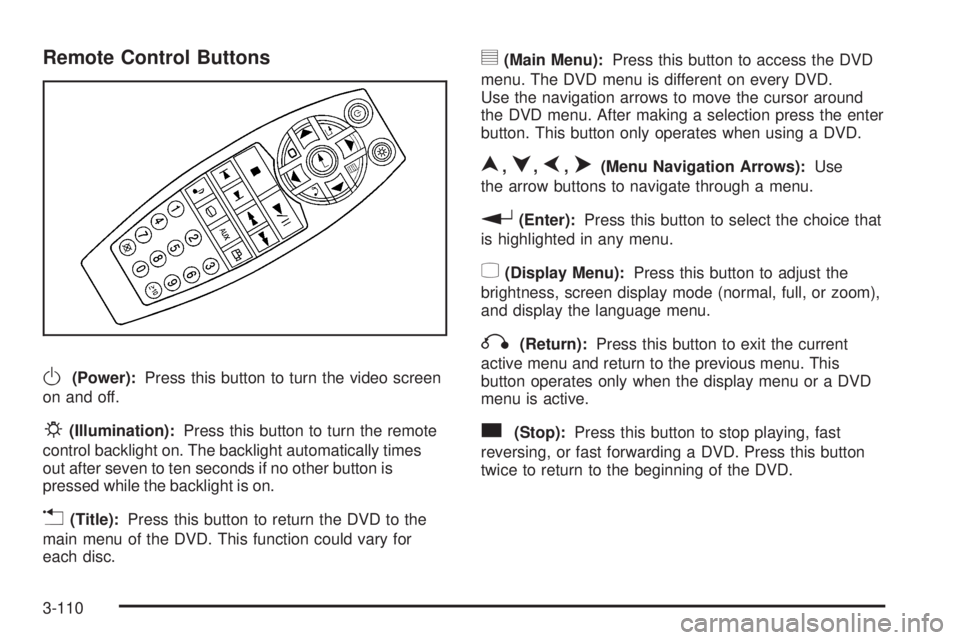
Remote Control Buttons
O(Power):Press this button to turn the video screen
on and off.
P(Illumination):Press this button to turn the remote
control backlight on. The backlight automatically times
out after seven to ten seconds if no other button is
pressed while the backlight is on.
v(Title):Press this button to return the DVD to the
main menu of the DVD. This function could vary for
each disc.
y(Main Menu):Press this button to access the DVD
menu. The DVD menu is different on every DVD.
Use the navigation arrows to move the cursor around
the DVD menu. After making a selection press the enter
button. This button only operates when using a DVD.
n,q,p,o(Menu Navigation Arrows):Use
the arrow buttons to navigate through a menu.
r(Enter):Press this button to select the choice that
is highlighted in any menu.
z(Display Menu):Press this button to adjust the
brightness, screen display mode (normal, full, or zoom),
and display the language menu.
q(Return):Press this button to exit the current
active menu and return to the previous menu. This
button operates only when the display menu or a DVD
menu is active.
c(Stop):Press this button to stop playing, fast
reversing, or fast forwarding a DVD. Press this button
twice to return to the beginning of the DVD.
3-110
Page 265 of 504

P(Power):Press thePbutton to turn RSA on
and off.
Volume:Turn this knob to increase or to decrease
the volume of the wired headphones. The left knob
controls the left headphones and the right knob controls
the right headphones.
SRCE (Source):Press this button to switch between
the radio (AM/FM), XM™ (if equipped), CD, and if
your vehicle has these features, DVD, front auxiliary,
and rear auxiliary.
©¨(Seek):When listening to FM, AM, or XM™
(if equipped), press the left
©or right¨seek arrow
to go to the next or the previous station or channels and
stay there. This function is inactive, with some radios,
if the front seat passengers are listening to the radio.
Press and hold either the left
©or right¨seek
arrow until the display ashes, to tune to an individual
station. The display stops ashing after the buttons
have not been pushed for more than two seconds.
This function is inactive, with some radios, if the front
seat passengers are listening to the radio.
While listening to a disc, press the
©seek arrow
to go back to the start of the current track or chapter
(if more than ten seconds have played). Press the
right
¨seek arrow to go to the next track or chapter
on the disc. This function is inactive, with some radios,
if the front seat passengers are listening to the radio.
When a DVD video menu is being displayed, press
either the left
©or right¨seek arrow to perform
a cursor up or down on the menu. Hold either the
left
©or right¨seek arrow to perform a cursor
left or right on the menu. Rear Seat Audio with Rear Climate Control shown
3-115