lights HUMMER H2 2009 User Guide
[x] Cancel search | Manufacturer: HUMMER, Model Year: 2009, Model line: H2, Model: HUMMER H2 2009Pages: 524, PDF Size: 3.1 MB
Page 150 of 524
Reprogramming Universal Home
Remote Buttons
You can reprogram any of the three buttons by repeating
the instructions.
Erasing Universal Home Remote
Buttons
You should erase the programmed buttons when you
sell or terminate your lease.
To erase either Rolling Code or Fixed Code on the
Universal Home Remote device:
1. Press and hold the two outside buttons at the same
time for approximately 20 seconds, until the indicator
lights, located directly above the buttons, begin to
blink rapidly.
2. Once the indicator lights begin to blink, release both
buttons. The codes from all buttons will be erased.
For help or information on the Universal Home Remote
System, call the customer assistance phone number
underCustomer Assistance Offices on page 7-6.
Storage Areas
Glove Box
Lift up on the glove box lever to open it.
Cupholders
Cupholders are located in front of the center console.
They are also located in the rear center armrest, and on
the left rear of the vehicle.
2-64
Page 157 of 524
Instrument Panel Overview...............................3-4
Hazard Warning Flashers................................3-6
Horn .............................................................3-6
Tilt Wheel.....................................................3-6
Heated Steering Wheel...................................3-7
Turn Signal/Multifunction Lever.........................3-8
Turn and Lane-Change Signals........................3-8
Headlamp High/Low-Beam Changer..................3-9
Flash-to-Pass.................................................3-9
Windshield Wipers........................................3-10
Windshield Washer.......................................3-10
Rear Window Wiper/Washer...........................3-11
Cruise Control..............................................3-12
Exterior Lamps.............................................3-15
Headlamps on Reminder................................3-16
Daytime Running Lamps (DRL).......................3-16
Automatic Headlamp System..........................3-17
Instrument Panel Brightness...........................3-17
Dome Lamps ...............................................3-18
Dome Lamp Override....................................3-18
Entry/Exit Lighting.........................................3-18
Reading Lamps............................................3-18
Electric Power Management...........................3-19
Battery Run-Down Protection..........................3-19
Accessory Power Outlet(s).............................3-20
Ashtray(s) and Cigarette Lighter......................3-21
Analog Clock...............................................3-21Climate Controls............................................3-22
Dual Automatic Climate Control System...........3-22
Outlet Adjustment.........................................3-27
Rear Air Conditioning and Heating System
and Electronic Climate Controls....................3-28
Warning Lights, Gages, and Indicators............3-29
Instrument Panel Cluster................................3-30
Speedometer and Odometer...........................3-31
Trip Odometer..............................................3-31
Tachometer.................................................3-31
Safety Belt Reminders...................................3-32
Airbag Readiness Light..................................3-32
Airbag Off Light............................................3-33
Charging System Light..................................3-35
Voltmeter Gage............................................3-36
Brake System Warning Light..........................3-37
Antilock Brake System (ABS) Warning Light.....3-38
StabiliTrak
®Indicator Light.............................3-38
Engine Coolant Temperature Gage..................3-39
Tire Pressure Light.......................................3-39
Malfunction Indicator Lamp.............................3-40
Oil Pressure Gage........................................3-42
Oil Pressure Light.........................................3-43
Security Light...............................................3-44
Cruise Control Light......................................3-44
Highbeam On Light.......................................3-44
Section 3 Instrument Panel
3-1
Page 171 of 524
Exterior Lamps
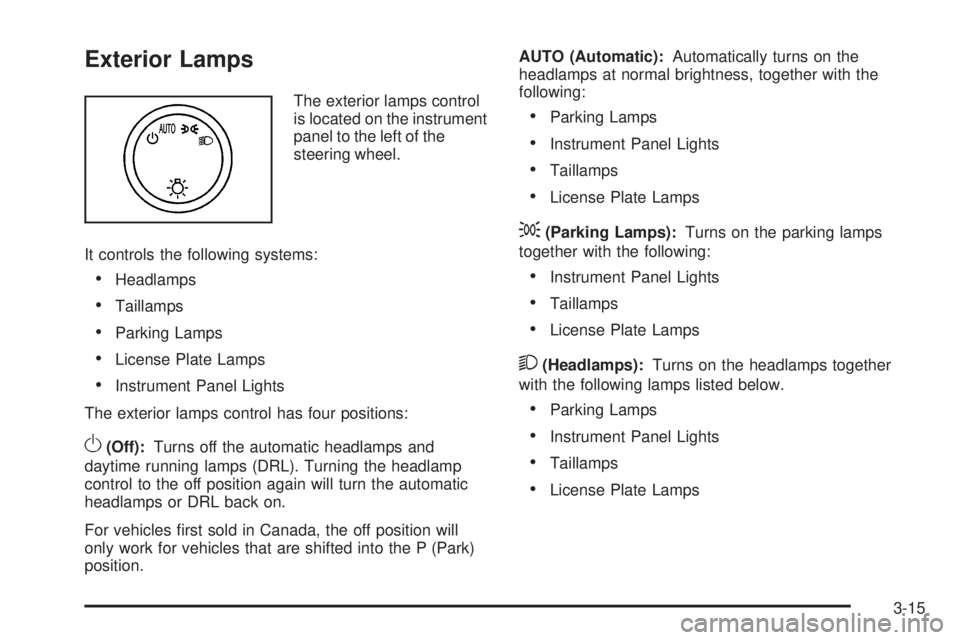
The exterior lamps control
is located on the instrument
panel to the left of the
steering wheel.
It controls the following systems:
Headlamps
Taillamps
Parking Lamps
License Plate Lamps
Instrument Panel Lights
The exterior lamps control has four positions:
O(Off):Turns off the automatic headlamps and
daytime running lamps (DRL). Turning the headlamp
control to the off position again will turn the automatic
headlamps or DRL back on.
For vehicles rst sold in Canada, the off position will
only work for vehicles that are shifted into the P (Park)
position.AUTO (Automatic):Automatically turns on the
headlamps at normal brightness, together with the
following:
Parking Lamps
Instrument Panel Lights
Taillamps
License Plate Lamps
;(Parking Lamps):Turns on the parking lamps
together with the following:
Instrument Panel Lights
Taillamps
License Plate Lamps
2(Headlamps):Turns on the headlamps together
with the following lamps listed below.
Parking Lamps
Instrument Panel Lights
Taillamps
License Plate Lamps
3-15
Page 172 of 524
When the headlamps are turned on while the vehicle is
on, the headlamps will turn off automatically 10 minutes
after the ignition is turned off. When the headlamps are
turned on while the vehicle is off, the headlamps will stay
on for 10 minutes before automatically turning off to
prevent the battery from being drained. Turn the
headlamp control to off and then back to the headlamp on
position to make the headlamps stay on for an additional
10 minutes.
Headlamps on Reminder
If a door is open, a reminder chime will sound when the
headlamps or parking lamps are manually turned on and
the key is out of the ignition. To turn off the chime, turn
the headlamp switch to off or AUTO and then back on,
or close and re-open the door. In the AUTO mode, the
headlamps turn off once the ignition is in LOCK/OFF or
may remain on until the headlamp delay ends (if enabled
in the DIC). See “Exit Lighting” underDIC Vehicle
Customization on page 3-64.
Daytime Running Lamps (DRL)
Daytime Running Lamps (DRL) can make it easier for
others to see the front of your vehicle during the day.
Fully functional daytime running lamps are required on
all vehicles rst sold in Canada.
The DRL system will come on when the following
conditions are met:
The ignition is on.
The exterior lamps control is in AUTO.
The transmission is not in P (Park).
The light sensor determines it is daytime.
When the DRL are on, only the DRL lamps will be on.
The taillamps, sidemarker, instrument panel lights,
and other lamps will not be on.
When it begins to get dark, the automatic headlamp
system will switch from DRL to the headlamps.
To turn off the DRL lamps, turn the exterior lamps
control to the OFF position and then release. For vehicles
rst sold in Canada, the transmission must be in the
P (Park) position, before the DRL lamps can be
turned off.
3-16
Page 173 of 524
Automatic Headlamp System
When it is dark enough outside and the headlamp
switch is in AUTO, the automatic headlamp system will
turn on the headlamps at the normal brightness along
with other lamps such as the taillamps, sidemarker,
parking lamps, roof marker lamps, and the instrument
panel lights. The radio lights will also be dim.
To turn off the automatic headlamp system, turn the
exterior lamps switch to the off position and then release.
For vehicles rst sold in Canada, the transmission must
be in the P (Park) position, before the automatic
headlamp system can be turned off.
The vehicle has a light sensor located on the top of
the instrument panel. Do not cover this sensor or
the system will come on whenever the ignition is on.
The system may also turn on the headlamps when
driving through a parking garage, heavy overcast
weather, or a tunnel. This is normal.
There is a delay in the transition between the
daytime and nighttime operation of the Daytime Running
Lamps (DRL) and the automatic headlamp systems so
that driving under bridges or bright overhead street lights
does not affect the system. The DRL and automatic
headlamp system will only be affected when the light
sensor sees a change in lighting lasting longer than
the delay.If the vehicle is started in a dark garage, the automatic
headlamp system will come on immediately. Once the
vehicle leaves the garage, it takes approximately
one minute for the automatic headlamp system to
change to DRL if it is light outside. During that delay, the
instrument panel cluster may not be as bright as usual.
Make sure the instrument panel brightness control is in
the full bright position. SeeInstrument Panel Brightness
on page 3-17.
Instrument Panel Brightness
D(Instrument Panel Brightness):This feature
controls the brightness of the instrument panel lights
and is located next to the exterior lamp control.
Push the knob to extend out and then it can be turned.
Turn the knob clockwise or counterclockwise to
brighten or dim the instrument panel lights. Turning
the knob to the farthest clockwise position turns on
the dome lamps.
3-17
Page 185 of 524
Manual Operation
DC(Fan Control):Press these buttons on the rear
seat audio control panel to increase or decrease airow.
+/−(Temperature Control):Press these buttons
to adjust the temperature of the air owing into the
passenger area. Press the + button for warmer air
and press the−button for cooler air. The temperature
settings will display in 0-12 increments, going from
the coolest (0) to the warmest (12) setting.
N(Air Delivery Mode Control):Press the mode
button to change the direction of the airow in the
vehicle. Repeatedly press the button until the desired
mode appears on the display. Multiple presses will cycle
through the delivery selections.
Select from the following:
H(Vent):Air is directed to the headliner outlets.
)(Bi-Level):Air is directed to the oor outlets as well
as the headliner outlets. The rear system oor outlet
is located at the passenger side rear quarter trim panel.
6(Floor):Air is directed to the oor outlets.
The rear system oor outlets are located under
the seats.
Warning Lights, Gages, and
Indicators
Warning lights and gages can signal that something is
wrong before it becomes serious enough to cause
an expensive repair or replacement. Paying attention
to the warning lights and gages could prevent injury.
Warning lights come on when there may be or is
a problem with one of the vehicle’s functions. Some
warning lights come on briey when the engine is
started to indicate they are working.
Gages can indicate when there may be or is a problem
with one of the vehicle’s functions. Often gages and
warning lights work together to indicate a problem with
the vehicle.
When one of the warning lights comes on and stays on
while driving, or when one of the gages shows there may
be a problem, check the section that explains what to do.
Follow this manual’s advice. Waiting to do repairs can be
costly and even dangerous.
3-29
Page 191 of 524
{CAUTION:
If the airbag readiness light ever comes on and
stays on, it means that something may be wrong
with the airbag system. For example, the right
front passenger airbag could inate even though
the airbag on-off switch is turned off.
To help avoid injury to yourself or others, have the
vehicle serviced right away. SeeAirbag Readiness
Light on page 3-32for more information, including
important safety information.
If the word ON or the on symbol is lit, it means that
the right front passenger frontal airbag is enabled (may
inate). SeeAirbag Off Switch on page 1-76for more
information, including important safety information.
If, after several seconds, both status indicator lights
remain on, or if there are no lights at all, there may
be a problem with the lights or the airbag on-off switch.
See your dealer/retailer for service.
Charging System Light
This light comes on briey
when the ignition key is
turned to START, but the
engine is not running, as a
check to show it is working.
If it does not, have the vehicle serviced by your
dealer/retailer.
The light should go out once the engine starts. If it stays
on, or comes on while driving, there could be a problem
with the charging system. A charging system message
in the Driver Information Center (DIC) can also appear.
SeeDIC Warnings and Messages on page 3-56for
more information. This light could indicate that there are
problems with a generator drive belt, or that there is an
electrical problem. Have it checked right away. If the
vehicle must be driven a short distance with the light
on, turn off accessories, such as the radio and air
conditioner.
3-35
Page 222 of 524
AUTO DOOR UNLOCK
This feature allows you to select whether or not to turn
off the automatic door unlocking feature. It also allows
you to select which doors and when the doors will
automatically unlock. SeeProgrammable Automatic
Door Locks on page 2-11for more information.
Press the customization button until AUTO DOOR
UNLOCK appears on the DIC display. Press the
set/reset button once to access the settings for this
feature. Then press the customization button to scroll
through the following settings:
OFF:None of the doors will automatically unlock.
DRIVER AT KEY OUT:Only the driver’s door will
unlock when the key is taken out of the ignition.
DRIVER IN PARK:Only the driver’s door will unlock
when the vehicle is shifted into P (Park).
ALL AT KEY OUT:All of the doors will unlock when
the key is taken out of the ignition.
ALL IN PARK (default):All of the doors will unlock
when the vehicle is shifted into P (Park).
NO CHANGE:No change will be made to this feature.
The current setting will remain.
To select a setting, press the set/reset button while the
desired setting is displayed on the DIC.
REMOTE DOOR LOCK
This feature allows you to select the type of feedback
you will receive when locking the vehicle with the
Remote Keyless Entry (RKE) transmitter. You will not
receive feedback when locking the vehicle with the RKE
transmitter if the doors are open. SeeRemote Keyless
Entry (RKE) System Operation on page 2-5for more
information.
Press the customization button until REMOTE DOOR
LOCK appears on the DIC display. Press the set/reset
button once to access the settings for this feature.
Then press the customization button to scroll through
the following settings:
OFF:There will be no feedback when you press the
lock button on the RKE transmitter.
LIGHTS ONLY:The exterior lamps will ash when you
press the lock button on the RKE transmitter.
HORN ONLY:The horn will sound on the second press
of the lock button on the RKE transmitter.
HORN & LIGHTS (default):The exterior lamps
will ash when you press the lock button on the RKE
transmitter, and the horn will sound when the lock button
is pressed again within ve seconds of the previous
command.
NO CHANGE:No change will be made to this feature.
The current setting will remain.
3-66
Page 223 of 524
To select a setting, press the set/reset button while the
desired setting is displayed on the DIC.
REMOTE DOOR UNLOCK
This feature allows you to select the type of feedback
you will receive when unlocking the vehicle with the
Remote Keyless Entry (RKE) transmitter. You will not
receive feedback when unlocking the vehicle with the
RKE transmitter if the doors are open. SeeRemote
Keyless Entry (RKE) System Operation on page 2-5
for more information.
Press the customization button until REMOTE DOOR
UNLOCK appears on the DIC display. Press the
set/reset button once to access the settings for this
feature. Then press the customization button to scroll
through the following settings:
LIGHTS OFF:The exterior lamps will not ash when
you press the unlock button on the RKE transmitter.
LIGHTS ON (default):The exterior lamps will
ash when you press the unlock button on the RKE
transmitter.
NO CHANGE:No change will be made to this feature.
The current setting will remain.
To select a setting, press the set/reset button while the
desired setting is displayed on the DIC.
DELAY DOOR LOCK
This feature allows you to select whether or not the
locking of the vehicle’s doors and liftgate will be delayed.
When locking the doors and liftgate with the power
door lock switch or the Remote Keyless Entry (RKE)
transmitter and a door or the liftgate is open, this feature
will delay locking the doors and liftgate until ve seconds
after the last door is closed. You will hear three chimes to
signal that the delayed locking feature is in use. The key
must be out of the ignition for this feature to work. You
can temporarily override delayed locking by pressing the
power door lock switch or the RKE transmitter a second
time. SeeDelayed Locking on page 2-11for more
information.
Press the customization button until DELAY DOOR
LOCK appears on the DIC display. Press the set/reset
button once to access the settings for this feature.
Then press the customization button to scroll through
the following settings:
OFF:There will be no delayed locking of the vehicle’s
doors.
ON (default):The doors will not lock until ve seconds
after the last door or the liftgate is closed.
NO CHANGE:No change will be made to this feature.
The current setting will remain.
To select a setting, press the set/reset button while the
desired setting is displayed on the DIC.
3-67
Page 224 of 524
EXIT LIGHTING
This feature allows you to select the amount of time you
want the exterior lamps to remain on when it is dark
enough outside. This happens after the key is turned
from ON/RUN to LOCK/OFF.
Press the customization button until EXIT LIGHTING
appears on the DIC display. Press the set/reset button
once to access the settings for this feature. Then press
the customization button to scroll through the following
settings:
OFF:The exterior lamps will not turn on.
30 SECONDS (default):The exterior lamps will stay on
for 30 seconds.
1 MINUTE:The exterior lamps will stay on for
one minute.
2 MINUTES:The exterior lamps will stay on for
two minutes.
NO CHANGE:No change will be made to this feature.
The current setting will remain.
To select a setting, press the set/reset button while the
desired setting is displayed on the DIC.
APPROACH LIGHTING
This feature allows you to select whether or not to
have the exterior lights turn on briey during low light
periods after unlocking the vehicle using the Remote
Keyless Entry (RKE) transmitter.
Press the customization button until APPROACH
LIGHTING appears on the DIC display. Press the
set/reset button once to access the settings for
this feature. Then press the customization button
to scroll through the following settings:
OFF:The exterior lights will not turn on when you
unlock the vehicle with the RKE transmitter.
ON (default):If it is dark enough outside, the exterior
lights will turn on briey when you unlock the vehicle
with the RKE transmitter.
The lights will remain on for 20 seconds or until the lock
button on the RKE transmitter is pressed, or the vehicle is
no longer off. SeeRemote Keyless Entry (RKE) System
Operation on page 2-5for more information.
NO CHANGE:No change will be made to this feature.
The current setting will remain.
To select a setting, press the set/reset button while the
desired setting is displayed on the DIC.
3-68