wheel HUMMER H2 2009 Service Manual
[x] Cancel search | Manufacturer: HUMMER, Model Year: 2009, Model line: H2, Model: HUMMER H2 2009Pages: 524, PDF Size: 3.1 MB
Page 235 of 524
Storing a Radio Station as a Favorite
Drivers are encouraged to set up their radio station
favorites while the vehicle is parked. Tune to favorite
stations using the presets, favorites button, and
steering wheel controls, if the vehicle has this feature.
SeeDefensive Driving on page 4-2.
FAV (Favorites):A maximum of 36 stations can be
programmed as favorites using the six pushbuttons
positioned below the radio station frequency labels and
by using the radio favorites page button (FAV button).
Press the FAV button to go through up to six pages
of favorites, each having six favorite stations available
per page. Each page of favorites can contain any
combination of AM, FM, or XM (if equipped) stations.
The balance/fade and tone settings that were previously
adjusted, are stored with the favorite stations.
To store a station as a favorite, perform the following
steps:
1. Tune to the desired radio station.
2. Press the FAV button to display the page where the
station is to be stored.3. Press and hold one of the six pushbuttons until a
beep sounds. When that pushbutton is pressed
and released, the station that was set, returns.
4. Repeat the steps for each pushbutton radio station
to store as a favorite.
The number of favorites pages can be setup using
the MENU button. To setup the number of favorites
pages, perform the following steps:
1. Press the MENU button to display the radio
setup menu.
2. Press the pushbutton located below the FAV 1-6
label.
3. Select the desired number of favorites pages
by pressing the pushbutton located below the
displayed page numbers.
4. Press the FAV button, or let the menu time out,
to return to the original main radio screen showing
the radio station frequency labels and to begin
the process of programming favorites for the chosen
amount of numbered pages.
3-79
Page 263 of 524

Navigation/Radio System
For vehicles with a navigation radio system, see the
separate Navigation System manual.
Bluetooth®
Vehicles with a Bluetooth system can use a Bluetooth
capable cell phone with a Hands Free Prole to make and
receive phone calls. The system can be used while the
key is in ON/RUN or ACC/ACCESSORY position. The
range of the Bluetooth system can be up to 30 ft. (9.1 m).
Not all phones support all functions, and not all phones
are guaranteed to work with the in-vehicle Bluetooth
system. See gm.com/bluetooth for more information
on compatible phones.
Voice Recognition
The Bluetooth system uses voice recognition to interpret
voice commands to dial phone numbers and name tags.
Noise:Keep interior noise levels to a minimum.
The system may not recognize voice commands if
there is too much background noise.
When to Speak:A short tone sounds after the system
responds indicating when it is waiting for a voice
command. Wait until the tone and then speak.
How to Speak:Speak clearly in a calm and natural
voice.
Audio System
When using the in-vehicle Bluetooth system, sound
comes through the vehicle’s front audio system speakers
and overrides the audio system. Use the audio system
volume knob, during a call, to change the volume level.
The adjusted volume level remains in memory for later
calls. To prevent missed calls, a minimum volume level
is used if the volume is turned down too low.
Bluetooth Controls
Use the buttons located on the steering wheel to
operate the in-vehicle Bluetooth system. SeeAudio
Steering Wheel Controls on page 3-129for more
information.
bg(Push To Talk):Press to answer incoming calls,
to conrm system information, and to start speech
recognition.
cx(Phone On Hook):Press to end a call, reject a
call, or to cancel an operation.
3-107
Page 285 of 524
Audio Steering Wheel Controls
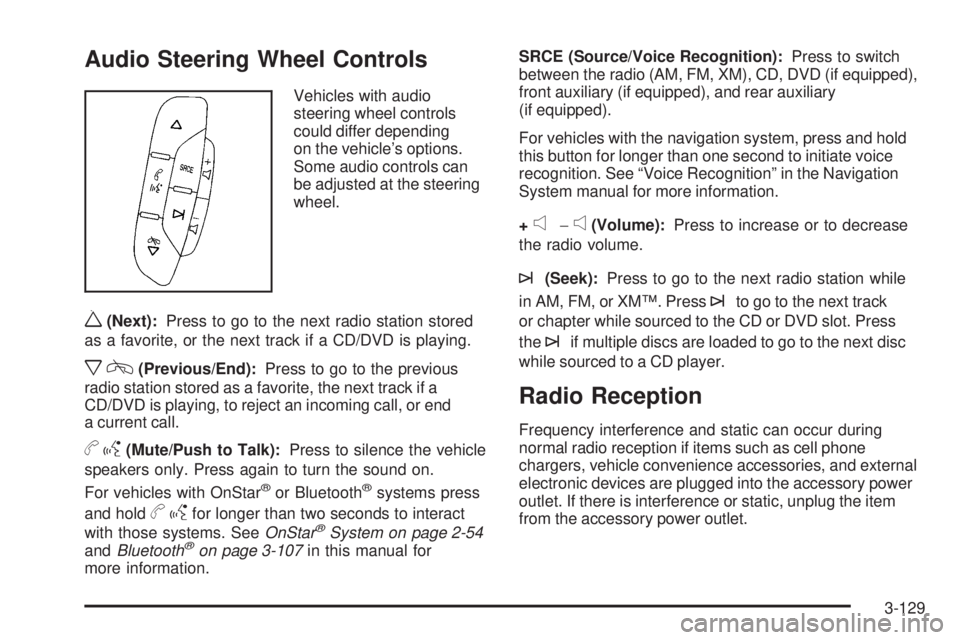
Vehicles with audio
steering wheel controls
could differ depending
on the vehicle’s options.
Some audio controls can
be adjusted at the steering
wheel.
w(Next):Press to go to the next radio station stored
as a favorite, or the next track if a CD/DVD is playing.
xc(Previous/End):Press to go to the previous
radio station stored as a favorite, the next track if a
CD/DVD is playing, to reject an incoming call, or end
a current call.
bg(Mute/Push to Talk):Press to silence the vehicle
speakers only. Press again to turn the sound on.
For vehicles with OnStar
®or Bluetooth®systems press
and hold
bgfor longer than two seconds to interact
with those systems. SeeOnStar®System on page 2-54
andBluetooth®on page 3-107in this manual for
more information.SRCE (Source/Voice Recognition):Press to switch
between the radio (AM, FM, XM), CD, DVD (if equipped),
front auxiliary (if equipped), and rear auxiliary
(if equipped).
For vehicles with the navigation system, press and hold
this button for longer than one second to initiate voice
recognition. See “Voice Recognition” in the Navigation
System manual for more information.
+
e−e(Volume):Press to increase or to decrease
the radio volume.
¨(Seek):Press to go to the next radio station while
in AM, FM, or XM™. Press
¨to go to the next track
or chapter while sourced to the CD or DVD slot. Press
the
¨if multiple discs are loaded to go to the next disc
while sourced to a CD player.
Radio Reception
Frequency interference and static can occur during
normal radio reception if items such as cell phone
chargers, vehicle convenience accessories, and external
electronic devices are plugged into the accessory power
outlet. If there is interference or static, unplug the item
from the accessory power outlet.
3-129
Page 291 of 524
Antilock Brake System (ABS)
This vehicle has the Antilock Brake System (ABS), an
advanced electronic braking system that helps prevent a
braking skid.
When the engine is started and the vehicle begins to
drive away, ABS checks itself. A momentary motor
or clicking noise might be heard while this test is going
on. This is normal.
If there is a problem with
the ABS, this warning light
stays on. SeeAntilock
Brake System (ABS)
Warning Light on
page 3-38.Let us say the road is wet and you are driving safely.
Suddenly, an animal jumps out in front of you. You slam
on the brakes and continue braking. Here is what
happens with ABS:
A computer senses that the wheels are slowing down.
If one of the wheels is about to stop rolling, the computer
will separately work the brakes at each front wheel
and at both rear wheels.
ABS can change the brake pressure to each wheel, as
required, faster than any driver could. This can help
the driver steer around the obstacle while braking hard.
As the brakes are applied, the computer keeps
receiving updates on wheel speed and controls braking
pressure accordingly.
Remember: ABS does not change the time needed to get
a foot up to the brake pedal or always decrease stopping
distance. If you get too close to the vehicle in front of you,
there will not be enough time to apply the brakes if that
vehicle suddenly slows or stops. Always leave enough
room up ahead to stop, even with ABS.
4-5
Page 293 of 524

The StabiliTrak disable
button is located on the
instrument panel below the
climate controls.
The traction control part of StabiliTrak can be turned off
by pressing and releasing the StabiliTrak button if both
systems (traction control and StabiliTrak) were previously
on. To disable both traction control and StabiliTrak, press
and hold the button until STABILITRAK OFF is displayed
on the DIC and the StabiliTrak light comes on the
instrument panel.
Traction control and StabiliTrak can be turned on by
pressing and releasing the StabiliTrak button if not
automatically shut off for any other reason.
When the traction control or StabiliTrak system is turned
off, the StabiliTrak light and the appropriate traction
control off or StabiliTrak off message will be displayed on
the DIC to warn the driver. The vehicle will still havebrake-traction control when traction control is off, but will
not be able to use the engine speed management
system. See “Traction Control Operation” next for more
information.
When the traction control system has been turned off,
there may be system noises as a result of the
brake-traction control coming on.
It is recommended to leave the system on for normal
driving conditions, but it may be necessary to turn
the system off if the vehicle is stuck in sand, mud, ice or
snow, and you want to “rock” the vehicle to attempt to
free it. It may also be necessary to turn off the
system when driving in extreme off-road conditions
where high wheel spin is required. SeeIf Your Vehicle
is Stuck in Sand, Mud, Ice, or Snow on page 4-39.
When the transfer case is in Four-Wheel-Low Lock, the
stability system is automatically disabled, the StabiliTrak
light will come on and the STABILITRAK OFF message
will appear on the DIC. Both traction control and
StabiliTrak are automatically disabled in this condition.
4-7
Page 294 of 524
Traction Control Operation
The traction control system is part of the
StabiliTrak system. Traction control limits wheel
spin by reducing engine power to the wheels (engine
speed management) and by applying brakes to
each individual wheel (brake-traction control) as
necessary.
The traction control system is enabled automatically
when the vehicle is started. It will activate and the
StabiliTrak light will ash if it senses that any of the
wheels are spinning or beginning to lose traction while
driving. If the traction control is turned off, only the
brake-traction control portion of traction control will work.
The engine speed management will be disabled. In this
mode, engine power is not reduced automatically and the
driven wheels can spin more freely. This can cause the
brake-traction control to activate constantly.
Notice:If the wheel(s) of one axle is allowed to
spin excessively while the StabiliTrak, ABS
and brake warning lights and any relevant DIC
messages are displayed, the transfer case could bedamaged. The repairs would not be covered by the
vehicle warranty. Reduce engine power and do
not spin the wheel(s) excessively while these lights
and messages are displayed.
The traction control system may activate on dry or
rough roads or under conditions such as heavy
acceleration while turning or abrupt upshifts/downshifts
of the transmission. When this happens, a reduction
in acceleration may be noticed, or a noise or vibration
may be heard. This is normal.
If cruise control is being used when StabiliTrak activates,
the cruise control automatically disengages. The
cruise control can be re-engaged when road conditions
allow. SeeCruise Control on page 3-12.
StabiliTrak may also turn off automatically if it determines
that a problem exists with the system. If the problem does
not clear itself after restarting the vehicle, see your
dealer/retailer for service.
4-8
Page 295 of 524

Traction Control System (TCS)
The vehicle has a Traction Control System (TCS) that
limits wheel spin. This is especially useful in slippery road
conditions. The system operates only if it senses that any
of the wheels are spinning or beginning to lose traction.
When this happens, TCS applies the brakes to limit wheel
spin and also reduces engine power. The system may be
heard or felt while it is working, but this is normal.
TCS can operate on dry roads under some conditions.
When this happens, the system may be heard while it is
working or a reduction in acceleration may be noticed.
This is normal and does not mean there is a problem with
the vehicle. Examples of these conditions include hard
acceleration in a turn, an abrupt upshift or downshift of
the transmission or driving on rough roads.
If cruise control is being used when TCS begins to limit
wheel spin, the cruise control automatically disengages.
The cruise control can be re-engaged when road
conditions allow. SeeCruise Control on page 3-12.SERVICE TRACTION CONTROL comes on in the
Driver information Center (DIC) when a Traction Control
System or Antilock Brake System problem has been
detected and the vehicle needs service. SeeDIC
Warnings and Messages on page 3-56. When this
message is on, the system will not limit wheel spin.
Adjust your driving accordingly.
The traction control system automatically comes on
whenever the vehicle is started. To limit wheel
spin, especially in slippery road conditions, the system
should always be left on. But the traction control
system can be turned off if needed. It may be necessary
to turn the system off if the vehicle is stuck in sand,
mud, ice, or snow, and you want to “rock” the vehicle to
attempt to free it. SeeIf Your Vehicle is Stuck in
Sand, Mud, Ice, or Snow on page 4-39.
4-9
Page 296 of 524

To turn the system off,
press and release the
TCS button.
This light will come on
steady when the traction
control system has been
turned off. This light ashes
when TCS is active.
If the TCS button is pressed, the traction control system
will turn off and a TRACTION CONTROL OFF message
will appear on the DIC. Press the TCS button again to
turn the system back on. The TRACTION CONTROL
OFF message will then go off. The Traction Control
System will reset itself at each ignition cycle.
Adding non-dealer/non-retailer accessories can affect
the vehicle’s performance. SeeAccessories and
Modifications on page 5-3.Locking Rear Axle
The locking rear axle can give the vehicle additional
traction from the rear wheels when traveling in off-road
situations such as mud, snow, sand, steep hills and
uneven terrain.
The button used to turn
this feature on or off is
located below the transfer
case dial to the right of
the steering wheel.
To lock the rear axle:
1. Place the transfer case in the Four-Wheel-Low Lock
mode. This is the only mode which will allow the rear
axle to lock. SeeFull-Time Four-Wheel Drive on
page 2-37for more information regarding the transfer
case and Four-Wheel-Low-Lock mode.
2. Press the button with the vehicle stopped or moving
less than 2 mph (3 km/h).
4-10
Page 297 of 524

The light in the button must stop ashing and remain
illuminated before the rear axle is locked.
Notice:If you try to lock the axle while the vehicle
is stuck and the tires are spinning, the vehicle’s
drivetrain could be damaged. The repairs would not
be covered by the vehicle warranty. Always lock
the axle before attempting situations and/or
navigating terrain which could possibly cause the
vehicle to become stuck.
The locking rear axle will be disengaged when the
vehicle’s speed is greater than 40 mph (64 km/h), if the
vehicle’s battery is low and/or the transfer case is
shifted out of Four-Wheel-Low-Lock mode.
Notice:If the vehicle’s axle is locked while driving
on pavement, the drivetrain could be damaged.
Repairs would not be covered by the vehicle
warranty. Do not use the locking axle on pavement.
If four-wheel drive is needed when traveling on
pavement, use only 4HI.Steering
Power Steering
If power steering assist is lost because the engine stops
or the system is not functioning, the vehicle can be
steered but it will take more effort.
Steering Tips
It is important to take curves at a reasonable speed.
Traction in a curve depends on the condition of the tires
and the road surface, the angle at which the curve is
banked, and vehicle speed. While in a curve, speed is
the one factor that can be controlled.
If there is a need to reduce speed, do it before entering
the curve, while the front wheels are straight.
Try to adjust the speed so you can drive through the
curve. Maintain a reasonable, steady speed. Wait
to accelerate until out of the curve, and then accelerate
gently into the straightaway.
4-11
Page 298 of 524
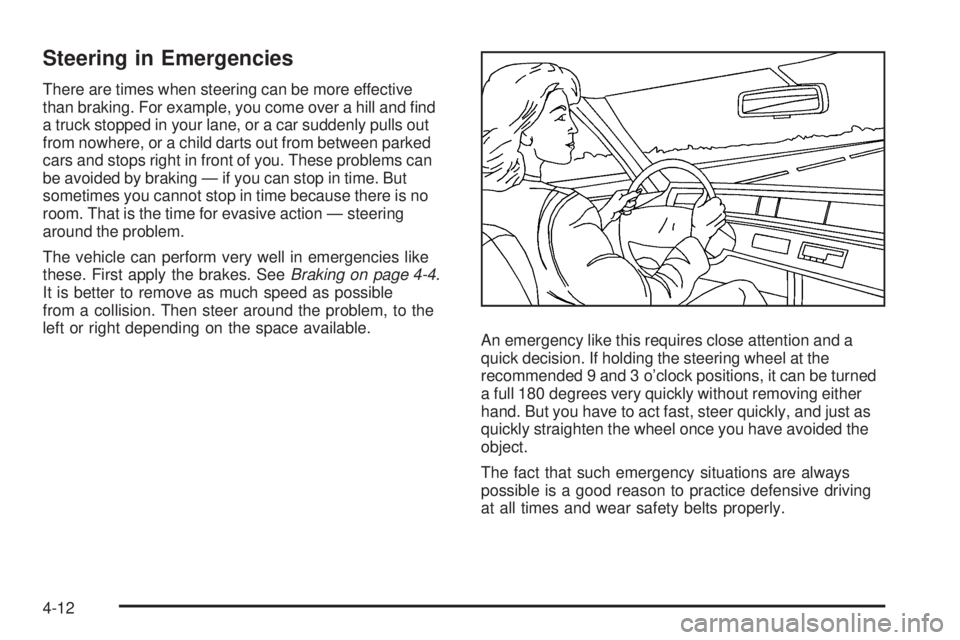
Steering in Emergencies
There are times when steering can be more effective
than braking. For example, you come over a hill and nd
a truck stopped in your lane, or a car suddenly pulls out
from nowhere, or a child darts out from between parked
cars and stops right in front of you. These problems can
be avoided by braking — if you can stop in time. But
sometimes you cannot stop in time because there is no
room. That is the time for evasive action — steering
around the problem.
The vehicle can perform very well in emergencies like
these. First apply the brakes. SeeBraking on page 4-4.
It is better to remove as much speed as possible
from a collision. Then steer around the problem, to the
left or right depending on the space available.
An emergency like this requires close attention and a
quick decision. If holding the steering wheel at the
recommended 9 and 3 o’clock positions, it can be turned
a full 180 degrees very quickly without removing either
hand. But you have to act fast, steer quickly, and just as
quickly straighten the wheel once you have avoided the
object.
The fact that such emergency situations are always
possible is a good reason to practice defensive driving
at all times and wear safety belts properly.
4-12