instrument panel HUMMER H3 2007 Service Manual
[x] Cancel search | Manufacturer: HUMMER, Model Year: 2007, Model line: H3, Model: HUMMER H3 2007Pages: 480, PDF Size: 2.73 MB
Page 198 of 480

FUEL CAP
This message displays if the vehicle’s fuel cap is
either off or loose. Pull over as soon as possible
and check to see if the fuel cap is secure. You may
also see the check engine light on the instrument
panel cluster. If the check engine light does
come on when the fuel cap was loose, it may take
a few driving trips before the light turns off. See
Malfunction Indicator Lamp on page 186for more
information if the light still remains on. Press
and release the reset stem to acknowledge the
message and clear it from the display.
LOW FUEL
This message displays if the level of fuel in the
vehicle is low. Also check the fuel gage. See
Fuel Gage on page 191for more information.
Rell the fuel tank as soon as possible.
LOW TIRE
This message displays if a low tire pressure is
detected in any of the vehicle’s tires. Press
and release the reset stem to acknowledge the
message and clear it from the display. The
message appears at each ignition cycle until the
tires are inated to the correct ination pressure.
SeeTires on page 367andInation - Tire
Pressure on page 375for more information on
tires and the correct ination pressures.
OIL
This message displays when the oil pressure is
low. SeeOil Pressure Light on page 189and
Engine Oil on page 323for more information.
PARK BRK (Brake)
This message displays when the parking brake
is set. SeeParking Brake on page 116and
Brake System Warning Light on page 182for
more information. The message clears from the
display after the parking brake is released or
by pressing and releasing the reset stem.
198
Page 200 of 480
SERVICE CHARG (Charge)
SYS (System)
This message displays if there is a problem
with the battery charging system. Under certain
conditions, the battery warning light may also turn
on in the instrument panel cluster. SeeBattery
Warning Light on page 181. The battery will not be
charging at an optimal rate and the vehicle will
lose the ability to enter the fuel economy mode.
The vehicle is safe to drive, however have
the electrical system checked by your dealer.
Press and release the reset stem to acknowledge
the message and clear it from the display.
SERVICE STAB (Stability)
SYS (System)
This message displays if there is a problem
with the StabiliTrak®system. Have your vehicle
serviced by your dealer. SeeStabiliTrak®System
on page 244for more information.
STAB (Stability) SYS (System) OFF
This message displays when the StabiliTrak®
system is turned off. SeeStabiliTrak®System
on page 244for more information.
TRAC (Traction) OFF
This message along with the traction off light
displays when the Traction Control System (TCS)
is turned off by pressing the TCS button. See
Traction Off Light on page 184andTraction
Control System (TCS) on page 241for more
information.
TRACTION FAILED
This message displays if there is a problem with
the Traction Control System (TCS). Check
the TCS as soon as possible and have your
vehicle serviced by your dealer. SeeTraction
Control System (TCS) on page 241for more
information. Press and release the reset stem to
acknowledge the message and clear it from
the display.
TURN SIGNAL
This message displays when the turn signal is
on for about 0.75 miles (1.2 km) of travel. Press
and release the reset stem to acknowledge
the message and clear it from the display.
200
Page 243 of 480

Locking Rear Axle
Your vehicle may have this feature. The locking
rear axle can give your vehicle additional traction
from the rear wheels when traveling in off-road
situations such as mud, snow, sand, steep
hills and uneven terrain.
The button used to turn
this feature on or off is
located to the right
of the transfer case
buttons on the center of
the instrument panel.
To lock the rear axle, do the following:
1. Place the transfer case in the 4LO Lock mode.
This is the only mode which will allow the rear
axle to lock. SeeFull-Time Four-Wheel Drive
on page 111for more information regarding
the transfer case and 4LO Lock mode.
2. Press the button with the vehicle stopped or
moving less than 2 mph (3 km/h).
You must wait for the light in the button to stop
ashing and remain illuminated before the
rear axle is locked.Notice:If you try to lock the rear axle while
your vehicle is stuck and the tires are spinning,
you could damage your vehicle’s drivetrain.
The repairs would not be covered by your
warranty. Always lock the rear axle before
attempting situations and/or navigating terrain
which could possibly cause the vehicle to
become stuck.
The locking rear axle will be disengaged when the
wheel speed is greater than 20 mph (32 km/h),
if the vehicle’s battery is low and/or the transfer
case is shifted out of 4LO Lock mode.
Notice:If you lock the rear axle while driving
on pavement, you could damage your vehicle’s
drivetrain. The repairs would not be covered by
your warranty. Do not use the locking rear axle
on pavement. If you need four-wheel drive when
traveling on pavement, use only 4HI.
243
Page 305 of 480
Turn Signals When Towing a Trailer
The arrows on your instrument panel will ash
whenever you signal a turn or lane change.
Properly hooked up, the trailer lamps will also ash,
telling other drivers you’re about to turn, change
lanes or stop.
When towing a trailer, the arrows on your
instrument panel will ash for turns even if the bulbs
on the trailer are burned out. Thus, you may think
drivers behind you are seeing your signal when
they are not. It’s important to check occasionally to
be sure the trailer bulbs are still working.
Driving On Grades
Reduce speed and shift to a lower gearbefore
you start down a long or steep downgrade. If you
don’t shift down, you might have to use your
brakes so much that they would get hot and no
longer work well.
If you have an automatic transmission, you can
tow in DRIVE (D). You may want to shift the
transmission to THIRD (3) or, if necessary, a lower
gear selection if the transmission shifts too often
under heavy loads and/or hilly conditions.If you have a manual transmission and you
are towing a trailer, it is better not to use the
highest gear.
When towing at high altitude on steep uphill
grades, consider the following: Engine coolant
will boil at a lower temperature than at normal
altitudes. If you turn your engine off immediately
after towing at high altitude on steep uphill grades,
your vehicle may show signs similar to engine
overheating. To avoid this, let the engine run
while parked, preferably on level ground, with
the automatic transmission in PARK (P) for a
few minutes before turning the engine off.
For manual transmissions, let the engine run
while parked, preferably on level ground, with the
transmission out of gear and the parking brake
applied, for a few minutes before turning the
engine off. If you do get the overheat warning,
seeEngine Overheating on page 338.
305
Page 310 of 480
Trailer Brake Control Wiring Harness
The trailer brake control wiring harness is located
under the instrument panel to the right of the
steering column. The wires are taped to the
harness that goes to the courtesy light under
the instrument panel. The harness will contain
the following wires:
Red Wire: AUX B+
Black Wire: Ground
Light Blue Wire: Brake Signal
Dark Blue Wire: Trailer Brakes
Trailer Recommendations
You must subtract your hitch loads from the
Cargo Weight Rating (CWR). CWR is the
maximum weight of the load your vehicle can
carry. It doesn’t include the weight of the people
inside, but you can gure about 150 lbs. (68 kg)
for each seat. The total cargo load must not
be more than your vehicles CWR.
Weigh your vehicle with your trailer attached,
so that you won’t go over the GVWR or GAWR.
If you are using a weight-distributing hitch,
weigh the vehicle without the spring bars in place.
You’ll get the best performance if you spread
out the weight of your load the right way, and if
you choose the correct hitch and trailer brakes.
For more information seeTowing a Trailer
on page 297.
310
Page 313 of 480

Appearance Care........................................ 406
Cleaning the Inside of Your Vehicle.......... 406
Fabric/Carpet............................................. 407
Leather...................................................... 408
Instrument Panel, Vinyl, and Other
Plastic Surfaces..................................... 409
Care of Safety Belts.................................. 409
Weatherstrips............................................ 409
Washing Your Vehicle............................... 410
Cleaning Exterior Lamps/Lenses................ 410
Finish Care............................................... 410
Windshield, Backglass, and Wiper Blades.... 411
Aluminum or Chrome-Plated Wheels......... 412
Tires......................................................... 413
Sheet Metal Damage................................. 413
Finish Damage.......................................... 413Underbody Maintenance............................ 413
Chemical Paint Spotting............................ 414
Vehicle Care/Appearance Materials............ 414
Vehicle Identication.................................. 415
Vehicle Identication Number (VIN)........... 415
Service Parts Identication Label............... 416
Electrical System........................................ 416
Add-On Electrical Equipment..................... 416
Windshield Wiper Fuses............................ 417
Power Windows and Other Power
Options.................................................. 417
Fuses and Circuit Breakers....................... 417
Engine Compartment Fuse Block............... 418
Capacities and Specications.................... 422
Section 5 Service and Appearance Care
313
Page 321 of 480
Checking Things Under
the Hood
{CAUTION:
An electric fan under the hood can start up
and injure you even when the engine is not
running. Keep hands, clothing, and tools
away from any underhood electric fan.
{CAUTION:
Things that burn can get on hot engine
parts and start a re. These include
liquids like fuel, oil, coolant, brake uid,
windshield washer and other uids, and
plastic or rubber. You or others could be
burned. Be careful not to drop or spill
things that will burn onto a hot engine.
Hood Release
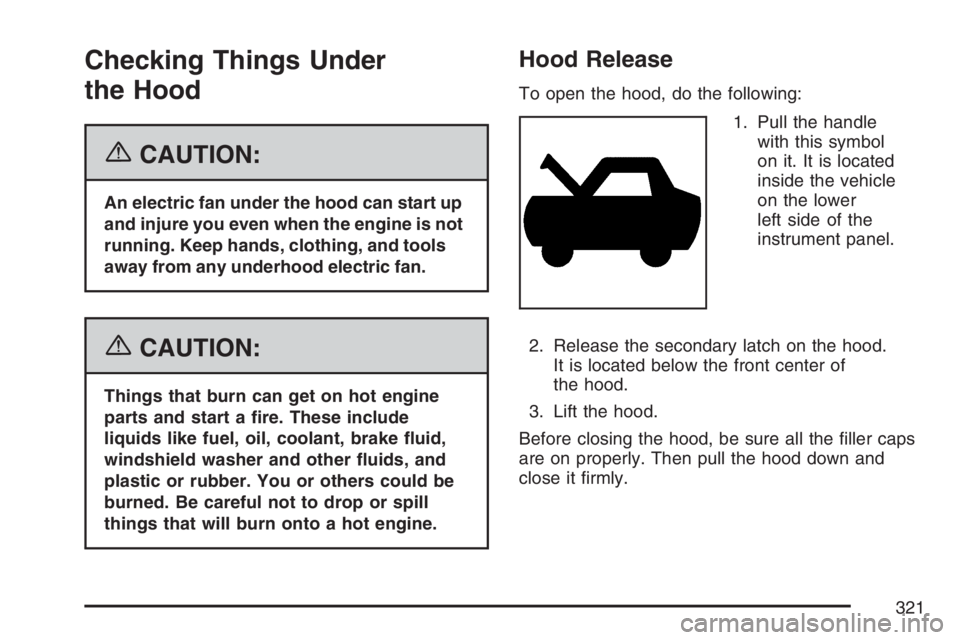
To open the hood, do the following:
1. Pull the handle
with this symbol
on it. It is located
inside the vehicle
on the lower
left side of the
instrument panel.
2. Release the secondary latch on the hood.
It is located below the front center of
the hood.
3. Lift the hood.
Before closing the hood, be sure all the ller caps
are on properly. Then pull the hood down and
close it rmly.
321
Page 338 of 480
Add coolant mixture at the recovery tank, but be
careful not to spill it.
{CAUTION:
You can be burned if you spill coolant on
hot engine parts. Coolant contains
ethylene glycol, and it will burn if the
engine parts are hot enough. Do not spill
coolant on a hot engine.
Occasionally check the coolant level in the
radiator. For information on how to add coolant to
the radiator, seeCooling System on page 340.
Radiator Pressure Cap
Notice:If the pressure cap is not tightly
installed, coolant loss and possible engine
damage may occur. Be sure the cap is properly
and tightly secured.
SeeEngine Compartment Overview on page 322
for more information on location.
Engine Overheating
A coolant temperature gage is on the instrument
panel. SeeEngine Coolant Temperature Gage
on page 185.
The air conditioning might stop working if the
engine is too hot. This is normal and helps cool
the engine.
If Steam Is Coming From Your Engine
{CAUTION:
Steam from an overheated engine can
burn you badly, even if you just open the
hood. Stay away from the engine if you
see or hear steam coming from it. Just
turn it off and get everyone away from the
vehicle until it cools down.Wait until there
is no sign of steam or coolant before you
open the hood.
If you keep driving when your engine is
overheated, the liquids in it can catch re.
CAUTION: (Continued)
338
Page 376 of 480
How to Check
Use a good quality pocket-type gage to check tire
pressure. You cannot tell if your tires are
properly inated simply by looking at them. Radial
tires may look properly inated even when they
are underinated. Check the tire’s ination
pressure when the tires are cold. Cold means your
vehicle has been sitting for at least three hours
or driven no more than 1 mile (1.6 km).
Remove the valve cap from the tire valve stem.
Press the tire gage rmly onto the valve to
get a pressure measurement. If the cold tire
ination pressure matches the recommended
pressure on the Tire and Loading Information
label, no further adjustment is necessary. If the
ination pressure is low, add air until you reach the
recommended amount.
If you overll the tire, release air by pushing on
the metal stem in the center of the tire valve.
Recheck the tire pressure with the tire gage.
Be sure to put the valve caps back on the valve
stems. They help prevent leaks by keeping out dirt
and moisture.
Tire Pressure Monitor System
Your vehicle has a Tire Pressure Monitor System
(TPMS). This system uses radio and sensor
technology to check tire pressure levels. TPMS
sensors are mounted onto each tire and wheel
assembly on your vehicle, including the spare tire.
The TPMS sensors monitor the air pressure in
your vehicle’s tires and transmit the tire pressure
readings to a receiver located in the vehicle.
When a low tire pressure condition is detected,
the TPMS will illuminate the low tire pressure
warning light located in the instrument panel
cluster, and at the same time display the LOW
TIRE warning message on the Driver Information
Center (DIC). The low tire pressure warning
light and the LOW TIRE warning message appear
at each ignition cycle until the tires are inated
to the correct ination pressure.
376
Page 409 of 480
Instrument Panel, Vinyl, and Other
Plastic Surfaces
A soft cloth dampened with water may be used to
remove dust. If a more thorough cleaning is
necessary, a clean soft cloth dampened with a
mild soap solution can be used to gently remove
dust and dirt. Never use spot lifters or removers
on plastic surfaces. Many commercial cleaners and
coatings that are sold to preserve and protect
soft plastic surfaces may permanently change the
appearance and feel of your interior and are
not recommended. Do not use silicone or
wax-based products, or those containing organic
solvents to clean your vehicle’s interior because
they can alter the appearance by increasing
the gloss in a non-uniform manner.
Some commercial products may increase gloss on
your instrument panel. The increase in gloss
may cause annoying reections in the windshield
and even make it difficult to see through the
windshield under certain conditions.
Care of Safety Belts
Keep belts clean and dry.
{CAUTION:
Do not bleach or dye safety belts. If you
do, it may severely weaken them. In a
crash, they might not be able to provide
adequate protection. Clean safety belts
only with mild soap and lukewarm water.
Weatherstrips
Silicone grease on weatherstrips will make them
last longer, seal better, and not stick or squeak.
Apply silicone grease with a clean cloth. During
very cold, damp weather frequent application may
be required. SeeRecommended Fluids and
Lubricants on page 440.
409