air condition HUMMER H3 2009 User Guide
[x] Cancel search | Manufacturer: HUMMER, Model Year: 2009, Model line: H3, Model: HUMMER H3 2009Pages: 382, PDF Size: 1.99 MB
Page 139 of 382
Rear Window Defogger
The rear window defogger uses a
warming grid to remove fog or
frost from the rear window when the
key is in the ignition and turned
to ON/RUN.
=(Rear Defogger):Press to turn
the rear window defogger on or
off. After the button is rst pressed
the rear window defogger stays
on for about 15 minutes. If turned on
again, the defogger only runs for
about seven and one-half minutes.
Notice:Do not use anything
sharp on the inside of the rear
window. If you do, you could cut
or damage the warming grid, and
the repairs would not be covered
by the vehicle warranty. Do not
attach a temporary vehicle
license, tape, a decal or anything
similar to the defogger grid.
Outlet Adjustment
Use the air outlets located in the
center and on the side of the
instrument panel to direct the
airow.
This vehicle has air outlets that
allow you to adjust the direction and
amount of airow inside the
vehicle. Move the louvers up or
down to change the direction of the
airow. Use the thumbwheel
under the outlets to change the
direction of the airow from left
to right.Operation TipsUse the recirculation mode for
maximum air conditioning
performance.
Clear away any ice, snow or
leaves from the air inlets at
the base of the windshield that
may block the ow of air into the
vehicle.
Use of non-GM approved hood
deectors may adversely affect
the performance of the system.
Keep the path under the
front seats clear of objects to help
circulate the air inside of the
vehicle more effectively.
Instrument Panel 3-21
Page 145 of 382
If, after several seconds, both status
indicator lights remain on, or if
there are no lights at all, there may
be a problem with the lights or
the passenger sensing system. See
your dealer/retailer for service.
{CAUTION
If the airbag readiness light ever
comes on and stays on, it means
that something may be wrong with
the airbag system. To help avoid
injury to yourself or others, have
the vehicle serviced right away.
SeeAirbag Readiness Light on
page 3-25for more information,
including important safety
information.
Charging System Light
This light comes on briey when the
ignition key is turned, but the
engine is not running, as a check to
show it is working.
It should go out once the engine
starts. If it stays on, or comes
on while driving, there could be a
problem with the charging system. A
charging system message in the
Driver Information Center (DIC) may
also appear. SeeDIC Warnings
and Messages on page 3-37
for more information. This light could
indicate that there are problems
with a generator drive belt, or that
there is an electrical problem.
Have it checked right away. If the
vehicle must be driven a short
distance with the light on, turn off all
the accessories, such as the
radio and air conditioner.
Up-Shift Light
The vehicle may have an up-shift
light.
When this light comes on, shift to
the next higher gear if weather,
road, and traffic conditions allow.
SeeManual Transmission Operation
on page 2-22for more information.
Brake System Warning
Light
The vehicle’s hydraulic brake
system is divided into two parts. If
one part is not working, the
other part can still work and stop
the vehicle. For good braking
though, both parts need to be
working well.
Instrument Panel 3-27
Page 149 of 382
the vehicle’s fuel economy might
not be as good, and the engine
might not run as smoothly.
This could lead to costly repairs
that might not be covered by
the vehicle warranty.
Notice:Modications made to
the engine, transmission,
exhaust, intake, or fuel system of
the vehicle or the replacement
of the original tires with other
than those of the same Tire
Performance Criteria (TPC) can
affect the vehicle’s emission
controls and can cause this light
to come on. Modications to
these systems could lead
to costly repairs not covered by
the vehicle warranty. This
could also result in a failure to
pass a required Emission
Inspection/Maintenance test. See
Accessories and Modifications
on page 5-3.This light comes on during a
malfunction in one of two ways:
Light Flashing:A misre condition
has been detected. A misre
increases vehicle emissions and
could damage the emission control
system on the vehicle. Diagnosis
and service might be required.
The following can prevent more
serious damage to the vehicle:
Reduce vehicle speed.
Avoid hard accelerations.
Avoid steep uphill grades.
If towing a trailer, reduce the
amount of cargo being hauled
as soon as it is possible.
If the light continues to ash, when
it is safe to do so, stop the
vehicle. Find a safe place to park
the vehicle. Turn the key off, wait at
least 10 seconds, and restart the
engine. If the light is still ashing,
follow the previous steps and
see your dealer/retailer for service
as soon as possible.Light On Steady:An emission
control system malfunction has been
detected on the vehicle. Diagnosis
and service might be required.
An emission system malfunction
might be corrected by:
Make sure the fuel cap is fully
installed. SeeFilling the Tank
on page 5-7. The diagnostic
system can determine if the fuel
cap has been left off or
improperly installed. A loose or
missing fuel cap allows fuel
to evaporate into the atmosphere.
A few driving trips with the cap
properly installed should turn
the light off.
If the vehicle has been driven
through a deep puddle of
water, the vehicle’s electrical
system might be wet. The
condition is usually corrected
when the electrical system dries
out. A few driving trips should
turn the light off.
Instrument Panel 3-31
Page 155 of 382
RFA 3:This mode ashes the
parking lamps and sounds the horn
when you press the lock or
unlock buttons on the RKE
transmitter.
RFA 4:This mode disables RKE
feedback. There will be no feedback
when you press the lock or unlock
buttons on the RKE transmitter.
DIC Warnings and
Messages
Messages are displayed on the DIC
to notify the driver that the status
of the vehicle has changed and that
some action may be needed by
the driver to correct the condition.
Multiple messages may appear one
after another. The messages are
displayed for several seconds each.
Some messages may not require
immediate action, but you should
press and release the trip odometer
reset stem to acknowledge that
you received the messages and toclear them from the display. Each
message must be acknowledged
individually.
Some messages cannot be cleared
from the DIC display because
they are more urgent. These
messages require action before they
can be cleared. You should take
any messages that appear on
the display seriously and remember
that clearing the messages only
makes the messages disappear, not
correct the problem.
The following are the possible
messages that can be displayed
and some information about them.
AC (Air Conditioning) OFF
This message displays when
the engine coolant temperature is
too high and the air conditioning
in the vehicle needs to be turned off.
SeeEngine Overheating on
page 5-27andClimate Control
System on page 3-19for more
information. This message displays
along with the ENG HOT message.
ABS (Antilock Brake System)
FAULT
This message displays if there is a
problem with the Antilock Brake
System (ABS). Check the ABS as
soon as possible and have the
vehicle serviced by your
dealer/retailer. SeeBrakes on
page 5-30andAntilock Brake
System (ABS) Warning Light on
page 3-28for more information.
Press and release the reset stem to
acknowledge the message and
clear it from the display.
BRAKES
This message displays if there is a
problem with the brakes. Check
the brakes as soon as possible and
have the vehicle serviced by
your dealer/retailer. SeeBrakes on
page 5-30andBrake System
Warning Light on page 3-27for
more information. Press and release
the reset stem to acknowledge
the message and clear it from the
display.
Instrument Panel 3-37
Page 179 of 382
If the system is not sure it
recognized the number
properly, it responds “Dial
Number, Please say yes or
no?” followed by a tone. If the
number is correct, say
“Yes”. The system responds
with “OK, Sending Number”
and the dial tones are
sent and the call continues.
Sending a Stored Name Tag
During a Call
1. Press
g. The system responds
with “Ready” followed by a tone.
2. Say “Send name tag.” The
system responds with “Say
a name tag to send tones”
followed by a tone.
3. Say the name tag to send.
If the system clearly
recognizes the name tag it
responds with “OK, Sending
tones are sent and the
call continues.
If the system is not sure it
recognized the name tag
properly, it responds
“Dial
yes or no?” followed by a
tone. If the name tag is
correct, say “Yes”. The
system responds with “OK,
Sending
dial tones are sent and the
call continues.
Clearing the System
Unless information is deleted out of
the in-vehicle Bluetooth system,
it will be retained indenitely. This
includes all saved name tags in
the phonebook and phone pairing
information. For information on
how to delete this information, see
the above sections on Deleting
a Paired Phone and Deleting
Name Tags.
Other Information
The Bluetooth®word mark and
logos are owned by the Bluetooth®
SIG, Inc. and any use of such
marks by General Motors is under
license. Other trademarks and
trade names are those of their
respective owners.
This device complies with Part 15 of
the FCC Rules. Operation is
subject to the following two
conditions:
1. This device may not cause
harmful interference.
2. This device must accept any
interference received, including
interference that may cause
undesired operation.
Instrument Panel 3-61
Page 192 of 382
5. Wait for the light in the button
to stop ashing and remain
illuminated to show that the front
axle is locked.
Notice:If you try to lock the axle
while the vehicle is stuck and
the tires are spinning, the
vehicle’s drivetrain could be
damaged. The repairs would not
be covered by the vehicle
warranty. Always lock the axle
before attempting situations
and/or navigating terrain which
could possibly cause the vehicle
to become stuck.
Locking axles will be disengaged
when the wheel speed is greater
than 40 mph (64 km/h), if the
vehicle’s battery is low and/or the
transfer case is shifted out of
4LO Lock mode.Notice:If the vehicle’s axle is
locked while driving on pavement,
the drivetrain could be damaged.
Repairs would not be covered
by the vehicle warranty. Do
not use the locking axle on
pavement. If four-wheel drive is
needed when traveling on
pavement, use only 4HI.
Steering
Power Steering
If power steering assist is lost
because the engine stops or the
system is not functioning, the vehicle
can be steered but it will take
more effort.
Steering Tips
It is important to take curves at a
reasonable speed.
Traction in a curve depends on the
condition of the tires and the
road surface, the angle at which the
curve is banked, and vehicle
speed. While in a curve, speed is
the one factor that can be controlled.
If there is a need to reduce speed,
do it before entering the curve,
while the front wheels are straight.
Try to adjust the speed so you
can drive through the curve.
Maintain a reasonable, steady
speed. Wait to accelerate until out
of the curve, and then accelerate
gently into the straightaway.
4-10 Driving Your Vehicle
Page 195 of 382
Of course, traction is reduced when
water, snow, ice, gravel, or other
material is on the road. For safety,
slow down and adjust your
driving to these conditions. It is
important to slow down on slippery
surfaces because stopping
distance will be longer and vehicle
control more limited.
While driving on a surface with
reduced traction, try your best to
avoid sudden steering, acceleration,
or braking, including reducing
vehicle speed by shifting to a lower
gear. Any sudden changes could
cause the tires to slide. You may not
realize the surface is slippery until
the vehicle is skidding. Learn to
recognize warning clues — such as
enough water, ice, or packed
snow on the road to make a
mirrored surface — and slow down
when you have any doubt.
Remember: Any Antilock Brake
System (ABS) helps avoid only the
braking skid.Off-Road Driving
The airbag system is designed to
work properly under a wide range
of conditions, including off-road
usage. Always wear your safety belt
and observe safe driving speeds,
especially on rough terrain.
Drinking and driving can be very
dangerous on any road and this is
certainly true for off-road driving.
At the very time you need special
alertness and driving skills, your
reexes, perceptions, and judgment
can be affected by even a small
amount of alcohol. You could
have a serious — or even
fatal — accident if you drink and
drive or ride with a driver who has
been drinking.Off-roading can be great fun
but has some denite hazards. The
greatest of these is the terrain
itself. When off-road driving, traffic
lanes are not marked, curves are not
banked, and there are no road
signs. Surfaces can be slippery,
rough, uphill, or downhill.
Avoid sharp turns and abrupt
maneuvers. Failure to operate the
vehicle correctly off-road could result
in loss of vehicle control or vehicle
rollover.
Off-roading involves some new
skills. That is why it is very important
that you read these driving tips
and suggestions to help make
off-road driving safer and more
enjoyable.
Driving Your Vehicle 4-13
Page 214 of 382
Allow greater following distance on
any slippery road and watch for
slippery spots. Icy patches
can occur on otherwise clear roads
in shaded areas. The surface of
a curve or an overpass can remain
icy when the surrounding roads
are clear. Avoid sudden steering
maneuvers and braking while on ice.
Turn off cruise control, if equipped,
on slippery surfaces.
Blizzard Conditions
Being stuck in snow can be in a
serious situation. Stay with the
vehicle unless there is help nearby.
If possible, use theRoadside
Service on page 7-6. To get help
and keep everyone in the vehicle
safe:
Turn on theHazard Warning
Flashers on page 3-5.
Tie a red cloth to an outside
mirror.
{CAUTION
Snow can trap engine exhaust
under the vehicle. This may cause
exhaust gases to get inside.
Engine exhaust contains carbon
monoxide (CO) which cannot be
seen or smelled. It can cause
unconsciousness and even death.
If the vehicle is stuck in the snow:
Clear away snow from
around the base of your
vehicle, especially any that is
blocking the exhaust pipe.
Check again from time to
time to be sure snow does
not collect there.
Open a window about two
inches (5 cm) on the side of
the vehicle that is away from
the wind to bring in fresh air.
Fully open the air outlets on
or under the instrument
panel.
(Continued)
CAUTION (Continued)
Adjust the Climate Control
system to a setting that
circulates the air inside the
vehicle and set the fan speed
to the highest setting. See
Climate Control System in the
Index.
For more information about
carbon monoxide, seeEngine
Exhaust on page 2-31.
Snow can trap exhaust gases
under your vehicle. This can
cause deadly CO (carbon
monoxide) gas to get inside. CO
could overcome you and kill you.
You cannot see it or smell it, so
you might not know it is in your
vehicle. Clear away snow from
around the base of your vehicle,
especially any that is blocking the
exhaust.
4-32 Driving Your Vehicle
Page 242 of 382
The malfunction indicator lamp
could turn on and the vehicle
might fail a smog-check test.
SeeMalfunction Indicator Lamp
on page 3-30. If this occurs, return
to your authorized dealer/retailer
for diagnosis. If it is determined
that the condition is caused by the
type of fuel used, repairs might
not be covered by the vehicle
warranty.
Additives
To provide cleaner air, all gasolines
in the United States are now
required to contain additives that
help prevent engine and fuel system
deposits from forming, allowing
the emission control system to work
properly. In most cases, you
should not have to add anything to
the fuel. However, some gasolines
contain only the minimum amount of
additive required to meet U.S.
Environmental Protection Agency
regulations. To help keep fuel
injectors and intake valves clean, orif the vehicle experiences problems
due to dirty injectors or valves,
look for gasoline that is advertised
as TOP TIER Detergent Gasoline.
For customers who do not use
TOP TIER Detergent Gasoline
regularly, one bottle of GM Fuel
System Treatment PLUS, added to
the fuel tank at every engine oil
change, can help clean deposits
from fuel injectors and intake valves.
GM Fuel System Treatment PLUS
is the only gasoline additive
recommended by General Motors.
Also, your dealer/retailer has
additives that will help correct and
prevent most deposit-related
problems.
Gasolines containing oxygenates,
such as ethers and ethanol,
and reformulated gasolines
might be available in your area.
We recommend that you use these
gasolines, if they comply with
the specications described earlier.However, E85 (85% ethanol) and
other fuels containing more than
10% ethanol must not be used
in vehicles that were not designed
for those fuels.
Notice:This vehicle was not
designed for fuel that contains
methanol. Do not use fuel
containing methanol. It can
corrode metal parts in the fuel
system and also damage plastic
and rubber parts. That damage
would not be covered under
the vehicle warranty.
Some gasolines that are
not reformulated for low
emissions can contain an
octane-enhancing additive called
methylcyclopentadienyl manganese
tricarbonyl (MMT); ask the
attendant where you buy gasoline
whether the fuel contains MMT.
We recommend against the use of
such gasolines. Fuels containing
MMT can reduce the life of
spark plugs and the performance
5-6 Service and Appearance Care
Page 253 of 382
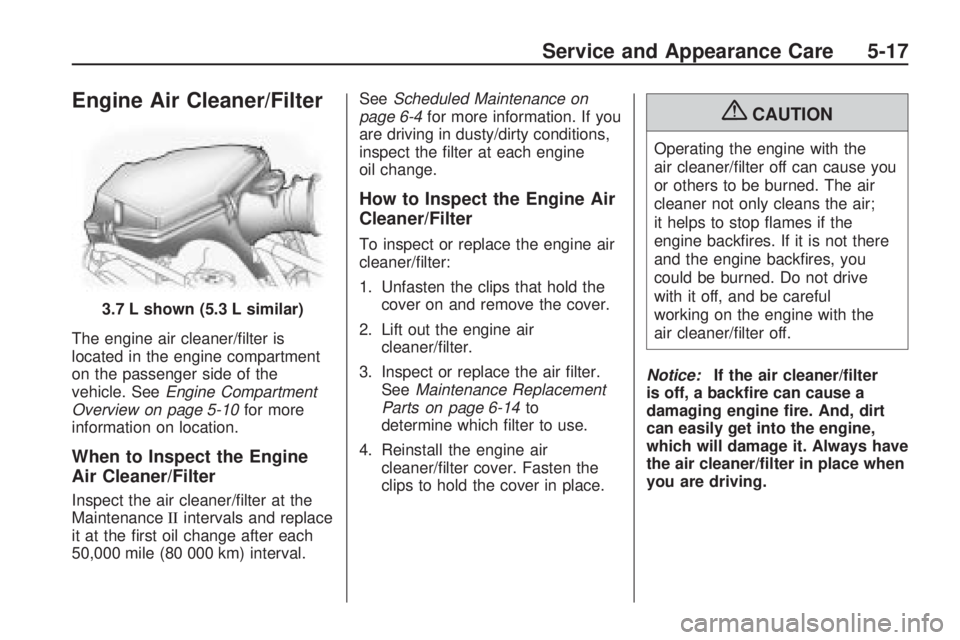
Engine Air Cleaner/Filter
The engine air cleaner/lter is
located in the engine compartment
on the passenger side of the
vehicle. SeeEngine Compartment
Overview on page 5-10for more
information on location.
When to Inspect the Engine
Air Cleaner/Filter
Inspect the air cleaner/lter at the
MaintenanceIIintervals and replace
it at the rst oil change after each
50,000 mile (80 000 km) interval.SeeScheduled Maintenance on
page 6-4for more information. If you
are driving in dusty/dirty conditions,
inspect the lter at each engine
oil change.
How to Inspect the Engine Air
Cleaner/Filter
To inspect or replace the engine air
cleaner/lter:
1. Unfasten the clips that hold the
cover on and remove the cover.
2. Lift out the engine air
cleaner/lter.
3. Inspect or replace the air lter.
SeeMaintenance Replacement
Parts on page 6-14to
determine which lter to use.
4. Reinstall the engine air
cleaner/lter cover. Fasten the
clips to hold the cover in place.
{CAUTION
Operating the engine with the
air cleaner/lter off can cause you
or others to be burned. The air
cleaner not only cleans the air;
it helps to stop ames if the
engine backres. If it is not there
and the engine backres, you
could be burned. Do not drive
with it off, and be careful
working on the engine with the
air cleaner/lter off.
Notice:If the air cleaner/lter
is off, a backre can cause a
damaging engine re. And, dirt
can easily get into the engine,
which will damage it. Always have
the air cleaner/lter in place when
you are driving. 3.7 L shown (5.3 L similar)
Service and Appearance Care 5-17