instrument cluster HUMMER H3 2009 User Guide
[x] Cancel search | Manufacturer: HUMMER, Model Year: 2009, Model line: H3, Model: HUMMER H3 2009Pages: 382, PDF Size: 1.99 MB
Page 134 of 382
The instrument panel lights, cluster,
and radio display do not dim to
complete darkness. Turn the
thumbwheel all the way up to turn
the dome lamps on.
Dome Lamp
The dome lamps are located in the
front area of the vehicle. There
is also a dome lamp in the cargo
area of the H3 model only.
Turn the thumbwheel, located next
to the exterior lamps control, all
the way up to turn the dome
and footwell lamps on. In this
position, the lamps remain on
whether a door is opened or closed.
The dome lamp in the cargo area
automatically turns off when:
The shift lever is shifted out of
P (Park) (automatic
transmissions).
The parking brake is released
(manual transmissions).
Dome Lamp Override
E
(Dome Lamp Override):You
can use the dome override
button, located below the exterior
lamps control, to set the dome
and footwell lamps to come
on automatically when a door is
opened, or to remain off. To turn the
lamps off, press the
Ebutton in.
With the button in this position,
the dome lamps will remain off when
the doors are open. To return the
lamps to automatic operation, press
Eagain and return it to the out
position. With the button in this
position, the dome lamps will come
on when a door is opened.
Exit Lighting
The interior lamps will come on
when the key is removed from the
ignition. The lamps will not come on
if the dome override button is
pressed in.
Reading Lamps
The reading lamps are located in
the overhead console.
Press the button located next to
each lamp to turn them on or off.
These lamps will not come on
with the dome lamps.
3-16 Instrument Panel
Page 141 of 382
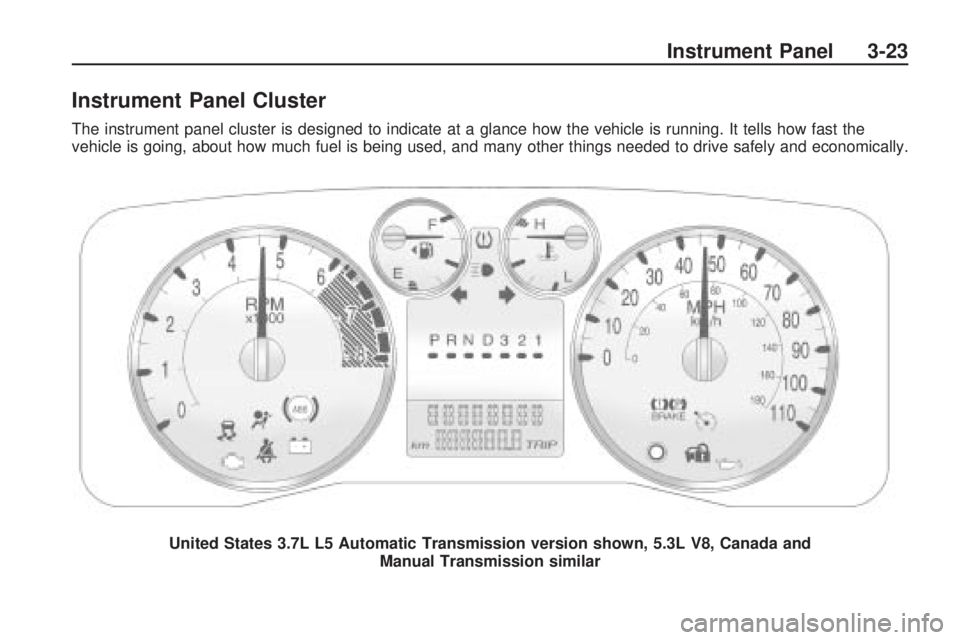
Instrument Panel Cluster
The instrument panel cluster is designed to indicate at a glance how the vehicle is running. It tells how fast the
vehicle is going, about how much fuel is being used, and many other things needed to drive safely and economically.United States 3.7L L5 Automatic Transmission version shown, 5.3L V8, Canada and Manual Transmission similar
Instrument Panel 3-23
Page 142 of 382
Speedometer and
Odometer
The speedometer shows the speed
in both miles per hour (mph) and
kilometers per hour (km/h).
The odometer shows how far the
vehicle has been driven, in
either miles (used in the United
States) or kilometers (used in
Canada).
The odometer mileage can be
checked without the vehicle running
by pressing the trip information
stem. See “Odometer” underDIC
Operation and Displays on
page 3-34for more information.
If the cluster is replaced the
new one will automatically detect
and update the vehicle’s
accumulated mileage.
Trip Odometer
The vehicle has a trip odometer that
indicates how far the vehicle has
been driven since the trip odometer
was last set to zero.
See “Trip Odometer” underDIC
Operation and Displays on
page 3-34for more information.
Tachometer
The tachometer displays the
engine speed in revolutions per
minute (rpm).
Notice:If the engine is operated
while the tachometer is in the
shaded warning area, the vehicle
could be damaged, and the
damages would not be covered
by the vehicle warranty. Do
not operate the engine with the
tachometer in the shaded
warning area.
Safety Belt Reminders
Driver Safety Belt Reminder
Light
When the engine is started, a chime
sounds for several seconds to
remind the driver to fasten their
safety belt, unless it is already
buckled.
The safety belt light comes on and
stays on for several seconds,
then ashes for several more.
This chime and light are repeated if
the driver safety belt remains
unbuckled and the vehicle is in
motion. If the driver safety belt is
already buckled, neither the
chime nor the light comes on.
3-24 Instrument Panel
Page 143 of 382
Passenger Safety Belt
Reminder Light
Several seconds after the engine is
started, a chime sounds for several
seconds to remind the front
passenger to buckle their safety belt.
This only occurs if the passenger
airbag is enabled. SeePassenger
Sensing System on page 1-54for
more information. The passenger
safety belt light, located on the
instrument panel, comes on and
stays on for several seconds and
then ashes for several more.
This chime and light are repeated if
the passenger remains unbuckled
and the vehicle is in motion.If the passenger safety belt is
buckled before the engine is started,
neither the chime nor the light
comes on.
The front passenger safety belt
warning light and chime may turn on
if an object is put on the seat
such as a briefcase, handbag,
grocery bag, laptop or other
electronic device. To turn off the
warning light and or chime, remove
the object from the seat or buckle
the safety belt
Airbag Readiness Light
There is an airbag readiness light on
the instrument panel cluster,
which shows the airbag symbol. The
system checks the airbag’s
electrical system for malfunctions.
The light indicates if there is an
electrical problem. The system
check includes the airbag sensor,the pretensioners, the airbag
modules, the wiring and the crash
sensing and diagnostic module.
For more information on the airbag
system, seeAirbag System on
page 1-46.
This light comes on when the
vehicle is started, and ashes for a
few seconds. The light goes out
when the system is ready.
Instrument Panel 3-25
Page 152 of 382
An arrow on the fuel gage indicates
the side of the vehicle the fuel
door is on.
Here are three things that can
happen but do not indicate a
problem with the fuel gage:
At the gas station, the gas pump
shuts off before the gage
reads full.
It takes a little more or less fuel
to ll up than the gage indicated.
For example, the gage may
have indicated the tank was half
full, but it actually took a little
more or less than half the tank’s
capacity to ll the tank.
The gage moves a little when
turning a corner or speeding up.
When the fuel in the fuel tank is low,
a LOW FUEL message displays
on the Driver Information
Center (DIC). SeeDIC Warnings
and Messages on page 3-37
for more information.
Driver Information
Center (DIC)
The Driver Information Center (DIC)
displays information such as the
trip odometer, personalization
features, and warning messages.
The DIC display is located on
the instrument panel cluster.
DIC Operation and
Displays
The Driver Information Center (DIC)
comes on when the ignition is on.
If a problem is detected, a warning
message appears on the display.
Pressing and releasing the trip
odometer reset stem on the
DIC acknowledges some current
warnings or service messages.
Some messages only clear after the
required action has been taken.
The DIC has different modes which
can be accessed by pressing the
trip odometer reset stem on the DIC.
These modes are explained in thefollowing section. The DIC trip
odometer reset stem is located on
the instrument panel cluster
next to the DIC display. To scroll
through the available functions,
press and release the reset stem.
Trip Information
Odometer
The odometer is automatically
displayed on the DIC when you start
the vehicle. The odometer shows the
total distance the vehicle has been
driven in either miles for the United
States or kilometers for Canada.
Trip Odometer
Press and release the reset stem
until TRIP appears on the DIC
display. The trip odometer shows the
current distance traveled since the
last reset of the trip odometer in
either miles for the United States or
kilometers for Canada.
To reset the trip odometer, press
and hold the reset stem until
the display returns to zero.
3-34 Instrument Panel
Page 156 of 382
CHANGE OIL
This message displays when the oil
needs to be changed. Check the
oil in the vehicle as soon as possible
and have the vehicle serviced by
your dealer/retailer. SeeEngine Oil
on page 5-13andScheduled
Maintenance on page 6-4for more
information. Press and release
the reset stem to acknowledge the
message and clear it from the
display.
DOORS
This message displays when one or
more of the doors is ajar. Check
all the doors on the vehicle to make
sure they are closed. The message
clears from the display after all
of the doors are closed.
ENG (Engine) HOT
This message displays when the
engine coolant temperature is
hot. Check the engine coolant
temperature gage. SeeEngine
Coolant Temperature Gage
on page 3-29. Have the vehicleserviced by your dealer/retailer as
soon as possible if you suspect
the engine is overheating. See
Engine Overheating on page 5-27
for more information.
FLUID
This message displays if the brake
uid is low. Check the brake
uid as soon as possible and have
the vehicle serviced by your
dealer/retailer. SeeBrakes on
page 5-30for more information.
Press and release the reset stem to
acknowledge the message and
clear it from the display.
FUEL CAP
This message displays if the
vehicle’s fuel cap is either off or
loose. Pull over as soon as possible
and check to see if the fuel cap is
secure. You may also see the check
engine light on the instrument
panel cluster. If the check engine
light does come on when the
fuel cap was loose, it may take a
few driving trips before the lightturns off. SeeMalfunction Indicator
Lamp on page 3-30for more
information if the light still remains
on. Press and release the reset
stem to acknowledge the message
and clear it from the display.
HSA (Hill Start Assist) ON
This message displays when the Hill
Start Assist is enabled. See
Braking on page 4-3for more
information.
LOW FUEL
This message displays if the level of
fuel in the vehicle is low. Also
check the fuel gage. SeeFuel Gage
on page 3-33for more information.
Rell the fuel tank as soon as
possible.
LOW TIRE
On vehicles with the Tire Pressure
Monitor System (TPMS), this
message displays if a low tire
pressure is detected in any of the
vehicle’s tires. Press and release the
reset stem to acknowledge the
3-38 Instrument Panel
Page 158 of 382
SERV (Service) VEH (Vehicle)
This message displays if the
vehicle needs service. Have the
vehicle serviced by your
dealer/retailer as soon as possible.
SERVICE CHARG (Charge)
SYS (System)
This message displays if there is a
problem with the battery charging
system. Under certain conditions,
the battery warning light may
also turn on in the instrument panel
cluster. SeeCharging System
Light on page 3-27. The battery will
not be charging at an optimal
rate and the vehicle will lose the
ability to enter the fuel economy
mode. The vehicle is safe to drive,
however have the electrical
system checked by your
dealer/retailer. Press and release
the reset stem to acknowledge
the message and clear it from the
display.
SERVICE STAB (Stability)
SYS (System)
This message displays if there is a
problem with the StabiliTrak®
system. Have the vehicle serviced
by your dealer/retailer. See
StabiliTrak
®System on page 4-6for
more information.
STAB (Stability)
SYS (System) OFF
This message displays when the
StabiliTrak®system is turned
off. SeeStabiliTrak®System on
page 4-6for more information.
TRAC (Traction) OFF
This message along with the
traction off light displays when the
Traction Control System (TCS)
is turned off by pressing the TCS
button. SeeStabiliTrak
®/Traction
Control System (TCS) Warning Light
on page 3-29andTraction Control
System (TCS) on page 4-7for
more information.
TRACTION FAULT
This message displays if there is a
problem with the Traction Control
System (TCS). Check the TCS
as soon as possible and have the
vehicle serviced by your
dealer/retailer. SeeTraction Control
System (TCS) on page 4-7for
more information. Press and release
the reset stem to acknowledge
the message and clear it from the
display.
TURN SIGNAL
This message displays when the
turn signal is on for about 0.75 miles
(1.2 km) of travel. Press and
release the reset stem to
acknowledge the message and
clear it from the display.
3-40 Instrument Panel
Page 252 of 382
When the system has calculated
that oil life has been diminished,
it indicates that an oil change
is necessary. A CHANGE OIL
message comes on. SeeDIC
Warnings and Messages on
page 3-37. Change the oil as soon
as possible within the next
600 miles (1 000 km). It is possible
that, if driving under the best
conditions, the oil life system might
not indicate that an oil change is
necessary for over a year. However,
the engine oil and lter must be
changed at least once a year and
at this time the system must be
reset. Your dealer/retailer has
trained people who will perform this
work using genuine parts and reset
the system. It is also important
to check the oil regularly and keep it
at the proper level.
If the system is ever reset
accidentally, the oil must be
changed at 3,000 miles (5 000 km)
since the last oil change.
Remember to reset the oil life
system whenever the oil is changed.How to Reset the Engine Oil
Life System
The Engine Oil Life System
calculates when to change the
engine oil and lter based on vehicle
use. Whenever the oil is changed,
reset the system so it can calculate
when the next oil change is required.
If a situation occurs where the oil is
changed prior to a CHANGE OIL
message being turned on, reset the
system.
To reset the Engine Oil Life system:
1. With the engine off, turn the
ignition to ON/RUN.
2. Press and release the stem in
the lower center of the
instrument cluster until the OIL
LIFE message is displayed.
3. Once the alternating OIL LIFE
and RESET messages appear,
press and hold the stem until
several beeps sound. This
conrms that the oil life system
has been reset.
4. Turn the key to LOCK/OFF.If the CHANGE OIL message
comes back on when the vehicle is
started, the engine oil life system
has not reset. Repeat the procedure.
SeeDIC Warnings and Messages
on page 3-37.
What to Do with Used Oil
Used engine oil contains certain
elements that can be unhealthy for
your skin and could even cause
cancer. Do not let used oil stay on
your skin for very long. Clean your
skin and nails with soap and water,
or a good hand cleaner. Wash or
properly dispose of clothing or rags
containing used engine oil. See the
manufacturer’s warnings about the
use and disposal of oil products.
Used oil can be a threat to the
environment. If you change your own
oil, be sure to drain all the oil from the
lter before disposal. Never dispose
of oil by putting it in the trash, pouring
it on the ground, into sewers, or into
streams or bodies of water. Recycle
it by taking it to a place that collects
used oil.
5-16 Service and Appearance Care
Page 290 of 382
Tire Pressure Monitor
Operation
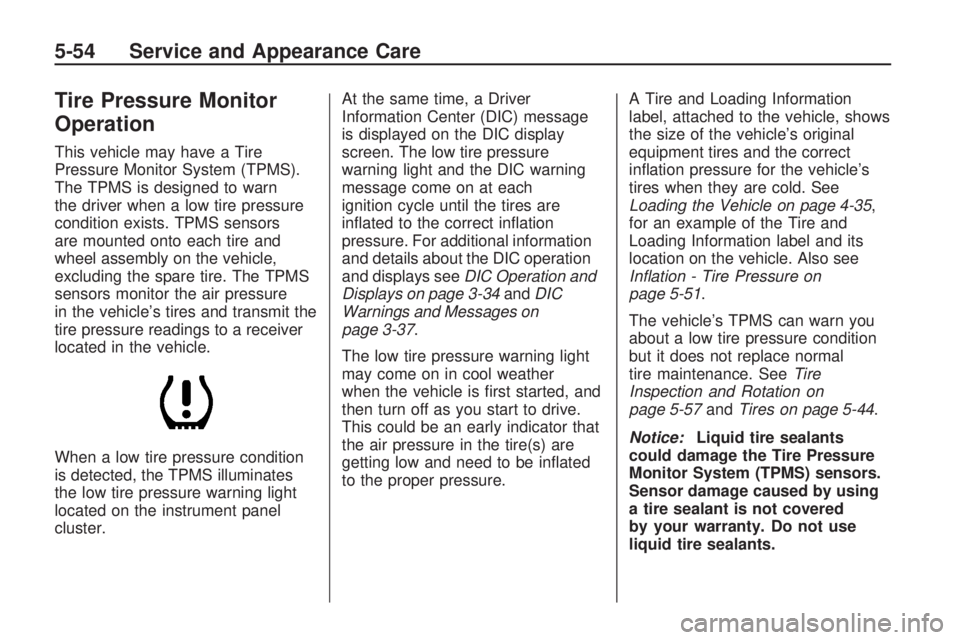
This vehicle may have a Tire
Pressure Monitor System (TPMS).
The TPMS is designed to warn
the driver when a low tire pressure
condition exists. TPMS sensors
are mounted onto each tire and
wheel assembly on the vehicle,
excluding the spare tire. The TPMS
sensors monitor the air pressure
in the vehicle’s tires and transmit the
tire pressure readings to a receiver
located in the vehicle.
When a low tire pressure condition
is detected, the TPMS illuminates
the low tire pressure warning light
located on the instrument panel
cluster.At the same time, a Driver
Information Center (DIC) message
is displayed on the DIC display
screen. The low tire pressure
warning light and the DIC warning
message come on at each
ignition cycle until the tires are
inated to the correct ination
pressure. For additional information
and details about the DIC operation
and displays seeDIC Operation and
Displays on page 3-34andDIC
Warnings and Messages on
page 3-37.
The low tire pressure warning light
may come on in cool weather
when the vehicle is rst started, and
then turn off as you start to drive.
This could be an early indicator that
the air pressure in the tire(s) are
getting low and need to be inated
to the proper pressure.A Tire and Loading Information
label, attached to the vehicle, shows
the size of the vehicle’s original
equipment tires and the correct
ination pressure for the vehicle’s
tires when they are cold. See
Loading the Vehicle on page 4-35,
for an example of the Tire and
Loading Information label and its
location on the vehicle. Also see
Inflation - Tire Pressure on
page 5-51.
The vehicle’s TPMS can warn you
about a low tire pressure condition
but it does not replace normal
tire maintenance. SeeTire
Inspection and Rotation on
page 5-57andTires on page 5-44.
Notice:Liquid tire sealants
could damage the Tire Pressure
Monitor System (TPMS) sensors.
Sensor damage caused by using
a tire sealant is not covered
by your warranty. Do not use
liquid tire sealants.
5-54 Service and Appearance Care
Page 375 of 382
Fuel (cont.)
Filling a Portable Fuel
Container....................... 5-8
Filling the Tank.................. 5-7
Fuels in Foreign Countries . . . 5-7
Gage ..............................3-33
Gasoline Octane................ 5-5
Gasoline Specications........ 5-5
Fuses
Engine Compartment
Fuse Block...................5-92
Fuses and Circuit
Breakers......................5-91
Windshield Wiper..............5-91
G
Gage
Engine Coolant
Temperature.................3-29
Fuel................................3-33
Speedometer...................3-24
Tachometer......................3-24
Garage Door Opener............2-42Gasoline
Octane............................. 5-5
Specications..................... 5-5
Glove Box...........................2-47
GM Mobility Reimbursement
Program............................ 7-5
H
Hazard Warning Flashers........ 3-5
Head Restraints..................... 1-2
Headlamp
Aiming ............................5-39
Headlamps..........................5-41
Bulb Replacement.............5-41
Daytime Running Lamp.....3-13
Exterior Lamps.................3-11
Flash-to-Pass..................... 3-7
Halogen Bulbs..................5-41
High/Low Beam Changer..... 3-7
On Reminder...................3-13
Heated Seats........................ 1-4
Heater................................3-19
Engine Coolant.................2-19
Highbeam On Light..............3-33Highway Hypnosis................4-30
Hill and Mountain Roads.......4-30
Hood
Checking Things Under....... 5-9
Release............................ 5-9
Horn .................................... 3-5
How to Wear Safety Belts
Properly..........................1-14
Hydraulic Clutch...................5-21
I
Ignition Positions..................2-16
Infants and Young Children,
Restraints........................1-28
Ination - Tire Pressure.........5-51
Instrument Panel
Brightness.......................3-15
Cluster............................3-23
Overview........................... 3-4
INDEX i-5