audio HUMMER H3 2009 Owners Manual
[x] Cancel search | Manufacturer: HUMMER, Model Year: 2009, Model line: H3, Model: HUMMER H3 2009Pages: 382, PDF Size: 1.99 MB
Page 1 of 382
Seats and Restraint
System............................... 1-1
Head Restraints
.............. 1-2
Front Seats
.................... 1-3
Rear Seats
.................... 1-7
Safety Belts
..................1-11
Child Restraints
.............1-25
Airbag System
..............1-46
Restraint System
Check
......................1-60
Features and Controls...... 2-1
Keys
............................. 2-2
Doors and Locks
............ 2-5
Windows
........................ 2-9
Theft-Deterrent
Systems
...................2-11
Starting and Operating Your
Vehicle
.....................2-15
Mirrors
.........................2-33
Object Detection
Systems
...................2-36
OnStar
®System
............2-39Universal Home
Remote System
.........2-42
Storage Areas
...............2-47
Sunroof
........................2-50
Instrument Panel............... 3-1
Instrument Panel
Overview
.................... 3-4
Climate Controls
............3-19
Warning Lights, Gages,
and Indicators
............3-22
Driver Information
Center (DIC)
.............3-34
Audio System(s)
............3-41
Driving Your Vehicle......... 4-1
Your Driving, the Road,
and the Vehicle
........... 4-1
Towing
........................4-40
Service and
Appearance Care............... 5-1
Service
.......................... 5-3
Fuel
.............................. 5-5
Checking Things Under
the Hood
.................... 5-9
Rear Axle
.....................5-38Four-Wheel Drive
..........5-38
Front Axle
....................5-39
Headlamp Aiming
..........5-39
Bulb Replacement
.........5-41
Windshield Wiper Blade
Replacement
.............5-44
Tires
...........................5-44
Appearance Care
..........5-83
Vehicle Identication
......5-90
Electrical System
...........5-91
Capacities and
Specications
............5-96
Maintenance Schedule...... 6-1
Maintenance Schedule
..... 6-1
Customer Assistance
Information........................ 7-1
Customer Assistance and
Information
................. 7-1
Reporting Safety
Defects
.....................7-14
Vehicle Data Recording
and Privacy
...............7-16
Index....................................i-1
2009 HUMMER H3/H3T Owner ManualM
Page 4 of 382
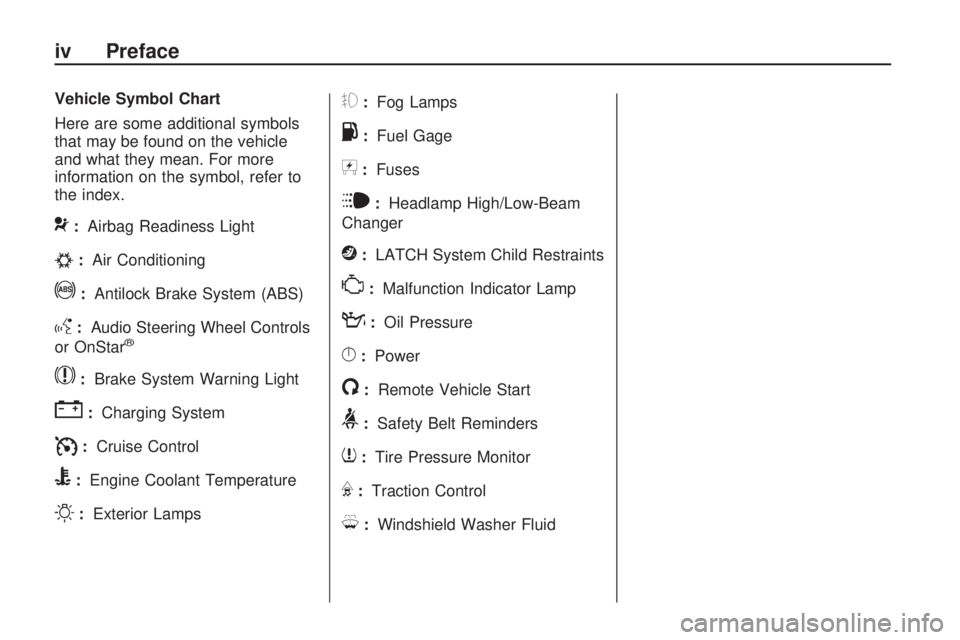
Vehicle Symbol Chart
Here are some additional symbols
that may be found on the vehicle
and what they mean. For more
information on the symbol, refer to
the index.
9:Airbag Readiness Light
#:Air Conditioning
!:Antilock Brake System (ABS)
g:Audio Steering Wheel Controls
or OnStar®
$:Brake System Warning Light
":Charging System
I:Cruise Control
B:Engine Coolant Temperature
O:Exterior Lamps
#:Fog Lamps
.:Fuel Gage
+:Fuses
i:Headlamp High/Low-Beam
Changer
j:LATCH System Child Restraints
*:Malfunction Indicator Lamp
::Oil Pressure
}:Power
/:Remote Vehicle Start
>:Safety Belt Reminders
7:Tire Pressure Monitor
F:Traction Control
M:Windshield Washer Fluid
iv Preface
Page 83 of 382
If you leave the key in the
ACC/ACCESSORY or ON/RUN
position with the engine off,
the battery could be drained.
You may not be able to start the
vehicle if the battery is allowed
to drain for an extended period
of time.
(D) START:This is the position that
starts the engine. When the engine
starts, release the key. The ignition
switch returns to ON/RUN for driving.
A warning tone will sound when the
driver door is opened, the ignition
is in ACC/ACCESSORY or
LOCK/OFF and the key is in
the ignition.Retained Accessory
Power (RAP)
These vehicle accessories can be
used for up to 20 minutes after
the engine is turned off:
Audio System
Front Wipers
Power Windows
Sunroof (if equipped)
These features will work when
the key is in ON/RUN or
ACC/ACCESSORY. Once the key is
turned from ON/RUN to LOCK/OFF,
these features continue working
for up to 20 minutes or until a door
is opened.
Starting the Engine
Place the transmission in the
proper gear.
Automatic Transmission
Move the shift lever to P (Park) or
N (Neutral). The engine will not start
in any other position. To restart
the vehicle when it is already
moving, use N (Neutral) only.
Notice:Do not try to shift to
P (Park) if the vehicle is moving.
If you do, you could damage
the transmission. Shift to P (Park)
only when the vehicle is stopped.
Manual Transmission
The shift lever should be in
N (Neutral) and the parking brake
engaged. Hold the clutch pedal
down to the oor and start the
engine. The vehicle will not start
if the clutch pedal is not all the
way down.
Features and Controls 2-17
Page 107 of 382

Most vehicles include 30 trial
minutes good for 60 days.
Hands-Free Calling can also be
linked to a Verizon Wireless service
plan in the U.S. or a Bell Mobility
service plan in Canada, depending
on eligibility. To nd out more,
refer to the OnStar Owner’s Guide
in the vehicle’s glove box, visit
onstar.com or onstar.ca, or speak
with an OnStar advisor by pressing
the OnStar button or calling
1-888-4-ONSTAR (1-888-466-7827).
OnStar Turn-by-Turn
Navigation
Vehicles with the OnStar
Turn-by-Turn Navigation system
can provide voice-guided driving
directions. Press the OnStar button
to have an OnStar advisor locate
a business or address and download
driving directions to the vehicle.
Voice-guided directions to the
desired destination will play
through the audio system speakers.
See the OnStar Owner’s Guide
for more information.
OnStar Virtual Advisor
OnStar Virtual Advisor is a feature
of OnStar Hands-Free Calling
that uses minutes to access
location-based weather, local traffic
reports, and stock quotes. Press
the phone button and give a
few simple voice commands to
browse through the various topics.
See the OnStar Owner’s Guide
for more information. This feature is
only available in the continental U.S.
Additional OnStar Controls
The vehicle may have a button,
located on the driver side of the
instrument panel near the headlamp
controls, that can be used to
interact with OnStar.Use this button to dial numbers
into voicemail systems or to
dial phone number extensions.
See the OnStar Owner’s Guide for
more information.
How OnStar Service Works
The OnStar system can record
and transmit vehicle information.
This information is automatically
sent to an OnStar Call Center when
the OnStar button is pressed, the
emergency button is pressed,
or if the airbags or AACN system
deploy. This information usually
includes the vehicle’s GPS location
and, in the event of a crash,
additional information regarding
the crash that the vehicle was
involved in (e.g. the direction from
which the vehicle was hit). When the
Virtual Advisor feature of OnStar
Hands-Free Calling is used,
the vehicle also sends OnStar the
vehicle’s GPS location so they
can provide services where
it is located.
Features and Controls 2-41
Page 120 of 382
Oil Pressure Light.............3-32
Security Light....................3-33
Cruise Control Light..........3-33
Highbeam On Light...........3-33
Fuel Gage........................3-33
Driver Information
Center (DIC)
Driver Information Center
(DIC)...............................3-34
DIC Operation and
Displays..........................3-34
DIC Warnings and
Messages........................3-37
Audio System(s)
Audio System(s)................3-41
Setting the Clock..............3-41
Radio(s)............................3-42
XM Radio Messages.........3-51
Navigation/Radio System. . .3-52
Bluetooth®........................3-52
Theft-Deterrent Feature.....3-62
Radio Reception...............3-62
Fixed Mast Antenna..........3-63
XM™ Satellite Radio
Antenna System..............3-63
3-2 Instrument Panel
Page 123 of 382
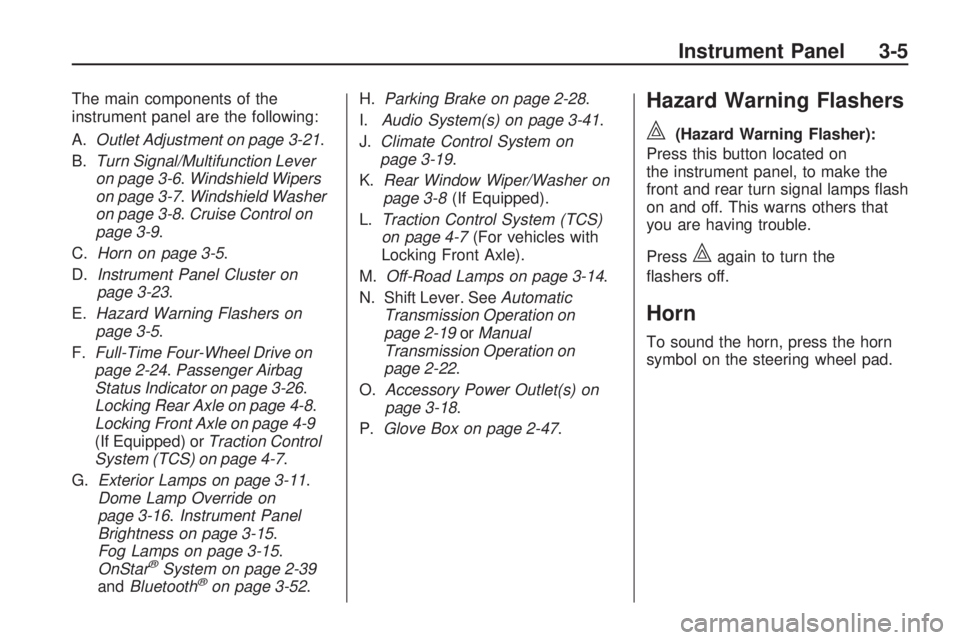
The main components of the
instrument panel are the following:
A.Outlet Adjustment on page 3-21.
B.Turn Signal/Multifunction Lever
on page 3-6.Windshield Wipers
on page 3-7.Windshield Washer
on page 3-8.Cruise Control on
page 3-9.
C.Horn on page 3-5.
D.Instrument Panel Cluster on
page 3-23.
E.Hazard Warning Flashers on
page 3-5.
F.Full-Time Four-Wheel Drive on
page 2-24.Passenger Airbag
Status Indicator on page 3-26.
Locking Rear Axle on page 4-8.
Locking Front Axle on page 4-9
(If Equipped) orTraction Control
System (TCS) on page 4-7.
G.Exterior Lamps on page 3-11.
Dome Lamp Override on
page 3-16.Instrument Panel
Brightness on page 3-15.
Fog Lamps on page 3-15.
OnStar
®System on page 2-39
andBluetooth®on page 3-52.H.Parking Brake on page 2-28.
I.Audio System(s) on page 3-41.
J.Climate Control System on
page 3-19.
K.Rear Window Wiper/Washer on
page 3-8(If Equipped).
L.Traction Control System (TCS)
on page 4-7(For vehicles with
Locking Front Axle).
M.Off-Road Lamps on page 3-14.
N. Shift Lever. SeeAutomatic
Transmission Operation on
page 2-19orManual
Transmission Operation on
page 2-22.
O.Accessory Power Outlet(s) on
page 3-18.
P.Glove Box on page 2-47.
Hazard Warning Flashers
|
(Hazard Warning Flasher):
Press this button located on
the instrument panel, to make the
front and rear turn signal lamps ash
on and off. This warns others that
you are having trouble.
Press
|again to turn the
ashers off.
Horn
To sound the horn, press the horn
symbol on the steering wheel pad.
Instrument Panel 3-5
Page 159 of 382
Audio System(s)
Determine which radio the vehicle
has and read the following pages to
become familiar with its features.
{CAUTION
Taking your eyes off the road for
extended periods could cause a
crash resulting in injury or death
to you or others. Do not give
extended attention to
entertainment tasks while driving.
This system provides access to
many audio and non audio listings.
To minimize taking your eyes off
the road while driving, do the
following while the vehicle is parked:
Become familiar with the
operation and controls of
the audio system.
Set up the tone, speaker
adjustments, and preset radio
stations.For more information, seeDefensive
Driving on page 4-2.
Notice:Contact your
dealer/retailer before adding any
equipment.
Adding audio or communication
equipment could interfere
with the operation of the vehicle’s
engine, radio, or other systems,
and could damage them.
Follow federal rules covering
mobile radio and telephone
equipment.
The vehicle has Retained Accessory
Power (RAP). With RAP, the
audio system can be played even
after the ignition is turned off.
SeeRetained Accessory Power
(RAP) on page 2-17for more
information.
Setting the Clock
The clock can be set with the
ignition on or off.
To set the clock:
1. Press and hold H until the
correct hour and AM or PM
displays.
2. Press and hold M until the
correct minute displays.
Press DISP (Display) to display the
time while the ignition is turned off.
Instrument Panel 3-41
Page 161 of 382
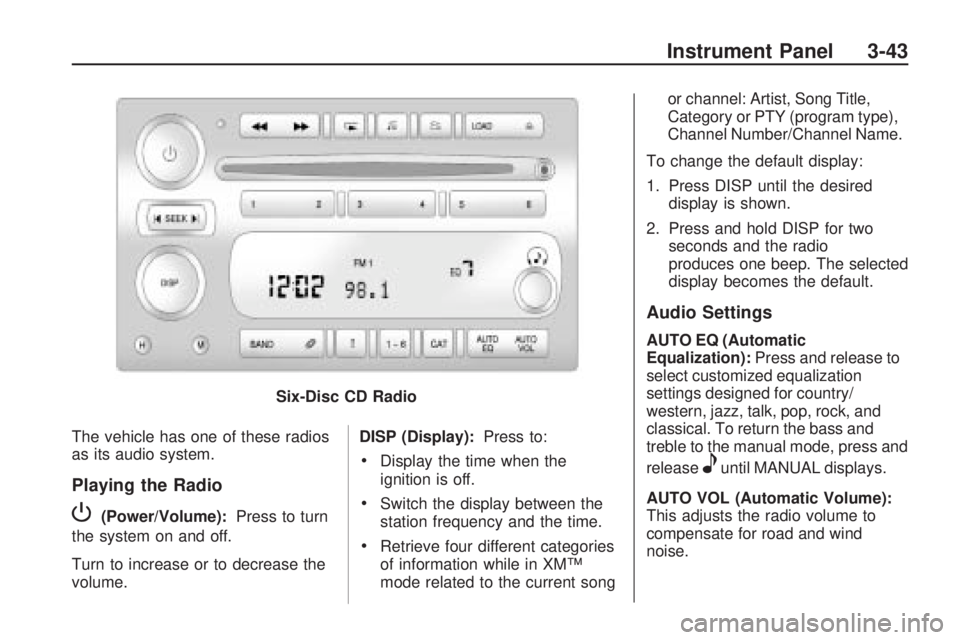
The vehicle has one of these radios
as its audio system.
Playing the Radio
P(Power/Volume):Press to turn
the system on and off.
Turn to increase or to decrease the
volume. DISP (Display):
Press to:
Display the time when the
ignition is off.
Switch the display between the
station frequency and the time.
Retrieve four different categories
of information while in XM™
mode related to the current song or channel: Artist, Song Title,
Category or PTY (program type),
Channel Number/Channel Name.
To change the default display:
1. Press DISP until the desired display is shown.
2. Press and hold DISP for two seconds and the radio
produces one beep. The selected
display becomes the default.
Audio Settings
AUTO EQ (Automatic
Equalization): Press and release to
select customized equalization
settings designed for country/
western, jazz, talk, pop, rock, and
classical. To return the bass and
treble to the manual mode, press and
release
euntil MANUAL displays.
AUTO VOL (Automatic Volume):
This adjusts the radio volume to
compensate for road and wind
noise.
Six-Disc CD Radio
Instrument Panel 3-43
Page 165 of 382
Using the CD Player
The CD player can play smaller
3 inch (8 cm) single CDs with
an adapter ring.
A CD in the player it stays in the
player when the ignition is turned off.
When the ignition or radio is
turned on, the CD starts to play
where it stopped, if it was the last
selected audio source.
Loading a CD
To load a CD do one of the
following:
Single CD Radio:
To Insert a CD with the ignition
on, insert the CD partway into
the slot, label side up, until
the player pulls the CD in. The
CD begins playing automatically.
To insert a CD with the ignition
off, press
Z(Eject) or the
DISP knob rst.The CD symbol displays when a CD
is inserted, and the track number
displays when each new track starts
to play.
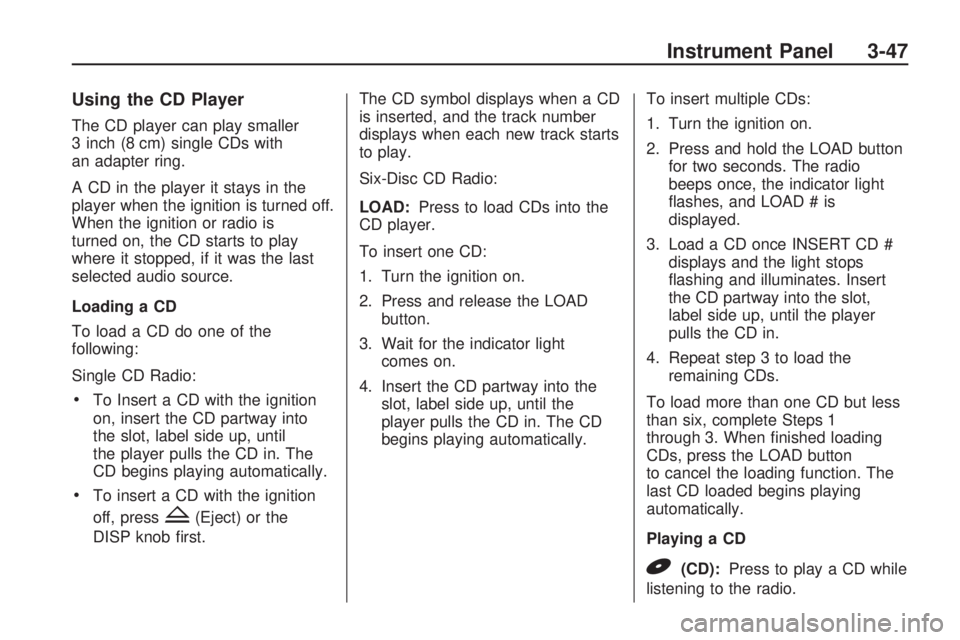
Six-Disc CD Radio:
LOAD:Press to load CDs into the
CD player.
To insert one CD:
1. Turn the ignition on.
2. Press and release the LOAD
button.
3. Wait for the indicator light
comes on.
4. Insert the CD partway into the
slot, label side up, until the
player pulls the CD in. The CD
begins playing automatically.To insert multiple CDs:
1. Turn the ignition on.
2. Press and hold the LOAD button
for two seconds. The radio
beeps once, the indicator light
ashes, and LOAD # is
displayed.
3. Load a CD once INSERT CD #
displays and the light stops
ashing and illuminates. Insert
the CD partway into the slot,
label side up, until the player
pulls the CD in.
4. Repeat step 3 to load the
remaining CDs.
To load more than one CD but less
than six, complete Steps 1
through 3. When nished loading
CDs, press the LOAD button
to cancel the loading function. The
last CD loaded begins playing
automatically.
Playing a CD
B(CD):Press to play a CD while
listening to the radio.
Instrument Panel 3-47
Page 169 of 382
player and the loading slot free of
foreign materials, liquids, and
debris.
If an error displays, see “CD
Messages” later in this section.
CD Messages
CHECK CD:If this message
displays and/or the CD comes out, it
could be for one of the following
reasons:
The CD player is very hot. When
the temperature returns to
normal, the CD should play.
The road is very rough. When
the road becomes smoother,
the CD should play.
The CD is dirty, scratched, wet,
or upside down.
The air is very humid. Wait about
an hour and try again.
The format of the CD might not
be compatible.
A problem may have occurred
while burning the CD.
The label could be caught in the
CD player.
If the CD is not playing correctly, for
any other reason, try a known
good CD.
If any error occurs repeatedly or if
an error cannot be corrected,
contact your dealer/retailer. If the
radio displays an error message,
write it down and provide it to your
dealer/retailer when reporting
the problem.
XM Radio Messages
XL (Explicit Language Channels):
These channels, or any others,
can be blocked by calling
1-800-852-XMXM (9696).
Updating:The encryption code in
the receiver is being updated,
and no action is required. This
process should take no longer than
30 seconds.No Signal:The system is
functioning correctly, but the vehicle
is in a location that is blocking
the XM signal. When the vehicle is
moved into an open area, the
signal should return.
Loading XM:The audio system is
acquiring and processing audio and
text data. No action is needed. This
message should disappear shortly.
CH Off Air:This channel is not
currently in service. Tune in
to another channel.
CH Unauth:This channel is
blocked or cannot be received with
your XM Subscription package.
CH Unavail:This previously
assigned channel is no longer
assigned. Tune to another station. If
this station was one of the presets,
choose another station for that
preset button.
No Info:No artist, song title,
category, or text information is
available at this time on this channel.
The system is working properly.
Instrument Panel 3-51