radio HUMMER H3 2009 User Guide
[x] Cancel search | Manufacturer: HUMMER, Model Year: 2009, Model line: H3, Model: HUMMER H3 2009Pages: 382, PDF Size: 1.99 MB
Page 159 of 382
Audio System(s)
Determine which radio the vehicle
has and read the following pages to
become familiar with its features.
{CAUTION
Taking your eyes off the road for
extended periods could cause a
crash resulting in injury or death
to you or others. Do not give
extended attention to
entertainment tasks while driving.
This system provides access to
many audio and non audio listings.
To minimize taking your eyes off
the road while driving, do the
following while the vehicle is parked:
Become familiar with the
operation and controls of
the audio system.
Set up the tone, speaker
adjustments, and preset radio
stations.For more information, seeDefensive
Driving on page 4-2.
Notice:Contact your
dealer/retailer before adding any
equipment.
Adding audio or communication
equipment could interfere
with the operation of the vehicle’s
engine, radio, or other systems,
and could damage them.
Follow federal rules covering
mobile radio and telephone
equipment.
The vehicle has Retained Accessory
Power (RAP). With RAP, the
audio system can be played even
after the ignition is turned off.
SeeRetained Accessory Power
(RAP) on page 2-17for more
information.
Setting the Clock
The clock can be set with the
ignition on or off.
To set the clock:
1. Press and hold H until the
correct hour and AM or PM
displays.
2. Press and hold M until the
correct minute displays.
Press DISP (Display) to display the
time while the ignition is turned off.
Instrument Panel 3-41
Page 160 of 382
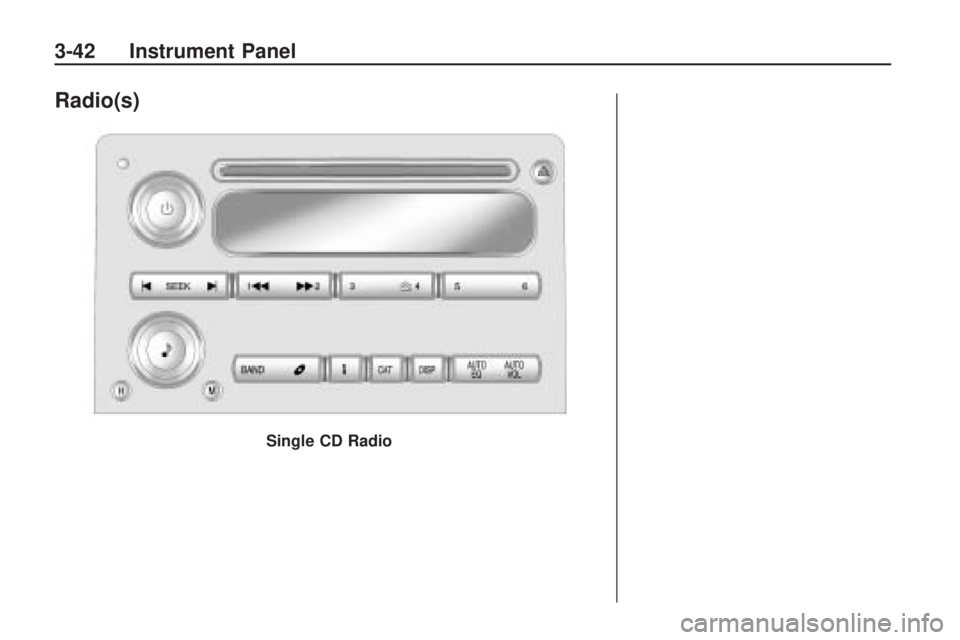
Radio(s)
Single CD Radio
3-42 Instrument Panel
Page 161 of 382
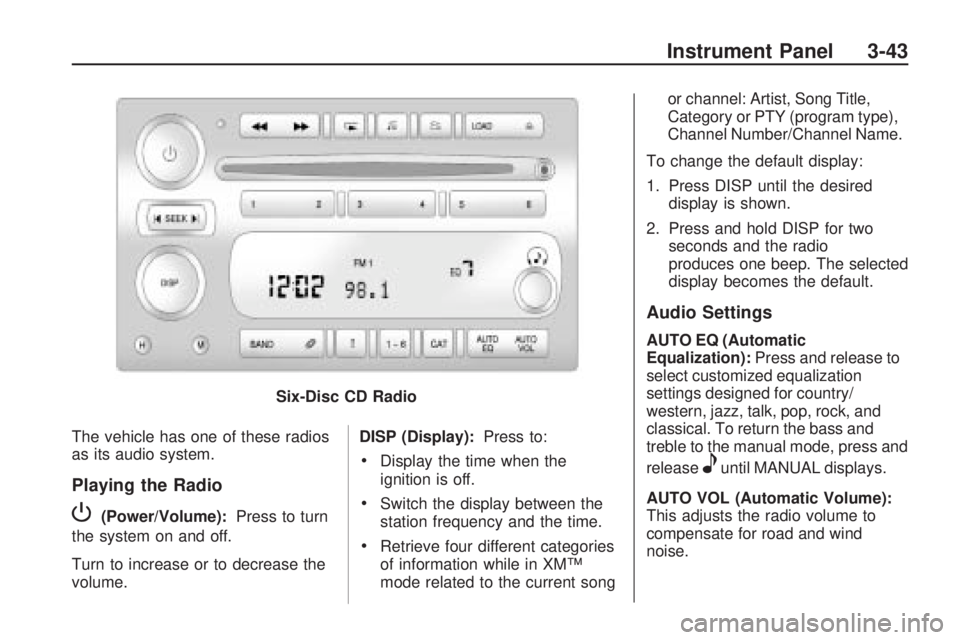
The vehicle has one of these radios
as its audio system.
Playing the Radio
P(Power/Volume):Press to turn
the system on and off.
Turn to increase or to decrease the
volume. DISP (Display):
Press to:
Display the time when the
ignition is off.
Switch the display between the
station frequency and the time.
Retrieve four different categories
of information while in XM™
mode related to the current song or channel: Artist, Song Title,
Category or PTY (program type),
Channel Number/Channel Name.
To change the default display:
1. Press DISP until the desired display is shown.
2. Press and hold DISP for two seconds and the radio
produces one beep. The selected
display becomes the default.
Audio Settings
AUTO EQ (Automatic
Equalization): Press and release to
select customized equalization
settings designed for country/
western, jazz, talk, pop, rock, and
classical. To return the bass and
treble to the manual mode, press and
release
euntil MANUAL displays.
AUTO VOL (Automatic Volume):
This adjusts the radio volume to
compensate for road and wind
noise.
Six-Disc CD Radio
Instrument Panel 3-43
Page 162 of 382
To set Automatic Volume:
1. Adjust the volume at the desired
level.
2. Press AUTO VOL to select LOW,
MEDIUM, or HIGH. Each higher
setting allows for more volume
compensation at faster vehicle
speeds.
To turn automatic volume off, press
AUTO VOL until AVOL OFF
displays.
Tone and Speaker Controls
To adjust all tone and speaker
controls to the center setting, press
and hold
euntil CEN or ALL
CENTERED displays and the radio
beeps once.Adjusting the Tone (Bass/Treble)
To adjust Bass/Treble:
Press and release
euntil BASS or
TREB displays.
Turneto increase or to
decrease the level.
To set the Bass or Treble to the
center setting, press and hold
e
until the radio beeps once.
Adjusting the Speakers
(Balance/Fade)
To adjust the Balance:
Press and release
euntil BAL
displays.
Turneto move the sound
toward the right or the left
speakers.
To adjust the balance to the
center setting, press and hold
e
until the radio beeps once.To adjust the Fade:
Press and release
euntil FAD or
FADE displays
Turneto move the sound
toward the front or the rear
speakers.
To set the fade to the center
setting, press and hold
e
until the radio beeps once.
Using the Radio
XM™ Satellite Radio Service
XM is a satellite radio service that is
based in the 48 contiguous United
States and 10 Canadian provinces.
XM Satellite Radio has a wide
variety of programming and
commercial-free music,
coast-to-coast, and in digital-quality
sound. During your trial or when
you subscribe, you will get unlimited
access to XM Radio Online for
when you are not in the vehicle. A
service fee is required to receive the
XM service. For more information,
3-44 Instrument Panel
Page 163 of 382
contact XM at.xmradio.com or call
1-800-929-2100 in the U.S. and
xmradio.ca or call 1-877-438-9677
in Canada.
4(Information) (XM Satellite
Radio Service):Press to display
additional information current
XM station when
4is shown on the
display. When the complete
message has shown,
4disappears
from the display. The last
message can be viewed until a new
message is received or the station
is changed.
Parts of the message appear
every three seconds if the
entire message cannot be shown
on the display at once.
Press and release4to manually
scroll through the message.
When4is pressed and a
message is not available from the
station, NO INFO is shown on
the display.Selecting an FM/AM/XM Station
BAND:Press to select FM1,
FM2, AM, XM1, or XM2.
Manual Tuning
e(Tune):Turn to select a radio
station.
Automatic Tuning
1-6 (Preset Pushbuttons):Press
to select preset stations.
tSEEKu:Press and release to
go to the previous or next station
and stay there. The radio only stops
at stations with a strong signal.
Press and hold to scan stations or
preset stations.
To scan stations:
1. Press and hold
torufor more
than two seconds. SCN or SCAN
displays and the radio beeps
once. The radio goes to a station,
plays for a few seconds, then
goes to the next station.2. Press
toruagain or one of
the pushbuttons to stop
scanning presets.
To scan preset stations:
1. Press and hold
torufor more
than four seconds. PSC or
PSCN displays and the radio
beeps twice. The radio goes to a
preset station, plays for a few
seconds, then goes to the
next preset station.
2. Press
toruagain or one of
the pushbuttons to stop
scanning presets.
Programming Preset Stations
Up to 30 stations (six FM1, six FM2,
and six AM, six XM1 and six XM2),
and equalization settings for
each station can be programmed on
the six numbered pushbuttons.
To program presets:
1. Turn the radio on.
2. Press BAND to select FM1, FM2,
AM, or XM1 or XM2.
Instrument Panel 3-45
Page 164 of 382
3. Tune in the desired station.
4. Press AUTO EQ to select the
equalization.
5. Press and hold one of the six
numbered pushbuttons until
the radio beeps once.
6. Repeat the steps for each
pushbutton.
Finding a Category (CAT) Station
(XM Satellite Radio Service Only)
To select an XM station by category
for the Single CD Radio:
1. Press CAT to select a
category mode.
2. Press CAT repeatedly to change
the category.
3. Press
toruto select the rst
station in the category.
4. To go to another station in the
selected category:
Press CAT once if the
category is displayed.
Press CAT twice if the
category is not displayed.5. Press CAT to exit program type
select mode. If CAT times out
and is no longer on the display,
go back to Step 1.
If the desired program type cannot
be found, NONE or NOT FOUND
displays and the radio returns to the
previous station.
To select an XM station by category
for the Six-Disc CD Radio:
1. Press CAT to select a
category mode.
2. Turn
eto select a category.
3. Press
toruto select the rst
station in the category.
4. Press
toruto go to another
station within the category if
category is displayed. If
CAT times out and is no longer
on the display, go back to
Step 1.
5. Press CAT to exit program type
select mode.If the desired program type cannot
be found, NONE or NOT FOUND
displays and the radio returns to the
previous station.
Radio Messages
CAL ERR (Calibration Error):
Displays if the radio is no longer
congured properly for the vehicle.
The vehicle must be returned to
your dealer/retailer for service.
LOC (Locked):Displays when the
THEFTLOCK
®system has locked
up. The vehicle must be returned to
your dealer/retailer for service.
If any error occurs repeatedly or
cannot be corrected, contact
your dealer/retailer.
Radio Messages for
XM™ Only
SeeXM Radio Messages on
page 3-51later in this section for
further detail.
3-46 Instrument Panel
Page 165 of 382
Using the CD Player
The CD player can play smaller
3 inch (8 cm) single CDs with
an adapter ring.
A CD in the player it stays in the
player when the ignition is turned off.
When the ignition or radio is
turned on, the CD starts to play
where it stopped, if it was the last
selected audio source.
Loading a CD
To load a CD do one of the
following:
Single CD Radio:
To Insert a CD with the ignition
on, insert the CD partway into
the slot, label side up, until
the player pulls the CD in. The
CD begins playing automatically.
To insert a CD with the ignition
off, press
Z(Eject) or the
DISP knob rst.The CD symbol displays when a CD
is inserted, and the track number
displays when each new track starts
to play.
Six-Disc CD Radio:
LOAD:Press to load CDs into the
CD player.
To insert one CD:
1. Turn the ignition on.
2. Press and release the LOAD
button.
3. Wait for the indicator light
comes on.
4. Insert the CD partway into the
slot, label side up, until the
player pulls the CD in. The CD
begins playing automatically.To insert multiple CDs:
1. Turn the ignition on.
2. Press and hold the LOAD button
for two seconds. The radio
beeps once, the indicator light
ashes, and LOAD # is
displayed.
3. Load a CD once INSERT CD #
displays and the light stops
ashing and illuminates. Insert
the CD partway into the slot,
label side up, until the player
pulls the CD in.
4. Repeat step 3 to load the
remaining CDs.
To load more than one CD but less
than six, complete Steps 1
through 3. When nished loading
CDs, press the LOAD button
to cancel the loading function. The
last CD loaded begins playing
automatically.
Playing a CD
B(CD):Press to play a CD while
listening to the radio.
Instrument Panel 3-47
Page 166 of 382
Single CD Radio:
1
r(Previous):Press to go to
the start of the current track
after more than eight seconds have
played. Press or hold 1
rmore
than once to continue moving
backward through the CD.
2
[(Next):Press to go to the
next track. Press or hold 2
[more
than once to continue moving
forward through the CD.
4
y(Random):Press to hear the
tracks in random order. Press 4
yagain to turn off random play.
tSEEKu:Press to go to the start
of the current or the previous
track. Press
uto go to the start of
the next track. To continue
moving backward or forward through
the tracks press and hold
tor
u, or press multiple times.
Z(Eject):Press to eject a CD.
Eject can be used with either
the ignition or radio off.
Six-Disc Radio:
r(Reverse):Press to reverse
within the track.
[(Fast Forward):Press to fast
forward within the track.
tSEEKu:Presstto go to the
start of the current track, if more
than ten seconds have played.
Press
uto go to the next track. To
continue moving backward or
forward through the tracks press
and hold
toru, or press multiple
times.
Press and hold
torufor more
than two seconds until SCAN
displays and a beep sounds to scan
one CD. The radio goes to the
next track, plays for 10 seconds,
then goes to the next track. Press
t
oruagain, to stop scanning.Press and hold
torufor more
than four seconds until CD
SCAN displays and a beep sounds
to scan all loaded CDs. Use this
feature to listen to 10 seconds of the
rst track of each loaded CD.
Press
toruagain, to stop
scanning.
N(Repeat):One track or an
entire CD can be repeated.
Press and releaseNto repeat
the current track. RPT ON
displays. Press again to turn off
repeat play. RPT OFF displays.
Press and holdNfor
two seconds to repeat the
current CD. RPT ON displays.
Press again to turn off repeat
play. RPT OFF displays.
3-48 Instrument Panel
Page 169 of 382
player and the loading slot free of
foreign materials, liquids, and
debris.
If an error displays, see “CD
Messages” later in this section.
CD Messages
CHECK CD:If this message
displays and/or the CD comes out, it
could be for one of the following
reasons:
The CD player is very hot. When
the temperature returns to
normal, the CD should play.
The road is very rough. When
the road becomes smoother,
the CD should play.
The CD is dirty, scratched, wet,
or upside down.
The air is very humid. Wait about
an hour and try again.
The format of the CD might not
be compatible.
A problem may have occurred
while burning the CD.
The label could be caught in the
CD player.
If the CD is not playing correctly, for
any other reason, try a known
good CD.
If any error occurs repeatedly or if
an error cannot be corrected,
contact your dealer/retailer. If the
radio displays an error message,
write it down and provide it to your
dealer/retailer when reporting
the problem.
XM Radio Messages
XL (Explicit Language Channels):
These channels, or any others,
can be blocked by calling
1-800-852-XMXM (9696).
Updating:The encryption code in
the receiver is being updated,
and no action is required. This
process should take no longer than
30 seconds.No Signal:The system is
functioning correctly, but the vehicle
is in a location that is blocking
the XM signal. When the vehicle is
moved into an open area, the
signal should return.
Loading XM:The audio system is
acquiring and processing audio and
text data. No action is needed. This
message should disappear shortly.
CH Off Air:This channel is not
currently in service. Tune in
to another channel.
CH Unauth:This channel is
blocked or cannot be received with
your XM Subscription package.
CH Unavail:This previously
assigned channel is no longer
assigned. Tune to another station. If
this station was one of the presets,
choose another station for that
preset button.
No Info:No artist, song title,
category, or text information is
available at this time on this channel.
The system is working properly.
Instrument Panel 3-51
Page 170 of 382
Not Found:There are no channels
available for the selected category.
The system is working properly.
XM Locked:The XM receiver in the
vehicle may have previously been
in another vehicle. For security
purposes, XM receivers cannot be
swapped between vehicles. If
this message is received after
having the vehicle serviced, check
with your dealer/retailer.
Radio ID:If tuned to channel 0, this
message will alternate with the XM
Radio 8 digit radio ID label. This label
is needed to activate the service.
Unknown:If this message is
received when tuned to channel 0,
there may be a receiver fault.
Consult with your dealer/retailer.
Chk XMRcvr:If this message does
not clear within a short period of
time, the receiver may have a fault.
Consult with your dealer/retailer.Navigation/Radio System
For vehicles with a navigation
radio system, see the separate
Navigation System manual.
Bluetooth®
Vehicles with a Bluetooth system
can use a Bluetooth capable
cell phone with a Hands Free Prole
to make and receive phone calls.
The system can be used while
the key is in ON/RUN or
ACC/ACCESSORY position. The
range of the Bluetooth system
can be up to 30 ft. (9.1 m). Not all
phones support all functions,
and not all phones are guaranteed
to work with the in-vehicle
Bluetooth system. See
gm.com/bluetooth for more
information on compatible phones.
Voice Recognition
The Bluetooth system uses voice
recognition to interpret voice
commands to dial phone numbers
and name tags.Noise:Keep interior noise levels to
a minimum. The system may not
recognize voice commands if there
is too much background noise.
When to Speak:A short tone
sounds after the system responds
indicating when it is waiting for
a voice command. Wait until
the tone and then speak.
How to Speak:Speak clearly in a
calm and natural voice.
Audio System
When using the in-vehicle Bluetooth
system, sound comes through
the vehicle’s front audio system
speakers and overrides the audio
system. Use the audio system
volume knob, during a call,
to change the volume level. The
adjusted volume level remains
in memory for later calls. To prevent
missed calls, a minimum volume
level is used if the volume is turned
down too low.
3-52 Instrument Panel