roof HUMMER H3 2010 Owner's Manual
[x] Cancel search | Manufacturer: HUMMER, Model Year: 2010, Model line: H3, Model: HUMMER H3 2010Pages: 410, PDF Size: 2.24 MB
Page 148 of 410
6-4 Lighting
The DRL system comes on when
the following conditions are met:
.The ignition is on.
.The exterior lamps control is
in AUTO.
.The transmission is not in
P (Park), if the vehicle has an
automatic transmission.
.The light sensor determines it is
daytime.
When the DRL are on, no other
lamps are on. The instrument panel
will not be lit up either. For vehicles
first sold in Canada, if parking lamps
are manually turned on, DRL will
stay on.
When it begins to get dark, the
automatic headlamp system
changes from DRL to the
headlamps.
The regular headlamp system
should be turned on when needed.
To turn off the DRL, see Exterior
Lamp Controls
on page 6‑1. Vehicles first sold in Canada
cannot turn off DRL unless certain
conditions are met. See
Exterior
Lamp Controls on page 6‑1.
Automatic Headlamp
System
When it is dark enough outside, the
automatic headlamp system turns
on after the transmission has been
shifted from P (Park) to D (Drive).
The headlamps, taillamps,
sidemarker, parking lamps, roof
marker lamps, and the instrument
panel lights turn on at normal
brightness. The radio lights will
become dimmer when the
headlights are off compared to
when the headlights are on.
The vehicle has a light sensor
located on the top of the instrument
panel. Do not cover the sensor,
or the system will be on whenever
the ignition is on. The system can turn on the
headlamps when driving in a
parking garage, through a tunnel or
when there is overcast weather.
This is normal.
There is a delay in the transition
between the daytime and nighttime
operation of the Daytime Running
Lamps (DRL) and the automatic
headlamp system so that driving
under bridges or bright overhead
street lights does not affect the
system. The DRL and automatic
headlamp system will only be
affected when the light sensor
detects a change in lighting lasting
longer than the delay.
If the vehicle is started in a dark
garage, the automatic headlamp
system comes on immediately.
Once the vehicle leaves the garage,
it takes about one minute for the
automatic headlamp system to
change to DRL if it is light outside.
Page 150 of 410
6-6 Lighting
Fog Lamps
The fog lamp button is located in the
exterior lamps control.
#(Fog Lamps):The headlamps
or parking lamps must be on for the
fog lamps to work. Press
#to turn
the fog lamps on or off. An indicator
light turns on when the fog lamps
are on.
Never use the fog lamps in the dark
without turning on the headlamps.
When the high-beam headlamps
are turned on, the fog lamps turn off
automatically. When the high-beam
headlamps are turned off, the fog
lamps come on again.
Some localities have laws that
require the headlamps to be on
along with the fog lamps.
Off-Road Lamps
For vehicles with off-road lamps,
they provide auxiliary lighting when
the vehicle is used off road. These
lamps are not intended to be used
in place of existing vehicle lighting.
They are not to be used on any
public street or highway and are to
be covered when not in use. Check
your state and local laws before
installing or using any auxiliary
lighting. In some states it may be
necessary to remove the roof lamps
when operating the vehicle on the
highway.
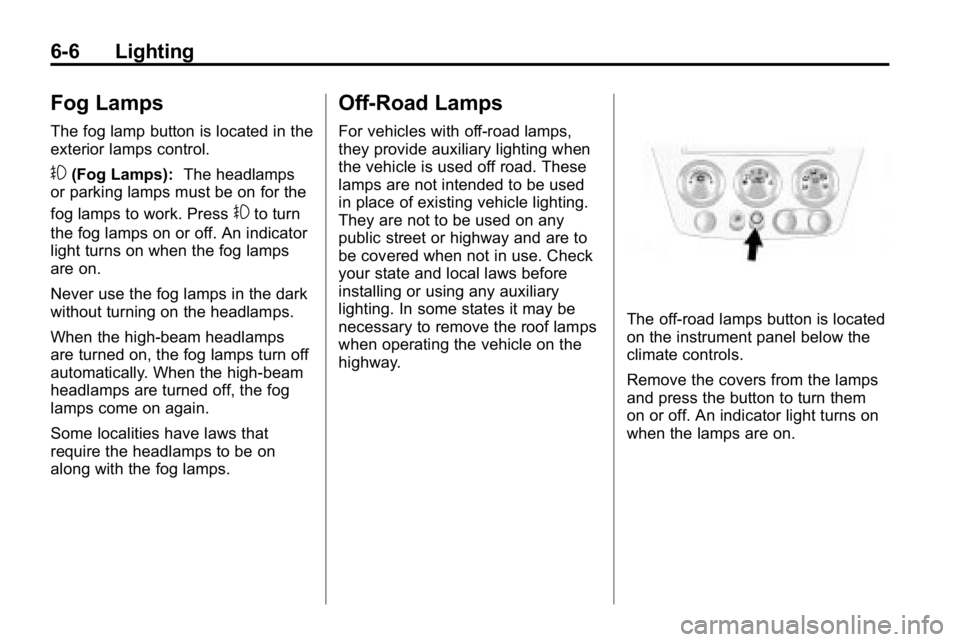
The off-road lamps button is located
on the instrument panel below the
climate controls.
Remove the covers from the lamps
and press the button to turn them
on or off. An indicator light turns on
when the lamps are on.
Page 164 of 410
7-10 Infotainment System
Fixed Mast Antenna
The fixed mast antenna can
withstand most car washes without
being damaged as long as it is
securely attached to the base.
If the mast becomes slightly bent,
straighten it out by hand. If the mast
is badly bent, replace it.
Occasionally check to make sure
the antenna is tightened to its base.
If tightening is required, tighten
by hand until fully seated plus
one quarter turn.
Satellite Radio Antenna
The XM Satellite Radio antenna is
located on the roof of the vehicle.
Keep the antenna clear of
obstructions for clear radio
reception.
If the vehicle has a sunroof, the
performance of the XM system may
be affected if the sunroof is open.
Audio Players
CD Player
The CD player can play smaller
8 cm (3 in) single CDs with an
adapter ring.
A CD in the player it stays in the
player when the ignition is turned
off. When the ignition or radio is
turned on, the CD starts to play
where it stopped, if it was the last
selected audio source.
Care of CDs
Store CDs in their original cases or
other protective cases and away
from direct sunlight and dust. The
CD player scans the bottom of
the disc. If the bottom of a CD is
damaged it may not play properly or
at all. Do not touch the bottom of a
CD while handling it. Pick up CDs
by grasping the outer edges or the
edge of the hole and the outer edge.
If the surface of a CD is dirty, take
a soft, lint free cloth or dampen a
clean, soft cloth in a mild, neutraldetergent solution mixed with water,
and clean it. Make sure the wiping
process starts from the center to
the edge.
Care of the CD Player
Do not add labels to a CD, it could
get caught in the CD player. Use a
marking pen to write on the top of
the CD if a description is needed.
Do not use CD lens cleaners, they
could damage the CD player.
Notice:
If a label is added to a
CD, or more than one CD is
inserted into the slot at a time,
or an attempt is made to play
scratched or damaged CDs, the
CD player could be damaged.
While using the CD player, use
only CDs in good condition
without any label, load one CD at
a time, and keep the CD player
and the loading slot free of
foreign materials, liquids, and
debris.
If an error displays, see “CD
Messages” later in this section.
Page 192 of 410
9-8 Driving and Operating
Loading Your Vehicle for
Off-Road Driving
{WARNING
.Cargo on the load floor piled
higher than the seatbacks
can be thrown forward during
a sudden stop. You or your
passengers could be injured.
Keep cargo below the top of
the seatbacks.
.Unsecured cargo on the load
floor can be tossed about
when driving over rough
terrain. You or your
passengers can be struck
by flying objects. Secure
the cargo properly.(Continued)
WARNING (Continued)
.Heavy loads on the roof raise
the vehicle's center of gravity,
making it more likely to roll
over. You can be seriously or
fatally injured if the vehicle
rolls over. Put heavy loads
inside the cargo area, not on
the roof. Keep cargo in the
cargo area as far forward and
low as possible.
There are some important things to
remember about how to load your
vehicle.
.The heaviest things should be
on the floor, forward of the rear
axle. Put heavier items as far
forward as you can.
.Be sure the load is properly
secured, so things are not
tossed around. You will find other important
information under
Vehicle Load
Limits
on page 9‑27and Tireson
page 10‑44.
Environmental Concerns
Off-road driving can provide
wholesome and satisfying
recreation. However, it also
raises environmental concerns.
We recognize these concerns
and urge every off-roader to follow
these basic rules for protecting the
environment:
.Always use established trails,
roads, and areas that have been
specially set aside for public
off-road recreational driving and
obey all posted regulations.
.Avoid any driving practice
that could damage shrubs,
flowers, trees, or grasses or
disturb wildlife. This includes
wheel-spinning, breaking down
trees, or unnecessary driving
through streams or over soft
ground.
Page 219 of 410
Driving and Operating 9-35
A warning tone will sound when the
driver door is opened, the ignition is
in ACC/ACCESSORY or LOCK/OFF
and the key is in the ignition.
Retained Accessory
Power (RAP)
These vehicle accessories can be
used for up to 20 minutes after the
engine is turned off:
.Audio System
.Front Wipers
.Power Windows
.Sunroof (if equipped)
These features will work when
the key is in ON/RUN or
ACC/ACCESSORY. Once the
key is turned from ON/RUN to
LOCK/OFF, these features continue
working for up to 20 minutes or until
a door is opened.
Starting the Engine
Place the transmission in the
proper gear.
Automatic Transmission
Move the shift lever to P (Park) or
N (Neutral). The engine will not start
in any other position. To restart the
vehicle when it is already moving,
use N (Neutral) only.
Notice: Do not try to shift to
P (Park) if the vehicle is moving.
If you do, you could damage the
transmission. Shift to P (Park)
only when the vehicle is stopped.
Manual Transmission
The shift lever should be in
N (Neutral) and the parking brake
engaged. Hold the clutch pedal
down to the floor and start the
engine. The vehicle will not start
if the clutch pedal is not all the
way down. Starting Procedure
1. With your foot off the accelerator
pedal, turn the ignition key to
START. When the engine starts,
let go of the key. The idle speed
will go down as the engine
warms. Do not race the engine
immediately after starting it.
Operate the engine and
transmission gently to allow
the oil to warm up and lubricate
all moving parts.
The vehicle has a
Computer-Controlled Cranking
System. This feature assists in
starting the engine and protects
components. If the ignition key is
turned to the START position,
and then released when the
engine begins cranking, the
engine will continue cranking
for a few seconds or until the
vehicle starts. If the engine
does not start and the key is
held in START for many
seconds, cranking will be
stopped after 15 seconds to
prevent cranking motor damage.
Page 307 of 410

Vehicle Care 10-41
FuseUsage
1 Heated Seats
2 Grille Guard
3 Stop Lamp
(H3T Only)
4 Roof Rack Lamps
5 Battery Ignition
Switch
6 Front Wiper
7 Regulated Voltage
Control Power
8 Power Locks
9 Sunroof, Front
Washer Pump
10 Accessories (SPO) 11 Not Used
12 Transfer Case
Control Module
13 Radio
14 Body Control
Module Fuse
Usage
15 Rear Wiper Motor
(H3 Only)
16 Rear Wiper Pump
Switch (H3 Only)
17 Air Injection Reactor
(AIR) Pump Relay/
Transmission
Control Module
(TCM) (V8 Only)
18 Rear Vision Camera
19 Cluster
20 Rear Turn Lamp,
Hazard Lamp
21 Powertrain Control
Module 1
22 Mass Air Flow
Sensor, Canister
Vent Purge Solenoid
23 Injector/V8 Coil
24 Fog Lamp
25 Powertrain Control
Module B Fuse
Usage
26 Transmission
Control
Module (TCM)
27 Airbags
28 Not Used
29 Antilock Brake
System, StabiliTrak
®
30Rear Window
Defogger
31 Canister Vent
32 Regulated Voltage
Control Sensor
33 Ignition 1
34 Transmission
35 Cruise Control,
Miscellaneous
36 Horn
37 Driver Side Rear
Park Lamp
38 Amplifier
Page 308 of 410

10-42 Vehicle Care
FuseUsage
39 Daytime Running
Lamps
40 Passenger Side
Headlamp
41 Driver Side
Headlamp
42 Trailer
Back-Up Lamp
43 Front Park Lamps
44 Air Injection Reactor
(AIR) Solenoid
45 Auxiliary Power 2/
Cigarette Lighter
46 Electronic Throttle
Control
47 Oxygen Sensor
48 Air Conditioning
Clutch
49 Rear Park Lamp
50 Stop Lamp Fuse
Usage
51 Auxiliary Power 1/
Cigarette Lighter
52 StabiliTrak
®,
Antilock Brake
System
53 Power Heated Seat,
Belt Switch
54 Fuel System Control
Module (FSCM)
55 Trailer Parking
Lamps
56 Front Turn Signal,
Hazard Signal,
Courtesy Mirror
57 Power Sunroof
58 Transfer Case
Control Module
Switch
59 Climate Controls
Control Head
60 Back‐Up Lamp
61 Power Seats Fuse Usage
62 Air Injection Reactor
(AIR) Pump
63 Passenger Side
Power Window
64 Antilock Brake
System,
StabiliTrak
®2
Solenoid
67 Antilock Brake
System,
StabiliTrak
®1 Motor
68 Driver Side Power
Window
82 Climate Control Fan
83 Electronic Brake
Controller
84 Trailer B+ Fuse
85 Starter
91 Generator Megafuse
Page 407 of 410

INDEX i-9
Replacing Airbag System . . . . . . 3-42
Replacing LATCH SystemParts After a Crash . . . . . . . . . . . 3-59
Replacing Safety Belt System Parts After a
Crash . . . . . . . . . . . . . . . . . . . . . . . . 3-27
Reporting Safety Defects
Canadian Government . . . . . . 13-14
General Motors . . . . . . . . . . . . . 13-14
U.S. Government . . . . . . . . . . . 13-13
Retained Accessory
Power (RAP) . . . . . . . . . . . . . . . . . 9-35
Ride Control Systems Messages . . . . . . . . . . . . . . . . . . . . 5-24
Roadside Service . . . . . . . . . . . . . . 13-5
Roof Sunroof . . . . . . . . . . . . . . . . . . . . . . . 2-17
Roof Rack System . . . . . . . . . . . . . . 4-4
Rotation, Tires . . . . . . . . . . . . . . . . 10-57
Routing, Engine Drive Belt . . . . . 12-4
Running the Vehicle While Parked . . . . . . . . . . . . . . . . . . . . . . . 9-41S
Safety Belts . . . . . . . . . . . . . . . . . . . 3-10Care . . . . . . . . . . . . . . . . . . . . . . . . . . 3-26
Extender . . . . . . . . . . . . . . . . . . . . . . 3-26
How to Wear Safety BeltsProperly . . . . . . . . . . . . . . . . . . . . . 3-15
Lap-Shoulder Belt . . . . . . . . . . . . 3-20
Reminders . . . . . . . . . . . . . . . . . . . . . 5-9
Replacing After a Crash . . . . . . 3-27
Use During Pregnancy . . . . . . . . 3-25
Safety Defects Reporting
Canadian Government . . . . . . 13-14
General Motors . . . . . . . . . . . . . 13-14
U.S. Government . . . . . . . . . . . 13-13
Safety Locks . . . . . . . . . . . . . . . . . . . . 2-6
Safety System Check . . . . . . . . . . 3-26
Satellite Radio . . . . . . . . . . . . . . . . . . 7-6
Scheduled Maintenance . . . . . . . 11-2
Scheduling Appointments . . . . . . 13-8
Seats Adjustment, Front . . . . . . . . . . . . . . 3-3
Head Restraints . . . . . . . . . . . . . . . 3-2
Heated Front . . . . . . . . . . . . . . . . . . 3-6
Lumbar Adjustment, Front . . . . . 3-4 Seats (cont.)
Power Adjustment, Front . . . . . . 3-3
Rear . . . . . . . . . . . . . . . . . . . . . . 3-7, 3-9
Reclining Seatbacks . . . . . . . . . . . 3-4
Secondary Latch System . . . . . 10-84
Securing Child Restraints . . . . . . . . 3-59, 3-61, 3-62
Security Light . . . . . . . . . . . . . . . . . . . . . . . . . . 5-17
Vehicle . . . . . . . . . . . . . . . . . . . . . . . . 2-9
Service Accessories andModifications . . . . . . . . . . . . . . . . 10-3
Doing Your Own Work . . . . . . . . 10-4
Engine Soon Lamp . . . . . . . . . . . 5-12
Maintenance Records . . . . . . . 11-11
Maintenance, General Information . . . . . . . . . . . . . . . . . . 11-1
Parts Identification Label . . . . . 12-1
Publications Ordering Information . . . . . . . . . . . . . . . . 13-12
Scheduling Appointments . . . . . 13-8
Vehicle Messages . . . . . . . . . . . . 5-25
Page 408 of 410

i-10 INDEX
Servicing theAirbag-Equipped Vehicle . . . . . 3-40
Shifting Into Park . . . . . . . . . . . . . . . . . . . . . . 9-37
Out of Park . . . . . . . . . . . . . . . . . . . 9-38
Signals, Turn and Lane-Change . . . . . . . . . . . . . . . . . 6-5
Specifications and Capacities . . . . . . . . . . . . . . . . . . . . 12-2
Speedometer . . . . . . . . . . . . . . . . . . . 5-8
StabiliTrak System . . . . . . . . . . . . . 9-53
Start Assist, Hills . . . . . . . . . . . . . . 9-52
Starter Switch Check . . . . . . . . . 10-30
Starting the Engine . . . . . . . . . . . . 9-35
Steering . . . . . . . . . . . . . . . . . . . . . . . . 9-4 Fluid, Power . . . . . . . . . . . . . . . . 10-24
Wheel Adjustment . . . . . . . . . . . . . 5-2
Stoplamps and Back-Up Lamps Bulb Replacement . . . 10-35, 10-36
Storage Areas Cargo Cover . . . . . . . . . . . . . . . . . . . 4-2
Cargo Management System . . . 4-2
Center Console . . . . . . . . . . . . . . . . 4-1
Convenience Net . . . . . . . . . . . . . . 4-3
Front . . . . . . . . . . . . . . . . . . . . . . . . . . 4-1 Storage Areas (cont.)
Glove Box . . . . . . . . . . . . . . . . . . . . . 4-1
Rear Compartment/Storage
Panel Cover . . . . . . . . . . . . . . . . . . 4-2
Roof Rack System . . . . . . . . . . . . . 4-4
Stuck Vehicle . . . . . . . . . . . . . . . . . . 9-26
Sun Visors . . . . . . . . . . . . . . . . . . . . . 2-17
Sunroof . . . . . . . . . . . . . . . . . . . . . . . . 2-17
Symbols . . . . . . . . . . . . . . . . . . . . . . . . . . iv
System Roof Rack . . . . . . . . . . . . . . . . . . . . . 4-4
System Check Automatic TransmissionShiftlock Control . . . . . . . . . . 10-30
T
Tachometer . . . . . . . . . . . . . . . . . . . . . 5-8
Tailgate . . . . . . . . . . . . . . . . . . . . . . . . . 2-7
TaillampsBulb Replacement . . . 10-35, 10-36
Text Telephone (TTY) Users . . . 13-4
Theft-Deterrent Systems . . . . . . . . . . . . . . . 2-10, 2-11
Immobilizer . . . . . . . . . . . . . . . . . . . 2-10
Time . . . . . . . . . . . . . . . . . . . . . . . . . . . . 5-4 Tires
Buying New Tires . . . . . . . . . . . 10-59
Chains . . . . . . . . . . . . . . . . . . . . . . 10-64
Changing . . . . . . . . . . . . 10-66, 10-75
Designations . . . . . . . . . . . . . . . 10-46
Different Size . . . . . . . . . . . . . . . 10-60
Full-Size Spare . . . . . . . . . . . . . 10-85
If a Tire Goes Flat . . . . . . . . . . 10-64
Inflation Monitor System . . . . 10-53
Inspection . . . . . . . . . . . . . . . . . . 10-57
Messages . . . . . . . . . . . . . . . . . . . . 5-25
Pressure Light . . . . . . . . . . . . . . . . 5-16
Pressure Monitor System . . . 10-52
Rotation . . . . . . . . . . . . . . . . . . . . 10-57
Secondary Latch System . . . 10-84
Sidewall Labeling . . . . . . . . . . . 10-44
Terminology and
Definitions . . . . . . . . . . . . . . . . . 10-48
Uniform Tire Quality Grading . . . . . . . . . . . . . . . . . . . 10-61
Wheel Alignment and Tire
Balance . . . . . . . . . . . . . . . . . . . 10-62
Wheel Replacement . . . . . . . . 10-63
When It Is Time for New Tires . . . . . . . . . . . . . . . . . . . . . . 10-58