ABS HUMMER H3 2010 Owners Manual
[x] Cancel search | Manufacturer: HUMMER, Model Year: 2010, Model line: H3, Model: HUMMER H3 2010Pages: 410, PDF Size: 2.24 MB
Page 4 of 410
iv Introduction
{WARNING
These mean there is something
that could hurt you or other
people.
Notice: This means there is
something that could result in
property or vehicle damage.
This would not be covered by
the vehicle's warranty.
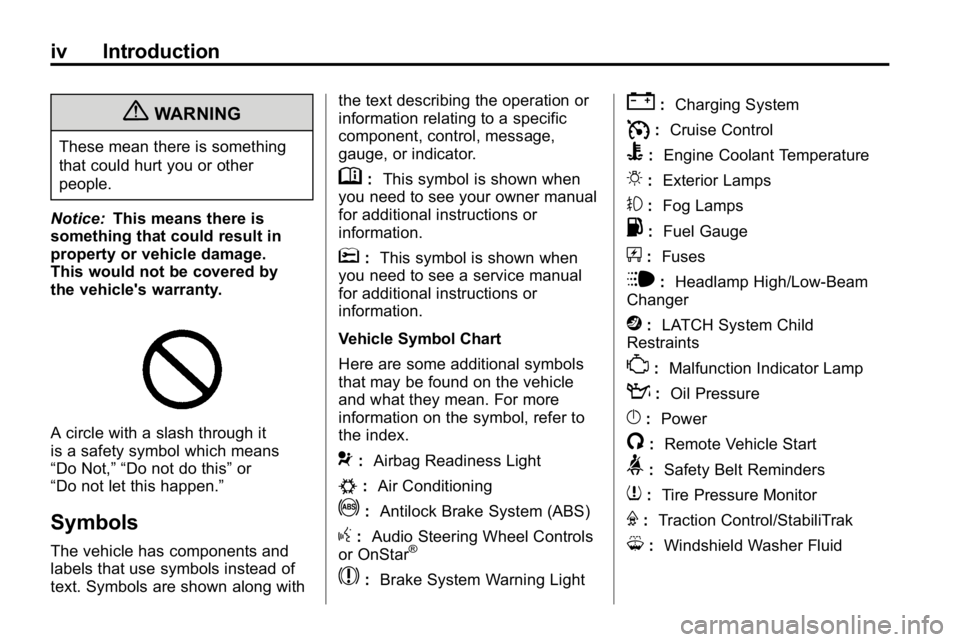
A circle with a slash through it
is a safety symbol which means
“Do Not,” “Do not do this” or
“Do not let this happen.”
Symbols
The vehicle has components and
labels that use symbols instead of
text. Symbols are shown along with the text describing the operation or
information relating to a specific
component, control, message,
gauge, or indicator.
M:
This symbol is shown when
you need to see your owner manual
for additional instructions or
information.
*: This symbol is shown when
you need to see a service manual
for additional instructions or
information.
Vehicle Symbol Chart
Here are some additional symbols
that may be found on the vehicle
and what they mean. For more
information on the symbol, refer to
the index.
9: Airbag Readiness Light
#:Air Conditioning
!:Antilock Brake System (ABS)
g:Audio Steering Wheel Controls
or OnStar®
$: Brake System Warning Light
":Charging System
I:Cruise Control
B: Engine Coolant Temperature
O:Exterior Lamps
#:Fog Lamps
.: Fuel Gauge
+:Fuses
i: Headlamp High/Low-Beam
Changer
j: LATCH System Child
Restraints
*: Malfunction Indicator Lamp
::Oil Pressure
}:Power
/:Remote Vehicle Start
>:Safety Belt Reminders
7:Tire Pressure Monitor
F:Traction Control/StabiliTrak
M:Windshield Washer Fluid
Page 110 of 410
4-2 Storage
Additional Storage
Features
Rear Compartment/
Storage Panel Cover
The H3 has a rear storage area
located on the passenger side of the
cargo area. To open it, pull the two
tabs out and open lid.
Cargo Cover
Notice:Do not put items onto the
cargo cover. The weight of the
items could cause the attachment
clips to break. The cargo cover
could no longer be attached and
used. The repairs would not be
covered by the warranty. Never
put anything on top of the cargo
cover. The vehicle may have a cargo
cover. It can be used to cover
items in the rear of the vehicle.
To install the cover, place the loops
on each corner of the cover on the
four hooks in the rear of the vehicle.
The cover should be stored securely
when not in use.
Cargo Tie Downs
There may be four cargo tie-downs
that can be moved on the tracks
located on the roof. To move, loosen
the tie-down counterclockwise. Turn
clockwise to tighten and lock in
place.
Cargo Management
System
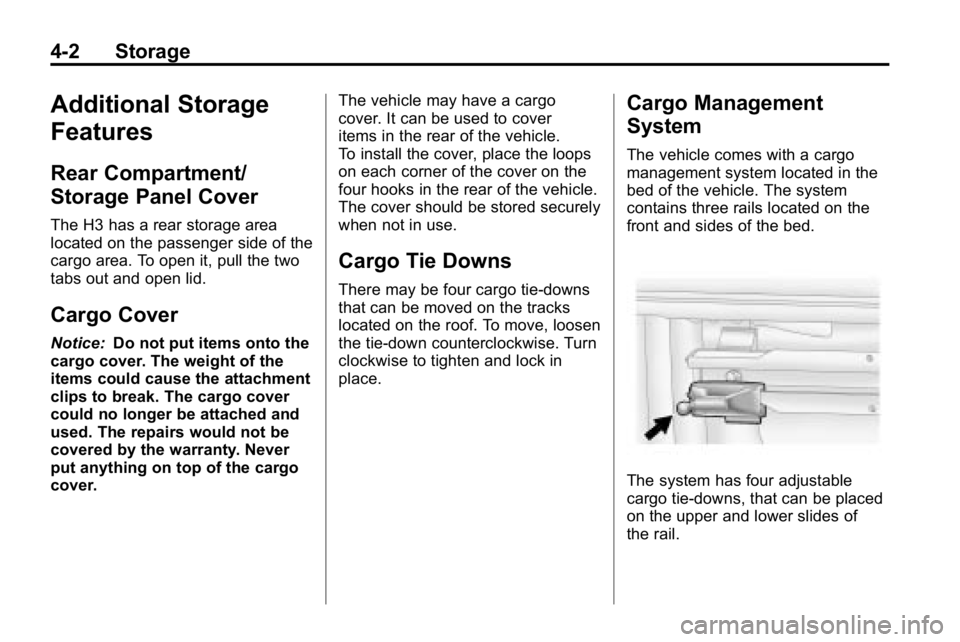
The vehicle comes with a cargo
management system located in the
bed of the vehicle. The system
contains three rails located on the
front and sides of the bed.
The system has four adjustable
cargo tie-downs, that can be placed
on the upper and lower slides of
the rail.
Page 113 of 410
Storage 4-5
Adjusting the Crossrails
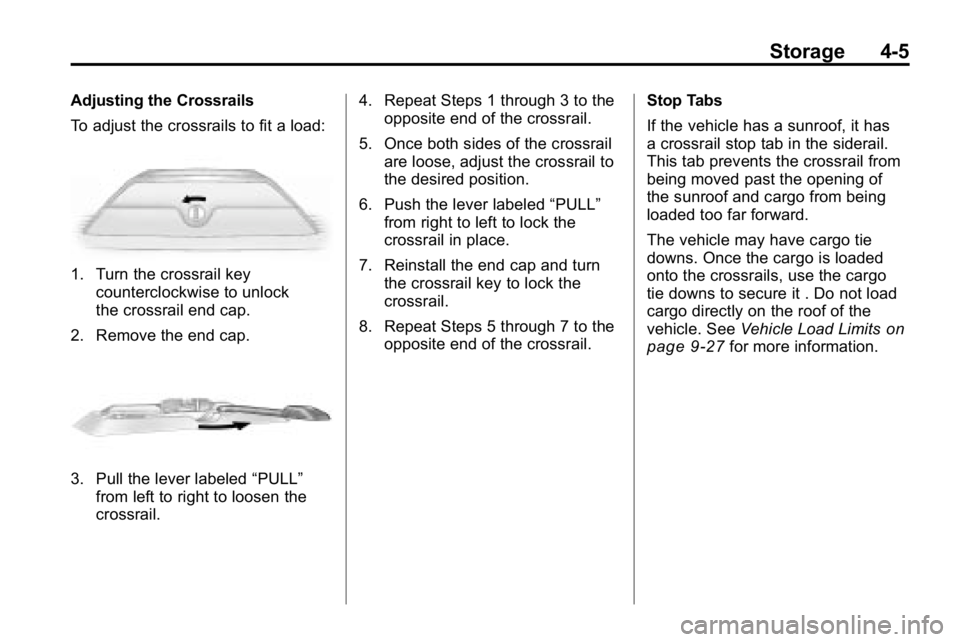
To adjust the crossrails to fit a load:
1. Turn the crossrail keycounterclockwise to unlock
the crossrail end cap.
2. Remove the end cap.
3. Pull the lever labeled “PULL”
from left to right to loosen the
crossrail. 4. Repeat Steps 1 through 3 to the
opposite end of the crossrail.
5. Once both sides of the crossrail are loose, adjust the crossrail to
the desired position.
6. Push the lever labeled “PULL”
from right to left to lock the
crossrail in place.
7. Reinstall the end cap and turn the crossrail key to lock the
crossrail.
8. Repeat Steps 5 through 7 to the opposite end of the crossrail. Stop Tabs
If the vehicle has a sunroof, it has
a crossrail stop tab in the siderail.
This tab prevents the crossrail from
being moved past the opening of
the sunroof and cargo from being
loaded too far forward.
The vehicle may have cargo tie
downs. Once the cargo is loaded
onto the crossrails, use the cargo
tie downs to secure it . Do not load
cargo directly on the roof of the
vehicle. See
Vehicle Load Limits
on
page 9‑27for more information.
Page 115 of 410
Instruments and Controls 5-1
Instruments and
Controls
Controls
Steering Wheel Adjustment . . . 5-2
Horn . . . . . . . . . . . . . . . . . . . . . . . . . . 5-2
Windshield Wiper/Washer . . . . . 5-2
Rear Window Wiper/Washer . . . . . . . . . . . . . . . . . . . . . . 5-3
Compass . . . . . . . . . . . . . . . . . . . . . 5-3
Clock . . . . . . . . . . . . . . . . . . . . . . . . . 5-4
Power Outlets . . . . . . . . . . . . . . . . . 5-5
Cigarette Lighter . . . . . . . . . . . . . . 5-5
Ashtrays . . . . . . . . . . . . . . . . . . . . . . 5-6
Warning Lights, Gauges, and
Indicators
Warning Lights, Gauges, and Indicators . . . . . . . . . . . . . . . . . . . . 5-6
Instrument Cluster . . . . . . . . . . . . 5-7
Speedometer . . . . . . . . . . . . . . . . . 5-8
Odometer . . . . . . . . . . . . . . . . . . . . . 5-8
Trip Odometer . . . . . . . . . . . . . . . . . 5-8 Tachometer . . . . . . . . . . . . . . . . . . . 5-8
Fuel Gauge . . . . . . . . . . . . . . . . . . . 5-8
Engine Coolant Temperature
Gauge . . . . . . . . . . . . . . . . . . . . . . . 5-9
Safety Belt Reminders . . . . . . . . 5-9
Airbag Readiness Light . . . . . . 5-10
Passenger Airbag Status
Indicator . . . . . . . . . . . . . . . . . . . . 5-11
Charging System Light . . . . . . . 5-11
Malfunction Indicator Lamp . . . . . . . . . . . . . 5-12
Brake System Warning Light . . . . . . . . . . . . . . . . . . . . . . . 5-14
Antilock Brake System (ABS) Warning Light . . . . . . . . . . . . . . 5-15
Up-Shift Light . . . . . . . . . . . . . . . . 5-15
Traction Control System (TCS)/StabiliTrak
®Light . . . . 5-16
Tire Pressure Light . . . . . . . . . . 5-16
Engine Oil Pressure Light . . . . 5-17
Security Light . . . . . . . . . . . . . . . . 5-17
High-Beam on Light . . . . . . . . . 5-17
Cruise Control Light . . . . . . . . . 5-18
Information Displays
Driver Information Center (DIC) . . . . . . . . . . . . . . . 5-18
Vehicle Messages
Vehicle Messages . . . . . . . . . . . 5-21
Battery Voltage and ChargingMessages . . . . . . . . . . . . . . . . . . 5-21
Brake System Messages . . . . 5-22
Door Ajar Messages . . . . . . . . . 5-22
Engine Cooling System Messages . . . . . . . . . . . . . . . . . . 5-23
Engine Oil Messages . . . . . . . . 5-23
Engine Power Messages . . . . 5-23
Fuel System Messages . . . . . . 5-24
Lamp Messages . . . . . . . . . . . . . 5-24
Ride Control System Messages . . . . . . . . . . . . . . . . . . 5-24
Service Vehicle Messages . . . 5-25
Tire Messages . . . . . . . . . . . . . . . 5-25
Transmission Messages . . . . . 5-25
Universal Remote System
Universal Remote System . . . 5-26
Universal Remote System Programming . . . . . . . . . . . . . . . 5-26
Universal Remote System Operation . . . . . . . . . . . . . . . . . . 5-30
Page 129 of 410
Instruments and Controls 5-15
If the light comes on while driving,
pull off the road and stop. The brake
pedal might be harder to push, or it
might go closer to the floor. It can
take longer to stop. If the light is
still on, have the vehicle towed for
service. SeeTowing the Vehicle
on
page 10‑90.
{WARNING
The brake system might not be
working properly if the brake
system warning light is on.
Driving with the brake system
warning light on can lead to a
crash. If the light is still on after
the vehicle has been pulled off
the road and carefully stopped,
have the vehicle towed for
service.
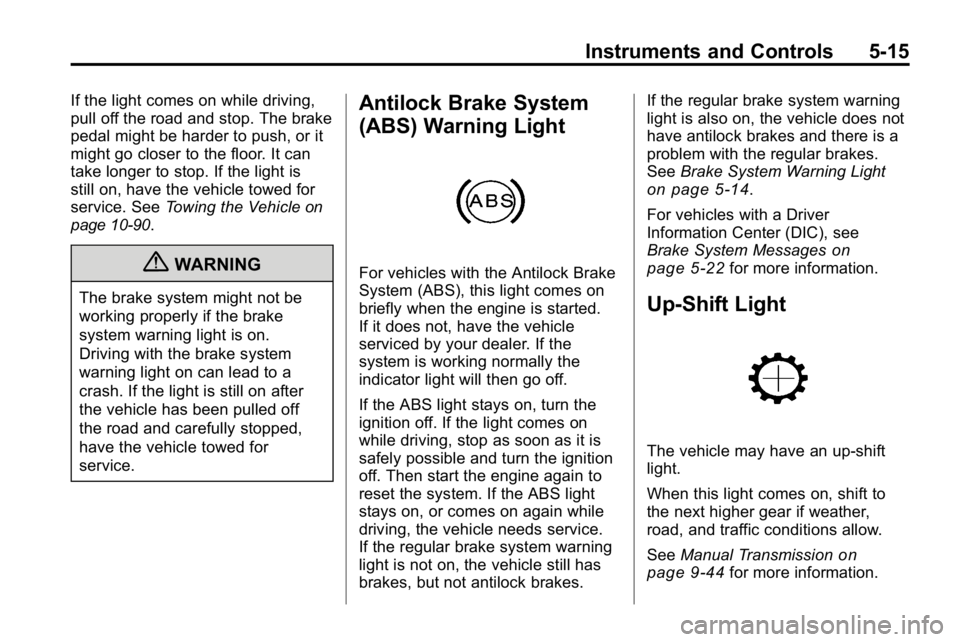
Antilock Brake System
(ABS) Warning Light
For vehicles with the Antilock Brake
System (ABS), this light comes on
briefly when the engine is started.
If it does not, have the vehicle
serviced by your dealer. If the
system is working normally the
indicator light will then go off.
If the ABS light stays on, turn the
ignition off. If the light comes on
while driving, stop as soon as it is
safely possible and turn the ignition
off. Then start the engine again to
reset the system. If the ABS light
stays on, or comes on again while
driving, the vehicle needs service.
If the regular brake system warning
light is not on, the vehicle still has
brakes, but not antilock brakes. If the regular brake system warning
light is also on, the vehicle does not
have antilock brakes and there is a
problem with the regular brakes.
See
Brake System Warning Light
on page 5‑14.
For vehicles with a Driver
Information Center (DIC), see
Brake System Messages
on
page 5‑22for more information.
Up-Shift Light
The vehicle may have an up-shift
light.
When this light comes on, shift to
the next higher gear if weather,
road, and traffic conditions allow.
See Manual Transmission
on
page 9‑44for more information.
Page 136 of 410
5-22 Instruments and Controls
The vehicle is safe to drive,
however have the electrical system
checked by your dealer. Press
and release the reset stem to
acknowledge the message and
clear it from the display.
Brake System Messages
ABS (Antilock Brake System)
FAULT
This message displays if there is a
problem with the Antilock Brake
System (ABS). Check the ABS as
soon as possible and have the
vehicle serviced by your dealer.
SeeAntilock Brake System (ABS)
on page 9‑50andAntilock Brake
System (ABS) Warning Lighton
page 5‑15for more information.
Press and release the reset stem
to acknowledge the message and
clear it from the display.
BRAKES
This message displays if there is a
problem with the brakes. Check the
brakes as soon as possible and
have the vehicle serviced by your
dealer. See Brakes
on page 10‑26andBrake System Warning Lighton
page 5‑14for more information.
Press and release the reset stem
to acknowledge the message and
clear it from the display.
FLUID
This message displays if the brake
fluid is low. Check the brake fluid
as soon as possible and have the
vehicle serviced by your dealer.
See Brake Fluid
on page 10‑27for
more information. Press and release
the reset stem to acknowledge the
message and clear it from the
display.
HSA (Hill Start Assist) ON
This message displays when the
Hill Start Assist is enabled. See Hill
Start Assist (HSA)
on page 9‑52for
more information.
PARK BRK (Brake)
This message displays when the
parking brake is set. See Parking
Brake
on page 9‑51and Brake
System Warning Lighton
page 5‑14for more information.
The message clears from the
display after the parking brake is
released or by pressing and
releasing the reset stem.
Door Ajar Messages
DOORS
This message displays when one or
more of the doors is ajar. Check all
the doors on the vehicle to make
sure they are closed. The message
clears from the display after all of
the doors are closed.
Page 185 of 410
Driving and Operating 9-1
Driving and
Operating
Driving Information
Defensive Driving . . . . . . . . . . . . . 9-2
Drunk Driving . . . . . . . . . . . . . . . . . 9-2
Control of a Vehicle . . . . . . . . . . . 9-3
Braking . . . . . . . . . . . . . . . . . . . . . . . 9-3
Steering . . . . . . . . . . . . . . . . . . . . . . . 9-4
Off-Road Recovery . . . . . . . . . . . . 9-5
Loss of Control . . . . . . . . . . . . . . . . 9-6
Off-Road Driving . . . . . . . . . . . . . . 9-7
Driving on Wet Roads . . . . . . . 9-22
Highway Hypnosis . . . . . . . . . . . 9-22
Hill and Mountain Roads . . . . . 9-23
Winter Driving . . . . . . . . . . . . . . . 9-24
If the Vehicle is Stuck . . . . . . . . 9-26
Vehicle Load Limits . . . . . . . . . . 9-27
Truck-Camper LoadingInformation . . . . . . . . . . . . . . . . . 9-33
Starting and Operating
New Vehicle Break-In . . . . . . . . 9-33
Ignition Positions . . . . . . . . . . . . 9-34
Retained AccessoryPower (RAP) . . . . . . . . . . . . . . . 9-35
Starting the Engine . . . . . . . . . . 9-35
Engine Coolant Heater . . . . . . . 9-36
Shifting Into Park . . . . . . . . . . . . 9-37
Shifting Out of Park . . . . . . . . . . 9-38
Parking . . . . . . . . . . . . . . . . . . . . . . 9-39
Parking Over Things
That Burn . . . . . . . . . . . . . . . . . . 9-40
Engine Exhaust
Engine Exhaust . . . . . . . . . . . . . . 9-40
Running the Vehicle WhileParked . . . . . . . . . . . . . . . . . . . . . 9-41
Automatic Transmission
Automatic Transmission . . . . . 9-41
Manual Transmission
Manual Transmission . . . . . . . . 9-44
Drive Systems
Four-Wheel Drive . . . . . . . . . . . . 9-46
Brakes
Antilock BrakeSystem (ABS) . . . . . . . . . . . . . . 9-50
Parking Brake . . . . . . . . . . . . . . . 9-51
Brake Assist . . . . . . . . . . . . . . . . . 9-51
Hill Start Assist (HSA) . . . . . . . 9-52
Ride Control Systems
Traction Control System (TCS) . . . . . . . . . . . . . . 9-52
StabiliTrak System . . . . . . . . . . . 9-53
Locking Rear Axle . . . . . . . . . . . 9-54
Locking Front Axle . . . . . . . . . . . 9-55
Cruise Control
Cruise Control . . . . . . . . . . . . . . . 9-57
Object Detection Systems
Rear Vision Camera (RVC) . . . . . . . . . . . . . 9-60
Fuel
Fuel . . . . . . . . . . . . . . . . . . . . . . . . . 9-64
Recommended Fuel . . . . . . . . . 9-64
Gasoline Specifications . . . . . . 9-65
California FuelRequirements . . . . . . . . . . . . . . 9-65
Page 208 of 410
9-24 Driving and Operating
Winter Driving
Driving on Snow or Ice
Drive carefully when there is snow
or ice between the tires and the
road, creating less traction or grip.
Wet ice can occur at about 0°C
(32°F) when freezing rain begins to
fall, resulting in even less traction.
Avoid driving on wet ice or in
freezing rain until roads can be
treated with salt or sand.
Drive with caution, whatever the
condition. Accelerate gently so
traction is not lost. Accelerating too
quickly causes the wheels to spin
and makes the surface under the
tires slick, so there is even less
traction.
Try not to break the fragile traction.
If you accelerate too fast, the drive
wheels will spin and polish the
surface under the tires even more.The
Antilock Brake System (ABS)
on page 9‑50improves vehicle
stability during hard stops on
slippery roads, but apply the brakes
sooner than when on dry pavement.
Allow greater following distance on
any slippery road and watch for
slippery spots. Icy patches can
occur on otherwise clear roads in
shaded areas. The surface of a
curve or an overpass can remain icy
when the surrounding roads are
clear. Avoid sudden steering
maneuvers and braking while
on ice.
Turn off cruise control, if equipped,
on slippery surfaces.Blizzard Conditions
Being stuck in snow can be a
serious situation. Stay with the
vehicle unless there is help nearby.
If possible, use the Roadside
Service
on page 13‑5. To get help
and keep everyone in the
vehicle safe:
.Turn on the hazard warning
flashers.
.Tie a red cloth to an outside
mirror.
{WARNING
Snow can trap engine exhaust
under the vehicle. This may
cause exhaust gases to get
inside. Engine exhaust contains
carbon monoxide (CO) which
cannot be seen or smelled. It can
cause unconsciousness and even
death.
(Continued)
Page 234 of 410

9-50 Driving and Operating
Brakes
Antilock Brake
System (ABS)
This vehicle has the Antilock Brake
System (ABS), an advanced
electronic braking system that helps
prevent a braking skid.
When the engine is started and the
vehicle begins to drive away, ABS
checks itself. A momentary motor or
clicking noise might be heard while
this test is going on, and it might
even be noticed that the brake
pedal moves a little. This is normal.
If there is a problem with ABS, this
warning light stays on. SeeAntilock
Brake System (ABS) Warning Light
on page 5‑15. If driving safely on a wet road and
it becomes necessary to slam on
the brakes and continue braking
to avoid a sudden obstacle, a
computer senses that the wheels
are slowing down. If one of the
wheels is about to stop rolling, the
computer will separately work the
brakes at each wheel.
ABS can change the brake pressure
to each wheel, as required, faster
than any driver could. This can help
the driver steer around the obstacle
while braking hard.
As the brakes are applied, the
computer keeps receiving updates
on wheel speed and controls
braking pressure accordingly.
Remember: ABS does not change
the time needed to get a foot up to
the brake pedal or always decrease
stopping distance. If you get too
close to the vehicle in front of you,
there will not be enough time to
apply the brakes if that vehicle
suddenly slows or stops. Always
leave enough room up ahead to
stop, even with ABS.
Using ABS
Do not pump the brakes. Just hold
the brake pedal down firmly and let
ABS work. The ABS pump or motor
might be heard operating, and the
brake pedal might be felt to pulsate,
but this is normal.
Braking in Emergencies
ABS allows the driver to steer and
brake at the same time. In many
emergencies, steering can help
more than even the very best
braking.
Page 236 of 410
9-52 Driving and Operating
The stability system hydraulic brake
control module increases brake
pressure at each corner of the
vehicle until the ABS activates.
Minor brake pedal pulsations or
pedal movement during this time
is normal and the driver should
continue to apply the brake pedal
as the driving situation dictates.
The brake assist feature will
automatically disengage when
the brake pedal is released or
brake pedal pressure is quickly
decreased.
Hill Start Assist (HSA)
This vehicle has a Hill Start Assist
(HSA) feature, which may be useful
when the vehicle is stopped on a
grade. This feature is designed to
prevent the vehicle from rolling,
either forward or rearward, during
vehicle drive off. After the vehicle
is stopped on an incline, quickly
push the brake pedal to the floor
to activate Hill Start Assist.When the system activates, a
chime will sound and the HSA ON
message will be displayed. The
brakes will automatically be held
for a maximum of two seconds
while the driver switches from
applying the brakes to pushing
the accelerator pedal. When Hill
Start Assist is active, the driver
might experience a
“hard brake
pedal.” This is normal and does
not affect safe brake operation.
After activation, the system will
automatically disengage when the
accelerator pedal is pressed. Do
not turn off the ignition while this
feature is active. The Hill Start
Assist feature may not disengage
fully if the ignition is turned off.
The system will not activate with
the transmission in P (Park), when
traveling down a steep grade in a
drive gear, or if the vehicle is facing
uphill with the transmission in
R (Reverse).
Ride Control Systems
Traction Control
System (TCS)
The vehicle has a Traction Control
System (TCS) that limits wheel
spin. This is especially useful in
slippery road conditions. The
system operates only if it senses
that any of the wheels are spinning
or beginning to lose traction. When
this happens, TCS reduces engine
power. The system may be heard
or felt while it is working. This is
normal and does not mean there is
a problem with the vehicle.
TCS can operate on dry roads
under some conditions. When
this happens, the system may be
heard working or a reduction in
acceleration may be noticed. This
is normal and does not mean there
is a problem with the vehicle.