headlights Hyundai Accent 2003 Owner's Manual
[x] Cancel search | Manufacturer: HYUNDAI, Model Year: 2003, Model line: Accent, Model: Hyundai Accent 2003Pages: 186, PDF Size: 11.36 MB
Page 47 of 186
1- 34 FEATURES OF YOUR HYUNDAI
B260B01A-AAT
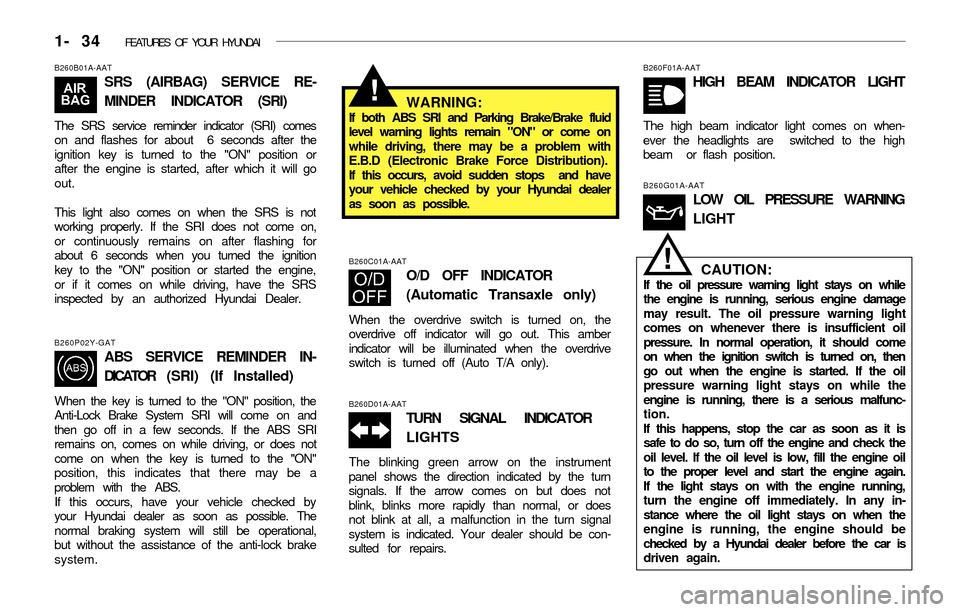
SRS (AIRBAG) SERVICE RE-
MINDER INDICATOR (SRI)
The SRS service reminder indicator (SRI) comes
on and flashes for about 6 seconds after the
ignition key is turned to the "ON" position or
after the engine is started, after which it will go
out.
This light also comes on when the SRS is not
working properly. If the SRI does not come on,
or continuously remains on after flashing for
about 6 seconds when you turned the ignition
key to the "ON" position or started the engine,
or if it comes on while driving, have the SRS
inspected by an authorized Hyundai Dealer.
B260P02Y-GAT
ABS SERVICE REMINDER IN-
DICATOR (SRI) (If Installed)
When the key is turned to the "ON" position, the
Anti-Lock Brake System SRI will come on and
then go off in a few seconds. If the ABS SRI
remains on, comes on while driving, or does not
come on when the key is turned to the "ON"
position, this indicates that there may be a
problem with the ABS.
If this occurs, have your vehicle checked by
your Hyundai dealer as soon as possible. The
normal braking system will still be operational,
but without the assistance of the anti-lock brake
system.
WARNING:If both ABS SRI and Parking Brake/Brake fluid
level warning lights remain "ON" or come on
while driving, there may be a problem with
E.B.D (Electronic Brake Force Distribution).
If this occurs, avoid sudden stops and have
your vehicle checked by your Hyundai dealer
as soon as possible.
B260F01A-AAT
HIGH BEAM INDICATOR LIGHT
The high beam indicator light comes on when-
ever the headlights are switched to the high
beam or flash position.
B260C01A-AAT
O/D OFF INDICATOR
(Automatic Transaxle only)
When the overdrive switch is turned on, the
overdrive off indicator will go out. This amber
indicator will be illuminated when the overdrive
switch is turned off (Auto T/A only).
B260D01A-AAT
TURN SIGNAL INDICATOR
LIGHTS
The blinking green arrow on the instrument
panel shows the direction indicated by the turn
signals. If the arrow comes on but does not
blink, blinks more rapidly than normal, or does
not blink at all, a malfunction in the turn signal
system is indicated. Your dealer should be con-
sulted for repairs.
B260G01A-AAT
LOW OIL PRESSURE WARNING
LIGHT
CAUTION:If the oil pressure warning light stays on while
the engine is running, serious engine damage
may result. The oil pressure warning light
comes on whenever there is insufficient oil
pressure. In normal operation, it should come
on when the ignition switch is turned on, then
go out when the engine is started. If the oil
pressure warning light stays on while the
engine is running, there is a serious malfunc-
tion.
If this happens, stop the car as soon as it is
safe to do so, turn off the engine and check the
oil level. If the oil level is low, fill the engine oil
to the proper level and start the engine again.
If the light stays on with the engine running,
turn the engine off immediately. In any in-
stance where the oil light stays on when the
engine is running, the engine should be
checked by a Hyundai dealer before the car is
driven again.
!
!
Page 54 of 186
FEATURES OF YOUR HYUNDAI 1- 41
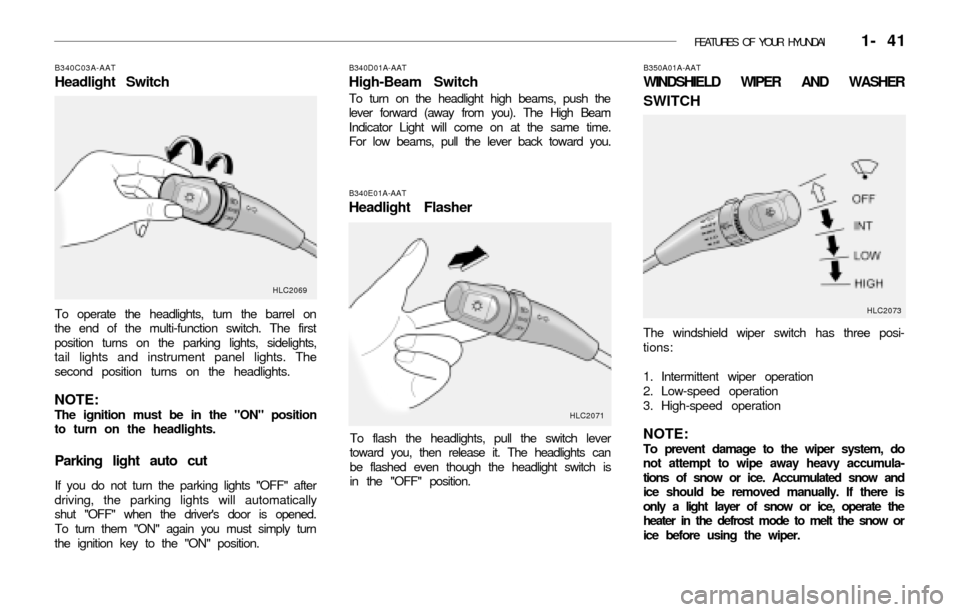
B340E01A-AAT
Headlight Flasher
To flash the headlights, pull the switch lever
toward you, then release it. The headlights can
be flashed even though the headlight switch is
in the "OFF" position.
B350A01A-AAT
WINDSHIELD WIPER AND WASHER
SWITCH
The windshield wiper switch has three posi-
tions:
1. Intermittent wiper operation
2. Low-speed operation
3. High-speed operation
NOTE:To prevent damage to the wiper system, do
not attempt to wipe away heavy accumula-
tions of snow or ice. Accumulated snow and
ice should be removed manually. If there is
only a light layer of snow or ice, operate the
heater in the defrost mode to melt the snow or
ice before using the wiper. To operate the headlights, turn the barrel on
the end of the multi-function switch. The first
position turns on the parking lights, sidelights,
tail lights and instrument panel lights. The
second position turns on the headlights.
NOTE:The ignition must be in the "ON" position
to turn on the headlights.
Parking light auto cut
If you do not turn the parking lights "OFF" after
driving, the parking lights will automatically
shut "OFF" when the driver's door is opened.
To turn them "ON" again you must simply turn
the ignition key to the "ON" position.
B340D01A-AAT
High-Beam Switch
To turn on the headlight high beams, push the
lever forward (away from you). The High Beam
Indicator Light will come on at the same time.
For low beams, pull the lever back toward you.
B340C03A-AAT
Headlight Switch
HLC2069
HLC2071HLC2073
Page 63 of 186
1- 50 FEATURES OF YOUR HYUNDAI
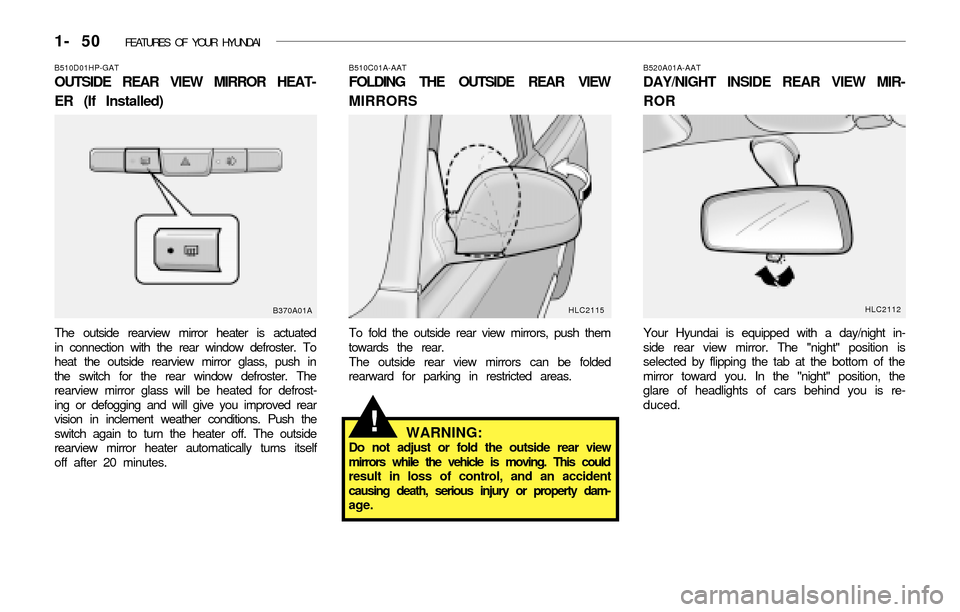
B510D01HP-GAT
OUTSIDE REAR VIEW MIRROR HEAT-
ER (If Installed)
The outside rearview mirror heater is actuated
in connection with the rear window defroster. To
heat the outside rearview mirror glass, push in
the switch for the rear window defroster. The
rearview mirror glass will be heated for defrost-
ing or defogging and will give you improved rear
vision in inclement weather conditions. Push the
switch again to turn the heater off. The outside
rearview mirror heater automatically turns itself
off after 20 minutes.
B370A01AB510C01A-AAT
FOLDING THE OUTSIDE REAR VIEW
MIRRORS
To fold the outside rear view mirrors, push them
towards the rear.
The outside rear view mirrors can be folded
rearward for parking in restricted areas.
B520A01A-AAT
DAY/NIGHT INSIDE REAR VIEW MIR-
ROR
Your Hyundai is equipped with a day/night in-
side rear view mirror. The "night" position is
selected by flipping the tab at the bottom of the
mirror toward you. In the "night" position, the
glare of headlights of cars behind you is re-
duced.
HLC2115
WARNING:Do not adjust or fold the outside rear view
mirrors while the vehicle is moving. This could
result in loss of control, and an accident
causing death, serious injury or property dam-
age.
!
HLC2112
Page 110 of 186
2- 14 DRIVING YOUR HYUNDAI
C190A01A-AAT
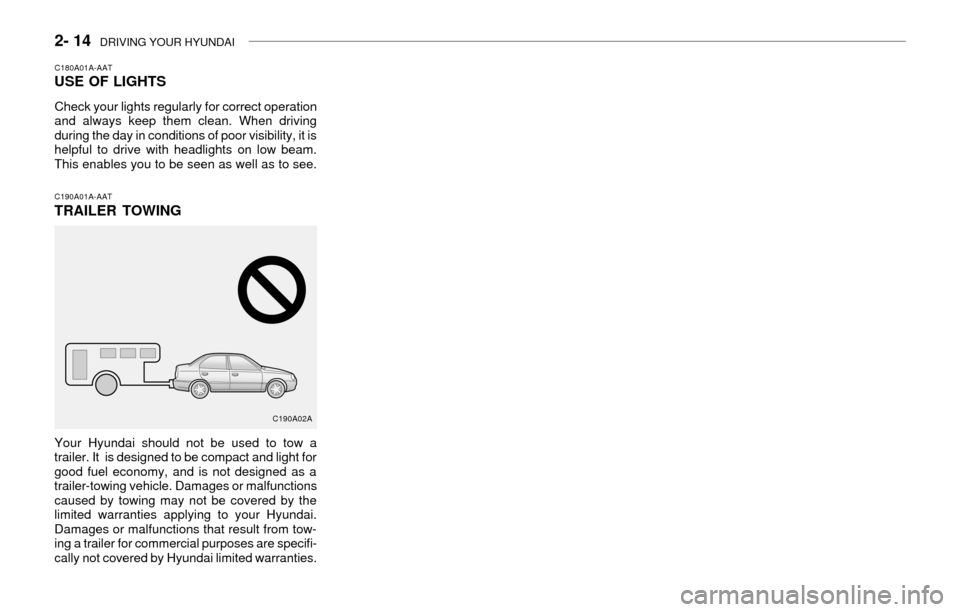
TRAILER TOWING
Your Hyundai should not be used to tow a
trailer. It is designed to be compact and light for
good fuel economy, and is not designed as a
trailer-towing vehicle. Damages or malfunctions
caused by towing may not be covered by the
limited warranties applying to your Hyundai.
Damages or malfunctions that result from tow-
ing a trailer for commercial purposes are specifi-
cally not covered by Hyundai limited warranties.
C180A01A-AATUSE OF LIGHTS
Check your lights regularly for correct operation
and always keep them clean. When driving
during the day in conditions of poor visibility, it is
helpful to drive with headlights on low beam.
This enables you to be seen as well as to see.
C190A02A
Page 157 of 186
DO-IT-YOURSELF MAINTENANCE 6- 21
G240A01A-AATPOWER STEERING HOSES
It is suggested that you check the power steer-
ing hose connections for fluid leakage at those
intervals specified in the vehicle maintenance
schedule in Section 5.
The power steering hoses should be replaced if
there is severe surface cracking, pulling, scuff-
ing or worn spots. Deterioration of the hose
could cause premature failure.
Recommended Fluid
Use PSF-3 type fluid
NOTE:Do not start the engine when the power
steering oil reservoir is empty.
G250A01A-AAT
FOR MORE INFORMATION ABOUT
YOUR HYUNDAI
If you desire additional information about main-
taining and servicing your Hyundai, you may
purchase a factory Shop Manual at your Hyundai
dealer's parts department. This is the same
manual used by dealership technicians and while
it is highly technical it can be useful in obtaining
a better understanding of your car and how it
works.
G290A04A-AATHEADLIGHT AIMING ADJUSTMENT
Before performing aiming adjustment, make sure
of the following.
1. Keep all tires inflated to the correct pressure.
2. Place the vehicle on level ground and press
the front bumper & rear bumper down sever-
al times. Place vehicle at a distance of 118
in. (3m) from the test wall.
3. See that the vehicle is unloaded (except for
full levels of coolant, engine oil and fuel, and
spare tire, jack, and tools). Have the driver or
equivalent weight placed in driver's seat.
4. Clean the headlight lenses and turn on the
headlights (Low beam).5. Open the hood.
6. Draw the vertical line (through the center of
each headlight) and the horizontal line
(through the center of each headlight) on the
aiming screen.
And then, draw the parallel line at 0.8 in.(21
mm) place under the horizontal line.
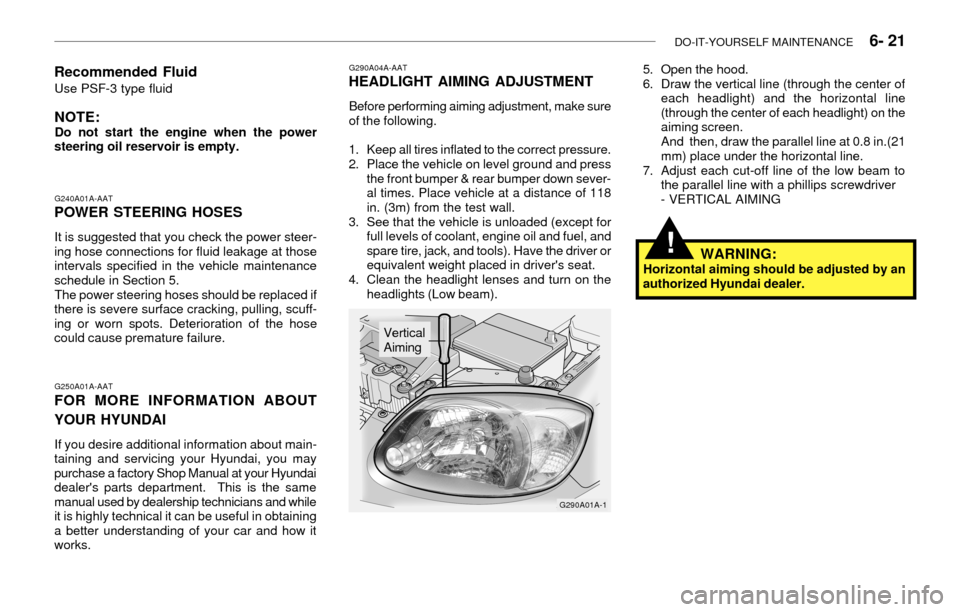
7. Adjust each cut-off line of the low beam to
the parallel line with a phillips screwdriver
- VERTICAL AIMING
G290A01A-1
Vertical
Aiming
WARNING:Horizontal aiming should be adjusted by an
authorized Hyundai dealer.
!
Page 158 of 186
6- 22 DO-IT-YOURSELF MAINTENANCE
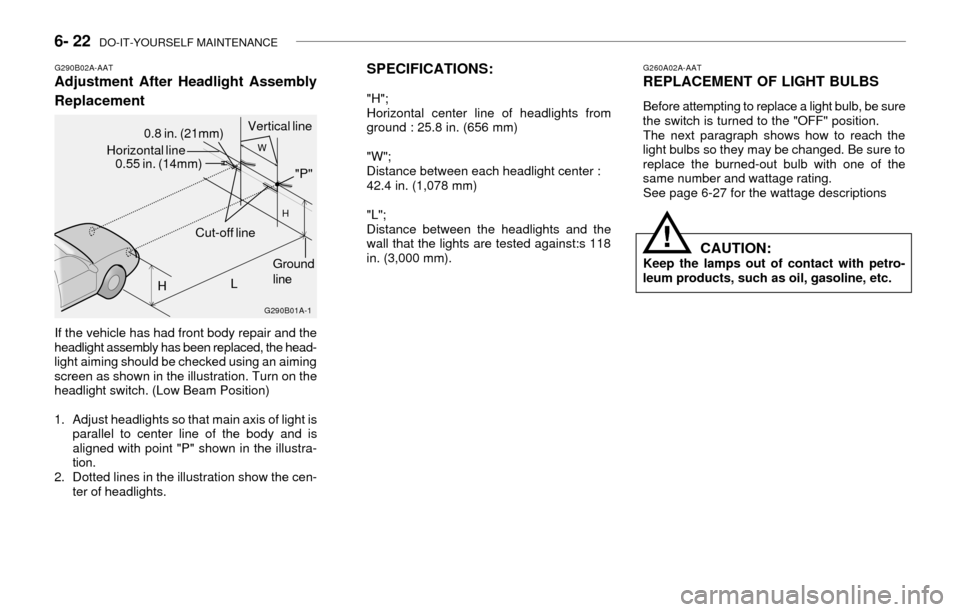
SPECIFICATIONS:
"H";
Horizontal center line of headlights from
ground : 25.8 in. (656 mm)
"W";
Distance between each headlight center :
42.4 in. (1,078 mm)
"L";
Distance between the headlights and the
wall that the lights are tested against:s 118
in. (3,000 mm).
!
G260A02A-AATREPLACEMENT OF LIGHT BULBS
Before attempting to replace a light bulb, be sure
the switch is turned to the "OFF" position.
The next paragraph shows how to reach the
light bulbs so they may be changed. Be sure to
replace the burned-out bulb with one of the
same number and wattage rating.
See page 6-27 for the wattage descriptions
CAUTION:Keep the lamps out of contact with petro-
leum products, such as oil, gasoline, etc.
G290B02A-AATAdjustment After Headlight Assembly
Replacement
If the vehicle has had front body repair and the
headlight assembly has been replaced, the head-
light aiming should be checked using an aiming
screen as shown in the illustration. Turn on the
headlight switch. (Low Beam Position)
1. Adjust headlights so that main axis of light is
parallel to center line of the body and is
aligned with point "P" shown in the illustra-
tion.
2. Dotted lines in the illustration show the cen-
ter of headlights.
G290B01A-1
HGround
line Horizontal line
0.55 in. (14mm)0.8 in. (21mm)Vertical line
L
W
H
Cut-off line"P"