Od off Hyundai Accent 2004 Owner's Guide
[x] Cancel search | Manufacturer: HYUNDAI, Model Year: 2004, Model line: Accent, Model: Hyundai Accent 2004Pages: 205, PDF Size: 3.2 MB
Page 69 of 205
1FEATURES OF YOUR HYUNDAI
57PARKING BRAKEDAY/NIGHT INSIDE REARVIEW
MIRROR
B520A01A-AAT
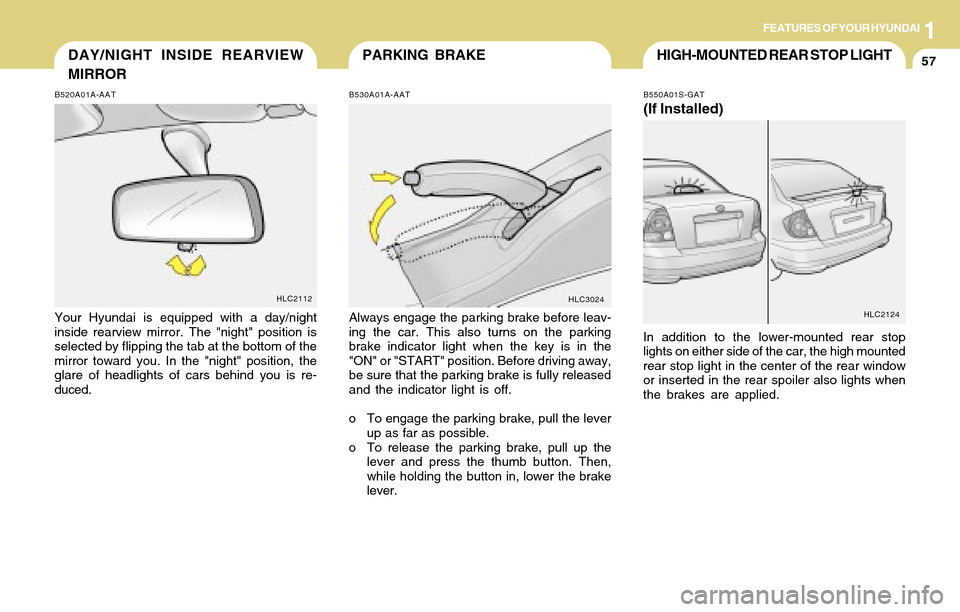
Your Hyundai is equipped with a day/night
inside rearview mirror. The "night" position is
selected by flipping the tab at the bottom of the
mirror toward you. In the "night" position, the
glare of headlights of cars behind you is re-
duced.
HLC2112
B530A01A-AAT
Always engage the parking brake before leav-
ing the car. This also turns on the parking
brake indicator light when the key is in the
"ON" or "START" position. Before driving away,
be sure that the parking brake is fully released
and the indicator light is off.
o To engage the parking brake, pull the lever
up as far as possible.
o To release the parking brake, pull up the
lever and press the thumb button. Then,
while holding the button in, lower the brake
lever.
HLC3024
HIGH-MOUNTED REAR STOP LIGHT
B550A01S-GAT
(If Installed)
In addition to the lower-mounted rear stop
lights on either side of the car, the high mounted
rear stop light in the center of the rear window
or inserted in the rear spoiler also lights when
the brakes are applied.
HLC2124
Page 71 of 205
1FEATURES OF YOUR HYUNDAI
59
B560A02S-AAT
B560A01A-1
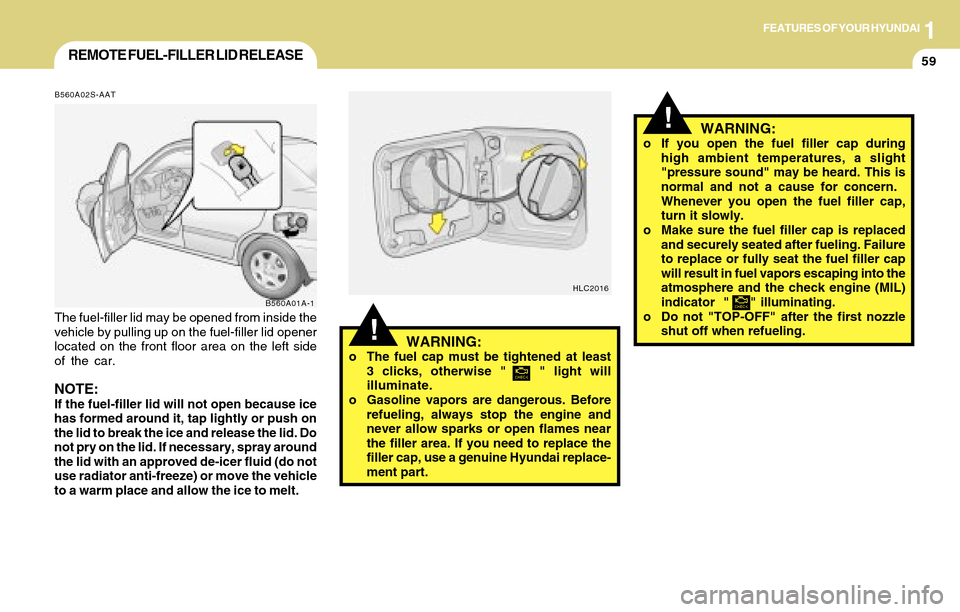
The fuel-filler lid may be opened from inside the
vehicle by pulling up on the fuel-filler lid opener
located on the front floor area on the left side
of the car.
NOTE:If the fuel-filler lid will not open because ice
has formed around it, tap lightly or push on
the lid to break the ice and release the lid. Do
not pry on the lid. If necessary, spray around
the lid with an approved de-icer fluid (do not
use radiator anti-freeze) or move the vehicle
to a warm place and allow the ice to melt.
REMOTE FUEL-FILLER LID RELEASE
!WARNING:o The fuel cap must be tightened at least
3 clicks, otherwise " " light will
illuminate.
o Gasoline vapors are dangerous. Before
refueling, always stop the engine and
never allow sparks or open flames near
the filler area. If you need to replace the
filler cap, use a genuine Hyundai replace-
ment part.
HLC2016
!
o If you open the fuel filler cap during
high ambient temperatures, a slight
"pressure sound" may be heard. This is
normal and not a cause for concern.
Whenever you open the fuel filler cap,
turn it slowly.
o Make sure the fuel filler cap is replaced
and securely seated after fueling. Failure
to replace or fully seat the fuel filler cap
will result in fuel vapors escaping into the
atmosphere and the check engine (MIL)
indicator " " illuminating.
o Do not "TOP-OFF" after the first nozzle
shut off when refueling.WARNING:
Page 77 of 205
1FEATURES OF YOUR HYUNDAI
65HEATING AND VENTILATION
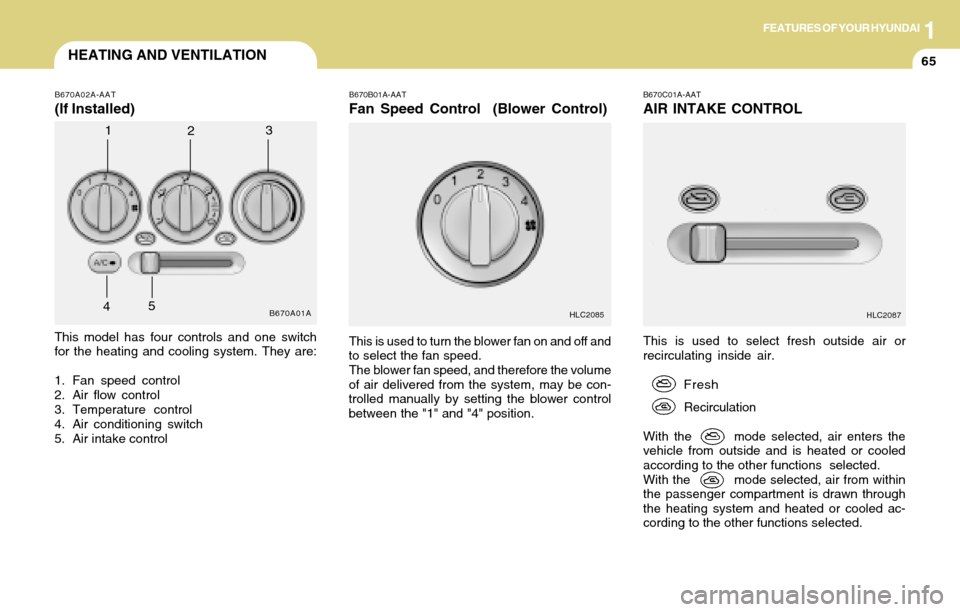
This is used to select fresh outside air or
recirculating inside air.
Fresh
Recirculation
With the mode selected, air enters the
vehicle from outside and is heated or cooled
according to the other functions selected.
With the mode selected, air from within
the passenger compartment is drawn through
the heating system and heated or cooled ac-
cording to the other functions selected.
B670C01A-AAT
AIR INTAKE CONTROL
This model has four controls and one switch
for the heating and cooling system. They are:
1. Fan speed control
2. Air flow control
3. Temperature control
4. Air conditioning switch
5. Air intake control
B670B01A-AAT
Fan Speed Control (Blower Control)
This is used to turn the blower fan on and off and
to select the fan speed.
The blower fan speed, and therefore the volume
of air delivered from the system, may be con-
trolled manually by setting the blower control
between the "1" and "4" position.
B670A02A-AAT
(If Installed)
B670A01A
1
23
4
HLC2085HLC20875
Page 79 of 205
1FEATURES OF YOUR HYUNDAI
67
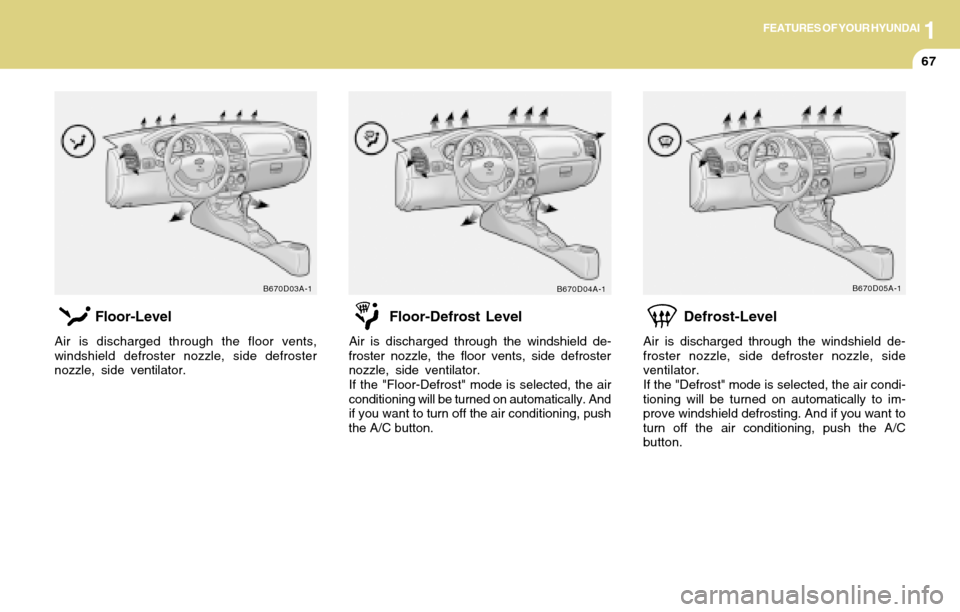
Defrost-Level
Air is discharged through the windshield de-
froster nozzle, side defroster nozzle, side
ventilator.
If the "Defrost" mode is selected, the air condi-
tioning will be turned on automatically to im-
prove windshield defrosting. And if you want to
turn off the air conditioning, push the A/C
button.
B670D05A-1
Floor-Level
Air is discharged through the floor vents,
windshield defroster nozzle, side defroster
nozzle, side ventilator.
B670D03A-1
Floor-Defrost Level
Air is discharged through the windshield de-
froster nozzle, the floor vents, side defroster
nozzle, side ventilator.
If the "Floor-Defrost" mode is selected, the air
conditioning will be turned on automatically. And
if you want to turn off the air conditioning, push
the A/C button.
B670D04A-1
Page 82 of 205
1FEATURES OF YOUR HYUNDAI
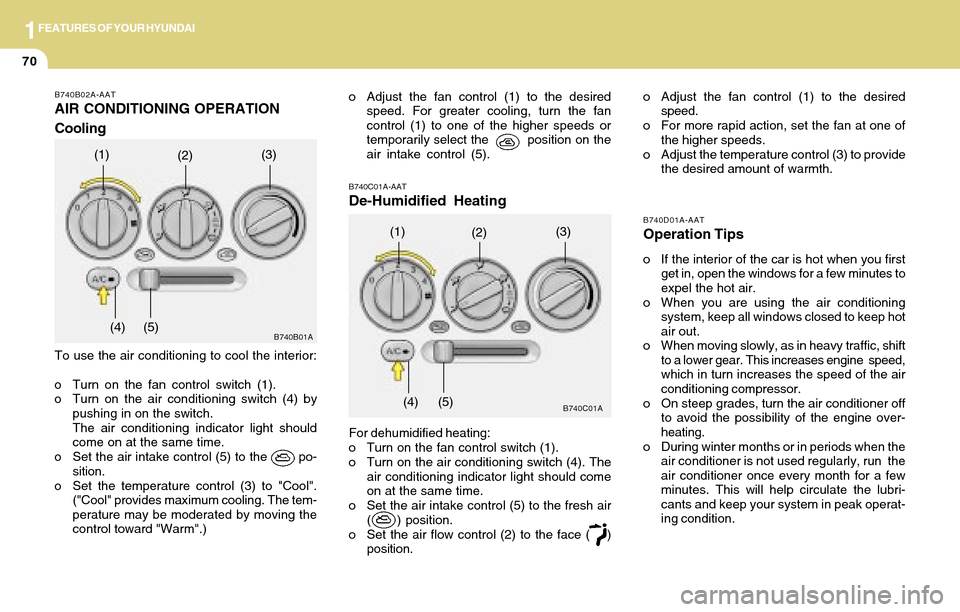
70
B740B02A-AAT
AIR CONDITIONING OPERATION
Cooling
To use the air conditioning to cool the interior:
o Turn on the fan control switch (1).
o Turn on the air conditioning switch (4) by
pushing in on the switch.
The air conditioning indicator light should
come on at the same time.
o Set the air intake control (5) to the po-
sition.
o Set the temperature control (3) to "Cool".
("Cool" provides maximum cooling. The tem-
perature may be moderated by moving the
control toward "Warm".)
(1)(2)(3)
(4) (5)
B740D01A-AAT
Operation Tips
o If the interior of the car is hot when you first
get in, open the windows for a few minutes to
expel the hot air.
o When you are using the air conditioning
system, keep all windows closed to keep hot
air out.
o When moving slowly, as in heavy traffic, shift
to a lower gear. This increases engine speed,
which in turn increases the speed of the air
conditioning compressor.
o On steep grades, turn the air conditioner off
to avoid the possibility of the engine over-
heating.
o During winter months or in periods when the
air conditioner is not used regularly, run the
air conditioner once every month for a few
minutes. This will help circulate the lubri-
cants and keep your system in peak operat-
ing condition.
B740C01A-AAT
De-Humidified Heating
For dehumidified heating:
o Turn on the fan control switch (1).
o Turn on the air conditioning switch (4). The
air conditioning indicator light should come
on at the same time.
o Set the air intake control (5) to the fresh air
( ) position.
o Set the air flow control (2) to the face ( )
position.
B740C01A
(1)(2)(3)
(4) (5)
o Adjust the fan control (1) to the desired
speed. For greater cooling, turn the fan
control (1) to one of the higher speeds or
temporarily select the position on the
air intake control (5).o Adjust the fan control (1) to the desired
speed.
o For more rapid action, set the fan at one of
the higher speeds.
o Adjust the temperature control (3) to provide
the desired amount of warmth.
B740B01A
Page 87 of 205
1FEATURES OF YOUR HYUNDAI
75AUDIO SYSTEM
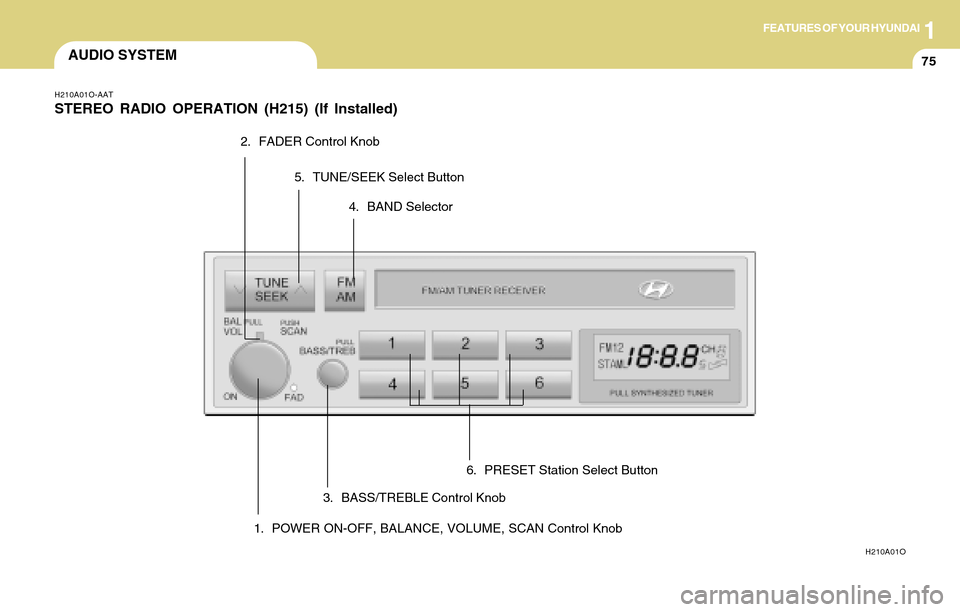
1. POWER ON-OFF, BALANCE, VOLUME, SCAN Control Knob
H210A01O-AAT
STEREO RADIO OPERATION (H215) (If Installed)
H210A01O
2. FADER Control Knob
3. BASS/TREBLE Control Knob4. BAND Selector 5. TUNE/SEEK Select Button
6. PRESET Station Select Button
Page 88 of 205
1FEATURES OF YOUR HYUNDAI
76
2. FAD (Fader Control) Knob
Turn the control knob counterclockwise to em-
phasize front speaker sound (rear speaker
sound will be attenuated). When the control
knob is turned clockwise, rear speaker sound
will be emphasized (front speaker sound will
be attenuated).
3. BASS Control Knob
Press to pop the knob out and turn to the left or
right for the desired bass tone.
TREBLE Control Knob.
Pull the bass control knob further out. Turn to
the left or right for the desired treble tone.
4. BAND Selector
Pressing the button changes the AM, FM1
and FM2 bands. The mode selected is dis-
played on LCD.
5. TUNE (Manual) Select Button
Press the ( ) side or ( ) side to increase or to
decrease the frequency. With the button held
down for 1 sec. or more, the stop signal (broad-
casting radio wave) is ignored and channel
selection continues.
SEEK Operation
(Automatic Channel Selection)
Press the TUNE select button for 1 sec. or
more. When the ( ) side is pressed, the unit will
automatically tune to the next higher frequency
and when the ( ) side is pressed, it will automa-
tically tune to the next lower frequency.
6. PRESET STATION SELECT Button
Six (6) stations for AM, FM1 and FM2 respec-
tively can be preset in the electronic memory
circuit on this unit.
HOW TO PRESET STATIONS
Six AM and twelve FM stations may be pro-
grammed into the memory of the radio. Then, by
simply pressing the band select button and/or
one of the six station select buttons, you may
recall any of these stations instantly. To pro-
gram the stations, follow these steps:
o Press band selector to set the band for AM,
FM1, and FM2.
o Select the desired station to be stored by
seek, scan or manual tuning.
o Determine the preset station select button
you wish to use to access that station.
H210B04O-AAT
1. POWER ON-OFF/VOLUME Control
Knob
The radio unit may be operated when the igni-
tion key is in the "ACC" or "ON" position. Rotate
the knob clockwise to switch the radio unit on
and to increase the volume.
The LCD shows the radio frequency in the radio
mode. Turn the knob counterclockwise to re-
duce the volume and to switch the radio unit off.
BAL (Balance Control) Knob
Pull and turn the control knob clockwise to
emphasize right speaker sound (left speaker
sound will be attenuated). When the control
knob is turned counterclockwise, left speaker
sound will be emphasized (right speaker sound
will be attenuated).
After adjusting the balance, push the knob
again to use the other function.
SCAN Knob
When the scan knob is pressed, the frequency
will increase and the receivable stations will be
tuned in one after another, receiving each sta-
tion for 5 seconds. To stop scanning, press the
scan knob again.
FM
AM
Page 90 of 205
1FEATURES OF YOUR HYUNDAI
78
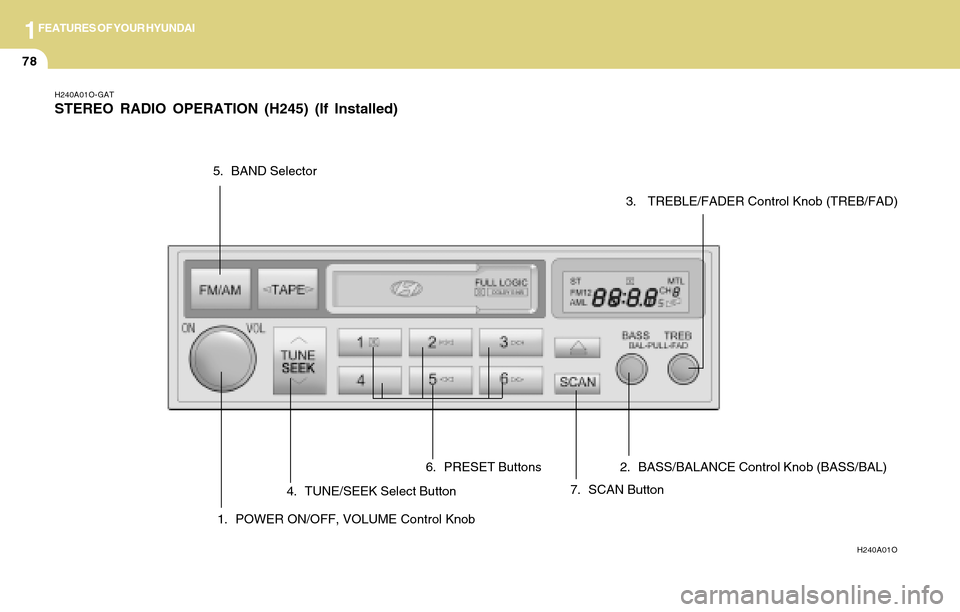
H240A01O-GAT
STEREO RADIO OPERATION (H245) (If Installed)
H240A01O
1. POWER ON/OFF, VOLUME Control Knob
5. BAND Selector
4. TUNE/SEEK Select Button
7. SCAN Button 6. PRESET Buttons 2. BASS/BALANCE Control Knob (BASS/BAL)
3. TREBLE/FADER Control Knob (TREB/FAD)
Page 91 of 205
1FEATURES OF YOUR HYUNDAI
79
3. TREB (Treble Control) Knob
Press to pop the knob out and turn to the left or
right for the desired treble tone.
FAD (Fader Control) Knob
Pull the treble control knob further out.
Turn the control knob counterclockwise to em-
phasize front speaker sound (rear speaker
sound will be attenuated).
When the control knob is turned clockwise,
rear speaker sound will be emphasized (front
speaker sound will be attenuated).
4. TUNE (Manual) Select Button
Press the ( ) side or ( ) side to increase or to
decrease the frequency. Press either button and
hold down to continuously scroll. Release but-
ton once the desired station is reached.
SEEK Operation
(Automatic Channel Selection)
Press the TUNE select button 0.5 sec or more.
Releasing it will automatically tune to the next
available station with a beep sound.When the ( ) side is pressed longer than 0.5
second, releasing will automatically tune to the
next higher frequency and when the ( ) side
is pressed longer than 0.5 second, releasing
will automatically tune to the next lower fre-
quency.
5. BAND Selector
Pressing the button changes the AM, FM1
and FM2 bands. The mode selected is dis-
played on LCD.
6. PRESET STATION SELECT Button
Six (6) stations for AM, FM1 and FM2 respec-
tively can be preset in the electronic memory
circuit on this unit.
HOW TO PRESET STATIONS
Six AM and twelve FM stations may be pro-
grammed into the memory of the radio. Then, by
simply pressing the band select button and/or
one of the six station select buttons, you may
recall any of these stations instantly. To pro-
gram the stations, follow these steps:
H240B04O-AAT
1. POWER ON-OFF Control Knob
The radio unit may be operated when the igni-
tion key is in the "ACC" or "ON" position. Press
the knob to switch the power on. The LCD
shows the radio frequency in the radio mode or
the tape direction indicator in the tape mode. To
switch the power off, press the knob again.
VOLUME Control
Rotate the knob clockwise to increase the vol-
ume and turn the knob counterclockwise to
reduce the volume.
2. BASS Control Knob
Press to pop the knob out and turn to the left or
right for the desired bass tone.
BAL (Balance Control) Knob
Pull the bass control knob further out.Turn the
control knob clockwise to emphasize right
speaker sound (left speaker sound will be
attenuated).
When the control knob is turned counterclock-
wise, left speaker sound will be emphasized
(right speaker sound will be attenuated).
FM/AM
Page 95 of 205
1FEATURES OF YOUR HYUNDAI
83
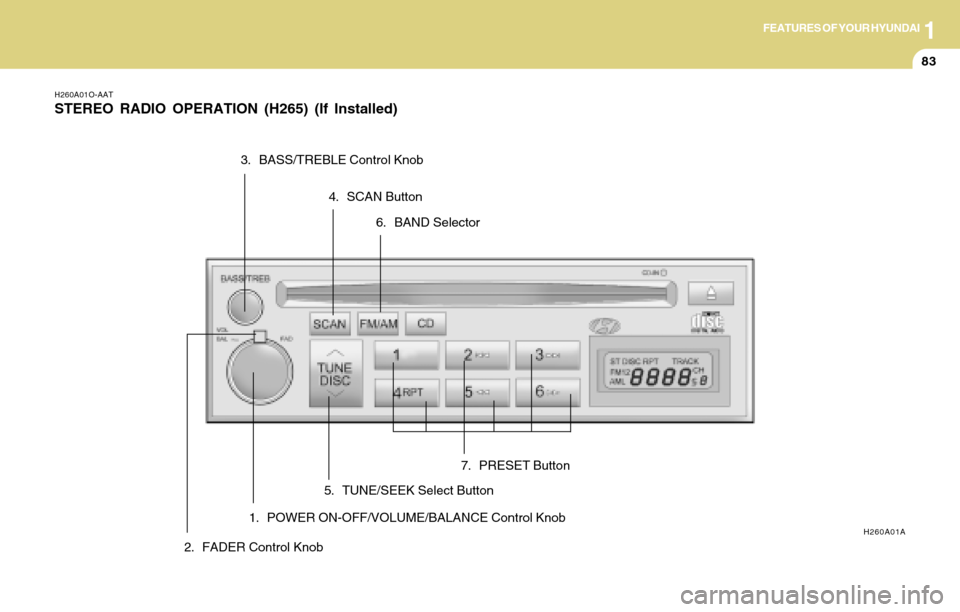
H260A01O-AAT
STEREO RADIO OPERATION (H265) (If Installed)
1. POWER ON-OFF/VOLUME/BALANCE Control KnobH260A01A
2. FADER Control Knob3. BASS/TREBLE Control Knob
4. SCAN Button
5. TUNE/SEEK Select Button6. BAND Selector
7. PRESET Button