light Hyundai Accent 2005 Workshop Manual
[x] Cancel search | Manufacturer: HYUNDAI, Model Year: 2005, Model line: Accent, Model: Hyundai Accent 2005Pages: 219, PDF Size: 7.07 MB
Page 178 of 219
6
DO-IT-YOURSELF MAINTENANCE
23
G240A01A-AATPOWER STEERING HOSESIt is suggested that you check the power steer-
ing hose connections for fluid leakage at those
intervals specified in the vehicle maintenance
schedule in Section 5.
The power steering hoses should be replaced if
there is severe surface cracking, pulling, scuff-
ing or worn spots. Deterioration of the hose
could cause premature failure.Recommended FluidUse PSF-3 type fluidNOTE:Do not start the engine when the power
steering oil reservoir is empty.
HEADLIGHT AIMING ADJUSTMENT
G250A01A-AATFOR MORE INFORMATION ABOUT
YOUR HYUNDAIIf you desire additional information about main-
taining and servicing your Hyundai, you may
purchase a factory Shop Manual at your Hyundai
dealer's parts department. This is the same
manual used by dealership technicians and while
it is highly technical it can be useful in obtaining
a better understanding of your car and how it
works.
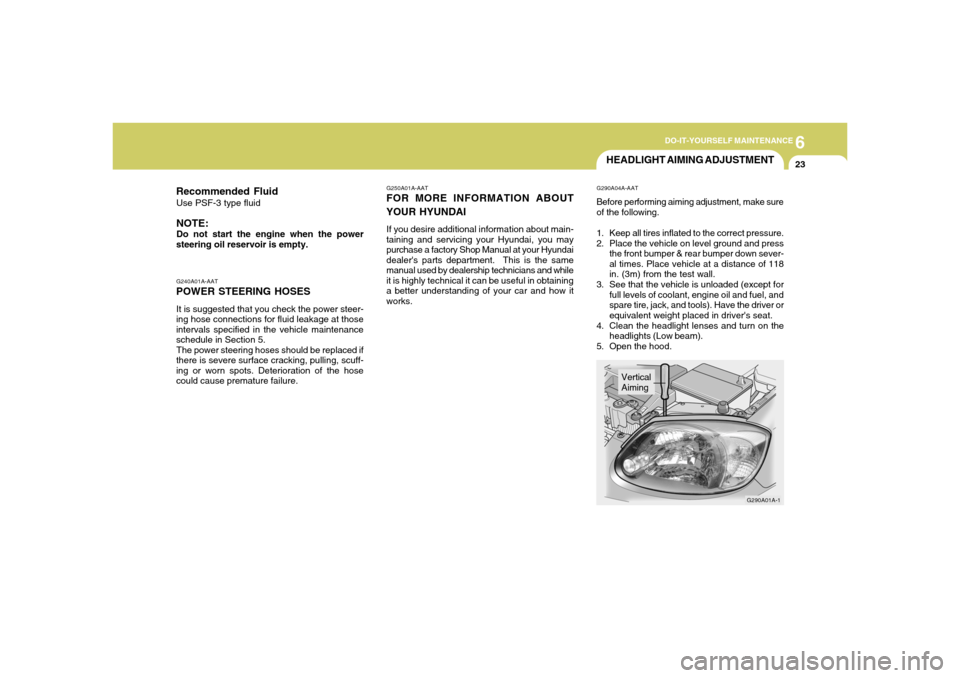
G290A04A-AATBefore performing aiming adjustment, make sure
of the following.
1. Keep all tires inflated to the correct pressure.
2. Place the vehicle on level ground and press
the front bumper & rear bumper down sever-
al times. Place vehicle at a distance of 118
in. (3m) from the test wall.
3. See that the vehicle is unloaded (except for
full levels of coolant, engine oil and fuel, and
spare tire, jack, and tools). Have the driver or
equivalent weight placed in driver's seat.
4. Clean the headlight lenses and turn on the
headlights (Low beam).
5. Open the hood.
G290A01A-1
Vertical
Aiming
Page 179 of 219
6
DO-IT-YOURSELF MAINTENANCE
24
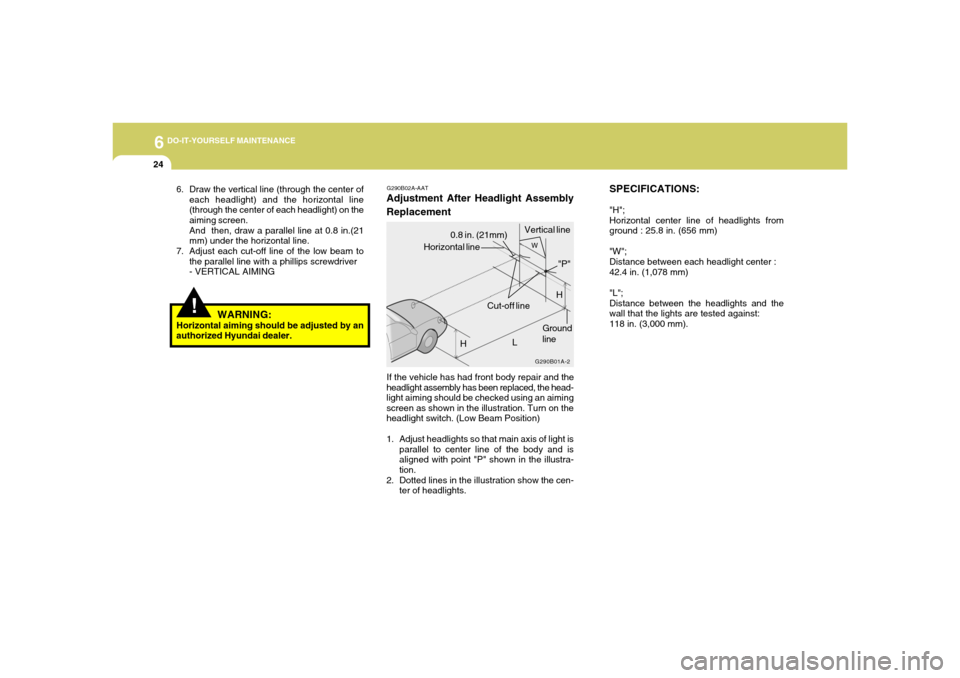
SPECIFICATIONS:"H";
Horizontal center line of headlights from
ground : 25.8 in. (656 mm)
"W";
Distance between each headlight center :
42.4 in. (1,078 mm)
"L";
Distance between the headlights and the
wall that the lights are tested against:
118 in. (3,000 mm).
G290B02A-AATAdjustment After Headlight Assembly
ReplacementIf the vehicle has had front body repair and the
headlight assembly has been replaced, the head-
light aiming should be checked using an aiming
screen as shown in the illustration. Turn on the
headlight switch. (Low Beam Position)
1. Adjust headlights so that main axis of light is
parallel to center line of the body and is
aligned with point "P" shown in the illustra-
tion.
2. Dotted lines in the illustration show the cen-
ter of headlights.
G290B01A-2
HGround
line Horizontal line0.8 in. (21mm)Vertical line
L
W
H
Cut-off line"P"
!
6. Draw the vertical line (through the center of
each headlight) and the horizontal line
(through the center of each headlight) on the
aiming screen.
And then, draw a parallel line at 0.8 in.(21
mm) under the horizontal line.
7. Adjust each cut-off line of the low beam to
the parallel line with a phillips screwdriver
- VERTICAL AIMING
WARNING:
Horizontal aiming should be adjusted by an
authorized Hyundai dealer.
Page 180 of 219
6
DO-IT-YOURSELF MAINTENANCE
25
REPLACEMENT OF LIGHT BULBS!
G260A02A-AATBefore attempting to replace a light bulb, be sure
the switch is turned to the "OFF" position.
The next paragraph shows how to reach the
light bulbs so they may be changed. Be sure to
replace the burned-out bulb with one of the
same number and wattage rating.
See page 6-31 for the wattage descriptions
CAUTION:
Keep the lamps out of contact with petro-
leum products, such as oil, gasoline, etc.
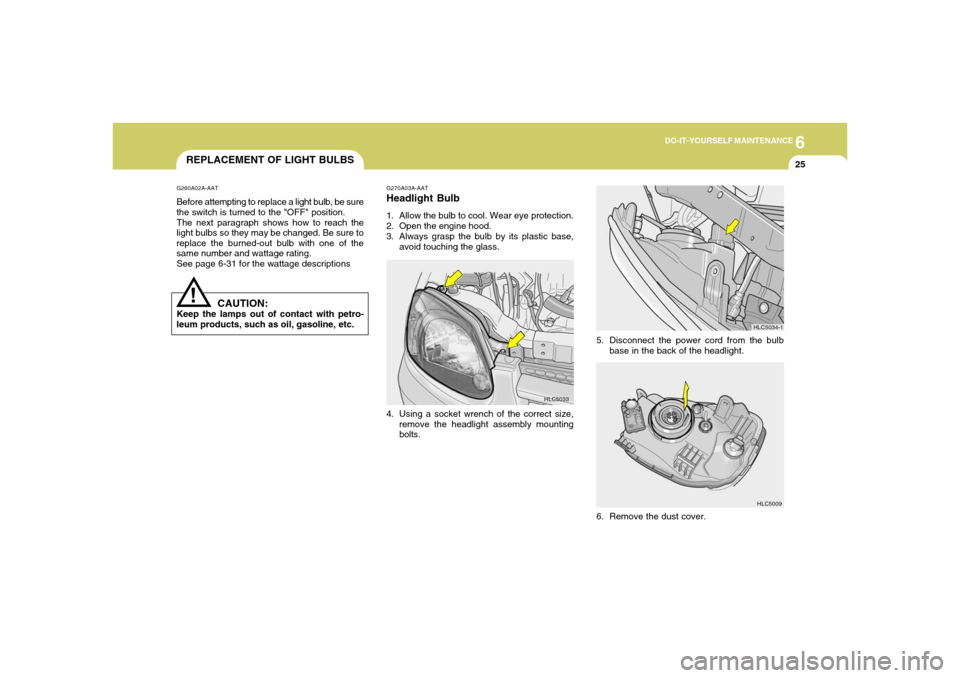
HLC5033 G270A03A-AAT
Headlight Bulb1. Allow the bulb to cool. Wear eye protection.
2. Open the engine hood.
3. Always grasp the bulb by its plastic base,
avoid touching the glass.
4. Using a socket wrench of the correct size,
remove the headlight assembly mounting
bolts.
6. Remove the dust cover.
HLC5009
5. Disconnect the power cord from the bulb
base in the back of the headlight.
HLC5034-1
Page 181 of 219
6
DO-IT-YOURSELF MAINTENANCE
26
!
WARNING:
The halogen bulb contains gas under pres-
sure and if impacted could shatter, resulting
in flying fragments. Always wear eye protec-
tion when servicing the bulb. Protect the
bulb against abrasions or scratches and
against liquids when lighted. Turn the bulb
on only when installed in a headlight. Re-
place the headlight if damaged or cracked.
Keep the bulb out of the reach of children
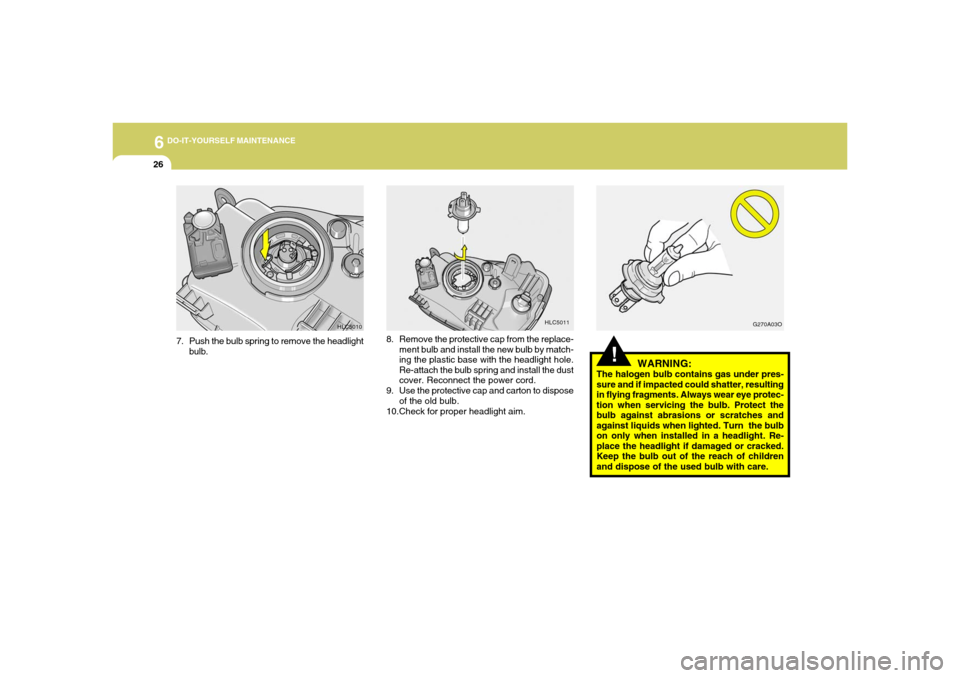
and dispose of the used bulb with care. 8. Remove the protective cap from the replace-
ment bulb and install the new bulb by match-
ing the plastic base with the headlight hole.
Re-attach the bulb spring and install the dust
cover. Reconnect the power cord.
9. Use the protective cap and carton to dispose
of the old bulb.
10.Check for proper headlight aim.
G270A03O
HLC5011
7. Push the bulb spring to remove the headlight
bulb.
HLC5010
Page 182 of 219
6
DO-IT-YOURSELF MAINTENANCE
27
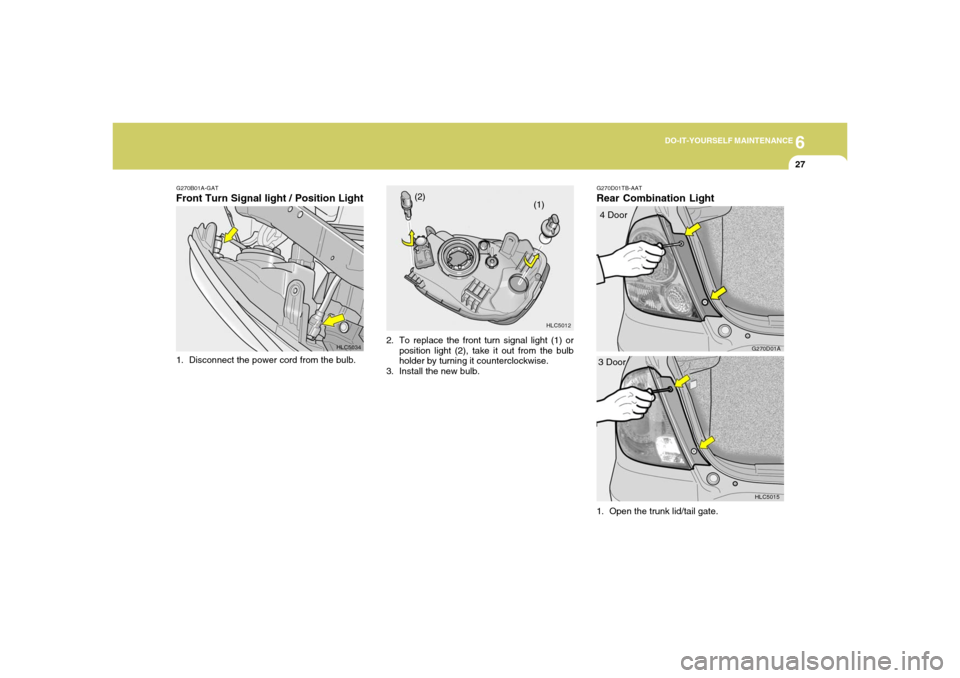
G270B01A-GATFront Turn Signal light / Position Light1. Disconnect the power cord from the bulb.
HLC5034
HLC5012
(1) (2)
2. To replace the front turn signal light (1) or
position light (2), take it out from the bulb
holder by turning it counterclockwise.
3. Install the new bulb.
G270D01TB-AATRear Combination Light
HLC5015
3 Door
G270D01A
4 Door
1. Open the trunk lid/tail gate.
Page 183 of 219
6
DO-IT-YOURSELF MAINTENANCE
28
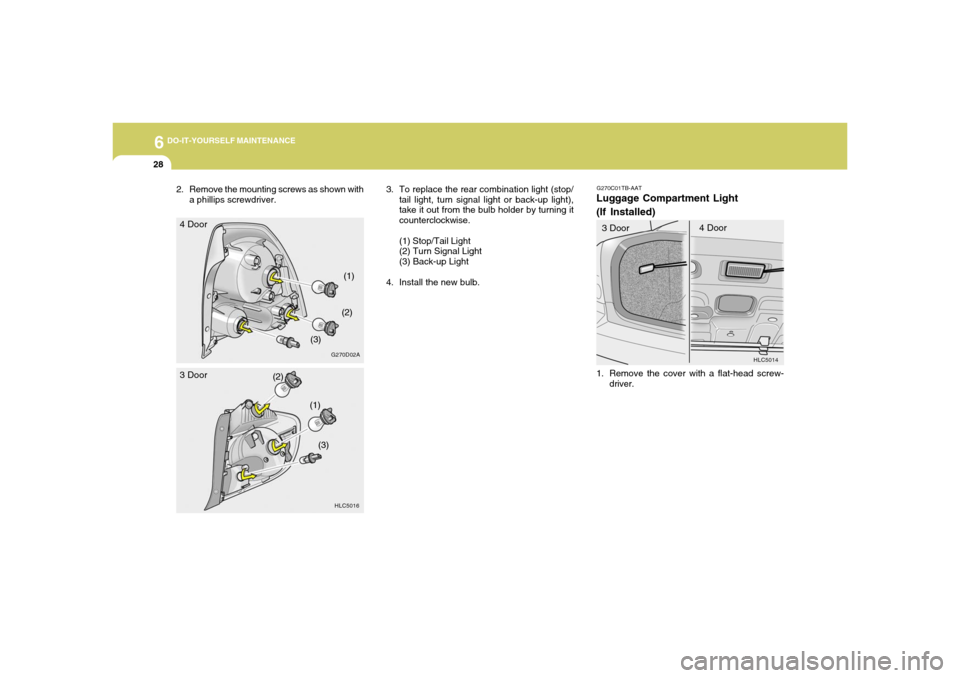
3. To replace the rear combination light (stop/
tail light, turn signal light or back-up light),
take it out from the bulb holder by turning it
counterclockwise.
(1) Stop/Tail Light
(2) Turn Signal Light
(3) Back-up Light
4. Install the new bulb.
G270C01TB-AATLuggage Compartment Light
(If Installed)
HLC5014
1. Remove the cover with a flat-head screw-
driver. 3 Door4 Door
(2)
(1)
(3)
HLC5016
3 Door
G270D02A
4 Door
(1)
(2)
(3) 2. Remove the mounting screws as shown with
a phillips screwdriver.
Page 184 of 219
6
DO-IT-YOURSELF MAINTENANCE
29
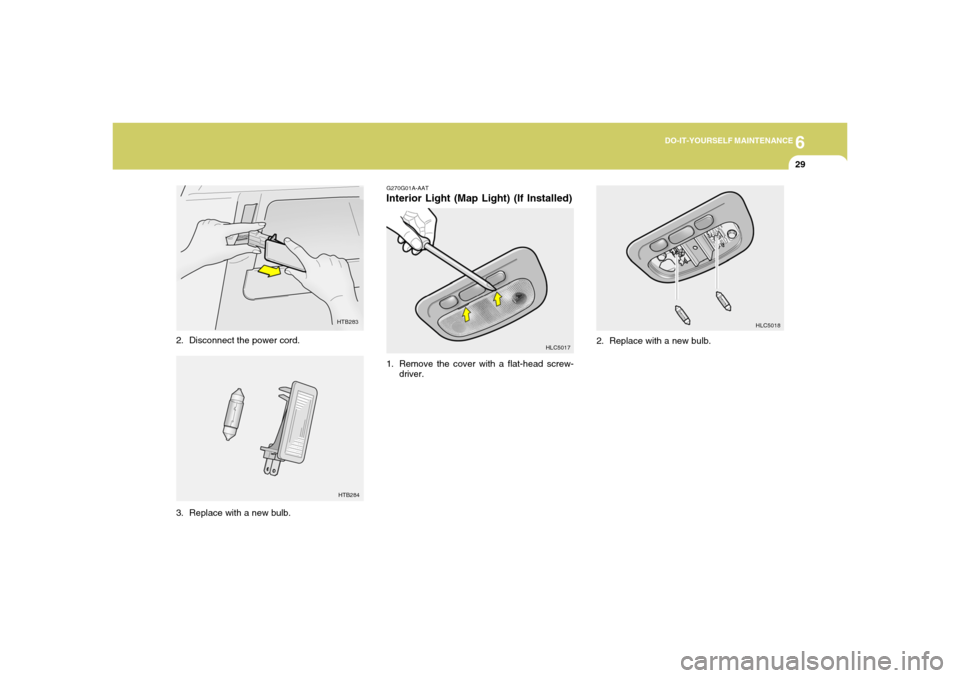
3. Replace with a new bulb.
HTB283
2. Disconnect the power cord.
HTB284
G270G01A-AATInterior Light (Map Light) (If Installed)1. Remove the cover with a flat-head screw-
driver.
HLC5017HLC5018
2. Replace with a new bulb.
Page 185 of 219
6
DO-IT-YOURSELF MAINTENANCE
30
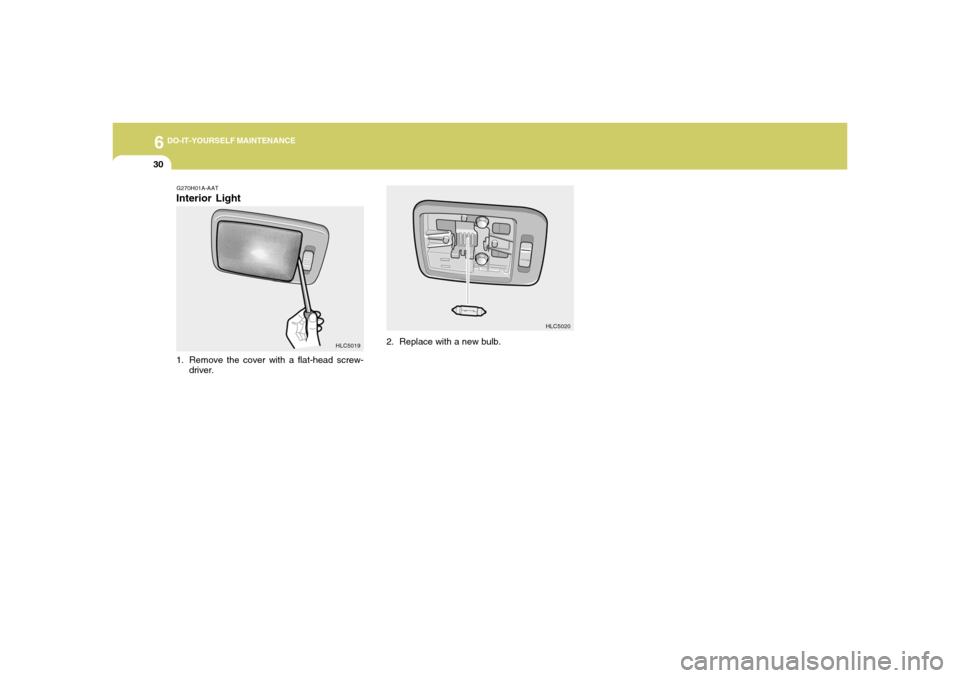
2. Replace with a new bulb.
HLC5020
G270H01A-AATInterior Light1. Remove the cover with a flat-head screw-
driver.
HLC5019
Page 186 of 219
6
DO-IT-YOURSELF MAINTENANCE
31
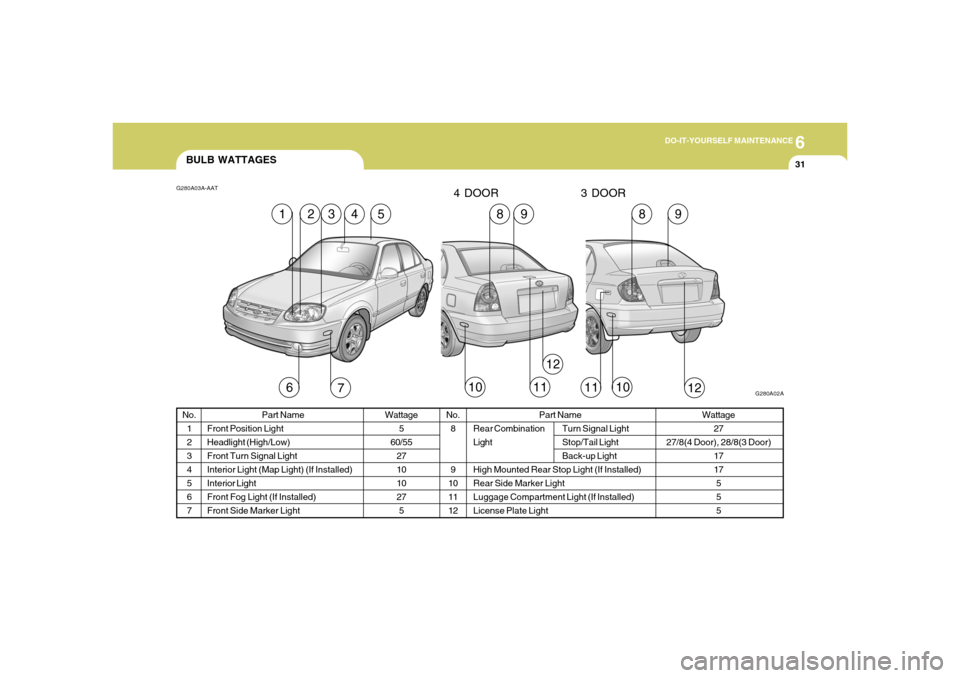
BULB WATTAGES
Part Name
Front Position Light
Headlight (High/Low)
Front Turn Signal Light
Interior Light (Map Light) (If Installed)
Interior Light
Front Fog Light (If Installed)
Front Side Marker LightNo.
8
9
10
11
12
G280A03A-AAT
G280A02A
5
2
Wattage
5
60/55
27
10
10
27
5
No.
1
2
3
4
5
6
7
Wattage
27
27/8(4 Door), 28/8(3 Door)
17
17
5
5
5 Part Name
Rear Combination Turn Signal Light
Light Stop/Tail Light
Back-up Light
High Mounted Rear Stop Light (If Installed)
Rear Side Marker Light
Luggage Compartment Light (If Installed)
License Plate Light
7
6
12
10
11
1
3
4
9
8
9
8
10
11
12
4 DOOR 3 DOOR
Page 189 of 219
6
DO-IT-YOURSELF MAINTENANCE
34
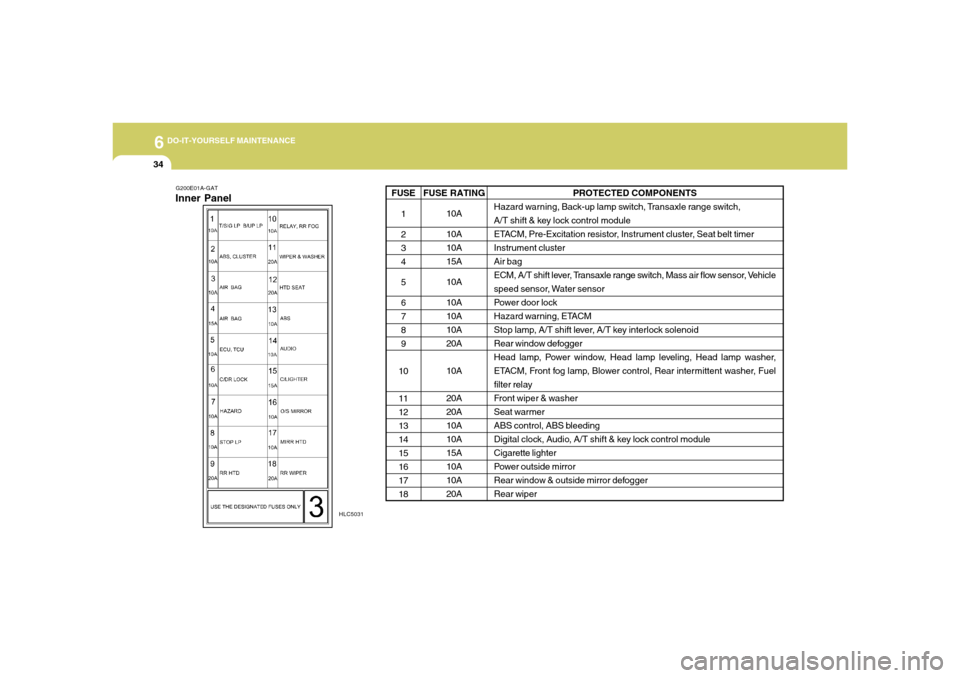
G200E01A-GATInner Panel
HLC5031
PROTECTED COMPONENTS
Hazard warning, Back-up lamp switch, Transaxle range switch,
A/T shift & key lock control module
ETACM, Pre-Excitation resistor, Instrument cluster, Seat belt timer
Instrument cluster
Air bag
ECM, A/T shift lever, Transaxle range switch, Mass air flow sensor, Vehicle
speed sensor, Water sensor
Power door lock
Hazard warning, ETACM
Stop lamp, A/T shift lever, A/T key interlock solenoid
Rear window defogger
Head lamp, Power window, Head lamp leveling, Head lamp washer,
ETACM, Front fog lamp, Blower control, Rear intermittent washer, Fuel
filter relay
Front wiper & washer
Seat warmer
ABS control, ABS bleeding
Digital clock, Audio, A/T shift & key lock control module
Cigarette lighter
Power outside mirror
Rear window & outside mirror defogger
Rear wiper
FUSE RATING
10A
10A
10A
15A
10A
10A
10A
10A
20A
10A
20A
20A
10A
10A
15A
10A
10A
20A FUSE
1
2
3
4
5
6
7
8
9
10
11
12
13
14
15
16
17
18