ECO mode Hyundai Accent 2009 User Guide
[x] Cancel search | Manufacturer: HYUNDAI, Model Year: 2009, Model line: Accent, Model: Hyundai Accent 2009Pages: 266, PDF Size: 8.77 MB
Page 139 of 266
![Hyundai Accent 2009 User Guide 1
FEATURES OF YOUR HYUNDAI
129129
10. CAT(FOLDER) ButtonMoves [CAT
] Button when Category
Up search operation.
o Category is moved Up from the cat-
egory currently being received and
Category Name b](/img/35/14391/w960_14391-138.png "Hyundai Accent 2009 User Guide 1
FEATURES OF YOUR HYUNDAI
129129
10. CAT(FOLDER) ButtonMoves [CAT
] Button when Category
Up search operation.
o Category is moved Up from the cat-
egory currently being received and
Category Name b")
1
FEATURES OF YOUR HYUNDAI
129129
10. CAT(FOLDER) ButtonMoves [CAT
] Button when Category
Up search operation.
o Category is moved Up from the cat-
egory currently being received and
Category Name becomes displayed.
o If the Enter Key is not pressed within 5
seconds, then the previous mode will
be restored.
o If the Key is pressed while in the last
Category, then the first category will
become displayed and operation will
be repeated.
o Corresponding category can be se-
lected by pressing ENTER. Moves
[CAT
] Button when Category Down
search operation.
o Category is moved Down from the cat-
egory currently being received and
Category Name becomes displayed.
o If the Enter Key is not pressed within 5
seconds, then the previous mode will
be restored.
o If the [CAT
] Key is pressed while in
the first Category, then the last cat-
egory will become displayed and op-
eration will be repeated.
o Corresponding category can be se-
lected by pressing ENTER.
11. TUNE/ENTER ButtonTurn this button clockwise by one notch to
increase or decrease frequency in FM or
AM MODE. The frequency changes by
0.2Mhz in FM MODE and 10Khz in AM
MODE.
In XM MODE, turn this button to explore
the channel and press this button select
the channel.
Press this button while holding SETUP
button to activate / inactivate the item to.
Select SETUP item using left and right
function of the Tune button.12. PRESET ButtonPush [1]~[6] buttons less than 0.8 second
to play the channel saved in each button.
Push PRESET button for 0.8 second or
longer to save current channel to the
respective button with a beep.
!
CAUTION:
o Do not place beverages close to the
audio system. The playback mecha-
nism may be damaged if you spill
them.
o Do not strike or allow anything to
impact the audio system, damage to
the system mechanisms could oc-
cur.
Page 141 of 266
1
FEATURES OF YOUR HYUNDAI
131131
PA710SD01MC-AAT1. CD Loading SlotPlease face printed side upward and
gently push in. When the ignition switch
is on ACC or ON and power is off, power
is automatically turned on if the CD is
loaded. This CDP supports only 12 cm
CD. If VCD or Data CD is loaded, "Er-6"
message will appear and CD will be
ejected.2. CD IndicatorWhen car ignition switch is ACC or ON
and if the CD is loaded, this indicator is
lighted. If the CD is ejected the light is
turned off.3. CD Eject ButtonPush
button to eject the CD. This
button is enabled when ignition switch is
off.
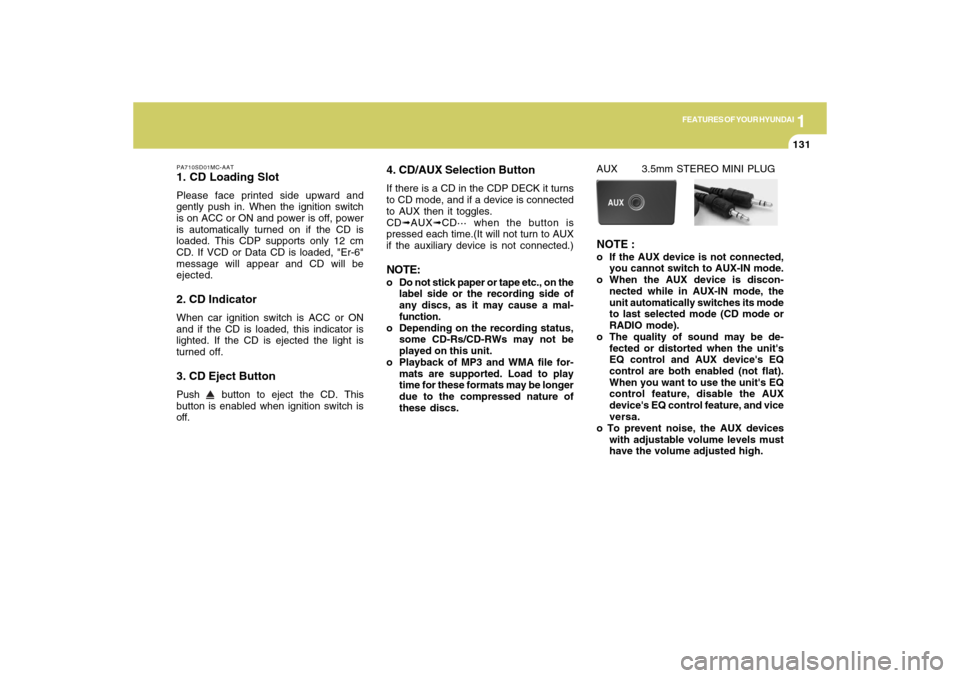
4. CD/AUX Selection ButtonIf there is a CD in the CDP DECK it turns
to CD mode, and if a device is connected
to AUX then it toggles.
CD➟AUX➟CD··· when the button is
pressed each time.(It will not turn to AUX
if the auxiliary device is not connected.)NOTE:o Do not stick paper or tape etc., on the
label side or the recording side of
any discs, as it may cause a mal-
function.
o Depending on the recording status,
some CD-Rs/CD-RWs may not be
played on this unit.
o Playback of MP3 and WMA file for-
mats are supported. Load to play
time for these formats may be longer
due to the compressed nature of
these discs.
AUX 3.5mm STEREO MINI PLUGNOTE :o If the AUX device is not connected,
you cannot switch to AUX-IN mode.
o When the AUX device is discon-
nected while in AUX-IN mode, the
unit automatically switches its mode
to last selected mode (CD mode or
RADIO mode).
o The quality of sound may be de-
fected or distorted when the unit's
EQ control and AUX device's EQ
control are both enabled (not flat).
When you want to use the unit's EQ
control feature, disable the AUX
device's EQ control feature, and vice
versa.
o To prevent noise, the AUX devices
with adjustable volume levels must
have the volume adjusted high.
Page 142 of 266

1FEATURES OF YOUR HYUNDAI
132
o If an external power connector is
connected to the vehicle, noise may
be introduced to the sound. If noise is
heard, verify the AUX device volume
is turned up, then test the sound with
the power cable disconnected. If
necessary, use the AUX device pow-
ered from its internal battery, or pur-
chase a ground loop isolator to con-
nect the AUX device to the vehicle.5. Automatic Track Selection Buttono Push [SEEK
] button for less than
0.8 second to play from the beginning
of current song.
o Push [SEEK ] button for less than
0.8 second and press again within 1
second to play the previous song.
o Push [SEEK ] button for 0.8 or longer
to initiate reverse direction high speed
sound search of current song.
o Push [SEEK ] button for less than
0.8 second to play the next song.
o Push [SEEK ] button for 0.8 or longer
to initiate high speed sound search of
current song.
6. Information Display ButtonDisplays the information of the current
CD TRACK in the order of DISC TITLE
➟DISC ARTIST➟TRACK TITLE➟ TRACK
ARTIST➟TOTAL TRACK➟Play Screen
➟DISC TITLE➟···.(not displayed if the in-
formation is not available on the DISC.)7. TUNE/ENTER ButtonTurn this button clockwise to display
songs after current song.
Also, turn this button counterclockwise to
display songs before current song.
To listen to the displayed song, press the
button to skip to the song and play.8. RANDOM Play ButtonTurns on/off the randomization of the play
list of files in the currently played DISC.
To cancel the mode, press the key once
again.9. REPEAT ButtonRepeats current song when the button is
pressed for less than 0.8 seconds.
Repeats current folder when the button is
pressed for 0.8 second or longer. (If there
is no folder, entire disc will be repeated.)
10. SCAN Play ButtonPlays first 10 seconds of each song in the
DISC. To cancel the mode, press the key
once again.11. FOLDER ButtonFolder up/down operation
o Folder is moved up or down from cur-
rently playing and folder name be-
comes displayed.
o Press enter key to play the selected
folder.
o If the enter key is not pressed within 5
seconds, then the previous folder name
will be displayed again.NOTE:o To assure proper operation of the
unit, keep the vehicle interior tem-
perature within a normal range by
using the vehicle's air conditioning
or heating system.
o When replacing the fuse, replace it
with a fuse having the correct capac-
ity.
o All stored bookmarks are all erased
when the car battery is disconnected
or power to the vehicle is lost. If this
occurs, the bookmarks will have to
be reset.
Page 158 of 266
DRIVING YOUR HYUNDAI
152
DRIVING FOR ECONOMYC140A02A-AATYou can save fuel and get more miles
from your car if you follow these sugges-
tions:
o Drive smoothly. Accelerate at a mod-
erate rate. Don't make "jack-rabbit"
starts or full-throttle shifts and maintain
a steady cruising speed. Don't race
between stoplights. Try to adjust your
speed to that of the other traffic so you
don't have to change speeds unnec-
essarily. Avoid heavy traffic whenever
possible. Always maintain a safe dis-
tance from other vehicles so you can
avoid unnecessary braking. This also
reduces brake wear.
o Drive at a moderate speed. The faster
you drive, the more fuel your car uses.
Driving at a moderate speed, espe-
cially on the highway, is one of the
most effective ways to reduce fuel con-
sumption.
o Don't "ride" the brake or clutch pedal.
This can increase fuel consumption
and also increase wear on these com-
ponents. In addition, driving with your
foot resting on the brake pedal may
cause the brakes to overheat, which
reduces their effectiveness and may
lead to more serious consequences. o Under some conditions your parking
brake can freeze in the engaged posi-
tion. This is most likely to happen when
there is an accumulation of snow or ice
around or near the rear brakes or if the
brakes are wet. If there is a risk that the
parking brake may freeze, apply it only
temporarily while you put the gear
selector lever in "P" (automatic) or in
first or reverse gear (manual transaxle)
and block the rear wheels so the car
cannot roll. Then release the parking
brake.
o Do not hold the vehicle on the upgrade
with the accelerator pedal. This can
cause the transaxle to overheat. Al-
ways use the brake pedal or parking
brake.o Take care of your tires. Keep them
inflated to the recommended pressure.
Incorrect inflation, either too much or
too little, results in unnecessary tire
wear. Check the tire pressures at least
once a month.
o Be sure that the wheels are aligned
correctly. Improper alignment can re-
sult from hitting curbs or driving too fast
over irregular surfaces. Poor align-
ment causes faster tire wear and may
also result in other problems as well as
greater fuel consumption.
o Keep your car in good condition. For
better fuel economy and reduced main-
tenance costs, maintain your car in
accordance with the maintenance
schedule in Section 5. If you drive your
car in severe conditions, more fre-
quent maintenance is required (see
Section 5 for details).
o Keep your car clean. For maximum
service, your Hyundai should be kept
clean and free of corrosive materials.
It is especially important that mud, dirt,
ice, etc. not be allowed to accumulate
on the underside of the car. This extra
weight can result in increased fuel
consumption and also contribute to
corrosion.
Page 247 of 266

8
CONSUMER INFORMATION, REPORTING SAFETY DEFECTS & BINDING ARBITRATION OF WARRANTY CLAIMS
9
Intended Outboard Sidewall: The
side of an asymmetrical tire, that must
always face outward when mounted on
a vehicle.
Kilopascal (kPa): The metric unit for
air pressure.
Load Index: An assigned number rang-
ing from 1 to 279 that corresponds to
the load carrying capacity of a tire.
Maximum Inflation Pressure: The
maximum air pressure to which a cold
tire may be inflated. The maximum air
pressure is molded onto the sidewall.
Maximum Load Rating: The load rat-
ing for a tire at the maximum permis-
sible inflation pressure for that tire.
Maximum Loaded Vehicle Weight:
The sum of curb weight; accessory
weight; vehicle capacity weight; and
production options weight.
Normal Occupant Weight: The num-
ber of occupants a vehicle is designed
to seat multiplied by 150 pounds (68
kg).Occupant Distribution: Designated
seating positions.
Outward Facing Sidewall: The side
of a asymmetrical tire that has a par-
ticular side that faces outward when
mounted on a vehicle. The side of the
tire that contains a whitewall, bears
white lettering or bears manufacturer,
brand and or model name molding that
is higher or deeper than the same
moldings on the other sidewall of the
tire.
Passenger (P-Metric) Tire: A tire used
on passenger cars and some light duty
trucks and multipurpose vehicles.
Recommended Inflation Pressure:
Vehicle manufacturer's recommended
tire inflation pressure and shown on
the tire placard.
Radial Ply tire: A pneumatic tire in
which the ply cords that extend to the
beads are laid at 90 degrees to the
centerline of the tread.Rim: A metal support for a tire and
upon which the tire beads are seated.
Sidewall: The portion of a tire be-
tween the tread and the bead.
Speed Rating: An alphanumeric code
assigned to a tire indicating the maxi-
mum speed at which a tire can oper-
ate.
Traction: The friction between the tire
and the road surface. The amount of
grip provided.
Tread: The portion of a tire that comes
into contact with the road.
Treadwear Indicators: Narrow bands,
sometimes called "wear bars," that
show across the tread of a tire when
only 2/32 inch of tread remains.
UTQGS: Uniform Tire Quality Grading
Standards, a tire information system
that provides consumers with ratings
for a tire's traction, temperature and
treadwear. Ratings are determined by
tire manufacturers using government
testing procedures. The ratings are
molded into the sidewall of the tire.
Page 248 of 266

8
CONSUMER INFORMATION, REPORTING SAFETY DEFECTS & BINDING ARBITRATION OF WARRANTY CLAIMS
10
I040A01O-AATSNOW TIRES
If you equip your car with snow tires,
they should be the same size and
have the same load capacity as the
original tires. Snow tires should be
installed on all four wheels; otherwise,
poor handling may result.
Snow tires should carry 4 psi (28 kPa)
more air pressure than the pressure
recommended for the standard tires on
the tire label on the driver's side of the
center pillar , or up to the maximum
pressure shown on the tire sidewall
whichever is less.
Do not drive faster than 75 mph (120
km/h) when your car is equipped with
snow tires.
I040B01JM-AATALL SEASON TIRES
Hyundai specifies all season tires on
some models to provide good perfor-
mance for use all year round, including
snowy and icy road conditions. All sea-
son tires are identified by ALL SEA-
SON and/or M+S (Mud and Snow) on
the tire sidewall. Snow tires have better
snow traction than all season tires an
may be more appropriate in some areas. Vehicle Capacity Weight: The num-
ber of designated seating positions
multiplied by 150 lbs. (68 kg) plus the
rated cargo and luggage load.
Vehicle Maximum Load on the Tire:
Load on an individual tire due to curb
and accessory weight plus maximum
occupant and cargo weight.
Vehicle Normal Load on the Tire:
That load on an individual tire that is
determined by distributing to each axle
its share of the curb weight, accessory
weight, and normal occupant weight
and driving by 2.
Vehicle Placard: A label permanently
attached to a vehicle showing the origi-
nal equipment tire size and recom-
mended inflation pressure.