speaker Hyundai Accent 2009 Owner's Manual
[x] Cancel search | Manufacturer: HYUNDAI, Model Year: 2009, Model line: Accent, Model: Hyundai Accent 2009Pages: 266, PDF Size: 8.77 MB
Page 127 of 266
1
FEATURES OF YOUR HYUNDAI
1171
FEATURES OF YOUR HYUNDAI
117
STEREO SOUND SYSTEM
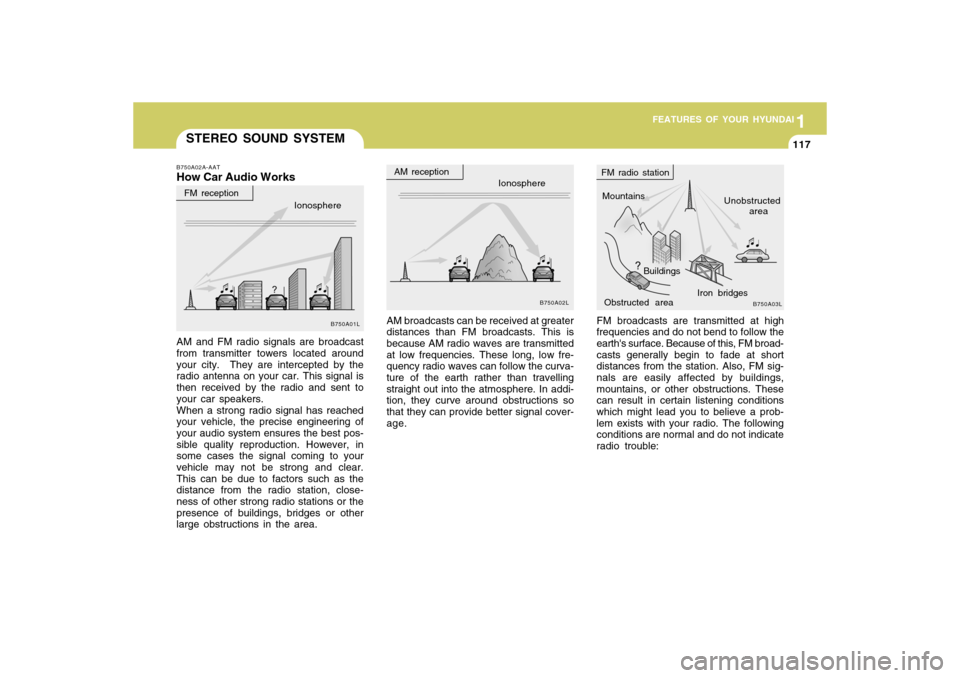
FM broadcasts are transmitted at high
frequencies and do not bend to follow the
earth's surface. Because of this, FM broad-
casts generally begin to fade at short
distances from the station. Also, FM sig-
nals are easily affected by buildings,
mountains, or other obstructions. These
can result in certain listening conditions
which might lead you to believe a prob-
lem exists with your radio. The following
conditions are normal and do not indicate
radio trouble: AM broadcasts can be received at greater
distances than FM broadcasts. This is
because AM radio waves are transmitted
at low frequencies. These long, low fre-
quency radio waves can follow the curva-
ture of the earth rather than travelling
straight out into the atmosphere. In addi-
tion, they curve around obstructions so
that they can provide better signal cover-
age.
B750A02A-AATHow Car Audio WorksAM and FM radio signals are broadcast
from transmitter towers located around
your city. They are intercepted by the
radio antenna on your car. This signal is
then received by the radio and sent to
your car speakers.
When a strong radio signal has reached
your vehicle, the precise engineering of
your audio system ensures the best pos-
sible quality reproduction. However, in
some cases the signal coming to your
vehicle may not be strong and clear.
This can be due to factors such as the
distance from the radio station, close-
ness of other strong radio stations or the
presence of buildings, bridges or other
large obstructions in the area.
Ionosphere
B750A02L
Mountains
Buildings
Obstructed areaUnobstructed
area FM radio station
B750A03L
Ionosphere FM reception
B750A01L
Iron bridges
AM reception
Page 135 of 266
![Hyundai Accent 2009 Owners Manual 1
FEATURES OF YOUR HYUNDAI
125125
6. Automatic Track Selection Buttono Push [SEEK
] button for less than
0.8 second to play from the beginning
of current song.
o Push [SEEK ] button for less than
0](/img/35/14391/w960_14391-134.png "Hyundai Accent 2009 Owners Manual 1
FEATURES OF YOUR HYUNDAI
125125
6. Automatic Track Selection Buttono Push [SEEK
] button for less than
0.8 second to play from the beginning
of current song.
o Push [SEEK ] button for less than
0")
1
FEATURES OF YOUR HYUNDAI
125125
6. Automatic Track Selection Buttono Push [SEEK
] button for less than
0.8 second to play from the beginning
of current song.
o Push [SEEK ] button for less than
0.8 second and press again within 1
second to play the previous song.
o Push [SEEK ] button for 0.8 or longer
to initiate reverse direction high speed
sound search of current song.
o Push [SEEK ] button for less than
0.8 second to play the next song.
o Push [SEEK ] button for 0.8 or longer
to initiate high speed sound search of
current song.
7. Information Display ButtonDisplays the information of the current
CD TRACK in the order of DISC TITLE
➟DISC ARTIST➟TRACK TITLE➟ TRACK
ARTIST➟TOTAL TRACK➟ Play Screen
➟DISC TITLE➟···.(not displayed if the in-
formation is not available on the DISC.)8. TUNE/ENTER ButtonTurn this button clockwise to display
songs after current song.
Also, turn this button counterclockwise to
display songs before current song.
To listen to the displayed song, press the
button to skip to the song and play.
9. RANDOM Play ButtonTurns on/off the randomization of the play
list of files in the currently played DISC.
To cancel the mode, press the key once
again.10. REPEAT ButtonRepeats current song when the button is
pressed for less than 0.8 second.
Repeats current folder when the button is
pressed for 0.8 second or longer. (If there
is no folder, entire disc will be repeated.)11. SCAN Play ButtonPlays first 10 seconds of each song in the
DISC. To cancel the mode, press the key
once again.12. FOLDER ButtonFolder up/down operation
o Folder is moved up or down from cur-
rently playing and folder name be-
comes displayed.
o Press enter key to play the selected
folder.
o If the enter key is not pressed within 5
seconds, then the previous folder name
will be displayed again.
NOTE:o To assure proper operation of the
unit, keep the vehicle interior tem-
perature within a normal range by
using the vehicle's air conditioning
or heating system.
o When replacing the fuse, replace it
with a fuse having the correct capac-
ity.
o All stored bookmarks are all erased
when the car battery is disconnected
or power to the vehicle is lost. If this
occurs, the bookmarks will have to
be reset.
o This equipment is designed to be
used only in a 12 volt DC battery
system with negative ground.
o This unit is made of precision parts.
Do not attempt to disassemble or
adjust any parts.
o When driving your vehicle, be sure to
keep the volume of the unit set low
enough to allow you to hear sounds
coming from the outside.
o Do not expose this equipment (in-
cluding the speakers and CD) to water
or excessive moisture.
Page 143 of 266
1
FEATURES OF YOUR HYUNDAI
133133
o This equipment is designed to be
used only in a 12 volt DC battery
system with negative ground.
o This unit is made of precision parts.
Do not attempt to disassemble or
adjust any parts.
o When driving your vehicle, be sure to
keep the volume of the unit set low
enough to allow you to hear sounds
coming from the outside.
o Do not expose this equipment (in-
cluding the speakers and CD) to water
or excessive moisture.
!
CAUTION:
o Do not insert warped or poor quality
discs into the CD player as damage
to the unit may occur.
o Do not insert anything like coins into
the player slot as damage to the unit
may occur.
o Do not place beverages close to the
audio system. The playback mecha-
nism may be damaged if you spill
them.
o Do not strike or allow anything to
impact the audio system, damage to
the system mechanisms could oc-
cur.
o Off-road or rough surface driving may
cause the compact disc to skip. Do
not use the compact disc when driv-
ing in such conditions as damage to
the compact disc face could occur.
o Do not attempt to grab or pull the
compact disc out while the disc is
being pulled into the audio unit by the
self-loading mechanism. Damage to
the audio unit and compact disc could
occur.