ESP Hyundai Accent 2010 User Guide
[x] Cancel search | Manufacturer: HYUNDAI, Model Year: 2010, Model line: Accent, Model: Hyundai Accent 2010Pages: 284, PDF Size: 10.23 MB
Page 105 of 284
1
FEATURES OF YOUR HYUNDAI
93
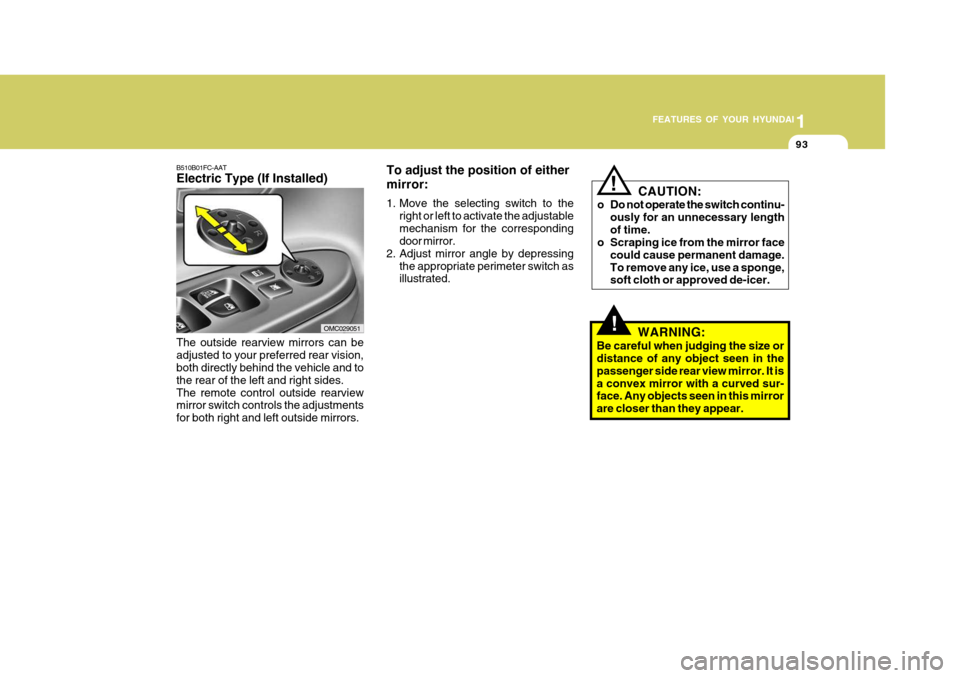
B510B01FC-AAT Electric Type (If Installed) The outside rearview mirrors can be adjusted to your preferred rear vision, both directly behind the vehicle and to the rear of the left and right sides.The remote control outside rearview mirror switch controls the adjustments for both right and left outside mirrors.
OMC029051 To adjust the position of either mirror:
1. Move the selecting switch to the
right or left to activate the adjustable mechanism for the corresponding door mirror.
2. Adjust mirror angle by depressing
the appropriate perimeter switch asillustrated.!
CAUTION:
o Do not operate the switch continu- ously for an unnecessary length of time.
o Scraping ice from the mirror face
could cause permanent damage.To remove any ice, use a sponge, soft cloth or approved de-icer.
WARNING:
Be careful when judging the size ordistance of any object seen in the passenger side rear view mirror. It isa convex mirror with a curved sur- face. Any objects seen in this mirror are closer than they appear.!
Page 111 of 284
1
FEATURES OF YOUR HYUNDAI
99
- When refueling always shut the
engine off. Sparks produced by electrical components related tothe engine can ignite fuel va- pors causing a fire. Always in- sure that the engine is OFF be-fore and during refueling. Once refueling is complete, check to make sure the fuel filler cap anddoor are securely closed, before starting the engine.
- Do not light any fire around a gas station. DO NOT use matchesor a lighter and DO NOT SMOKE or leave a lit cigarette in yourvehicle while at a gas station especially during refueling. Au- tomotive fuel is highly flammableand can, when ignited, result in explosion by flames.
- If a fire breaks out during refuel- ing, leave the vicinity of the ve-hicle, and immediately contact the manager of the gas stationor contact the police and local fire department. Follow any safety instructions they provide.
!
TRUNK LID/TAIL GATE
B540A01MC-GAT
WARNING:
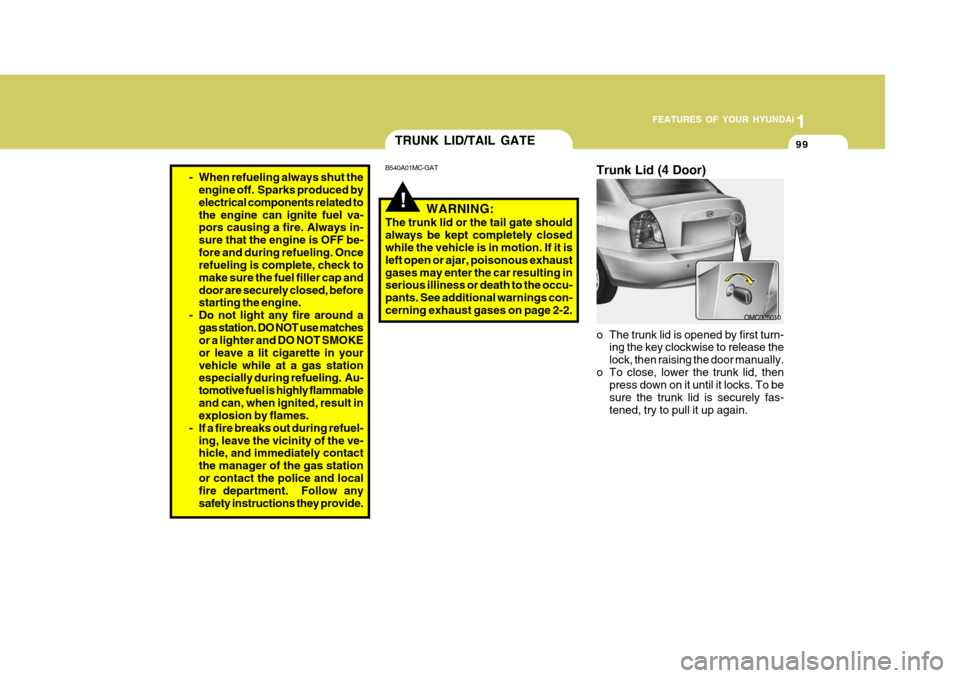
The trunk lid or the tail gate should always be kept completely closed while the vehicle is in motion. If it is left open or ajar, poisonous exhaustgases may enter the car resulting in serious illiness or death to the occu- pants. See additional warnings con-cerning exhaust gases on page 2-2. Trunk Lid (4 Door)
o The trunk lid is opened by first turn-
ing the key clockwise to release the lock, then raising the door manually.
o To close, lower the trunk lid, then press down on it until it locks. To besure the trunk lid is securely fas-tened, try to pull it up again.
OMC025010
Page 140 of 284
1FEATURES OF YOUR HYUNDAI
128
5. Best Station Memory (BSM)Button
When the BSM button is pressed, the six channels from the highest field in-tensity are selected next and stored in memory. The stations selected are stored in the sequence of frequencyfrom the first preset key.
6. PRESET STATION Select Buttons
Six stations for AM(MW, LW), FM1 and FM2 respectively can be preset in the electronic memory circuit. HOW TO PRESET STATIONS Six AM(MW, LW) and twelve FM sta- tions may be programmed into thememory of the radio. Then, by simply pressing the AM(MW, LW) / FM select button and/or one of the six stationselect buttons, you may recall any of these stations instantly. To program the stations, follow these steps: o Press AM(MW, LW)/FM selector to
set the band for AM(MW, LW), FM1and FM2.
o Select the desired station to be stored
by seek or manual tuning.
o Determine the preset station select button you wish to use to access thatstation.
o Press the station select button for more than two seconds. A selectbutton indicator will show in the dis-play indicating which select button you have depressed. The frequency display will flash after it has beenstored into the memory. You should then release the button, and proceed to program the next desired station.A total of 24 stations can be pro- grammed by selecting one AM(MW, LW) and two FM station per button.
o When completed, any preset station may be recalled by selecting AM(MW,LW), FM1 or FM2 band and theappropriate station button.
! CAUTION:
o Do not place beverages close to the audio system. The audio sys- tem mechanism may be damaged if you spill them.
o Do not strike or allow anything to impact the audio system, damageto the system mechanisms could occur.
Page 145 of 284
1
FEATURES OF YOUR HYUNDAI
133133133133
o FADER Control Turn the control knob clockwise to emphasize rear speaker sound (frontspeaker sound will be attenuated). When the control knob is turned counterclock- wise, front speaker sound will be em-phasized (rear speaker sound will be attenuated). o BALANCE Control Rotate the knob clockwise to empha- size right speaker sound (Left speaker sound will be attenuated). When the control knob is turned counterclock-wise, left speaker sound will be empha- sized (Right speaker sound will be at- tenuated).
! CAUTION:
o Do not place beverages close to the audio system. The playback mechanism may be damaged if you spill them.
o Do not strike or allow anything to impact the audio system, damageto the system mechanisms could occur.
7. PRESET STATION Select But-
tons
Six stations for AM, FM1 and FM2respectively can be preset in the elec-tronic memory circuit. HOW TO PRESET STATIONS Six AM and twelve FM stations may be programmed into the memory of the radio. Then, by simply pressing the band select button and/or one of the sixstation select buttons, you may recall any of these stations instantly. To pro- gram the stations, follow these steps:
o Press AM, FM selector to set the band for AM, FM1 and FM2.
o Select the desired station to be stored by seek or manual tuning.
o Determine the preset station select button you wish to use to access that station.
o Press the station select button for more than two seconds. Beep soundwill be heard while depressing the button. You should then release thebutton, and proceed to program the next desired station. A total of 18 stations can be pro- grammed by selecting one AM andtwo FM station per button.
o When completed, any preset station
may be recalled by selecting AM,FM1 or FM2 band and the appropri- ate station button.
Page 152 of 284
1FEATURES OF YOUR HYUNDAI
140
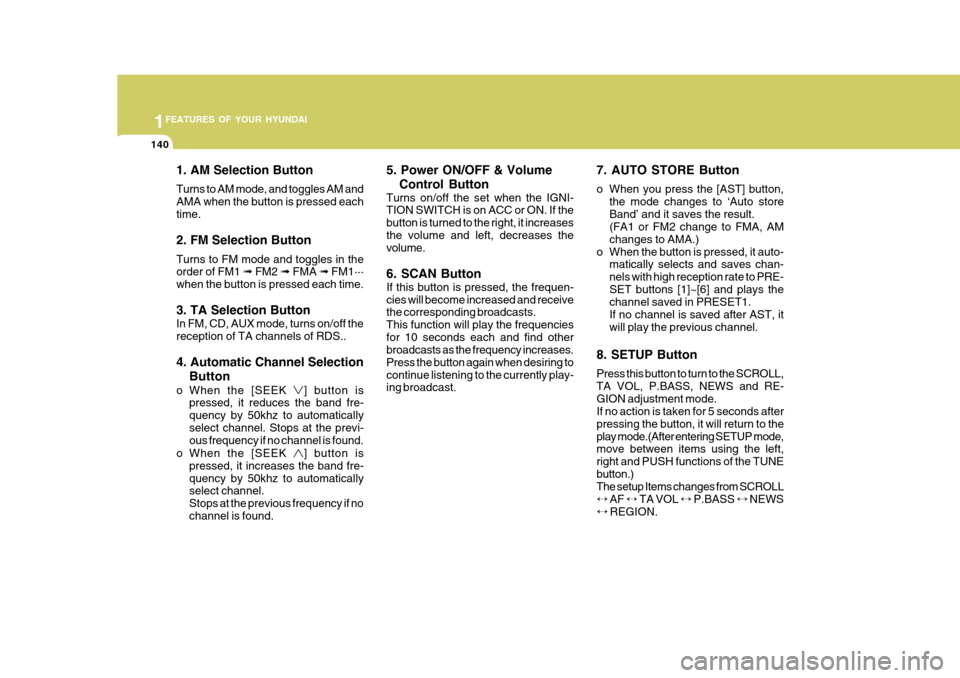
1. AM Selection Button Turns to AM mode, and toggles AM and AMA when the button is pressed eachtime. 2. FM Selection Button Turns to FM mode and toggles in the order of FM1 ➟ FM2 ➟ FMA ➟ FM1···
when the button is pressed each time. 3. TA Selection Button In FM, CD, AUX mode, turns on/off the reception of TA channels of RDS.. 4. Automatic Channel Selection
Button
o When the [SEEK
] button is
pressed, it reduces the band fre- quency by 50khz to automaticallyselect channel. Stops at the previ- ous frequency if no channel is found.
o When the [SEEK
] button is
pressed, it increases the band fre- quency by 50khz to automatically select channel. Stops at the previous frequency if nochannel is found. 5. Power ON/OFF & Volume
Control Button
Turns on/off the set when the IGNI- TION SWITCH is on ACC or ON. If the button is turned to the right, it increasesthe volume and left, decreases the volume. 6. SCAN Button If this button is pressed, the frequen- cies will become increased and receive the corresponding broadcasts. This function will play the frequenciesfor 10 seconds each and find other broadcasts as the frequency increases. Press the button again when desiring tocontinue listening to the currently play- ing broadcast. 7. AUTO STORE Button
o When you press the [AST] button,
the mode changes to ‘Auto store Band’ and it saves the result. (FA1 or FM2 change to FMA, AM changes to AMA.)
o When the button is pressed, it auto- matically selects and saves chan-nels with high reception rate to PRE-SET buttons [1]~[6] and plays the channel saved in PRESET1. If no channel is saved after AST, itwill play the previous channel.
8. SETUP Button Press this button to turn to the SCROLL, TA VOL, P.BASS, NEWS and RE-GION adjustment mode. If no action is taken for 5 seconds after pressing the button, it will return to theplay mode.(After entering SETUP mode, move between items using the left, right and PUSH functions of the TUNEbutton.) The setup Items changes from SCROLL ↔ AF ↔ TA VOL ↔ P.BASS ↔ NEWS
↔ REGION.
Page 153 of 284
1
FEATURES OF YOUR HYUNDAI
141141141141
!
CAUTION:
o Do not place beverages close to the audio system. The playback mechanism may be damaged if you spill them.
o Do not strike or allow anything to impact the audio system, damageto the system mechanisms couldoccur.
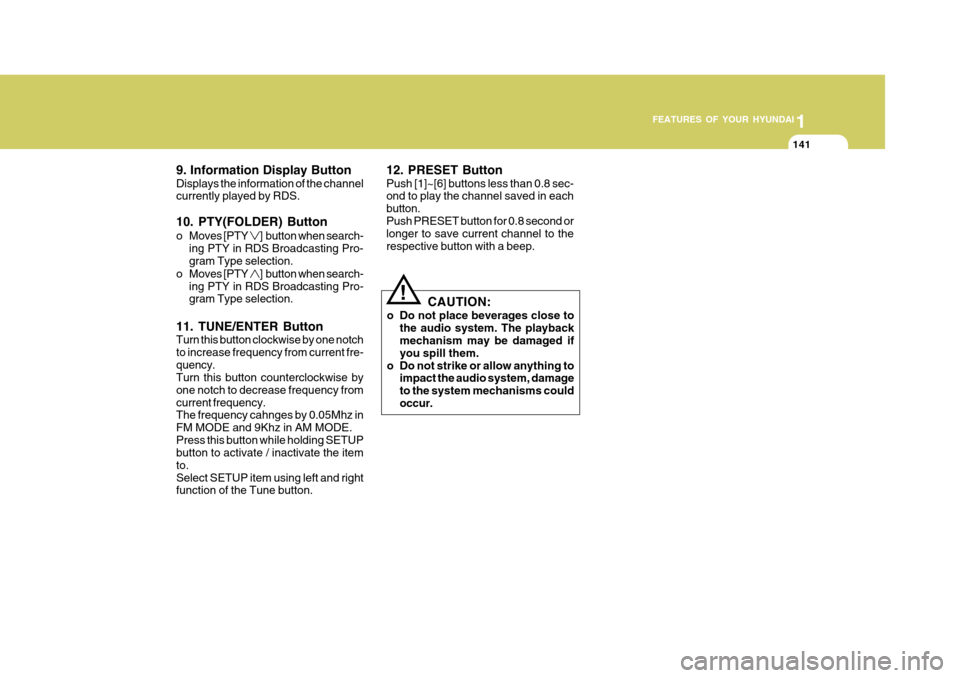
9. Information Display Button Displays the information of the channel currently played by RDS. 10. PTY(FOLDER) Button
o Moves [PTY
] button when search-
ing PTY in RDS Broadcasting Pro- gram Type selection.
o Moves [PTY
] button when search-
ing PTY in RDS Broadcasting Pro- gram Type selection.
11. TUNE/ENTER Button Turn this button clockwise by one notch to increase frequency from current fre-quency. Turn this button counterclockwise by one notch to decrease frequency fromcurrent frequency. The frequency cahnges by 0.05Mhz in FM MODE and 9Khz in AM MODE.Press this button while holding SETUP button to activate / inactivate the item to.Select SETUP item using left and right function of the Tune button. 12. PRESET Button Push [1]~[6] buttons less than 0.8 sec- ond to play the channel saved in each button.Push PRESET button for 0.8 second or longer to save current channel to the respective button with a beep.
Page 158 of 284
![Hyundai Accent 2010 User Guide 1FEATURES OF YOUR HYUNDAI
146
1. AM Selection Button Pressing the [AM] button selects the AM band. 2. FM Selection Button Turns to FM mode and toggles FM1 and FM2 when the button is pressed each time.](/img/35/14390/w960_14390-157.png "Hyundai Accent 2010 User Guide 1FEATURES OF YOUR HYUNDAI
146
1. AM Selection Button Pressing the [AM] button selects the AM band. 2. FM Selection Button Turns to FM mode and toggles FM1 and FM2 when the button is pressed each time.")
1FEATURES OF YOUR HYUNDAI
146
1. AM Selection Button Pressing the [AM] button selects the AM band. 2. FM Selection Button Turns to FM mode and toggles FM1 and FM2 when the button is pressed each time.
3. Automatic Channel SelectionButton
o When the [SEEK
] button is
pressed, it reduces the band fre- quency by 50khz to automatically select channel. Stops at the previ- ous frequency if no channel is found.
o When the [SEEK
] button is
pressed, it increases the band fre- quency by 50khz to automaticallyselect channel. Stops at the previous frequency if no channel is found. 4. Power ON/OFF & Volume
Control Button
Turns on/off the set when the IGNI- TION SWITCH is on ACC or ON. If the button is turned to the right, it increasesthe volume and left, decreases the volume. 5. SCAN Button If this button is pressed, the frequen- cies will become increased and receive the corresponding broadcasts. This function will play the frequenciesfor 10 seconds each and find other broadcasts as the frequency increases. Press the button again when desiring tocontinue listening to the currently play- ing broadcast. 6. AUTO STORE Button When the button is pressed, it auto- matically selects and saves channels with high reception rate to PRESETbuttons (1~6) and plays the channel saved on PRESET1. If no channel os saved after AST, it willplay the previous channel. 7. SETUP Button Press this button to turn to the SCROLL and P.BASS adjustment mode. If no action is taken for 5 seconds afterpressing the button, it will return to the play mode.(After entering SETUP mode, move between items using the left,right and PUSH functions of the TUNE button.) The setup Items changes from SCROLL↔
P.BASS.
8. TUNE/ENTER Button Turn this button clockwise one notch to increase frequency from current fre- quency. Turn this button counterclockwise byone notch to decrease frequency from current frequency. The frequency cahnges by 0.2Mhz inFM MODE and 9Khz in AM MODE. Press this button while holding SETUP button to activate/inactivate the itemto. Select SETUP item using left and right function of the Tune button.
Page 159 of 284
1
FEATURES OF YOUR HYUNDAI
147147147147
!
CAUTION:
o Do not place beverages close to the audio system. The playback mechanism may be damaged if you spill them.
o Do not strike or allow anything to
impact the audio system, damageto the system mechanisms could occur.
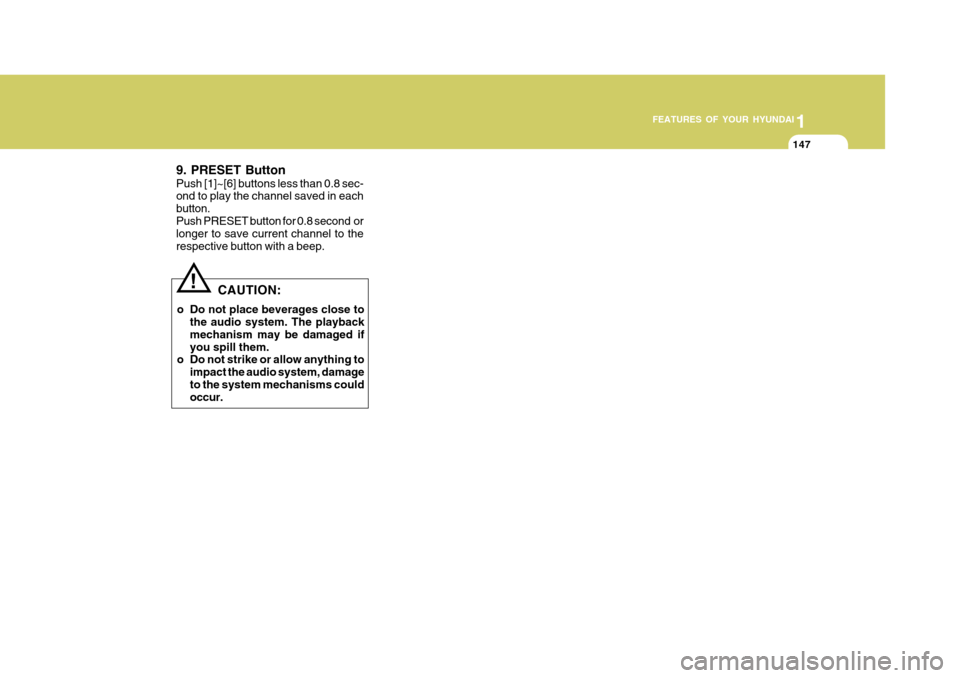
9. PRESET Button Push [1]~[6] buttons less than 0.8 sec- ond to play the channel saved in each button.Push PRESET button for 0.8 second or longer to save current channel to the respective button with a beep.
Page 163 of 284
2
Engine Exhaust can be Dangerous! ............................. 2-2
Before Starting the Engine ............................................ 2-3
Key Position ................................................................. 2-4Starting ......................................................................... 2-5
Operating the Manual Transaxle .................................. 2-7
Automatic Transaxle ..................................................... 2-9Anti-lock Brake System (ABS) .................................... 2-13
Electronic Stability Program (ESP) ..............................2-14
Vehicle Stability Management (VSM) ..........................2-15
Rear Parking Assist System ....................................... 2-16
Good Braking Practices .............................................. 2-18
Driving for Economy .................................................... 2-19
Smooth Cornering ........................................................ 2-21
Winter Driving .............................................................. 2-21
Trailer or Vehicle Towing ............................................. 2-24
DRIVING YOUR HYUNDAI
2
Page 167 of 284
2
DRIVING YOUR HYUNDAI
5
2
DRIVING YOUR HYUNDAI
5
!WARNING:
Never run the engine in a closed or poorly ventilated area any longer than is needed to move your car in or out of the area. The carbon mon-oxide gas emitted is odorless and can cause serious injury or death.
C050A01E C051A01O-GAT STARTING FOR THE DIESEL ENGINE ENGINE COLD
o Turn the ignition key to position
"ON" and wait for the pre-heat indi- cator light to go out.
o Operate the starter until the engine
runs.
ENGINE WARM Operate the starter. If the engine does not respond on the first attempt, wait several seconds and try again usingthe pre-heat.
STARTING
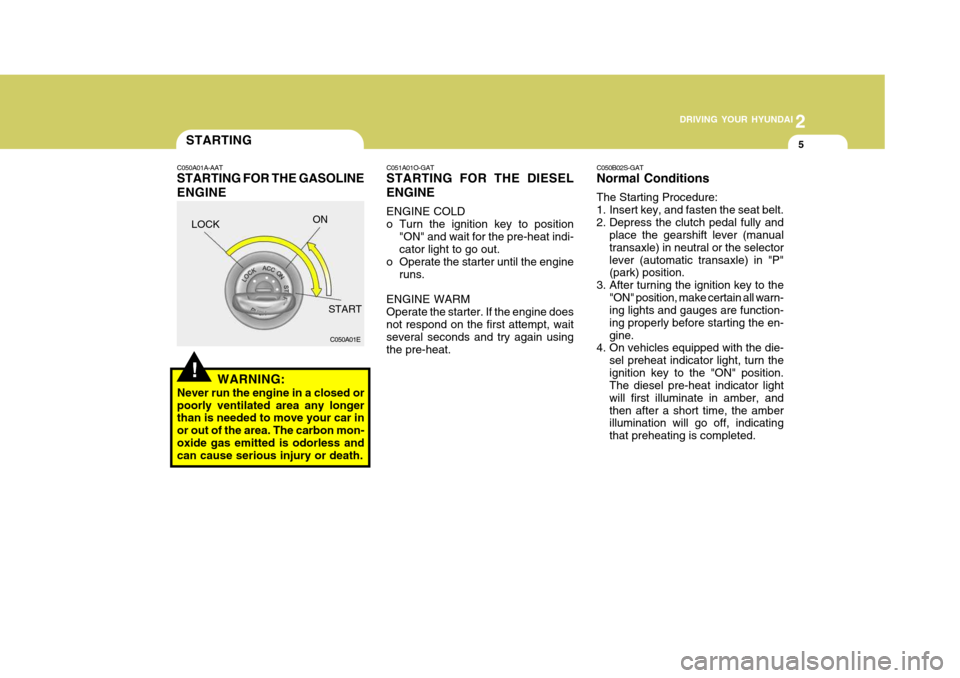
C050A01A-AAT STARTING FOR THE GASOLINE ENGINE C050B02S-GAT Normal Conditions The Starting Procedure:
1. Insert key, and fasten the seat belt.
2. Depress the clutch pedal fully and
place the gearshift lever (manualtransaxle) in neutral or the selectorlever (automatic transaxle) in "P" (park) position.
3. After turning the ignition key to the "ON" position, make certain all warn-ing lights and gauges are function- ing properly before starting the en-gine.
4. On vehicles equipped with the die-
sel preheat indicator light, turn theignition key to the "ON" position. The diesel pre-heat indicator light will first illuminate in amber, andthen after a short time, the amber illumination will go off, indicating that preheating is completed.
LOCK
ON
START