reset Hyundai Accent 2011 Owner's Manual
[x] Cancel search | Manufacturer: HYUNDAI, Model Year: 2011, Model line: Accent, Model: Hyundai Accent 2011Pages: 282, PDF Size: 14.82 MB
Page 83 of 282
1FEATURES OF YOUR HYUNDAI72
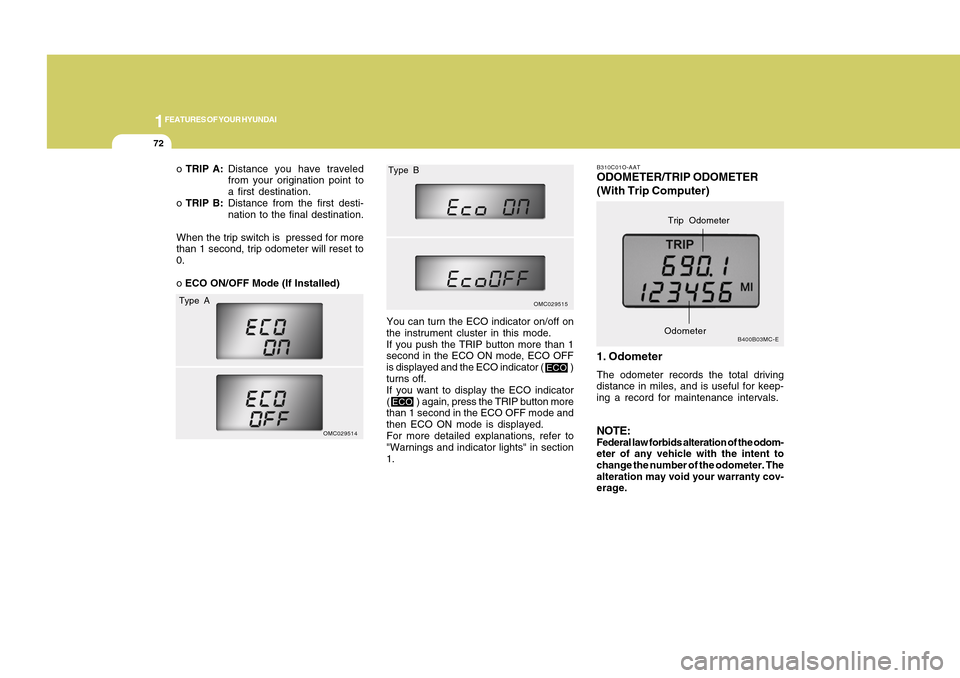
B310C01O-AATODOMETER/TRIP ODOMETER
(With Trip Computer)
1. OdometerThe odometer records the total driving
distance in miles, and is useful for keep-
ing a record for maintenance intervals.NOTE:Federal law forbids alteration of the odom-
eter of any vehicle with the intent to
change the number of the odometer. The
alteration may void your warranty cov-
erage.
B400B03MC-E
Trip Odometer
Odometer
o TRIP A:Distance you have traveled
from your origination point to
a first destination.
o TRIP B:Distance from the first desti-
nation to the final destination.
When the trip switch is pressed for more
than 1 second, trip odometer will reset to
0.
o ECO ON/OFF Mode (If Installed)
OMC029514
OMC029515
You can turn the ECO indicator on/off on
the instrument cluster in this mode.
If you push the TRIP button more than 1
second in the ECO ON mode, ECO OFF
is displayed and the ECO indicator ( )
turns off.
If you want to display the ECO indicator
( ) again, press the TRIP button more
than 1 second in the ECO OFF mode and
then ECO ON mode is displayed.
For more detailed explanations, refer to
"Warnings and indicator lights" in section
1.
Type AType B
ECO
ECO
Page 84 of 282
1
FEATURES OF YOUR HYUNDAI
731
FEATURES OF YOUR HYUNDAI
73
2. Trip Odometero This mode indicates the drive distance
travelled since the last drive time reset.
o Refer to the explanation of the trip
computer (see page 1-74, Tripmeter).
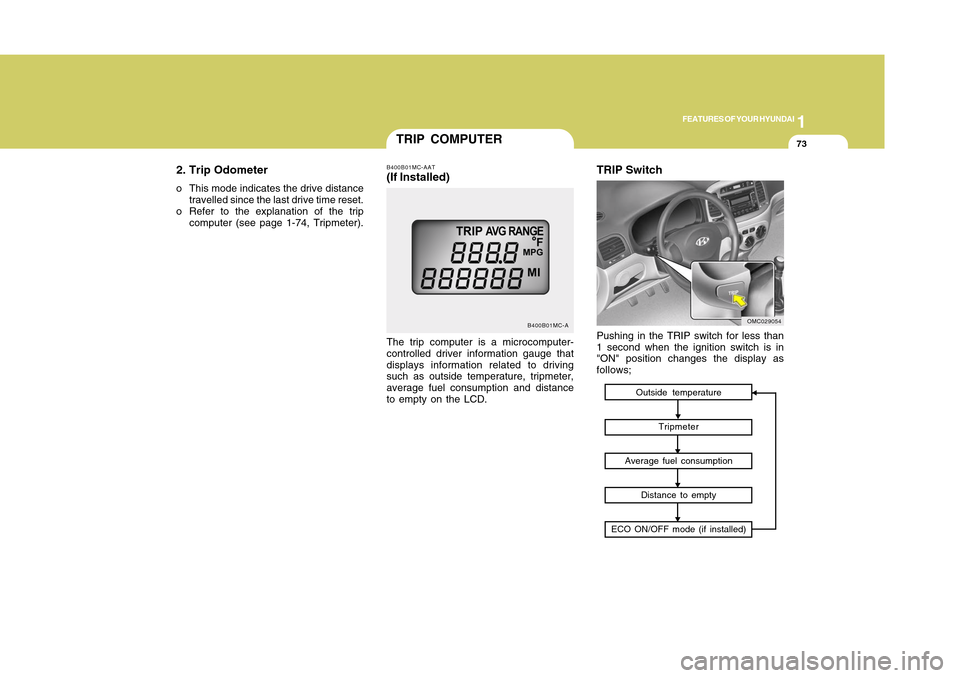
TRIP COMPUTER
B400B01MC-A
The trip computer is a microcomputer-
controlled driver information gauge that
displays information related to driving
such as outside temperature, tripmeter,
average fuel consumption and distance
to empty on the LCD.B400B01MC-AAT(If Installed)
Outside temperature
Tripmeter
Average fuel consumption
Distance to empty
ECO ON/OFF mode (if installed)
TRIP SwitchPushing in the TRIP switch for less than
1 second when the ignition switch is in
"ON" position changes the display as
follows;
OMC029054
Page 85 of 282
1FEATURES OF YOUR HYUNDAI74
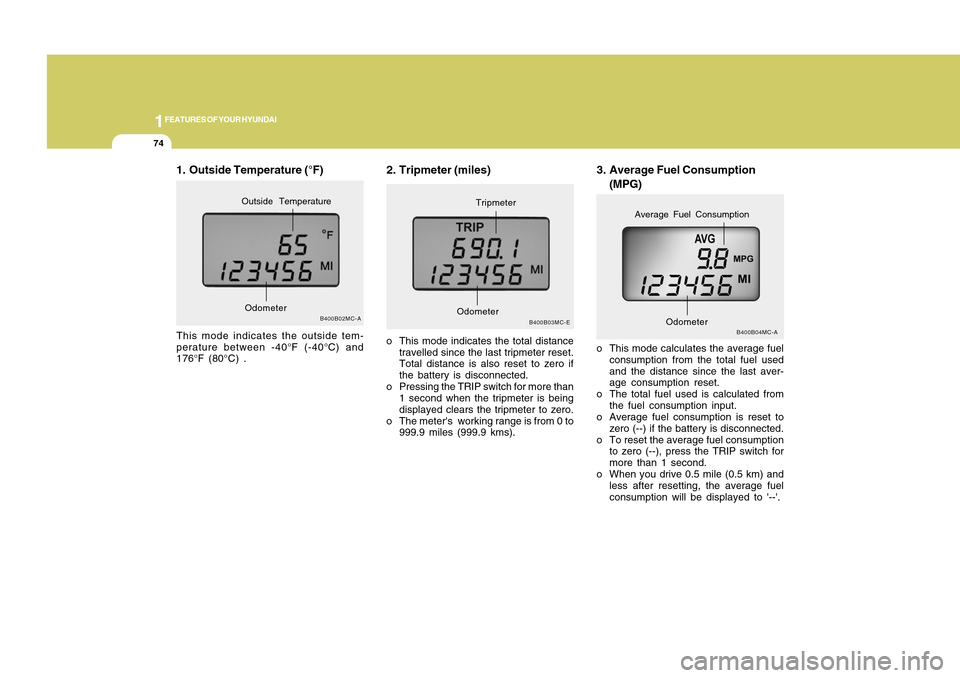
3. Average Fuel Consumption
(MPG)
B400B04MC-A
o This mode calculates the average fuel
consumption from the total fuel used
and the distance since the last aver-
age consumption reset.
o The total fuel used is calculated from
the fuel consumption input.
o Average fuel consumption is reset to
zero (--) if the battery is disconnected.
o To reset the average fuel consumption
to zero (--), press the TRIP switch for
more than 1 second.
o When you drive 0.5 mile (0.5 km) and
less after resetting, the average fuel
consumption will be displayed to '--'.
Odometer
Average Fuel Consumption
2. Tripmeter (miles)o This mode indicates the total distance
travelled since the last tripmeter reset.
Total distance is also reset to zero if
the battery is disconnected.
o Pressing the TRIP switch for more than
1 second when the tripmeter is being
displayed clears the tripmeter to zero.
o The meter's working range is from 0 to
999.9 miles (999.9 kms).
B400B03MC-E
OdometerTripmeter
1. Outside Temperature (°F)This mode indicates the outside tem-
perature between -40°F (-40°C) and
176°F (80°C) .
B400B02MC-A
OdometerOutside Temperature
Page 93 of 282
1FEATURES OF YOUR HYUNDAI82
CIGARETTE LIGHTER
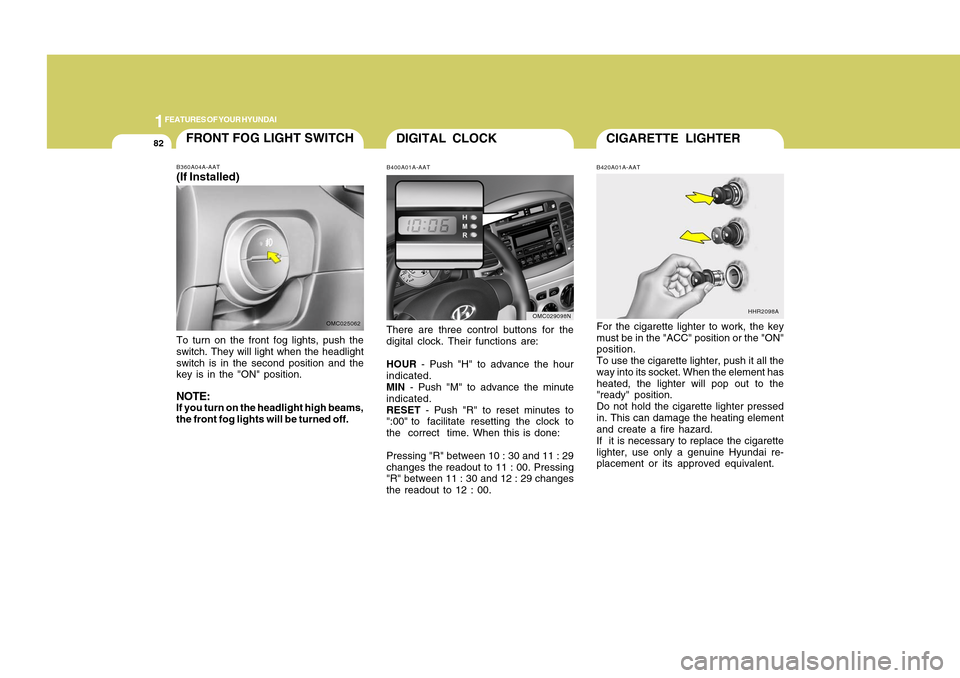
DIGITAL CLOCK
B420A01A-AATFor the cigarette lighter to work, the key
must be in the "ACC" position or the "ON"
position.
To use the cigarette lighter, push it all the
way into its socket. When the element has
heated, the lighter will pop out to the
"ready" position.
Do not hold the cigarette lighter pressed
in. This can damage the heating element
and create a fire hazard.
If it is necessary to replace the cigarette
lighter, use only a genuine Hyundai re-
placement or its approved equivalent.
HHR2098A
B400A01A-AATThere are three control buttons for the
digital clock. Their functions are:
HOUR - Push "H" to advance the hour
indicated.
MIN - Push "M" to advance the minute
indicated.
RESET - Push "R" to reset minutes to
":00" to facilitate resetting the clock to
the correct time. When this is done:
Pressing "R" between 10 : 30 and 11 : 29
changes the readout to 11 : 00. Pressing
"R" between 11 : 30 and 12 : 29 changes
the readout to 12 : 00.
OMC029098N
FRONT FOG LIGHT SWITCHB360A04A-AAT(If Installed)To turn on the front fog lights, push the
switch. They will light when the headlight
switch is in the second position and the
key is in the "ON" position.NOTE:If you turn on the headlight high beams,
the front fog lights will be turned off.
OMC025062
Page 97 of 282
1FEATURES OF YOUR HYUNDAI86
!
CAUTION:
If the sunroof is not reset, it may not
operate properly.B460E02TG-GATResetting the sunroofWhenever the vehicle battery is discon-
nected or discharged, you have to reset
your sunroof system as follows:
1. Turn the ignition key to the "ON" posi-
tion.
2. Press the TILT UP button for more than
1 second to tilt up the sunroof com-
pletely when the sunroof is fully closed.
Then, release the button.
3. Press and hold the TILT UP button
once again until the sunroof has re-
turned to the original position of TILT
UP after it is raised a little higher than
the maximum TILT UP position. Then,
release the button.
4. Press and hold the TILT UP button
within 5 seconds until the sunroof is
operated as follows;
TILT DOWN → SLIDE OPEN → SLIDE
CLOSE
Then, release the button.
!
CAUTION:
o Do not open the sunroof in severely
cold temperature or when it is cov-
ered with ice or snow.
o Periodically remove any dirt that may
have accumulated on the guide rails.
o Do not press any sunroof control
button longer than necessary.
Damage to the motor or system com-
ponents could occur.
Manual tilt downTo close the sunroof, press the SLIDE
OPEN button on the overhead console
and hold it until the sunroof is closed.NOTE:After washing the car or after there is
rain, be sure to wipe off any water that is
on the sunroof before operating it.
!
WARNING:
o Do not close a sunroof if anyone's
hands, arms or body are between
the sliding glass and the sunroof
sash, as this could result in injury.
o Do not place your head or arms out
of the sunroof opening at any time.
o While the vehicle is moving, always
keep the head, hands and other parts
of the body of all occupants away
from the roof opening. Otherwise,
you could be seriously injured if the
vehicle stops suddenly or if the ve-
hicle is involved in an accident.
Page 117 of 282
1FEATURES OF YOUR HYUNDAI
106
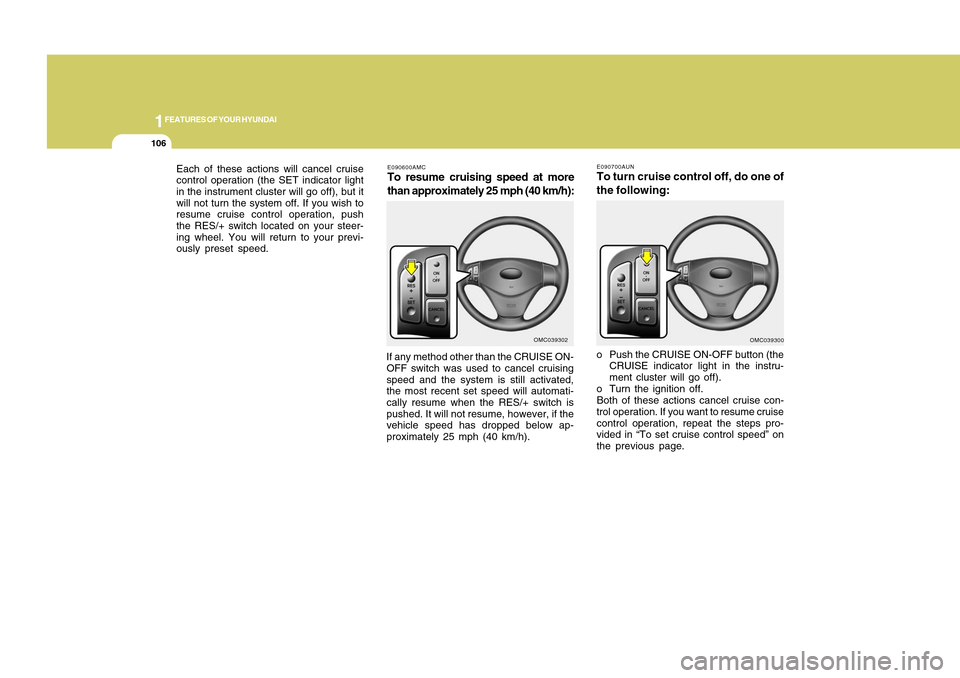
E090600AMCTo resume cruising speed at more
than approximately 25 mph (40 km/h):If any method other than the CRUISE ON-
OFF switch was used to cancel cruising
speed and the system is still activated,
the most recent set speed will automati-
cally resume when the RES/+ switch is
pushed. It will not resume, however, if the
vehicle speed has dropped below ap-
proximately 25 mph (40 km/h).
OMC039302
o Push the CRUISE ON-OFF button (the
CRUISE indicator light in the instru-
ment cluster will go off).
o Turn the ignition off.
Both of these actions cancel cruise con-
trol operation. If you want to resume cruise
control operation, repeat the steps pro-
vided in “To set cruise control speed” on
the previous page. Each of these actions will cancel cruise
control operation (the SET indicator light
in the instrument cluster will go off), but it
will not turn the system off. If you wish to
resume cruise control operation, push
the RES/+ switch located on your steer-
ing wheel. You will return to your previ-
ously preset speed.
OMC039300 E090700AUN
To turn cruise control off, do one of
the following:
Page 134 of 282
1123123
DRIVING YOUR HYUNDAI
1
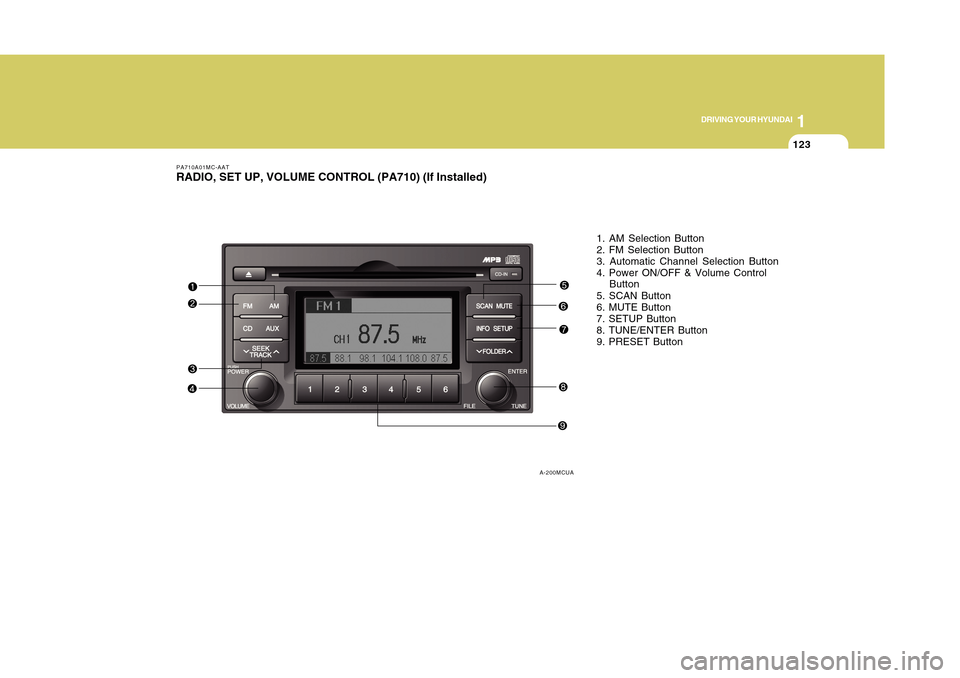
1. AM Selection Button
2. FM Selection Button
3. Automatic Channel Selection Button
4. Power ON/OFF & Volume Control
Button
5. SCAN Button
6. MUTE Button
7. SETUP Button
8. TUNE/ENTER Button
9. PRESET Button
PA710A01MC-AATRADIO, SET UP, VOLUME CONTROL (PA710) (If Installed)
A-200MCUA
Page 135 of 282
![Hyundai Accent 2011 Owners Manual 1FEATURES OF YOUR HYUNDAI
124
PA710B01MC-AAT1. AM Selection ButtonPressing the [AM] button selects the AM
band. AM Mode is displayed on the LCD.2. FM Selection ButtonTurns to FM mode and toggles FM1 a](/img/35/14385/w960_14385-134.png "Hyundai Accent 2011 Owners Manual 1FEATURES OF YOUR HYUNDAI
124
PA710B01MC-AAT1. AM Selection ButtonPressing the [AM] button selects the AM
band. AM Mode is displayed on the LCD.2. FM Selection ButtonTurns to FM mode and toggles FM1 a")
1FEATURES OF YOUR HYUNDAI
124
PA710B01MC-AAT1. AM Selection ButtonPressing the [AM] button selects the AM
band. AM Mode is displayed on the LCD.2. FM Selection ButtonTurns to FM mode and toggles FM1 and
FM2 when the button is pressed each
time.3. Automatic Channel Selection
Buttono When the [SEEK
] button is pressed,
it reduces the band frequency by
200khz to automatically select chan-
nel. Stops at the previous frequency if
no channel is found.
o When the [SEEK ] button is pressed,
it increases the band frequency by
50khz to automatically select channel.
Stops at the previous frequency if no
channel is found.
4. Power ON/OFF & Volume Control
ButtonTurns on/off the set when the IGNITION
SWITCH is on ACC or ON. If the button is
turned to the right, it increases the volume
and left, decreases the volume.
5. SCAN ButtonIf this button is pressed, the frequencies
will become increased and receive the
corresponding broadcasts.
This function will play the frequencies for
10 seconds each and find other broad-
casts as the frequency increases.
Press the button again when desiring to
continue listening to the currently playing
broadcast.6. MUTE ButtonPress to temporarily cut off the Sound.7. SETUP ButtonPress this button to turn to the SCROLL
and P.BASS adjustment mode.
If no action is taken for 5 seconds after
pressing the button, it will return to the
play mode.(After entering SETUP mode,
move between items using the left, right
and PUSH functions of the TUNE button.)
The setup Items changes from SCROLL
<->P.BASS.
8. TUNE/ENTER ButtonTurn this button clockwise one notch to
increase frequency from current fre-
quency.
Turn this button counterclockwise by one
notch to decrease frequency from current
frequency.
The frequency cahnges by 0.2Mhz in FM
MODE and 9Khz in AM MODE.
Press this button while holding SETUP
button to activate / inactivate the item to.
Select SETUP item using left and right
function of the Tune button.9. PRESET ButtonPush [1]~[6] buttons less than 0.8 second
to play the channel saved in each button.
Push PRESET button for 0.8 second or
longer to save current channel to the
respective button with a beep.
!
CAUTION:
o Do not place beverages close to the
audio system. The audio system
mechanism may be damaged if you
spill them.
o Do not strike or allow anything to
impact the audio system, damage to
the system mechanisms could oc-
cur.
Page 138 of 282
1127127
DRIVING YOUR HYUNDAI
1
11. SCAN Play ButtonPlays first 10 seconds of each song in the
DISC. To cancel the mode, press the key
once again.12. FOLDER ButtonFolder up/down operation.
o Folder is moved up or down from cur-
rently playing and folder name be-
comes displayed.
o Press enter key to play the
selectedfolder.
o If the enter key is not pressed with in 5
seconds, then the previous folder name
will be displayed again.
NOTE:o To assure Proper operation of the
unit, keep the vehicle interior tem-
perature within a nomal range by
using the vehicle’s air conditioning
or heating system.
o When replacing the fuse, replace it
with a fuse having the correct capac-
ity.
o All stored bookmarks are all erased
when the car battery is disconnected
or power to the vehocle is lost. if this
occurs, the bookmarks will have to
be reset.
o This equipment is designed to be
used only in a 12 volt DC battery
system with negative ground.
o This unit is made of precision parts.
Do not attempt to disassemble or
adjust any parts.
o when driving your vehicle, be sure to
keep the volume of the unit set low
enough to allow you to hear sounds
coming from the outside.
o Do not expose this equipment (in-
cluding the speakers and CD) to water
or excessive moisture.
!
CAUTION:
o Do not insert warped or poor quality
discs into the CD player as damage
to the unit may occur.
o Do not insert anything like coins into
the player slot as damage to the unit
may occur.
o Do not place beverages close to the
audio system. The playback mecha-
nism may be damaged if you spill
them.
o Do not strike or allow anything to
impact the audio system, damage to
the system mechanisms could oc-
cur.
o Off-road or rough sunface driving
may cause the compact disc to skip.
Do not use the compact disc when
driving in such conditions as dam-
age to the compact disc face could
occur.
o Do not attempt to grab or pull the
compact disc out while the disc is
being pulled into the audio unit by the
self-loading mechanism. Damage to
the audio unit and compact disc could
occur.
Page 144 of 282
1133133
DRIVING YOUR HYUNDAI
1
!
CAUTION:
o You need the power cable exclusive
for an iPod in order to operate the
iPod with the buttons on the audio
system. The PC cable provided by
Apple may cause a malfunction and
should not be used in the vehicle.
o When connecting the device with the
iPod cable, push in the jack fully.
o When adjusting the sound effects of
the iPod and the audio system, the
sound effects of both devices may
overlap and distort the quality of the
sound.
o Deactivate (turn off) the equalizer
function of the iPod when adjusting
the audio system's volume, and turn
off the equalizer of the audio system
when using the equalizer of the iPod.
o When the iPod cable is connected,
the system can be switched to the
AUX mode even without the iPod
device and may cause noise. Dis-
connect the iPod cable when not
using the iPod device.
o When the iPod is not used with the
audio system, the iPod cable should
be removed from the iPod.
NOTE:o Some iPod models might not support
the communication protocol and the
files will not be played. (iPod models
supported: Mini, 4G, Photo, Nano,
5G)
o The order of search or playback of
songs in the iPod can be different
from the order searched in the audio
system.
o If the iPod crashes due to its own
trouble, reset the iPod. (Reset: Refer
to iPod manual)
o An iPod may not operate normally on
low battery.
o Some iPod devices, such as the
iPhone, can be connected through
the Bluetooth interface. The device
must have audio Bluetooth capabil-
ity (such as for stereo headphone
Bluetooth). The device can play, but
it will not be controlled by the audio
system.