instrument cluster Hyundai Accent 2012 Owner's Manual - RHD (UK. Australia)
[x] Cancel search | Manufacturer: HYUNDAI, Model Year: 2012, Model line: Accent, Model: Hyundai Accent 2012Pages: 367, PDF Size: 25.39 MB
Page 8 of 367
1
How to use this manual / 1-2
Fuel requirements / 1-3
Vehicle run-in process / 1-6Indicator symbols on the instrument cluster / 1-7
Introduction
Page 14 of 367
17
Introduction
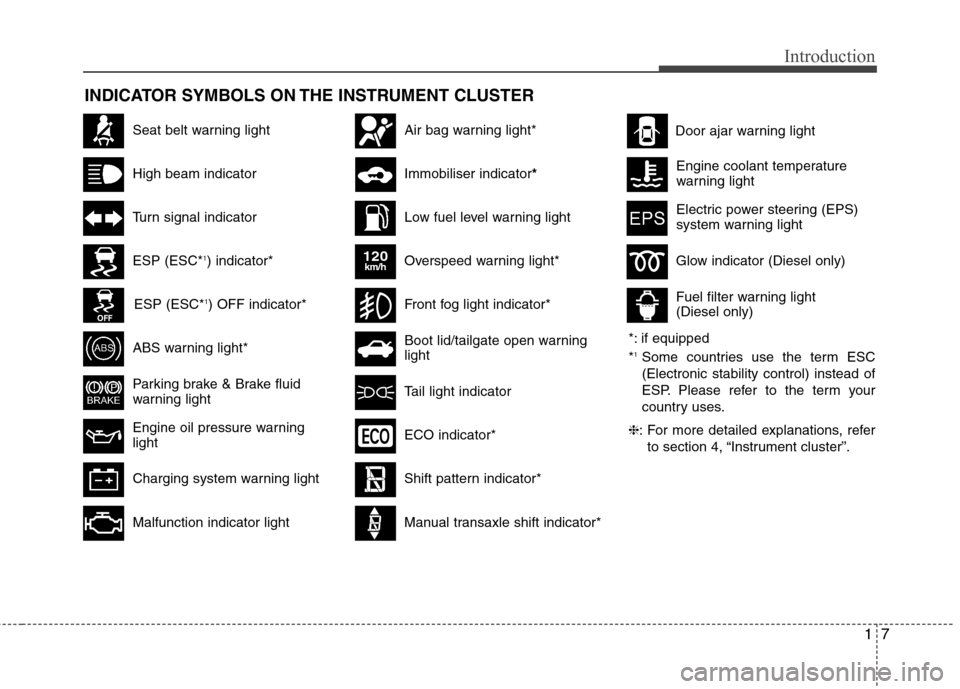
INDICATOR SYMBOLS ON THE INSTRUMENT CLUSTER
Seat belt warning light
High beam indicator
Turn signal indicator
ABS warning light*
Parking brake & Brake fluid
warning light
Engine oil pressure warning light
ESP (ESC*1
) indicator*
ESP (ESC* 1
) OFF indicator*
Malfunction indicator light
Air bag warning light*
Immobiliser indicator *
Low fuel level warning light
*: if equipped *1
Some countries use the term ESC (Electronic stability control) instead of
ESP. Please refer to the term your
country uses.
❈ : For more detailed explanations, refer
to section 4, “Instrument cluster”.
Charging system warning light Overspeed warning light*
120km/h
Tail light indicator
Boot lid/tailgate open warning light
Front fog light indicator*
Glow indicator (Diesel only)
Fuel filter warning light (Diesel only)
Shift pattern indicator*
Electric power steering (EPS)
system warning light
Door ajar warning light
ECO indicator*
Manual transaxle shift indicator*
Engine coolant temperature
warning light
Page 17 of 367
23
Your vehicle at a glance
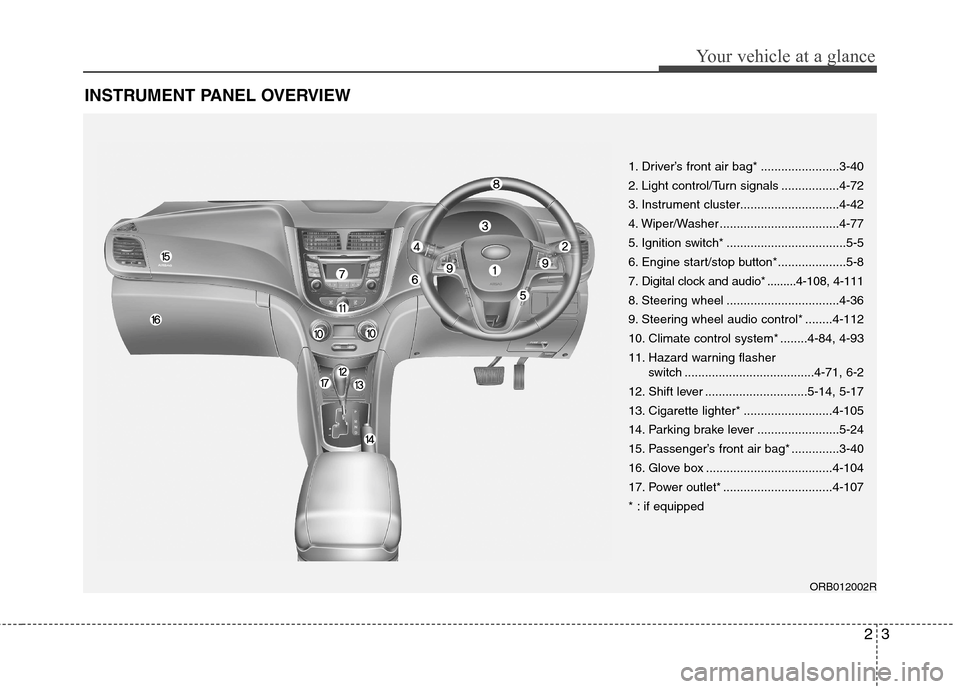
INSTRUMENT PANEL OVERVIEW
1. Driver’s front air bag* .......................3-40
2. Light control/Turn signals .................4-72
3. Instrument cluster.............................4-42
4. Wiper/Washer ...................................4-77
5. Ignition switch* ...................................5-5
6. Engine start/stop button*....................5-8
7. Digital clock and audio* .........4-108, 4-111
8. Steering wheel .................................4-36
9. Steering wheel audio control* ........4-112
10. Climate control system* ........4-84, 4-93
11. Hazard warning flasher switch ......................................4-71, 6-2
12. Shift lever ..............................5-14, 5-17
13. Cigarette lighter* ..........................4-105
14. Parking brake lever ........................5-24
15. Passenger’s front air bag* ..............3-40
16. Glove box .....................................4-104
17. Power outlet* ................................4-107
* : if equipped
ORB012002R
Page 57 of 367
339
Safety features of your vehicle
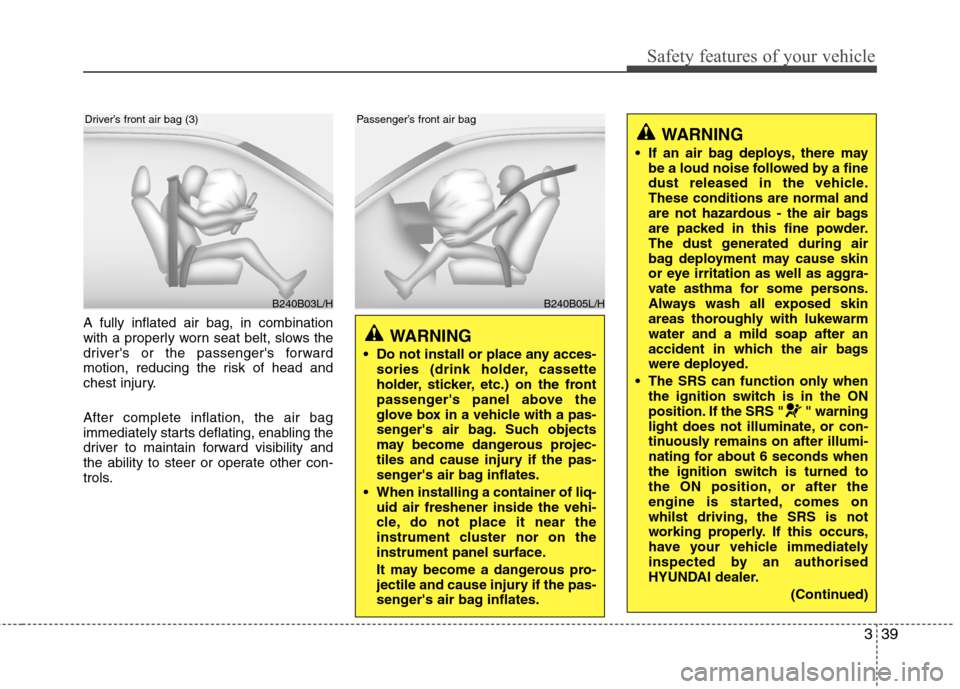
A fully inflated air bag, in combination
with a properly worn seat belt, slows the
driver's or the passenger's forward
motion, reducing the risk of head and
chest injury. After complete inflation, the air bag
immediately starts deflating, enabling the
driver to maintain forward visibility and
the ability to steer or operate other con-
trols.
B240B03L/H
Driver’s front air bag (3)
B240B05L/H
Passenger’s front air bag
WARNING
Do not install or place any acces- sories (drink holder, cassette
holder, sticker, etc.) on the front
passenger's panel above the
glove box in a vehicle with a pas-
senger's air bag. Such objects
may become dangerous projec-
tiles and cause injury if the pas-
senger's air bag inflates.
When installing a container of liq- uid air freshener inside the vehi-
cle, do not place it near the
instrument cluster nor on the
instrument panel surface.
It may become a dangerous pro-
jectile and cause injury if the pas-
senger's air bag inflates.
WARNING
If an air bag deploys, there may be a loud noise followed by a fine
dust released in the vehicle.These conditions are normal and
are not hazardous - the air bags
are packed in this fine powder.
The dust generated during air
bag deployment may cause skin
or eye irritation as well as aggra-
vate asthma for some persons.
Always wash all exposed skin
areas thoroughly with lukewarmwater and a mild soap after an
accident in which the air bags
were deployed.
The SRS can function only when the ignition switch is in the ON
position. If the SRS " " warning
light does not illuminate, or con-
tinuously remains on after illumi-
nating for about 6 seconds when
the ignition switch is turned to
the ON position, or after the
engine is started, comes on
whilst driving, the SRS is not
working properly. If this occurs,
have your vehicle immediately
inspected by an authorised
HYUNDAI dealer.
(Continued)
Page 72 of 367
4
Keys / 4-3 Smart key / 4-6Remote keyless entry / 4-10
Door locks / 4-13Boot / 4-17
Tailgate / 4-19
Windows / 4-22Bonnet / 4-27
Fuel filler lid / 4-29
Sunroof / 4-32
Steering wheel / 4-36
Mirrors / 4-38
Instrument cluster / 4-42
Rear parking assist system / 4-67Rearview camera / 4-70
Hazard warning flasher / 4-71Lighting / 4-72
Wipers and washers / 4-77
Interior light / 4-80
Defroster / 4-83
Manual climate control system / 4-84
Automatic climate control system / 4-93
Windscreen defrosting and defogging / 4-100
Features of your vehicle
Page 113 of 367
Features of your vehicle
42
4
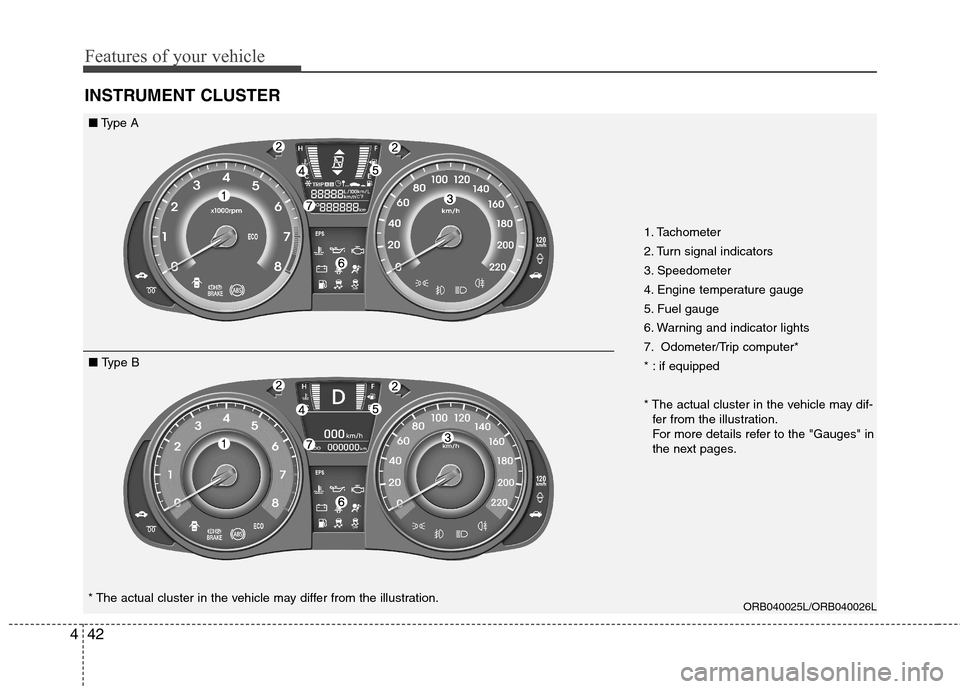
INSTRUMENT CLUSTER
ORB040025L/ORB040026L
* The actual cluster in the vehicle may differ from the illustration. 1. Tachometer
2. Turn signal indicators
3. Speedometer
4. Engine temperature gauge
5. Fuel gauge
6. Warning and indicator lights
7. Odometer/Trip computer*
* : if equipped
* The actual cluster in the vehicle may dif-
fer from the illustration.
For more details refer to the "Gauges" in
the next pages.
■ Type A
■ Type B
Page 120 of 367
449
Features of your vehicle
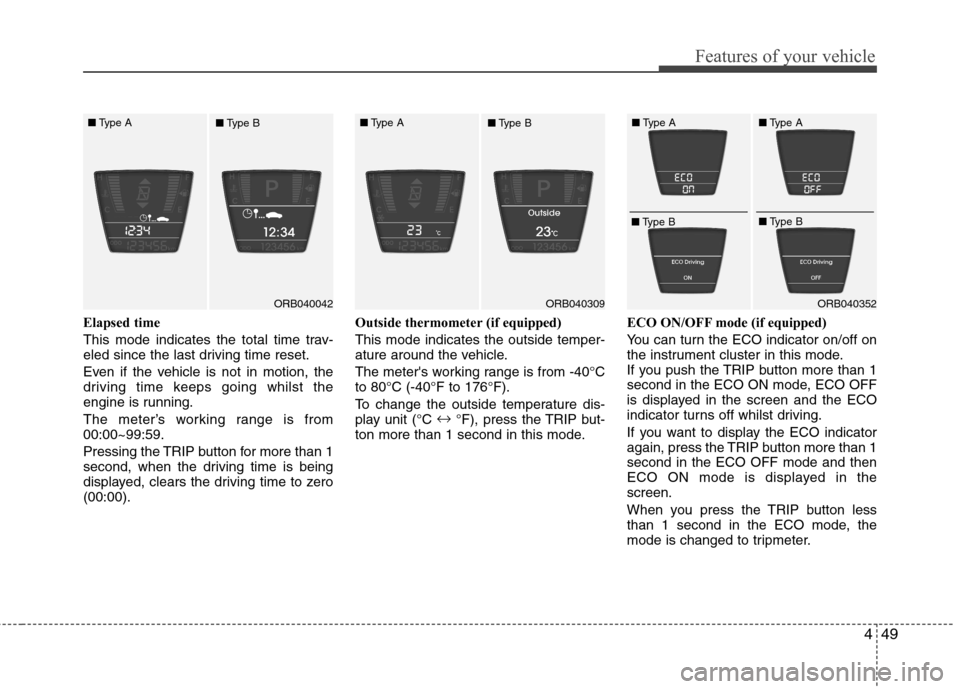
Elapsed time
This mode indicates the total time trav-
eled since the last driving time reset.
Even if the vehicle is not in motion, the
driving time keeps going whilst the
engine is running.
The meter’s working range is from 00:00~99:59.
Pressing the TRIP button for more than 1
second, when the driving time is being
displayed, clears the driving time to zero(00:00).Outside thermometer
(if equipped)
This mode indicates the outside temper-
ature around the vehicle.
The meter's working range is from -40°C to 80°C (-40°F to 176°F).
To change the outside temperature dis-
play unit (°C
°F), press the TRIP but-
ton more than 1 second in this mode. ECO ON/OFF mode (if equipped)
You can turn the ECO indicator on/off on
the instrument cluster in this mode.
If you push the TRIP button more than 1
second in the ECO ON mode, ECO OFF
is displayed in the screen and the ECO
indicator turns off whilst driving.
If you want to display the ECO indicator
again, press the TRIP button more than 1second in the ECO OFF mode and then
ECO ON mode is displayed in thescreen.
When you press the TRIP button less
than 1 second in the ECO mode, the
mode is changed to tripmeter.
ORB040042ORB040352
■
Type A
■Type BORB040309
■
Type A
■Type B ■
Type A
■ Type B ■
Type A
■ Type B
Page 224 of 367
Driving your vehicle
18
5
For smooth operation, depress the brake
pedal when shifting from N (Neutral) to aforward or reverse gear.Transaxle ranges
The indicator in the instrument cluster
displays the shift lever position when the
ignition switch is in the ON position.
P (Park)
Always come to a complete stop before
shifting into P (Park). This position locks
the transaxle and prevents the drivewheels from rotating.
WARNING - Automatic
transaxle
Always check the surrounding areas near your vehicle for peo-
ple, especially children, beforeshifting a car into D (Drive) or R
(Reverse).
Before leaving the driver’s seat, always make sure the shift lever
is in the P (Park) position; then
set the parking brake fully and
shut the engine off. Unexpected
and sudden vehicle movementcan occur if these precautions
are not followed in the order iden-tified.
CAUTION
To avoid damage to your
transaxle, do not accelerate the
engine in R (Reverse) or any for-ward gear position with thebrakes on.
When stopped on an incline, do not hold the vehicle stationarywith engine power. Use the serv-ice brake or the parking brake.
Do not shift from N (Neutral) or P (Park) into D (Drive), or R
(Reverse) when the engine isabove idle speed.
WARNING
Shifting into P (Park) whilst the vehicle is in motion will cause the
drive wheels to lock which will
cause you to lose control of the
vehicle.
Do not use the P (Park) position in place of the parking brake.
Always make sure the shift lever
is latched in the P (Park) position
and set the parking brake fully.
Never leave a child unattended in a vehicle.
Page 240 of 367
Driving your vehicle
34
5
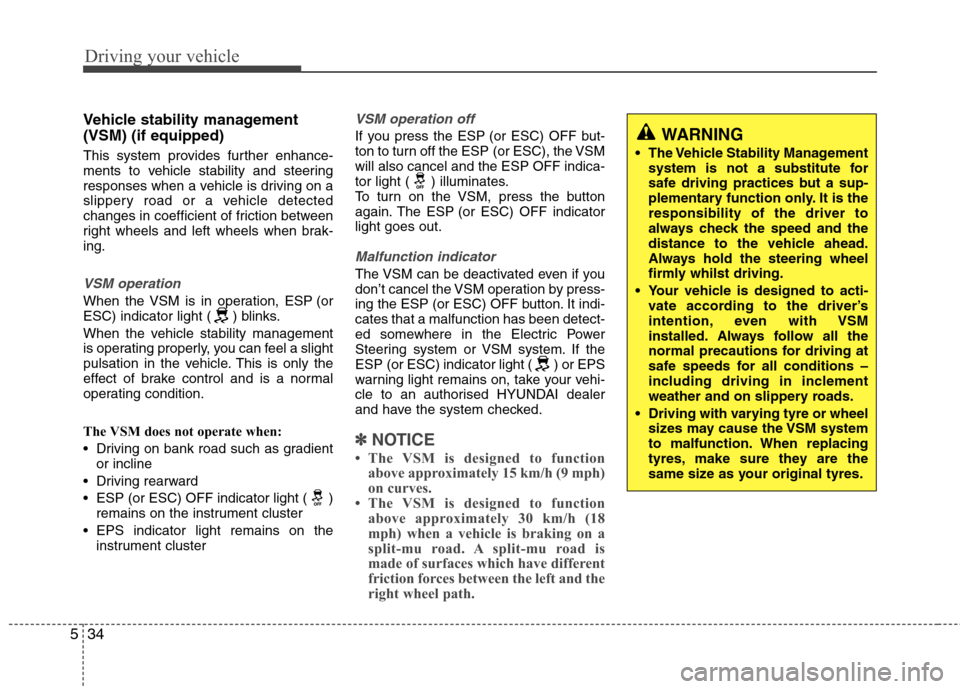
Vehicle stability management (VSM) (if equipped)
This system provides further enhance-
ments to vehicle stability and steering
responses when a vehicle is driving on a
slippery road or a vehicle detected
changes in coefficient of friction between
right wheels and left wheels when brak-ing.
VSM operation
When the VSM is in operation, ESP (or
ESC) indicator light ( ) blinks.
When the vehicle stability management
is operating properly, you can feel a slight
pulsation in the vehicle. This is only the
effect of brake control and is a normal
operating condition.
The VSM does not operate when:
Driving on bank road such as gradient
or incline
Driving rearward
ESP (or ESC) OFF indicator light ( ) remains on the instrument cluster
EPS indicator light remains on the instrument cluster
VSM operation off
If you press the ESP (or ESC) OFF but-
ton to turn off the ESP (or ESC), the VSMwill also cancel and the ESP OFF indica-
tor light ( ) illuminates.
To turn on the VSM, press the button
again. The ESP (or ESC) OFF indicatorlight goes out.
Malfunction indicator
The VSM can be deactivated even if you
don’t cancel the VSM operation by press-
ing the ESP (or ESC) OFF button. It indi-cates that a malfunction has been detect-
ed somewhere in the Electric Power
Steering system or VSM system. If the
ESP (or ESC) indicator light ( ) or EPS
warning light remains on, take your vehi-
cle to an authorised HYUNDAI dealer
and have the system checked.
✽✽ NOTICE
The VSM is designed to function above approximately 15 km/h (9 mph)
on curves.
The VSM is designed to function above approximately 30 km/h (18
mph) when a vehicle is braking on a
split-mu road. A split-mu road is
made of surfaces which have different
friction forces between the left and the
right wheel path.
WARNING
The Vehicle Stability Management system is not a substitute for
safe driving practices but a sup-
plementary function only. It is theresponsibility of the driver to
always check the speed and the
distance to the vehicle ahead.
Always hold the steering wheel
firmly whilst driving.
Your vehicle is designed to acti- vate according to the driver’s
intention, even with VSM
installed. Always follow all the
normal precautions for driving at
safe speeds for all conditions –
including driving in inclement
weather and on slippery roads.
Driving with varying tyre or wheel sizes may cause the VSM system
to malfunction. When replacing
tyres, make sure they are the
same size as your original tyres.
Page 326 of 367
Maintenance
56
7
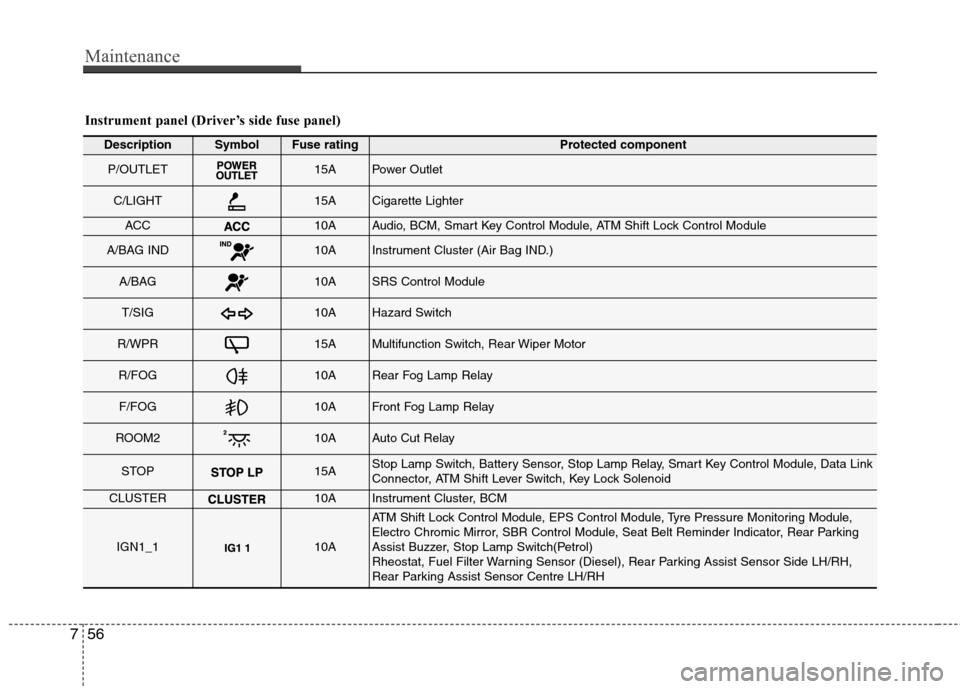
Instrument panel (Driver’s side fuse panel)
DescriptionSymbolFuse ratingProtected component
P/OUTLET15APower Outlet
C/LIGHT15ACigarette Lighter
ACC10AAudio, BCM, Smart Key Control Module, ATM Shift Lock Control Module
A/BAG IND10AInstrument Cluster (Air Bag IND.)
A/BAG10ASRS Control Module
T/SIG10AHazard Switch
R/WPR15AMultifunction Switch, Rear Wiper Motor
R/FOG10ARear Fog Lamp Relay
F/FOG10AFront Fog Lamp Relay
ROOM210AAuto Cut Relay
STOP15AStop Lamp Switch, Battery Sensor, Stop Lamp Relay, Smart Key Control Module, Data Link
Connector, ATM Shift Lever Switch, Key Lock Solenoid
CLUSTER10AInstrument Cluster, BCM
IGN1_110A
ATM Shift Lock Control Module, EPS Control Module, Tyre Pressure Monitoring Module,
Electro Chromic Mirror, SBR Control Module, Seat Belt Reminder Indicator, Rear Parking
Assist Buzzer, Stop Lamp Switch(Petrol)
Rheostat, Fuel Filter Warning Sensor (Diesel), Rear Parking Assist Sensor Side LH/RH,
Rear Parking Assist Sensor Centre LH/RH