door auto lock Hyundai Accent 2013 Owner's Manual
[x] Cancel search | Manufacturer: HYUNDAI, Model Year: 2013, Model line: Accent, Model: Hyundai Accent 2013Pages: 402, PDF Size: 8.49 MB
Page 31 of 402
313
Safety features of your vehicle
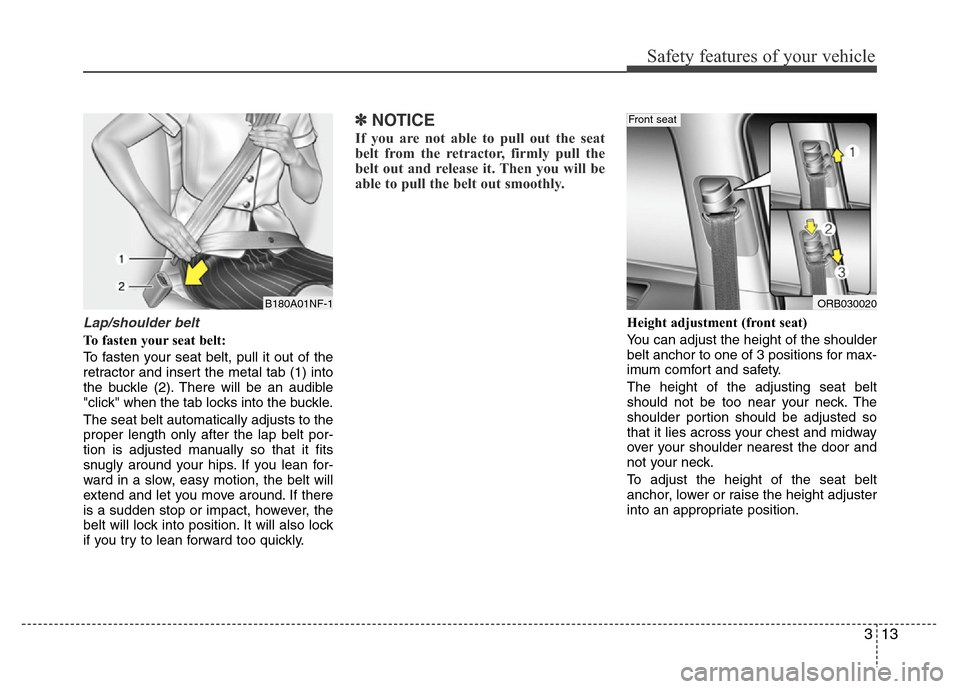
Lap/shoulder belt
To fasten your seat belt:
To fasten your seat belt, pull it out of the
retractor and insert the metal tab (1) into
the buckle (2). There will be an audible
"click" when the tab locks into the buckle.
The seat belt automatically adjusts to the
proper length only after the lap belt por-
tion is adjusted manually so that it fits
snugly around your hips. If you lean for-
ward in a slow, easy motion, the belt will
extend and let you move around. If there
is a sudden stop or impact, however, the
belt will lock into position. It will also lock
if you try to lean forward too quickly.
✽NOTICE
If you are not able to pull out the seat
belt from the retractor, firmly pull the
belt out and release it. Then you will be
able to pull the belt out smoothly.
Height adjustment (front seat)
You can adjust the height of the shoulder
belt anchor to one of 3 positions for max-
imum comfort and safety.
The height of the adjusting seat belt
should not be too near your neck. The
shoulder portion should be adjusted so
that it lies across your chest and midway
over your shoulder nearest the door and
not your neck.
To adjust the height of the seat belt
anchor, lower or raise the height adjuster
into an appropriate position.
ORB030020
Front seat
B180A01NF-1
Page 32 of 402
Safety features of your vehicle
14 3
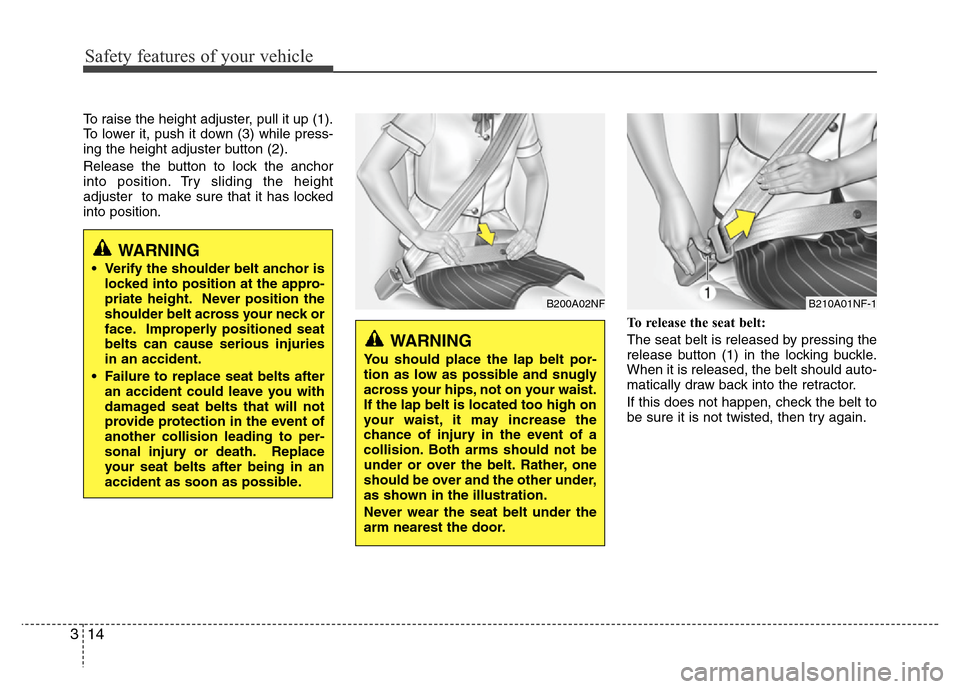
To raise the height adjuster, pull it up (1).
To lower it, push it down (3) while press-
ing the height adjuster button (2).
Release the button to lock the anchor
into position. Try sliding the height
adjuster to make sure that it has locked
into position.
To release the seat belt:
The seat belt is released by pressing the
release button (1) in the locking buckle.
When it is released, the belt should auto-
matically draw back into the retractor.
If this does not happen, check the belt to
be sure it is not twisted, then try again.
B200A02NF
WARNING
You should place the lap belt por-
tion as low as possible and snugly
across your hips, not on your waist.
If the lap belt is located too high on
your waist, it may increase the
chance of injury in the event of a
collision. Both arms should not be
under or over the belt. Rather, one
should be over and the other under,
as shown in the illustration.
Never wear the seat belt under the
arm nearest the door.
WARNING
• Verify the shoulder belt anchor is
locked into position at the appro-
priate height. Never position the
shoulder belt across your neck or
face. Improperly positioned seat
belts can cause serious injuries
in an accident.
• Failure to replace seat belts after
an accident could leave you with
damaged seat belts that will not
provide protection in the event of
another collision leading to per-
sonal injury or death. Replace
your seat belts after being in an
accident as soon as possible.
B210A01NF-1
Page 71 of 402
4
Keys / 4-3
Smart key / 4-6
Remote keyless entry / 4-10
Door locks / 4-13
Trunk / 4-17
Tailgate / 4-20
Windows / 4-23
Hood / 4-28
Fuel filler lid / 4-30
Sunroof / 4-33
Steering wheel / 4-37
Mirrors / 4-39
Instrument cluster / 4-43
Rear parking assist system / 4-69
Rearview camera / 4-72
Hazard warning flasher / 4-73
Lighting / 4-74
Wipers and washers / 4-81
Interior light / 4-84
Defroster / 4-87
Manual climate control system / 4-88
Automatic climate control system / 4-97
Windshield defrosting and defogging / 4-104
Features of your vehicle
Page 77 of 402
47
Features of your vehicle
However, if any door remains open, the
doors won't lock and the chime will sound
for 3 seconds. Close the door and try
again to lock the doors.
If trunk/tailgate remains open, the hazard
warning light won't operate. After this,
trunk/tailgate is closed, the hazard warn-
ing lights blink once.
The button will only operate when the
smart key is within 0.7~1 m (28~40 in.)
from the outside door handle. If you want
to make sure that a door has locked or
not, you should check the door lock but-
ton inside the vehicle or pull the outside
door handle.
Even though you press the outside door
handle buttons, the doors will not lock
and the chime will sound for 3 seconds if
any of following occur:
• The smart key is in the vehicle.
• The ignition switch is in ACC or ON
position.
• Any door except the trunk/tailgate is
open.Using the button on the smart key
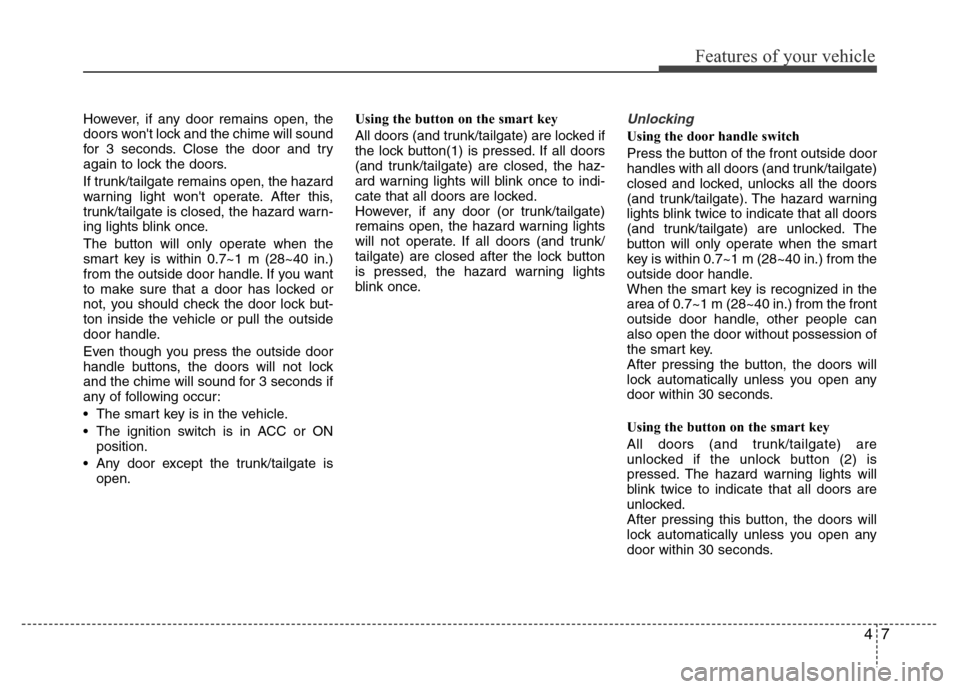
All doors (and trunk/tailgate) are locked if
the lock button(1) is pressed. If all doors
(and trunk/tailgate) are closed, the haz-
ard warning lights will blink once to indi-
cate that all doors are locked.
However, if any door (or trunk/tailgate)
remains open, the hazard warning lights
will not operate. If all doors (and trunk/
tailgate) are closed after the lock button
is pressed, the hazard warning lights
blink once.Unlocking
Using the door handle switch
Press the button of the front outside door
handles with all doors (and trunk/tailgate)
closed and locked, unlocks all the doors
(and trunk/tailgate). The hazard warning
lights blink twice to indicate that all doors
(and trunk/tailgate) are unlocked. The
button will only operate when the smart
key is within 0.7~1 m (28~40 in.) from the
outside door handle.
When the smart key is recognized in the
area of 0.7~1 m (28~40 in.) from the front
outside door handle, other people can
also open the door without possession of
the smart key.
After pressing the button, the doors will
lock automatically unless you open any
door within 30 seconds.
Using the button on the smart key
All doors (and trunk/tailgate) are
unlocked if the unlock button (2) is
pressed. The hazard warning lights will
blink twice to indicate that all doors are
unlocked.
After pressing this button, the doors will
lock automatically unless you open any
door within 30 seconds.
Page 78 of 402
Features of your vehicle
8 4
Trunk unlocking (4 Door)
Using the trunk handle switch
If you are within 0.7~1 m (28~40 in.) from
the outside trunk handle with your smart
key in your possession, the trunk will
unlock and open when you press the
trunk handle switch. Once the trunk is
opened and then closed, the trunk will be
locked automatically.
If the trunk is closed with the smart key in
the trunk, the warning chime will sound
for about 5 seconds and the trunk will not
locked.
Using the button on the smart key
The trunk is opened if the trunk unlock
button (3) is pressed for more than 1 sec-
ond. Once the trunk is opened and then
closed, the trunk will lock automatically.
❈The word “HOLD” is written on the but-
ton to inform you that you must press
and hold the button for 1 second.
Tailgate unlocking (5 Door)
Using the tailgate handle switch
If you are within 0.7 m ~ 1 m (28 ~ 40 in.)
from the outside tailgate handle, with
your smart key in possession, the tail-
gate will unlock and open when you
press the tailgate handle switch.
The hazard warning lights will blink twice
to indicate that the tailgate is unlocked.
Once the tailgate is opened and then
closed when all doors are locked, the tail-
gate will lock automatically.
Using the button on the smart key
The tailgate is unlocked if the tailgate
unlock button (3) is pressed for more
than 1 second. Once the tailgate is
opened and then closed when all doors
are locked, the tailgate will lock automat-
ically.
❈The word “HOLD” is written on the but-
ton to inform you that you must press
and hold the button for 1 second.
Start-up
You can start the engine without inserting
the key. For detailed information refer to
“Engine start/stop button” in section 5.
Smart key precautions
✽NOTICE
• If, for some reason, you happen to lose
your smart key, you will not be able to
start the engine. Tow the vehicle, if
necessary, and contact an authorized
HYUNDAI dealer.
• A maximum of 2 smart keys can be
registered to a single vehicle. If you
lose a smart key, you should immedi-
ately take the vehicle and key to your
authorized HYUNDAI dealer to pro-
tect it from potential theft.
• The smart key will not work if any of
following occur:
- The smart key is close to a radio
transmitter such as a radio station or
an airport which can interfere with
normal operation of the smart key.
- You keep the smart key near a
mobile two-way radio system or a
cellular phone.
- Another vehicle’s smart key is being
operated close to your vehicle.
When the smart key does not work
correctly, open and close the door with
the mechanical key. If you have a
problem with the smart key, contact
an authorized HYUNDAI dealer.
(Continued)
Page 80 of 402
Features of your vehicle
10 4
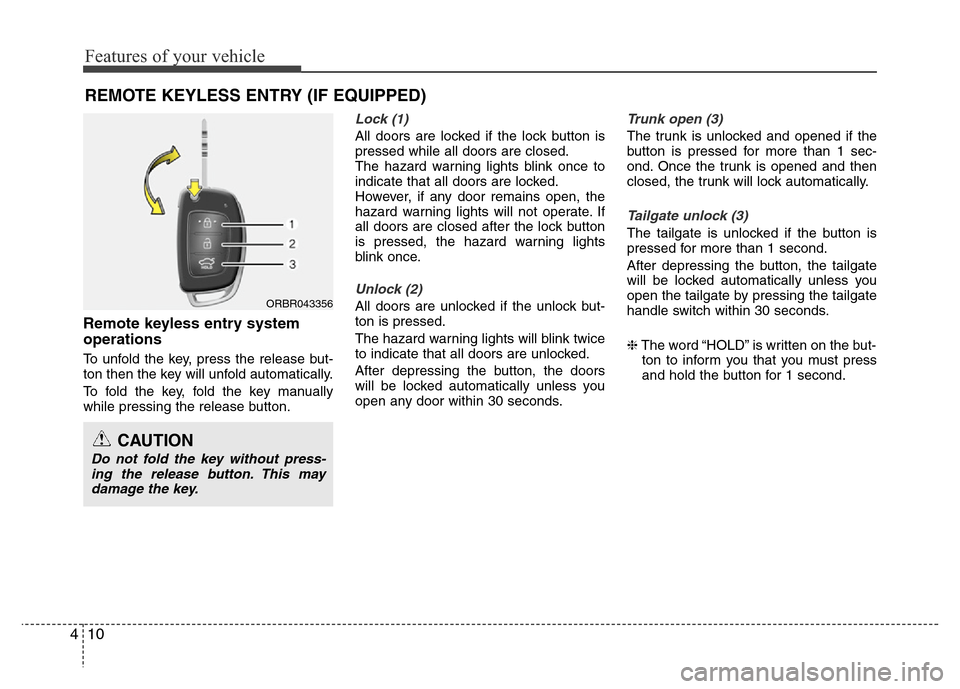
Remote keyless entry system
operations
To unfold the key, press the release but-
ton then the key will unfold automatically.
To fold the key, fold the key manually
while pressing the release button.
Lock (1)
All doors are locked if the lock button is
pressed while all doors are closed.
The hazard warning lights blink once to
indicate that all doors are locked.
However, if any door remains open, the
hazard warning lights will not operate. If
all doors are closed after the lock button
is pressed, the hazard warning lights
blink once.
Unlock (2)
All doors are unlocked if the unlock but-
ton is pressed.
The hazard warning lights will blink twice
to indicate that all doors are unlocked.
After depressing the button, the doors
will be locked automatically unless you
open any door within 30 seconds.
Trunk open (3)
The trunk is unlocked and opened if the
button is pressed for more than 1 sec-
ond. Once the trunk is opened and then
closed, the trunk will lock automatically.
Tailgate unlock (3)
The tailgate is unlocked if the button is
pressed for more than 1 second.
After depressing the button, the tailgate
will be locked automatically unless you
open the tailgate by pressing the tailgate
handle switch within 30 seconds.
❈The word “HOLD” is written on the but-
ton to inform you that you must press
and hold the button for 1 second.
REMOTE KEYLESS ENTRY (IF EQUIPPED)
ORBR043356
CAUTION
Do not fold the key without press-
ing the release button. This may
damage the key.
Page 83 of 402
413
Features of your vehicle
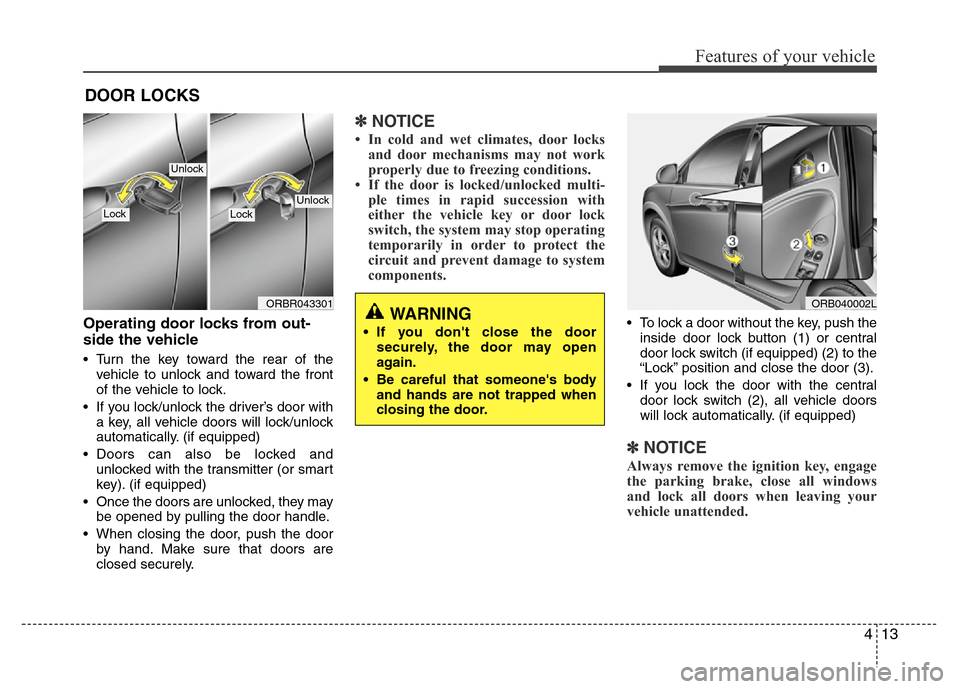
Operating door locks from out-
side the vehicle
• Turn the key toward the rear of the
vehicle to unlock and toward the front
of the vehicle to lock.
• If you lock/unlock the driver’s door with
a key, all vehicle doors will lock/unlock
automatically. (if equipped)
• Doors can also be locked and
unlocked with the transmitter (or smart
key). (if equipped)
• Once the doors are unlocked, they may
be opened by pulling the door handle.
• When closing the door, push the door
by hand. Make sure that doors are
closed securely.
✽NOTICE
• In cold and wet climates, door locks
and door mechanisms may not work
properly due to freezing conditions.
• If the door is locked/unlocked multi-
ple times in rapid succession with
either the vehicle key or door lock
switch, the system may stop operating
temporarily in order to protect the
circuit and prevent damage to system
components.
• To lock a door without the key, push the
inside door lock button (1) or central
door lock switch (if equipped) (2
) to the
“Lock” position and close the door (3).
• If you lock the door with the central
door lock switch (2), all vehicle doors
will lock automatically. (if equipped)
✽NOTICE
Always remove the ignition key, engage
the parking brake, close all windows
and lock all doors when leaving your
vehicle unattended.
DOOR LOCKS
ORB040002LWARNING
• If you don't close the door
securely, the door may open
again.
• Be careful that someone's body
and hands are not trapped when
closing the door.
ORBR043301
UnlockLockLock
Unlock
Page 86 of 402
Features of your vehicle
16 4
Speed sensing door lock system
(if equipped)
All doors will be automatically locked
after the vehicle speed exceeds 15 km/h.
And all doors will be automatically
unlocked when you turn the engine off or
when you remove the ignition key. (if
equipped)
Impact sensing door unlock sys-
tem (if equipped)
All doors will be automatically unlocked
after an impact causes the air bags to
deploy.
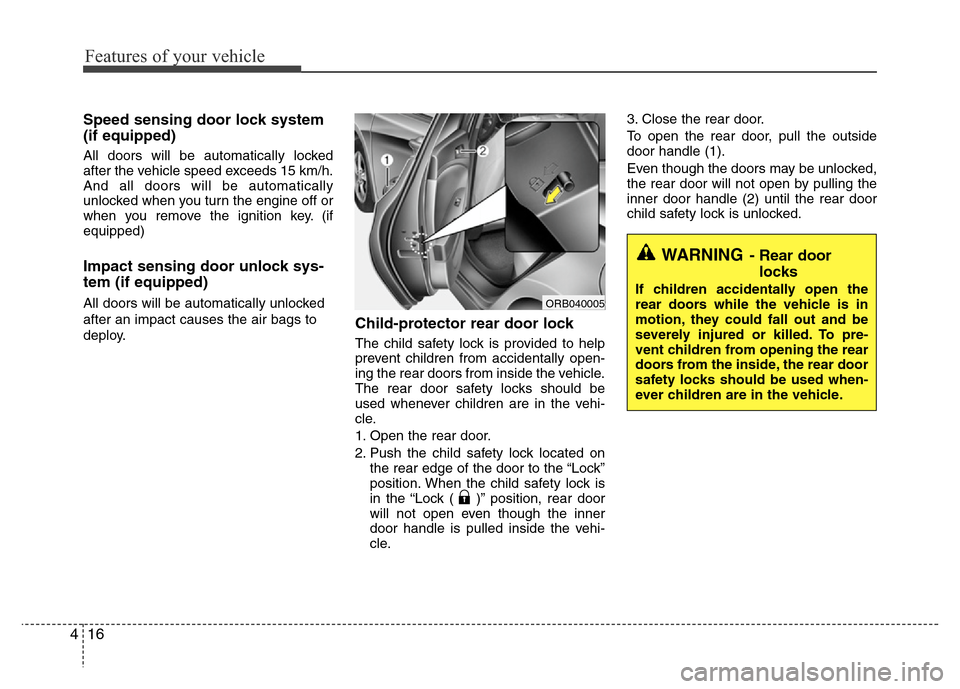
Child-protector rear door lock
The child safety lock is provided to help
prevent children from accidentally open-
ing the rear doors from inside the vehicle.
The rear door safety locks should be
used whenever children are in the vehi-
cle.
1. Open the rear door.
2. Push the child safety lock located on
the rear edge of the door to the “Lock”
position. When the child safety lock is
in the “Lock ( )” position, rear door
will not open even though the inner
door handle is pulled inside the vehi-
cle.3. Close the rear door.
To open the rear door, pull the outside
door handle (1).
Even though the doors may be unlocked,
the rear door will not open by pulling the
inner door handle (2) until the rear door
child safety lock is unlocked.
WARNING- Rear door
locks
If children accidentally open the
rear doors while the vehicle is in
motion, they could fall out and be
severely injured or killed. To pre-
vent children from opening the rear
doors from the inside, the rear door
safety locks should be used when-
ever children are in the vehicle.ORB040005
Page 87 of 402
417
Features of your vehicle
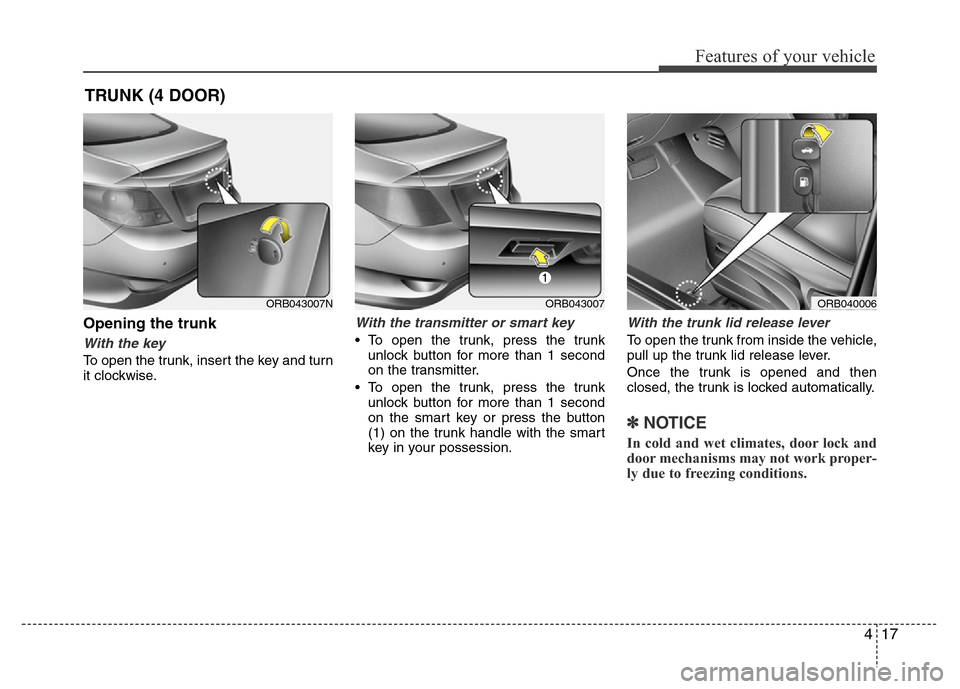
Opening the trunk
With the key
To open the trunk, insert the key and turn
it clockwise.
With the transmitter or smart key
• To open the trunk, press the trunk
unlock button for more than 1 second
on the transmitter.
• To open the trunk, press the trunk
unlock button for more than 1 second
on the smart key or press the button
(1) on the trunk handle with the smart
key in your possession.
With the trunk lid release lever
To open the trunk from inside the vehicle,
pull up the trunk lid release lever.
Once the trunk is opened and then
closed, the trunk is locked automatically.
✽NOTICE
In cold and wet climates, door lock and
door mechanisms may not work proper-
ly due to freezing conditions.
TRUNK (4 DOOR)
ORB040006ORB043007ORB043007N
Page 90 of 402
Features of your vehicle
20 4
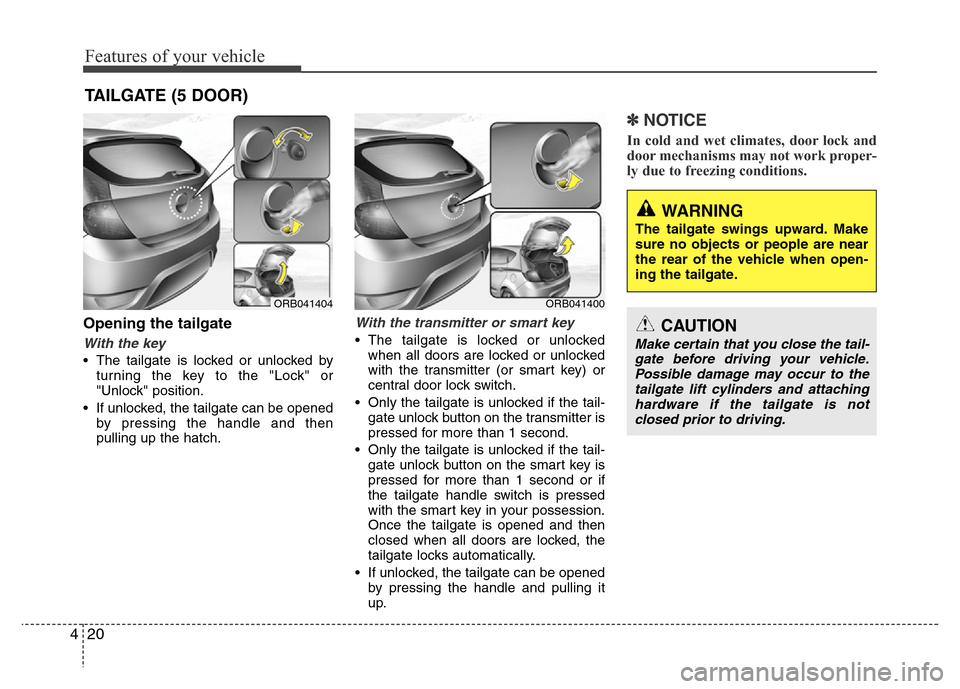
Opening the tailgate
With the key
• The tailgate is locked or unlocked by
turning the key to the "Lock" or
"Unlock" position.
• If unlocked, the tailgate can be opened
by pressing the handle and then
pulling up the hatch.
With the transmitter or smart key
• The tailgate is locked or unlocked
when all doors are locked or unlocked
with the transmitter (or smart key) or
central door lock switch.
• Only the tailgate is unlocked if the tail-
gate unlock button on the transmitter is
pressed for more than 1 second.
• Only the tailgate is unlocked if the tail-
gate unlock button on the smart key is
pressed for more than 1 second or if
the tailgate handle switch is pressed
with the smart key in your possession.
Once the tailgate is opened and then
closed when all doors are locked, the
tailgate locks automatically.
• If unlocked, the tailgate can be opened
by pressing the handle and pulling it
up.
✽NOTICE
In cold and wet climates, door lock and
door mechanisms may not work proper-
ly due to freezing conditions.
TAILGATE (5 DOOR)
WARNING
The tailgate swings upward. Make
sure no objects or people are near
the rear of the vehicle when open-
ing the tailgate.
CAUTION
Make certain that you close the tail-
gate before driving your vehicle.
Possible damage may occur to the
tailgate lift cylinders and attaching
hardware if the tailgate is not
closed prior to driving.
ORB041400ORB041404