parking lig Hyundai Accent 2013 Owner's Manual
[x] Cancel search | Manufacturer: HYUNDAI, Model Year: 2013, Model line: Accent, Model: Hyundai Accent 2013Pages: 402, PDF Size: 8.49 MB
Page 15 of 402
Your vehicle at a glance
4 2
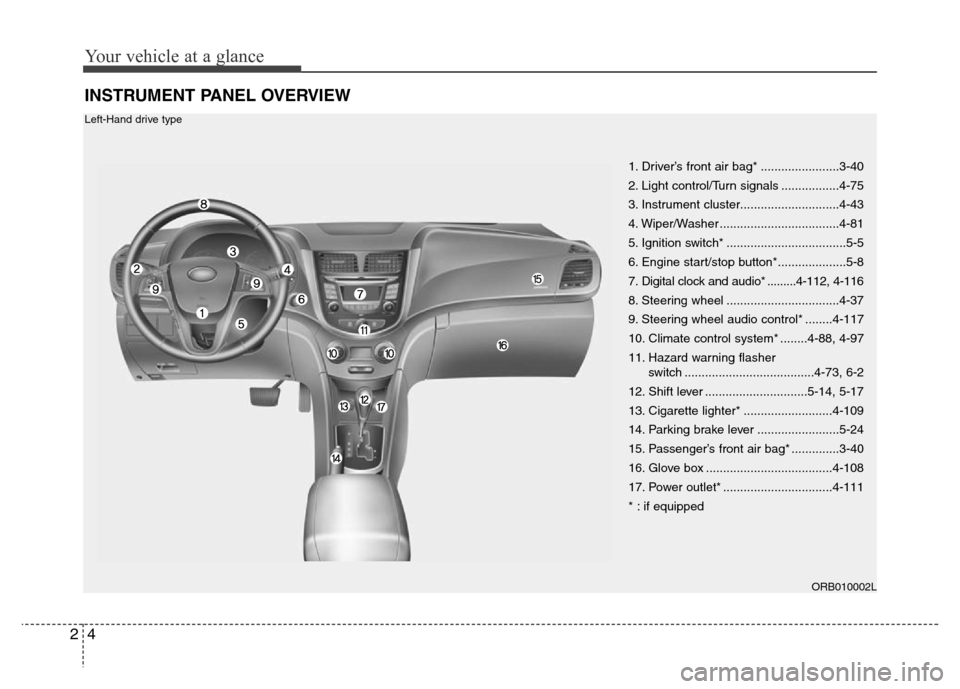
INSTRUMENT PANEL OVERVIEW
1. Driver’s front air bag* .......................3-40
2. Light control/Turn signals .................4-75
3. Instrument cluster.............................4-43
4. Wiper/Washer ...................................4-81
5. Ignition switch* ...................................5-5
6. Engine start/stop button*....................5-8
7. Digital clock and audio* .........4-112, 4-116
8. Steering wheel .................................4-37
9. Steering wheel audio control* ........4-117
10. Climate control system* ........4-88, 4-97
11. Hazard warning flasher
switch ......................................4-73, 6-2
12. Shift lever ..............................5-14, 5-17
13. Cigarette lighter* ..........................4-109
14. Parking brake lever ........................5-24
15. Passenger’s front air bag* ..............3-40
16. Glove box .....................................4-108
17. Power outlet* ................................4-111
* : if equipped
ORB010002L
Left-Hand drive type
Page 16 of 402
25
Your vehicle at a glance
ORB012002R
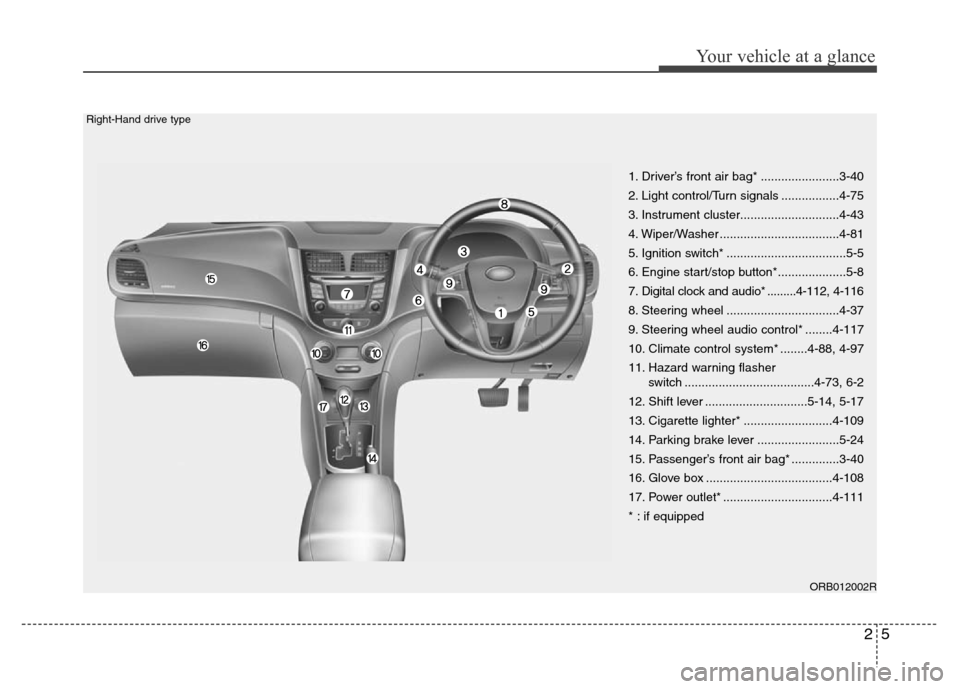
1. Driver’s front air bag* .......................3-40
2. Light control/Turn signals .................4-75
3. Instrument cluster.............................4-43
4. Wiper/Washer ...................................4-81
5. Ignition switch* ...................................5-5
6. Engine start/stop button*....................5-8
7. Digital clock and audio* .........4-112, 4-116
8. Steering wheel .................................4-37
9. Steering wheel audio control* ........4-117
10. Climate control system* ........4-88, 4-97
11. Hazard warning flasher
switch ......................................4-73, 6-2
12. Shift lever ..............................5-14, 5-17
13. Cigarette lighter* ..........................4-109
14. Parking brake lever ........................5-24
15. Passenger’s front air bag* ..............3-40
16. Glove box .....................................4-108
17. Power outlet* ................................4-111
* : if equipped
Right-Hand drive type
Page 71 of 402
4
Keys / 4-3
Smart key / 4-6
Remote keyless entry / 4-10
Door locks / 4-13
Trunk / 4-17
Tailgate / 4-20
Windows / 4-23
Hood / 4-28
Fuel filler lid / 4-30
Sunroof / 4-33
Steering wheel / 4-37
Mirrors / 4-39
Instrument cluster / 4-43
Rear parking assist system / 4-69
Rearview camera / 4-72
Hazard warning flasher / 4-73
Lighting / 4-74
Wipers and washers / 4-81
Interior light / 4-84
Defroster / 4-87
Manual climate control system / 4-88
Automatic climate control system / 4-97
Windshield defrosting and defogging / 4-104
Features of your vehicle
Page 98 of 402
Features of your vehicle
28 4
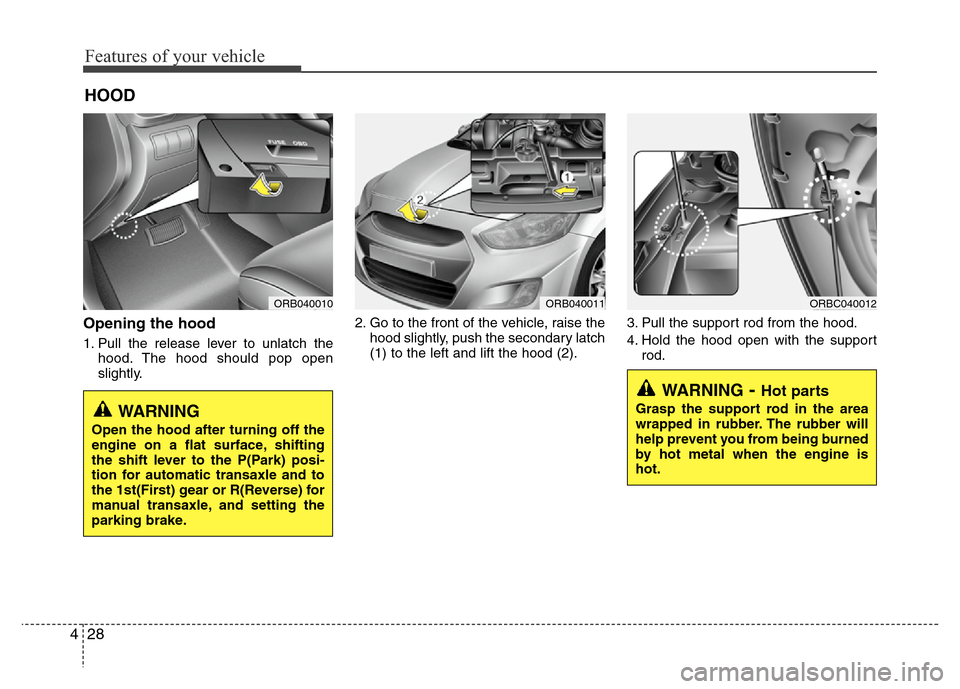
Opening the hood
1. Pull the release lever to unlatch the
hood. The hood should pop open
slightly.2. Go to the front of the vehicle, raise the
hood slightly, push the secondary latch
(1) to the left and lift the hood (2).3. Pull the support rod from the hood.
4. Hold the hood open with the support
rod.
HOOD
ORB040010ORB040011ORBC040012
WARNING- Hot parts
Grasp the support rod in the area
wrapped in rubber. The rubber will
help prevent you from being burned
by hot metal when the engine is
hot.WARNING
Open the hood after turning off the
engine on a flat surface, shifting
the shift lever to the P(Park) posi-
tion for automatic transaxle and to
the 1st(First) gear or R(Reverse) for
manual transaxle, and setting the
parking brake.
Page 115 of 402
445
Features of your vehicle
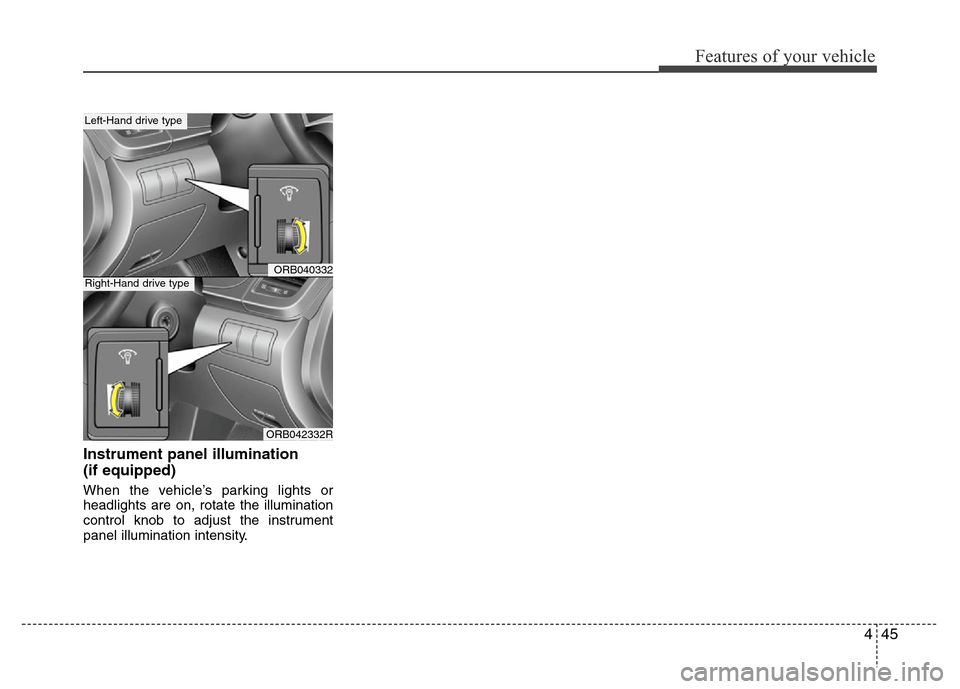
Instrument panel illumination
(if equipped)
When the vehicle’s parking lights or
headlights are on, rotate the illumination
control knob to adjust the instrument
panel illumination intensity.
ORB040332
ORB042332R
Left-Hand drive type
Right-Hand drive type
Page 124 of 402
Features of your vehicle
54 4
Warnings and indicators
All warning lights are checked by turning
the ignition switch ON (do not start the
engine). Any light that does not illuminate
should be checked by an authorized
HYUNDAI dealer.
After starting the engine, check to make
sure that all warning lights are off. If any
are still on, this indicates a situation that
needs attention. When releasing the
parking brake, the brake system warning
light should go off. The fuel warning light
will stay on if the fuel level is low.
ECO indicator
(if equipped)
(Automatic transaxle)
The ECO indicator is a system that
informs you to drive economically.
It is displayed if you drive fuel efficiently
to help you improve fuel efficiency.
• The ECO indicator (green) will turn on
when you are driving fuel efficiently in
the ECO ON mode.
If you don't want the indicator dis-
played, you can turn the ECO ON
mode to OFF mode by pressing the
TRIP button.
As per ECO ON/OFF Mode operation,
refer to the previous page.
• The fuel-efficiency can be changed by
the driver's driving habit and road con-
dition.
• It doesn't work at the condition which
doesn't meet economical driving such
as P (Park), N (Neutral), R (Reverse)
or sports mode.
• While the instant fuel consumption
mode is displayed on the LCD screen,
the ECO indicator turns off.
WARNING
Don't keep watching the indicator
while driving. It will distract you
while driving and cause an acci-
dent that results in severe personal
injury.ECO
Page 127 of 402
457
Features of your vehicle
Parking brake & brake
fluid warning light
Parking brake warning
This light is illuminated when the parking
brake is applied with the ignition switch in
the START or ON position. The warning
light should go off when the parking
brake is released while the engine is run-
ning.Low brake fluid level warning
If the warning light remains on, it may
indicate that the brake fluid level in the
reservoir is low.
If the warning light remains on:
1. Drive carefully to the nearest safe
location and stop your vehicle.
2. With the engine stopped, check the
brake fluid level immediately and add
fluid as required. Then check all brake
components for fluid leaks.
3. Do not drive the vehicle if leaks are
found, the warning light remains on or
the brakes do not operate properly.
Have the vehicle towed to any author-
ized HYUNDAI dealer for a brake sys-
tem inspection and necessary repairs.
Your vehicle is equipped with dual-diago-
nal braking systems. This means you still
have braking on two wheels even if one
of the dual systems should fail. With only
one of the dual systems working, more
than normal pedal travel and greater
pedal pressure are required to stop the
car. Also, the car will not stop in as short
a distance with only a portion of the
brake system working. If the brakes fail
while you are driving, shift to a lower gear
for additional engine braking and stop the
car as soon as it is safe to do so.
CAUTION
If the oil pressure warning light
stays on while the engine is run-
ning, serious engine damage may
result. The oil pressure warning
light comes on whenever there is
insufficient oil pressure. In normal
operation, it should come on when
the ignition switch is turned on,
then go out when the engine is
started. If the oil pressure warning
light stays on while the engine is
running, there is a serious malfunc-
tion.
If this happens, stop the car as
soon as it is safe to do so, turn off
the engine and check the oil level. If
the oil level is low, fill the engine oil
to the proper level and start the
engine again. If the light stays on
with the engine running, turn the
engine off immediately. In any
instance where the oil light stays on
when the engine is running, the
engine should be checked by an
authorized HYUNDAI dealer before
the car is driven again.
Page 128 of 402
Features of your vehicle
58 4
To check bulb operation, check whether
the parking brake and brake fluid warning
light illuminates when the ignition switch
is in the ON position.Automatic transaxle shift
indicator (if equipped)
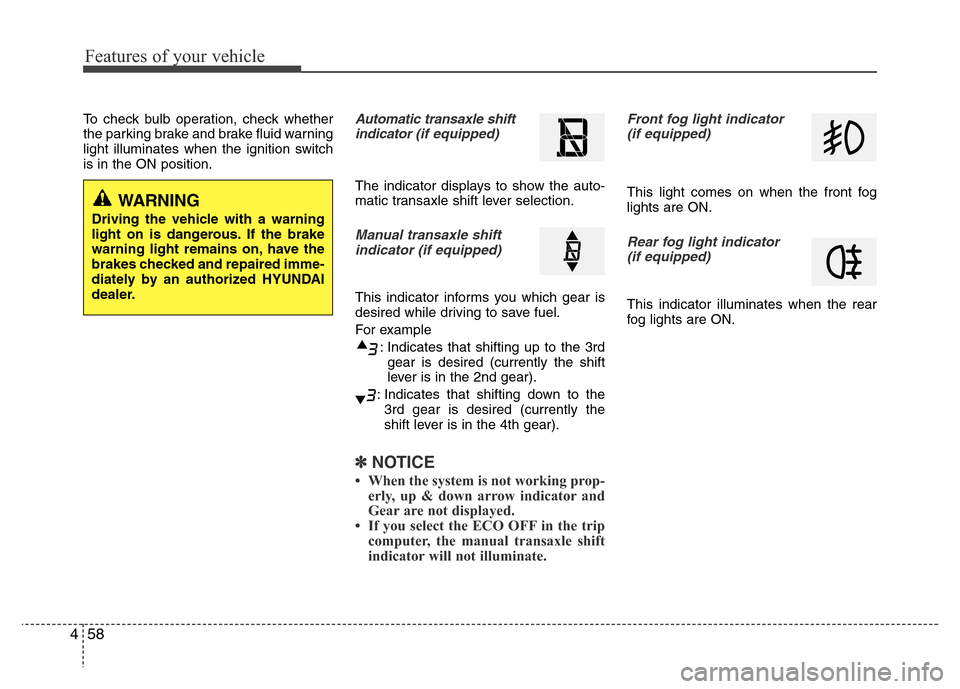
The indicator displays to show the auto-
matic transaxle shift lever selection.
Manual transaxle shift
indicator (if equipped)
This indicator informs you which gear is
desired while driving to save fuel.
For example
: Indicates that shifting up to the 3rd
gear is desired (currently the shift
lever is in the 2nd gear).
: Indicates that shifting down to the
3rd gear is desired (currently the
shift lever is in the 4th gear).
✽NOTICE
• When the system is not working prop-
erly, up & down arrow indicator and
Gear are not displayed.
• If you select the ECO OFF in the trip
computer, the manual transaxle shift
indicator will not illuminate.
Front fog light indicator
(if equipped)
This light comes on when the front fog
lights are ON.
Rear fog light indicator
(if equipped)
This indicator illuminates when the rear
fog lights are ON.
WARNING
Driving the vehicle with a warning
light on is dangerous. If the brake
warning light remains on, have the
brakes checked and repaired imme-
diately by an authorized HYUNDAI
dealer.
Page 144 of 402
Features of your vehicle
74 4
Battery saver function
(if equipped)
• The purpose of this feature is to pre-
vent the battery from being dis-
charged. The system automatically
turns off the parking lights when the
driver removes the ignition key (smart
key: turns off the engine) and opens
the driver-side door.
• With this feature, the parking lights will
be turned off automatically if the driver
parks on the side of road at night.
If necessary, to keep the lights on
when the ignition key is removed,
(smart key: turns off the engine) per-
form the following:
1) Open the driver-side door.
2) Turn the parking lights OFF and ON
again using the light switch on the
steering column.
Headlight escort function
(if equipped)
If you turn the ignition switch to the ACC
or OFF position with the headlights ON,
the headlights (and/or tail lights) remain
on for about 5 minutes. However, if the
driver’s door is opened and closed, the
headlights are turned off after 15 sec-
onds.
The headlights can be turned off by
pressing the lock button on the transmit-
ter (or smart key) twice or turning the
light switch to the OFF or Auto position.
However, if you turn the light switch to the
Auto position when it is dark outside, the
headlights will not be turned off.
Headlight welcome function
(if equipped)
When the headlight switch is in the ON or
AUTO position and all doors (and tail-
gate) are closed and locked, if you press
the door unlock button on the transmitter
(or smart key), the headlights will come
on for about 15 seconds.
If the headlight switch is in the AUTO
position, the function can only operate at
night.
At this time, if you press the door unlock
button again or door lock button on the
transmitter (or smart key), the headlights
will turn off immediately.
LIGHTING
CAUTION
If the driver gets out of the vehicle
through other doors (except dri-
ver's door and front passenger’s
door), the battery saver function
does not operate and the headlight
escort function does not turn off
automatically. Therefore, it causes
the battery to be discharged. In this
case, make sure to turn off the lamp
before getting out of the vehicle.
Page 145 of 402
475
Features of your vehicle
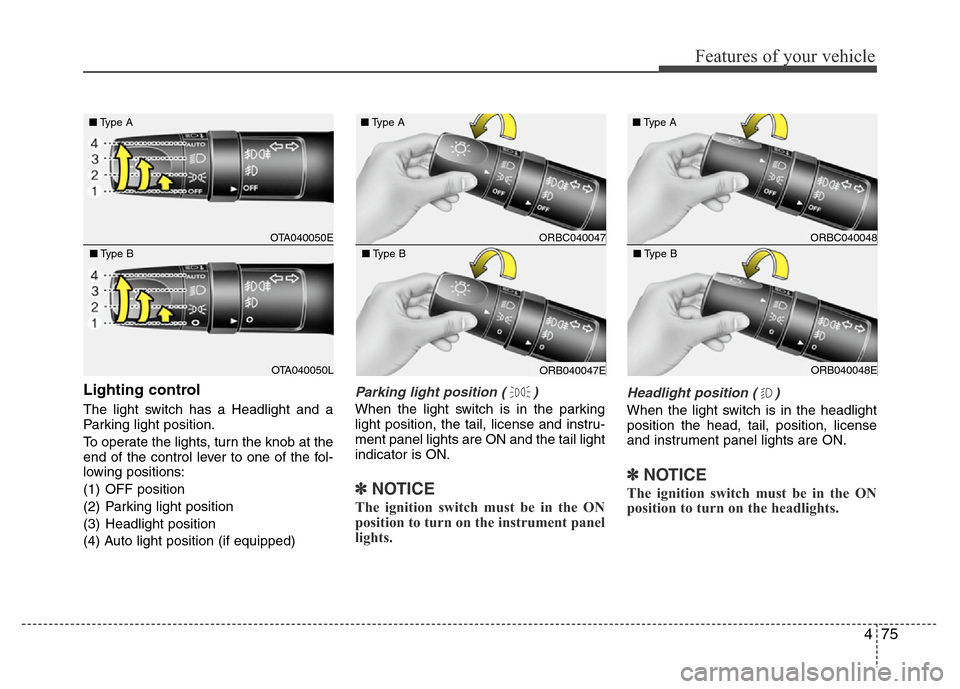
Lighting control
The light switch has a Headlight and a
Parking light position.
To operate the lights, turn the knob at the
end of the control lever to one of the fol-
lowing positions:
(1) OFF position
(2) Parking light position
(3) Headlight position
(4) Auto light position (if equipped)
Parking light position ( )
When the light switch is in the parking
light position, the tail, license and instru-
ment panel lights are ON and the tail light
indicator is ON.
✽NOTICE
The ignition switch must be in the ON
position to turn on the instrument panel
lights.
Headlight position ( )
When the light switch is in the headlight
position the head, tail, position, license
and instrument panel lights are ON.
✽NOTICE
The ignition switch must be in the ON
position to turn on the headlights.
OTA040050E ■Type A
OTA040050L ■Type B
ORBC040047 ■Type A
ORB040047E ■Type B
ORBC040048 ■Type A
ORB040048E ■Type B