Ac system Hyundai Accent 2016 Owner's Manual
[x] Cancel search | Manufacturer: HYUNDAI, Model Year: 2016, Model line: Accent, Model: Hyundai Accent 2016Pages: 456, PDF Size: 16.41 MB
Page 222 of 456
![Hyundai Accent 2016 Owners Manual 4145
Features of your vehicle
Turning Bluetooth System Off
Press the key Select [Phone]
Select [Bluetooth System Off]
Once
Bluetooth®Wireless Technology is
turned off, Bluetooth®Wireless
Technolog](/img/35/14353/w960_14353-221.png "Hyundai Accent 2016 Owners Manual 4145
Features of your vehicle
Turning Bluetooth System Off
Press the key Select [Phone]
Select [Bluetooth System Off]
Once
Bluetooth®Wireless Technology is
turned off, Bluetooth®Wireless
Technolog")
4145
Features of your vehicle
Turning Bluetooth System Off
Press the key Select [Phone]
Select [Bluetooth System Off]
Once
Bluetooth®Wireless Technology is
turned off, Bluetooth®Wireless
Technology related features will not be
supported within the audio system.
✽ ✽ NOTICE
To turn Bluetooth®Wireless Technology
back on, go to [Phone] and
select “Yes”.SETUPCLOCK
SETUPCLOCK
Page 223 of 456
Features of your vehicle
146
4
VOICE RECOGNITION
(if equipped model)
Using Voice Recognition
Starting Voice Recognition
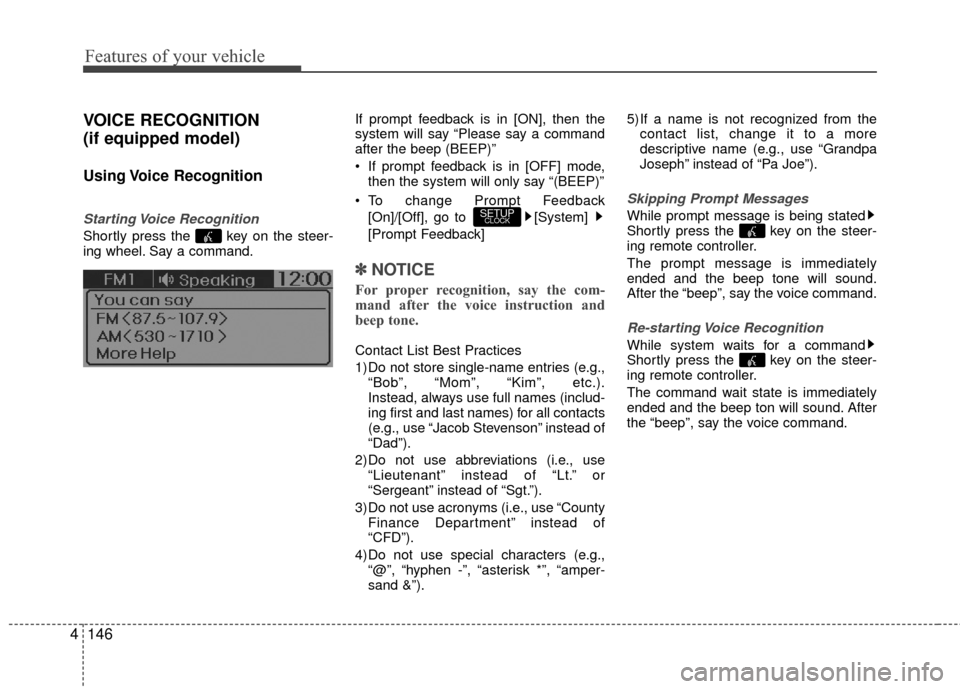
Shortly press the key on the steer-
ing wheel. Say a command. If prompt feedback is in [ON], then the
system will say “Please say a command
after the beep (BEEP)”
If prompt feedback is in [OFF] mode,
then the system will only say “(BEEP)”
To change Prompt Feedback [On]/[Off], go to [System]
[Prompt Feedback]
✽ ✽ NOTICE
For proper recognition, say the com-
mand after the voice instruction and
beep tone.
Contact List Best Practices
1) Do not store single-name entries (e.g.,
“Bob”, “Mom”, “Kim”, etc.).
Instead, always use full names (includ-
ing first and last names) for all contacts
(e.g., use “Jacob Stevenson” instead of
“Dad”).
2) Do not use abbreviations (i.e., use “Lieutenant” instead of “Lt.” or
“Sergeant” instead of “Sgt.”).
3) Do not use acronyms (i.e., use “County Finance Department” instead of
“CFD”).
4) Do not use special characters (e.g., “@”, “hyphen -”, “asterisk *”, “amper-
sand &”). 5) If a name is not recognized from the
contact list, change it to a more
descriptive name (e.g., use “Grandpa
Joseph” instead of “Pa Joe”).
Skipping Prompt Messages
While prompt message is being stated
Shortly press the key on the steer-
ing remote controller.
The prompt message is immediately
ended and the beep tone will sound.
After the “beep”, say the voice command.
Re-starting Voice Recognition
While system waits for a command
Shortly press the key on the steer-
ing remote controller.
The command wait state is immediately
ended and the beep ton will sound. After
the “beep”, say the voice command.
SETUPCLOCK
Page 224 of 456
4147
Features of your vehicle
ENDING VOICE RECOGNITION
While Voice Recognition is operating
Press and hold the key on the steer-
ing remote controller.
✽ ✽NOTICE
• While using voice command, pressing
any steering wheel control or a differ-
ent key will end voice command.
• When the system is waiting for a voice command, say “cancel” or “end” to
end voice command.
• When the system is waiting for a voice command, press and hold the key
on the steering wheel to end voice
command.
Voice Recognition and Phone
Contact Tips:
The Hyundai Voice Recognition System
may have difficulty understanding some
accents or uncommon names.
When using Voice Recognition to place a
call, speak in a moderate tone, with clear
pronunciation To maximize the use of
Voice Recognition, consider these guide-
lines when storing contacts:
Do not store single-name entries (e.g.,
“Bob”, “Mom”, etc.). Instead, always use
full names (including first and last names)
for these contacts
Do not use special characters (e.g., '@', '-', '*', '&', etc.)
Do not use abbreviations (i.e., use "Lieutenant" instead of "Lt.") or acronyms
(i.e., use "County Finance Department"
instead of "C. F. D."; Be sure to say the
name exactly as it is entered in the con-
tacts list
Page 226 of 456
4149
Features of your vehicle
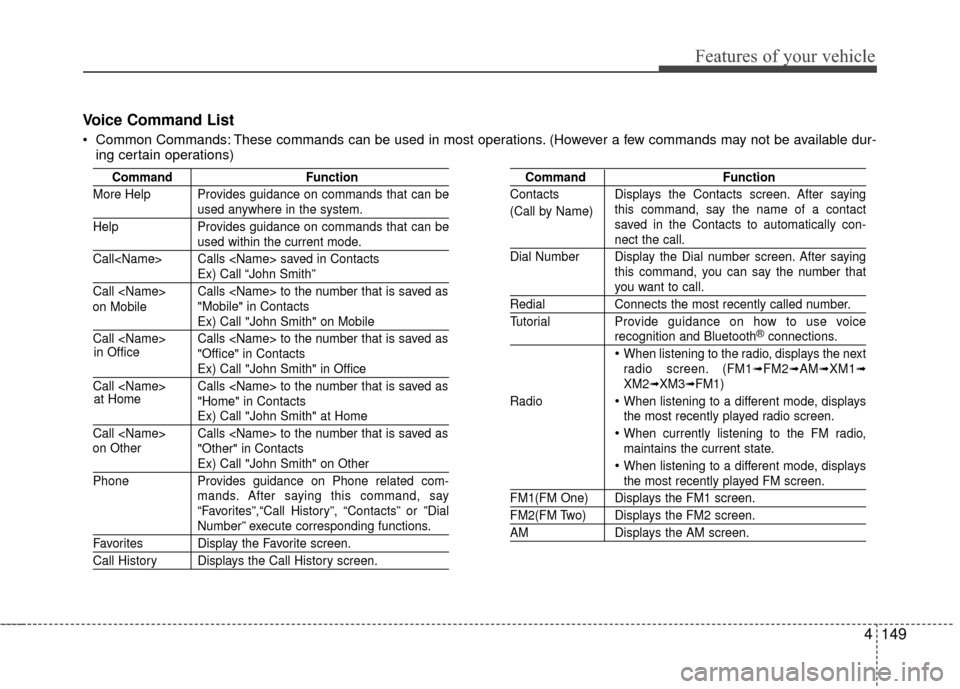
Voice Command List
Common Commands: These commands can be used in most operations. (However a few commands may not be available dur-ing certain operations)
Command Function
More Help Provides guidance on commands that can be
used anywhere in the system.
Help Provides guidance on commands that can be
used within the current mode.
Call
Ex) Call “John Smith”
Call
Ex) Call "John Smith" on Mobile
Call
Ex) Call "John Smith" in Office
Call
Ex) Call "John Smith" at Home
Call
Ex) Call "John Smith" on Other
Phone Provides guidance on Phone related com-
mands. After saying this command, say
“Favorites”,“Call History”, “Contacts” or ”Dial
Number” execute corresponding functions.
Favorites Display the Favorite screen.
Call History Displays the Call History screen.
Command Function
Contacts Displays the Contacts screen. After saying this command, say the name of a contact
saved in the Contacts to automatically con-
nect the call.
Dial Number Display the Dial number screen. After saying this command, you can say the number that
you want to call.
RedialConnects the most recently called number.
Tutorial Pro vide guidance on how to use voice
recognition and Bluetooth®connections.
When listening to the radio, displays the next
radio screen. (FM1➟FM2➟AM➟XM1➟XM2➟XM3➟FM1)
Radio
When listening to a different mode, displays
the most recently played radio screen.
When currently listening to the FM radio,
maintains the current state.
When listening to a different mode, displaysthe most recently played FM screen.
FM1(FM One) Displays the FM1 screen.
FM2(FM Two) Displays the FM2 screen.
AM Displays the AM screen.
(Call by Name)
on Mobile
in Office
at Home
on Other
Page 233 of 456
Features of your vehicle
156
4
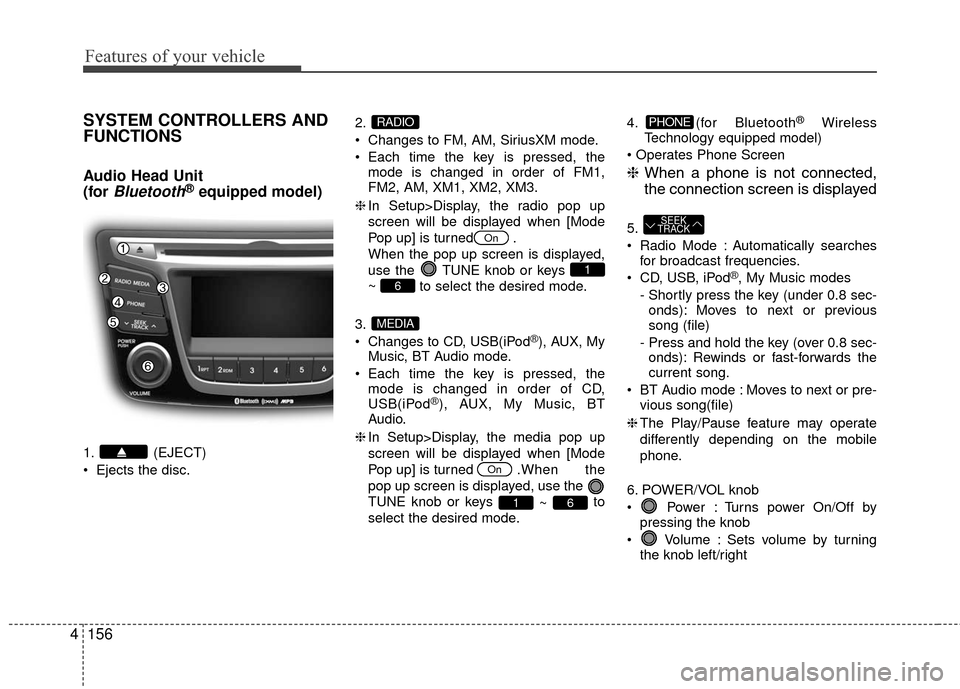
SYSTEM CONTROLLERS AND
FUNCTIONS
Audio Head Unit
(for
Bluetooth®equipped model)
1. (EJECT)
Ejects the disc. 2.
Changes to FM, AM, SiriusXM mode.
Each time the key is pressed, the
mode is changed in order of FM1,
FM2, AM, XM1, XM2, XM3.
❈ In Setup>Display, the radio pop up
screen will be displayed when [Mode
Pop up] is turned .
When the pop up screen is displayed,
use the TUNE knob or keys
~ to select the desired mode.
3.
Changes to CD, USB(iPod
®), AUX, My
Music, BT Audio mode.
Each time the key is pressed, the mode is changed in order of CD,
USB(iPod
®), AUX, My Music, BT
Audio.
❈ In Setup>Display, the media pop up
screen will be displayed when [Mode
Pop up] is turned . When the
pop up screen is displayed, use the
TUNE knob or keys ~ to
select the desired mode. 4. (for Bluetooth
®Wireless
Technology equipped model)
❈ When a phone is not connected,
the connection screen is displayed
5.
Radio Mode : Automatically searches
for broadcast frequencies.
CD, USB, iPod
®, My Music modes
- Shortly press the key (under 0.8 sec- onds): Moves to next or previous
song (file)
- Press and hold the key (over 0.8 sec- onds): Rewinds or fast-forwards the
current song.
BT Audio mode : Moves to next or pre- vious song(file)
❈ The Play/Pause feature may operate
differently depending on the mobile
phone.
6. POWER/VOL knob
Power : Turns power On/Off by pressing the knob
Volume : Sets volume by turning the knob left/right
SEEK
TRACK
PHONE
61
On
MEDIA
6
1
On
RADIO
Page 234 of 456
4157
Features of your vehicle
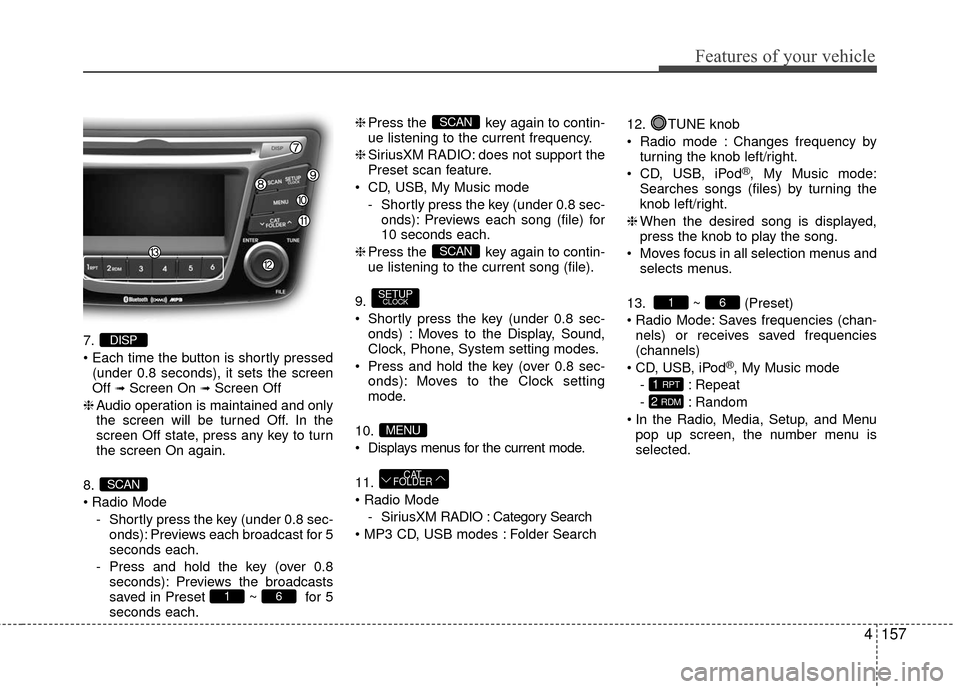
7.
(under 0.8 seconds), it sets the screen
Off
➟Screen On ➟Screen Off
❈ Audio operation is maintained and only
the screen will be turned Off. In the
screen Off state, press any key to turn
the screen On again.
8.
Radio Mode - Shortly press the key (under 0.8 sec-onds): Previews each broadcast for 5
seconds each.
- Press and hold the key (over 0.8 seconds): Previews the broadcasts
saved in Preset ~ for 5
seconds each. ❈
Press the key again to contin-
ue listening to the current frequency.
❈ SiriusXM RADIO: does not support the
Preset scan feature.
CD, USB, My Music mode - Shortly press the key (under 0.8 sec-onds): Previews each song (file) for
10 seconds each.
❈ Press the key again to contin-
ue listening to the current song (file).
9.
Shortly press the key (under 0.8 sec- onds) : Moves to the Display, Sound,
Clock, Phone, System setting modes.
Press and hold the key (over 0.8 sec- onds): Moves to the Clock setting
mode.
10.
Displays menus for the current mode.
11.
- SiriusXM RADIO : Category Search
Folder Search 12. TUNE knob
Radio mode : Changes frequency by
turning the knob left/right.
CD, USB, iPod
®, My Music mode:
Searches songs (files) by turning the
knob left/right.
❈ When the desired song is displayed,
press the knob to play the song.
Moves focus in all selection menus and selects menus.
13. ~ (Preset)
Radio Mode: Saves frequencies (chan- nels) or receives saved frequencies
(channels)
CD, USB, iPod
®, My Music mode
- : Repeat
- : Random
In the Radio, Media, Setup, and Menu pop up screen, the number menu is
selected.
2 RDM
1 RPT
61
CAT
FOLDER
MENU
SETUPCLOCK
SCAN
SCAN
61
SCAN
DISP
Page 238 of 456
![Hyundai Accent 2016 Owners Manual 4161
Features of your vehicle
CLOCK SETTINGS
Press the key Select[Clock]
through
TUNE knobor key
Selectmenu through TUNE knob
Clock Settings
This menu is used to set the time.
Select [Clock Setting](/img/35/14353/w960_14353-237.png "Hyundai Accent 2016 Owners Manual 4161
Features of your vehicle
CLOCK SETTINGS
Press the key Select[Clock]
through
TUNE knobor key
Selectmenu through TUNE knob
Clock Settings
This menu is used to set the time.
Select [Clock Setting")
4161
Features of your vehicle
CLOCK SETTINGS
Press the key Select[Clock]
through
TUNE knobor key
Selectmenu through TUNE knob
Clock Settings
This menu is used to set the time.
Select [Clock Settings] Set through
TUNE knob Press TUNE knob
❈Adjust the number currently in focus to set the [hour] and press the tune knob to
set the [minute].
Calendar Settings
This menu is used to set the date
(DD/MM/YYYY).
Select [Calendar Settings]
Set through
TUNE knob Press TUNEknob
❈Adjust the number currently in focus to make the settings and press the tune
knob to move to the next setting. (Set in
order of Day/Month/Year)
Time Format
This function is used to set the 12/24
hour time format of the audio system.
Select [Time Format] Set 12Hr / 24Hr
through TUNE
knob
Clock Display when Power is OFF
Select [Clock Disp.(Pwr Off) Set / through TUNEknob
: Displays time/date on screen
: Turn off.Off
On
OffOn
3
SETUPCLOCK
Page 239 of 456
![Hyundai Accent 2016 Owners Manual Features of your vehicle
162
4
SYSTEM SETTINGS
Press the keySelect [System]
Select menu through TUNE knob
Memory Information
Displays currently used memory and
total system memory.
Select [Memory Inf](/img/35/14353/w960_14353-238.png "Hyundai Accent 2016 Owners Manual Features of your vehicle
162
4
SYSTEM SETTINGS
Press the keySelect [System]
Select menu through TUNE knob
Memory Information
Displays currently used memory and
total system memory.
Select [Memory Inf")
Features of your vehicle
162
4
SYSTEM SETTINGS
Press the keySelect [System]
Select menu through TUNE knob
Memory Information
Displays currently used memory and
total system memory.
Select [Memory Information] OK
The currently used memory is displayed
on the left side while the total system
memory is displayed on the right side.
Prompt Feedback
This feature is used to change voice
command feedback between Normal and
Expert modes.
Select [Prompt Feedback] Set through
TUNEknob
Normal(On) : This mode is for beginner users and provides detailed instruc-
tions during voice command operation.
Expert(Off) : This mode is for expert users and omits some information dur-
ing voice command operation. (When
using Expert mode, guidance instruc-
tions can be heard through the [Help]
or [Menu] commands.
Language
This menu is used to set the display and
voice recognition language.
Select [Language] Set through
TUNE knob
❈ The system will reboot after the lan-
guage is changed.
❈ Language support by region
- English, Français, EspañolSETUPCLOCK
Page 242 of 456
4165
Features of your vehicle
SiriusXM®Satellite Radio
information
Satellite Radio channels:
Enjoy SiriusXM Satellite Radio with a 3-
month trial subscription to the Sirius Select
package. You’ll get over 140 channels,
including commercial-free music, plus all
your favorite sports, exclusive talk, enter-
tainment, and a selection of premium pro-
gramming. For more information and a
complete list of SiriusXM channels, visit sir-
iusxm.com in the United States, siriusxm.ca
in Canada, or call SiriusXM at 1-888-539-
7474.
Satellite Radio reception factors:
To receive the satellite signal, your vehicle
has been equipped with a satellite radio
antenna located on the roof of your vehi-
cle. The vehicle roof provides the best
location for an unobstructed, open view of
the sky, a requirement of a satellite radio
system. Like AM/FM, there are several fac-
tors that can affect satellite radio reception
performance:
Antenna obstructions: For optimal
reception performance, keep the anten-
na clear of snow and ice build-up and
keep luggage and other material as far
away from the anten na as possible. Terrain: Hills, mountains, tall buildings,
bridges, tunnels, freeway overpasses,
parking garages, dense tree foliage and
thunderstorms can interfere with your
reception.
SiriusXM Satellite Radio service:
SiriusXM is a subscription-based satellite
radio service that broadcasts music,
sports, news and entertainment program-
ming to radio receivers, which are avail-
able for installation in motor vehicles or
factory installed, as well as for the home,
portable and wireless devices, and
through an Internet connection on person-
al computer.
Vehicles that are equipped with a factory
installed SiriusXM Satellite Radio system
include:
Hardware and an introductory trial sub-
scription term, which begins on the date
of sale or lease of the vehicle.
For a small upgrade fee, access to SiriusXM music channels, and other
select channels over the Internet using
any computer connected to the Internet
(U.S. customers only).
For information on extended subscrip-
tion terms, contact SiriusXM at 1-888-
539-7474.
NOTE:
SiriusXM services require a subscrip-
tion sold separately, or as a package,
by Sirius XM Radio Inc. If you decide
to continue service after your trial, the
subscription plan you choose will
automatically renew thereafter and
you will be charged according to your
chosen payment method at then-cur-
rent rates. Fees and taxes apply. To
cancel you must call SiriusXM at 1-
866-635-2349. See SiriusXM Customer
Agreement for complete terms at
www.siriusxm.com. SiriusXM U.S.
satellite and data services are avail-
able only in the 48 contiguous USA,
DC and PR (with coverage limita-
tions). SiriusXM satellite service is
also available in Canada; see www.sir-
iusxm. ca. All fees and programming
subject to change. Sirius, XM and all
related marks and logos are trade-
marks of Sirius XM Radio Inc.
Page 251 of 456
Features of your vehicle
174
4
✽
✽
NOTICE - USING THE MY
MUSIC
• Even if memory is available, a maxi-
mum of 6,000 songs can be stored.
• The same song can be copied up to 1,000 times.
• Memory info can be checked in the System menu of Setup.
AUX
AUX is used to play external MEDIA cur-
rently connected with the AUX terminal.
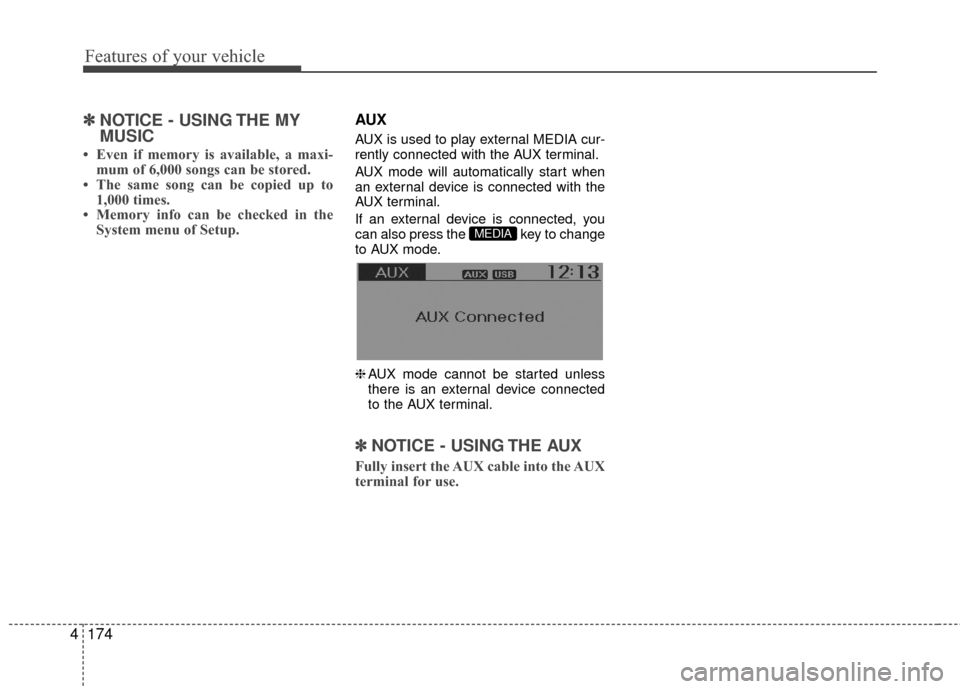
AUX mode will automatically start when
an external device is connected with the
AUX terminal.
If an external device is connected, you
can also press the key to change
to AUX mode.
❈ AUX mode cannot be started unless
there is an external device connected
to the AUX terminal.
✽ ✽ NOTICE - USING THE AUX
Fully insert the AUX cable into the AUX
terminal for use.
MEDIA