door lock Hyundai Accent 2017 User Guide
[x] Cancel search | Manufacturer: HYUNDAI, Model Year: 2017, Model line: Accent, Model: Hyundai Accent 2017Pages: 380, PDF Size: 12.45 MB
Page 81 of 380
4-7
Features of your vehicle
✽
✽NOTICE - Unlock mode con-
version (if equipped)
You can change the system to unlock all
doors by turning the key to the right
once. If you want this feature (central
door unlock mode), perform the follow-
ing:
two stage unlock mode ↔ ↔
central door
unlock mode
The unlock mode is changed alternately
by pressing the lock button and unlock
button on the transmitter (if equipped)
at the same time for 5 seconds or more.
The hazard warning lights will blink
four times to indicate that the mode con-
version is completed.
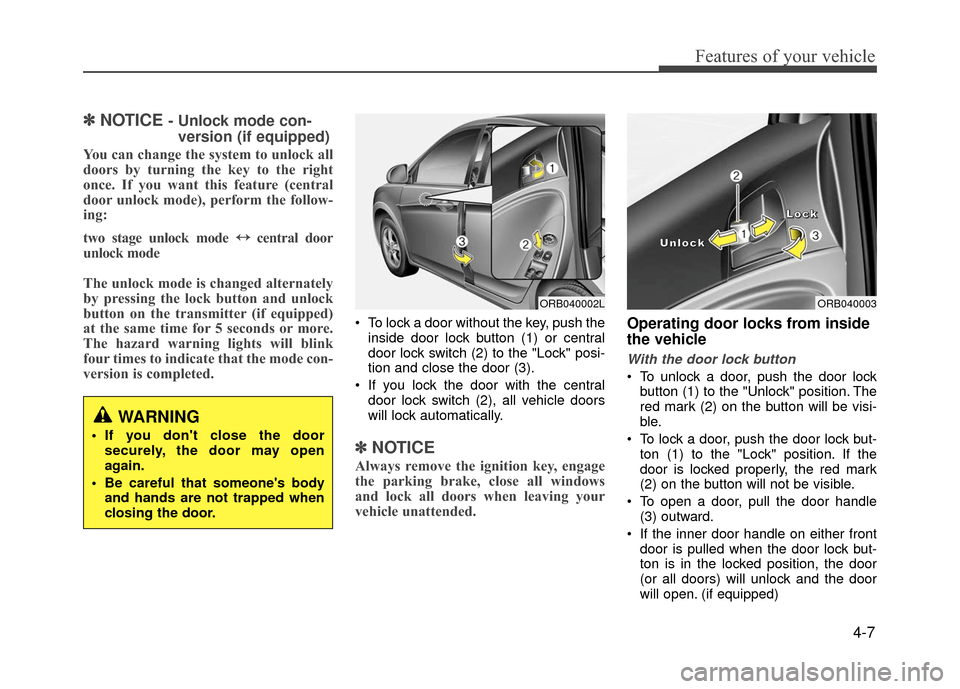
To lock a door without the key, push the
inside door lock button (1) or central
door lock switch (2) to the "Lock" posi-
tion and close the door (3).
If you lock the door with the central door lock switch (2), all vehicle doors
will lock automatically.
✽ ✽ NOTICE
Always remove the ignition key, engage
the parking brake, close all windows
and lock all doors when leaving your
vehicle unattended.
Operating door locks from inside
the vehicle
With the door lock button
To unlock a door, push the door lock
button (1) to the "Unlock" position. The
red mark (2) on the button will be visi-
ble.
To lock a door, push the door lock but- ton (1) to the "Lock" position. If the
door is locked properly, the red mark
(2) on the button will not be visible.
To open a door, pull the door handle (3) outward.
If the inner door handle on either front door is pulled when the door lock but-
ton is in the locked position, the door
(or all doors) will unlock and the door
will open. (if equipped)
WARNING
If you don't close the doorsecurely, the door may open
again.
Be careful that someone's body and hands are not trapped when
closing the door.
ORB040002LORB040003
L
L
L
L
o
o
o
o
c
c
c
c
k
k
k
k
U
U
U
U
n
n
n
n
l
l
l
l
o
o
o
o
c
c
c
c
k
k
k
k
Page 82 of 380
Features of your vehicle
4-8
Front door cannot be locked if the igni-tion key is in the ignition switch and the
door is open. (if equipped)
With central door lock switch (if equipped)
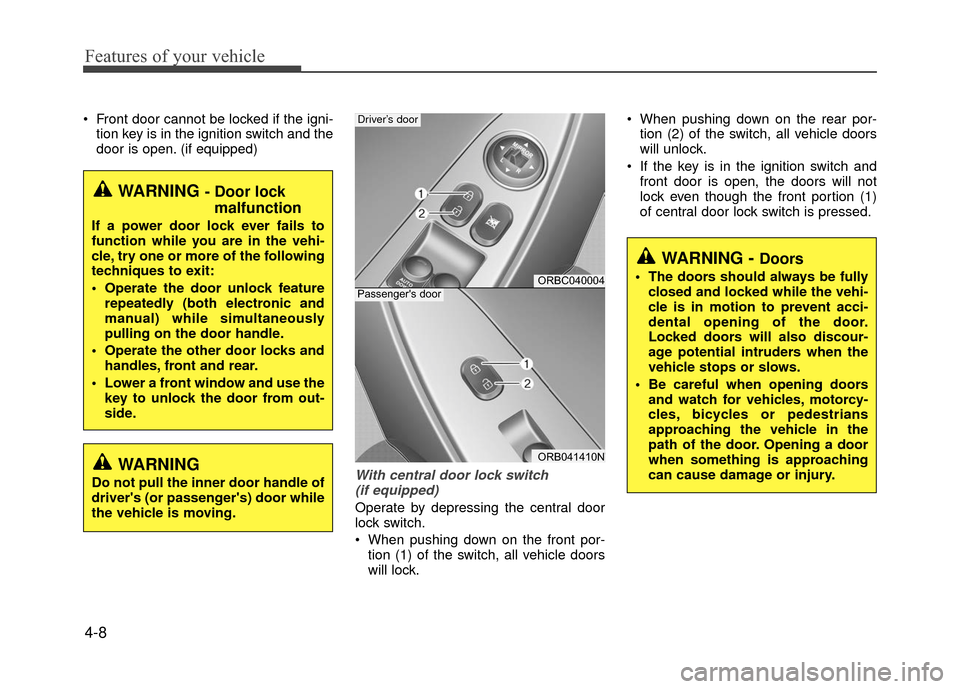
Operate by depressing the central door
lock switch.
When pushing down on the front por- tion (1) of the switch, all vehicle doors
will lock. When pushing down on the rear por-
tion (2) of the switch, all vehicle doors
will unlock.
If the key is in the ignition switch and front door is open, the doors will not
lock even though the front portion (1)
of central door lock switch is pressed.
WARNING - Door lock malfunction
If a power door lock ever fails to
function while you are in the vehi-
cle, try one or more of the following
techniques to exit:
Operate the door unlock feature
repeatedly (both electronic and
manual) while simultaneously
pulling on the door handle.
Operate the other door locks and handles, front and rear.
Lower a front window and use the key to unlock the door from out-
side.
ORBC040004
ORB041410N
Passenger's door
Driver’s door
WARNING - Doors
The doors should always be fullyclosed and locked while the vehi-
cle is in motion to prevent acci-
dental opening of the door.
Locked doors will also discour-
age potential intruders when the
vehicle stops or slows.
Be careful when opening doors and watch for vehicles, motorcy-
cles, bicycles or pedestrians
approaching the vehicle in the
path of the door. Opening a door
when something is approaching
can cause damage or injury.
WARNING
Do not pull the inner door handle of
driver's (or passenger's) door while
the vehicle is moving.
Page 83 of 380
4-9
Features of your vehicle
Impact sensing door unlock sys-
tem (if equipped)
All doors will be automatically unlocked
when the impact is delivered to impact
sensors while the ignition switch is ON.
However, the doors may not be unlocked
if mechanical problems occur with the
door lock system or battery.
Speed sensing door lock system
(if equipped)
All doors will be automatically locked
after the vehicle speed exceeds 9 mph
(15 km/h). And all doors will be automat-
ically unlocked when you turn the engine
off or when you remove the ignition key.
(if equipped)
Auto door lock/unlock feature
(Automatic transaxle)
(if equipped)
All doors will automatically lock whenthe shift lever is moved out of P (Park).
All doors will automatically unlock when the shift lever is moved into P
(Park).
Child-protector rear door lock
The child safety lock is provided to help
prevent children from accidentally open-
ing the rear doors from inside the vehicle.
The rear door safety locks should be
used whenever children are in the vehi-
cle.
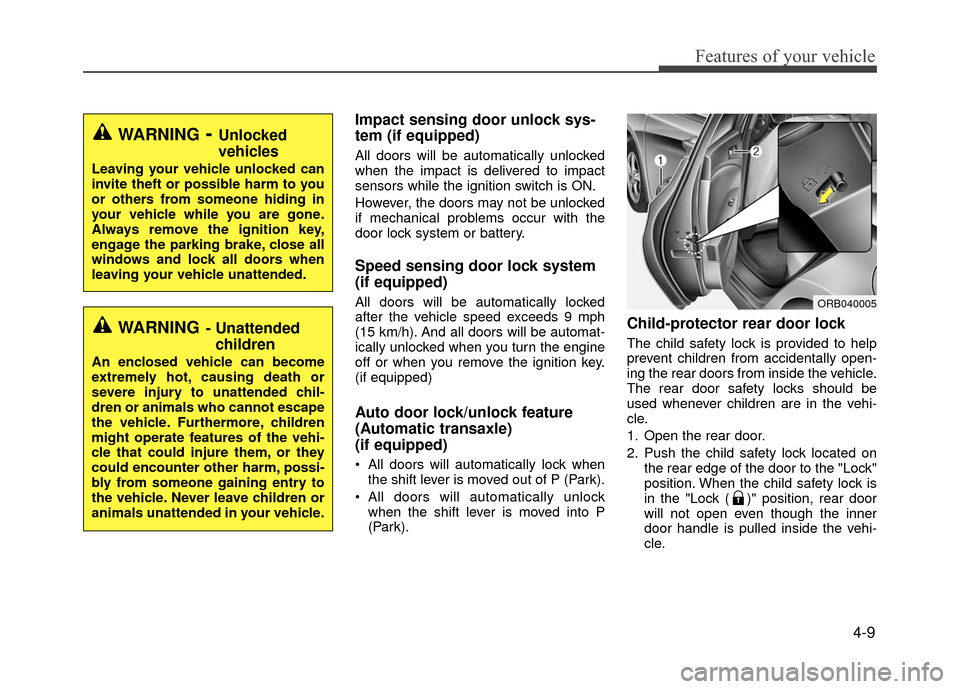
1. Open the rear door.
2. Push the child safety lock located on the rear edge of the door to the "Lock"
position. When the child safety lock is
in the "Lock ( )" position, rear door
will not open even though the inner
door handle is pulled inside the vehi-
cle.WARNING- Unattendedchildren
An enclosed vehicle can become
extremely hot, causing death or
severe injury to unattended chil-
dren or animals who cannot escape
the vehicle. Furthermore, children
might operate features of the vehi-
cle that could injure them, or they
could encounter other harm, possi-
bly from someone gaining entry to
the vehicle. Never leave children or
animals unattended in your vehicle.
WARNING- Unlocked
vehicles
Leaving your vehicle unlocked can
invite theft or possible harm to you
or others from someone hiding in
your vehicle while you are gone.
Always remove the ignition key,
engage the parking brake, close all
windows and lock all doors when
leaving your vehicle unattended.
ORB040005
Page 84 of 380
Features of your vehicle
4-10
3. Close the rear door.
To open the rear door, pull the outside
door handle (2).
Even though the doors may be unlocked,
the rear door will not open by pulling the
inner door handle until the rear door child
safety lock is unlocked.
Opening the trunk
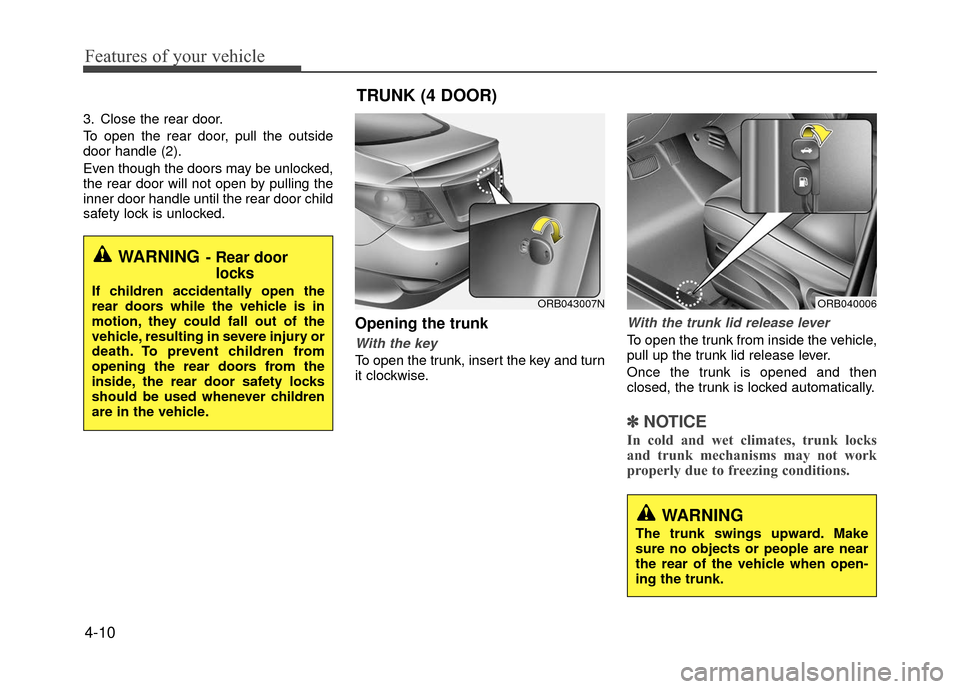
With the key
To open the trunk, insert the key and turn
it clockwise.
With the trunk lid release lever
To open the trunk from inside the vehicle,
pull up the trunk lid release lever.
Once the trunk is opened and then
closed, the trunk is locked automatically.
✽ ✽NOTICE
In cold and wet climates, trunk locks
and trunk mechanisms may not work
properly due to freezing conditions.
WARNING- Rear door
locks
If children accidentally open the
rear doors while the vehicle is in
motion, they could fall out of the
vehicle, resulting in severe injury or
death. To prevent children from
opening the rear doors from the
inside, the rear door safety locks
should be used whenever children
are in the vehicle.
TRUNK (4 DOOR)
ORB040006ORB043007N
WARNING
The trunk swings upward. Make
sure no objects or people are near
the rear of the vehicle when open-
ing the trunk.
Page 86 of 380
Features of your vehicle
4-12
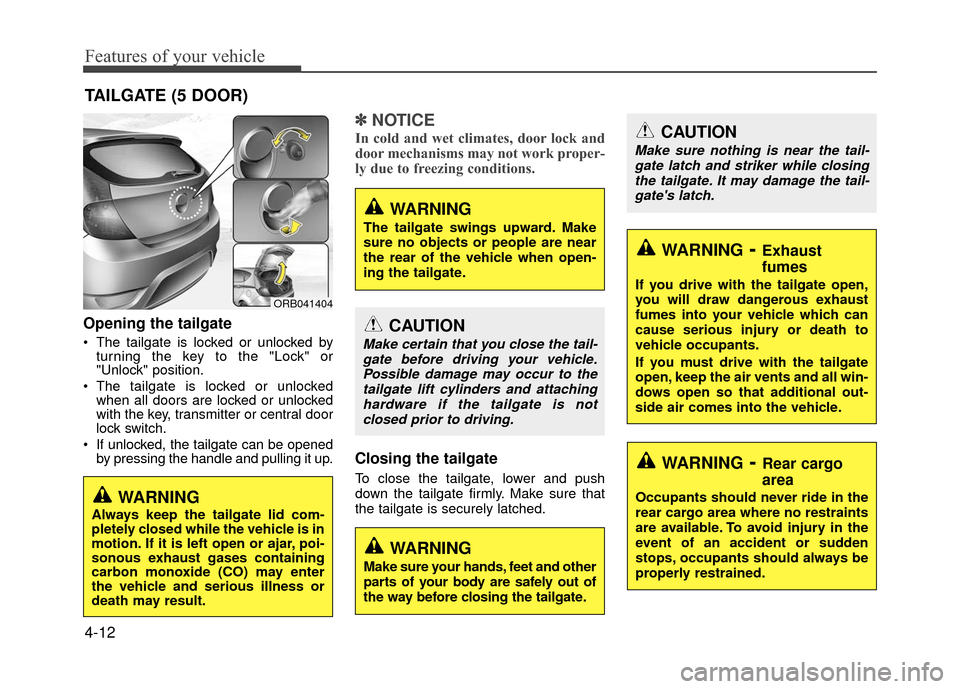
Opening the tailgate
The tailgate is locked or unlocked byturning the key to the "Lock" or
"Unlock" position.
The tailgate is locked or unlocked when all doors are locked or unlocked
with the key, transmitter or central door
lock switch.
If unlocked, the tailgate can be opened by pressing the handle and pulling it up.
✽ ✽ NOTICE
In cold and wet climates, door lock and
door mechanisms may not work proper-
ly due to freezing conditions.
Closing the tailgate
To close the tailgate, lower and push
down the tailgate firmly. Make sure that
the tailgate is securely latched.
TAILGATE (5 DOOR)
ORB041404
WARNING
The tailgate swings upward. Make
sure no objects or people are near
the rear of the vehicle when open-
ing the tailgate.
WARNING
Always keep the tailgate lid com-
pletely closed while the vehicle is in
motion. If it is left open or ajar, poi-
sonous exhaust gases containing
carbon monoxide (CO) may enter
the vehicle and serious illness or
death may result.
CAUTION
Make certain that you close the tail-
gate before driving your vehicle.Possible damage may occur to thetailgate lift cylinders and attachinghardware if the tailgate is notclosed prior to driving.
WARNING
Make sure your hands, feet and other
parts of your body are safely out of
the way before closing the tailgate.
CAUTION
Make sure nothing is near the tail-gate latch and striker while closingthe tailgate. It may damage the tail- gate's latch.
WARNING- Exhaust
fumes
If you drive with the tailgate open,
you will draw dangerous exhaust
fumes into your vehicle which can
cause serious injury or death to
vehicle occupants.
If you must drive with the tailgate
open, keep the air vents and all win-
dows open so that additional out-
side air comes into the vehicle.
WARNING- Rear cargo
area
Occupants should never ride in the
rear cargo area where no restraints
are available. To avoid injury in the
event of an accident or sudden
stops, occupants should always be
properly restrained.
Page 87 of 380
4-13
Features of your vehicle
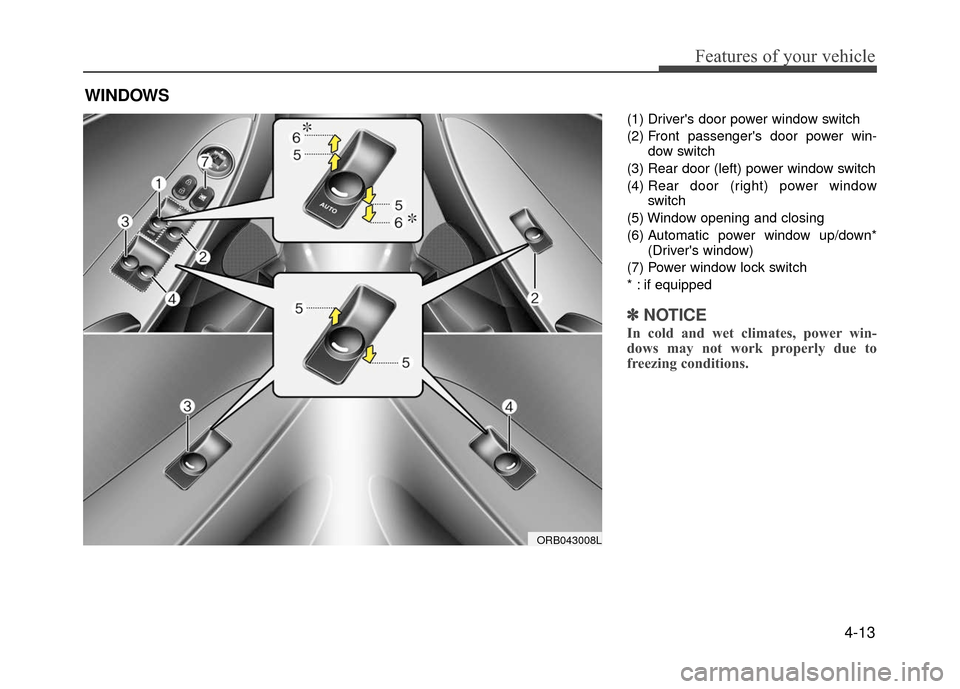
(1) Driver's door power window switch
(2) Front passenger's door power win-dow switch
(3) Rear door (left) power window switch
(4) Rear door (right) power window
switch
(5) Window opening and closing
(6) Automatic power window up/down* (Driver's window)
(7) Power window lock switch
* : if equipped
✽ ✽ NOTICE
In cold and wet climates, power win-
dows may not work properly due to
freezing conditions.
WINDOWS
ORB043008L
Page 88 of 380
Features of your vehicle
4-14
Power windows
The ignition switch must be in the ONposition for power windows to operate.
Each door has a power window switch
that controls that door's window. The
driver has a power window lock switch
which can block the operation of pas-
senger windows. The driver’s door has
a master power window switch that
controls all the windows in the vehicle.
The power windows can be operated for approximately 30 seconds after the igni-
tion key is removed or turned to the ACC
or LOCK position. However, if the front
doors open, the power windows cannot
be operated within the 30 second period
(if equipped : remote keyless entry sys-
tem).
✽ ✽ NOTICE
• In cold and wet climates, power win-
dows my not work properly due to
freezing conditions.
• While driving with the rear windows down or with the sunroof (if
equipped) opened (or partially
opened), your vehicle may demon-
strate a wind buffeting or pulsation
noise. This noise is normal and can be
reduced or eliminated by taking the
following actions. If the noise occurs
with one or both of the rear windows
down, partially lower both front win-
dows approximately one inch. If you
experience the noise with the sunroof
open, slightly close the sunroof.
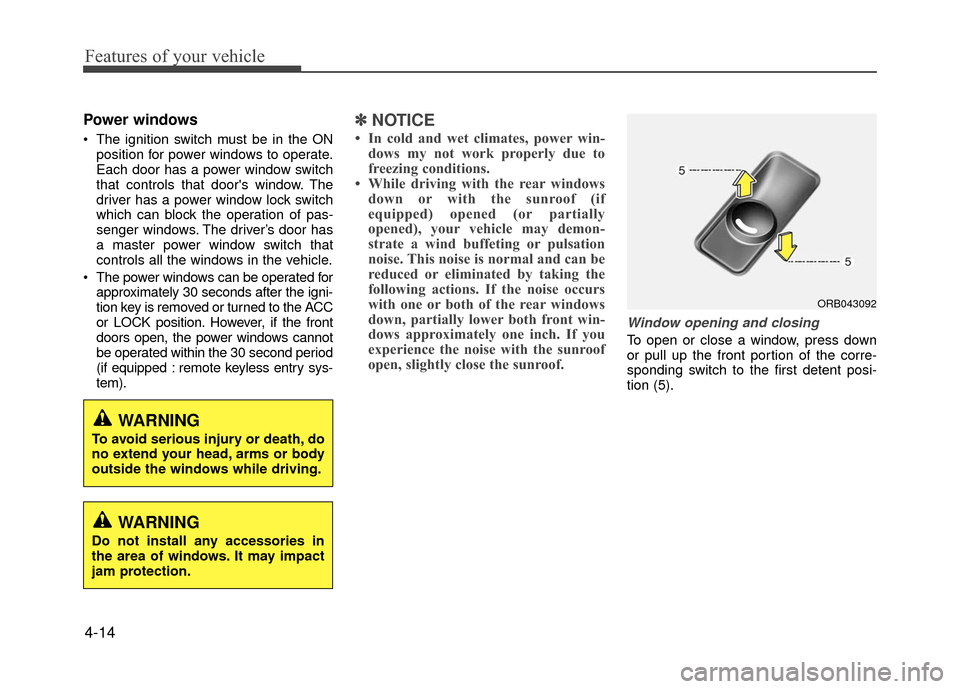
Window opening and closing
To open or close a window, press down
or pull up the front portion of the corre-
sponding switch to the first detent posi-
tion (5).
ORB043092
WARNING
To avoid serious injury or death, do
no extend your head, arms or body
outside the windows while driving.
WARNING
Do not install any accessories in
the area of windows. It may impact
jam protection.
Page 90 of 380
Features of your vehicle
4-16
✽
✽NOTICE
The automatic reverse feature is only
active when the "Auto Up" feature is
used by fully pulling up the switch to the
second detent.
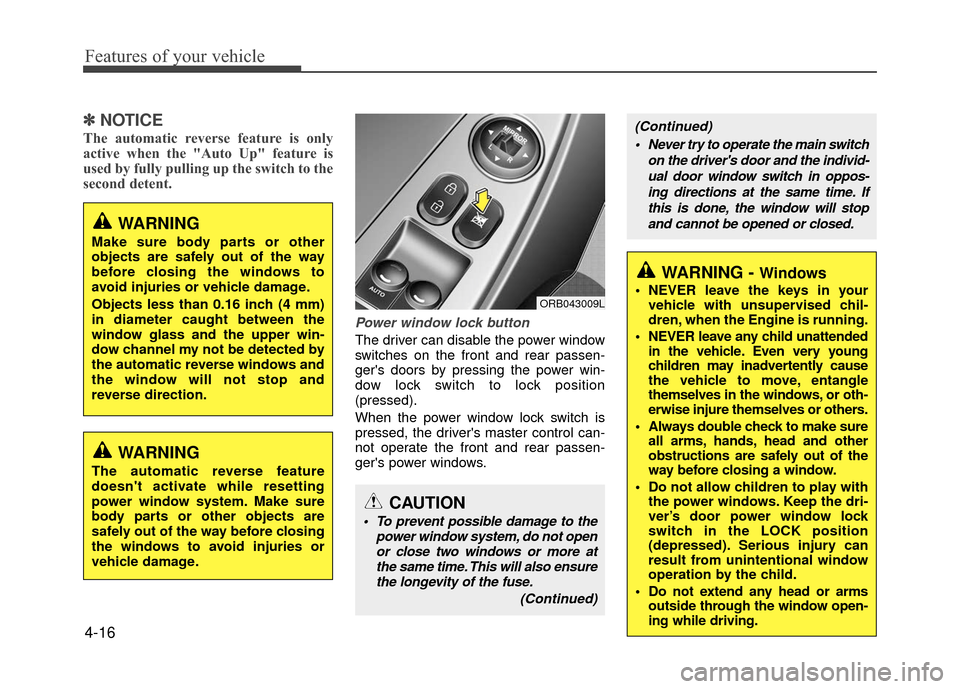
Power window lock button
The driver can disable the power window
switches on the front and rear passen-
ger's doors by pressing the power win-
dow lock switch to lock position
(pressed).
When the power window lock switch is
pressed, the driver's master control can-
not operate the front and rear passen-
ger's power windows.
ORB043009L
CAUTION
To prevent possible damage to the
power window system, do not openor close two windows or more atthe same time. This will also ensurethe longevity of the fuse.
(Continued)
(Continued)
Never try to operate the main switch on the driver's door and the individ-ual door window switch in oppos-ing directions at the same time. Ifthis is done, the window will stopand cannot be opened or closed.
WARNING - Windows
NEVER leave the keys in your vehicle with unsupervised chil-
dren, when the Engine is running.
NEVER leave any child unattended in the vehicle. Even very young
children may inadvertently cause
the vehicle to move, entangle
themselves in the windows, or oth-
erwise injure themselves or others.
Always double check to make sure all arms, hands, head and other
obstructions are safely out of the
way before closing a window.
Do not allow children to play with the power windows. Keep the dri-
ver’s door power window lock
switch in the LOCK position
(depressed). Serious injury can
result from unintentional window
operation by the child.
Do not extend any head or arms outside through the window open-
ing while driving.
WARNING
Make sure body parts or other
objects are safely out of the way
before closing the windows to
avoid injuries or vehicle damage.
Objects less than 0.16 inch (4 mm)
in diameter caught between the
window glass and the upper win-
dow channel my not be detected by
the automatic reverse windows and
the window will not stop and
reverse direction.
WARNING
The automatic reverse feature
doesn't activate while resetting
power window system. Make sure
body parts or other objects are
safely out of the way before closing
the windows to avoid injuries or
vehicle damage.
Page 116 of 380
Features of your vehicle
4-42
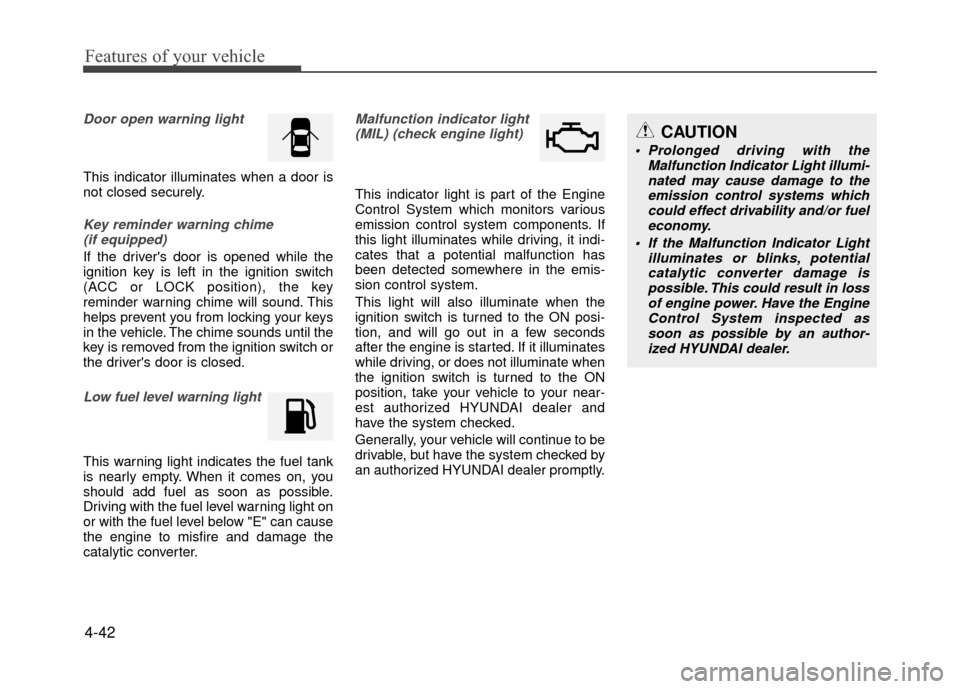
Door open warning light
This indicator illuminates when a door is
not closed securely.
Key reminder warning chime (if equipped)
If the driver's door is opened while the
ignition key is left in the ignition switch
(ACC or LOCK position), the key
reminder warning chime will sound. This
helps prevent you from locking your keys
in the vehicle. The chime sounds until the
key is removed from the ignition switch or
the driver's door is closed.
Low fuel level warning light
This warning light indicates the fuel tank
is nearly empty. When it comes on, you
should add fuel as soon as possible.
Driving with the fuel level warning light on
or with the fuel level below "E" can cause
the engine to misfire and damage the
catalytic converter.
Malfunction indicator light(MIL) (check engine light)
This indicator light is part of the Engine
Control System which monitors various
emission control system components. If
this light illuminates while driving, it indi-
cates that a potential malfunction has
been detected somewhere in the emis-
sion control system.
This light will also illuminate when the
ignition switch is turned to the ON posi-
tion, and will go out in a few seconds
after the engine is started. If it illuminates
while driving, or does not illuminate when
the ignition switch is turned to the ON
position, take your vehicle to your near-
est authorized HYUNDAI dealer and
have the system checked.
Generally, your vehicle will continue to be
drivable, but have the system checked by
an authorized HYUNDAI dealer promptly.
CAUTION
Prolonged driving with the Malfunction Indicator Light illumi-nated may cause damage to the emission control systems whichcould effect drivability and/or fueleconomy.
If the Malfunction Indicator Light illuminates or blinks, potentialcatalytic converter damage is possible. This could result in lossof engine power. Have the Engine Control System inspected assoon as possible by an author- ized HYUNDAI dealer.
Page 119 of 380
4-45
Features of your vehicle
Headlight delay (if equipped)
If you turn the ignition switch to the ACC
or OFF position with the headlights ON,
the headlights (and/or tail lights) remain
on for about 5 minutes. However, if the
driver’s door is opened and closed, the
headlights are turned off after 15 sec-
onds.
The headlights can be turned off by
pressing the lock button on the transmit-
ter twice or turning the light switch to the
OFF or AUTO position.
However, if you turn the light switch to the
AUTO position when it is dark outside,
the headlights will not be turned off.
Headlight welcome function
(if equipped)
When the headlight switch is in the ON or
AUTO position and all doors (and tail-
gate) are closed and locked, if you press
the door unlock button on the transmitter,
the headlights will come on for about 15
seconds.
If the headlight switch is in the AUTO
position, the function can only operate at
night.
At this time, if you press the door unlock
button again or door lock button on the
transmitter, the headlights will turn off
immediately.
Tail lamp warning chime
(if equipped)
If you turn the ignition switch to the OFF
position with the tail lamps ON and the
driver's door in an open position, the
warning chime will sound.
To stop the chime, perform one of the fol-
lowing:
1) Turn the ignition key to the ON posi-tion.
2) Turn the tail lamps OFF.
3) Close the driver's door.
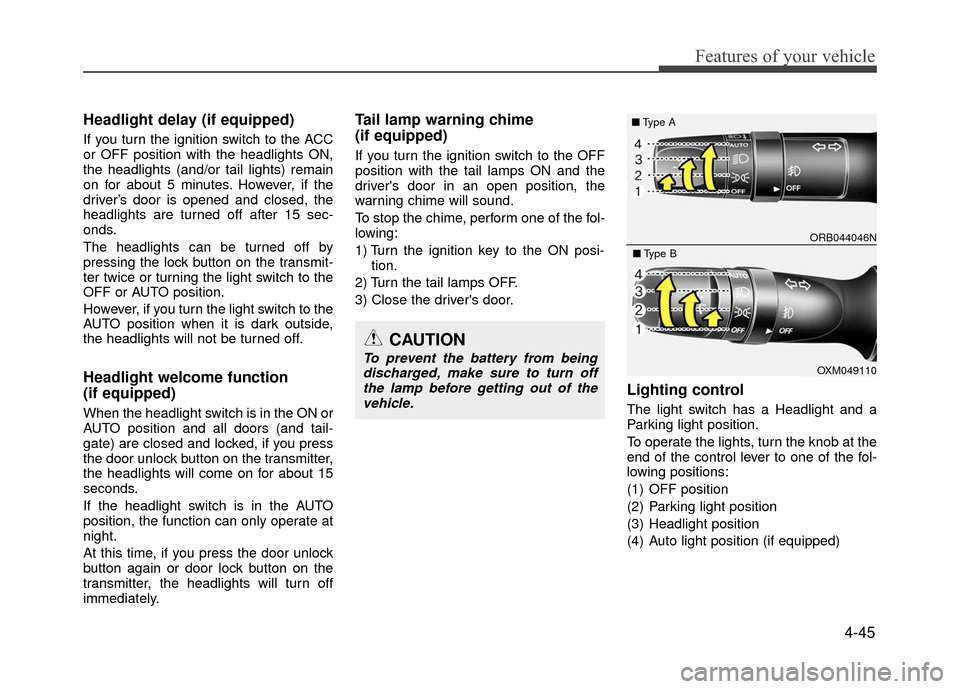
Lighting control
The light switch has a Headlight and a
Parking light position.
To operate the lights, turn the knob at the
end of the control lever to one of the fol-
lowing positions:
(1) OFF position
(2) Parking light position
(3) Headlight position
(4) Auto light position (if equipped)
CAUTION
To prevent the battery from being discharged, make sure to turn offthe lamp before getting out of thevehicle.
ORB044046N
■ Type A
OXM049110
■Type B