audio Hyundai Accent 2017 Owner's Manual
[x] Cancel search | Manufacturer: HYUNDAI, Model Year: 2017, Model line: Accent, Model: Hyundai Accent 2017Pages: 380, PDF Size: 12.45 MB
Page 15 of 380
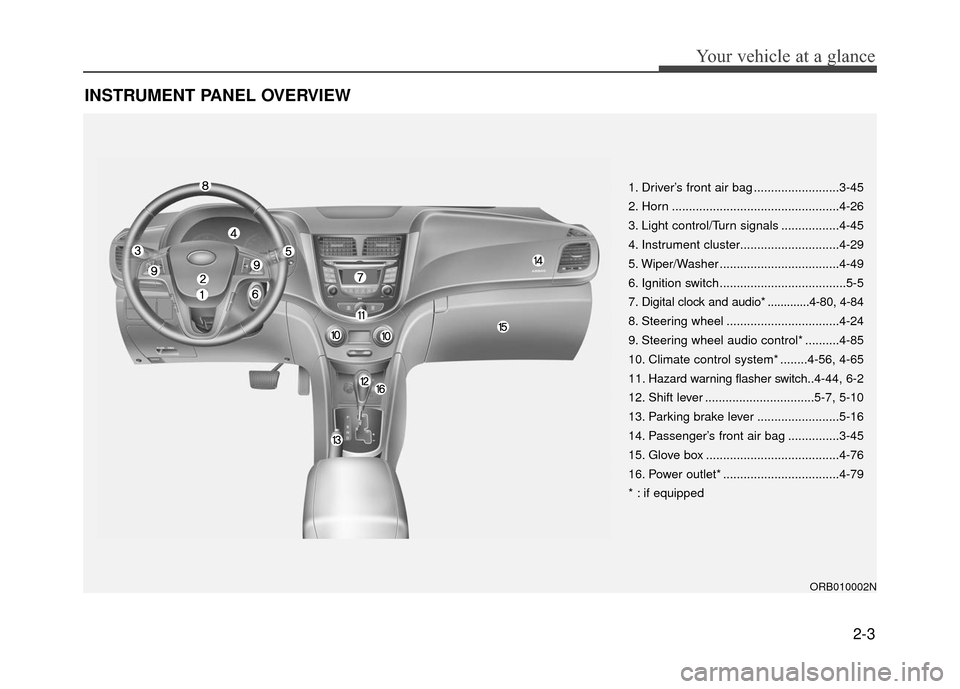
INSTRUMENT PANEL OVERVIEW
2-3
Your vehicle at a glance
1. Driver’s front air bag .........................3-45
2. Horn .................................................4-26
3. Light control/Turn signals .................4-45
4. Instrument cluster.............................4-29
5. Wiper/Washer ...................................4-49
6. Ignition switch .....................................5-5
7. Digital clock and audio* .............4-80, 4-84
8. Steering wheel .................................4-24
9. Steering wheel audio control* ..........4-85
10. Climate control system* ........4-56, 4-65
11. Hazard warning flasher switch..4-44, 6-2
12. Shift lever ................................5-7, 5-10
13. Parking brake lever ........................5-16
14. Passenger’s front air bag ...............3-45
15. Glove box .......................................4-76
16. Power outlet* ..................................4-79
* : if equipped
ORB010002N
Page 76 of 380
Interior features / 4-78
Exterior features / 4-83 Audio system / 4-84
Features of your vehicle4
Page 153 of 380
4-79
Features of your vehicle
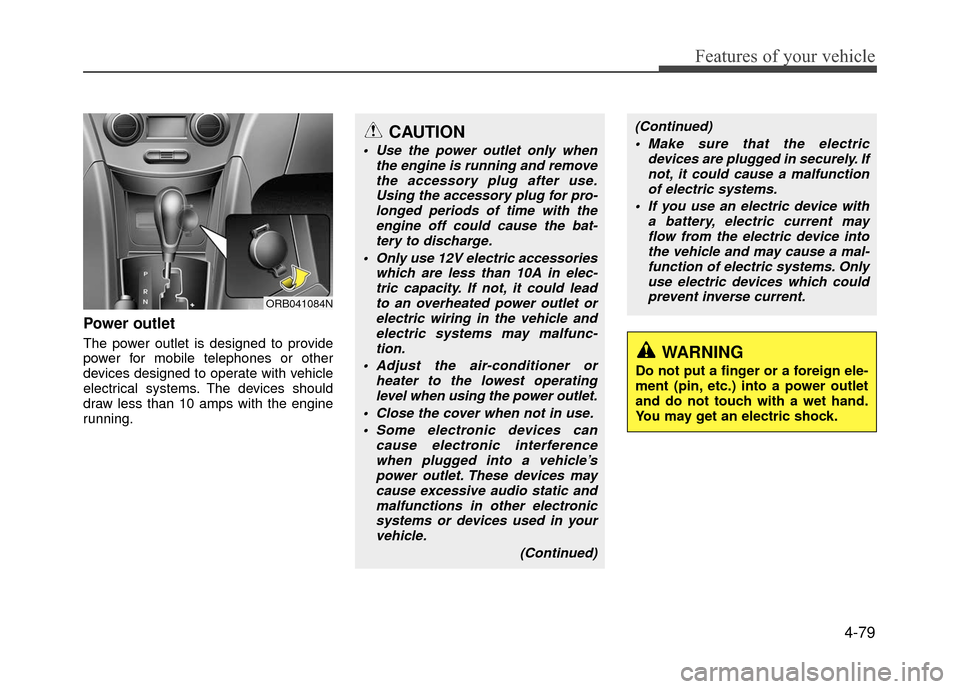
Power outlet
The power outlet is designed to provide
power for mobile telephones or other
devices designed to operate with vehicle
electrical systems. The devices should
draw less than 10 amps with the engine
running.
CAUTION
Use the power outlet only whenthe engine is running and removethe accessory plug after use.Using the accessory plug for pro-longed periods of time with the engine off could cause the bat-tery to discharge.
Only use 12V electric accessories which are less than 10A in elec-tric capacity. If not, it could leadto an overheated power outlet orelectric wiring in the vehicle andelectric systems may malfunc-tion.
Adjust the air-conditioner or heater to the lowest operatinglevel when using the power outlet.
Close the cover when not in use. Some electronic devices can cause electronic interferencewhen plugged into a vehicle’spower outlet. These devices maycause excessive audio static and malfunctions in other electronicsystems or devices used in yourvehicle.
(Continued)
WARNING
Do not put a finger or a foreign ele-
ment (pin, etc.) into a power outlet
and do not touch with a wet hand.
You may get an electric shock.
ORB041084N
(Continued) Make sure that the electric devices are plugged in securely. Ifnot, it could cause a malfunctionof electric systems.
If you use an electric device with a battery, electric current mayflow from the electric device intothe vehicle and may cause a mal- function of electric systems. Onlyuse electric devices which couldprevent inverse current.
Page 154 of 380
Features of your vehicle
4-80
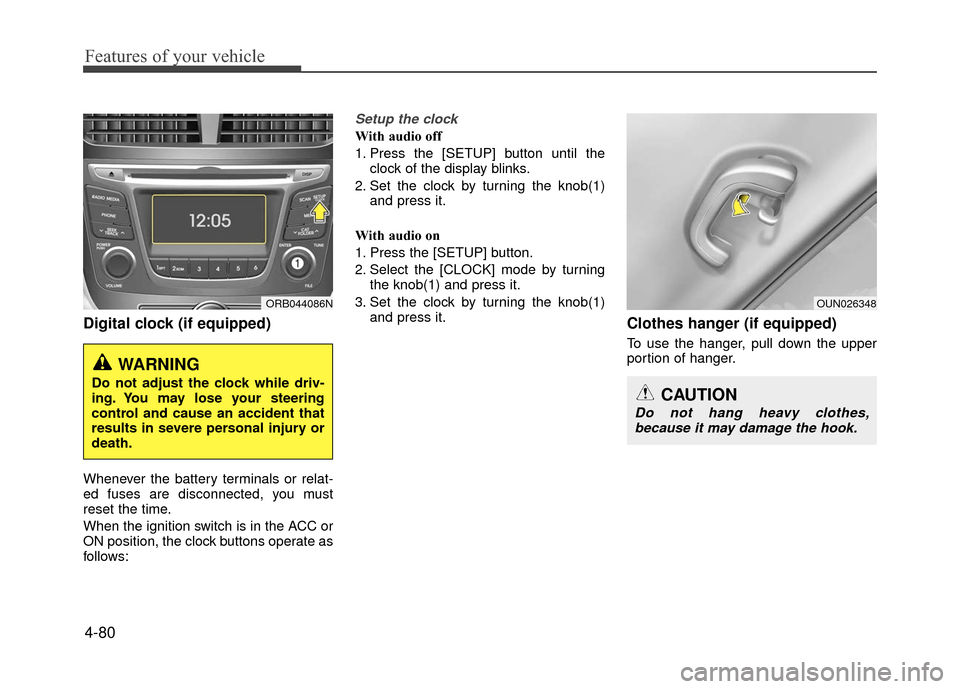
Digital clock (if equipped)
Whenever the battery terminals or relat-
ed fuses are disconnected, you must
reset the time.
When the ignition switch is in the ACC or
ON position, the clock buttons operate as
follows:
Setup the clock
With audio off
1. Press the [SETUP] button until theclock of the display blinks.
2. Set the clock by turning the knob(1) and press it.
With audio on
1. Press the [SETUP] button.
2. Select the [CLOCK] mode by turning the knob(1) and press it.
3. Set the clock by turning the knob(1) and press it.
Clothes hanger (if equipped)
To use the hanger, pull down the upper
portion of hanger.
WARNING
Do not adjust the clock while driv-
ing. You may lose your steering
control and cause an accident that
results in severe personal injury or
death.
ORB044086NOUN026348
CAUTION
Do not hang heavy clothes,because it may damage the hook.
Page 156 of 380
Features of your vehicle
4-82
Aux, USB and iPod®port
If your vehicle has an aux and/or
USB(universal serial bus) port or iPod®
port, you can use an aux port to connect
audio devices and an USB port to plug in
an USB and also an iPod
®port to plug in
an iPod®.
✽ ✽ NOTICE
When using a portable audio device
connected to the power outlet, noise may
occur during playback. If this happens,
use the power source of the portable
audio device.
❈ iPod®is a trademark of Apple Inc.
Bluetooth®Wireless Technology
hands-free (if equipped)
You can use a Bluetooth®Wireless
Technology phone.
Detailed information for the
Bluetooth®
Wireless Technology hands-free is
described in the "Audio section" in this
chapter or in the manual supplied sepa-
rately.
ORB044087N
CAUTION
When you return the cargo area cover to its original position, holdthe cover and lower it.
Do not operate the vehicle with the cover removed. It may dam-age the cover.
The cargo area cover may be lift- ed when the tailgate is opened.Ensure that the luggage on thecover is moved to a safe place.
Since the cargo area cover may be damaged or malformed, do notapply excessive force to the coveror do not put the heavy loads on it.
WARNING
Do not place objects on the cargo area cover while driving. Such
objects may be thrown about
inside the vehicle and possibly
injure vehicle occupants during
an accident or when braking.
Never allow anyone to ride in the luggage compartment. It is
designed for luggage only.
Maintain the balance of the vehi- cle and locate the weight as far
forward as possible.
Page 158 of 380
Features of your vehicle
4-84
✽
✽NOTICE
If you install an after market HID (high
intensity discharge) head lamp, your
vehicle's audio and electronic device
may malfunction.
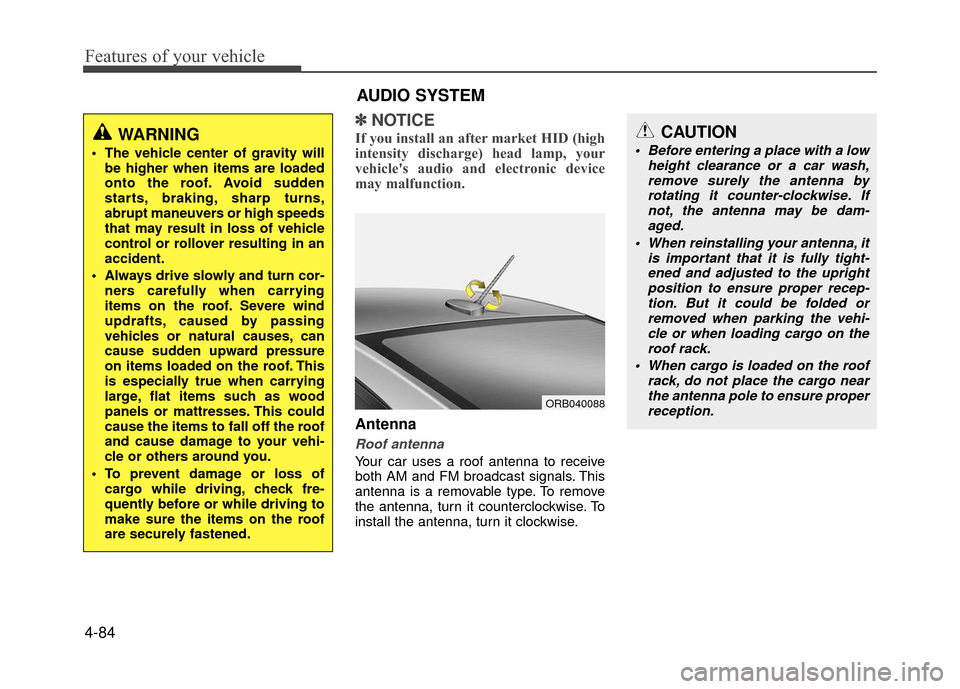
Antenna
Roof antenna
Your car uses a roof antenna to receive
both AM and FM broadcast signals. This
antenna is a removable type. To remove
the antenna, turn it counterclockwise. To
install the antenna, turn it clockwise.
WARNING
The vehicle center of gravity will
be higher when items are loaded
onto the roof. Avoid sudden
starts, braking, sharp turns,
abrupt maneuvers or high speeds
that may result in loss of vehicle
control or rollover resulting in an
accident.
Always drive slowly and turn cor- ners carefully when carrying
items on the roof. Severe wind
updrafts, caused by passing
vehicles or natural causes, can
cause sudden upward pressure
on items loaded on the roof. This
is especially true when carrying
large, flat items such as wood
panels or mattresses. This could
cause the items to fall off the roof
and cause damage to your vehi-
cle or others around you.
To prevent damage or loss of cargo while driving, check fre-
quently before or while driving to
make sure the items on the roof
are securely fastened.
AUDIO SYSTEM
ORB040088
CAUTION
Before entering a place with a low height clearance or a car wash,remove surely the antenna by rotating it counter-clockwise. Ifnot, the antenna may be dam-aged.
When reinstalling your antenna, it is important that it is fully tight-ened and adjusted to the upright position to ensure proper recep-tion. But it could be folded or removed when parking the vehi-cle or when loading cargo on the roof rack.
When cargo is loaded on the roof rack, do not place the cargo nearthe antenna pole to ensure properreception.
Page 159 of 380
4-85
Features of your vehicle
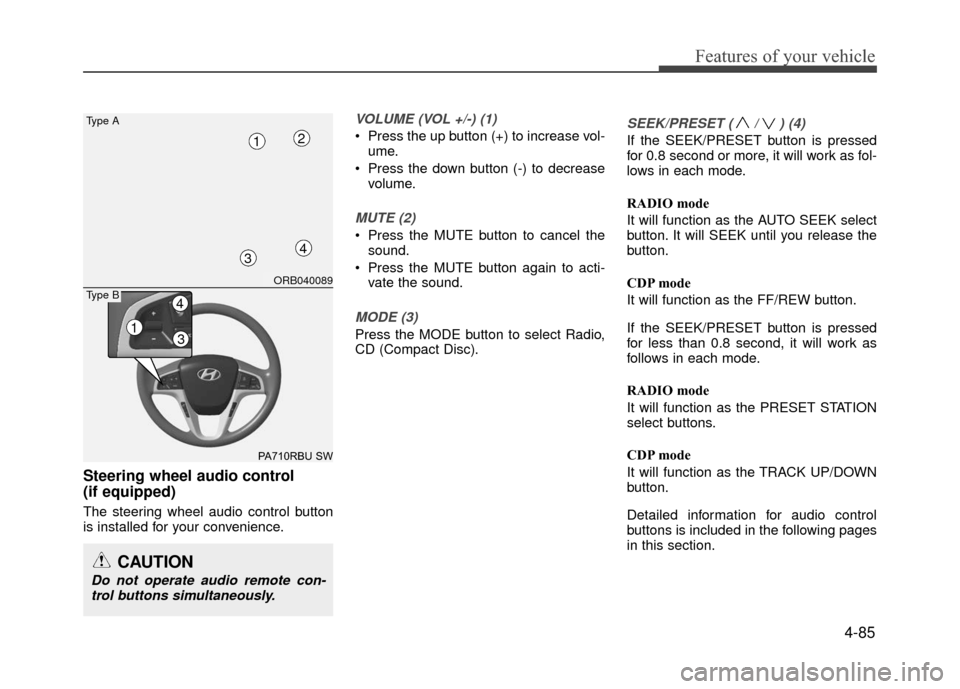
Steering wheel audio control
(if equipped)
The steering wheel audio control button
is installed for your convenience.
VOLUME (VOL +/-) (1)
Press the up button (+) to increase vol-ume.
Press the down button (-) to decrease volume.
MUTE (2)
Press the MUTE button to cancel thesound.
Press the MUTE button again to acti- vate the sound.
MODE (3)
Press the MODE button to select Radio,
CD (Compact Disc).
SEEK/PRESET ( / ) (4)
If the SEEK/PRESET button is pressed
for 0.8 second or more, it will work as fol-
lows in each mode.
RADIO mode
It will function as the AUTO SEEK select
button. It will SEEK until you release the
button.
CDP mode
It will function as the FF/REW button.
If the SEEK/PRESET button is pressed
for less than 0.8 second, it will work as
follows in each mode.
RADIO mode
It will function as the PRESET STATION
select buttons.
CDP mode
It will function as the TRACK UP/DOWN
button.
Detailed information for audio control
buttons is included in the following pages
in this section.
CAUTION
Do not operate audio remote con-trol buttons simultaneously.
ORB040089
PA710RBU SW
Type A
4
12
3
13
4Type B
Page 160 of 380
Features of your vehicle
4-86
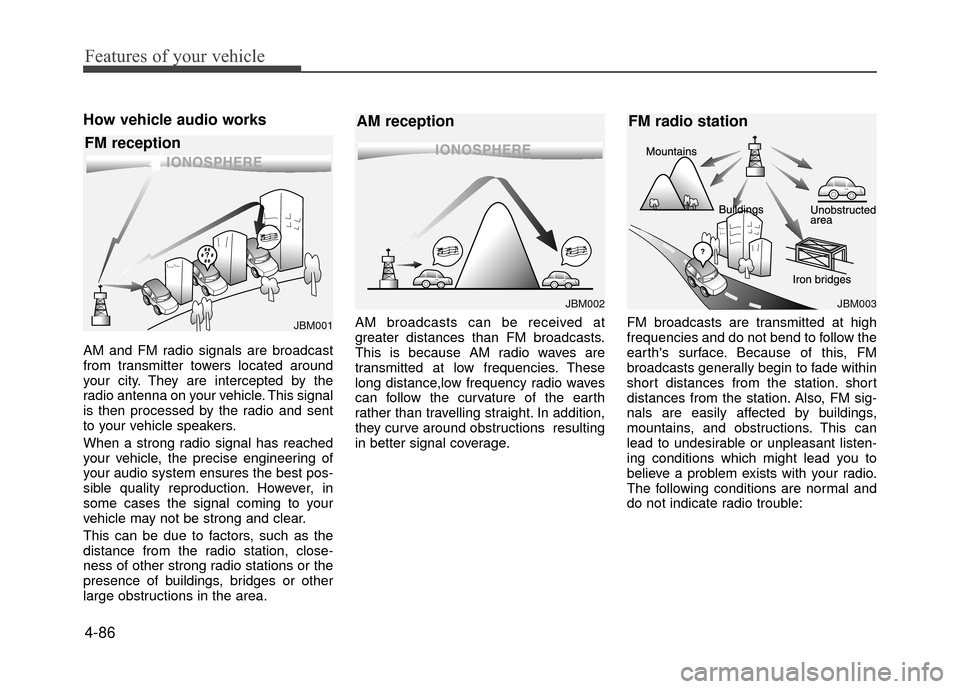
How vehicle audio works
AM and FM radio signals are broadcast
from transmitter towers located around
your city. They are intercepted by the
radio antenna on your vehicle. This signal
is then processed by the radio and sent
to your vehicle speakers.
When a strong radio signal has reached
your vehicle, the precise engineering of
your audio system ensures the best pos-
sible quality reproduction. However, in
some cases the signal coming to your
vehicle may not be strong and clear.
This can be due to factors, such as the
distance from the radio station, close-
ness of other strong radio stations or the
presence of buildings, bridges or other
large obstructions in the area.AM broadcasts can be received at
greater distances than FM broadcasts.
This is because AM radio waves are
transmitted at low frequencies. These
long distance,low frequency radio waves
can follow the curvature of the earth
rather than travelling straight. In addition,
they curve around obstructions resulting
in better signal coverage.
FM broadcasts are transmitted at high
frequencies and do not bend to follow the
earth's surface. Because of this, FM
broadcasts generally begin to fade within
short distances from the station. short
distances from the station. Also, FM sig-
nals are easily affected by buildings,
mountains, and obstructions. This can
lead to undesirable or unpleasant listen-
ing conditions which might lead you to
believe a problem exists with your radio.
The following conditions are normal and
do not indicate radio trouble:
JBM002
AM reception
JBM001
FM reception
JBM003
FM radio station
Page 161 of 380
4-87
Features of your vehicle
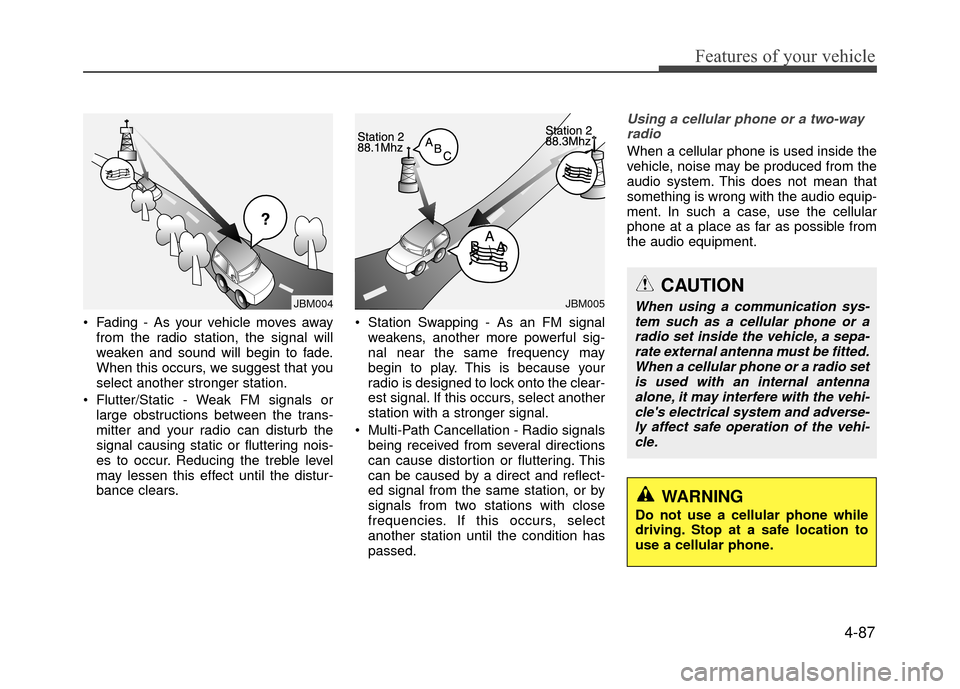
Fading - As your vehicle moves awayfrom the radio station, the signal will
weaken and sound will begin to fade.
When this occurs, we suggest that you
select another stronger station.
Flutter/Static - Weak FM signals or large obstructions between the trans-
mitter and your radio can disturb the
signal causing static or fluttering nois-
es to occur. Reducing the treble level
may lessen this effect until the distur-
bance clears. Station Swapping - As an FM signal
weakens, another more powerful sig-
nal near the same frequency may
begin to play. This is because your
radio is designed to lock onto the clear-
est signal. If this occurs, select another
station with a stronger signal.
Multi-Path Cancellation - Radio signals being received from several directions
can cause distortion or fluttering. This
can be caused by a direct and reflect-
ed signal from the same station, or by
signals from two stations with close
frequencies. If this occurs, select
another station until the condition has
passed.
Using a cellular phone or a two-wayradio
When a cellular phone is used inside the
vehicle, noise may be produced from the
audio system. This does not mean that
something is wrong with the audio equip-
ment. In such a case, use the cellular
phone at a place as far as possible from
the audio equipment.
JBM005JBM004
CAUTION
When using a communication sys-tem such as a cellular phone or a radio set inside the vehicle, a sepa-rate external antenna must be fitted. When a cellular phone or a radio setis used with an internal antennaalone, it may interfere with the vehi-cle's electrical system and adverse- ly affect safe operation of the vehi-cle.
WARNING
Do not use a cellular phone while
driving. Stop at a safe location to
use a cellular phone.
Page 162 of 380
Features of your vehicle
4-88
Caring for disc
If the temperature inside the car is toohigh, open the car windows to ventilate
before using the system.
It is illegal to copy and use MP3/WMA files without permission. Use CDs that
are created only by lawful means.
Do not apply volatile agents, such as benzene and thinner, normal cleaners
and magnetic sprays made for ana-
logue disc onto CDs.
To prevent the disc surface from get- ting damaged, hold CDs by the edges
or the center hole only.
Clean the disc surface with a piece of soft cloth before playback (wipe it from
the center to the outside edge).
Do not damage the disc surface or attach pieces of sticky tape or paper.
Make certain only CDs are inserted into the CD player (Do not insert more
than one CD at a time).
Keep CDs in their cases after use to protect them from scratches or dirt.
Depending on the type of CD-R/CD- RW CDs, certain CDs may not operate
normally according to the manufactur-
ing companies. In such circumstances,
continued use may cause malfunctions
to your audio system.
✽ ✽ NOTICE
- Playing an Incompatible Copy
Protected Audio CD
Some copy protected CDs, which do not
comply with international audio CD
standards (Red Book), may not play on
your car audio. Please note that inabili-
ties to properly play a copy protected
CD may indicate that the CD is defec-
tive, not the CD player.
NOTE:
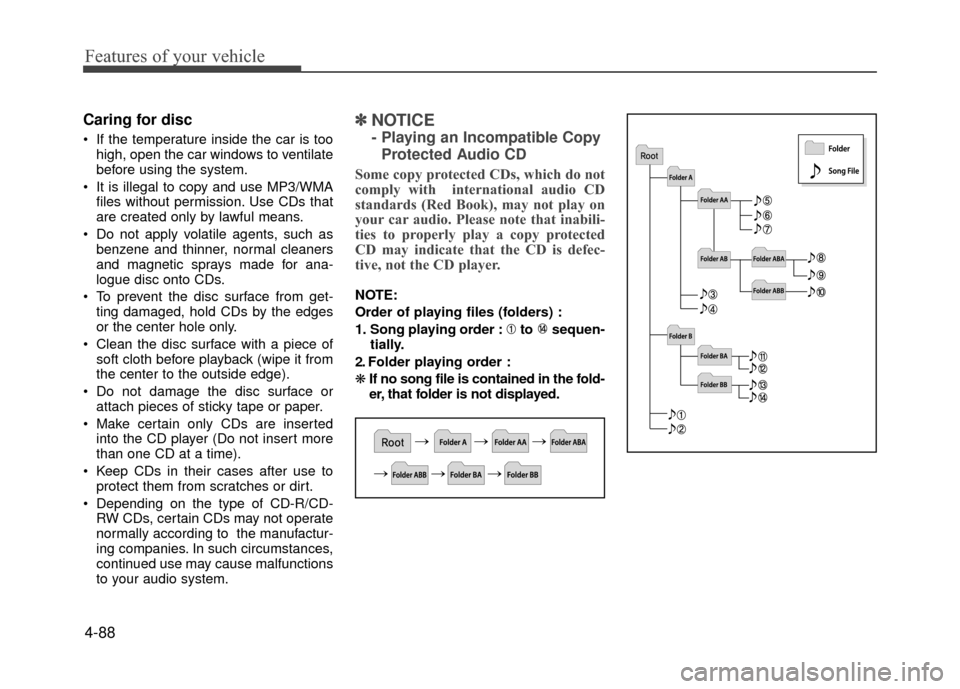
Order of playing files (folders) :
1. Song playing order : to sequen- tially.
2. Folder playing order :
\b If no song file is contained in the fold-
er, that folder is not displayed.