audio Hyundai Accent 2017 Owner's Guide
[x] Cancel search | Manufacturer: HYUNDAI, Model Year: 2017, Model line: Accent, Model: Hyundai Accent 2017Pages: 380, PDF Size: 12.45 MB
Page 175 of 380
![Hyundai Accent 2017 Owners Guide 4-101
Features of your vehicle
CLOCK SETTINGS
Press the key Select[Clock]
through
TUNE knobor key
Selectmenu through TUNE knob
Clock Settings
This menu is used to set the time.
Select [Clock Settin](/img/35/14348/w960_14348-174.png "Hyundai Accent 2017 Owners Guide 4-101
Features of your vehicle
CLOCK SETTINGS
Press the key Select[Clock]
through
TUNE knobor key
Selectmenu through TUNE knob
Clock Settings
This menu is used to set the time.
Select [Clock Settin")
4-101
Features of your vehicle
CLOCK SETTINGS
Press the key Select[Clock]
through
TUNE knobor key
Selectmenu through TUNE knob
Clock Settings
This menu is used to set the time.
Select [Clock Settings] Set through
TUNE knob Press TUNE knob
❈Adjust the number currently in focus to set the [hour] and press the tune knob to
set the [minute].
Calendar Settings
This menu is used to set the date
(DD/MM/YYYY).
Select [Calendar Settings]
Set through
TUNE knob Press TUNEknob
❈Adjust the number currently in focus to make the settings and press the tune
knob to move to the next setting. (Set in
order of Day/Month/Year)
Time Format
This function is used to set the 12/24
hour time format of the audio system.
Select [Time Format] Set 12Hr / 24Hr
through TUNE
knob
Clock Display when Power is OFF
Select [Clock Disp.(Pwr Off) Set / through TUNEknob
: Displays time/date on screen
: Turn off.Off
On
OffOn
3
SETUPCLOCK
Page 181 of 380
4-107
Features of your vehicle
BASIC METHOD OF USE :
AUDIO CD / MP3 CD / USB /
iPOD
®/ MY MUSIC
Press the key to change the
mode in order of CD➟USB(iPod®)➟AUX➟My Music➟BT Audio.
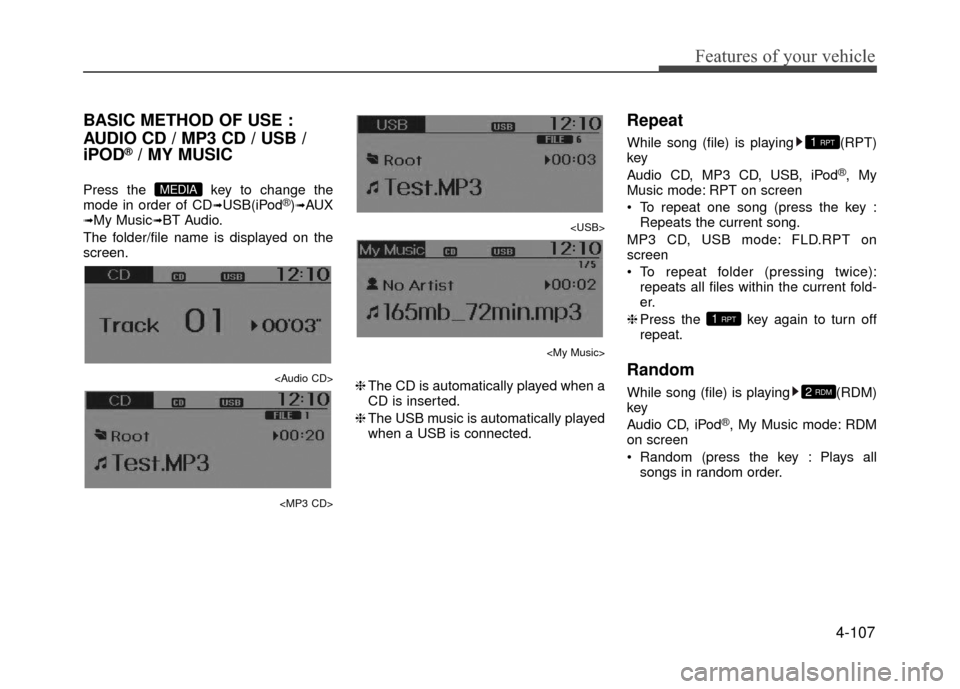
The folder/file name is displayed on the
screen.
Page 182 of 380
Features of your vehicle
4-108
MP3 CD, USB mode: FLD.RDM on
screen
Folder Random (press the key : Playsall files within the current folder in ran-
dom order.
MP3 CD, USB mode : ALL RDM on
screen
All Random (pressing twice): Plays all files in random order.
❈ Press the key again to turn off
repeat.
Changing Song/File
While song (file) is playing key
Shortly pressing the key : Plays the current song from the beginning.
❈ If the key is pressed again
within 1 second, the previous song is
played.
Pressing and holding the key (over 0.8 seconds): Rewinds the song.
While song (file) is playing
key
Shortly pressing the key : Plays the next song.
Pressing and holding the key (over 0.8 seconds): Fast forwards the song.
Scan
While song (file) is playing key
Shortly pressing the key : Scans allsongs from the next song for 10 sec-
onds each.
❈ Press the key again to turn off.
❈ The SCAN function is not supported in
iPod
®mode.
Folder Search : MP3 CD, USB
Mode
While file is playing (Folder
Up) key
Searches the next folder.
While file is playing (Folder
Down) key
Searches the parent folder.
❈ If a folder is selected by pressing the
TUNE knob, the first file within the
selected folder will be played.
Searching Songs (File)
TUNE knob : Searches for songs (files)
TUNE knob : Plays select- ed song (file)
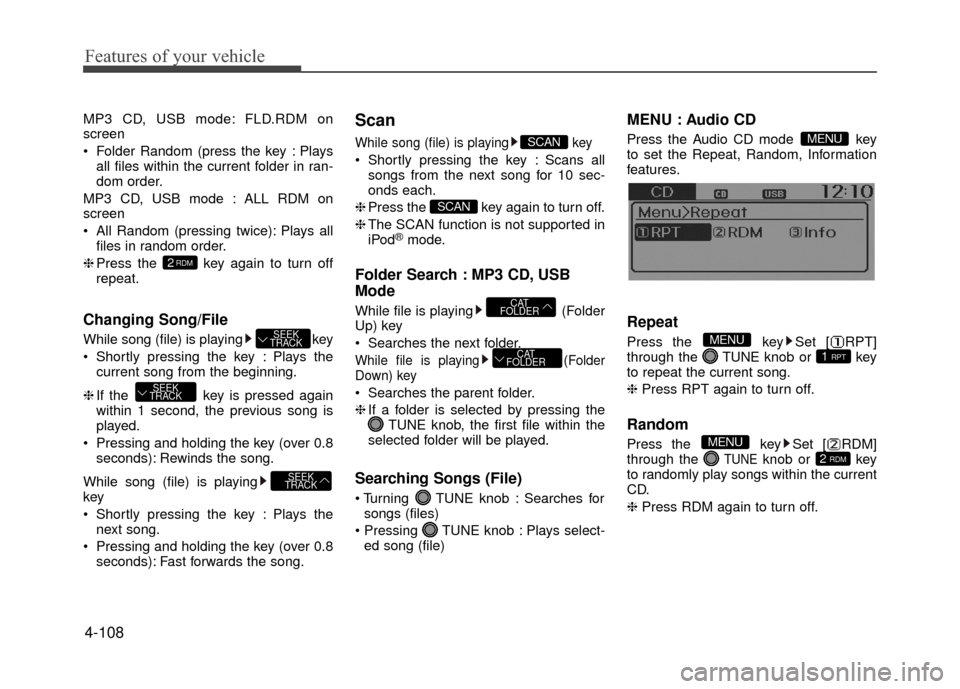
MENU : Audio CD
Press the Audio CD mode key
to set the Repeat, Random, Information
features.
Repeat
Press the key Set [ RPT]
through the TUNEknob or key
to repeat the current song.
❈ Press RPT again to turn off.
Random
Press the key Set [ RDM]
through the TUNEknob or key
to randomly play songs within the current
CD.
❈ Press RDM again to turn off.2 RDM
MENU
1 RPT
MENU
MENU
CAT
FOLDER
CAT
FOLDER
SCAN
SCAN
SEEK
TRACK
SEEK
TRACK
SEEK
TRACK
2RDM
Page 185 of 380
![Hyundai Accent 2017 Owners Guide 4-111
Features of your vehicle
Delete Selection
Press the key Set [ Del.Sel]
through the TUNEknob or key.
Songs within My Music are selected and
deleted.
➀Select the songs you wish to delete
from](/img/35/14348/w960_14348-184.png "Hyundai Accent 2017 Owners Guide 4-111
Features of your vehicle
Delete Selection
Press the key Set [ Del.Sel]
through the TUNEknob or key.
Songs within My Music are selected and
deleted.
➀Select the songs you wish to delete
from")
4-111
Features of your vehicle
Delete Selection
Press the key Set [ Del.Sel]
through the TUNEknob or key.
Songs within My Music are selected and
deleted.
➀Select the songs you wish to delete
from the list.
\b After selecting, press the key and
select the delete menu.
✽ ✽ NOTICE - USING THE MY
MUSIC
• Even if memory is available, a maxi- mum of 6,000 songs can be stored.
• The same song can be copied up to 1,000 times.
• Memory info can be checked in the System menu of Setup.
AUX
AUX is used to play external MEDIA cur-
rently connected with the AUX terminal.
AUX mode will automatically start when
an external device is connected with the
AUX terminal.
If an external device is connected, you
can also press the key to change
to AUX mode.
❈ AUX mode cannot be started unless
there is an external device connected
to the AUX terminal.
✽ ✽ NOTICE - USING THE AUX
Fully insert the AUX cable into the AUX
terminal for use.
Bluetooth®Wireless Technology
AUDIO (if equipped model)
What is
Bluetooth®Wireless
Technology
?
Bluetooth®Wireless Technology allows
devices to be connected in a short distance,
including hands-free devices, stereo head-
sets, wireless remote controllers, etc. For
more information, visit
the Bluetooth®
Wireless Technologywebsite atwww.Bluetooth.com
Before using Bluetooth®Wireless
Technology audio features
Bluetooth®Wireless Technology audio
may not be supported depending on
the compatibility of your
Bluetooth®
Wireless Technology mobile phone.
In order to use
Bluetooth®Wireless
Technology audio, you must first pair
and connect the
Bluetooth®Wireless
Technology mobile phone.
Bluetooth®Wireless Technology audio
can be used only when the [Audio
Streaming] of Phone is turned .
On
MEDIA
6
MENU
Page 186 of 380
Features of your vehicle
4-112
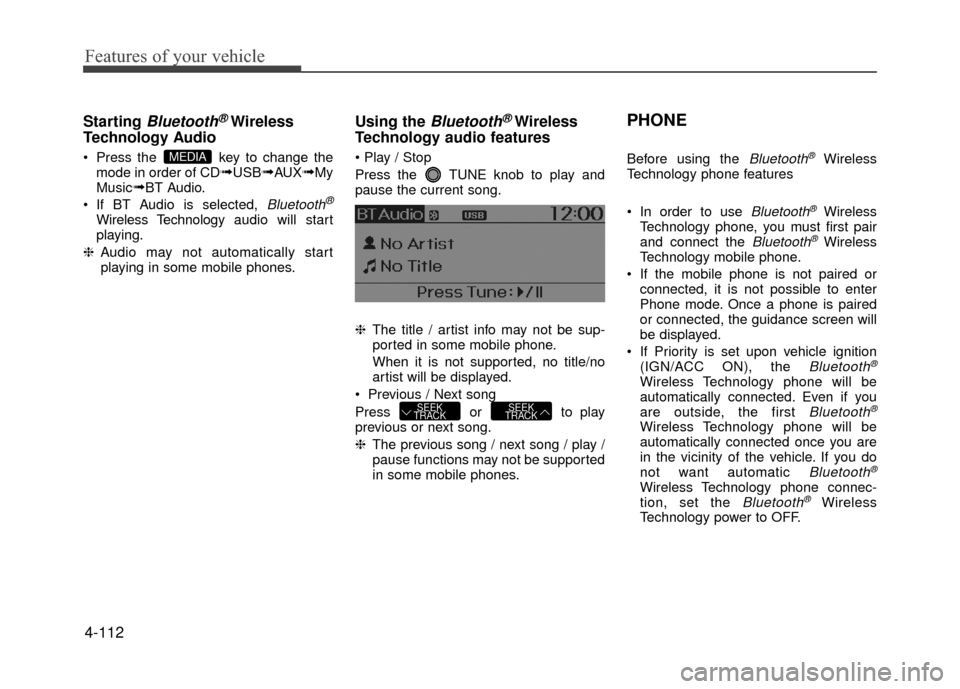
Starting Bluetooth®Wireless
Technology Audio
Press the key to change the
mode in order of CD➟USB➟AUX➟My
Music➟BT Audio.
If BT Audio is selected,
Bluetooth®
Wireless Technology audio will start
playing.
❈ Audio may not automatically start
playing in some mobile phones.
Using the Bluetooth®Wireless
Technology audio features
Press the TUNE knob to play and
pause the current song.
❈ The title / artist info may not be sup-
ported in some mobile phone.
When it is not supported, no title/no
artist will be displayed.
Previous / Next song
Press or to play
previous or next song.
❈ The previous song / next song / play /
pause functions may not be supported
in some mobile phones.
PHONE
Before using the Bluetooth®Wireless
Technology phone features
In order to use
Bluetooth®Wireless
Technology phone, you must first pair
and connect the
Bluetooth®Wireless
Technology mobile phone.
If the mobile phone is not paired or connected, it is not possible to enter
Phone mode. Once a phone is paired
or connected, the guidance screen will
be displayed.
If Priority is set upon vehicle ignition (IGN/ACC ON), the
Bluetooth®
Wireless Technology phone will be
automatically connected. Even if you
are outside, the first
Bluetooth®
Wireless Technology phone will be
automatically connected once you are
in the vicinity of the vehicle. If you do
not want automatic
Bluetooth®
Wireless Technology phone connec-
tion, set the Bluetooth®Wireless
Technology power to OFF.
SEEK
TRACKSEEK
TRACK
MEDIA
Page 187 of 380
4-113
Features of your vehicle
PHONE
(if equipped model)
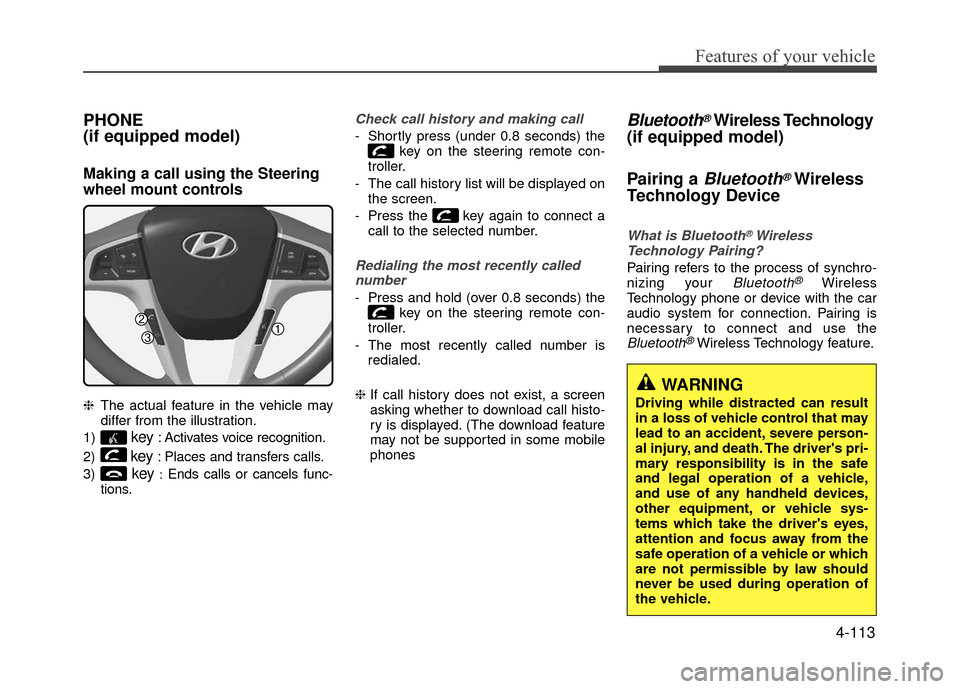
Making a call using the Steering
wheel mount controls
❈The actual feature in the vehicle may
differ from the illustration.
1)
key: Activates voice recognition.
2)
key: Places and transfers calls.
3)
key:Ends calls or cancels func-
tions.
Check call history and making call
- Shortly press (under 0.8 seconds) the key on the steering remote con-
troller.
- The call history list will be displayed on the screen.
- Press the key again to connect a call to the selected number.
Redialing the most recently callednumber
- Press and hold (over 0.8 seconds) the key on the steering remote con-
troller.
- The most recently called number is redialed.
❈ If call history does not exist, a screen
asking whether to download call histo-
ry is displayed. (The download feature
may not be supported in some mobile
phones
Bluetooth®Wireless Technology
(if equipped model)
Pairing a
Bluetooth®Wireless
Technology Device
What is Bluetooth®Wireless
Technology Pairing?
Pairing refers to the process of synchro-
nizing your Bluetooth®Wireless
Technology phone or device with the car
audio system for connection. Pairing is
necessary to connect and use the
Bluetooth®Wireless Technology feature.
WARNING
Driving while distracted can result
in a loss of vehicle control that may
lead to an accident, severe person-
al injury, and death. The driver's pri-
mary responsibility is in the safe
and legal operation of a vehicle,
and use of any handheld devices,
other equipment, or vehicle sys-
tems which take the driver's eyes,
attention and focus away from the
safe operation of a vehicle or which
are not permissible by law should
never be used during operation of
the vehicle.
Page 188 of 380
Features of your vehicle
Pairing key / key on
the Steering Remote Controller
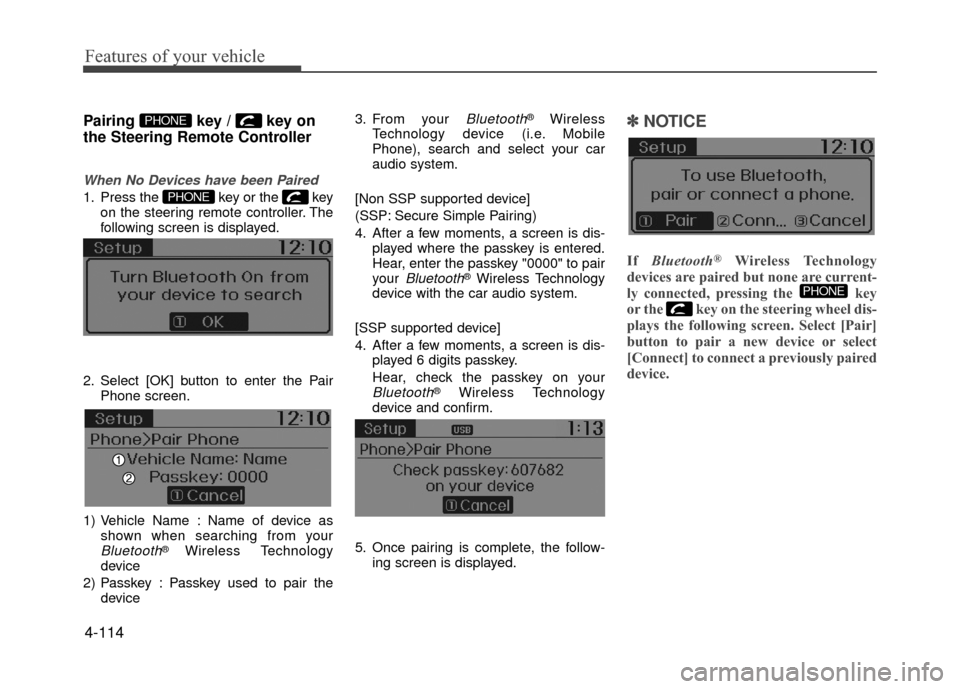
When No Devices have been Paired
1. Press the key or the keyon the steering remote controller. The
following screen is displayed.
2. Select [OK] button to enter the Pair Phone screen.
1) Vehicle Name : Name of device as shown when searching from your
Bluetooth®Wireless Technology
device
2) Passkey : Passkey used to pair the device 3. From your
Bluetooth®Wireless
Technology device (i.e. Mobile
Phone), search and select your car
audio system.
[Non SSP supported device]
(SSP: Secure Simple Pairing)
4. After a few moments, a screen is dis- played where the passkey is entered.
Hear, enter the passkey "0000" to pair
your
Bluetooth®Wireless Technology
device with the car audio system.
[SSP supported device]
4. After a few moments, a screen is dis- played 6 digits passkey.
Hear, check the passkey on your
Bluetooth®Wireless Technology
device and confirm.
5. Once pairing is complete, the follow- ing screen is displayed.
✽ ✽NOTICE
If Bluetooth®Wireless Technology
devices are paired but none are current-
ly connected, pressing the key
or the key on the steering wheel dis-
plays the following screen. Select [Pair]
button to pair a new device or select
[Connect] to connect a previously paired
device.
PHONE
PHONE
PHONE
4-114
Page 189 of 380
![Hyundai Accent 2017 Owners Guide 4-115
Features of your vehicle
Pairing through [PHONE] Setup
Press the keySelect [Phone]
Select [Pair Phone] Select TUNE
knob
1. The following steps are the same as those described in the section "W](/img/35/14348/w960_14348-188.png "Hyundai Accent 2017 Owners Guide 4-115
Features of your vehicle
Pairing through [PHONE] Setup
Press the keySelect [Phone]
Select [Pair Phone] Select TUNE
knob
1. The following steps are the same as those described in the section \"W")
4-115
Features of your vehicle
Pairing through [PHONE] Setup
Press the keySelect [Phone]
Select [Pair Phone] Select TUNE
knob
1. The following steps are the same as those described in the section "When
No Devices have been Paired" on the
previous page.
✽ ✽NOTICE
•Bluetooth®Wireless Technology fea-
tures supported within the vehicle are
as follows. Some features may not be
supported depending on your
Bluetooth
®Wireless Technology
device.
- Outgoing/Incoming Handsfree calls
- Operations during a call (Switch to Private, Switch to call waiting, MIC
on/off)
- Downloading Call History
- Downloading Mobile Contacts
- Bluetooth
®Wireless Technology
device auto connection
- Bluetooth Audio Streaming
• Up to five Bluetooth
®Wireless
Technology devices can be paired to
the Car Handsfree system.
• Only one Bluetooth
®Wireless
Technology device can be connected at
a time.
• Other devices cannot be paired while a Bluetooth
®Wireless Technology
device is connected.
• Only Bluetooth
®Wireless Technology
Handsfree and Bluetooth audio relat-
ed features are supported.
(Continued)(Continued)
Bluetooth related operations are pos-
sible only within devices that support
Handsfree or audio features, such as a
Bluetooth
®Wireless Technology
mobile phone or a Bluetooth audio
device.
• If a connected Bluetooth
®Wireless
Technology device becomes discon-
nected due to being out of communi-
cation range, turning the device OFF,
or a Bluetooth
®Wireless Technology
communication error, corresponding
Bluetooth
®Wireless Technology
devices are automatically searched
and reconnected.
• If the system becomes unstable due to communication errors between the
car Handsfree and the Bluetooth
®
Wireless Technology device, reset the
device by turning off and back on
again. Upon resetting Bluetooth
®
Wireless Technology device, the sys-
tem will be restored.
• After pairing is complete, a contacts download request is sent once to the
mobile phone. Some mobile phones
may require confirmation upon
receiving a download request, ensure
your mobile phone accepts the connec-
tion. Refer to your phones user’s man-
ual for additional information regard-
ing phone pairing and connections.
SETUPCLOCK
Page 190 of 380
![Hyundai Accent 2017 Owners Guide Features of your vehicle
4-116
Connecting a Device
Press the keySelect [Phone]
Select [Paired Phone List]
1) Connected Phone : Device that is cur- rently connected
2) Paired Phone : Device that is pa](/img/35/14348/w960_14348-189.png "Hyundai Accent 2017 Owners Guide Features of your vehicle
4-116
Connecting a Device
Press the keySelect [Phone]
Select [Paired Phone List]
1) Connected Phone : Device that is cur- rently connected
2) Paired Phone : Device that is pa")
Features of your vehicle
4-116
Connecting a Device
Press the keySelect [Phone]
Select [Paired Phone List]
1) Connected Phone : Device that is cur- rently connected
2) Paired Phone : Device that is paired but not connected
From the paired phone list, select the
device you want to connect and select
[Connect].
Changing Priority
What is Priority?
It is possible to pair up to five Bluetooth®
Wireless Technology devices with the car
audio system. The "Change Priority" fea-
ture is used to set the connection priority
of paired phones.
Press the
keySelect [Phone]
Select [Paired Phone List] From the paired phone list, select the
phone you want to
switchto the highest
priority, then select [Change Priority] but-
ton from the Menu. The selected device
will be changed to the highest priority.
✽ ✽ NOTICE
Priority icon will be displayed when the
selected phone is set as a priority phone.
SETUPCLOCK
SETUPCLOCK
Page 192 of 380
Features of your vehicle
4-118
USING Bluetooth®Wireless
Technology
Phone Menu Screen
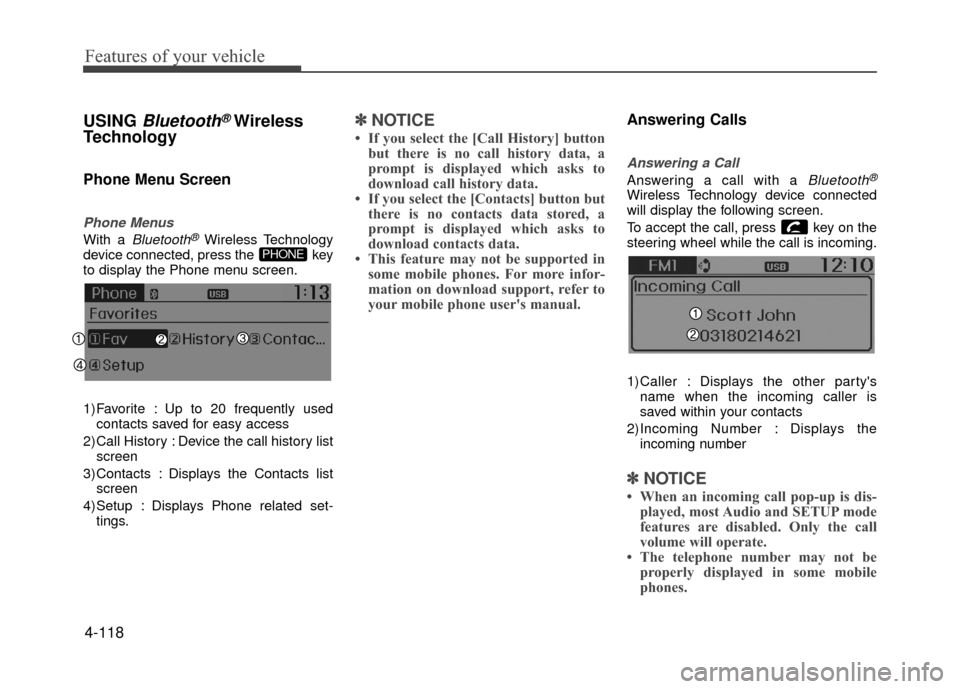
Phone Menus
With a Bluetooth®Wireless Technology
device connected, press the key
to display the Phone menu screen.
1) Favorite : Up to 20 frequently used contacts saved for easy access
2) Call History : Device the call history list screen
3) Contacts : Displays the Contacts list screen
4) Setup : Displays Phone related set- tings.
✽ ✽ NOTICE
• If you select the [Call History] button
but there is no call history data, a
prompt is displayed which asks to
download call history data.
• If you select the [Contacts] button but there is no contacts data stored, a
prompt is displayed which asks to
download contacts data.
• This feature may not be supported in some mobile phones. For more infor-
mation on download support, refer to
your mobile phone user's manual.
Answering Calls
Answering a Call
Answering a call with a Bluetooth®
Wireless Technology device connected
will display the following screen.
To accept the call, press key on the
steering wheel while the call is incoming.
1)Caller : Displays the other party's
name when the incoming caller is
saved within your contacts
2)Incoming Number : Displays the incoming number
✽ ✽ NOTICE
• When an incoming call pop-up is dis-
played, most Audio and SETUP mode
features are disabled. Only the call
volume will operate.
• The telephone number may not be properly displayed in some mobile
phones.
PHONE