audio Hyundai Accent 2017 Owner's Guide
[x] Cancel search | Manufacturer: HYUNDAI, Model Year: 2017, Model line: Accent, Model: Hyundai Accent 2017Pages: 380, PDF Size: 12.45 MB
Page 194 of 380
Features of your vehicle
4-120
✽
✽NOTICE
• Up to 1,000 contacts saved in your
Bluetooth®Wireless Technology phone
can be downloaded into the car con-
tacts. Contacts that have been down-
loaded to the car cannot be edited or
deleted on the phone.
• Mobile phone contacts are managed separately for each paired Bluetooth
®
Wireless Technology device (max 5
devices x 1,000 contacts each).
Previously downloaded data is main-
tained even if the Bluetooth
®Wireless
Technology device has been discon-
nected.
(However, the contacts and call histo-
ry saved to the phone will be deleted if
a paired phone is deleted.)
• It is possible to download contacts during Bluetooth streaming audio.
• When downloading contacts, the icon will be displayed within the status bar. (Continued)(Continued)
• It is not possible to begin downloading
a contact list when the contact down-
load feature has been turned off with-
in the Bluetooth
®Wireless Technology
device. In addition, some devices may
require device authorization upon
attempting to download contacts. If
downloading does not normally occur,
check the Bluetooth
®Wireless
Technology device settings or the
screen state.
• The contacts download feature may not be supported in some mobile
phones. For more information of sup-
ported Bluetooth
®devices and func-
tion support, refer to your phone’s
user manual.
Bluetooth®Wireless
Technology Setting
Pairing a New Device
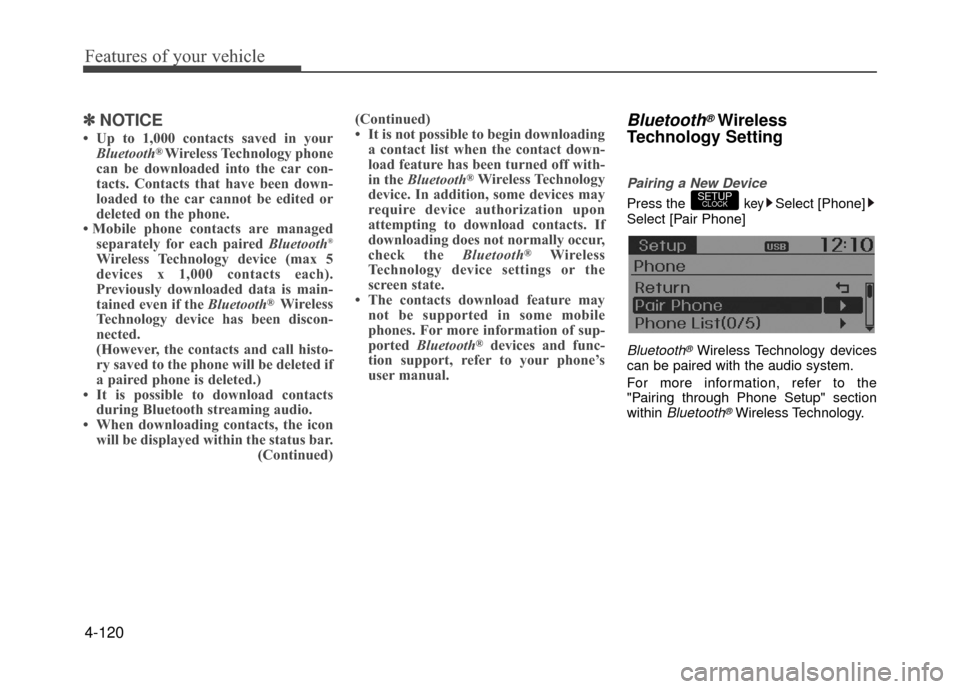
Press the keySelect [Phone]
Select [Pair Phone]
Bluetooth®Wireless Technology devices
can be paired with the audio system.
For more information, refer to the
"Pairing through Phone Setup" section
within
Bluetooth®Wireless Technology.
SETUPCLOCK
Page 195 of 380
![Hyundai Accent 2017 Owners Guide 4-121
Features of your vehicle
Viewing Paired Phone List
Press the keySelect [Phone]
Select [Paired Phone List]
This feature is used to view mobile
phones that have been paired with the
audio system.](/img/35/14348/w960_14348-194.png "Hyundai Accent 2017 Owners Guide 4-121
Features of your vehicle
Viewing Paired Phone List
Press the keySelect [Phone]
Select [Paired Phone List]
This feature is used to view mobile
phones that have been paired with the
audio system.")
4-121
Features of your vehicle
Viewing Paired Phone List
Press the keySelect [Phone]
Select [Paired Phone List]
This feature is used to view mobile
phones that have been paired with the
audio system. Upon selecting a paired
phone, the setup menu is displayed.
For more information, refer to the
"Setting
Bluetooth®Wireless Technology
Connection" section within Bluetooth®
Wireless Technology.
1) Connect/Disconnect Phone : Connect/ disconnects currently selected phone
2) Change Priority : Sets currently select- ed phone to highest connection priori-
ty 3) Delete : Deletes the currently selected
phone
4) Return : Moves to the previous screen
✽ ✽ NOTICE BEFORE DOWN-
LOADING CONTACTS
• Only contacts within connected
phones can be downloaded. Also
check to see that your mobile phone
supports the download feature.
• To learn more about whether your mobile phone supports contacts
downloads, refer to your mobile
phone user's manual.
• The contacts for only the connected phone can be downloaded.
Downloading Contacts
Press the keySelect [Phone]
Select [Contacts Download]
As the contacts are downloaded from
the mobile phone, a download progress
bar is displayed.
✽ ✽ NOTICE
• Upon downloading phone contacts,
the previous corresponding data is
deleted.
• This feature may not be supported in some mobile phones.
• Voice Recognition may not operate while contacts are being downloaded.
Outgoing Volume
Press thekeySelect [Phone]
Select [Outgoing Volume]
Use TUNE knob to adjust the outgo-
ing volume level.
✽ ✽ NOTICE
While on a call, the volume can be
changed by using the key.SEEK
TRACK
SETUPCLOCK
SETUPCLOCK
SETUPCLOCK
Page 196 of 380
![Hyundai Accent 2017 Owners Guide Features of your vehicle
4-122
Turning Bluetooth System Off
Press the keySelect [Phone]
Select [Bluetooth System Off]
Once
Bluetooth®Wireless Technology is
turned off, Bluetooth®Wireless
Technology](/img/35/14348/w960_14348-195.png "Hyundai Accent 2017 Owners Guide Features of your vehicle
4-122
Turning Bluetooth System Off
Press the keySelect [Phone]
Select [Bluetooth System Off]
Once
Bluetooth®Wireless Technology is
turned off, Bluetooth®Wireless
Technology")
Features of your vehicle
4-122
Turning Bluetooth System Off
Press the keySelect [Phone]
Select [Bluetooth System Off]
Once
Bluetooth®Wireless Technology is
turned off, Bluetooth®Wireless
Technology related features will not be
supported within the audio system.
✽ ✽ NOTICE
To turn Bluetooth®Wireless Technology
back on, go to [Phone] and
select "Yes".
VOICE RECOGNITION
(if equipped model)
Using Voice Recognition
Starting Voice Recognition
Shortly press the key on the steer-
ing wheel. Say a command.
If prompt feedback is in [ON], then the
system will say "Please say a command
after the beep (BEEP)"
If prompt feedback is in [OFF] mode, then the system will only say "(BEEP)"
To change Prompt Feedback [On]/[Off], go to [System]
[Prompt Feedback]
✽ ✽ NOTICE
For proper recognition, say the com-
mand after the voice instruction and
beep tone.
Contact List Best Practices
1) Do not store single-name entries (e.g.,
"Bob", "Mom", "Kim", etc.).
Instead, always use full names (includ-
ing first and last names) for all contacts
(e.g., use "Jacob Stevenson" instead
of "Dad").
2) Do not use abbreviations (i.e., use "Lieutenant" instead of "Lt." or
"Sergeant" instead of "Sgt.").
3) Do not use acronyms (i.e., use "County Finance Department" instead of
"CFD").
4) Do not use special characters (e.g., "@", "hyphen -", "asterisk *", "amper-
sand &").
5) If a name is not recognized from the contact list, change it to a more
descriptive name (e.g., use "Grandpa
Joseph" instead of "Pa Joe").
SETUPCLOCKSETUPCLOCK
SETUPCLOCK
Page 200 of 380
Features of your vehicle
4-126
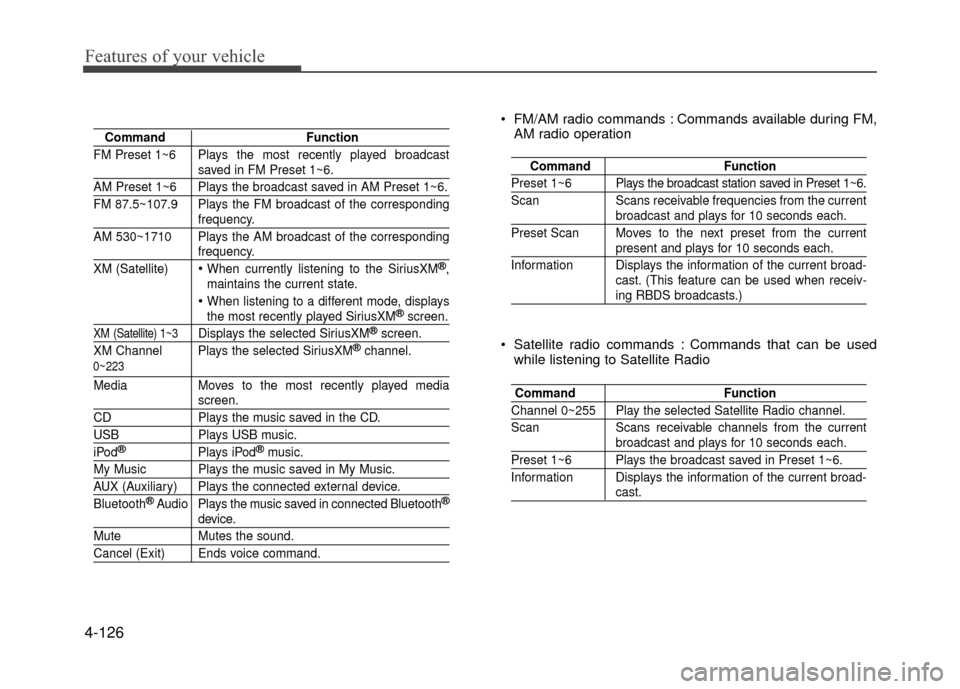
CommandFunction
FM Preset 1~6 Plays the most recently played broadcast
saved in FM Preset 1~6.
AM Preset 1~6 Plays the broadcast saved in AM Preset 1~6.
FM 87.5~107.9 Plays the FM broadcast of the corresponding
frequency.
AM 530~1710 Plays the AM broadcast of the corresponding
frequency.
XM (Satellite)
When currently listening to the SiriusXM®,
maintains the current state.
When listening to a different mode, displaysthe most recently played SiriusXM®screen.
XM (Satellite) 1~3Displays the selected SiriusXM®screen.
XM Channel Plays the selected SiriusXM®channel.
Media Moves to the most recently played mediascreen.
CD Plays the music saved in the CD.
USBPlays USB music.
iPod®Plays iPod®music.
My Music Plays the music saved in My Music.
AUX (Auxiliary) Plays the connected external device.
Bluetooth®Audio Plays the music saved in connected Bluetooth®
device.
Mute Mutes the sound.
Cancel (Exit) Ends voice command.
0~223
Command Function
Preset 1~6 Plays the broadcast station saved in Preset 1~6.
Scan Scans receivable frequencies from the current
broadcast and plays for 10 seconds each.
Preset Scan Moves to the next preset from the current
present and plays for 10 seconds each.
Information Displays the information of the current broad- cast. (This feature can be used when receiv-
ing RBDS broadcasts.)
FM/AM radio commands : Commands available during FM,AM radio operation
Command Function
Channel 0~255 Play the selected Satellite Radio channel.
Scan Scans receivable channels from the current
broadcast and plays for 10 seconds each.
Preset 1~6 Plays the broadcast saved in Preset 1~6.
Information Displays the information of the current broad-
cast.
Satellite radio commands : Commands that can be used
while listening to Satellite Radio
Page 201 of 380
4-127
Features of your vehicle
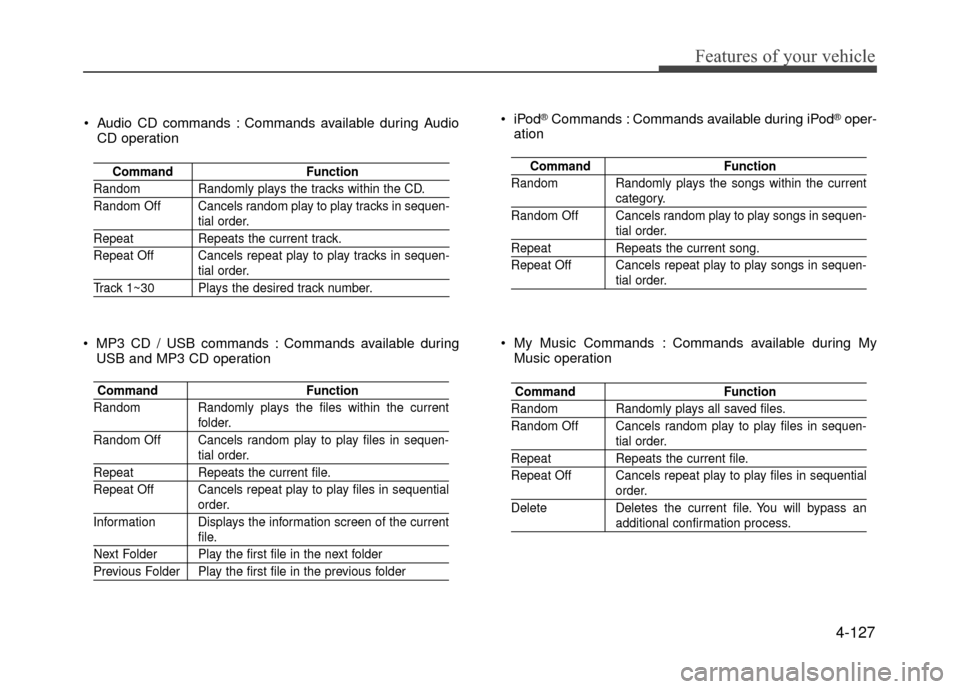
Audio CD commands : Commands available during AudioCD operation
Command Function
Random Randomly plays the tracks within the CD.
Random Off Cancels random play to play tracks in sequen-
tial order.
RepeatRepeats the current track.
Repeat Off Cancels repeat play to play tracks in sequen-
tial order.
Track 1~30 Plays the desired track number.
Command Function
Random Randomly plays the files within the current
folder.
Random Off Cancels random play to play files in sequen-
tial order.
Repeat Repeats the current file.
Repeat Off Cancels repeat play to play files in sequential
order.
Information Displays the information screen of the current
file.
Next Folder Play the first file in the next folder
Previous Folder Play the first file in the previous folder
MP3 CD / USB commands : Commands available during USB and MP3 CD operation
Command Function
Random Randomly plays the songs within the current
category.
Random Off Cancels random play to play songs in sequen-
tial order.
Repeat Repeats the current song.
Repeat Off Cancels repeat play to play songs in sequen-
tial order.
®Commands : Commands available during iPod®oper-
ation
Command Function
Random Randomly plays all saved files.
Random Off Cancels random play to play files in sequen-
tial order.
RepeatRepeats the current file.
Repeat Off Cancels repeat play to play files in sequential
order.
Delete Deletes the current file. You will bypass an
additional confirmation process.
My Music Commands : Commands available during My Music operation
Page 202 of 380
Features of your vehicle
4-128
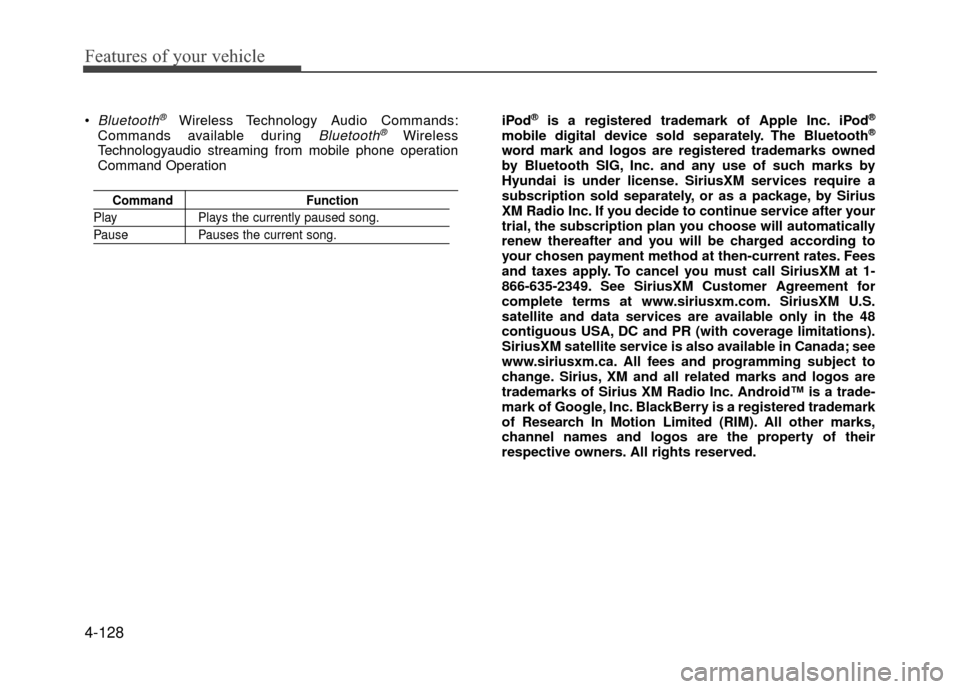
Bluetooth®Wireless Technology Audio Commands:
Commands available during Bluetooth®Wireless
Technologyaudio streaming from mobile phone operation
Command Operation
Command Function
PlayPlays the currently paused song.
PausePauses the current song.
iPod®is a registered trademark of Apple Inc. iPod®
mobile digital device sold separately. The Bluetooth®
word mark and logos are registered trademarks owned
by Bluetooth SIG, Inc. and any use of such marks by
Hyundai is under license. SiriusXM services require a
subscription sold separately, or as a package, by Sirius
XM Radio Inc. If you decide to continue service after your
trial, the subscription plan you choose will automatically
renew thereafter and you will be charged according to
your chosen payment method at then-current rates. Fees
and taxes apply. To cancel you must call SiriusXM at 1-
866-635-2349. See SiriusXM Customer Agreement for
complete terms at www.siriusxm.com. SiriusXM U.S.
satellite and data services are available only in the 48
contiguous USA, DC and PR (with coverage limitations).
SiriusXM satellite service is also available in Canada; see
www.siriusxm.ca. All fees and programming subject to
change. Sirius, XM and all related marks and logos are
trademarks of Sirius XM Radio Inc. Android™ is a trade-
mark of Google, Inc. BlackBerry is a registered trademark
of Research In Motion Limited (RIM). All other marks,
channel names and logos are the property of their
respective owners. All rights reserved.
Page 207 of 380
Driving your vehicle
5-4
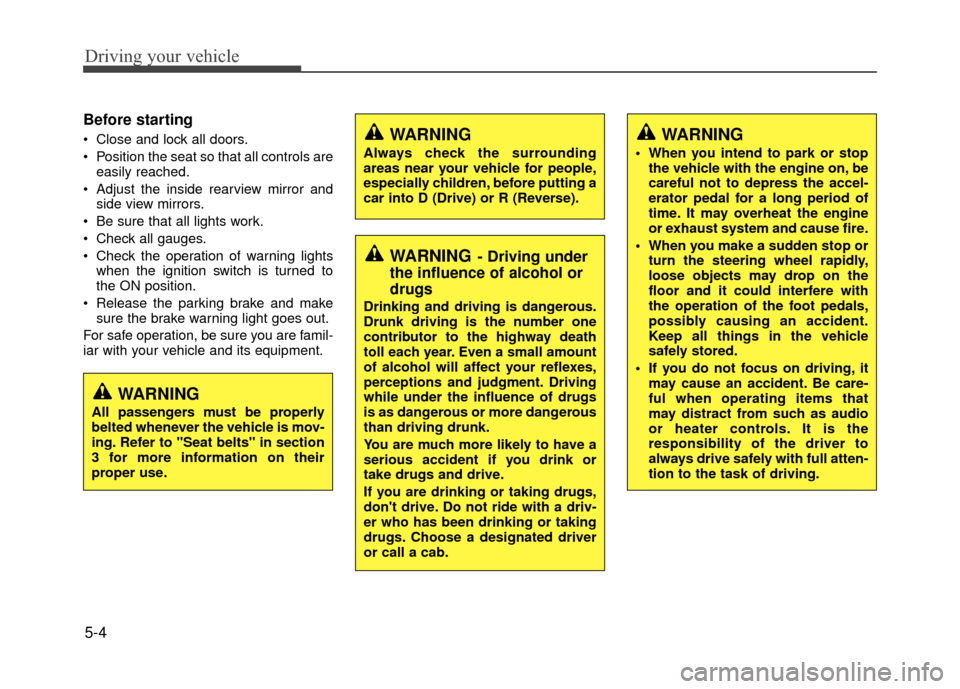
Before starting
Close and lock all doors.
Position the seat so that all controls areeasily reached.
Adjust the inside rearview mirror and side view mirrors.
Be sure that all lights work.
Check all gauges.
Check the operation of warning lights when the ignition switch is turned to
the ON position.
Release the parking brake and make sure the brake warning light goes out.
For safe operation, be sure you are famil-
iar with your vehicle and its equipment.WARNING
Always check the surrounding
areas near your vehicle for people,
especially children, before putting a
car into D (Drive) or R (Reverse).
WARNING- Driving under
the influence of alcohol or
drugs
Drinking and driving is dangerous.
Drunk driving is the number one
contributor to the highway death
toll each year. Even a small amount
of alcohol will affect your reflexes,
perceptions and judgment. Driving
while under the influence of drugs
is as dangerous or more dangerous
than driving drunk.
You are much more likely to have a
serious accident if you drink or
take drugs and drive.
If you are drinking or taking drugs,
don't drive. Do not ride with a driv-
er who has been drinking or taking
drugs. Choose a designated driver
or call a cab.
WARNING
When you intend to park or stop
the vehicle with the engine on, be
careful not to depress the accel-
erator pedal for a long period of
time. It may overheat the engine
or exhaust system and cause fire.
When you make a sudden stop or turn the steering wheel rapidly,
loose objects may drop on the
floor and it could interfere with
the operation of the foot pedals,
possibly causing an accident.
Keep all things in the vehicle
safely stored.
If you do not focus on driving, it may cause an accident. Be care-
ful when operating items that
may distract from such as audio
or heater controls. It is the
responsibility of the driver to
always drive safely with full atten-
tion to the task of driving.
WARNING
All passengers must be properly
belted whenever the vehicle is mov-
ing. Refer to "Seat belts" in section
3 for more information on their
proper use.
Page 318 of 380
7-35
Maintenance
Reset items
Items should be reset after the battery
has been discharged or the battery has
been disconnected.
Sunroof (See section 4)
Trip computer (See section 4)
Climate control system (See section 4)
Clock (See section 4)
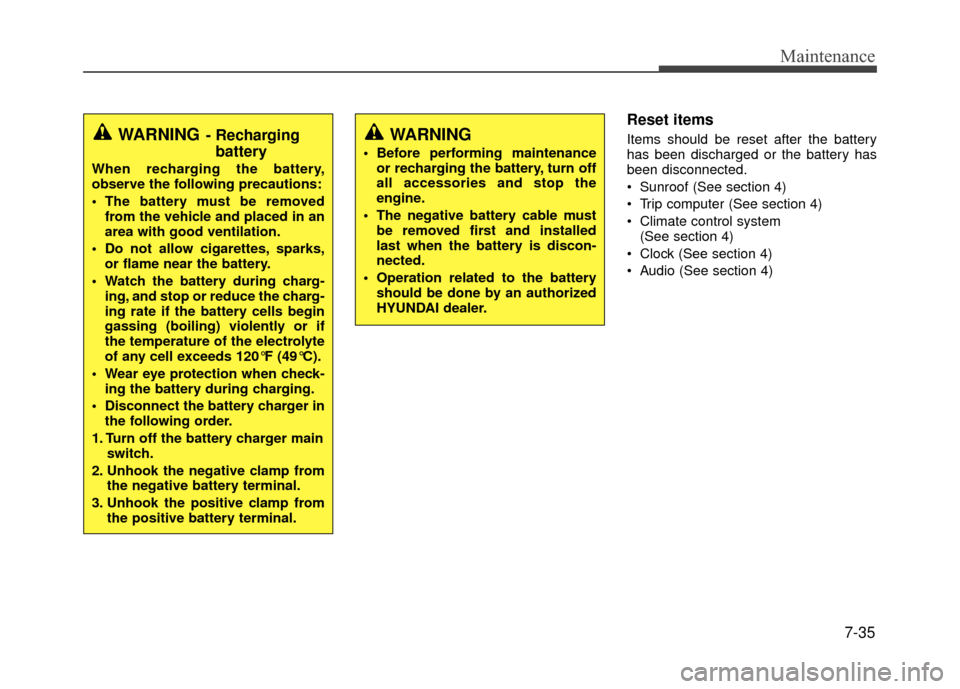
Audio (See section 4)WARNING
Before performing maintenance or recharging the battery, turn off
all accessories and stop the
engine.
The negative battery cable must be removed first and installed
last when the battery is discon-
nected.
Operation related to the battery should be done by an authorized
HYUNDAI dealer.
WARNING- Rechargingbattery
When recharging the battery,
observe the following precautions:
The battery must be removed
from the vehicle and placed in an
area with good ventilation.
Do not allow cigarettes, sparks, or flame near the battery.
Watch the battery during charg- ing, and stop or reduce the charg-
ing rate if the battery cells begin
gassing (boiling) violently or if
the temperature of the electrolyte
of any cell exceeds 120°F (49°C).
Wear eye protection when check- ing the battery during charging.
Disconnect the battery charger in the following order.
1. Turn off the battery charger main switch.
2. Unhook the negative clamp from the negative battery terminal.
3. Unhook the positive clamp from the positive battery terminal.
Page 335 of 380
Maintenance
7-52
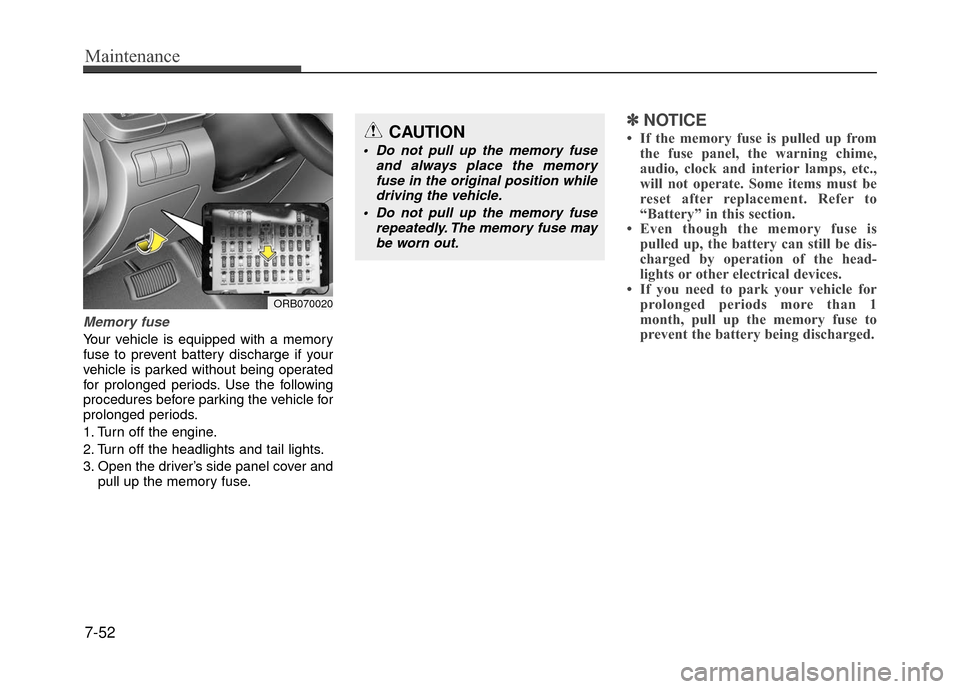
Memory fuse
Your vehicle is equipped with a memory
fuse to prevent battery discharge if your
vehicle is parked without being operated
for prolonged periods. Use the following
procedures before parking the vehicle for
prolonged periods.
1. Turn off the engine.
2. Turn off the headlights and tail lights.
3. Open the driver’s side panel cover andpull up the memory fuse.
✽ ✽NOTICE
• If the memory fuse is pulled up from
the fuse panel, the warning chime,
audio, clock and interior lamps, etc.,
will not operate. Some items must be
reset after replacement. Refer to
“Battery” in this section.
• Even though the memory fuse is pulled up, the battery can still be dis-
charged by operation of the head-
lights or other electrical devices.
• If you need to park your vehicle for prolonged periods more than 1
month, pull up the memory fuse to
prevent the battery being discharged.
ORB070020
CAUTION
Do not pull up the memory fuse
and always place the memoryfuse in the original position whiledriving the vehicle.
Do not pull up the memory fuse repeatedly. The memory fuse maybe worn out.
Page 339 of 380
Maintenance
7-56
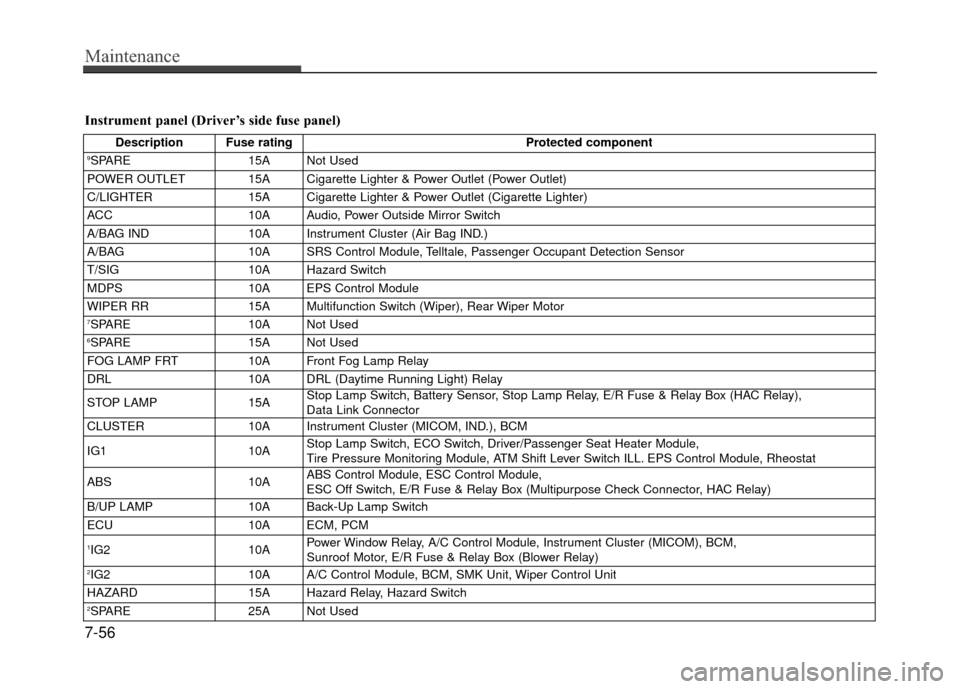
Instrument panel (Driver’s side fuse panel)
Description Fuse ratingProtected component9SPARE15A Not Used
POWER OUTLET 15A Cigarette Lighter & Power Outlet (Power Outlet)
C/LIGHTER 15A Cigarette Lighter & Power Outlet (Cigarette Lighter)
ACC 10A Audio, Power Outside Mirror Switch
A/BAG IND 10A Instrument Cluster (Air Bag IND.)
A/BAG 10A SRS Control Module, Telltale, Passenger Occupant Detection Sensor
T/SIG 10A Hazard Switch
MDPS 10A EPS Control Module
WIPER RR 15A Multifunction Switch (Wiper), Rear Wiper Motor
7SPARE10A Not Used6SPARE 15A Not Used
FOG LAMP FRT 10A Front Fog Lamp Relay
DRL 10A DRL (Daytime Running Light) Relay
STOP LAMP 15AStop Lamp Switch, Battery Sensor, Stop Lamp Relay, E/R Fuse & Relay Box (HAC Relay),
Data Link Connector
CLUSTER 10A Instrument Cluster (MICOM, IND.), BCM
IG1 10AStop Lamp Switch, ECO Switch, Driver/Passenger Seat Heater Module,
Tire Pressure Monitoring Module, ATM Shift Lever Switch ILL. EPS Control Module, Rheostat
ABS 10AABS Control Module, ESC Control Module,
ESC Off Switch, E/R Fuse & Relay Box (Multipurpose Check Connector, HAC Relay)
B/UP LAMP 10A Back-Up Lamp Switch
ECU 10A ECM, PCM
1IG210APower Window Relay, A/C Control Module, Instrument Cluster (MICOM), BCM,
Sunroof Motor, E/R Fuse & Relay Box (Blower Relay)
2IG2
10A A/C Control Module, BCM, SMK Unit, Wiper Control Unit
HAZARD 15A Hazard Relay, Hazard Switch
2SPARE25A Not Used