remote control Hyundai Accent 2017 Owner's Manual
[x] Cancel search | Manufacturer: HYUNDAI, Model Year: 2017, Model line: Accent, Model: Hyundai Accent 2017Pages: 380, PDF Size: 12.45 MB
Page 75 of 380
4Features of your vehicle
Keys / 4-3
Remote keyless entry / 4-3
Door locks / 4-6
Trunk / 4-10
Tailgate / 4-12
Windows / 4-13
Hood / 4-17
Fuel filler lid / 4-18
Sunroof / 4-21
Steering wheel / 4-24
Mirrors / 4-26
Instrument cluster / 4-29
Hazard warning flasher / 4-44
Lighting / 4-44
Wipers and washers / 4-49
Interior light / 4-53
Defroster / 4-55
Manual climate control system / 4-56
Automatic climate control system / 4-65
Windshield defrosting and defogging / 4-71
Storage compartments / 4-75
Page 88 of 380
Features of your vehicle
4-14
Power windows
The ignition switch must be in the ONposition for power windows to operate.
Each door has a power window switch
that controls that door's window. The
driver has a power window lock switch
which can block the operation of pas-
senger windows. The driver’s door has
a master power window switch that
controls all the windows in the vehicle.
The power windows can be operated for approximately 30 seconds after the igni-
tion key is removed or turned to the ACC
or LOCK position. However, if the front
doors open, the power windows cannot
be operated within the 30 second period
(if equipped : remote keyless entry sys-
tem).
✽ ✽ NOTICE
• In cold and wet climates, power win-
dows my not work properly due to
freezing conditions.
• While driving with the rear windows down or with the sunroof (if
equipped) opened (or partially
opened), your vehicle may demon-
strate a wind buffeting or pulsation
noise. This noise is normal and can be
reduced or eliminated by taking the
following actions. If the noise occurs
with one or both of the rear windows
down, partially lower both front win-
dows approximately one inch. If you
experience the noise with the sunroof
open, slightly close the sunroof.
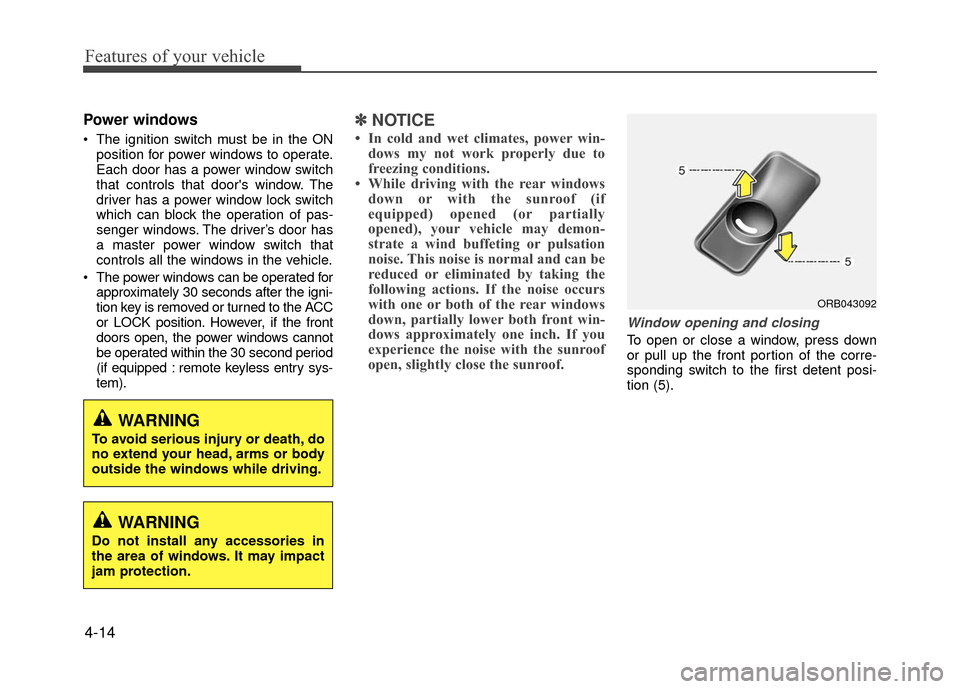
Window opening and closing
To open or close a window, press down
or pull up the front portion of the corre-
sponding switch to the first detent posi-
tion (5).
ORB043092
WARNING
To avoid serious injury or death, do
no extend your head, arms or body
outside the windows while driving.
WARNING
Do not install any accessories in
the area of windows. It may impact
jam protection.
Page 101 of 380
4-27
Features of your vehicle
Side View Mirrors
Be sure to adjust mirror angles before
driving.
Your vehicle is equipped with both left-
hand and right-hand side view mirrors.
The mirrors can be adjusted remotely
with the remote switch. The mirror heads
can be folded back to prevent damage
during an automatic car wash or when
passing in a narrow street.
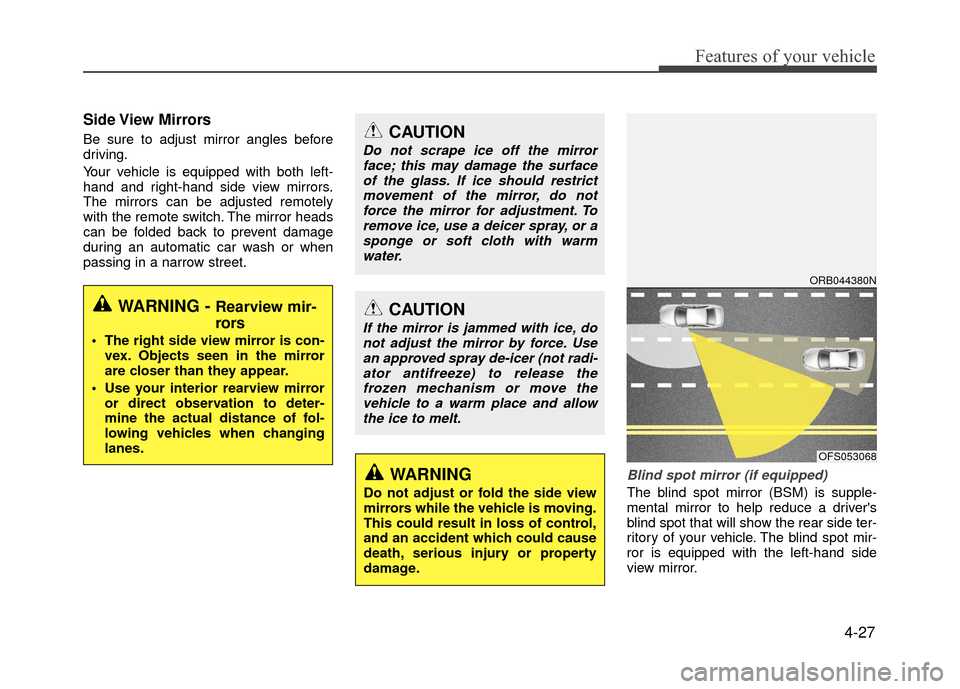
Blind spot mirror (if equipped)
The blind spot mirror (BSM) is supple-
mental mirror to help reduce a driver's
blind spot that will show the rear side ter-
ritory of your vehicle. The blind spot mir-
ror is equipped with the left-hand side
view mirror.
WARNING - Rearview mir-
rors
The right side view mirror is con-vex. Objects seen in the mirror
are closer than they appear.
Use your interior rearview mirror or direct observation to deter-
mine the actual distance of fol-
lowing vehicles when changing
lanes.
CAUTION
Do not scrape ice off the mirrorface; this may damage the surfaceof the glass. If ice should restrictmovement of the mirror, do notforce the mirror for adjustment. To remove ice, use a deicer spray, or asponge or soft cloth with warmwater.
CAUTION
If the mirror is jammed with ice, donot adjust the mirror by force. Usean approved spray de-icer (not radi-ator antifreeze) to release thefrozen mechanism or move thevehicle to a warm place and allowthe ice to melt.
WARNING
Do not adjust or fold the side view
mirrors while the vehicle is moving.
This could result in loss of control,
and an accident which could cause
death, serious injury or property
damage.
ORB044380N
OFS053068
Page 102 of 380
Features of your vehicle
4-28
Remote control
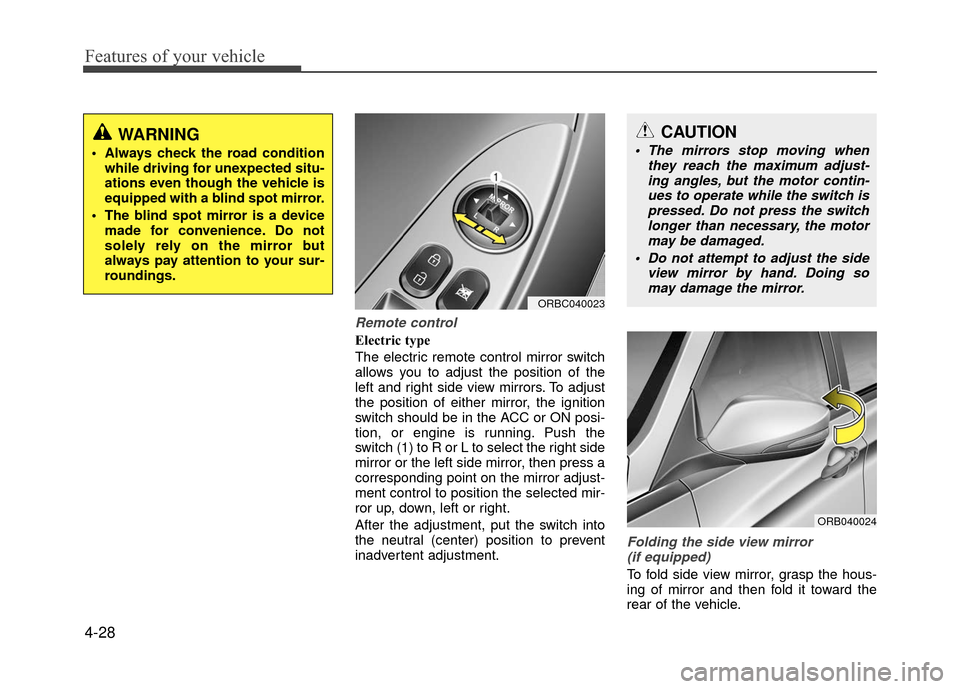
Electric type
The electric remote control mirror switch
allows you to adjust the position of the
left and right side view mirrors. To adjust
the position of either mirror, the ignition
switch should be in the ACC or ON posi-
tion, or engine is running. Push the
switch (1) to R or L to select the right side
mirror or the left side mirror, then press a
corresponding point on the mirror adjust-
ment control to position the selected mir-
ror up, down, left or right.
After the adjustment, put the switch into
the neutral (center) position to prevent
inadvertent adjustment.
Folding the side view mirror(if equipped)
To fold side view mirror, grasp the hous-
ing of mirror and then fold it toward the
rear of the vehicle.
WARNING
Always check the road condition while driving for unexpected situ-
ations even though the vehicle is
equipped with a blind spot mirror.
The blind spot mirror is a device made for convenience. Do not
solely rely on the mirror but
always pay attention to your sur-
roundings.
ORBC040023
CAUTION
The mirrors stop moving when they reach the maximum adjust-ing angles, but the motor contin- ues to operate while the switch ispressed. Do not press the switchlonger than necessary, the motor may be damaged.
Do not attempt to adjust the side view mirror by hand. Doing somay damage the mirror.
ORB040024
Page 159 of 380
4-85
Features of your vehicle
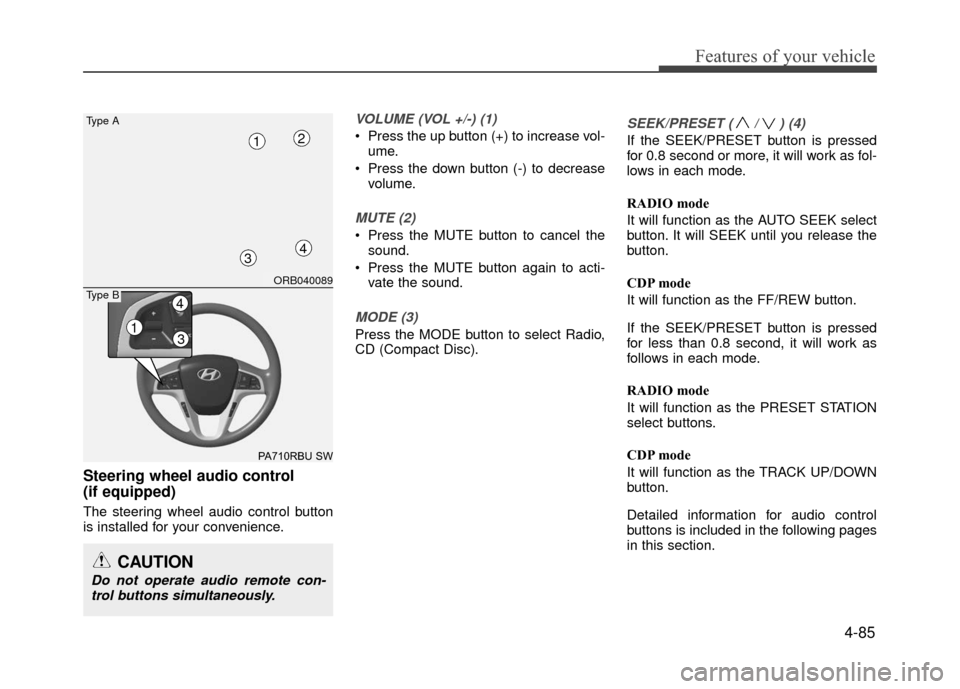
Steering wheel audio control
(if equipped)
The steering wheel audio control button
is installed for your convenience.
VOLUME (VOL +/-) (1)
Press the up button (+) to increase vol-ume.
Press the down button (-) to decrease volume.
MUTE (2)
Press the MUTE button to cancel thesound.
Press the MUTE button again to acti- vate the sound.
MODE (3)
Press the MODE button to select Radio,
CD (Compact Disc).
SEEK/PRESET ( / ) (4)
If the SEEK/PRESET button is pressed
for 0.8 second or more, it will work as fol-
lows in each mode.
RADIO mode
It will function as the AUTO SEEK select
button. It will SEEK until you release the
button.
CDP mode
It will function as the FF/REW button.
If the SEEK/PRESET button is pressed
for less than 0.8 second, it will work as
follows in each mode.
RADIO mode
It will function as the PRESET STATION
select buttons.
CDP mode
It will function as the TRACK UP/DOWN
button.
Detailed information for audio control
buttons is included in the following pages
in this section.
CAUTION
Do not operate audio remote con-trol buttons simultaneously.
ORB040089
PA710RBU SW
Type A
4
12
3
13
4Type B
Page 185 of 380
![Hyundai Accent 2017 Owners Manual 4-111
Features of your vehicle
Delete Selection
Press the key Set [ Del.Sel]
through the TUNEknob or key.
Songs within My Music are selected and
deleted.
➀Select the songs you wish to delete
from](/img/35/14348/w960_14348-184.png "Hyundai Accent 2017 Owners Manual 4-111
Features of your vehicle
Delete Selection
Press the key Set [ Del.Sel]
through the TUNEknob or key.
Songs within My Music are selected and
deleted.
➀Select the songs you wish to delete
from")
4-111
Features of your vehicle
Delete Selection
Press the key Set [ Del.Sel]
through the TUNEknob or key.
Songs within My Music are selected and
deleted.
➀Select the songs you wish to delete
from the list.
\b After selecting, press the key and
select the delete menu.
✽ ✽ NOTICE - USING THE MY
MUSIC
• Even if memory is available, a maxi- mum of 6,000 songs can be stored.
• The same song can be copied up to 1,000 times.
• Memory info can be checked in the System menu of Setup.
AUX
AUX is used to play external MEDIA cur-
rently connected with the AUX terminal.
AUX mode will automatically start when
an external device is connected with the
AUX terminal.
If an external device is connected, you
can also press the key to change
to AUX mode.
❈ AUX mode cannot be started unless
there is an external device connected
to the AUX terminal.
✽ ✽ NOTICE - USING THE AUX
Fully insert the AUX cable into the AUX
terminal for use.
Bluetooth®Wireless Technology
AUDIO (if equipped model)
What is
Bluetooth®Wireless
Technology
?
Bluetooth®Wireless Technology allows
devices to be connected in a short distance,
including hands-free devices, stereo head-
sets, wireless remote controllers, etc. For
more information, visit
the Bluetooth®
Wireless Technologywebsite atwww.Bluetooth.com
Before using Bluetooth®Wireless
Technology audio features
Bluetooth®Wireless Technology audio
may not be supported depending on
the compatibility of your
Bluetooth®
Wireless Technology mobile phone.
In order to use
Bluetooth®Wireless
Technology audio, you must first pair
and connect the
Bluetooth®Wireless
Technology mobile phone.
Bluetooth®Wireless Technology audio
can be used only when the [Audio
Streaming] of Phone is turned .
On
MEDIA
6
MENU
Page 187 of 380
4-113
Features of your vehicle
PHONE
(if equipped model)
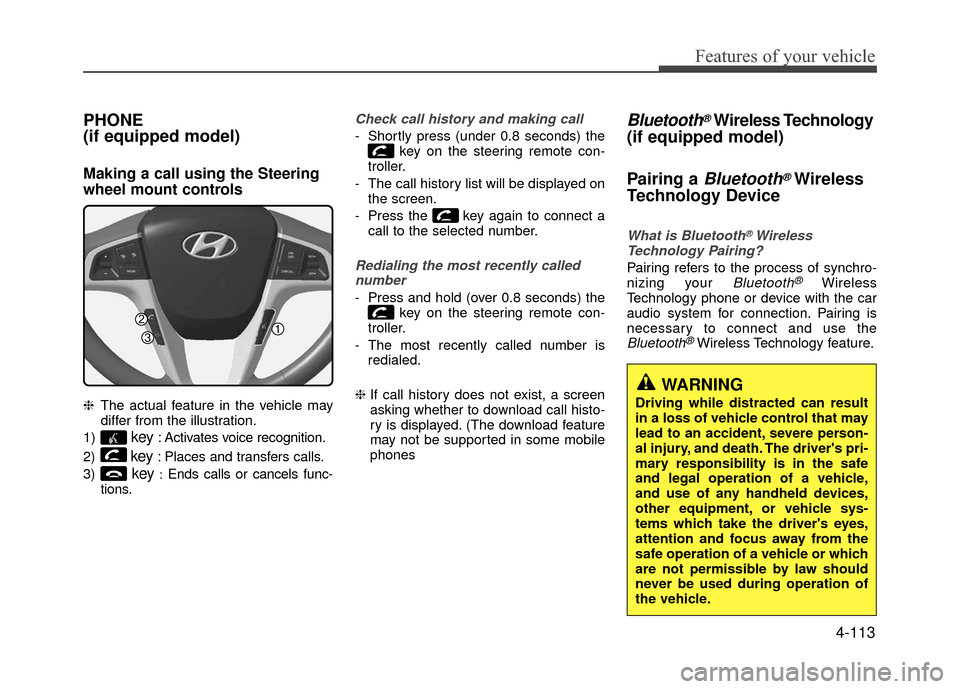
Making a call using the Steering
wheel mount controls
❈The actual feature in the vehicle may
differ from the illustration.
1)
key: Activates voice recognition.
2)
key: Places and transfers calls.
3)
key:Ends calls or cancels func-
tions.
Check call history and making call
- Shortly press (under 0.8 seconds) the key on the steering remote con-
troller.
- The call history list will be displayed on the screen.
- Press the key again to connect a call to the selected number.
Redialing the most recently callednumber
- Press and hold (over 0.8 seconds) the key on the steering remote con-
troller.
- The most recently called number is redialed.
❈ If call history does not exist, a screen
asking whether to download call histo-
ry is displayed. (The download feature
may not be supported in some mobile
phones
Bluetooth®Wireless Technology
(if equipped model)
Pairing a
Bluetooth®Wireless
Technology Device
What is Bluetooth®Wireless
Technology Pairing?
Pairing refers to the process of synchro-
nizing your Bluetooth®Wireless
Technology phone or device with the car
audio system for connection. Pairing is
necessary to connect and use the
Bluetooth®Wireless Technology feature.
WARNING
Driving while distracted can result
in a loss of vehicle control that may
lead to an accident, severe person-
al injury, and death. The driver's pri-
mary responsibility is in the safe
and legal operation of a vehicle,
and use of any handheld devices,
other equipment, or vehicle sys-
tems which take the driver's eyes,
attention and focus away from the
safe operation of a vehicle or which
are not permissible by law should
never be used during operation of
the vehicle.
Page 188 of 380
Features of your vehicle
Pairing key / key on
the Steering Remote Controller
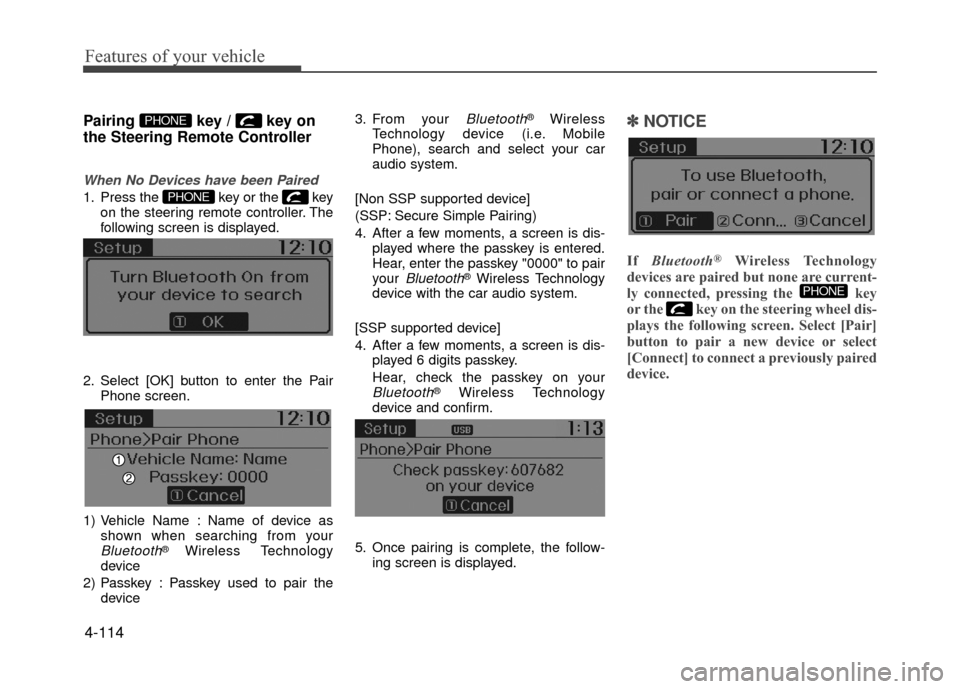
When No Devices have been Paired
1. Press the key or the keyon the steering remote controller. The
following screen is displayed.
2. Select [OK] button to enter the Pair Phone screen.
1) Vehicle Name : Name of device as shown when searching from your
Bluetooth®Wireless Technology
device
2) Passkey : Passkey used to pair the device 3. From your
Bluetooth®Wireless
Technology device (i.e. Mobile
Phone), search and select your car
audio system.
[Non SSP supported device]
(SSP: Secure Simple Pairing)
4. After a few moments, a screen is dis- played where the passkey is entered.
Hear, enter the passkey "0000" to pair
your
Bluetooth®Wireless Technology
device with the car audio system.
[SSP supported device]
4. After a few moments, a screen is dis- played 6 digits passkey.
Hear, check the passkey on your
Bluetooth®Wireless Technology
device and confirm.
5. Once pairing is complete, the follow- ing screen is displayed.
✽ ✽NOTICE
If Bluetooth®Wireless Technology
devices are paired but none are current-
ly connected, pressing the key
or the key on the steering wheel dis-
plays the following screen. Select [Pair]
button to pair a new device or select
[Connect] to connect a previously paired
device.
PHONE
PHONE
PHONE
4-114
Page 197 of 380
4-123
Features of your vehicle
Skipping Prompt Messages
While prompt message is being stated
Shortly press the key on the steer-
ing remote controller.
The prompt message is immediately
ended and the beep tone will sound.
After the "beep", say the voice command.
Re-starting Voice Recognition
While system waits for a command
Shortly press the key on the steer-
ing remote controller.
The command wait state is immediately
ended and the beep ton will sound. After
the "beep", say the voice command.
ENDING VOICE RECOGNITION
While Voice Recognition is operating
Press and hold the key on the steer-
ing remote controller.
✽ ✽NOTICE
• While using voice command, pressing
any steering wheel control or a differ-
ent key will end voice command.
• When the system is waiting for a voice command, say "cancel" or "end" to
end voice command.
• When the system is waiting for a voice command, press and hold the key
on the steering wheel to end voice
command.
Voice Recognition and Phone
Contact Tips:
The Hyundai Voice Recognition System
may have difficulty understanding some
accents or uncommon names.
When using Voice Recognition to place a
call, speak in a moderate tone, with clear
pronunciation To maximize the use of
Voice Recognition, consider these guide-
lines when storing contacts:
Do not store single-name entries (e.g.,
"Bob", "Mom", etc.). Instead, always
use full names (including first and last
names) for these contacts
Do not use special characters (e.g., '@', '-', '*', '&', etc.)
Do not use abbreviations (i.e., use "Lieutenant" instead of "Lt.") or
acronyms (i.e., use "County Finance
Department" instead of "C. F. D."; Be
sure to say the name exactly as it is
entered in the contacts list
Page 257 of 380
6-9
What to do in an emergency
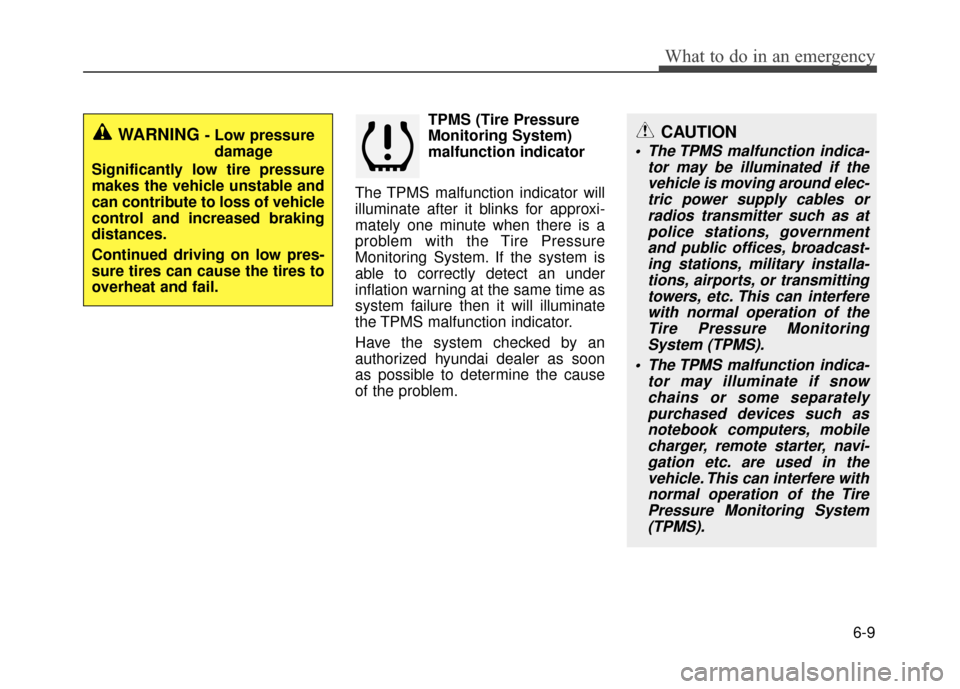
TPMS (Tire Pressure
Monitoring System)
malfunction indicator
The TPMS malfunction indicator will
illuminate after it blinks for approxi-
mately one minute when there is a
problem with the Tire Pressure
Monitoring System. If the system is
able to correctly detect an under
inflation warning at the same time as
system failure then it will illuminate
the TPMS malfunction indicator.
Have the system checked by an
authorized hyundai dealer as soon
as possible to determine the cause
of the problem.
WARNING - Low pressure damage
Significantly low tire pressure
makes the vehicle unstable and
can contribute to loss of vehicle
control and increased braking
distances.
Continued driving on low pres-
sure tires can cause the tires to
overheat and fail.CAUTION
The TPMS malfunction indica- tor may be illuminated if thevehicle is moving around elec-tric power supply cables orradios transmitter such as atpolice stations, governmentand public offices, broadcast-ing stations, military installa-tions, airports, or transmittingtowers, etc. This can interferewith normal operation of theTire Pressure MonitoringSystem (TPMS).
The TPMS malfunction indica- tor may illuminate if snowchains or some separatelypurchased devices such asnotebook computers, mobilecharger, remote starter, navi-gation etc. are used in thevehicle. This can interfere withnormal operation of the TirePressure Monitoring System(TPMS).