reset Hyundai Accent 2020 Owner's Guide
[x] Cancel search | Manufacturer: HYUNDAI, Model Year: 2020, Model line: Accent, Model: Hyundai Accent 2020Pages: 445, PDF Size: 42.28 MB
Page 311 of 445
5-49
Driving your vehicle
5
To temporarily accelerate with
the Cruise Control ON
Depress the accelerator pedal. When
you take your foot off the accelerator,
the vehicle will return to the previ-
ously set speed.
If you push the toggle switch down
(SET-) at the increased speed, the
Cruise Control will maintain the
increased speed.
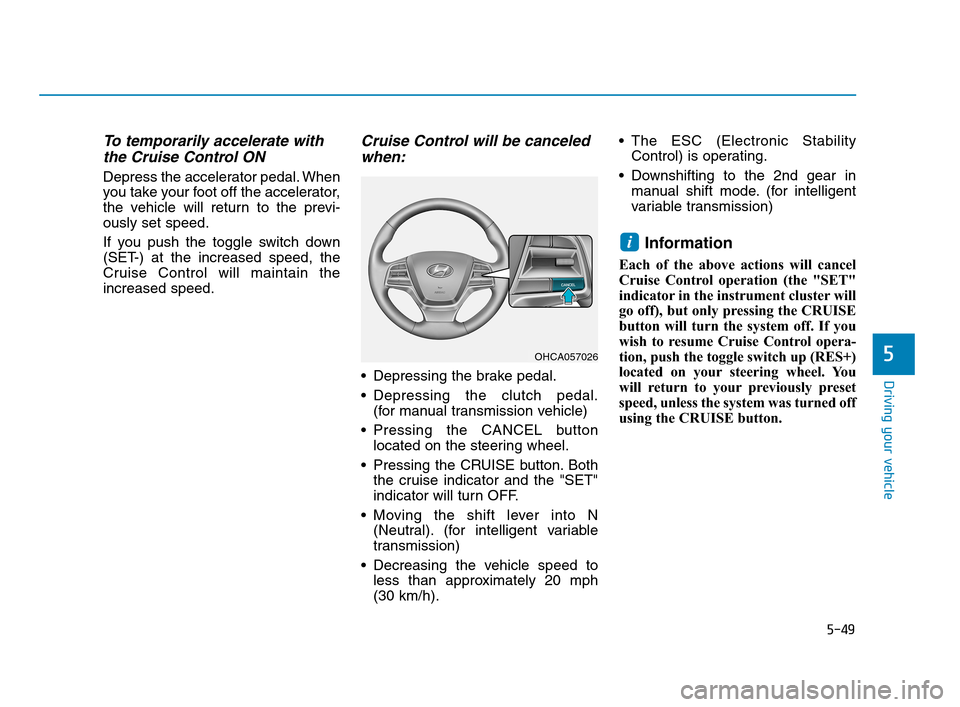
Cruise Control will be canceled
when:
Depressing the brake pedal.
Depressing the clutch pedal.
(for manual transmission vehicle)
Pressing the CANCEL button
located on the steering wheel.
Pressing the CRUISE button. Both
the cruise indicator and the "SET"
indicator will turn OFF.
Moving the shift lever into N
(Neutral). (for intelligent variable
transmission)
Decreasing the vehicle speed to
less than approximately 20 mph
(30 km/h). The ESC (Electronic Stability
Control) is operating.
Downshifting to the 2nd gear in
manual shift mode. (for intelligent
variable transmission)
Information
Each of the above actions will cancel
Cruise Control operation (the "SET"
indicator in the instrument cluster will
go off), but only pressing the CRUISE
button will turn the system off. If you
wish to resume Cruise Control opera-
tion, push the toggle switch up (RES+)
located on your steering wheel. You
will return to your previously preset
speed, unless the system was turned off
using the CRUISE button.
i
OHCA057026
HCa HMA 5.QXP 4/9/2019 2:40 PM Page 49
Page 312 of 445
5-50
Driving your vehicle
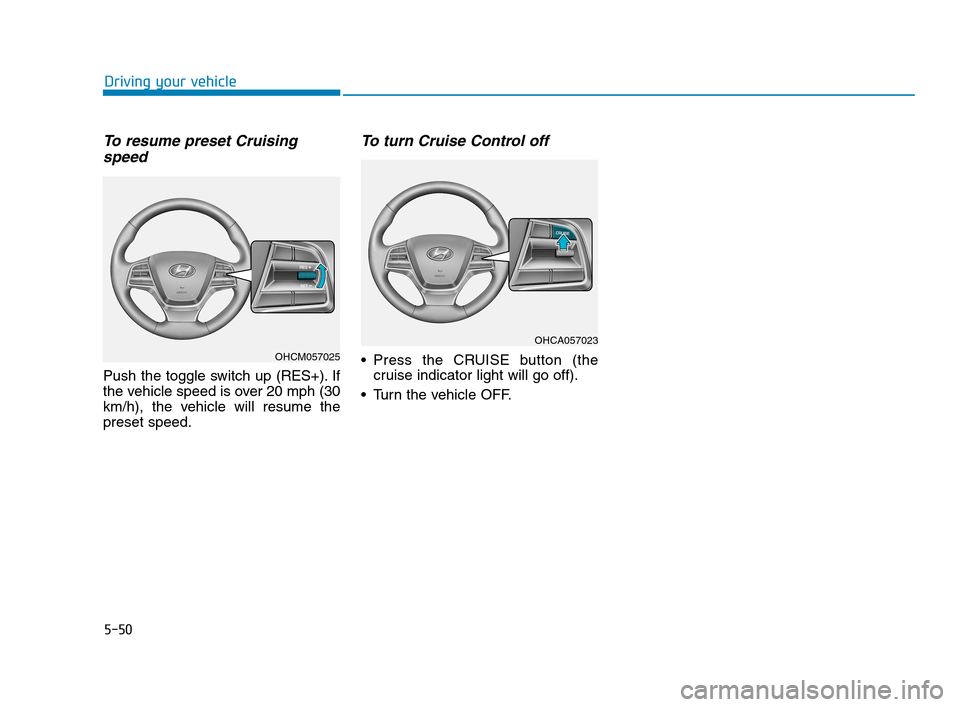
To resume preset Cruising
speed
Push the toggle switch up (RES+). If
the vehicle speed is over 20 mph (30
km/h), the vehicle will resume the
preset speed.
To turn Cruise Control off
Press the CRUISE button (the
cruise indicator light will go off).
Turn the vehicle OFF.OHCM057025
OHCA057023
HCa HMA 5.QXP 4/9/2019 2:40 PM Page 50
Page 350 of 445
7
Maintenance
7
Maintenance
Engine compartment .............................................7-3
Maintenance services ...........................................7-4
Owner's Responsibility .....................................................7-4
Owner Maintenance Precautions..................................7-4
Owner maintenance ...............................................7-5
Owner Maintenance Schedule .......................................7-6
Scheduled maintenance services.........................7-7
Normal Maintenance Schedule
(Smartstream G1.6) ...........................................................7-8
Maintenance Under Severe Usage Conditions
(Smartstream G1.6) .........................................................7-11
Severe Driving Conditions .............................................7-12
Explanation of scheduled maintenance items .7-13
Engine oil ..............................................................7-16
Checking the Engine Oil Level .....................................7-16
Checking the Engine Oil and Filter .............................7-17
Engine coolant......................................................7-18
Checking the Engine Coolant Level ............................7-18
Changing Engine Coolant .............................................7-20
Brake/clutch fluid ................................................7-21
Checking the Brake/Clutch Fluid Level .....................7-21
Washer fluid .........................................................7-22
Checking the Washer Fluid Level................................7-22
Parking brake .......................................................7-22
Checking the Parking Brake .........................................7-22
Air cleaner ............................................................7-23
Filter Replacement ..........................................................7-23
Climate control air filter .....................................7-24
Filter Inspection ...............................................................7-24
Wiper blades .........................................................7-26
Blade Inspection ..............................................................7-26
Blade Replacement .........................................................7-26
Battery...................................................................7-28
For Best Battery Service ..............................................7-29
Battery Recharging ........................................................7-29
Reset Features.................................................................7-30
7
HCa HMA 7.qxp 4/9/2019 2:47 PM Page 1
Page 379 of 445
7-30
Maintenance
By jump starting
After a jump start from a good bat-
tery, drive the vehicle for 20-30 min-
utes before it is shutoff. The vehicle
may not restart if you shut it off
before the battery had a chance to
adequately recharge. See "Jump
Starting" in chapter 6 for more infor-
mation on jump starting procedures.
Information
An inappropriately disposed
battery can be harmful to
the environment and human
health. Dispose of the bat-
tery according to your local
law(s) or regulations.
Reset Features
The following items may need to be
reset after the battery has been dis-
charged or the battery has been dis-
connected. See chapter 3 or 4 for:
Power Windows
Trip Computer
Climate Control System
Clock
Audio System
Sunroof
i
(Continued)
Watch the battery during
charging, and stop or reduce
the charging rate if the battery
cells begin boiling violently.
The negative battery cable
must be removed first and
installed last when the battery
is disconnected. Disconnect
the battery charger in the fol-
lowing order:
(1) Turn off the battery charg-
er main switch.
(2) Unhook the negative
clamp from the negative
battery terminal.
(3) Unhook the positive clamp
from the positive battery
terminal.
Always use a genuine
HYUNDAI approved battery
when you replace the battery.
HCa HMA 7.qxp 4/9/2019 2:48 PM Page 30
Page 383 of 445
7-34
Maintenance
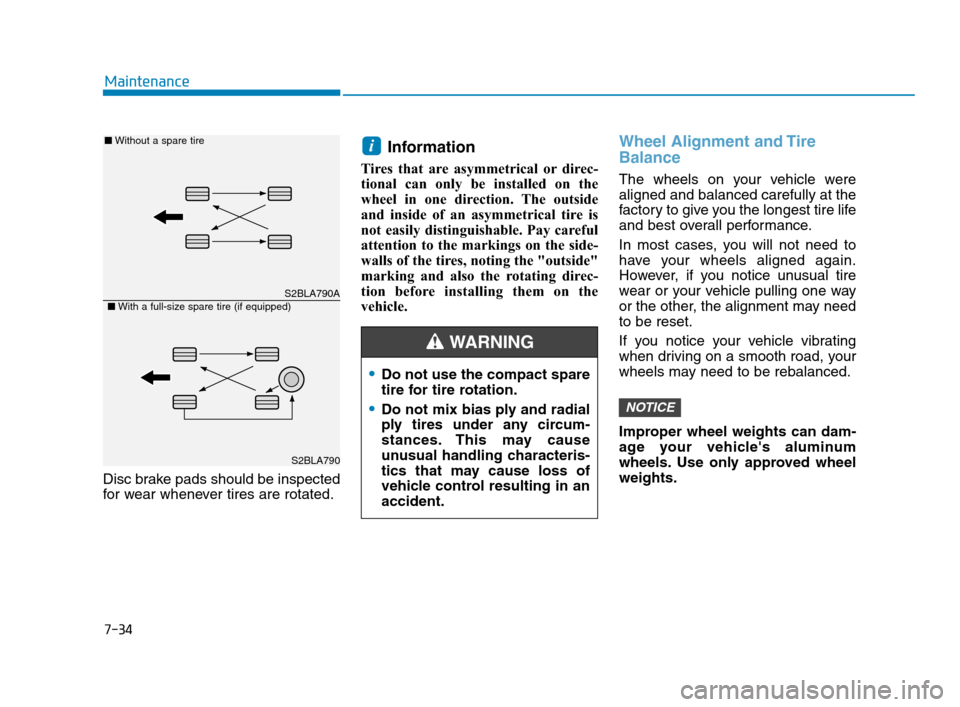
Disc brake pads should be inspected
for wear whenever tires are rotated.
Information
Tires that are asymmetrical or direc-
tional can only be installed on the
wheel in one direction. The outside
and inside of an asymmetrical tire is
not easily distinguishable. Pay careful
attention to the markings on the side-
walls of the tires, noting the "outside"
marking and also the rotating direc-
tion before installing them on the
vehicle.
Wheel Alignment and Tire
Balance
The wheels on your vehicle were
aligned and balanced carefully at the
factory to give you the longest tire life
and best overall performance.
In most cases, you will not need to
have your wheels aligned again.
However, if you notice unusual tire
wear or your vehicle pulling one way
or the other, the alignment may need
to be reset.
If you notice your vehicle vibrating
when driving on a smooth road, your
wheels may need to be rebalanced.
Improper wheel weights can dam-
age your vehicle's aluminum
wheels. Use only approved wheel
weights.
NOTICE
i
Do not use the compact spare
tire for tire rotation.
Do not mix bias ply and radial
ply tires under any circum-
stances. This may cause
unusual handling characteris-
tics that may cause loss of
vehicle control resulting in an
accident.
WARNING
S2BLA790A
S2BLA790
■Without a spare tire
■With a full-size spare tire (if equipped)
HCa HMA 7.qxp 4/9/2019 2:48 PM Page 34