Media Hyundai Accent 2020 Owner's Manual
[x] Cancel search | Manufacturer: HYUNDAI, Model Year: 2020, Model line: Accent, Model: Hyundai Accent 2020Pages: 445, PDF Size: 42.28 MB
Page 13 of 445
1
2
3
4
5
6
7
8
I
Your Vehicle at a Glance
Safety System of Your Vehicle
Convenient Features of Your Vehicle
Multimedia System
Driving Your Vehicle
What to Do in an Emergency
Maintenance
Specifications, Consumer Information and
Reporting Safety Defects
Index
TABLE OF CONTENTS
HCa HMA FOREWORD.QXP 1/5/2018 9:27 AM Page 11
Page 15 of 445
I-2
Accessing Your Vehicle ....................................................3-3
Immobilizer System....................................................3-11
Remote Key ..................................................................3-3
Smart Key.....................................................................3-6
Air bag - Advanced supplemental restraint system ........2-39
Additional Safety Precautions ....................................2-61
Air Bag Warning Labels.............................................2-61
How Does the Air Bag System Operate? ...................2-44
Occupant Classification System (OCS) .....................2-50
SRS Care ....................................................................2-60
What to Expect After an Air Bag Inflates ..................2-49
Where Are the Air Bags? ...........................................2-41
Why Didn't My Air Bag Go Off in a Collision?........2-55
Air cleaner.......................................................................7-23
Filter Replacement .....................................................7-23
Air Conditioning System ..................................................8-5
Appearance care..............................................................7-72
Exterior Care ..............................................................7-72
Interior Care ...............................................................7-77Audio (With Touch Screen) ..............................................4-9
Feature of Your Audio.......................................4-10, 4-13
List ..............................................................................4-19
Media ..........................................................................4-22
Phone ............................................................................4-1
Radio ..........................................................................4-18
Setup .............................................................................4-1
SiriusXM Radio..........................................................4-21
Automatic Climate Control System..............................3-104
Automatic Heating and Air Conditioning ................3-105
Manual Heating and Air Conditioning .....................3-106
System Maintenance.................................................3-113
System Operation .....................................................3-111
Battery .............................................................................7-28
Battery Recharging .....................................................7-29
For Best Battery Service ............................................7-29
Reset Features ............................................................7-30
Before driving ...................................................................5-3
Before Entering the Vehicle .........................................5-3
Before Starting .............................................................5-3
Index
A
B
HCa HMA INDEX.qxp 4/9/2019 3:13 PM Page 2
Page 19 of 445
I-6
Manual transmission .......................................................5-15
Good Driving Practices ..............................................5-17
Manual Transmission Operation ................................5-15
Mirrors ............................................................................3-20
Inside Rearview Mirror ..............................................3-20
Side View Mirrors ......................................................3-28
Multimedia system............................................................4-2
Antenna ........................................................................4-2
AUX, USB and iPod
®Port ..........................................4-2
Bluetooth®Wireless Technology Hands-Free ..............4-4
Features of Your Vehicle ..............................................4-7
How Vehicle Audio Works ...........................................4-5
Steering Wheel Audio Control .....................................4-3
Owner maintenance ..........................................................7-5
Owner Maintenance Schedule......................................7-6
Parking brake ..................................................................7-22
Checking the Parking Brake ......................................7-22Recommended Lubricants and Capacities ........................8-6
Recommended SAE viscosity number .........................8-8
Refrigerant Label ............................................................8-10
Reporting Safety Defects ................................................8-12
Scheduled maintenance services.......................................7-7
Maintenance Under Severe Usage Conditions
(Smartstream G1.6) .................................................7-11
Normal Maintenance Schedule (Smartstream G1.6) ...7-8
Severe Driving Conditions .........................................7-12
Seat belts .........................................................................2-16
Additional Seat Belt Safety Precautions ....................2-24
Care of Seat Belts .......................................................2-27
Seat Belt Restraint System .........................................2-18
Seat Belt Safety Precautions ......................................2-16
Seat Belt Warning Light .............................................2-17
Seats ..................................................................................2-3
Front Seats ....................................................................2-5
Head Restraints...........................................................2-11
Rear Seats .....................................................................2-8
Safety Precautions ........................................................2-4
Seat Warmers ..............................................................2-14
Index
O
P
S
R
HCa HMA INDEX.qxp 4/9/2019 3:13 PM Page 6
Page 75 of 445
2-48
Safety system of your vehicle
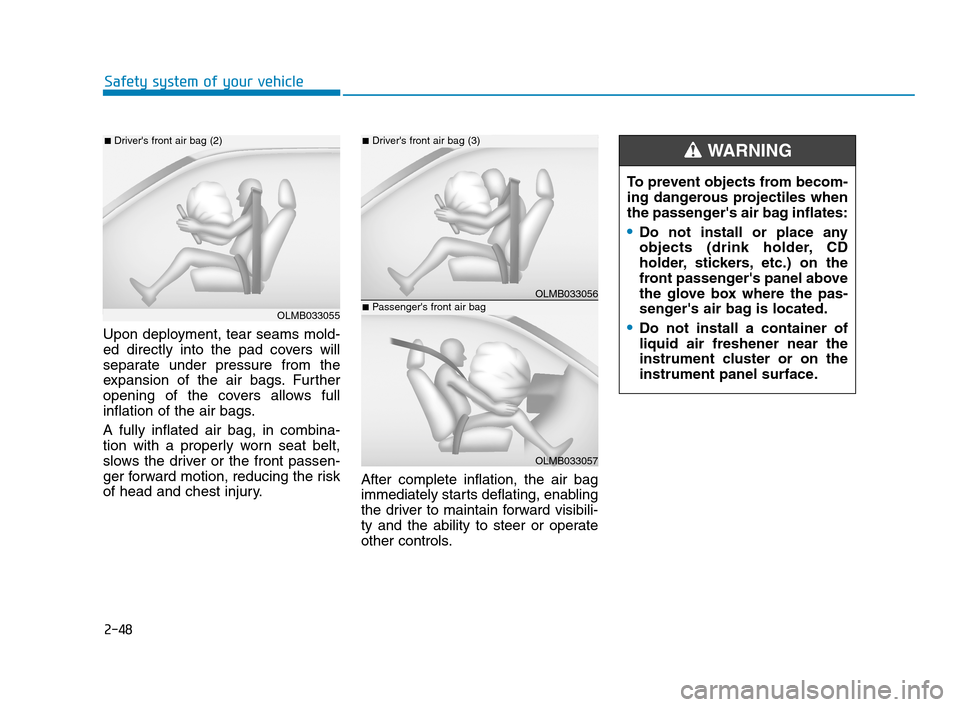
Upon deployment, tear seams mold-
ed directly into the pad covers will
separate under pressure from the
expansion of the air bags. Further
opening of the covers allows full
inflation of the air bags.
A fully inflated air bag, in combina-
tion with a properly worn seat belt,
slows the driver or the front passen-
ger forward motion, reducing the risk
of head and chest injury.After complete inflation, the air bag
immediately starts deflating, enabling
the driver to maintain forward visibili-
ty and the ability to steer or operate
other controls.
OLMB033055
■Driver's front air bag (2)
OLMB033056
■Driver's front air bag (3)
OLMB033057
■Passenger's front air bag
To prevent objects from becom-
ing dangerous projectiles when
the passenger's air bag inflates:
Do not install or place any
objects (drink holder, CD
holder, stickers, etc.) on the
front passenger's panel above
the glove box where the pas-
senger's air bag is located.
Do not install a container of
liquid air freshener near the
instrument cluster or on the
instrument panel surface.
WARNING
HCa HMA 2.QXP 5/7/2018 12:02 PM Page 48
Page 76 of 445
2-49
Safety system of your vehicle
2
What to Expect After an Air
Bag Inflates
After a frontal or side air bag inflates,
it will deflate very quickly. Air bag
inflation will not prevent the driver
from seeing out of the windshield or
being able to steer. Curtain air bags
may remain partially inflated for
some time after they deploy.
Noise and smoke from inflating
air bag
When the air bags inflate, they make
a loud noise and may produce
smoke and powder in the air inside of
the vehicle. This is normal and is a
result of the ignition of the air bag
inflator. After the air bag inflates, you
may feel substantial discomfort in
breathing because of the contact of
your chest with both the seat belt and
the air bag, as well as from breathing
the smoke and powder. The powder
may aggravate asthma for some
people. If you experience breathing
problems after an air bag deploy-
ment, seek medical attention imme-
diately.
Though the smoke and powder are
nontoxic, they may cause irritation to
the skin, eyes, nose, throat, etc. If
this is the case, wash and rinse with
cold water immediately and seek
medical attention if the symptoms
persist. (Continued)Always wash exposed skin
areas thoroughly with cold
and mild soap.
Always have an authorized
HYUNDAI dealer replace the
air bag immediately after
deployment. Air bags are
designed to be used only
once.
After an air bag inflates, take
the following precautions:
Open your windows and doors
as soon as possible after
impact to reduce prolonged
exposure to the smoke and
powder released by the inflat-
ing air bag.
Do not touch the air bag stor-
age area's internal compo-
nents immediately after an air
bag has inflated. The parts
that come into contact with an
inflating air bag may be very
hot.
(Continued)
WARNING
HCa HMA 2.QXP 5/7/2018 12:02 PM Page 49
Page 87 of 445
2-60
Safety system of your vehicle
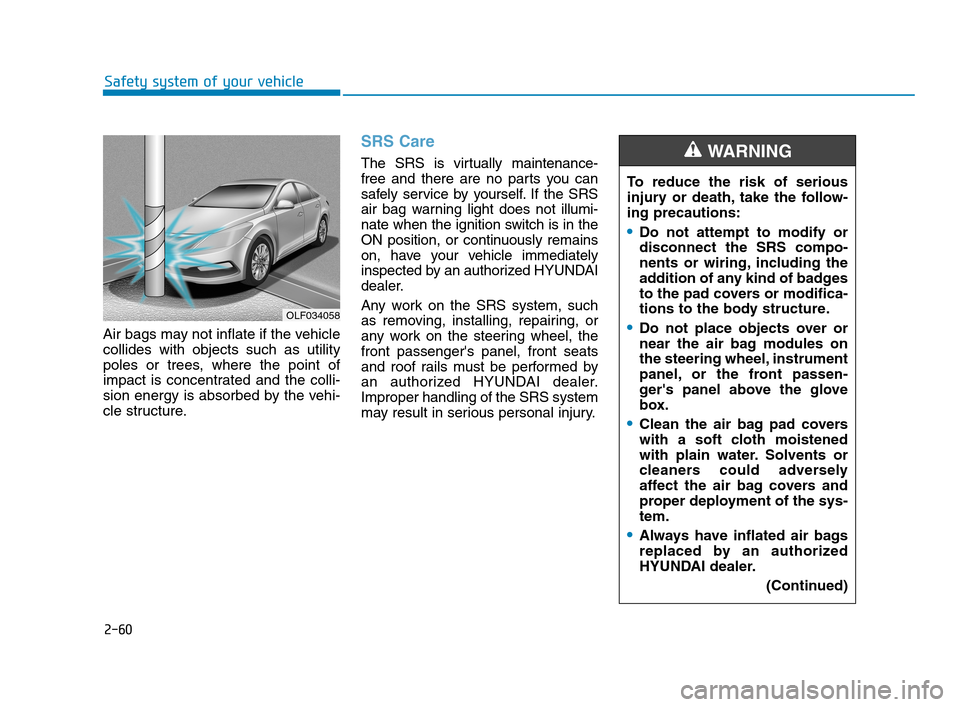
Air bags may not inflate if the vehicle
collides with objects such as utility
poles or trees, where the point of
impact is concentrated and the colli-
sion energy is absorbed by the vehi-
cle structure.
SRS Care
The SRS is virtually maintenance-
free and there are no parts you can
safely service by yourself. If the SRS
air bag warning light does not illumi-
nate when the ignition switch is in the
ON position, or continuously remains
on, have your vehicle immediately
inspected by an authorized HYUNDAI
dealer.
Any work on the SRS system, such
as removing, installing, repairing, or
any work on the steering wheel, the
front passenger's panel, front seats
and roof rails must be performed by
an authorized HYUNDAI dealer.
Improper handling of the SRS system
may result in serious personal injury.To reduce the risk of serious
injury or death, take the follow-
ing precautions:
Do not attempt to modify or
disconnect the SRS compo-
nents or wiring, including the
addition of any kind of badges
to the pad covers or modifica-
tions to the body structure.
Do not place objects over or
near the air bag modules on
the steering wheel, instrument
panel, or the front passen-
ger's panel above the glove
box.
Clean the air bag pad covers
with a soft cloth moistened
with plain water. Solvents or
cleaners could adversely
affect the air bag covers and
proper deployment of the sys-
tem.
Always have inflated air bags
replaced by an authorized
HYUNDAI dealer.
(Continued)
WARNING
OLF034058
HCa HMA 2.QXP 5/7/2018 12:04 PM Page 60
Page 97 of 445
3-9
Convenient features of your vehicle
Start-up
You can start the vehicle without
inserting the key.
For information, refer to the
"Engine Start/Stop Button" sec-
tion in chapter 5.
To prevent damaging the smart key:
Keep the smart key away from
any liquid or fire. Internal circuits
may malfunction if the inside of
the smart key gets damp (from
liquids or moisture) or if it is heat-
ed. This can exclude the smart
key from warranty coverage.
Avoid dropping or throwing the
smart key.
Protect the smart key from
extreme temperatures.
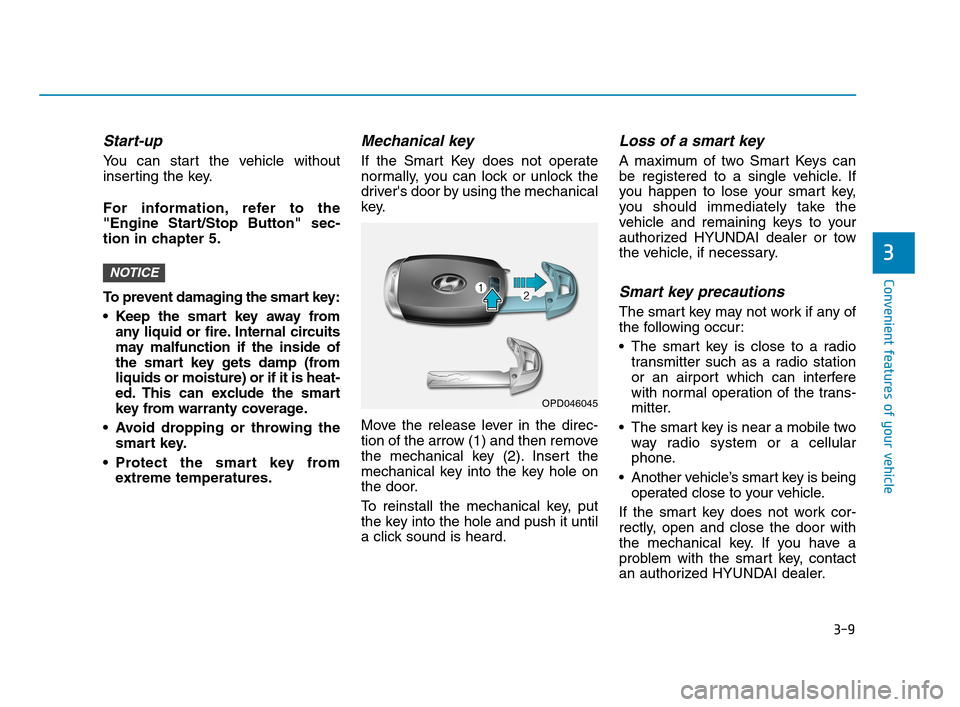
Mechanical key
If the Smart Key does not operate
normally, you can lock or unlock the
driver's door by using the mechanical
key.
Move the release lever in the direc-
tion of the arrow (1) and then remove
the mechanical key (2). Insert the
mechanical key into the key hole on
the door.
To reinstall the mechanical key, put
the key into the hole and push it until
a click sound is heard.
Loss of a smart key
A maximum of two Smart Keys can
be registered to a single vehicle. If
you happen to lose your smart key,
you should immediately take the
vehicle and remaining keys to your
authorized HYUNDAI dealer or tow
the vehicle, if necessary.
Smart key precautions
The smart key may not work if any of
the following occur:
The smart key is close to a radio
transmitter such as a radio station
or an airport which can interfere
with normal operation of the trans-
mitter.
The smart key is near a mobile two
way radio system or a cellular
phone.
Another vehicle’s smart key is being
operated close to your vehicle.
If the smart key does not work cor-
rectly, open and close the door with
the mechanical key. If you have a
problem with the smart key, contact
an authorized HYUNDAI dealer.
NOTICE
3
OPD046045
HCa HMA 3a(~84).qxp 4/9/2019 2:59 PM Page 9
Page 106 of 445
3-18
Convenient features of your vehicle
Information
The following symptoms may occur
during normal vehicle operation:
• The steering effort may be high
immediately after placing the ignition
switch in the ON position.
This happens as the system performs
the EPS system diagnostics. When
the diagnostics are completed, the
steering wheel will return to its nor-
mal condition.
• A click noise may be heard from the
EPS relay after the ignition switch is
in the ON or LOCK/OFF position.
• Motor noise may be heard when the
vehicle is at a stop or at a low driving
speed.
• When you operate the steering wheel
in low temperatures, abnormal noise
may occur. If the temperature rises,
the noise will disappear. This is a nor-
mal condition.
(Continued)(Continued)
• When an error is detected from the
EPS, the steering effort assist func-
tion will not be activated in order to
prevent fatal accidents. Instrument
cluster warning lights may be on or
the steering effort may be high. When
the following symptoms occur, imme-
diately drive the vehicle to a safe area
and check it.
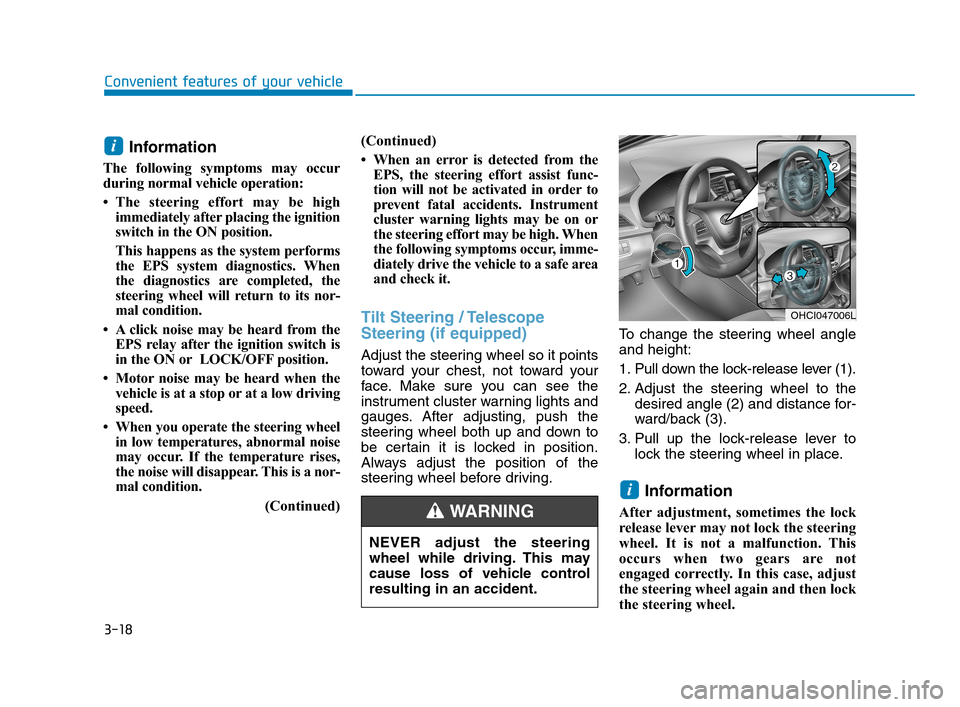
Tilt Steering / Telescope
Steering (if equipped)
Adjust the steering wheel so it points
toward your chest, not toward your
face. Make sure you can see the
instrument cluster warning lights and
gauges. After adjusting, push the
steering wheel both up and down to
be certain it is locked in position.
Always adjust the position of the
steering wheel before driving.To change the steering wheel angle
and height:
1. Pull down the lock-release lever (1).
2. Adjust the steering wheel to the
desired angle (2) and distance for-
ward/back (3).
3. Pull up the lock-release lever to
lock the steering wheel in place.
Information
After adjustment, sometimes the lock
release lever may not lock the steering
wheel. It is not a malfunction. This
occurs when two gears are not
engaged correctly. In this case, adjust
the steering wheel again and then lock
the steering wheel.
i
i
OHCI047006L
NEVER adjust the steering
wheel while driving. This may
cause loss of vehicle control
resulting in an accident.
WARNING
HCa HMA 3a(~84).qxp 4/9/2019 2:59 PM Page 18
Page 138 of 445
3-50
Convenient features of your vehicle
Information
Make sure to refuel your vehicle
according to the "Fuel Requirements"
suggested in the Introduction chapter.
Do not spill fuel on the exterior
surfaces of the vehicle. Any type
of fuel spilled on painted sur-
faces may damage the paint.
If the fuel filler cap requires
replacement, use only a genuine
HYUNDAI cap or the equivalent
specified for your vehicle. An
incorrect fuel filler cap can
result in a serious malfunction
of the fuel system or emission
control system.
NOTICE
i(Continued)
Do not over-fill or top-off your
vehicle tank, which can cause
gasoline spillage.
If a fire breaks out during refu-
eling, leave the vicinity of the
vehicle, and immediately con-
tact the manager of the gas
station and then contact the
local fire department. Follow
any safety instructions they
provide.
If pressurized fuel sprays out,
it can cover your clothes or
skin and thus subject you to
the risk of fire and burns.
Always remove the fuel cap
carefully and slowly. If the cap
is venting fuel or if you hear a
hissing sound, wait until the
condition stops before com-
pletely removing the cap.
Always check that the fuel cap
is installed securely to pre-
vent fuel spillage in the event
of an accident.
(Continued)
Once refueling has begun,
contact between your bare
hand and the vehicle should
be maintained until the filling
is complete.
Use only approved portable
plastic fuel containers designed
to carry and store gasoline.
When refueling, always move
the shift lever to the P (Park)
position (for intelligent vari-
able transmission) or first
gear or R (Reverse, for manu-
al transmission), set the park-
ing brake, and place the igni-
tion switch to the LOCK/ OFF
position. Sparks produced by
electrical components related
to the engine can ignite fuel
vapors causing a fire.
Do not use matches or a
lighter and do not smoke or
leave a lit cigarette in your
vehicle while at a gas station,
especially during refueling.
(Continued)
HCa HMA 3a(~84).qxp 4/9/2019 3:01 PM Page 50
Page 143 of 445
3-55
Convenient features of your vehicle
3
Outside temperature gauge
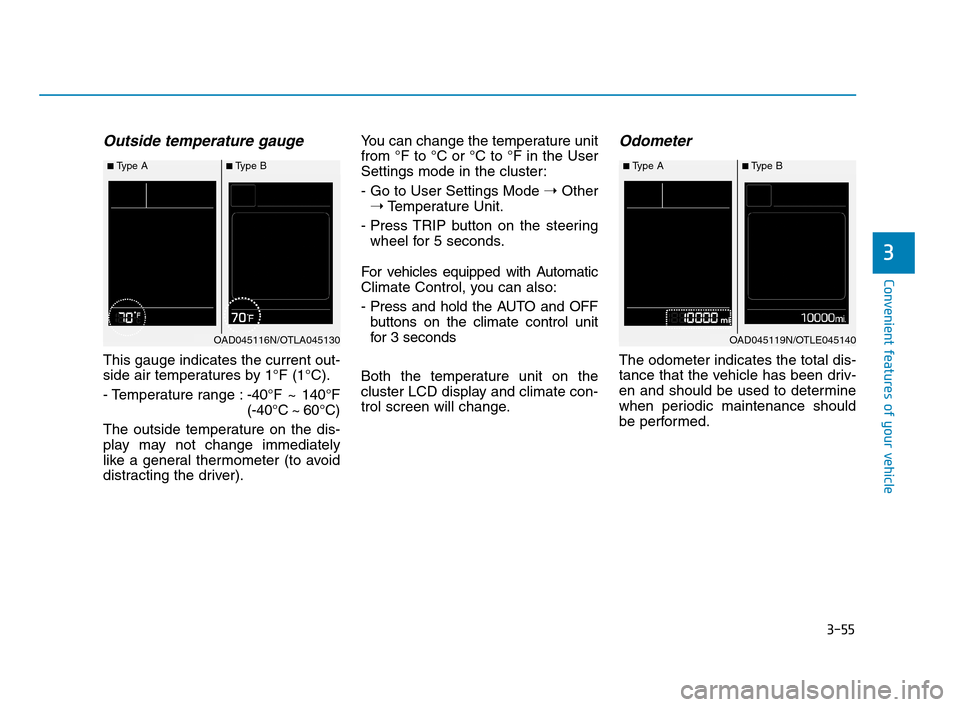
This gauge indicates the current out-
side air temperatures by 1°F (1°C).
- Temperature range :-40°F ~ 140°F
(-40°C ~ 60°C)
The outside temperature on the dis-
play may not change immediately
like a general thermometer (to avoid
distracting the driver).You can change the temperature unit
from °F to °C or °C to °F in the User
Settings mode in the cluster:
- Go to User Settings Mode ➝Other
➝Temperature Unit.
- Press TRIP button on the steering
wheel for 5 seconds.
For vehicles equipped with Automatic
Climate Control, you can also:
- Press and hold the AUTO and OFF
buttons on the climate control unit
for 3 seconds
Both the temperature unit on the
cluster LCD display and climate con-
trol screen will change.
Odometer
The odometer indicates the total dis-
tance that the vehicle has been driv-
en and should be used to determine
when periodic maintenance should
be performed.
■Type A■Type B
OAD045116N/OTLA045130
■Type A■Type B
OAD045119N/OTLE045140
HCa HMA 3a(~84).qxp 4/9/2019 3:02 PM Page 55