bluetooth HYUNDAI ACCENT 2022 User Guide
[x] Cancel search | Manufacturer: HYUNDAI, Model Year: 2022, Model line: ACCENT, Model: HYUNDAI ACCENT 2022Pages: 443, PDF Size: 42.78 MB
Page 234 of 443
![HYUNDAI ACCENT 2022 User Guide 4-27
Infotainment System
4
(4) Save: Save the selected file(s).
- Select the files you want to save,
and select [Save]. This saves the
selected files to My Music.
- If phone calls are received or
made](/img/35/41159/w960_41159-233.png "HYUNDAI ACCENT 2022 User Guide 4-27
Infotainment System
4
(4) Save: Save the selected file(s).
- Select the files you want to save,
and select [Save]. This saves the
selected files to My Music.
- If phone calls are received or
made")
4-27
Infotainment System
4
(4) Save: Save the selected file(s).
- Select the files you want to save,
and select [Save]. This saves the
selected files to My Music.
- If phone calls are received or
made while saving, saving will be
canceled.
- Up to 6,000 files can be saved.
- The currently playing file on the
USB device cannot be changed
while saving.
- My Music cannot be used while
saving.
- Up to 700 MB can be saved.
Information: Detailed information
on the currently playing song is dis-
played.
Sound Settings: Audio sound set-
tings can be changed.Information
- Using the iPod®Devices
• To use the audio system’s iPod
®con-
trol function, use the dedicated
cable provided with your iPod
®.
• Connecting the iPod
®to the vehicle
during play may result in a loud
noise that lasts about one to two sec-
onds. Connect the iPod
®to the vehi-
cle after stopping or pausing play.
• Connect the iPod
®with the vehicle in
the ACC ON state to begin charging.
• When connecting the iPod
®cable,
be sure to fully push the cable into
the port.
• When EQ effects are enabled simul-
taneously on external devices, such
as iPod
®s and the audio system, the
EQ effects may overlap, causing
sound quality deterioration or dis-
tortion. Deactivate the EQ function
for all external devices, if possible.
• Noise may occur when your iPod
®
or the AUX port is connected.
Disconnect and store separately
when not in use.
(Continued)(Continued)
• There may be noise if the audio sys-
tem is used with an iPod
®or AUX
external device connected to the
power jack. In these cases, discon-
nect the iPod
®or external device
from the power jack.
• Play may be interrupted, or device
malfunctions may occur depending
on the characteristics of your
iPod
®/iPhone®/iPad®.
• Play may fail if your iPhone
®is con-
nected through both Bluetooth®
Wireless Technology and USB. In
this case, select Dock connector or
Bluetooth
®Wireless Technology on
your iPhone®to change the sound
output settings.
• If your software version does not
support the communication proto-
col or your iPod
®is not recognized
due to device failure, anomalies or
defects, iPod
®mode cannot be used.
• iPod
®nano (5th generation) devices
may not be recognized if the battery
is low. Charge sufficiently before use.
(Continued)
i
HCa HMA 4.qxp 5/25/2020 10:59 AM Page 27
Page 237 of 443
4-30
Infotainment System
Information
- Using Bluetooth®Wireless
Technology(BT) Audio
(if equipped)
•Bluetooth
®Wireless Technology Audio
mode can only be used if a Bluetooth®
Wireless Technology-enabled phone is
connected. Only devices that support
Bluetooth
®Wireless Technology audio
can be used.
• If the Bluetooth
®Wireless Technology-
enabled phone is disconnected during
play, the music stops.
• When the TRACK UP/DOWN buttons
are used during Bluetooth
®Wireless
Technology audio streaming, a popping
noise or sound interruptions may occur,
depending on the cell phone device.
• Depending on the cell phone model,
the audio streaming function may
not be supported.
• If a phone call is made or received
when music is playing inBluetooth
®
Wireless Technology Audio mode,
the call may mix with the music.
• When returning to Bluetooth
®Wireless
Technology Audio mode after ending a
call, play might not resume automatical-
ly for some cell phone models.
Bluetooth®Wireless Technology
Handsfree is a feature that
enables drivers to practice safe
driving. Connecting the car
audio system with a
Bluetooth®
Wireless Technology phone
allows the user to conveniently
make calls, receive calls, and
manage the phone book. Before
using the
Bluetooth®Wireless
Technology, carefully read the
contents of this user’s manual.
Excessive use or operations
while driving may lead to negli-
gent driving practices and be
the cause of accidents.
Do not operate the device exces-
sively while driving.
Viewing the screen for pro-
longed periods of time is dan-
gerous and may lead to acci-
dents.
When driving, view the screen
only for short periods of time.
Bluetooth®Wireless Technology
(BT) Audio (if equipped)
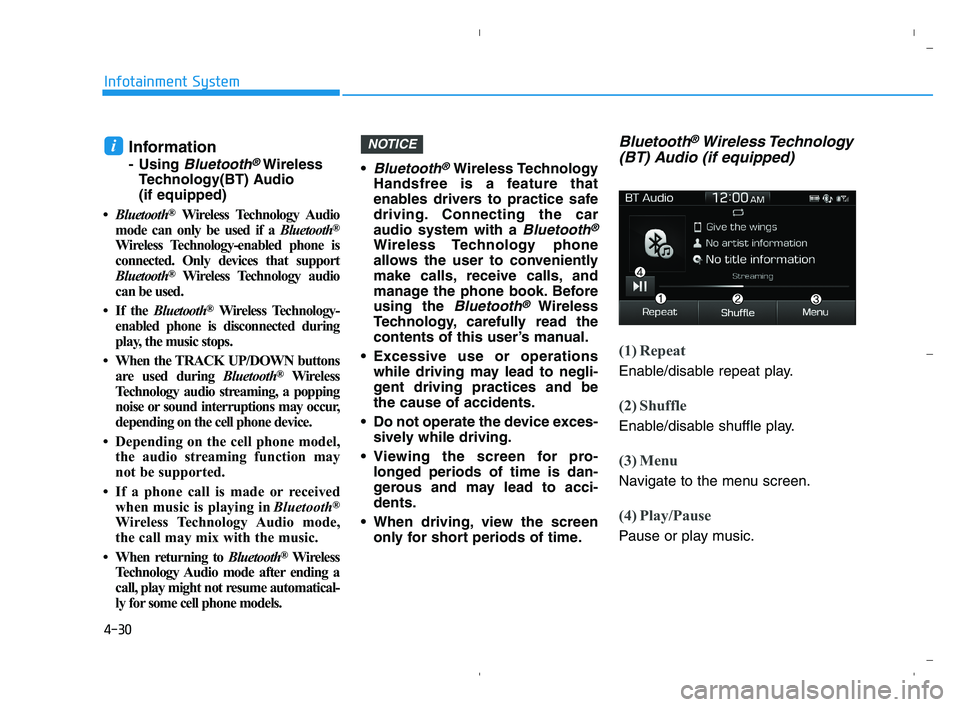
(1) Repeat
Enable/disable repeat play.
(2) Shuffle
Enable/disable shuffle play.
(3) Menu
Navigate to the menu screen.
(4) Play/Pause
Pause or play music.
NOTICEi
HCa HMA 4.qxp 5/25/2020 10:59 AM Page 30
Page 238 of 443
4-31
Infotainment System
4
Information
• Some cell phone models may not
support particular functions.
•Bluetooth
®Wireless Technology
audio volume is synced with cell
phone media volume.
Playback
Press the [MEDIA]button, and
select [BT Audio].
Changing songs
Press the [SEEK/TRACK]button to
play the previous or next song.
Information
Some cell phones may not support this
function.
Repeat play
Select[Repeat] to enable or disable
'Repeat all', 'Repeat current song' or
'Repeat category' play.
Repeat all: All songs in the
playlist are repeated.
Repeat current song: The cur-
rently playing song is repeated.
Repeat category: Repeat all
songs in the current category.
Information
The repeat play function is engaged,
depending on the operation of the connect-
edBluetooth
®Wireless Technology
device.
Shuffle play
Select [Shuffle] to enable or disable
'Shuffle', 'Shuffle category' play.
Shuffle: Songs are played in
random order.
Shuffle category: Songs within
the current category are played in
random order.
Information
The shuffle function is engaged,
depending on the operation of the con-
nected Bluetooth
®Wireless
Technology device.
Menu
Select [Menu], and select the desired
function.
Connections: The currently con-
nected
Bluetooth®Wireless
Technology device can be
changed.
Information: Detailed information
on the currently playing song is dis-
played.
Sound Settings: Audio sound set-
tings can be changed.
i
i
i
i
HCa HMA 4.qxp 5/25/2020 10:59 AM Page 31
Page 241 of 443
4-34
Infotainment System
Phone (if equipped)
Information
- Using Bluetooth®Wireless
Technology(BT) Cellular
Phone
•Bluetooth
®Wireless Technology is a
near-field wireless networking tech-
nology that uses the 2.4 GHz fre-
quency to connect various devices
within a certain distance wirelessly.
• The technology is used in PCs,
peripherals, Bluetooth
®Wireless
Technology phones, tablet PCs,
household appliances and automo-
biles. Devices supporting Bluetooth
®
Wireless Technology can exchange
data at high speeds without physical
cable connections.
•Bluetooth
®Wireless Technology
Handsfree devices enable convenient
access to phone functions through cell
phones equipped with Bluetooth
®
Wireless Technology.
• Some Bluetooth
®Wireless Technology
devices may not be supported by
the Bluetooth
®Wireless Technology
Handsfree function.
(Continued)(Continued)
• When Bluetooth
®Wireless Technology
is connected and calls are attempted
through a connected cell phone
from outside the vehicle, the call is
connected through the Bluetooth
®
Wireless Technology Handsfree
function of the vehicle.
• Please be sure to disconnect the
Bluetooth
®Wireless Technology
Handsfree function throughyour
Bluetooth
®Wireless Technology
device or the audio screen.
• See https://www.hyundaiusa.com/
BlueTooth/for a list of supported
Bluetooth
®Wireless Technology
devices.
Safety precautions
The Bluetooth®Wireless Technology
Handsfree function helps drivers to
drive safely. By connecting a
Bluetooth®Wireless Technology-
enabled phone to the vehicle’s
audio system, phone calls can be
made and received through the
audio system and contacts can be
managed. Consult the user manual
before use. Excessive manipulation of controls
while driving, making it difficult to
pay attention to the road ahead,
can lead to accidents. Do not oper-
ate the device excessively while
driving.
Looking at the screen for a pro-
longed time increases the risk of
accidents. Keep time spent looking
at the screen to a minimum.
Precautions when connecting
Bluetooth®Wireless Technology
devices
The vehicle supports the following
Bluetooth®Wireless Technology
functions. Some
Bluetooth®
Wireless Technology devices may
not support some functions.
1)
Bluetooth®Wireless Technology
Handsfree phone calls
2) Operations during a call
(Private, Switch, Out Vol. con-
trols)
3) Download call history saved to the
Bluetooth®Wireless Technology
device
4) Download contacts saved to the
Bluetooth®Wireless Technology
device
i
HCa HMA 4.qxp 5/25/2020 10:59 AM Page 34
Page 242 of 443
4-35
Infotainment System
4
5) Automatic contacts/call history
download when
Bluetooth®
Wireless Technology is connected
6) Automatic
Bluetooth®Wireless
Technology device connection
when the vehicle is started
7)
Bluetooth®Wireless Technology
audio streaming playback
Before connecting the audio sys-
tem to your device, make sure your
device supports
Bluetooth®
Wireless Technology.
Even if your device supports
Bluetooth®Wireless Technology, a
Bluetooth®Wireless Technology
connection cannot be established
if the device's
Bluetooth®Wireless
Technology function is switched
off. Search and connect with the
Bluetooth®Wireless Technology
function enabled.
Pair or connect
Bluetooth®Wireless
Technology devices to the audio
system with the vehicle at a stand-
still. If a
Bluetooth®Wireless Technology
connection is lost due to abnormal
conditions while a
Bluetooth®
Wireless Technology device is con-
nected (communication range
exceeded, device power OFF,
communication errors, etc.), the
disconnected
Bluetooth®Wireless
Technology device is searched for
and automatically reconnected.
If you want to disable the
Bluetooth®Wireless Technology
device auto-connect function, turn
the
Bluetooth®Wireless Technology
function OFF on your device.
Consult the user manuals for indi-
vidual devices to see whether
Bluetooth®Wireless Technology is
supported.
Handsfree call quality and volume
may vary depending on the type of
Bluetooth®Wireless Technology
device.
Some
Bluetooth®Wireless Technology
devices are subject to intermittent
Bluetooth®Wireless Technology
connection failures. In this case,
use the following method.1) Turn the
Bluetooth®Wireless
Technology function off on your
Bluetooth®Wireless Technology
device ➟Turn it on and try
again.
2) Delete the paired device from
both the audio system and
Bluetooth®Wireless Technology
device, then pair again.
3) Power down your
Bluetooth®
Wireless Technology device ➟
Turn it on and try again.
4) Completely remove the battery
from your
Bluetooth®Wireless
Technology device; reinsert it,
reboot, and attempt connection.
5) Restart the vehicle and reat-
tempt connection.
Information
Maximum power output of Bluetooth
is 3mW.
i
HCa HMA 4.qxp 5/25/2020 10:59 AM Page 35
Page 243 of 443
4-36
Infotainment System
Pairing a Bluetooth®Wireless
Technology device
Information on pairing Bluetooth®
Wireless Technology devices
Pairing refers to the process of
pairing
Bluetooth®Wireless
Technology cell phones or devices
with the system prior to connec-
tion. This is a necessary procedure
for
Bluetooth®Wireless Technology
connection and usage.
Up to five devices can be paired.
Pairing
Bluetooth®Wireless
Technology device is not allowed
while vehicle is moving.
Pairing the first Bluetooth®
Wireless Technology device
Press the [PHONE]button on the
audio system or the [CALL]button
on the steering wheel remote control
➟Search for the vehicle from the
Bluetooth®Wireless Technology
device, and pair ➟Enter the passkey
on the
Bluetooth®Wireless Technology
device or approve passkey ➟
Bluetooth®Wireless Technology pair-
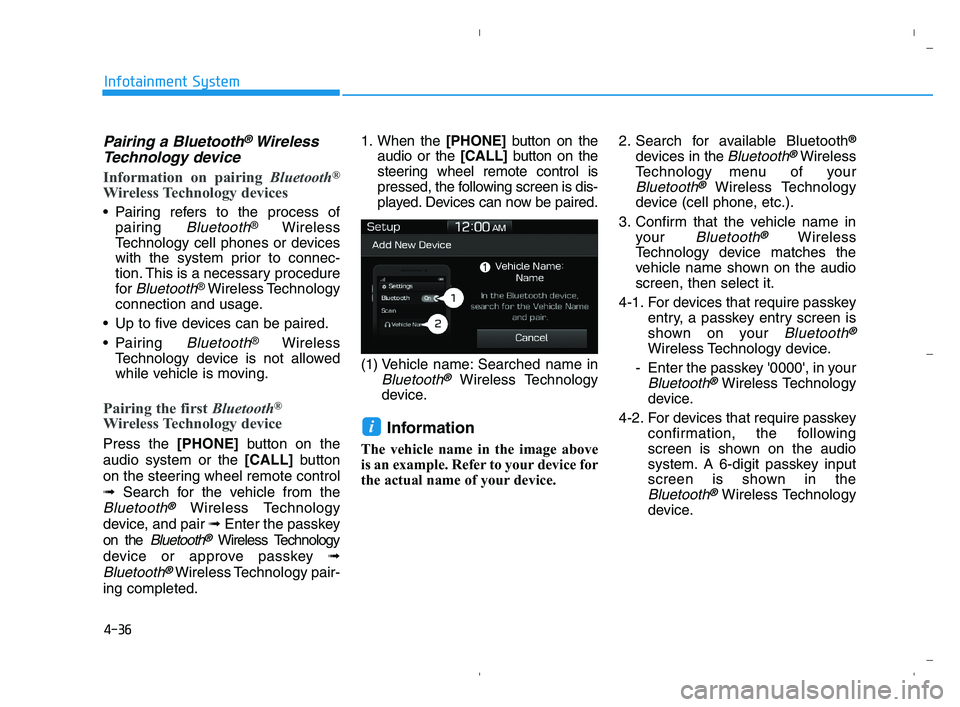
ing completed.1. When the [PHONE]button on the
audio or the [CALL]button on the
steering wheel remote control is
pressed, the following screen is dis-
played. Devices can now be paired.
(1) Vehicle name: Searched name in
Bluetooth®Wireless Technology
device.
Information
The vehicle name in the image above
is an example. Refer to your device for
the actual name of your device.2. Search for available Bluetooth
®
devices in the Bluetooth®Wireless
Technology menu of your
Bluetooth®Wireless Technology
device (cell phone, etc.).
3. Confirm that the vehicle name in
your
Bluetooth®Wireless
Technology device matches the
vehicle name shown on the audio
screen, then select it.
4-1. For devices that require passkey
entry, a passkey entry screen is
shown on your
Bluetooth®
Wireless Technology device.
- Enter the passkey '0000', in your
Bluetooth®Wireless Technology
device.
4-2. For devices that require passkey
confirmation, the following
screen is shown on the audio
system. A 6-digit passkey input
screen is shown in the
Bluetooth®Wireless Technology
device.
i
HCa HMA 4.qxp 5/25/2020 10:59 AM Page 36
Page 244 of 443
![HYUNDAI ACCENT 2022 User Guide 4-37
Infotainment System
4
- After confirming that the 6-digit
passkey on the audio screen
and the
Bluetooth®Wireless
Technology device are identical,
select [OK] in your
Bluetooth®
Wireless Techn](/img/35/41159/w960_41159-243.png "HYUNDAI ACCENT 2022 User Guide 4-37
Infotainment System
4
- After confirming that the 6-digit
passkey on the audio screen
and the
Bluetooth®Wireless
Technology device are identical,
select [OK] in your
Bluetooth®
Wireless Techn")
4-37
Infotainment System
4
- After confirming that the 6-digit
passkey on the audio screen
and the
Bluetooth®Wireless
Technology device are identical,
select [OK] in your
Bluetooth®
Wireless Technology device.
Information
The 6-digit passkey in the image
above is an example. Refer to your
vehicle for the actual passkey.
Pairing a second Bluetooth®
Wireless Technology device
Press the [SETUP]button on the
audio system ➟ Select [Bluetooth] ➟
Select [Connections] ➟Select [Add
New].
- The pairing procedure from this
point is identical to [Pairing the first
Bluetooth device].
Information
•Bluetooth®Wireless Technology
standby mode lasts for three min-
utes. If a device is not paired within
three minutes, pairing is canceled.
Start over from the beginning.
• For most Bluetooth
®Wireless
Technology devices, a connection is
established automatically after pair-
ing. Some devices, however, require
separate confirmation when con-
necting after pairing. Be sure to
check yourBluetooth
®Wireless
Technology device after pairing to
confirm that it has connected.
i
i
HCa HMA 4.qxp 5/25/2020 10:59 AM Page 37
Page 245 of 443
![HYUNDAI ACCENT 2022 User Guide 4-38
Infotainment System
Connecting Bluetooth®Wireless
Technology devices
If there are no connected devices
Press the [PHONE]button on the
audio system or the [CALL]button in
the steering wheel remot](/img/35/41159/w960_41159-244.png "HYUNDAI ACCENT 2022 User Guide 4-38
Infotainment System
Connecting Bluetooth®Wireless
Technology devices
If there are no connected devices
Press the [PHONE]button on the
audio system or the [CALL]button in
the steering wheel remot")
4-38
Infotainment System
Connecting Bluetooth®Wireless
Technology devices
If there are no connected devices
Press the [PHONE]button on the
audio system or the [CALL]button in
the steering wheel remote control ➟
List of paired
Bluetooth®Wireless
Technology devices ➟Select the
desired
Bluetooth®Wireless
Technology devices from the list ➟
Connect
Bluetooth®Wireless
Technology.
If there are connected devices
Press the [PHONE]button on the
audio system ➟Select [Settings] ➟
Select [Connections] ➟Select
Bluetooth®Wireless Technology
device to connect ➟Select [Connect]
➟Connect
Bluetooth®Wireless
Technology.
Information
• Only one Bluetooth®Wireless
Technology device can be connected
at a time.
• When a Bluetooth
®Wireless
Technology device is connected,
other devices cannot be paired.
Accepting/rejecting phone calls
Receiving phone calls with
Bluetooth®Wireless Technology con-
nected.
(1) Caller name: If the caller number
is in your contacts, the correspon-
ding name is displayed.
(2) Incoming phone number: Incoming
phone number is displayed.
(3) Accept: Accept call.
(4) Reject: Reject call.
i
HCa HMA 4.qxp 5/25/2020 10:59 AM Page 38
Page 246 of 443
4-39
Information
• When the incoming call screen is
displayed, audio mode and the set-
tings screen cannot be shown. Only
call volume control is supported.
• Some Bluetooth
®Wireless Technology
devices may not support the call
reject function.
• Some Bluetooth
®Wireless Technology
devices may not support the phone
number display function.
Operation during calls
Incoming call with Bluetooth®Wireless
Technology connected ➟Select
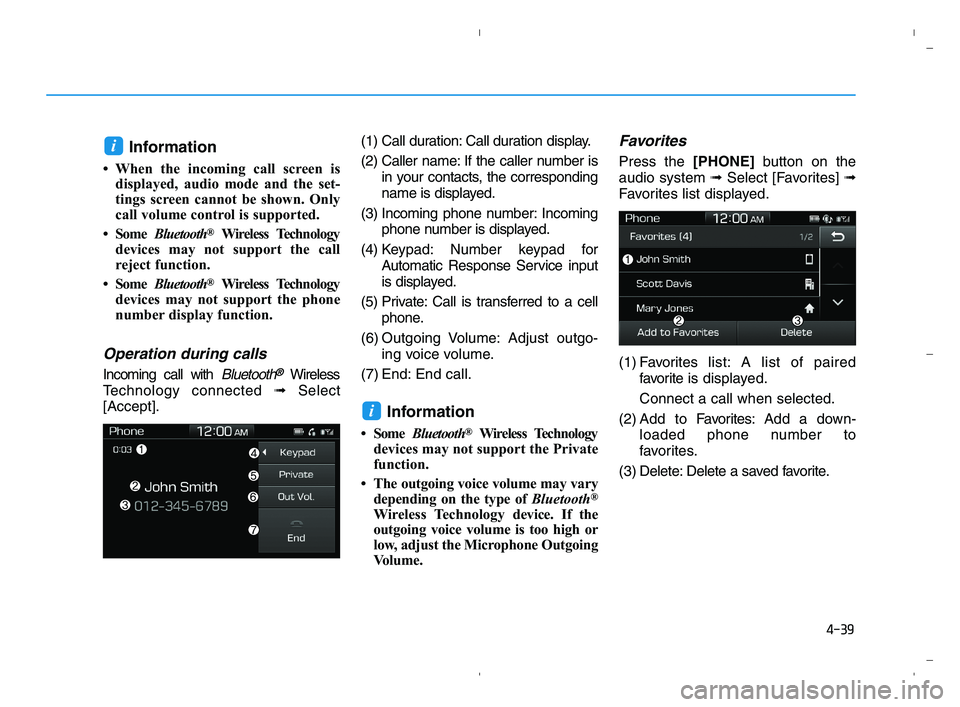
[Accept].(1) Call duration: Call duration display.
(2) Caller name: If the caller number is
in your contacts, the corresponding
name is displayed.
(3) Incoming phone number: Incoming
phone number is displayed.
(4) Keypad: Number keypad for
Automatic Response Service input
is displayed.
(5) Private: Call is transferred to a cell
phone.
(6) Outgoing Volume: Adjust outgo-
ing voice volume.
(7) End: End call.
Information
• Some Bluetooth®Wireless Technology
devices may not support the Private
function.
• The outgoing voice volume may vary
depending on the type of Bluetooth
®
Wireless Technologydevice. If the
outgoing voice volume is too high or
low, adjust the Microphone Outgoing
Volume.
Favorites
Press the [PHONE]button on the
audio system ➟Select [Favorites] ➟
Favorites list displayed.
(1) Favoriteslist: A list of paired
favorite is displayed.
Connect a call when selected.
(2) Add to Favorites:Add a down-
loaded phone number to
favorites.
(3) Delete: Delete a saved favorite.
i
i
HCa HMA 4.qxp 5/25/2020 10:59 AM Page 39
Page 247 of 443
4-40
Infotainment System
Information
• Up to 20 favorites can be saved for
each connected Bluetooth®Wireless
Technology device.
• Favorites can be accessed when the
Bluetooth
®Wireless Technology
device they were paired from is con-
nected.
• The audio system does not down-
load favorites from Bluetooth
®
Wireless Technology devices.
Favorites must be newly saved
before use.
• To add to favorites, contacts must be
downloaded first.
• Saved favorites are not updated
even if the contacts of the connected
Bluetooth
®Wireless Technology
device are changed. In this case,
favorites need to be deleted and
added again.
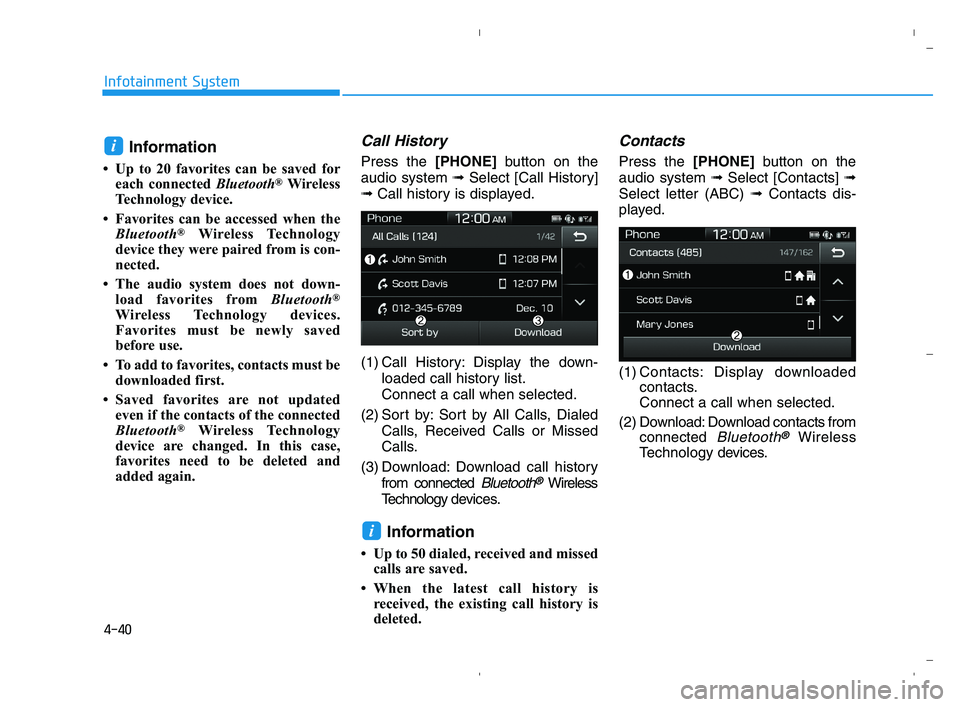
Call History
Press the [PHONE]button on the
audio system ➟Select [Call History]
➟Call history is displayed.
(1) Call History: Display the down-
loaded call history list.
Connect a call when selected.
(2) Sort by: Sort by All Calls, Dialed
Calls, Received Calls or Missed
Calls.
(3) Download: Download call history
from connected
Bluetooth®Wireless
Technology devices.
Information
• Up to 50 dialed, received and missed
calls are saved.
• When the latest call history is
received, the existing call history is
deleted.
Contacts
Press the [PHONE]button on the
audio system ➟Select [Contacts] ➟
Select letter (ABC) ➟Contacts dis-
played.
(1) Contacts: Display downloaded
contacts.
Connect a call when selected.
(2) Download: Download contacts from
connected
Bluetooth®Wireless
Technology devices.
i
i
HCa HMA 4.qxp 5/25/2020 10:59 AM Page 40