ECO mode HYUNDAI ACCENT 2023 Owner's Manual
[x] Cancel search | Manufacturer: HYUNDAI, Model Year: 2023, Model line: ACCENT, Model: HYUNDAI ACCENT 2023Pages: 443, PDF Size: 42.78 MB
Page 167 of 443
3-89
Convenient features of your vehicle
3
Onetouch turn signal function
To activate the One Touch Turn
Signal function, push the turn signal
lever up or down to position (B) and
then release it.
The lane change signals will blink 3,
5 or 7 times.
You can activate or deactivate the
One Touch Turn Signal function or
choose the number of blinks (3, 5, or
7) from the User Settings mode
(Light) on the LCD display.
For more information, refer to the
"LCD Display" section in this
chapter.
Battery saver function
The purpose of this feature is to pre-
vent the battery from being dis-
charged. The system automatically
turns off the parking lamp when the
driver turns the vehicle off and opens
the driver-side door.
With this feature, the parking lamps
will turn off automatically if the driver
parks on the side of road at night.If necessary, to keep the lamps on
when the vehicle is turned off, perform
the following:
1) Open the driver-side door.
2) Turn the parking lamps OFF and
ON again using the light switch on
the steering column.
Headlamp delay function
(if equipped)
If the key is removed from the ignition
switch or placed in the ACC position
or the LOCK/OFF position with the
headlamps ON, the headlamps
(and/or parking lamps) remain on for
about 5 minutes. However, if the dri-
ver’s door is opened and closed, the
headlights are turned off after 15
seconds. Also, with the engine off if
the driver's door is opened and
closed, the headlamps (and/or park-
ing lamps) are turned off after 15
seconds.
The headlamps (and/or parking
lamps) can be turned off by pressing
the lock button on the remote key or
smart key twice or turning the light
switch to the OFF or AUTO position.You can activate or deactivate the
Headlamp Delay function from the
User Settings Mode (Light) on the
LCD display.
For more information, refer to the
"LCD Display" section in this
chapter.
If the driver gets out of the vehicle
through other doors (except dri-
ver's door), the battery saver func-
tion does not operate and the
headlamp delay function does not
turn off automatically. Therefore, It
causes the battery to be dis-
charged. In this case, make sure
to turn off the lamp before getting
out of the vehicle.
NOTICE
HCa HMA 3b(85~).qxp 5/25/2020 10:44 AM Page 89
Page 183 of 443
3-105
Convenient features of your vehicle
3
Automatic Heating and Air
Conditioning
The Automatic Climate Control
System is controlled by setting the
desired temperature.
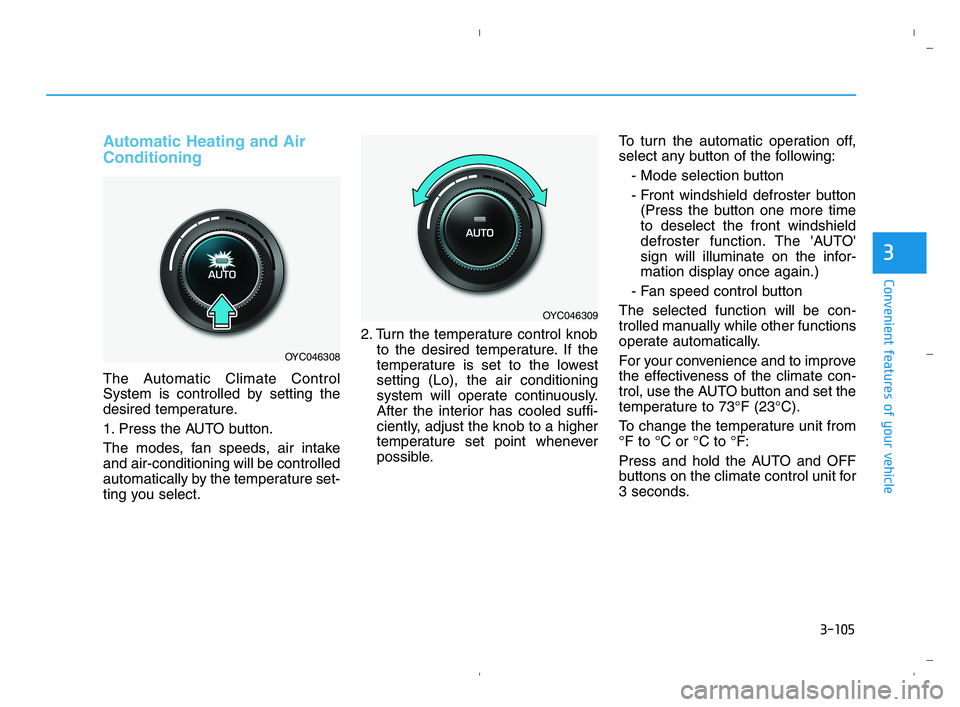
1. Press the AUTO button.
The modes, fan speeds, air intake
and air-conditioning will be controlled
automatically by the temperature set-
ting you select.2. Turn the temperature control knob
to the desired temperature. If the
temperature is set to the lowest
setting (Lo), the air conditioning
system will operate continuously.
After the interior has cooled suffi-
ciently, adjust the knob to a higher
temperature set point whenever
possible.To turn the automatic operation off,
select any button of the following:
- Mode selection button
- Front windshield defroster button
(Press the button one more time
to deselect the front windshield
defroster function. The 'AUTO'
sign will illuminate on the infor-
mation display once again.)
- Fan speed control button
The selected function will be con-
trolled manually while other functions
operate automatically.
For your convenience and to improve
the effectiveness of the climate con-
trol, use the AUTO button and set the
temperature to 73°F (23°C).
To change the temperature unit from
°F to °C or °C to °F:
Press and hold the AUTO and OFF
buttons on the climate control unit for
3 seconds.
OYC046308
OYC046309
HCa HMA 3b(85~).qxp 5/25/2020 10:46 AM Page 105
Page 193 of 443
3-115
Convenient features of your vehicle
3
For maximum defrosting, set the
temperature control to the extreme
right/hot position and the fan speed
control to the highest speed.
If warm air to the floor is desired
while defrosting or defogging, set the
mode to the floor-defrost position.
Before driving, clear all snow and
ice from the windshield, rear win-
dow, side view mirrors, and all side
windows.
Clear all snow and ice from the
hood and air inlet in the cowl grill to
improve heater and defroster effi-
ciency and to reduce the probability
of fogging up the inside of the wind-
shield.
If the engine temperature is still
cold after starting, then a brief
engine warm up period may be
required for the vented air flow to
become warm or hot.Manual Climate Control System
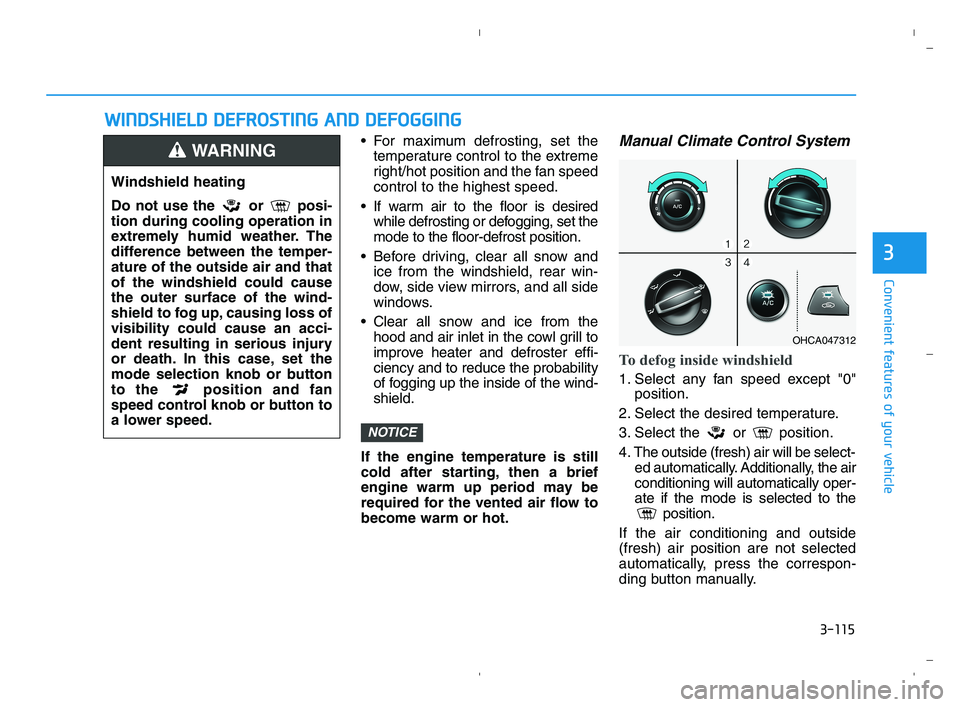
To defog inside windshield
1. Select any fan speed except "0"
position.
2. Select the desired temperature.
3. Select the or position.
4. The outside (fresh) air will be select-
ed automatically. Additionally, the air
conditioning will automatically oper-
ate if the mode is selected to the
position.
If the air conditioning and outside
(fresh) air position are not selected
automatically, press the correspon-
ding button manually.
NOTICE
W WI
IN
ND
DS
SH
HI
IE
EL
LD
D
D
DE
EF
FR
RO
OS
ST
TI
IN
NG
G
A
AN
ND
D
D
DE
EF
FO
OG
GG
GI
IN
NG
G
Windshield heating
Do not use the or posi-
tion during cooling operation in
extremely humid weather. The
difference between the temper-
ature of the outside air and that
of the windshield could cause
the outer surface of the wind-
shield to fog up, causing loss of
visibility could cause an acci-
dent resulting in serious injury
or death. In this case, set the
mode selection knob or button
to the position and fan
speed control knob or button to
a lower speed.
WARNING
OHCA047312
HCa HMA 3b(85~).qxp 5/25/2020 10:47 AM Page 115
Page 196 of 443
3-118
Convenient features of your vehicle
Auto Defogging System
(Only for Automatic Climate
Control System, if equipped)
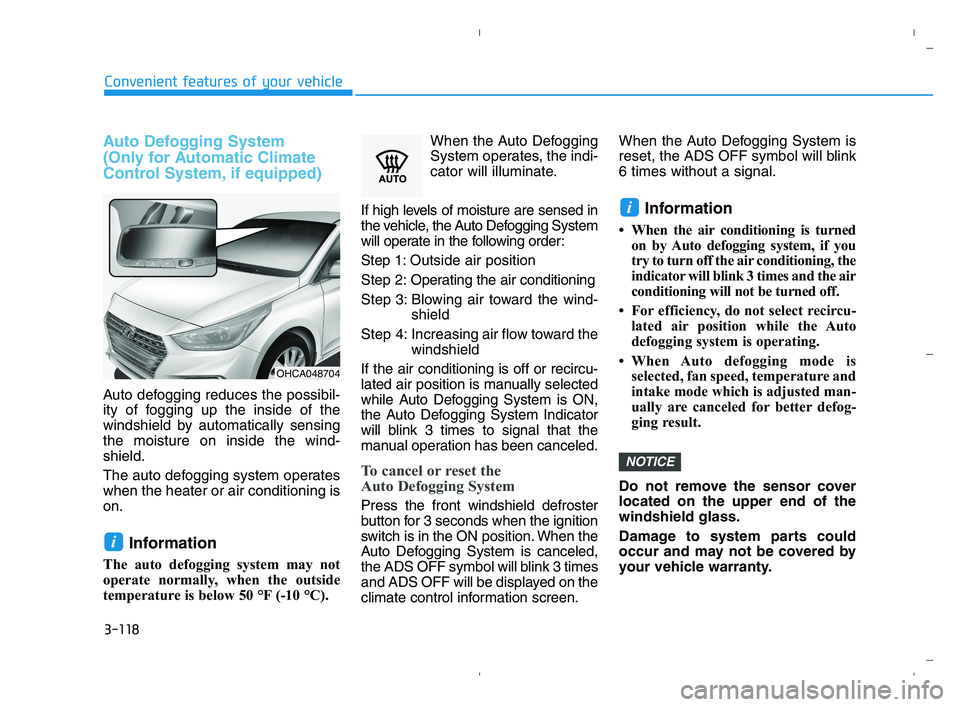
Auto defogging reduces the possibil-
ity of fogging up the inside of the
windshield by automatically sensing
the moisture on inside the wind-
shield.
The auto defogging system operates
when the heater or air conditioning is
on.
Information
The auto defogging system may not
operate normally, when the outside
temperature is below 50 °F (-10 °C).When the Auto Defogging
System operates, the indi-
cator will illuminate.
If high levels of moisture are sensed in
the vehicle, the Auto Defogging System
will operate in the following order:
Step 1: Outside air position
Step 2:Operating the air conditioning
Step 3: Blowing air toward the wind-
shield
Step 4: Increasing air flow toward the
windshield
If the air conditioning is off or recircu-
lated air position is manually selected
while Auto Defogging System is ON,
the Auto Defogging System Indicator
will blink 3 times to signal that the
manual operation has been canceled.
To cancel or reset the
Auto Defogging System
Press the front windshield defroster
button for 3 seconds when the ignition
switch is in the ON position. When the
Auto Defogging System is canceled,
the ADS OFF symbol will blink 3 times
and ADS OFF will be displayed on the
climate control information screen.When the Auto Defogging System is
reset, the ADS OFF symbol will blink
6 times without a signal.
Information
• When the air conditioning is turned
on by Auto defogging system, if you
try to turn off the air conditioning, the
indicator will blink 3 times and the air
conditioning will not be turned off.
• For efficiency, do not select recircu-
lated air position while the Auto
defogging system is operating.
• When Auto defogging mode is
selected, fan speed, temperature and
intake mode which is adjusted man-
ually are canceled for better defog-
ging result.
Do not remove the sensor cover
located on the upper end of the
windshield glass.
Damage to system parts could
occur and may not be covered by
your vehicle warranty.
NOTICE
i
i
OHCA048704
HCa HMA 3b(85~).qxp 5/25/2020 10:47 AM Page 118
Page 210 of 443
4-3
Infotainment System
4
Remove the antenna by rotating
it in a counter-clockwise direc-
tion, before entering a place with
a low floor height. If not, the
antenna may be damaged.
Securely install the antenna in
the upright position. This is to
guarantee proper signal recep-
tion. However, you may fold and
remove the antenna, before
parking the vehicle or loading
the luggage on the roof rack.
Do not load the luggage near the
antenna. This is to guarantee
proper signal reception.
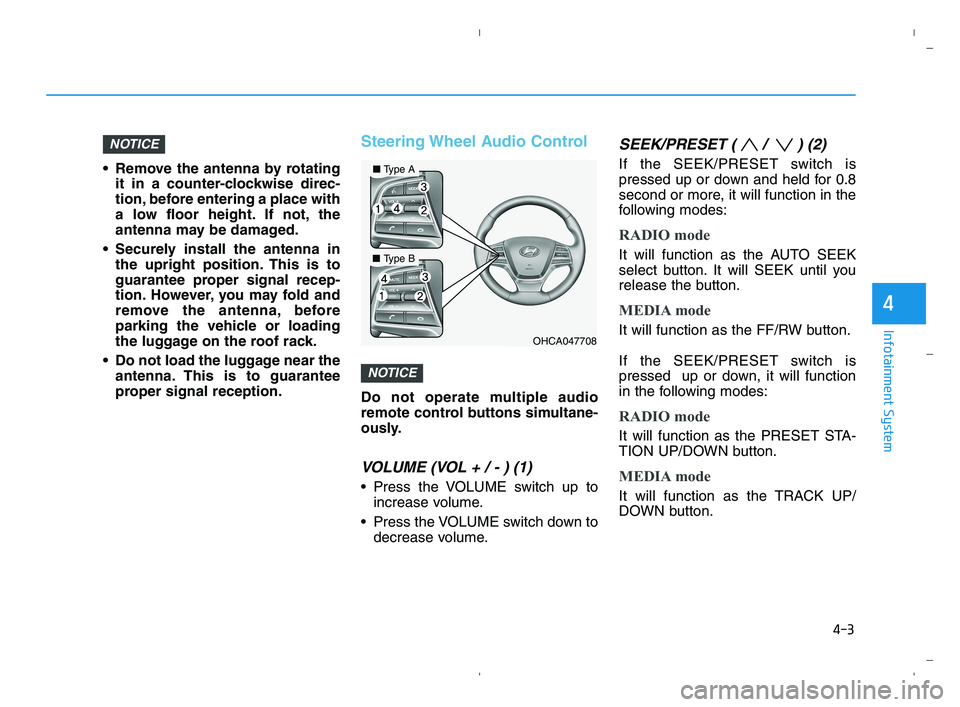
Steering Wheel Audio Control
Do not operate multiple audio
remote control buttons simultane-
ously.
VOLUME (VOL + / - ) (1)
Press the VOLUME switch up to
increase volume.
Press the VOLUME switch down to
decrease volume.
SEEK/PRESET ( / ) (2)
If the SEEK/PRESET switch is
pressed up or down and held for 0.8
second or more, it will function in the
following modes:
RADIO mode
It will function as the AUTO SEEK
select button. It will SEEK until you
release the button.
MEDIA mode
It will function as the FF/RW button.
If the SEEK/PRESET switch is
pressed up or down, it will function
in the following modes:
RADIO mode
It will function as the PRESET STA-
TION UP/DOWN button.
MEDIA mode
It will function as the TRACK UP/
DOWN button.
NOTICE
NOTICE
OHCA047708
■Type A
■Type B
HCa HMA 4.qxp 5/25/2020 10:57 AM Page 3
Page 222 of 443
4-15
Infotainment System
4
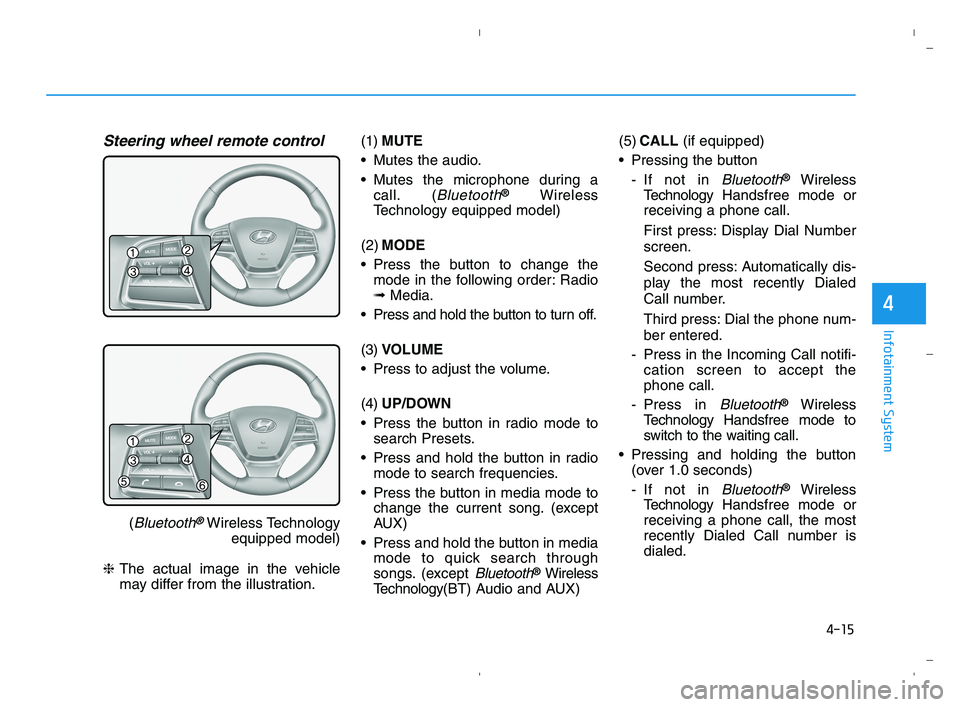
Steering wheel remote control
(Bluetooth®Wireless Technology
equipped model)
❈The actual image in the vehicle
may differ from the illustration.(1)MUTE
Mutes the audio.
Mutes the microphone during a
call. (
Bluetooth®Wireless
Technology equipped model)
(2)MODE
Press the button to change the
mode in the following order: Radio
➟Media.
Press and hold the button to turn off.
(3)VOLUME
Press to adjust the volume.
(4)UP/DOWN
Press the button in radio mode to
search Presets.
Press and hold the button in radio
mode to search frequencies.
Press the button in media mode to
change the current song. (except
AUX)
Press and hold the button in media
mode to quick search through
songs. (except
Bluetooth®Wireless
Technology(BT) Audio and AUX)(5)CALL (if equipped)
Pressing the button
- If not in
Bluetooth®Wireless
TechnologyHandsfree mode or
receiving a phone call.
First press: Display Dial Number
screen.
Second press: Automatically dis-
play the most recently Dialed
Call number.
Third press: Dial the phone num-
ber entered.
- Press in the Incoming Call notifi-
cation screen to accept the
phone call.
- Press in
Bluetooth®Wireless
TechnologyHandsfree mode to
switch to the waiting call.
Pressing and holding the button
(over 1.0 seconds)
- If not in
Bluetooth®Wireless
TechnologyHandsfree mode or
receiving a phone call, the most
recently Dialed Call number is
dialed.
HCa HMA 4.qxp 5/25/2020 10:58 AM Page 15
Page 228 of 443
4-21
Infotainment System
4
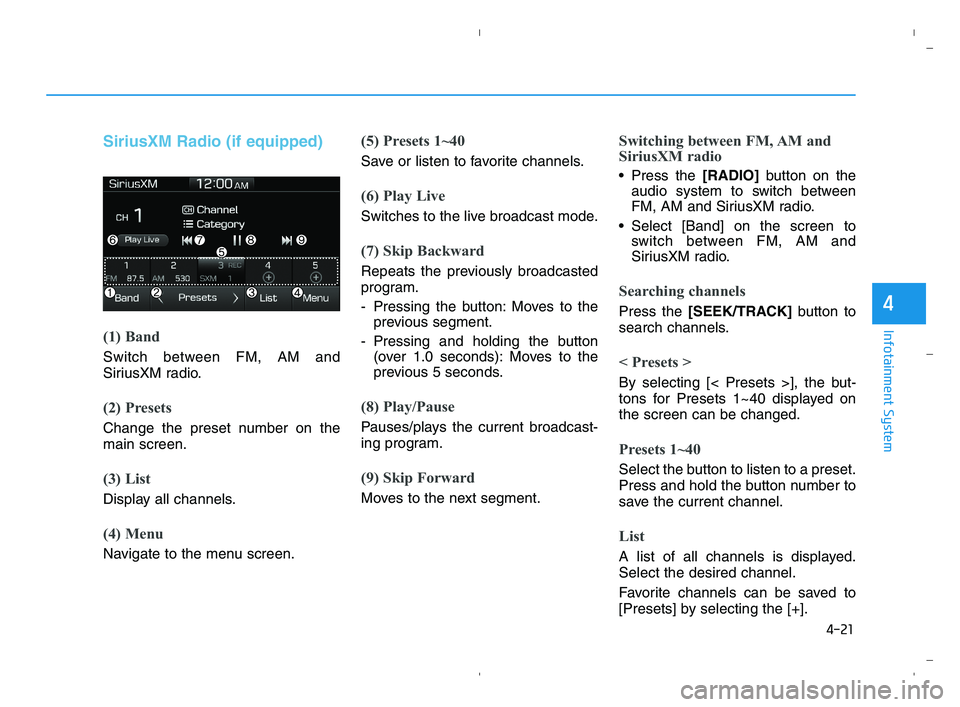
SiriusXM Radio (if equipped)
(1) Band
Switch between FM, AM and
SiriusXM radio.
(2) Presets
Change the preset number on the
main screen.
(3) List
Display all channels.
(4) Menu
Navigate to the menu screen.
(5) Presets 1~40
Save or listen to favorite channels.
(6) Play Live
Switches to the live broadcast mode.
(7) Skip Backward
Repeats the previously broadcasted
program.
- Pressing the button: Moves to the
previous segment.
- Pressing and holding the button
(over 1.0 seconds): Moves to the
previous 5 seconds.
(8) Play/Pause
Pauses/plays the current broadcast-
ing program.
(9) Skip Forward
Moves to the next segment.
Switching between FM, AM and
SiriusXM radio
Press the [RADIO]button on the
audio system to switch between
FM, AM and SiriusXM radio.
Select [Band] on the screen to
switch between FM, AM and
SiriusXM radio.
Searching channels
Press the [SEEK/TRACK]button to
search channels.
< Presets >
By selecting [< Presets >], the but-
tons for Presets 1~40 displayed on
the screen can be changed.
Presets 1~40
Select the button to listen to a preset.
Press and hold the button number to
save the current channel.
List
A list of all channels is displayed.
Select the desired channel.
Favorite channels can be saved to
[Presets] by selecting the [+].
HCa HMA 4.qxp 5/25/2020 10:58 AM Page 21
Page 234 of 443
![HYUNDAI ACCENT 2023 Owners Manual 4-27
Infotainment System
4
(4) Save: Save the selected file(s).
- Select the files you want to save,
and select [Save]. This saves the
selected files to My Music.
- If phone calls are received or
made](/img/35/56085/w960_56085-233.png "HYUNDAI ACCENT 2023 Owners Manual 4-27
Infotainment System
4
(4) Save: Save the selected file(s).
- Select the files you want to save,
and select [Save]. This saves the
selected files to My Music.
- If phone calls are received or
made")
4-27
Infotainment System
4
(4) Save: Save the selected file(s).
- Select the files you want to save,
and select [Save]. This saves the
selected files to My Music.
- If phone calls are received or
made while saving, saving will be
canceled.
- Up to 6,000 files can be saved.
- The currently playing file on the
USB device cannot be changed
while saving.
- My Music cannot be used while
saving.
- Up to 700 MB can be saved.
Information: Detailed information
on the currently playing song is dis-
played.
Sound Settings: Audio sound set-
tings can be changed.Information
- Using the iPod®Devices
• To use the audio system’s iPod
®con-
trol function, use the dedicated
cable provided with your iPod
®.
• Connecting the iPod
®to the vehicle
during play may result in a loud
noise that lasts about one to two sec-
onds. Connect the iPod
®to the vehi-
cle after stopping or pausing play.
• Connect the iPod
®with the vehicle in
the ACC ON state to begin charging.
• When connecting the iPod
®cable,
be sure to fully push the cable into
the port.
• When EQ effects are enabled simul-
taneously on external devices, such
as iPod
®s and the audio system, the
EQ effects may overlap, causing
sound quality deterioration or dis-
tortion. Deactivate the EQ function
for all external devices, if possible.
• Noise may occur when your iPod
®
or the AUX port is connected.
Disconnect and store separately
when not in use.
(Continued)(Continued)
• There may be noise if the audio sys-
tem is used with an iPod
®or AUX
external device connected to the
power jack. In these cases, discon-
nect the iPod
®or external device
from the power jack.
• Play may be interrupted, or device
malfunctions may occur depending
on the characteristics of your
iPod
®/iPhone®/iPad®.
• Play may fail if your iPhone
®is con-
nected through both Bluetooth®
Wireless Technology and USB. In
this case, select Dock connector or
Bluetooth
®Wireless Technology on
your iPhone®to change the sound
output settings.
• If your software version does not
support the communication proto-
col or your iPod
®is not recognized
due to device failure, anomalies or
defects, iPod
®mode cannot be used.
• iPod
®nano (5th generation) devices
may not be recognized if the battery
is low. Charge sufficiently before use.
(Continued)
i
HCa HMA 4.qxp 5/25/2020 10:59 AM Page 27
Page 235 of 443
4-28
Infotainment System
(Continued)
• The search and song play order in
the iPod
®device may be different
from the search order in the audio
system.
• If the iPod
®has failed due to an
internal defect, please reset the
iPod
®(consult your iPod®manual).
• Depending on the software version,
the iPod
®may fail to sync with the
system. If the media is removed or
disconnected before recognition, the
previous mode may not be restored
(iPad
®cannot be charged).
• Cables other than the 1-meter cable
provided with iPod
®/iPhone®/iPad®
products may not be recognized.
• When other music apps are used on
your iPod
®, the system sync func-
tion may fail due to malfunction of
the iPod
®application.
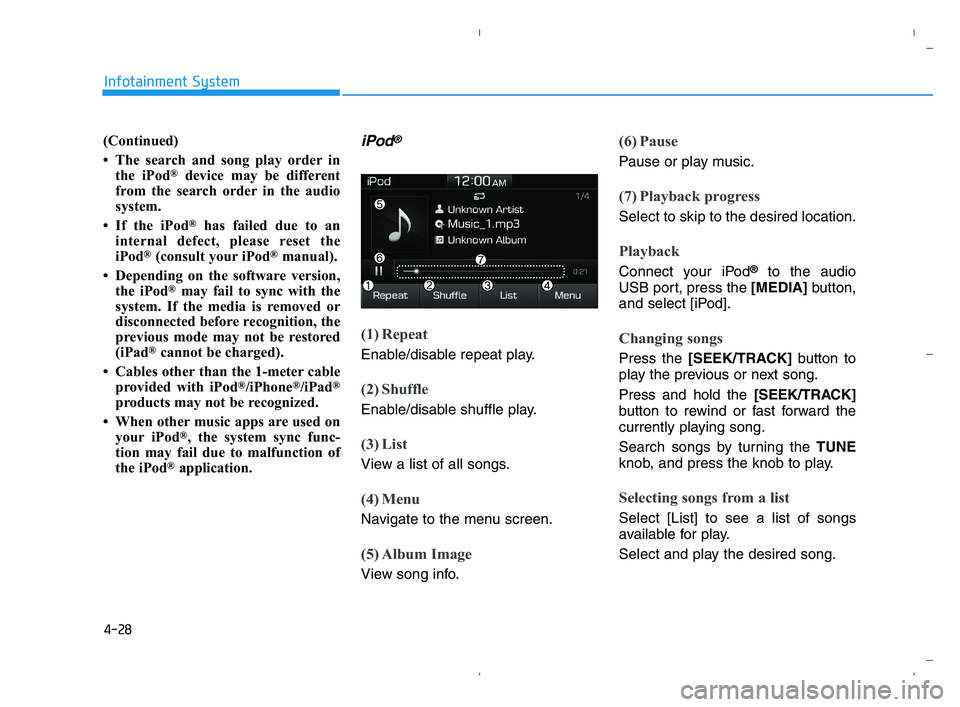
iPod®
(1) Repeat
Enable/disable repeat play.
(2) Shuffle
Enable/disable shuffle play.
(3) List
View a list of all songs.
(4) Menu
Navigate to the menu screen.
(5) Album Image
View song info.
(6) Pause
Pause or play music.
(7) Playback progress
Select to skip to the desired location.
Playback
Connect your iPod®to the audio
USB port, press the [MEDIA]button,
and select [iPod].
Changing songs
Press the [SEEK/TRACK]button to
play the previous or next song.
Press and hold the [SEEK/TRACK]
button to rewind or fast forward the
currently playing song.
Search songs by turning the TUNE
knob, and press the knob to play.
Selecting songs from a list
Select [List] to see a list of songs
available for play.
Select and play the desired song.
HCa HMA 4.qxp 5/25/2020 10:59 AM Page 28
Page 244 of 443
![HYUNDAI ACCENT 2023 Owners Manual 4-37
Infotainment System
4
- After confirming that the 6-digit
passkey on the audio screen
and the
Bluetooth®Wireless
Technology device are identical,
select [OK] in your
Bluetooth®
Wireless Techn](/img/35/56085/w960_56085-243.png "HYUNDAI ACCENT 2023 Owners Manual 4-37
Infotainment System
4
- After confirming that the 6-digit
passkey on the audio screen
and the
Bluetooth®Wireless
Technology device are identical,
select [OK] in your
Bluetooth®
Wireless Techn")
4-37
Infotainment System
4
- After confirming that the 6-digit
passkey on the audio screen
and the
Bluetooth®Wireless
Technology device are identical,
select [OK] in your
Bluetooth®
Wireless Technology device.
Information
The 6-digit passkey in the image
above is an example. Refer to your
vehicle for the actual passkey.
Pairing a second Bluetooth®
Wireless Technology device
Press the [SETUP]button on the
audio system ➟ Select [Bluetooth] ➟
Select [Connections] ➟Select [Add
New].
- The pairing procedure from this
point is identical to [Pairing the first
Bluetooth device].
Information
•Bluetooth®Wireless Technology
standby mode lasts for three min-
utes. If a device is not paired within
three minutes, pairing is canceled.
Start over from the beginning.
• For most Bluetooth
®Wireless
Technology devices, a connection is
established automatically after pair-
ing. Some devices, however, require
separate confirmation when con-
necting after pairing. Be sure to
check yourBluetooth
®Wireless
Technology device after pairing to
confirm that it has connected.
i
i
HCa HMA 4.qxp 5/25/2020 10:59 AM Page 37