knob Hyundai Atos 2002 Owner's Guide
[x] Cancel search | Manufacturer: HYUNDAI, Model Year: 2002, Model line: Atos, Model: Hyundai Atos 2002Pages: 249, PDF Size: 3.11 MB
Page 167 of 249
FEATURES OF YOUR HYUNDAI
1-30
B570A02A
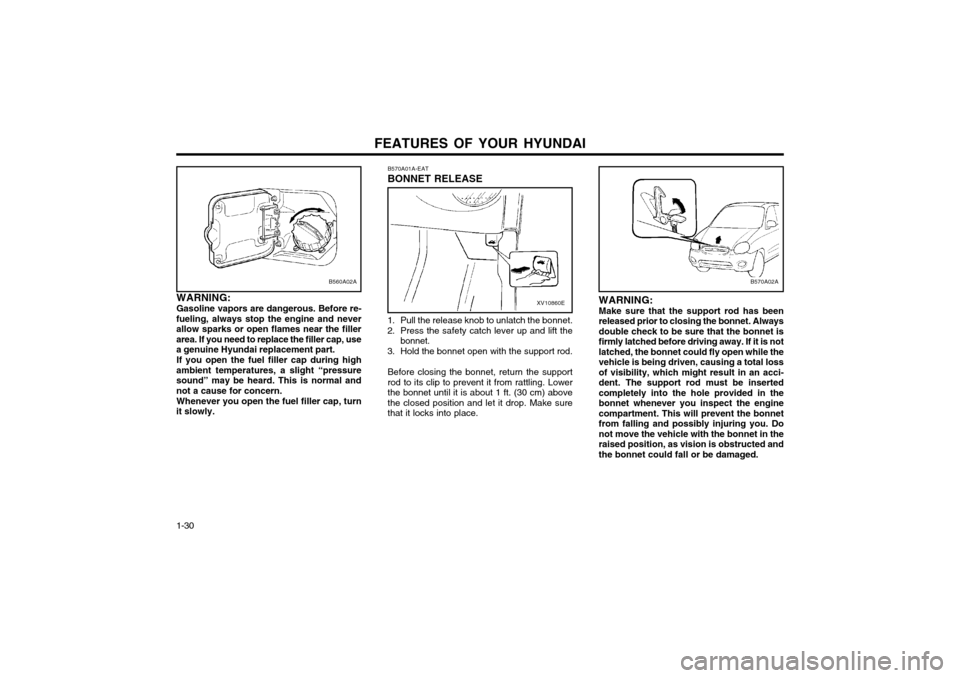
WARNING: Make sure that the support rod has been
released prior to closing the bonnet. Alwaysdouble check to be sure that the bonnet isfirmly latched before driving away. If it is notlatched, the bonnet could fly open while thevehicle is being driven, causing a total lossof visibility, which might result in an acci-dent. The support rod must be insertedcompletely into the hole provided in thebonnet whenever you inspect the enginecompartment. This will prevent the bonnetfrom falling and possibly injuring you. Donot move the vehicle with the bonnet in theraised position, as vision is obstructed andthe bonnet could fall or be damaged.
B570A01A-EAT BONNET RELEASE
B560A02A
WARNING: Gasoline vapors are dangerous. Before re-
fueling, always stop the engine and never allow sparks or open flames near the fillerarea. If you need to replace the filler cap, usea genuine Hyundai replacement part.
If you open the fuel filler cap during high
ambient temperatures, a slight “pressuresound” may be heard. This is normal andnot a cause for concern.
Whenever you open the fuel filler cap, turn
it slowly.XV10860E
1. Pull the release knob to unlatch the bonnet.
2. Press the safety catch lever up and lift the bonnet.
3. Hold the bonnet open with the support rod.
Before closing the bonnet, return the support rod to its clip to prevent it from rattling. Lowerthe bonnet until it is about 1 ft. (30 cm) abovethe closed position and let it drop. Make surethat it locks into place.
Page 172 of 249
FEATURES OF YOUR HYUNDAI 1-35
B680A02X-DAG
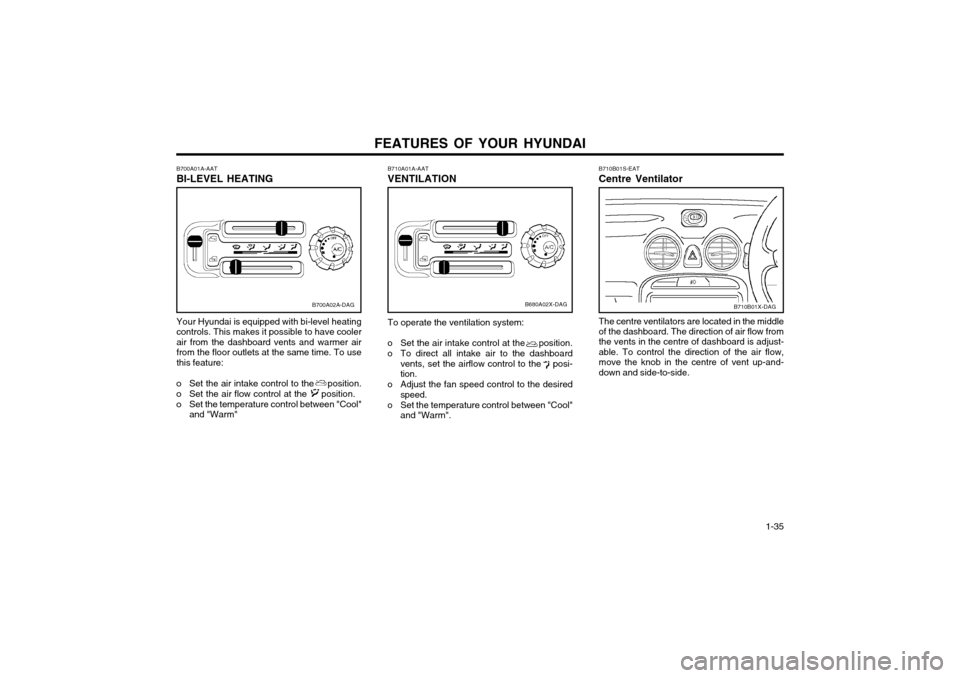
B710A01A-AAT VENTILATION To operate the ventilation system:
o Set the air intake control at the position.
o To direct all intake air to the dashboard vents, set the airflow control to the posi- tion.
o Adjust the fan speed control to the desired speed.
o Set the temperature control between "Cool" and "Warm".
B710B01S-EAT Centre Ventilator
B710B01X-DAG
The centre ventilators are located in the middle of the dashboard. The direction of air flow from the vents in the centre of dashboard is adjust- able. To control the direction of the air flow,move the knob in the centre of vent up-and-down and side-to-side.B700A02A-DAG
B700A01A-AAT BI-LEVEL HEATING Your Hyundai is equipped with bi-level heating controls. This makes it possible to have cooler
air from the dashboard vents and warmer airfrom the floor outlets at the same time. To usethis feature:
o Set the air intake control to the position.
o Set the air flow control at the position.
o Set the temperature control between "Cool" and "Warm"
Page 173 of 249
FEATURES OF YOUR HYUNDAI
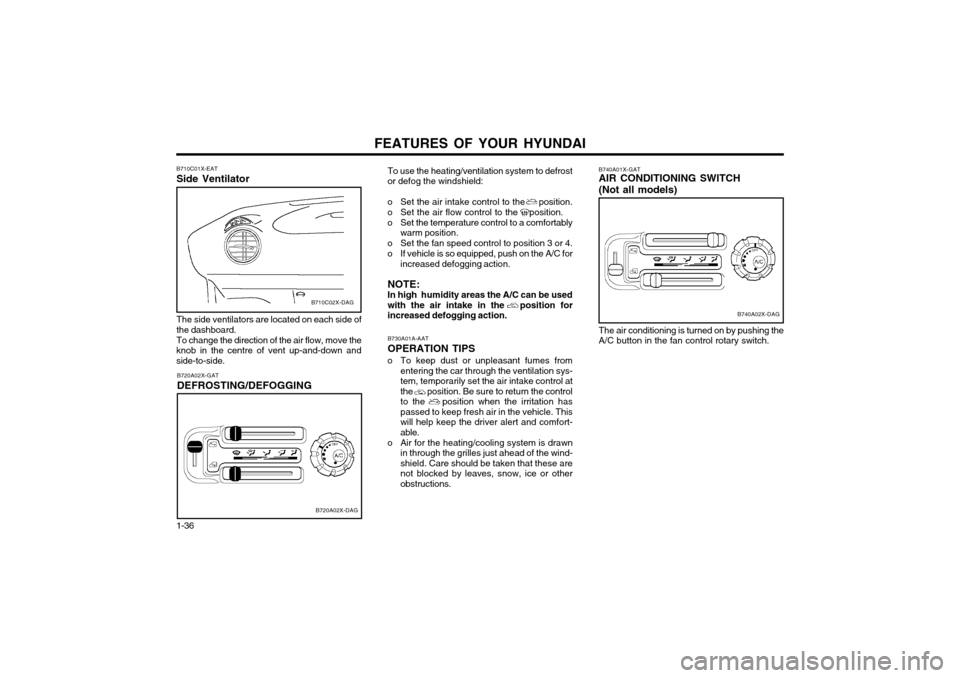
1-36 To use the heating/ventilation system to defrost or defog the windshield:
o Set the air intake control to the position.
o Set the air flow control to the position.
o Set the temperature control to a comfortably warm position.
o Set the fan speed control to position 3 or 4.
o If vehicle is so equipped, push on the A/C for increased defogging action.
NOTE: In high humidity areas the A/C can be usedwith the air intake in the position forincreased defogging action.
B730A01A-AAT OPERATION TIPS
o To keep dust or unpleasant fumes from entering the car through the ventilation sys-
tem, temporarily set the air intake control atthe position. Be sure to return the controlto the position when the irritation haspassed to keep fresh air in the vehicle. Thiswill help keep the driver alert and comfort-able.
o Air for the heating/cooling system is drawn in through the grilles just ahead of the wind-shield. Care should be taken that these arenot blocked by leaves, snow, ice or otherobstructions.
B740A01X-GAT AIR CONDITIONING SWITCH (Not all models)
B740A02X-DAG
The air conditioning is turned on by pushing the A/C button in the fan control rotary switch.
B710C02X-DAG
B710C01X-EAT Side Ventilator
B720A02X-DAG
B720A02X-GAT DEFROSTING/DEFOGGING
The side ventilators are located on each side of the dashboard.To change the direction of the air flow, move the
knob in the centre of vent up-and-down and side-to-side.
Page 177 of 249
FEATURES OF YOUR HYUNDAI
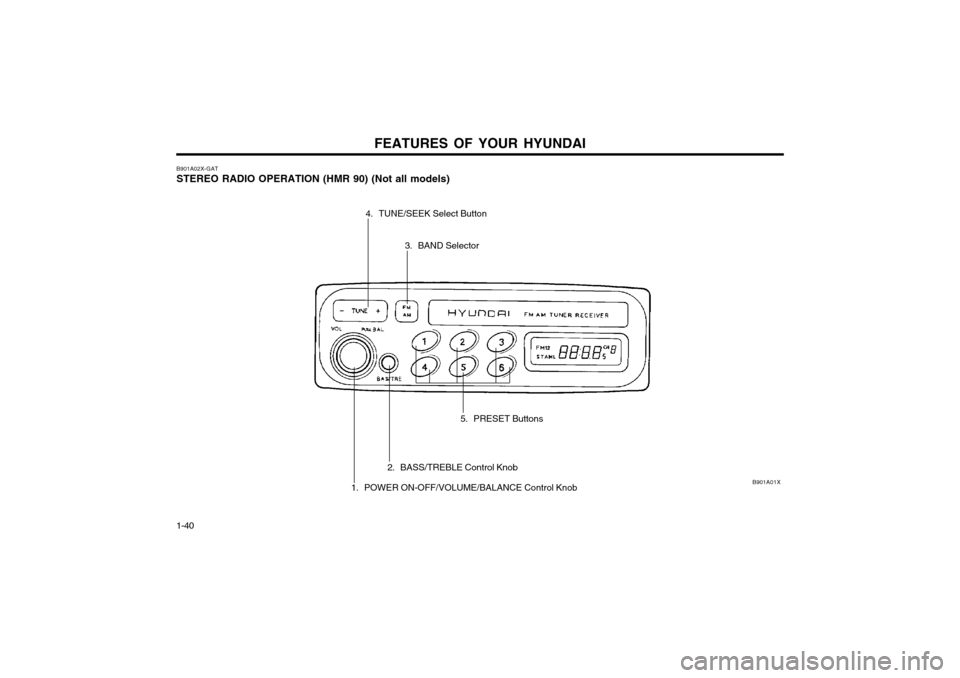
1-40 B901A02X-GAT STEREO RADIO OPERATION (HMR 90) (Not all models)
B901A01X
5. PRESET Buttons
3. BAND Selector
4. TUNE/SEEK Select Button
2. BASS/TREBLE Control Knob
1. POWER ON-OFF/VOLUME/BALANCE Control Knob
Page 178 of 249
FEATURES OF YOUR HYUNDAI 1-41
3. BAND Selector Pressing the button changes the AM, FM1
and FM2 bands. The mode selected is dis- played on LCD.
4. TUNE (Manual) Select Button Press the (+) side or (-) side to increase or to
decrease the frequency. With the button held down for 0.5 sec. or more, the stop signal(broadcasting radio wave) is ignored and chan-nel selection continues.
SEEK Operation (Automatic Channel
Selection) Press the TUNE select button 1 sec. or more.
When the (+) side is pressed, the unit willautomatically tune to the next higher frequencyand when the (-) side is pressed, it will automat-ically tune to the next lower frequency.
5. PRESET STATION SELECT Six (6) stations for AM, FM and FM2 respec-
tively can be preset in the electronic memory circuit on this unit.
HOW TO PRESET STATIONS Six AM and twelve FM stations may be pro-
grammed into the memory of the radio. Then, by simply pressing the band select button and/or one of the six station select buttons, you mayrecall any of these stations instantly. To pro-gram the stations, follow these steps:
B901B02X-GAT
1. POWER ON-OFF/VOLUME CON-
TROL KNOB
The radio unit may be operated when the igni-
tion key is in the "ACC" or "ON" position. Rotate the knob clockwise to switch the radio unit on,
and to increase the volume.
The LCD shows the radio frequency in the radio
mode. Turn the knob counterclockwise to re-duce the volume, and to switch the radio unitoff.
BAL (Balance Control) Knob Pull and turn the control knob clockwise to
emphasize right speaker sound (Left speaker sound will be attenuated). When the controlknob is turned counterclockwise, left speakersound will be emphasized (Right speaker sound
will be attenuated). 2. BASS Control Knob Press to pop the knob out and turn to the left or
right for the desired bass tone.
TREBLE Control Knob Further pull-lock position of popped-up knob.
Turn to the left or right for the desired treble tone.
FM
AMo Press band selector to set the band for AM,
FM and FM2.
o Select the desired station to be stored by seek, scan or manual tuning.
o Determine the preset station select button you wish to use to access that station.
o Press the station select button for more than two seconds. A select button indicator will show in the display indicating which selectbutton you have depressed. The frequencydisplay will flash after it has been stored intothe memory. You should then release thebutton, and proceed to program the nextdesired station. A total of 18 stations can beprogrammed by selecting one AM and twoFM stations per button.
o When completed, any preset station may be recalled by selecting AM, FM or FM2 bandand the appropriate station button.
Page 179 of 249
FEATURES OF YOUR HYUNDAI
1-42 B900A01X
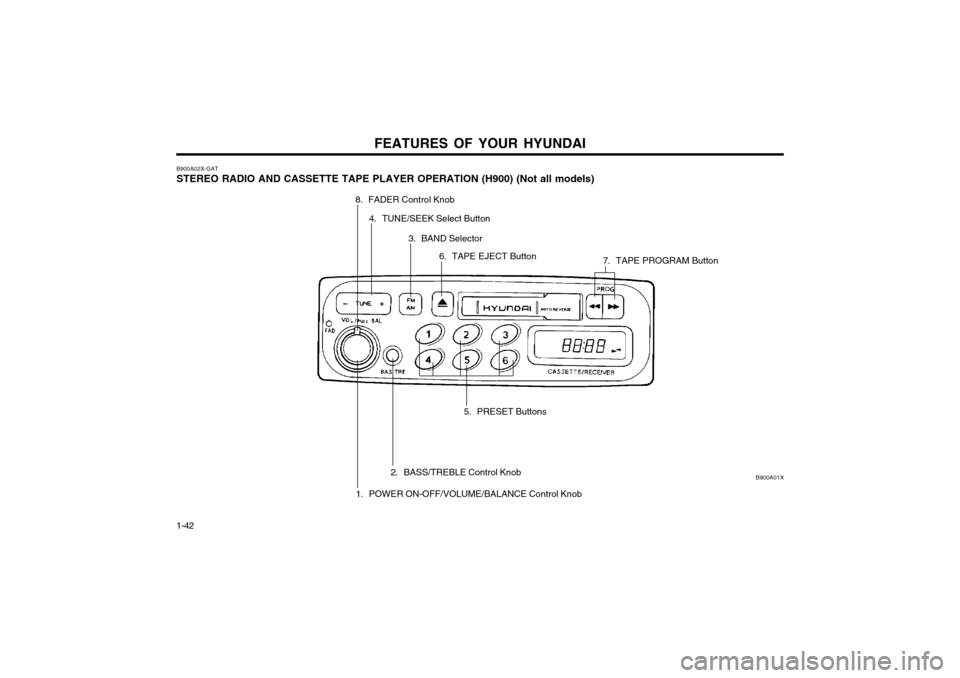
B900A02X-GAT STEREO RADIO AND CASSETTE TAPE PLAYER OPERATION (H900) (Not all models)
1. POWER ON-OFF/VOLUME/BALANCE Control Knob
2. BASS/TREBLE Control Knob 5. PRESET Buttons
8. FADER Control Knob
4. TUNE/SEEK Select Button
3. BAND Selector6. TAPE EJECT Button 7. TAPE PROGRAM Button
Page 180 of 249
FEATURES OF YOUR HYUNDAI 1-43
B900B02X-GAT
1. POWER ON-OFF/VOLUME CON-
TROL KNOB
The radio unit may be operated when the igni-
tion key is in the "ACC" or "ON" position. Rotate the knob clockwise to switch the radio unit on
and to increase the volume.
The LCD shows the radio frequency in the radio
mode, or the tape direction indicator in the tape mode. Turn the knob counterclockwise to re-duce the volume and to switch the radio unit off.
BAL (Balance Control) Knob Pull and turn the control knob clockwise to
emphasize right speaker sound. (Left speaker sound will be attenuated) When the controlknob is turned counterclockwise, left speakersound will be emphasized. (Right speaker sound
will be attenuated) 2. BASS Control Knob Press to pop the knob out and turn to the left or
right for the desired bass tone.
TREBLE Control Knob Further pull-lock position of popped-up knob.
Turn to the left or right for the desired treble tone. 3. BAND Selector Pressing the button changes the AM, FM1
and FM2 bands. The mode selected is dis- played on LCD.
4. TUNE (manual) Select Button Press the (+) side or (-) side to increase or to
decrease the frequency. With the button held down for 0.5 sec. or more, the stop signal(broadcasting radio wave) is ignored and chan-nel selection continues.
SEEK Operation (Automatic Channel
Selection) Press the TUNE select button 1 sec. or more.
When the (+) side is pressed, the unit willautomatically tune to the next higher frequencyand when the (-) side is pressed, it will automat-ically tune to the next lower frequency.
5. PRESET STATION SELECT Button Six (6) stations for AM, FM and FM2 respec-
tively can be preset in the electronic memory circuit on this unit.
HOW TO PRESET STATIONS Six AM and twelve FM stations may be pro-
grammed into the memory of the radio. Then, by simply pressing the band select button and/or one of the six station select buttons, you mayrecall any of these stations instantly. To pro-gram the stations, follow these steps:
FM AMo Press band selector to set the band for AM, FM, and FM2.
o Select the desired station to be stored by seek, scan or manual tuning.
o Determine the preset station select button you wish to use to access that station.
o Press the station select button for more than two seconds. A select button indicator will show in the display indicating which selectbutton you have depressed. The frequencydisplay will flash after it has been stored intothe memory. You should then release thebutton, and proceed to program the nextdesired station. A total of 18 stations can beprogrammed by selecting one AM and oneFM station per button.
o When completed, any preset station may be recalled by selecting AM, FM or FM2 bandand the appropriate station button.
6. TAPE EJECT Button To elect the tape, press the button. 7. TAPE PROGRAM When you press the button whose arrow is in
the same direction as the tape play arrow in the display the tape will advance at high speed.When you press the button whose arrow is inthe opposite direction to the tape play arrow inthe display the tape will rewind at high speed. To stop FF or REW action, press the opposite
button. When you press two buttons simulta-neously you play the reverse side of the tape
Page 181 of 249
FEATURES OF YOUR HYUNDAI
1-44
and an arrow will appear in the display to show tape direction.
8. FAD (Fader Control) Knob Turn the control knob clockwise to emphasize
front speaker sound (Rear speaker sound will be attenuated). When the control knob is turnedcounterclockwise, rear speaker sound will beemphasized (Front speaker sound will be atten-uated).
Page 182 of 249
FEATURES OF YOUR HYUNDAI 1-45
B922A01X
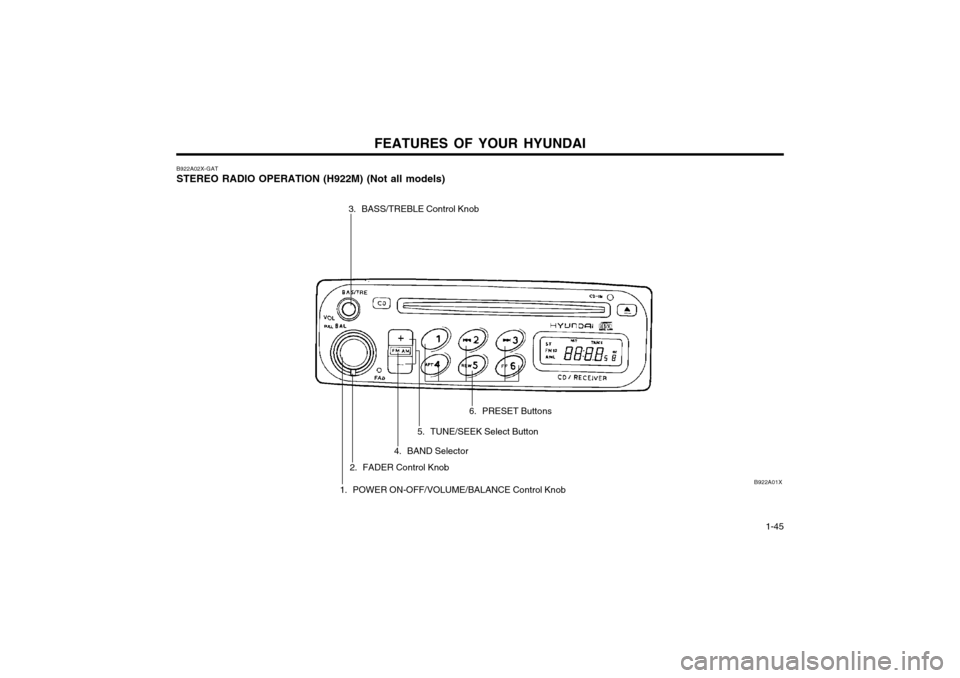
B922A02X-GAT STEREO RADIO OPERATION (H922M) (Not all models)
3. BASS/TREBLE Control Knob
1. POWER ON-OFF/VOLUME/BALANCE Control Knob
2. FADER Control Knob 6. PRESET Buttons
5. TUNE/SEEK Select Button
4. BAND Selector
Page 183 of 249
FEATURES OF YOUR HYUNDAI
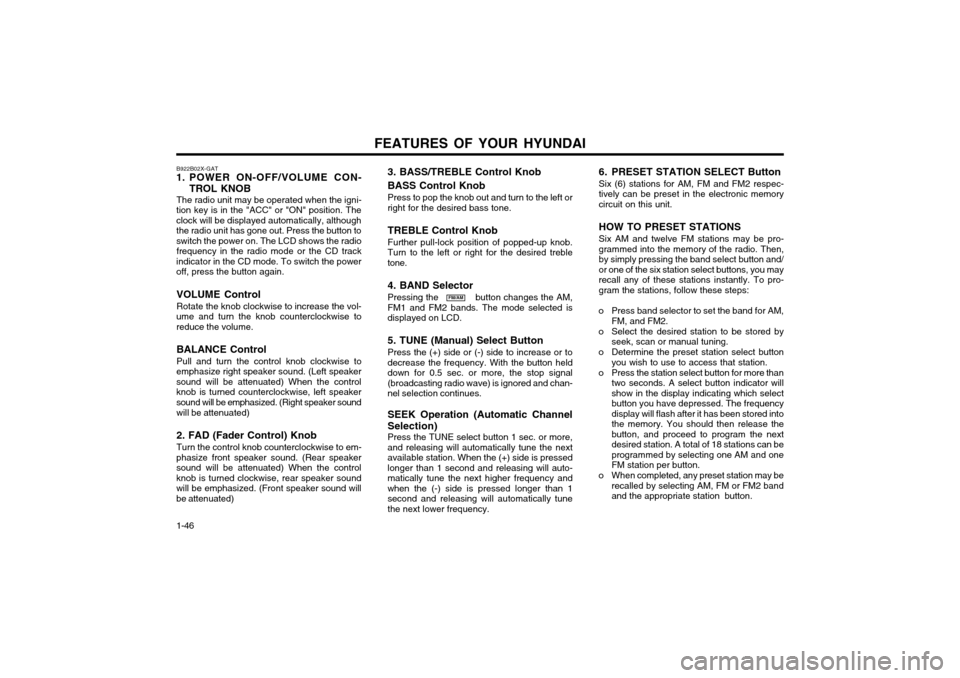
1-46 B922B02X-GAT
1. POWER ON-OFF/VOLUME CON-
TROL KNOB
The radio unit may be operated when the igni-
tion key is in the "ACC" or "ON" position. The clock will be displayed automatically, althoughthe radio unit has gone out. Press the button toswitch the power on. The LCD shows the radio frequency in the radio mode or the CD track
indicator in the CD mode. To switch the poweroff, press the button again.
VOLUME Control Rotate the knob clockwise to increase the vol-
ume and turn the knob counterclockwise to reduce the volume.
BALANCE Control Pull and turn the control knob clockwise to
emphasize right speaker sound. (Left speaker sound will be attenuated) When the controlknob is turned counterclockwise, left speakersound will be emphasized. (Right speaker sound
will be attenuated) 2. FAD (Fader Control) Knob Turn the control knob counterclockwise to em-
phasize front speaker sound. (Rear speaker sound will be attenuated) When the controlknob is turned clockwise, rear speaker soundwill be emphasized. (Front speaker sound willbe attenuated)
FM/AM 6. PRESET STATION SELECT Button Six (6) stations for AM, FM and FM2 respec- tively can be preset in the electronic memorycircuit on this unit. HOW TO PRESET STATIONS Six AM and twelve FM stations may be pro- grammed into the memory of the radio. Then,by simply pressing the band select button and/or one of the six station select buttons, you mayrecall any of these stations instantly. To pro-gram the stations, follow these steps:
o Press band selector to set the band for AM, FM, and FM2.
o Select the desired station to be stored by seek, scan or manual tuning.
o Determine the preset station select button you wish to use to access that station.
o Press the station select button for more than two seconds. A select button indicator willshow in the display indicating which selectbutton you have depressed. The frequencydisplay will flash after it has been stored intothe memory. You should then release thebutton, and proceed to program the nextdesired station. A total of 18 stations can beprogrammed by selecting one AM and oneFM station per button.
o When completed, any preset station may be recalled by selecting AM, FM or FM2 bandand the appropriate station button.
3. BASS/TREBLE Control Knob BASS Control Knob Press to pop the knob out and turn to the left or right for the desired bass tone. TREBLE Control Knob Further pull-lock position of popped-up knob. Turn to the left or right for the desired trebletone. 4. BAND Selector Pressing the button changes the AM, FM1 and FM2 bands. The mode selected isdisplayed on LCD. 5. TUNE (Manual) Select Button Press the (+) side or (-) side to increase or to decrease the frequency. With the button helddown for 0.5 sec. or more, the stop signal(broadcasting radio wave) is ignored and chan-nel selection continues. SEEK Operation (Automatic Channel Selection) Press the TUNE select button 1 sec. or more, and releasing will automatically tune the nextavailable station. When the (+) side is pressedlonger than 1 second and releasing will auto-matically tune the next higher frequency andwhen the (-) side is pressed longer than 1second and releasing will automatically tunethe next lower frequency.