knob Hyundai Atos 2002 User Guide
[x] Cancel search | Manufacturer: HYUNDAI, Model Year: 2002, Model line: Atos, Model: Hyundai Atos 2002Pages: 249, PDF Size: 3.11 MB
Page 54 of 249
FEATURES OF YOUR HYUNDAI
FEATURES OF YOUR HYUNDAI FEATURES OF YOUR HYUNDAI
FEATURES OF YOUR HYUNDAI
FEATURES OF YOUR HYUNDAI
1- 45
B900B02X-GAT
1. POWER ON-OFF/VOLUME CON-
TROL KNOB
The radio unit may be operated when the ignition key is in the "ACC" or "ON" position. Rotatethe knob clockwise to switch the radio unit on andto increase the volume.The LCD shows the radio frequency in the radiomode, or the tape direction indicator in the tapemode. Turn the knob counterclockwise to reducethe volume and to switch the radio unit off. BAL (Balance Control) Knob Pull and turn the control knob clockwise to em- phasize right speaker sound. (Left speaker soundwill be attenuated) When the control knob isturned counterclockwise, left speaker sound willbe emphasized. (Right speaker sound will beattenuated) 2. BASS Control Knob Press to pop the knob out and turn to the left or right for the desired bass tone. TREBLE Control Knob Further pull-lock position of popped-up knob. Turn to the left or right for the desired treble tone. 3. BAND Selector Pressing the button changes the AM, FM1 and FM2 bands. The mode selected is displayedon LCD. 4. TUNE (manual) Select Button Press the (+) side or (-) side to increase or to decrease the frequency. With the button helddown for 0.5 sec. or more, the stop signal (broad-casting radio wave) is ignored and channel se-lection continues. SEEK Operation (Automatic Channel Selection) Press the TUNE select button 1 sec. or more. When the (+) side is pressed, the unit will auto-matically tune to the next higher frequency andwhen the (-) side is pressed, it will automaticallytune to the next lower frequency.
5. PRESET STATION SELECT Button Six (6) stations for AM, FM and FM2 respectively can be preset in the electronic memory circuit onthis unit.
FM
AMHOW TO PRESET STATIONS Six AM and twelve FM stations may be pro- grammed into the memory of the radio. Then, bysimply pressing the band select button and/orone of the six station select buttons, you mayrecall any of these stations instantly. To programthe stations, follow these steps:
o Press band selector to set the band for AM,
FM, and FM2.
o Select the desired station to be stored by seek, scan or manual tuning.
o Determine the preset station select button you wish to use to access that station.
o Press the station select button for more than two seconds. A select button indicator will show in the display indicating which selectbutton you have depressed. The frequencydisplay will flash after it has been stored intothe memory. You should then release thebutton, and proceed to program the nextdesired station. A total of 18 stations can beprogrammed by selecting one AM and oneFM station per button.
o When completed, any preset station may be recalled by selecting AM, FM or FM2 bandand the appropriate station button.
Page 55 of 249
FEATURES OF YOUR HYUNDAI
FEATURES OF YOUR HYUNDAI FEATURES OF YOUR HYUNDAI
FEATURES OF YOUR HYUNDAI
FEATURES OF YOUR HYUNDAI
1- 46
6. TAPE EJECT Button To elect the tape, press the button. 7. TAPE PROGRAM When you press the button whose arrow is in the same direction as the tape play arrow in thedisplay the tape will advance at high speed.When you press the button whose arrow is in theopposite direction to the tape play arrow in thedisplay the tape will rewind at high speed.To stop FF or REW action, press the oppositebutton. When you press two buttons simulta-neously you play the reverse side of the tape andan arrow will appear in the display to show tapedirection. 8. FAD (Fader Control) Knob Turn the control knob clockwise to emphasize front speaker sound (Rear speaker sound will beattenuated). When the control knob is turnedcounterclockwise, rear speaker sound will beemphasized (Front speaker sound will be atten-uated).
Page 56 of 249
FEATURES OF YOUR HYUNDAI
FEATURES OF YOUR HYUNDAI FEATURES OF YOUR HYUNDAI
FEATURES OF YOUR HYUNDAI
FEATURES OF YOUR HYUNDAI
1- 47
B922A01X
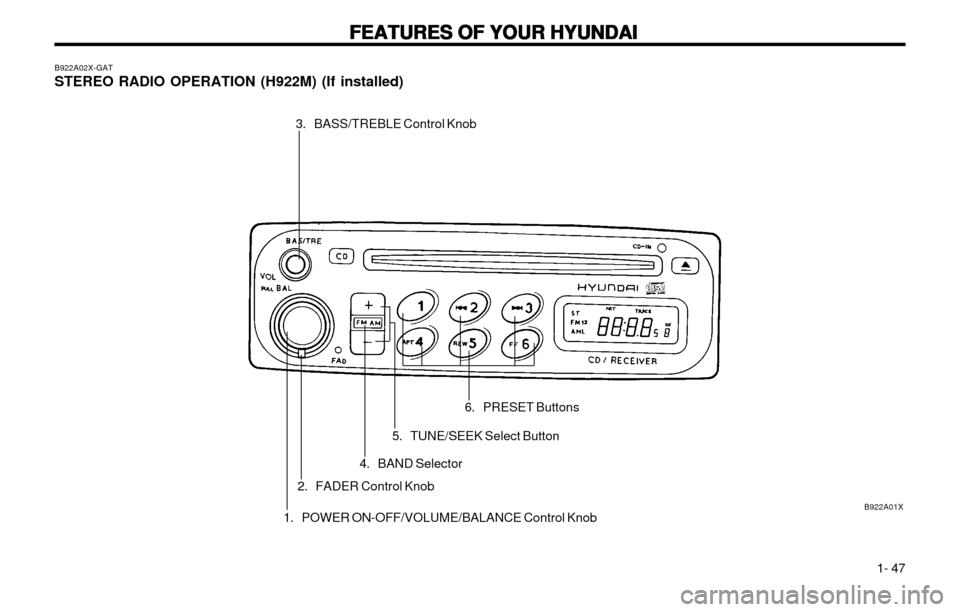
B922A02X-GAT STEREO RADIO OPERATION (H922M) (If installed)
3. BASS/TREBLE Control Knob
1. POWER ON-OFF/VOLUME/BALANCE Control Knob
2. FADER Control Knob 6. PRESET Buttons
5. TUNE/SEEK Select Button
4. BAND Selector
Page 57 of 249
FEATURES OF YOUR HYUNDAI
FEATURES OF YOUR HYUNDAI FEATURES OF YOUR HYUNDAI
FEATURES OF YOUR HYUNDAI
FEATURES OF YOUR HYUNDAI
1- 48
B922B03X-GAT
1. POWER ON-OFF/VOLUME
CONTROL KNOB
The radio unit may be operated when the ignition key is in the "ACC" or "ON" position. The clockwill be displayed automatically, although the ra-dio unit has gone out. Press the button to switchthe power on. The LCD shows the radio fre-quency in the radio mode or the CD track indica-tor in the CD mode. To switch the power off,press the button again. VOLUME Control Rotate the knob clockwise to increase the vol- ume and turn the knob counterclockwise to re-duce the volume. BALANCE Control Pull and turn the control knob clockwise to em- phasize right speaker sound. (Left speaker soundwill be attenuated) When the control knob isturned counterclockwise, left speaker sound willbe emphasized. (Right speaker sound will beattenuated) 2. FAD (Fader Control) Knob Turn the control knob counterclockwise to em- phasize front speaker sound. (Rear speakersound will be attenuated) When the control knobis turned clockwise, rear speaker sound will beemphasized. (Front speaker sound will be atten-uated)
FM/AM 6. PRESET STATION SELECT Button Six (6) stations for AM, FM and FM2 respectively can be preset in the electronic memory circuit onthis unit. HOW TO PRESET STATIONS Six AM and twelve FM stations may be pro- grammed into the memory of the radio. Then, bysimply pressing the band select button and/orone of the six station select buttons, you mayrecall any of these stations instantly. To programthe stations, follow these steps:
o Press band selector to set the band for AM,
FM, and FM2.
o Select the desired station to be stored by seek, scan or manual tuning.
o Determine the preset station select button you wish to use to access that station.
o Press the station select button for more than two seconds. A select button indicator will show in the display indicating which selectbutton you have depressed. The frequencydisplay will flash after it has been stored intothe memory. You should then release thebutton, and proceed to program the nextdesired station. A total of 18 stations can beprogrammed by selecting one AM and oneFM station per button.
o When completed, any preset station may be recalled by selecting AM, FM or FM2 bandand the appropriate station button.
3. BASS/TREBLE Control Knob BASS Control Knob Press to pop the knob out and turn to the left or right for the desired bass tone. TREBLE Control Knob Further pull-lock position of popped-up knob. Turn to the left or right for the desired treble tone. 4. BAND Selector Pressing the button changes the AM, FM1 and FM2 bands. The mode selected is displayedon LCD. 5. TUNE (Manual) Select Button Press the (+) side or (-) side to increase or to decrease the frequency. With the button helddown for 0.5 sec. or more, the stop signal (broad-casting radio wave) is ignored and channel se-lection continues. SEEK Operation (Automatic Channel Selection) Press the TUNE select button 1 sec. or more, and releasing will automatically tune the nextavailable station. When the (+) side is pressedlonger than 1 second and releasing will automat-ically tune the next higher frequency and whenthe (-) side is pressed longer than 1 second andreleasing will automatically tune the next lowerfrequency.
Page 66 of 249
DRIVING YOUR HYUNDAI
DRIVING YOUR HYUNDAI DRIVING YOUR HYUNDAI
DRIVING YOUR HYUNDAI
DRIVING YOUR HYUNDAI
2- 3
C050A01X-GAT
STARTING
STARTING STARTING
STARTING
STARTING
Normal starting with either a cold or warm
engine is obtained without pumping or depress-
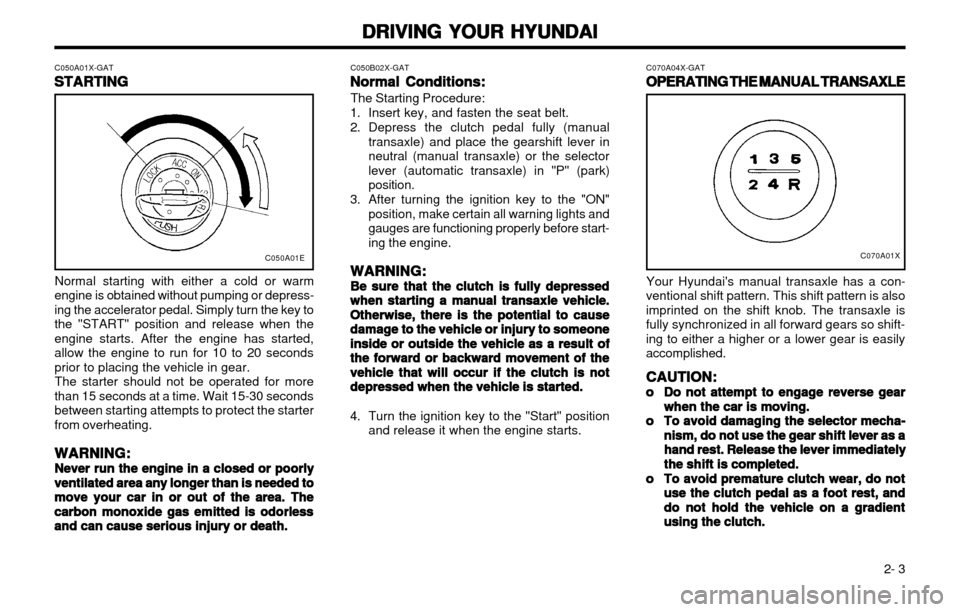
ing the accelerator pedal. Simply turn the key tothe "START" position and release when theengine starts. After the engine has started,allow the engine to run for 10 to 20 secondsprior to placing the vehicle in gear. The starter should not be operated for more
than 15 seconds at a time. Wait 15-30 secondsbetween starting attempts to protect the starterfrom overheating.
WARNING:
WARNING: WARNING:
WARNING:
WARNING:
Never run the engine in a closed or poorly
Never run the engine in a closed or poorly Never run the engine in a closed or poorly
Never run the engine in a closed or poorly
Never run the engine in a closed or poorly ventilated area
ventilated area ventilated area
ventilated area
ventilated area any longer than is needed to
any longer than is needed to any longer than is needed to
any longer than is needed to
any longer than is needed to
move your car in or out of the area. The
move your car in or out of the area. The move your car in or out of the area. The
move your car in or out of the area. The
move your car in or out of the area. The
carbon
carbon carbon
carbon
carbon monoxide gas emitted is odorless
monoxide gas emitted is odorless monoxide gas emitted is odorless
monoxide gas emitted is odorless
monoxide gas emitted is odorless
and can cause serious injury or death.
and can cause serious injury or death. and can cause serious injury or death.
and can cause serious injury or death.
and can cause serious injury or death. C050B02X-GAT
Normal Conditions:
Normal Conditions: Normal Conditions:
Normal Conditions:
Normal Conditions:
The Starting Procedure:
1. Insert key, and fasten the seat belt.
2. Depress the clutch pedal fully (manual transaxle) and place the gearshift lever in neutral (manual transaxle) or the selectorlever (automatic transaxle) in "P" (park)position.
3. After turning the ignition key to the "ON" position, make certain all warning lights andgauges are functioning properly before start-
ing the engine.
WARNING:
WARNING: WARNING:
WARNING:
WARNING:
Be sure that the clutch is fully depressed
Be sure that the clutch is fully depressed Be sure that the clutch is fully depressed
Be sure that the clutch is fully depressed
Be sure that the clutch is fully depressed when starting a
when starting a when starting a
when starting a
when starting a manual transaxle vehicle.
manual transaxle vehicle. manual transaxle vehicle.
manual transaxle vehicle.
manual transaxle vehicle.
Otherwise, there is the potential to cause
Otherwise, there is the potential to cause Otherwise, there is the potential to cause
Otherwise, there is the potential to cause
Otherwise, there is the potential to cause
damage
damage damage
damage
damage to the vehicle or injury to someone
to the vehicle or injury to someone to the vehicle or injury to someone
to the vehicle or injury to someone
to the vehicle or injury to someone
inside or outside the vehicle as a result
inside or outside the vehicle as a result inside or outside the vehicle as a result
inside or outside the vehicle as a result
inside or outside the vehicle as a result ofof
ofof
of
the forward or backward movement of the
the forward or backward movement of the the forward or backward movement of the
the forward or backward movement of the
the forward or backward movement of the
vehicle that will occur if the
vehicle that will occur if the vehicle that will occur if the
vehicle that will occur if the
vehicle that will occur if the clutch is not
clutch is not clutch is not
clutch is not
clutch is not
depressed when the vehicle is started.
depressed when the vehicle is started. depressed when the vehicle is started.
depressed when the vehicle is started.
depressed when the vehicle is started.
4. Turn the ignition key to the "Start" position
and release it when the engine starts. C070A04X-GAT
OPERATING THE MANUAL TRANSAXLE
OPERATING THE MANUAL TRANSAXLE OPERATING THE MANUAL TRANSAXLE
OPERATING THE MANUAL TRANSAXLE
OPERATING THE MANUAL TRANSAXLE
C070A01X
Your Hyundai's manual transaxle has a con-
ventional shift pattern. This shift pattern is also imprinted on the shift knob. The transaxle isfully synchronized in all forward gears so shift-
ing to either a higher or a lower gear is easilyaccomplished.
CAUTION:
CAUTION: CAUTION:
CAUTION:
CAUTION:
oo
oo
o Do not attempt to engage reverse gear
Do not attempt to engage reverse gear Do not attempt to engage reverse gear
Do not attempt to engage reverse gear
Do not attempt to engage reverse gear
when the
when the when the
when the
when the car is moving.
car is moving. car is moving.
car is moving.
car is moving.
oo
oo
o To avoid damaging the selector mecha-
To avoid damaging the selector mecha- To avoid damaging the selector mecha-
To avoid damaging the selector mecha-
To avoid damaging the selector mecha-
nism, do not use the gear
nism, do not use the gear nism, do not use the gear
nism, do not use the gear
nism, do not use the gear shift lever as a
shift lever as a shift lever as a
shift lever as a
shift lever as a
hand rest. Release the lever immediately
hand rest. Release the lever immediately hand rest. Release the lever immediately
hand rest. Release the lever immediately
hand rest. Release the lever immediately
the shift is completed.
the shift is completed. the shift is completed.
the shift is completed.
the shift is completed.
oo
oo
o To avoid premature clutch wear, do not
To avoid premature clutch wear, do not To avoid premature clutch wear, do not
To avoid premature clutch wear, do not
To avoid premature clutch wear, do not
use the clutch pedal as
use the clutch pedal as use the clutch pedal as
use the clutch pedal as
use the clutch pedal as
a foot rest, and
a foot rest, and a foot rest, and
a foot rest, and
a foot rest, and
do not hold the vehicle on a gradient
do not hold the vehicle on a gradient do not hold the vehicle on a gradient
do not hold the vehicle on a gradient
do not hold the vehicle on a gradient
using the clutch.
using the clutch. using the clutch.
using the clutch.
using the clutch.
C050A01E
Page 142 of 249
FEATURES OF YOUR HYUNDAI 1-5
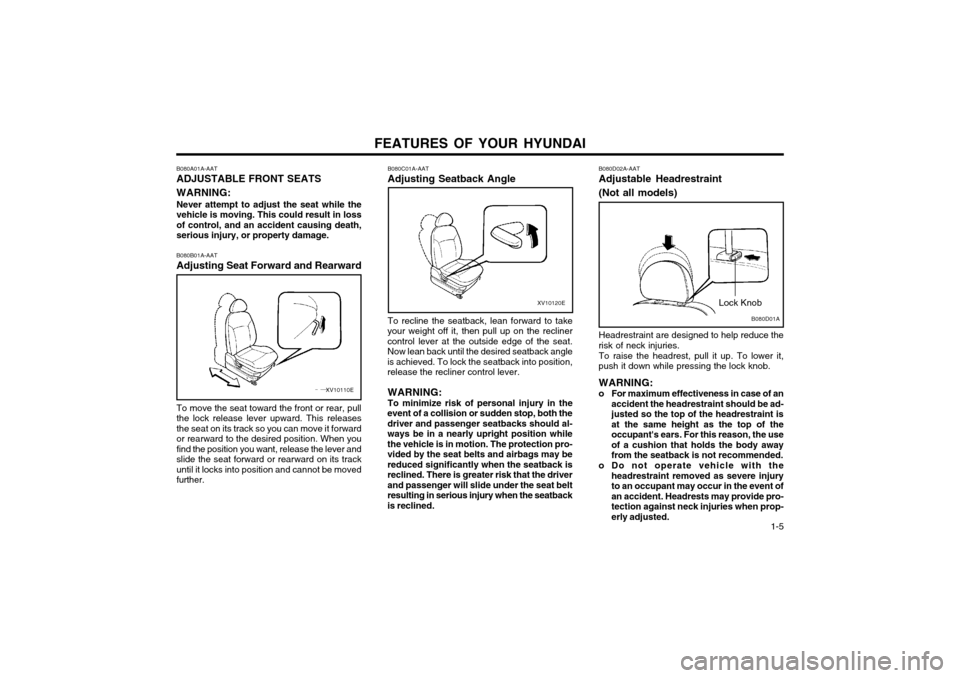
B080A01A-AAT ADJUSTABLE FRONT SEATS WARNING: Never attempt to adjust the seat while the vehicle is moving. This could result in lossof control, and an accident causing death,serious injury, or property damage. B080B01A-AAT Adjusting Seat Forward and Rearward
B080C01A-AATAdjusting Seatback Angle
XV10110E
To move the seat toward the front or rear, pull the lock release lever upward. This releasesthe seat on its track so you can move it forwardor rearward to the desired position. When youfind the position you want, release the lever andslide the seat forward or rearward on its trackuntil it locks into position and cannot be movedfurther.
XV10120E
To recline the seatback, lean forward to take
your weight off it, then pull up on the recliner control lever at the outside edge of the seat.Now lean back until the desired seatback angleis achieved. To lock the seatback into position,release the recliner control lever.
WARNING: To minimize risk of personal injury in the
event of a collision or sudden stop, both the driver and passenger seatbacks should al-ways be in a nearly upright position whilethe vehicle is in motion. The protection pro-vided by the seat belts and airbags may bereduced significantly when the seatback isreclined. There is greater risk that the driverand passenger will slide under the seat beltresulting in serious injury when the seatbackis reclined.B080D01A
Lock Knob
B080D02A-AAT Adjustable Headrestraint (Not all models) Headrestraint are designed to help reduce the
risk of neck injuries.
To raise the headrest, pull it up. To lower it,
push it down while pressing the lock knob.
WARNING:
o For maximum effectiveness in case of an accident the headrestraint should be ad- justed so the top of the headrestraint isat the same height as the top of theoccupant's ears. For this reason, the useof a cushion that holds the body awayfrom the seatback is not recommended.
o Do not operate vehicle with the headrestraint removed as severe injuryto an occupant may occur in the event ofan accident. Headrests may provide pro-tection against neck injuries when prop-erly adjusted.
Page 145 of 249
FEATURES OF YOUR HYUNDAI
1-8
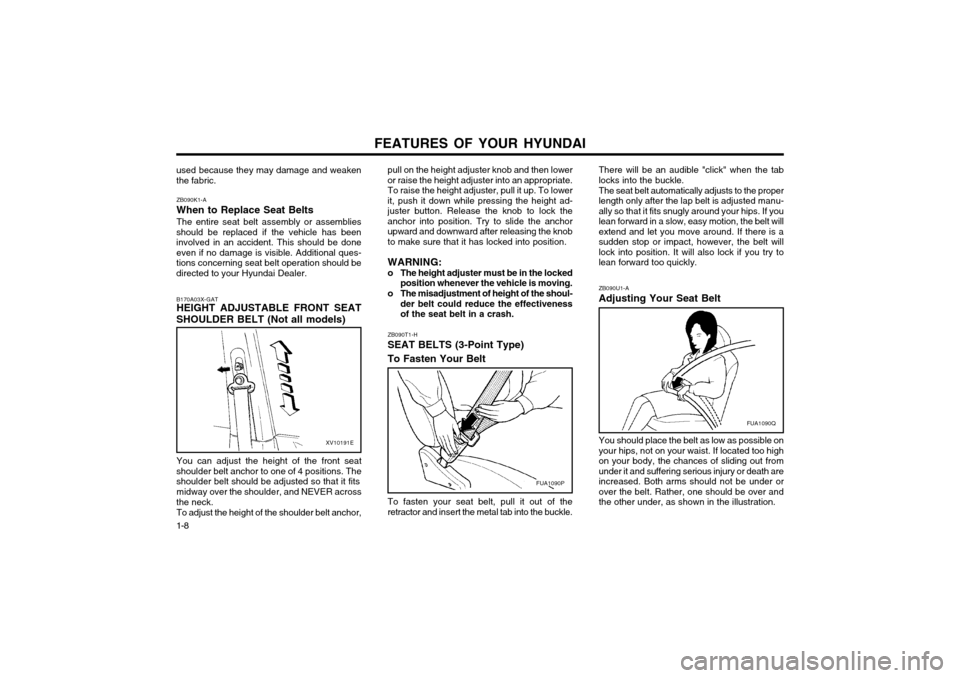
ZB090U1-A Adjusting Your Seat Belt You should place the belt as low as possible on your hips, not on your waist. If located too highon your body, the chances of sliding out fromunder it and suffering serious injury or death areincreased. Both arms should not be under orover the belt. Rather, one should be over andthe other under, as shown in the illustration.
There will be an audible "click" when the tablocks into the buckle. The seat belt automatically adjusts to the proper length only after the lap belt is adjusted manu-ally so that it fits snugly around your hips. If youlean forward in a slow, easy motion, the belt willextend and let you move around. If there is asudden stop or impact, however, the belt willlock into position. It will also lock if you try tolean forward too quickly.
To fasten your seat belt, pull it out of theretractor and insert the metal tab into the buckle.
pull on the height adjuster knob and then loweror raise the height adjuster into an appropriate.To raise the height adjuster, pull it up. To lowerit, push it down while pressing the height ad-
juster button. Release the knob to lock theanchor into position. Try to slide the anchorupward and downward after releasing the knobto make sure that it has locked into position. WARNING:
o The height adjuster must be in the locked
position whenever the vehicle is moving.
o The misadjustment of height of the shoul- der belt could reduce the effectiveness of the seat belt in a crash.
ZB090T1-H SEAT BELTS (3-Point Type) To Fasten Your Belt
used because they may damage and weaken the fabric.
B170A03X-GAT HEIGHT ADJUSTABLE FRONT SEAT
SHOULDER BELT (Not all models)
XV10191E
You can adjust the height of the front seat
shoulder belt anchor to one of 4 positions. The shoulder belt should be adjusted so that it fits
midway over the shoulder, and NEVER across
the neck.
To adjust the height of the shoulder belt anchor,
ZB090K1-A When to Replace Seat BeltsThe entire seat belt assembly or assemblies
should be replaced if the vehicle has been involved in an accident. This should be doneeven if no damage is visible. Additional ques-tions concerning seat belt operation should bedirected to your Hyundai Dealer.
FUA1090P
FUA1090Q
Page 158 of 249
FEATURES OF YOUR HYUNDAI 1-21
B340B01X-DAG
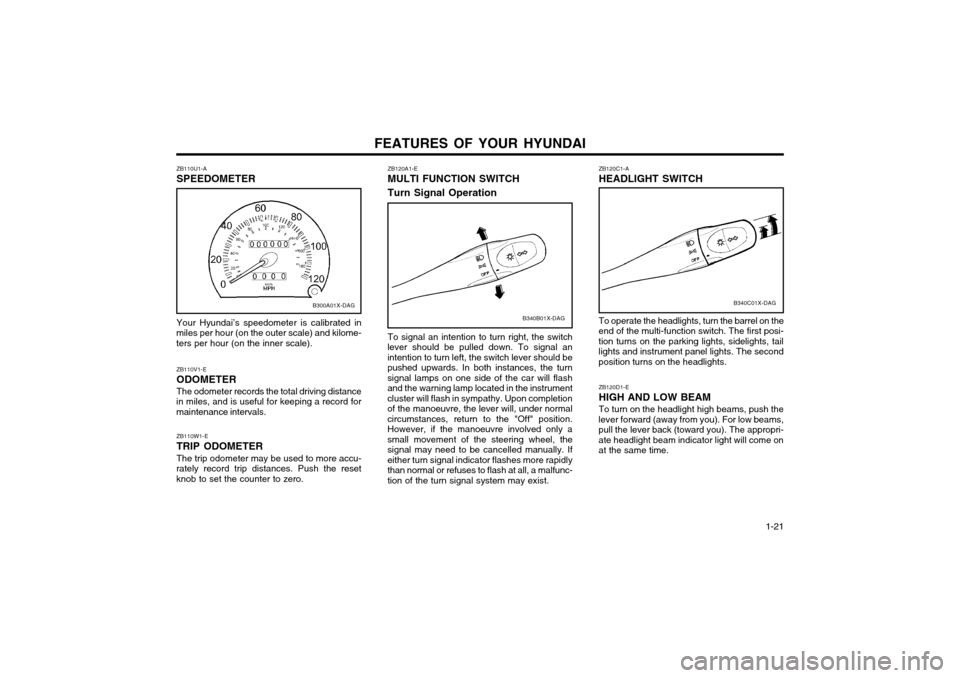
ZB120A1-E MULTI FUNCTION SWITCH Turn Signal Operation
To signal an intention to turn right, the switch
lever should be pulled down. To signal an intention to turn left, the switch lever should bepushed upwards. In both instances, the turnsignal lamps on one side of the car will flashand the warning lamp located in the instrumentcluster will flash in sympathy. Upon completionof the manoeuvre, the lever will, under normalcircumstances, return to the "Off" position.However, if the manoeuvre involved only asmall movement of the steering wheel, thesignal may need to be cancelled manually. Ifeither turn signal indicator flashes more rapidlythan normal or refuses to flash at all, a malfunc-tion of the turn signal system may exist.
ZB110U1-A SPEEDOMETER Your Hyundai’s speedometer is calibrated in
miles per hour (on the outer scale) and kilome- ters per hour (on the inner scale).
B300A01X-DAG
ZB110W1-E TRIP ODOMETER The trip odometer may be used to more accu-
rately record trip distances. Push the reset knob to set the counter to zero. ZB110V1-E ODOMETERThe odometer records the total driving distance
in miles, and is useful for keeping a record for maintenance intervals.
ZB120C1-A HEADLIGHT SWITCH
B340C01X-DAG
ZB120D1-E HIGH AND LOW BEAMTo turn on the headlight high beams, push the
lever forward (away from you). For low beams, pull the lever back (toward you). The appropri-ate headlight beam indicator light will come onat the same time.
To operate the headlights, turn the barrel on the
end of the multi-function switch. The first posi- tion turns on the parking lights, sidelights, taillights and instrument panel lights. The secondposition turns on the headlights.
Page 164 of 249
FEATURES OF YOUR HYUNDAI 1-27
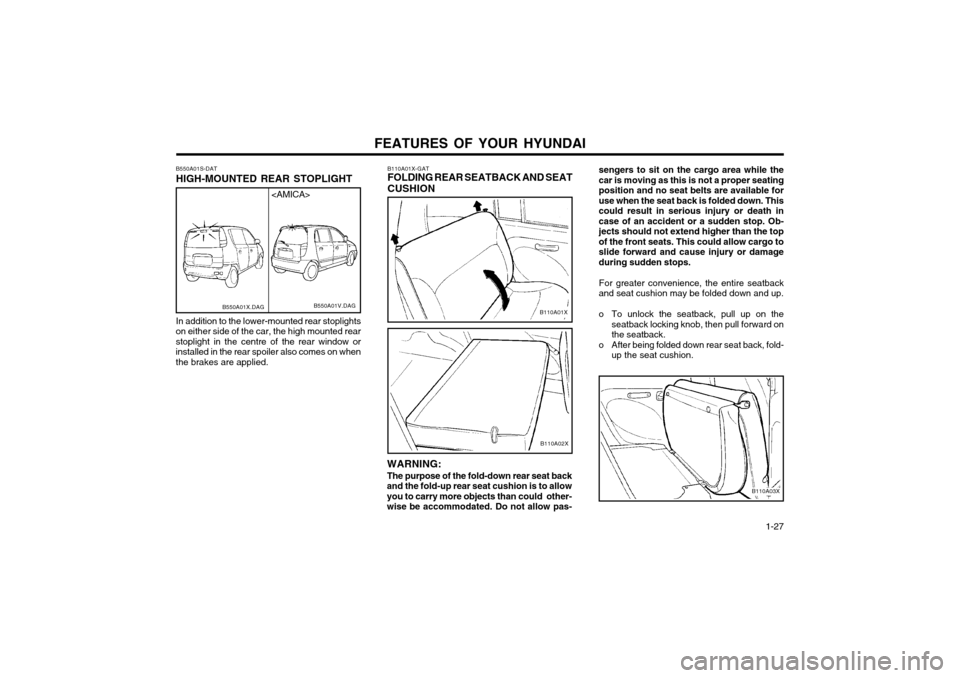
sengers to sit on the cargo area while the car is moving as this is not a proper seatingposition and no seat belts are available foruse when the seat back is folded down. Thiscould result in serious injury or death incase of an accident or a sudden stop. Ob-jects should not extend higher than the topof the front seats. This could allow cargo toslide forward and cause injury or damageduring sudden stops.
For greater convenience, the entire seatback
and seat cushion may be folded down and up.
o To unlock the seatback, pull up on the seatback locking knob, then pull forward on the seatback.
o After being folded down rear seat back, fold- up the seat cushion.
B110A03X
B110A01X-GAT FOLDING REAR SEATBACK AND SEAT CUSHION
B110A01X
WARNING: The purpose of the fold-down rear seat back
and the fold-up rear seat cushion is to allow you to carry more objects than could other-
wise be accommodated. Do not allow pas-
B110A02X
B550A01S-DAT HIGH-MOUNTED REAR STOPLIGHT In addition to the lower-mounted rear stoplights
on either side of the car, the high mounted rear stoplight in the centre of the rear window orinstalled in the rear spoiler also comes on whenthe brakes are applied.
B550A01V.DAG
B550A01X.DAG
Page 165 of 249
FEATURES OF YOUR HYUNDAI
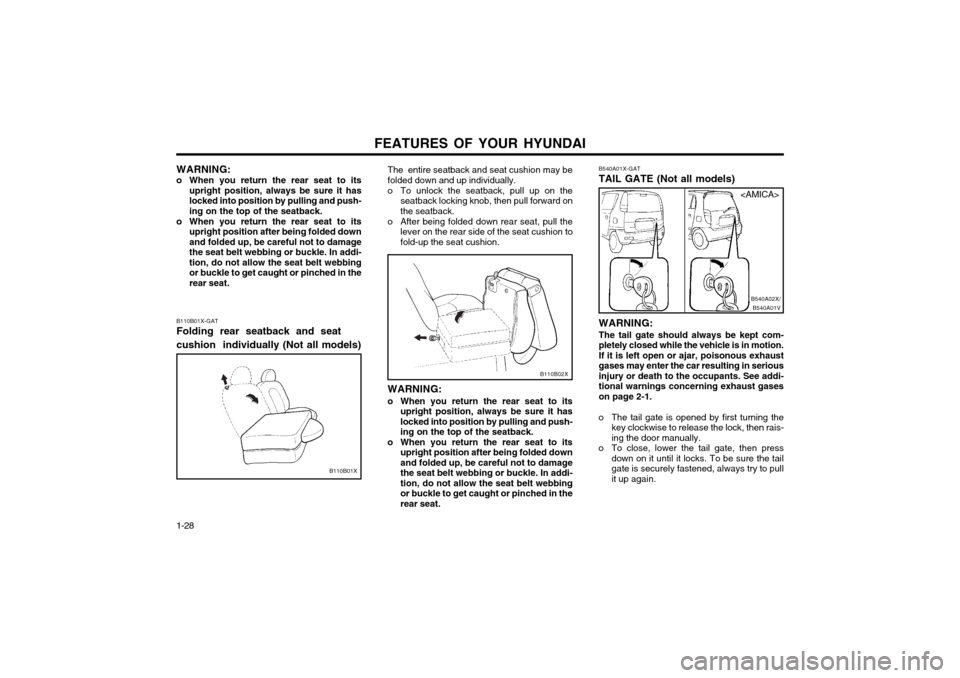
1-28 B540A01X-GAT TAIL GATE (Not all models) WARNING: The tail gate should always be kept com-
pletely closed while the vehicle is in motion.If it is left open or ajar, poisonous exhaust
gases may enter the car resulting in seriousinjury or death to the occupants. See addi-tional warnings concerning exhaust gaseson page 2-1.
o The tail gate is opened by first turning the key clockwise to release the lock, then rais-ing the door manually.
o To close, lower the tail gate, then press down on it until it locks. To be sure the tailgate is securely fastened, always try to pull
it up again.
B540A01VB540A02X/
B110B02X
The entire seatback and seat cushion may be folded down and up individually.
o To unlock the seatback, pull up on the
seatback locking knob, then pull forward on the seatback.
o After being folded down rear seat, pull the lever on the rear side of the seat cushion tofold-up the seat cushion.
WARNING:
o When you return the rear seat to its upright position, always be sure it haslocked into position by pulling and push-ing on the top of the seatback.
o When you return the rear seat to its upright position after being folded downand folded up, be careful not to damagethe seat belt webbing or buckle. In addi-tion, do not allow the seat belt webbingor buckle to get caught or pinched in therear seat.
B110B01X-GAT Folding rear seatback and seat cushion individually (Not all models)
B110B01X WARNING:
o When you return the rear seat to its upright position, always be sure it has locked into position by pulling and push-ing on the top of the seatback.
o When you return the rear seat to its upright position after being folded downand folded up, be careful not to damagethe seat belt webbing or buckle. In addi-tion, do not allow the seat belt webbingor buckle to get caught or pinched in therear seat.