phone Hyundai Atos 2002 Owner's Manual
[x] Cancel search | Manufacturer: HYUNDAI, Model Year: 2002, Model line: Atos, Model: Hyundai Atos 2002Pages: 249, PDF Size: 3.11 MB
Page 50 of 249
FEATURES OF YOUR HYUNDAI
FEATURES OF YOUR HYUNDAI FEATURES OF YOUR HYUNDAI
FEATURES OF YOUR HYUNDAI
FEATURES OF YOUR HYUNDAI
1- 41
B750B02Y-AAT Using a cellular phone or a two-way radio When a cellular phone is used inside the vehicle, noise may be produced from the audio equip-ment. This does not mean that something iswrong with the audio equipment. In such a case,use the cellular phone at a place as far aspossible from the audio equipment. CAUTION: When using a communication system suchas a cellular phone or a radio inside thevehicle, a separate external antenna must befitted. When a cellular phone or a radio set isused with an internal antenna alone, it mayinterfere with the vehicle's electrical systemand adversely affect safe operation of thevehicle. WARNING: Don't use a cellular phone when you aredriving, you must stop at a safe place to usea cellular phone.
SSAR013A
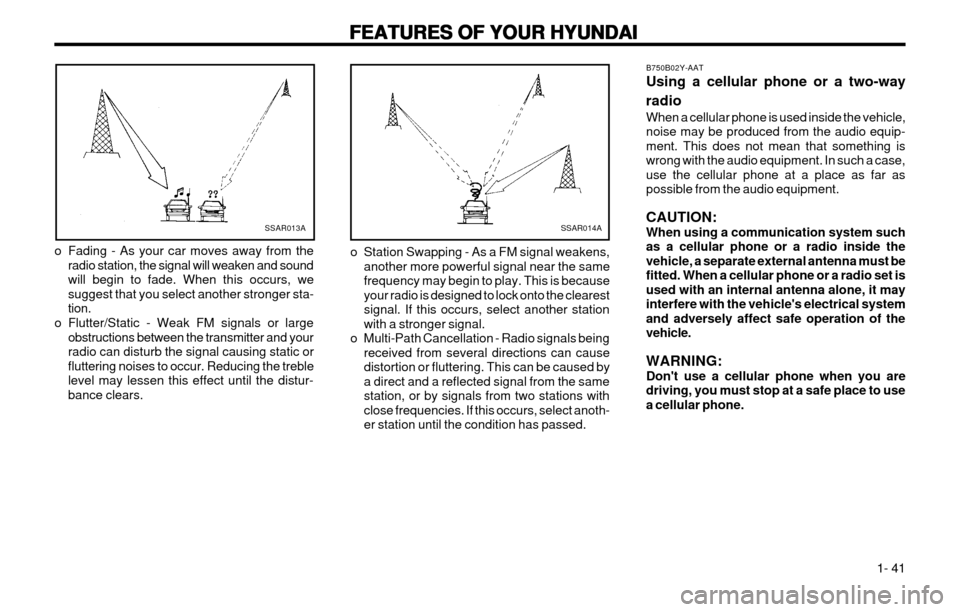
o Fading - As your car moves away from the radio station, the signal will weaken and sound will begin to fade. When this occurs, wesuggest that you select another stronger sta-tion.
o Flutter/Static - Weak FM signals or large obstructions between the transmitter and yourradio can disturb the signal causing static orfluttering noises to occur. Reducing the treblelevel may lessen this effect until the distur-bance clears.SSAR014A
o Station Swapping - As a FM signal weakens, another more powerful signal near the same frequency may begin to play. This is becauseyour radio is designed to lock onto the clearestsignal. If this occurs, select another stationwith a stronger signal.
o Multi-Path Cancellation - Radio signals being received from several directions can causedistortion or fluttering. This can be caused bya direct and a reflected signal from the samestation, or by signals from two stations withclose frequencies. If this occurs, select anoth-er station until the condition has passed.
Page 134 of 249
A070A01A-EATCAUTION: MODIFICATIONS TO YOUR HYUNDAI
Modification of components may void the manufacturer’s warranty Your Hyundai should not be modified in any way. Modifications may adversely affect the safety, durability and performance of your Hyundai. Componentswhich are subjected to modification or are added to the vehicle resulting inconsequential damage are not covered by the vehicle manufacturers war-ranty.
A080A01A-EAT TWO WAY RADIO INSTALLATION
This vehicle is fitted with electronically controlled fuel injection or other micro processor controlled equipment. It is possible for incorrectly installed two way radio equipment including mobile telephones to adversely affect these systems.Before radio equipment of this kind is installed, please contact your Hyundaidealer for recommendation regarding the suitability of the particular radioequipment concerned and the recommended method of installation andequipment location. Incorrectly installed or unsuitable equipment which givesrise to incorrect functioning of or damage to electronic vehicle components willnot fall within the scope of the vehicle manufacturers warranty.
Page 176 of 249
FEATURES OF YOUR HYUNDAI 1-39
B750B02Y-AAT Using a cellular phone or a two-way radio When a cellular phone is used inside the vehi- cle, noise may be produced from the audioequipment. This does not mean that somethingis wrong with the audio equipment. In such acase, use the cellular phone at a place as far aspossible from the audio equipment. CAUTION: When using a communication system sucha cellular phone or a radio set inside thevehicle, a separate external antenna mustbe fitted. When a cellular phone or a radioset is used by using an internal antennaalone, it may interfere with the vehicle'selectrical system and adversely affect safeoperation of the vehicle. WARNING: Don't use a cellular phone when you are driving, you must stop the car at the safeplace to use a cellular phone.
SSAR013A
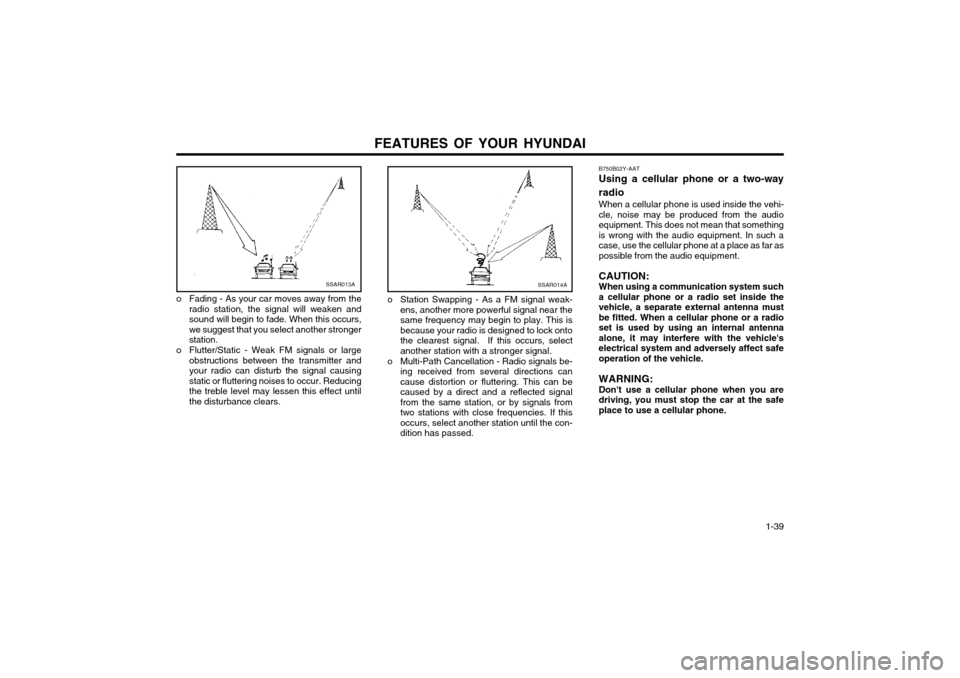
o Fading - As your car moves away from the radio station, the signal will weaken and sound will begin to fade. When this occurs,we suggest that you select another strongerstation.
o Flutter/Static - Weak FM signals or large obstructions between the transmitter andyour radio can disturb the signal causingstatic or fluttering noises to occur. Reducingthe treble level may lessen this effect untilthe disturbance clears.SSAR014A
o Station Swapping - As a FM signal weak-ens, another more powerful signal near the same frequency may begin to play. This isbecause your radio is designed to lock ontothe clearest signal. If this occurs, selectanother station with a stronger signal.
o Multi-Path Cancellation - Radio signals be- ing received from several directions cancause distortion or fluttering. This can becaused by a direct and a reflected signalfrom the same station, or by signals fromtwo stations with close frequencies. If thisoccurs, select another station until the con-dition has passed.