ESP Hyundai Azera 2005 User Guide
[x] Cancel search | Manufacturer: HYUNDAI, Model Year: 2005, Model line: Azera, Model: Hyundai Azera 2005Pages: 297, PDF Size: 13.2 MB
Page 111 of 297
1FEATURES OF YOUR HYUNDAI
94
oON In the "ON" position, the light stays on at all times.
CAUTION:
Do not leave this button pressed foran extended period of time when the vehicle is not running.
!
!
SPECTACLE CASE
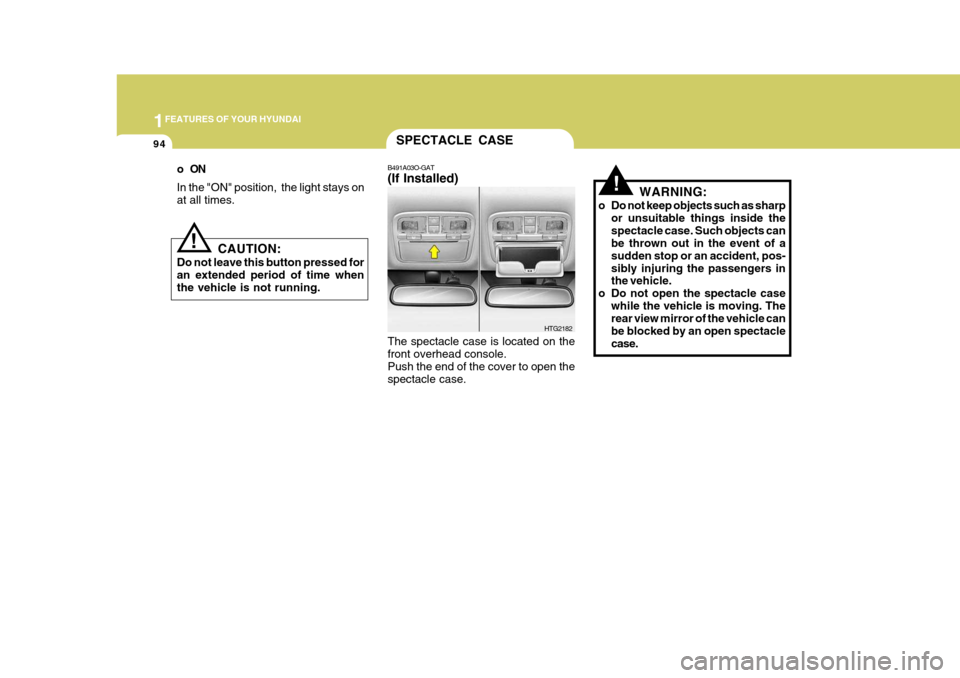
B491A03O-GAT (If Installed) The spectacle case is located on the front overhead console. Push the end of the cover to open thespectacle case. WARNING:
o Do not keep objects such as sharp or unsuitable things inside thespectacle case. Such objects can be thrown out in the event of a sudden stop or an accident, pos-sibly injuring the passengers in the vehicle.
o Do not open the spectacle case while the vehicle is moving. Therear view mirror of the vehicle can be blocked by an open spectaclecase.
HTG2182
Page 114 of 297
1
FEATURES OF YOUR HYUNDAI
97
!
CAUTION:
o Do not operate the switch continu- ously for an unnecessary length of time.
o Scraping ice from the mirror face
could cause permanent damage.To remove any ice, use a sponge, soft cloth or approved de-icer.!
WARNING:
Be careful when judging the size or distance of any object seen in the passenger side rearview mirror. It is a convex mirror with a curvedsurface. Any objects seen in this mirror are closer than they appear.
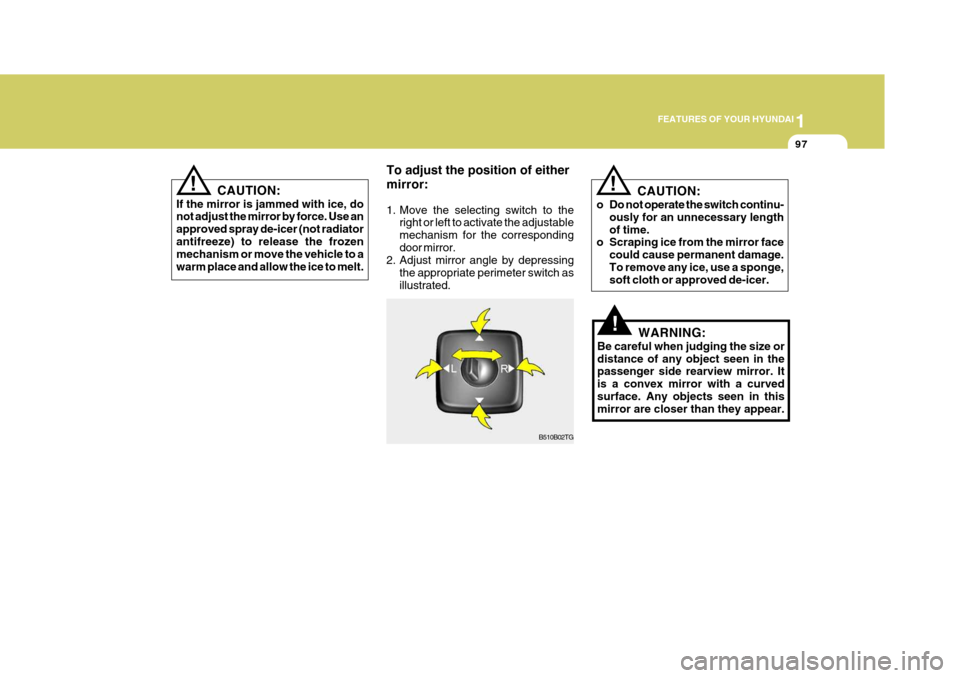
To adjust the position of either mirror:
1. Move the selecting switch to the
right or left to activate the adjustable mechanism for the correspondingdoor mirror.
2. Adjust mirror angle by depressing
the appropriate perimeter switch asillustrated.
B510B02TG
! CAUTION:
If the mirror is jammed with ice, do not adjust the mirror by force. Use an approved spray de-icer (not radiatorantifreeze) to release the frozen mechanism or move the vehicle to a warm place and allow the ice to melt.
Page 121 of 297
1FEATURES OF YOUR HYUNDAI
104
o Automotive fuels are flammable/
explosive materials. When refuel- ing, please note the following guidelines carefully. Failure tofollow these guidelines may re- sult in severe personal injury, se- vere burns or death by fire orexplosion.
- Before refueling always note thelocation of the Emergency Gaso- line Shut-Off, if available, at the gas station facility.
- Before touching the fuel nozzle
or fuel filler cap, you shouldeliminate potentially dangerous static electricity discharge bytouching another metal part of the front of the vehicle, a safe distance away from the fuel fillerneck, nozzle, or other gas source.
- Do not get back into a vehicle
once you have begun refueling.Do not touch, rub or slide against any item or fabric (polyester,satin, nylon, etc.) capable of pro- ducing static electricity. Static electricity discharge can ignitefuel vapors resulting in explo- sion.If you must re-enter the vehicle,
you should once again elimi- nate potentially dangerous static electricity discharge by touch-ing a metal part of the vehicle, away from the fuel filler neck, nozzle or other gasoline source.
- When using a portable fuel con- tainer be sure to place the con-tainer on the ground prior torefueling. Static electricity dis- charge from the container can ignite fuel vapors causing a fire.Once refueling has begun, con- tact with the vehicle should be maintained until the filling iscomplete. Use only portable fuel containers designed to carry and store gasoline.
- Do not use cellular phones around a gas station or whilerefueling any vehicle. Electriccurrent and/or electronic inter- ference from cellular phones can potentially ignite fuel vaporscausing a fire. If you must use your cellular phone use it in a place away from the gas station. - When refueling always shut the
engine off. Sparks produced byelectrical components related tothe engine can ignite fuel va- pors causing a fire. Always in- sure that the engine is OFF be-fore and during refueling. Once refueling is complete, check to make sure the fuel filler cap anddoor are securely closed, before starting the engine.
- Do not light any fire around a gas station. DO NOT use matchesor a lighter and DO NOT SMOKE or leave a lit cigarette in yourvehicle while at a gas station especially during refueling. Automotive fuel is highly flam-mable and can, when ignited, result in explosion by flames.
- If a fire breaks out during refuel- ing, leave the vicinity of the ve-hicle, and immediately contact the manager of the gas stationor contact the police and local fire department. Follow any safety instructions they provide.
Page 128 of 297
1
FEATURES OF YOUR HYUNDAI
111
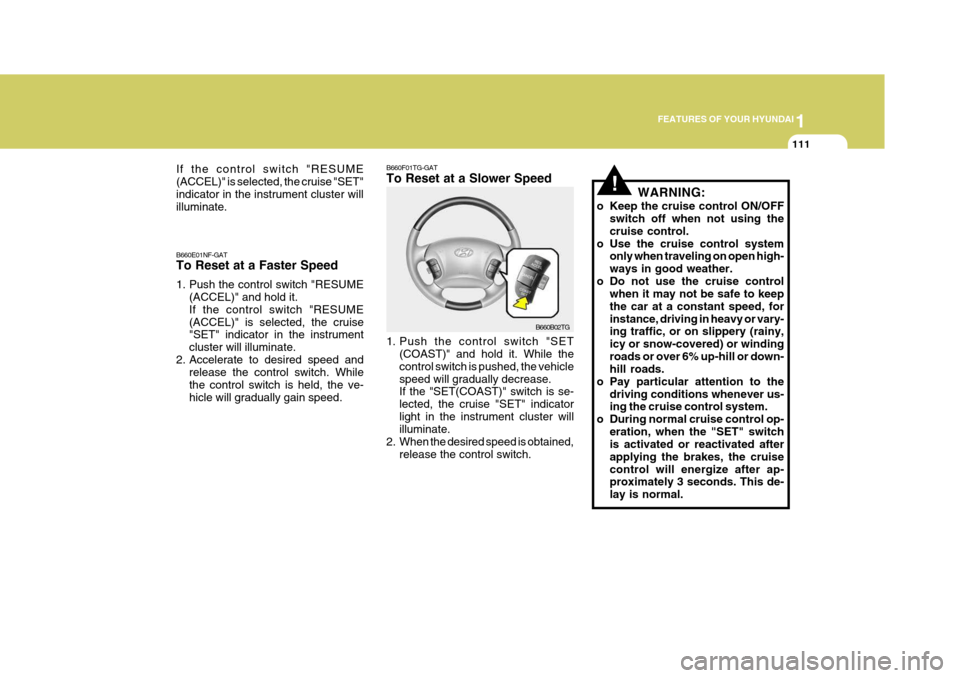
B660F01TG-GAT To Reset at a Slower Speed
B660B02TG
B660E01NF-GAT To Reset at a Faster Speed
1. Push the control switch "RESUME
(ACCEL)" and hold it. If the control switch "RESUME(ACCEL)" is selected, the cruise "SET" indicator in the instrument cluster will illuminate.
2. Accelerate to desired speed and release the control switch. Whilethe control switch is held, the ve-hicle will gradually gain speed. 1. Push the control switch "SET
(COAST)" and hold it. While thecontrol switch is pushed, the vehiclespeed will gradually decrease. If the "SET(COAST)" switch is se- lected, the cruise "SET" indicatorlight in the instrument cluster will illuminate.
2. When the desired speed is obtained, release the control switch.
If the control switch "RESUME (ACCEL)" is selected, the cruise "SET"indicator in the instrument cluster will illuminate.
!WARNING:
o Keep the cruise control ON/OFF switch off when not using the cruise control.
o Use the cruise control system only when traveling on open high-ways in good weather.
o Do not use the cruise control when it may not be safe to keepthe car at a constant speed, forinstance, driving in heavy or vary- ing traffic, or on slippery (rainy, icy or snow-covered) or windingroads or over 6% up-hill or down- hill roads.
o Pay particular attention to the driving conditions whenever us-ing the cruise control system.
o During normal cruise control op- eration, when the "SET" switchis activated or reactivated after applying the brakes, the cruisecontrol will energize after ap- proximately 3 seconds. This de- lay is normal.
Page 155 of 297
1FEATURES OF YOUR HYUNDAI
138
!
MIDDLE Control To increase the MIDDLE, rotate the knob clockwise, while to decrease the MIDDLE, rotate the knob counterclock- wise. TREBLE Control To increase the TREBLE, rotate the knob clockwise, while to decrease theTREBLE, rotate the knob counterclock- wise. FADER Control Turn the control knob clockwise to emphasize rear speaker sound (front speaker sound will be attenuated).When the control knob is turned coun- terclockwise, front speaker sound will be emphasized (rear speaker sound willbe attenuated). BALANCE Control Rotate the knob clockwise to empha- size right speaker sound (Left speaker sound will be attenuated). When the control knob is turned counter clockwise, left speaker sound will beemphasized (Right speaker sound will be attenuated). 8. PRESET STATION Select But-
tons
Six (6) stations for AM (MW, LW), FM1 and FM2 respectively can be preset in the electronic memory circuit. HOW TO PRESET STATIONS Six AM and twelve FM stations may be programmed into the memory of theradio. Then, by simply pressing the
band select button and/or one of the six station select buttons, you may recallany of these stations instantly. To program the stations, follow these steps:
o Press band selector to set the band for AM (MW, LW), FM1 and FM2.
o Select the desired station to be stored
by seek or manual tuning.
o Determine the preset station select
button you wish to use to access thatstation. o Press the station select button for
more than two seconds. Beep soundwill be heard while depressing the button. You should then release the button, and proceed to program thenext desired station. A total of 24 stations can be programmed by se-
lecting one AM (MW, LW) and twoFM station per button.
o When completed, any preset station
may be recalled by selecting AM,FM1 or FM2 band and the appropri-ate station button.
CAUTION:
o Do not place beverages close to the audio system. The playback mechanism may be damaged if you spill them.
o Do not impact on the audio sys- tem, or the playback mechanism
could be damaged.
Page 162 of 297
1
FEATURES OF YOUR HYUNDAI
145
!
MIDDLE Control To increase the MIDDLE, rotate the knob clockwise, while to decrease theMIDDLE, rotate the knob counterclock- wise. TREBLE Control To increase the TREBLE, rotate the knob clockwise, while to decrease the TREBLE, rotate the knob counterclock-wise. FADER Control Turn the control knob clockwise to emphasize rear speaker sound (frontspeaker sound will be attenuated). When the control knob is turned coun- terclockwise, front speaker sound willbe emphasized (rear speaker sound will be attenuated). BALANCE Control Rotate the knob clockwise to empha- size right speaker sound. (Left speaker sound will be attenuated) When the control knob is turned counterclockwise, left speaker sound will beemphasized (Right speaker sound will be attenuated).
8. PRESET STATION Select But-
tons
Six (6) stations for AM (MW, LW), FM1 and FM2 respectively can be preset in the electronic memory circuit. HOW TO PRESET STATIONS Six AM and twelve FM stations may be programmed into the memory of the radio. Then, by simply pressing the
band select button and/or one of the six
station select buttons, you may recall any of these stations instantly. To program the stations, follow thesesteps:
o Press band selector to set the band for AM (MW, LW), FM and FM2.
o Select the desired station to be stored by seek or manual tuning.
o Determine the preset station select button you wish to use to access thatstation. o Press the station select button for
more than two seconds. Beep sound will be heard while depressing the button. You should then release the button, and proceed to program thenext desired station. A total of 24 stations can be programmed by se- lecting one AM (MW, LW) and twoFM station per button.
o When completed, any preset station
may be recalled by selecting AM (MW, LW), FM1 or FM2 band and theappropriate station button.
CAUTION:
o Do not place beverages close to the audio system. The playback mechanism may be damaged if you spill them.
o Do not impact on the audio sys- tem, or the playback mechanismcould be damaged.
Page 172 of 297
1
FEATURES OF YOUR HYUNDAI
155
6. Best Station Memory (BSM) Button
When the BSM button is pressed, the six channels from the highest electricfield intensity are selected next and stored in memory. The stations se- lected are stored in the sequence fre-quency from the first preset key. 7. EQ Button Press the EQ button to select the CLAS- SIC, POPS, ROCK, JAZZ and DE- FEAT MODE for the desired tone qual- ity. Each press of the button changesthe display as follows; HOW TO PRESET STATIONS Six AM(MW, LW) and twelve FM sta- tions may be programmed into thememory of the radio. Then, by simply pressing the AM(MW, LW) / FM select button and/or one of the six stationselect buttons, you may recall any of these stations instantly. To program the stations, follow these steps:
o Press AM(MW, LW)/FM selector to
set the band for AM(MW, LW), FM1and FM2.
o Select the desired station to be stored by seek or manual tuning.
o Determine the preset station select button you wish to use to access that station.
o Press the station select button for more than two seconds. A selectbutton indicator will show in the dis- play indicating which select buttonyou have depressed. The frequency display will flash after it has been stored into the memory. You shouldthen release the button, and proceed to program the next desired station. A total of 24 stations can be pro-grammed by selecting one AM(MW, LW) and two FM station per button. o When completed, any preset station
may be recalled by selecting AM(MW, LW), FM1 or FM2 band and the appropriate station button.
8. PRESET STATION Select But- tons
Six (6) stations for AM(MW, LW), FM1and FM2 respectively can be preset in the electronic memory circuit.
! CAUTION
o Do not place beverages close to the audio system. The audio sys- tem mechanism may be damaged if you spill them.
o Do not strike or allow anything to
impact the audio system, damageto the system mechanisms could occur.
CLASSIC POPS ROCK JAZZ DE-
FEAT
Page 185 of 297
2
Engine Exhaust Can Be Dangerous! ............................ 2-2
Before Starting the Engine ............................................ 2-3
Key Positions ................................................................ 2-4Starting ......................................................................... 2-5
Automatic Transaxle ..................................................... 2-5Anti-Lock Brake System (ABS) ................................... 2-10
Electronic Stability Program (ESP) ..............................2-11
Back Warning System ................................................. 2-12
Good Braking Practices .............................................. 2-13
Driving for Economy .................................................... 2-14
Smooth Cornering ........................................................ 2-16
Winter Driving .............................................................. 2-16
Trailer or Vehicle Towing ............................................. 2-19
DRIVING YOUR HYUNDAI
2
Page 193 of 297
2
DRIVING YOUR HYUNDAI
9
o Do not "ride" the brakes. This can
cause them to overheat and mal- function. Instead, when you are driv- ing down a long hill, slow down and shift to a lower gear. When you dothis, engine braking will help slow the car.
o Slow down before shifting to a lower gear. Otherwise, the lower gear maynot be engaged.
o Always use the parking brake. Do not depend on placing the transaxlein "P" to keep the car from moving.
o Exercise extreme caution when driv- ing on a slippery surface. Be espe-cially careful when braking, acceler- ating or shifting gears. On a slipperysurface, an abrupt change in ve- hicle speed can cause the drive wheels to lose traction and the ve-hicle to go out of control.
C090N03O-AAT Good Driving Practices
o Never move the gear selector lever
from "P" or "N" to any other position with the accelerator pedal de- pressed.
o Never move the gear selector lever into "P" when the vehicle is in mo-tion.
o Be sure the car is completely stopped before you attempt to shift into "R".
o Never take the car out of gear and coast down a hill. This may be ex- tremely hazardous. Always leave the car in gear when moving.
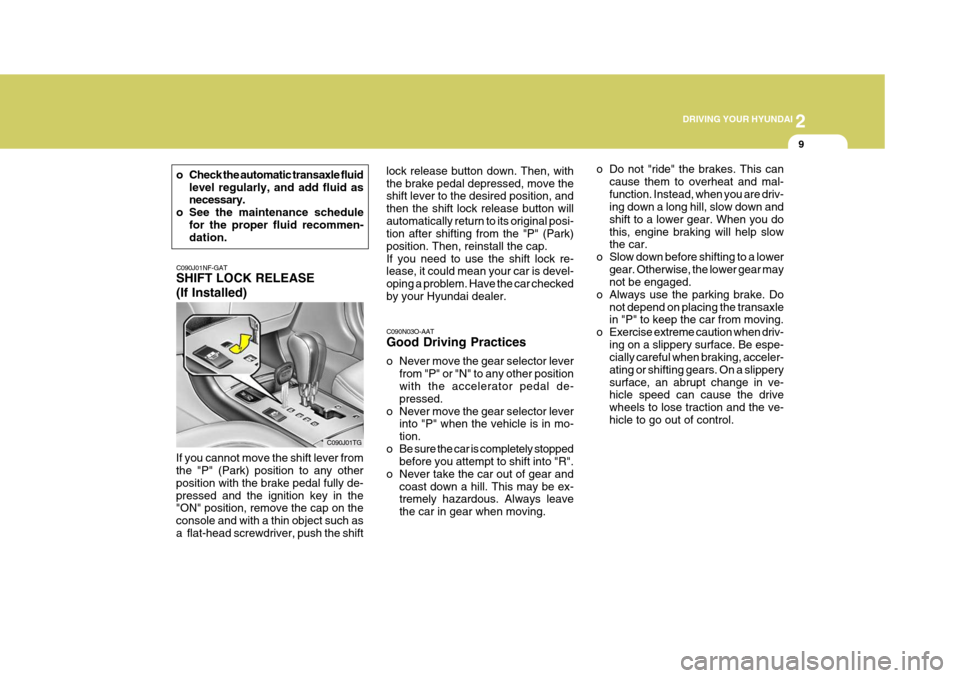
C090J01NF-GAT SHIFT LOCK RELEASE (If Installed)
If you cannot move the shift lever from the "P" (Park) position to any other position with the brake pedal fully de-pressed and the ignition key in the "ON" position, remove the cap on the console and with a thin object such asa flat-head screwdriver, push the shift C090J01TGlock release button down. Then, withthe brake pedal depressed, move the shift lever to the desired position, and then the shift lock release button willautomatically return to its original posi- tion after shifting from the "P" (Park) position. Then, reinstall the cap.If you need to use the shift lock re- lease, it could mean your car is devel- oping a problem. Have the car checkedby your Hyundai dealer.
o Check the automatic transaxle fluid
level regularly, and add fluid as necessary.
o See the maintenance schedule for the proper fluid recommen-dation.
Page 194 of 297
2 DRIVING YOUR HYUNDAI
10
!!
ANTI-LOCK BRAKE SYSTEM (ABS)
C120A01FC-GAT (If Installed) The Anti-Lock Brake System (ABS) is designed to prevent wheel lock-upduring sudden braking or on hazard- ous road surfaces. The ABS control module monitors the wheel speed andcontrols the pressure applied to each brake. Thus, in emergency situations or on slick roads, ABS will increasevehicle control during braking. NOTE:
o A click sound may be heard in the
engine compartment when the ve- hicle begins to move after the en- gine is started. These conditionsare normal and indicate that the anti-lock brake system (Electronic Stability Program) is functioningproperly.
o During ABS (ESP) operation, a
slight pulsation may be felt in thebrake pedal when the brakes are applied. Also, a noise may be heard in the engine compartment whilebraking. These conditions are nor- mal and indicate that the anti-lock brake system (Electronic StabilityProgram System) is functioning properly. WARNING:
ABS (ESP) will not prevent accidents due to improper or dangerous driv-ing maneuvers. Even though vehicle control is improved during emer- gency braking, always maintain a safe distance between you and ob- jects ahead. Vehicle speeds should always be reduced during extreme road conditions. The braking distance for cars equipped with an anti-lock braking system (Electronic Stability Program System) may be longer than for those without it in the following road con- ditions. During these conditions the vehicle should be driven at reduced speeds.
o Rough, gravel or snow-covered roads.
o With tire chains installed.
o On roads where the road surface is pitted or has different surfaceheight.
The safety features of an ABS (ESP)equipped vehicle should not be tested by high speed driving or cornering. This could endanger the safety of yourself or others.
WARNING:
o Avoid high cornering speeds.
o Do not make quick steering wheel movements, such as sharp lane changes or fast, sharp turns.
o Always wear your seat belts.
In a collision, an unbelted personis significantly more likely to die than a person wearing a seat belt.
o The risk of rollover is greatly in-
creased if you lose control ofyour vehicle at highway speeds.
o Loss of control often occurs if
two or more wheels drop off theroadway and the driver oversteers to reenter the roadway.
o In the event your vehicle leaves the roadway, do not steer sharply.Instead, slow down before pullingback into the travel lanes.
o Never exceed posted speed limits.
o Excessive depressing of the ac-
celerator pedal in slippery driv- ing conditions such as pulling out of deep snow or mud maycause severe damage to the transaxle. Rocking the vehicle is not recommended. Rather, usean appropriate towing method.