ECO mode Hyundai Azera 2006 Owner's Manual
[x] Cancel search | Manufacturer: HYUNDAI, Model Year: 2006, Model line: Azera, Model: Hyundai Azera 2006Pages: 307, PDF Size: 12.62 MB
Page 17 of 307
1
FEATURES OF YOUR HYUNDAI
3
BREAKING IN YOUR NEW
HYUNDAI
B010F01A-AATOperation in Foreign CountriesIf you are going to drive your Hyundai in
another country, be sure to:
o Observe all regulations regarding reg-
istration and insurance.
o Determine that acceptable fuel is avail-
able.B010E01A-AATGasolines for Cleaner AirTo help contribute to cleaner air, Hyundai
recommends that you use gasolines
treated with detergent additives, which
help prevent deposit formation in the en-
gine. These gasolines will help the engine
run cleaner and enhance performance of
the Emission Control System.
B020A01TG-AATDuring the First 1,200 Miles (2,000
Km)No formal "break-in" procedure is required
with your new Hyundai. However, you can
contribute to the economical operation
and durability of your Hyundai by observ-
ing the following recommendations dur-
ing the first 1,200 miles (2,000 km).
o Don't drive faster than 55 MPH (88 km/
h).
o While driving, keep your engine speed
(rpm, or revolutions per minute) be-
tween 2,000 rpm and 4,000 rpm.
o Use moderate acceleration. Don't start
quickly or depress the accelerator pedal
fully.
o For the first 200 miles (300 km), try to
avoid hard stops.
o Whether going fast or slow, vary your
speed from time to time.
o Don't let the engine idle longer than 3
minutes at one time.
o Don't tow a trailer during the first 1,200
miles (2,000 km) of operation.
IMMOBILIZER SYSTEMB880A01TG-AATThe immobilizer system is an anti-theft
device, designed to deter automobile theft.NOTE:This device complies with Part 15 of the
FCC rules. Operation is subject to the
following two conditions:
(1) This device may not cause harmful
interference, and (2) this device must
accept any interference received, in-
cluding interference that may cause
undesired operation.
CAUTION:
Changes or modifications not expressly
approved by the party responsible for
compliance could void the user's au-
thority to operate the equipment.
!
Page 20 of 307
1FEATURES OF YOUR HYUNDAI6
4. If all of the four password digits have
been successfully entered, turn the ig-
nition key "ON" and check that the im-
mobilizer indicator illuminates. From
this time, you have to start your engine
within 30 seconds. If you try to start your
engine after 30 seconds, your engine
will not start.NOTE:If the engine stalls while driving in the
"limp home" mode, you can start your
engine within 3 seconds without re-en-
tering the password.
If the immobilizer indicator blinks for five
seconds, you must re-enter the password
(steps 1~4).
After performing the limp home activation
procedure, consult with your authorized
Hyundai dealer as soon as possible. If the immobilizer warning indicator blinks
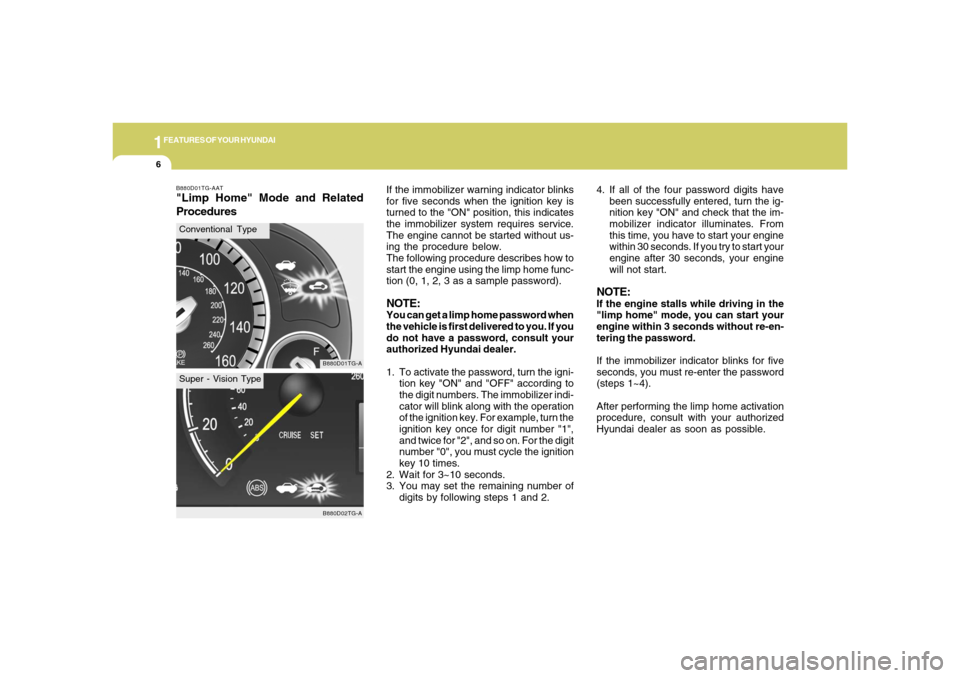
for five seconds when the ignition key is
turned to the "ON" position, this indicates
the immobilizer system requires service.
The engine cannot be started without us-
ing the procedure below.
The following procedure describes how to
start the engine using the limp home func-
tion (0, 1, 2, 3 as a sample password).
NOTE:You can get a limp home password when
the vehicle is first delivered to you. If you
do not have a password, consult your
authorized Hyundai dealer.
1. To activate the password, turn the igni-
tion key "ON" and "OFF" according to
the digit numbers. The immobilizer indi-
cator will blink along with the operation
of the ignition key. For example, turn the
ignition key once for digit number "1",
and twice for "2", and so on. For the digit
number "0", you must cycle the ignition
key 10 times.
2. Wait for 3~10 seconds.
3. You may set the remaining number of
digits by following steps 1 and 2.
B880D01TG-AAT"Limp Home" Mode and Related
Procedures
B880D01TG-AB880D02TG-A
Conventional TypeSuper - Vision Type
Page 45 of 307
1
FEATURES OF YOUR HYUNDAI
31
When the seat belt is fully extended from
the retractor to allow the installation of a
child restraint system, the seat belt opera-
tion changes to allow the belt to retract, but
not to extend (Automatic Locking Retrac-
tor Type). See page 1-39.NOTE:o Although the combination retractor
provides the same level of protection
for seated passengers in either emer-
gency or automatic locking modes, it
is recommended that seated passen-
gers use the emergency locking fea-
ture for improved convenience. The
automatic locking function is intended
to facilitate child restraint installa-
tion. To convert from the automatic
locking feature to the emergency lock-
ing operation mode, allow the unbuck-
led seat belt to fully retract.
o If the front passenger's seat belt is not
fastened when the ignition key is
turned to the "ON" position, the seat
belt warning light on the center fascia
panel will blink for approximately six
seconds to remind the front passen-
ger to fasten the front passenger's
seat belt. See page 1-70.
WARNING:
o For maximum restraint system pro-
tection, the seat belts must always be
used whenever the car is moving.
o Seat belts are most effective when
seatbacks are in the upright position.
o Children must always be seatbelted
in the rear seats. Never allow children
to ride in the front passenger seat.
o The shoulder belt should be positioned
midway over the shoulder nearest
the door for the most effective protec-
tion. Never wear the seat belt under
the arm nearest the door. Wearing the
belt under the arm nearest the door
could cause serious or fatal injuries in
an accident.
o Avoid wearing twisted seat belts. A
twisted belt can't do its job as well. In
a collision, it could even cut into you.
Be sure the belt webbing is straight
and not twisted.
o Be careful not to damage the belt
webbing or hardware. If the belt web-
bing or hardware is damaged, replace
it.
!
B190A01TG-AATSEAT BELTS-Front Passenger and
Rear Seat 3-Point System with Com-
bination Locking RetractorCombination retractor type seat belts are
installed in the rear seat positions to help
accommodate the installation of child re-
straint systems. Although a combination
retractor is also installed in the front passen-
ger seat position, Hyundai strongly recom-
mends that children always be seated in the
rear seat. NEVER place any infant restraint
system in the front seat of the vehicle.
This type of seat belt combines the fea-
tures of both an emergency locking retrac-
tor seat belt and an automatic locking
retractor seat belt. To fasten your seat belt,
pull it out of the retractor and insert the
metal tab into the buckle. There will be an
audible "click" when the tab locks into the
buckle. When not securing a child restraint,
the seat belt operates in the same way as
the driver's seat belt (Emergency Locking
Retractor Type). It automatically adjusts to
the proper length only after the lap belt
portion of the seat belt is adjusted manu-
ally so that it fits snugly around your hips.
Page 59 of 307
1
FEATURES OF YOUR HYUNDAI
45
B240A01TG
The purpose of the SRS is to provide the
vehicle's driver and/or the front passenger
with additional protection than that offered
by the seat belt system alone in case of a
frontal impact of sufficient severity.
The SRS uses sensors to gather informa-
tion about the driver's seat position, the
driver's and front passenger's seat belt
usage and impact severity.
The driver's seat track position sensor,
which is installed on the seat track, deter-
mines if the seat is fore or aft of a reference
position. The seat belt buckle sensors de-
termine if the driver and front passenger's
seat belts are fastened. These sensors
provide the ability to control the SRS de-
ployment based on how close the driver's
seat is to the steering wheel, whether or not
the seat belts are fastened, and how se-
vere the impact is.
The advanced SRS offers the ability to
control the airbag inflation with two levels.
A first stage level is provided for moderate-
severity impacts. A second stage level is
provided for more severe impacts.According to the impact severity, seating
position and seat belt usage, the
SRSCM(SRS Control Module) controls the
airbag inflation. Failure to properly wear
seat belts can increase the risk or severity
of injury in an accident.
Additionally, your Hyundai is equipped
with an occupant classification system in
the front passenger's seat. The occupant
classification system detects the presence
of a passenger in the front passenger's
seat and will turn off the front passenger's
airbag under certain conditions. For more
detail, see "Occupant Classification Sys-
tem" later in this section.
B240A01TG-AATDriver's and Passenger's Front
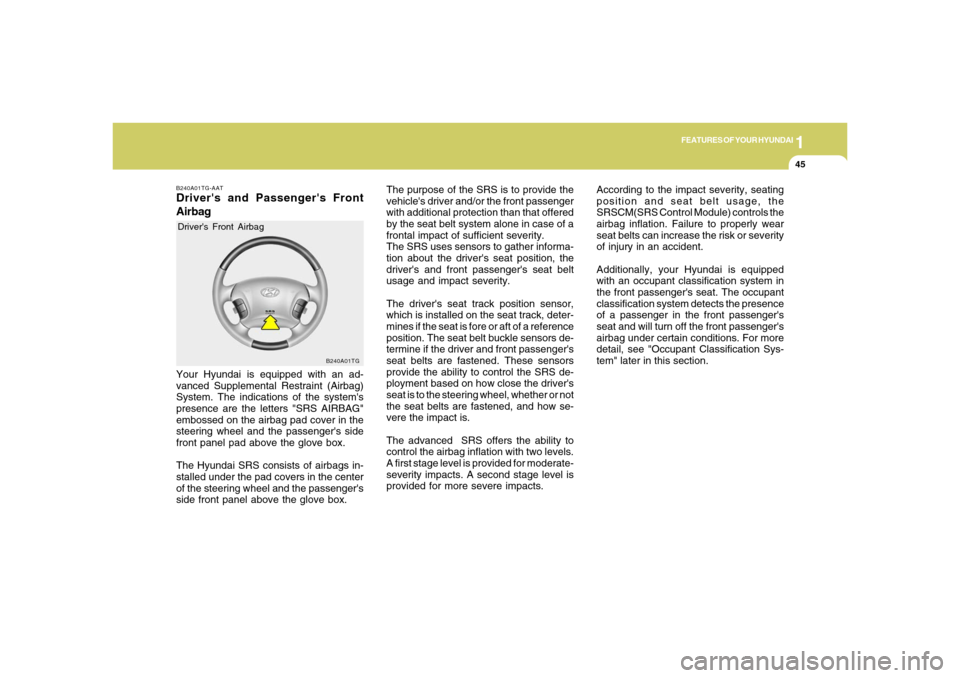
AirbagYour Hyundai is equipped with an ad-
vanced Supplemental Restraint (Airbag)
System. The indications of the system's
presence are the letters "SRS AIRBAG"
embossed on the airbag pad cover in the
steering wheel and the passenger's side
front panel pad above the glove box.
The Hyundai SRS consists of airbags in-
stalled under the pad covers in the center
of the steering wheel and the passenger's
side front panel above the glove box.Driver's Front Airbag
Page 87 of 307

1
FEATURES OF YOUR HYUNDAI
73
B260Q01NF-GAT
CRUISE Indicator Light
The cruise indicator light in the instrument
cluster is illuminated when the cruise con-
trol ON/OFF button on the steering wheel
is pushed.
The indicator light turns off when the cruise
control ON/OFF button is pushed again.
Information about the use of cruise control
begins on page 1-118.B260R01NF-GAT
Cruise SET Indicator Light
The Cruise SET indicator light in the instru-
ment cluster is illuminated when the cruise
control "COAST/SET" or "RES/ACCEL"
switch is pushed. The Cruise SET indica-
tor light does not illuminate when the cruise
control "CANCEL" switch is pushed or the
system is disengaged. To disengage the
cruise control system, refer to "To cancel
the cruise speed" on page 1-119.
B260U01TB-AAT
Immobilizer Warning Light
This indicator light comes on for a few
seconds after the ignition key is turned to
the "ON" position. At this time, you can start
the engine. The light goes out after the
engine is running. In case this light goes
out before you start the engine, you must
turn to the "LOCK" position and restart the
engine. In case this light blinks for five
seconds when the ignition key is turned to
the "ON" position, this indicates that the
immobilizer system is out of order. At this
time, refer to the explanation of the "Limp
Home" mode and related procedures (See
page 1-6) or consult your Hyundai dealer.
B265C01NF-AAT
Electronic Stability Control
(ESC) Indicator Lights
(If Installed)
The electronic stability control indicators
change operation according to the ignition
switch position and whether the system is
in operation.
They will illuminate when the ignition key
is turned to the "ON" position, but should go
out after three seconds. If the ESC or ESC-
OFF indicator stays on, take your car to
your authorized Hyundai dealer and have
the system checked. See section 2 for
more information about the ESC.
Page 92 of 307
1FEATURES OF YOUR HYUNDAI78
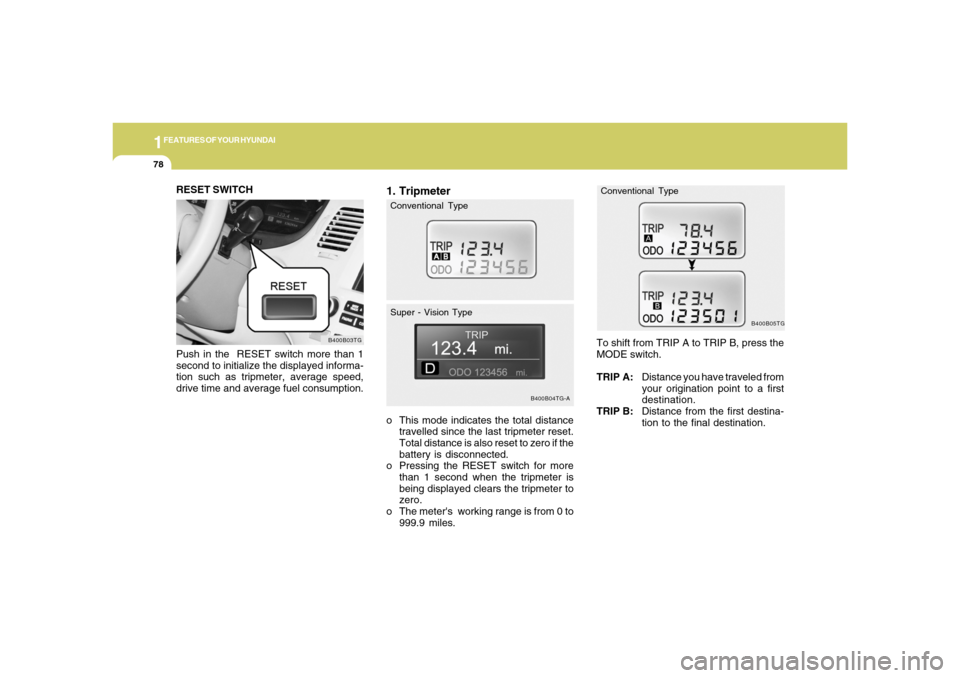
1. Tripmetero This mode indicates the total distance
travelled since the last tripmeter reset.
Total distance is also reset to zero if the
battery is disconnected.
o Pressing the RESET switch for more
than 1 second when the tripmeter is
being displayed clears the tripmeter to
zero.
o The meter's working range is from 0 to
999.9 miles.
B400B04TG-A
Conventional Type
Super - Vision Type
B400B05TG
To shift from TRIP A to TRIP B, press the
MODE switch.
TRIP A:Distance you have traveled from
your origination point to a first
destination.
TRIP B:Distance from the first destina-
tion to the final destination.Conventional Type
RESET SWITCH
Push in the RESET switch more than 1
second to initialize the displayed informa-
tion such as tripmeter, average speed,
drive time and average fuel consumption.
B400B03TG
Page 93 of 307
1
FEATURES OF YOUR HYUNDAI
79
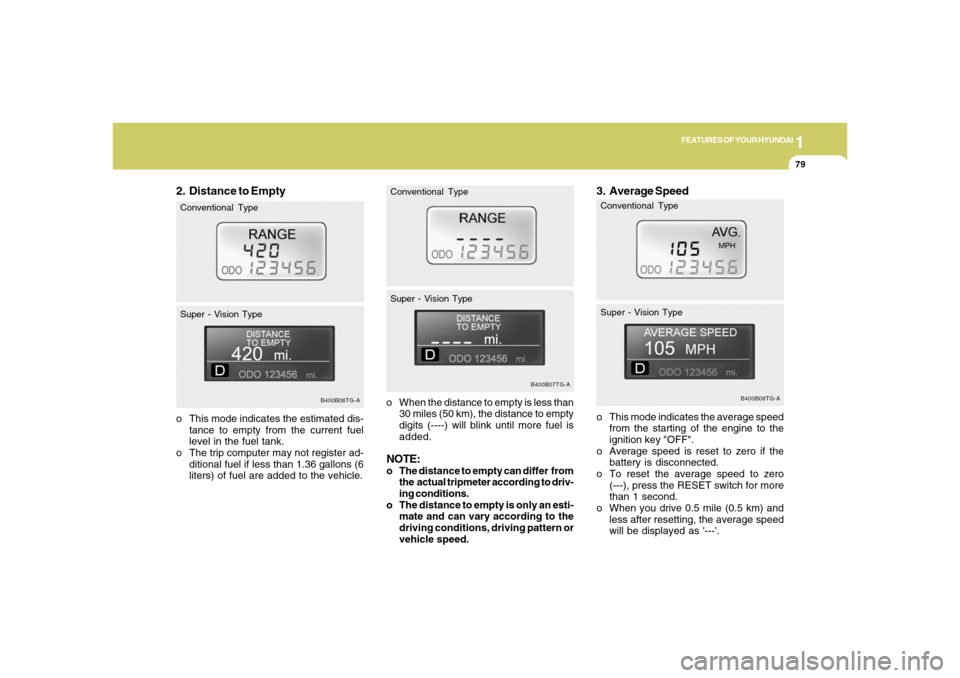
2. Distance to Empty
o When the distance to empty is less than
30 miles (50 km), the distance to empty
digits (----) will blink until more fuel is
added.NOTE:o The distance to empty can differ from
the actual tripmeter according to driv-
ing conditions.
o The distance to empty is only an esti-
mate and can vary according to the
driving conditions, driving pattern or
vehicle speed. o This mode indicates the estimated dis-
tance to empty from the current fuel
level in the fuel tank.
o The trip computer may not register ad-
ditional fuel if less than 1.36 gallons (6
liters) of fuel are added to the vehicle.
B400B06TG-A
Conventional Type
Super - Vision Type
B400B07TG-A
Conventional Type
Super - Vision Type
3. Average Speedo This mode indicates the average speed
from the starting of the engine to the
ignition key "OFF".
o Average speed is reset to zero if the
battery is disconnected.
o To reset the average speed to zero
(---), press the RESET switch for more
than 1 second.
o When you drive 0.5 mile (0.5 km) and
less after resetting, the average speed
will be displayed as '---'.
B400B08TG-A
Conventional Type
Super - Vision Type
Page 94 of 307
1FEATURES OF YOUR HYUNDAI80
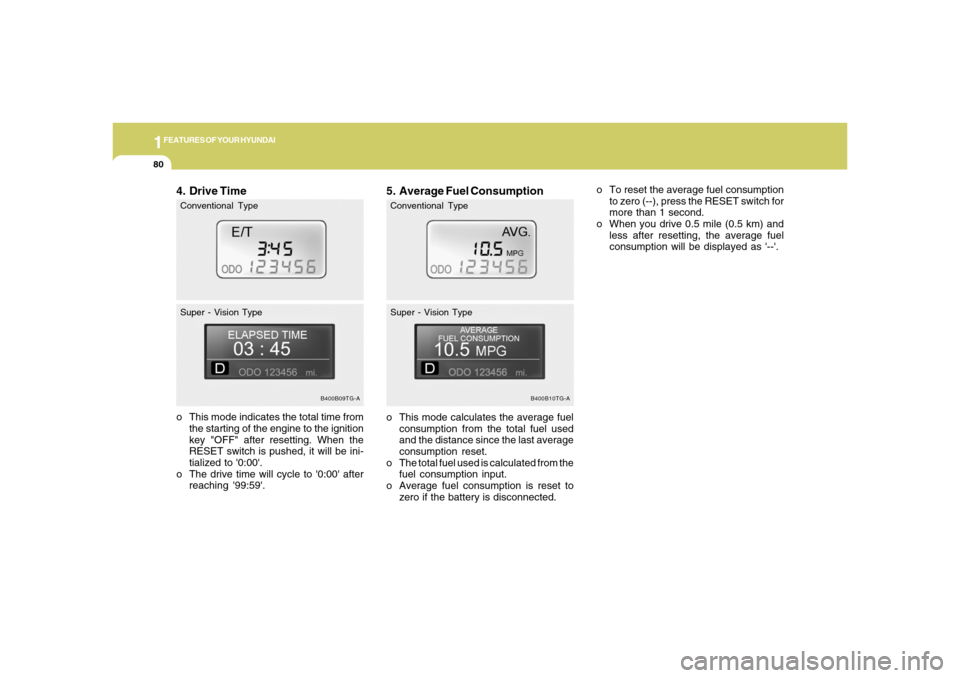
4. Drive Timeo This mode indicates the total time from
the starting of the engine to the ignition
key "OFF" after resetting. When the
RESET switch is pushed, it will be ini-
tialized to '0:00'.
o The drive time will cycle to '0:00' after
reaching '99:59'.
5. Average Fuel Consumptiono This mode calculates the average fuel
consumption from the total fuel used
and the distance since the last average
consumption reset.
o The total fuel used is calculated from the
fuel consumption input.
o Average fuel consumption is reset to
zero if the battery is disconnected.
B400B09TG-A
Conventional Type
Super - Vision Type
B400B10TG-A
Conventional Type
Super - Vision Type
o To reset the average fuel consumption
to zero (--), press the RESET switch for
more than 1 second.
o When you drive 0.5 mile (0.5 km) and
less after resetting, the average fuel
consumption will be displayed as '--'.
Page 118 of 307
1FEATURES OF YOUR HYUNDAI
104
!
Integrated HomeLink
® Wireless Con-
trol System
The HomeLink
® Wireless Control System
provides a convenient way to replace up to
three hand-held radio-frequency (RF)
transmitters with a single built-in device.
This innovative feature will learn the radio
frequency codes of most current transmit-
ters to operate devices such as gate op-
erators, garage door openers, entry door
locks, security systems, even home light-
ing. Both standard and rolling code-
equipped transmitters can be programmed
by following the outlined procedures. Ad-
ditional HomeLink
® information can be
found at: www.homelink.com or by calling
1-800-355-3515.
CAUTION:
Before programming HomeLink
® to a
garage door opener or gate operator,
make sure that people and objects are
out of the way of the device to prevent
potential harm or damage. Do not use
HomeLink
® with any garage door opener
that lacks the safety stop and reverse
features as required by U.S. federal
safety standards (this includes any ga-
rage door opener model manufactured
before April 1, 1982). A garage door that
cannot detect an object - signaling the
door to stop and reverse - does not meet
current U.S. federal safety standards.
Using a garage door opener without these
features increases the risk of serious
injury or death.Programming HomeLink
®
NOTE:o When programming a garage door
opener, it is advised to park the ve-
hicle outside of the garage.
o It is recommended that a new battery
be placed in the hand-held transmit-
ter of the device being programmed
to HomeLink
® for quicker training and
accurate transmission of the radio-
frequency signal.
o Some vehicles may require the igni-
tion switch to be turned to the second
(or "accessories") position for pro-
gramming and/or operation of
HomeLink.
o In the event that there are still pro-
gramming difficulties or questions
after following the programming steps
listed below, contact HomeLink
® at:
www.homelink.com or 1-800-355-
3515. Retain the original transmitter of the RF
device you are programming for use in
other vehicles as well as for future
HomeLink
® programming. It is also sug-
gested that upon the sale of the vehicle, the
programmed HomeLink
® buttons be
erased for security purposes.
1. Press and hold the button for more
than 6 seconds. When the compass
memory is cleared a "C" will appear in
the display.
2. To calibrate the compass, drive the
vehicle in 2 complete circles at less than
5 MPH (8 Km/h).
Page 120 of 307
1FEATURES OF YOUR HYUNDAI
106
4. Press and hold the just-trained
HomeLink
® button and observe the red
Status Indicator LED. If the indicator
light stays on constantly, programming
is complete and your device should
activate.
5. To program the remaining two
HomeLink® buttons, follow either steps
1 through 4 above for other Rolling
Code devices or steps 2 through 5 in
Standard Programming for standard
devices.
During programming, your handheld trans-
mitter may automatically stop transmitting.
Continue to press the Integrated
HomeLink
® Wireless Control System but-
ton (note steps 2 through 4 in the Standard
Programming portion of this document)
while you press and re-press ("cycle") your
handheld transmitter every two seconds
until the frequency signal has been learned.
The indicator light will flash slowly and
then rapidly after several seconds upon
successful training.Operating HomeLink
®
To operate, simply press and release the
programmed HomeLink
® button. Activa-
tion will now occur for the trained device
(i.e. garage door opener, gate operator,
security system, entry door lock, home/
office lighting, etc.). For convenience, the
hand-held transmitter of the device may
also be used at any time.
Reprogramming a Single HomeLink
®
Button
To program a new device to a previously
trained HomeLink
® button, follow these
steps:
1. Press and hold the desired HomeLink
®
button. Do NOT release until step 4 has
been completed.
2. When the indicator light begins to flash
slowly (after 20 seconds), position the
handheld transmitter 1 to 3 inches away
from the HomeLink
® surface.
3. Press and hold the handheld transmit-
ter button. The HomeLink
® indicator light
will flash, first slowly and then rapidly.
4. When the indicator light begins to flash
rapidly, release both buttons.
5. Press and hold the just-trainedHomeLink
® button and observe the red
Status Indicator LED. If the indicator
light stays on constantly, programming
is complete and your new device should
activate.
Erasing HomeLink
® Buttons
Individual buttons cannot be erased. How-
ever, to erase all three programmed but-
tons:
1. Press and hold the two outer HomeLink
®
buttons until the indicator light begins to
flash-after 20 seconds.
2. Release both buttons. Do not hold for
longer than 30 seconds.
The Integrated HomeLink
® Wireless Con-
trol System is now in the training (learn)
mode and can be programmed at any time
following the appropriate steps in the Pro-
gramming sections above.
FCC ID: NZLZTVHL3
IC: 4112A-ZTVHL3