buttons Hyundai Azera 2006 Owner's Manual
[x] Cancel search | Manufacturer: HYUNDAI, Model Year: 2006, Model line: Azera, Model: Hyundai Azera 2006Pages: 307, PDF Size: 12.62 MB
Page 101 of 307
1
FEATURES OF YOUR HYUNDAI
87
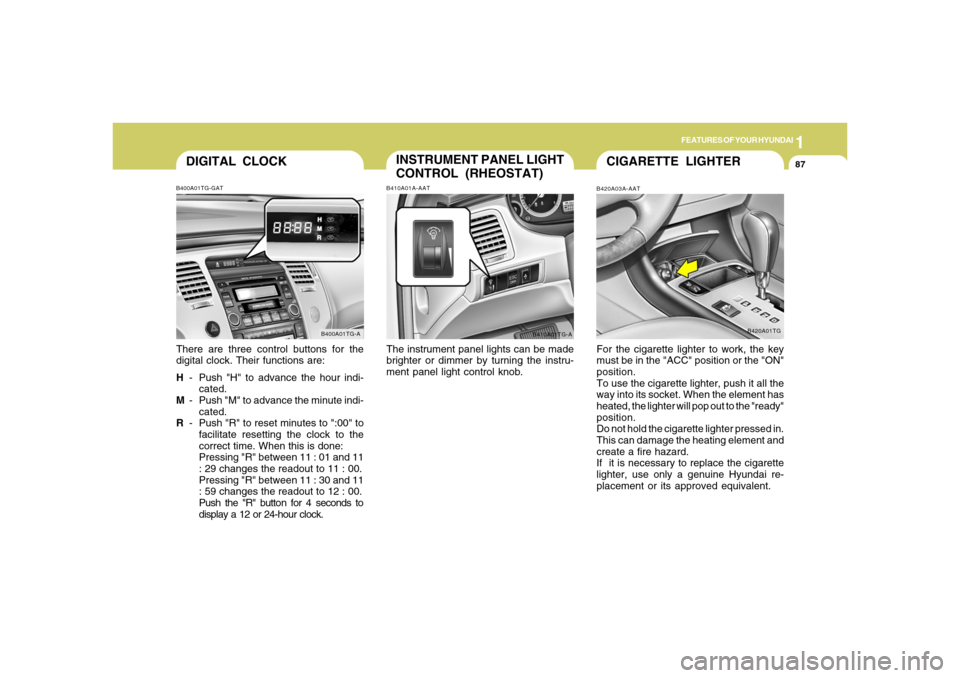
DIGITAL CLOCKB400A01TG-GATThere are three control buttons for the
digital clock. Their functions are:
H- Push "H" to advance the hour indi-
cated.
M- Push "M" to advance the minute indi-
cated.
R- Push "R" to reset minutes to ":00" to
facilitate resetting the clock to the
correct time. When this is done:
Pressing "R" between 11 : 01 and 11
: 29 changes the readout to 11 : 00.
Pressing "R" between 11 : 30 and 11
: 59 changes the readout to 12 : 00.
Push the "R" button for 4 seconds to
display a 12 or 24-hour clock.
B400A01TG-A
INSTRUMENT PANEL LIGHT
CONTROL (RHEOSTAT)B410A01A-AATThe instrument panel lights can be made
brighter or dimmer by turning the instru-
ment panel light control knob.
B410A01TG-A
CIGARETTE LIGHTERB420A03A-AATFor the cigarette lighter to work, the key
must be in the "ACC" position or the "ON"
position.
To use the cigarette lighter, push it all the
way into its socket. When the element has
heated, the lighter will pop out to the "ready"
position.
Do not hold the cigarette lighter pressed in.
This can damage the heating element and
create a fire hazard.
If it is necessary to replace the cigarette
lighter, use only a genuine Hyundai re-
placement or its approved equivalent.
B420A01TG
Page 105 of 307
1
FEATURES OF YOUR HYUNDAI
91
!SUNROOFB460A02Y-AAT(If Installed)
Sun Shade
B460A01TG
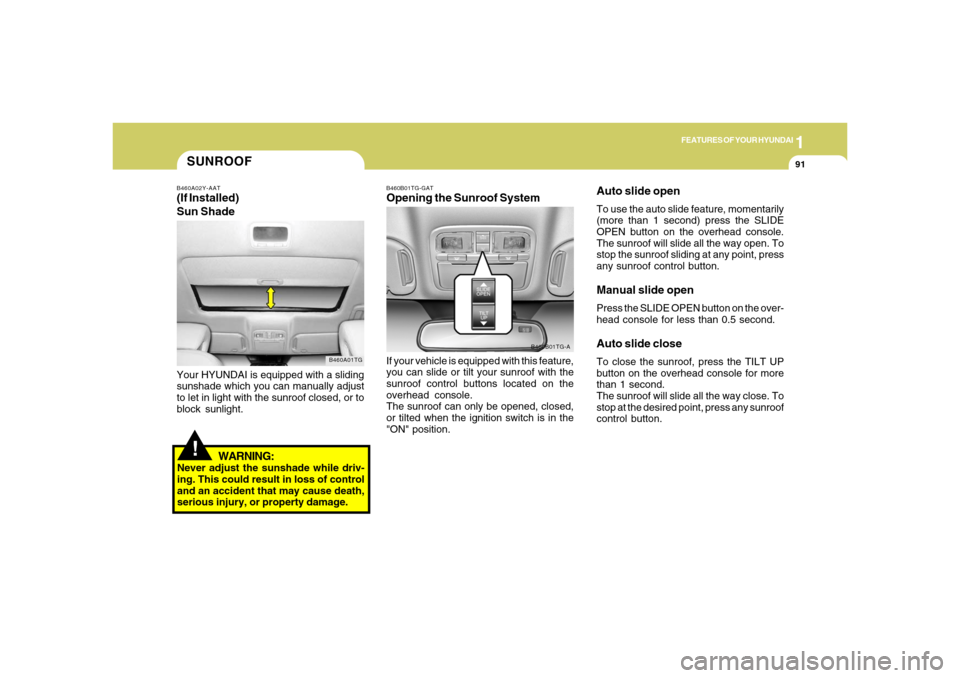
Your HYUNDAI is equipped with a sliding
sunshade which you can manually adjust
to let in light with the sunroof closed, or to
block sunlight.
WARNING:
Never adjust the sunshade while driv-
ing. This could result in loss of control
and an accident that may cause death,
serious injury, or property damage.
B460B01TG-GATOpening the Sunroof SystemIf your vehicle is equipped with this feature,
you can slide or tilt your sunroof with the
sunroof control buttons located on the
overhead console.
The sunroof can only be opened, closed,
or tilted when the ignition switch is in the
"ON" position.
B460B01TG-A
Auto slide openTo use the auto slide feature, momentarily
(more than 1 second) press the SLIDE
OPEN button on the overhead console.
The sunroof will slide all the way open. To
stop the sunroof sliding at any point, press
any sunroof control button.Manual slide openPress the SLIDE OPEN button on the over-
head console for less than 0.5 second.Auto slide closeTo close the sunroof, press the TILT UP
button on the overhead console for more
than 1 second.
The sunroof will slide all the way close. To
stop at the desired point, press any sunroof
control button.
Page 109 of 307
1
FEATURES OF YOUR HYUNDAI
95
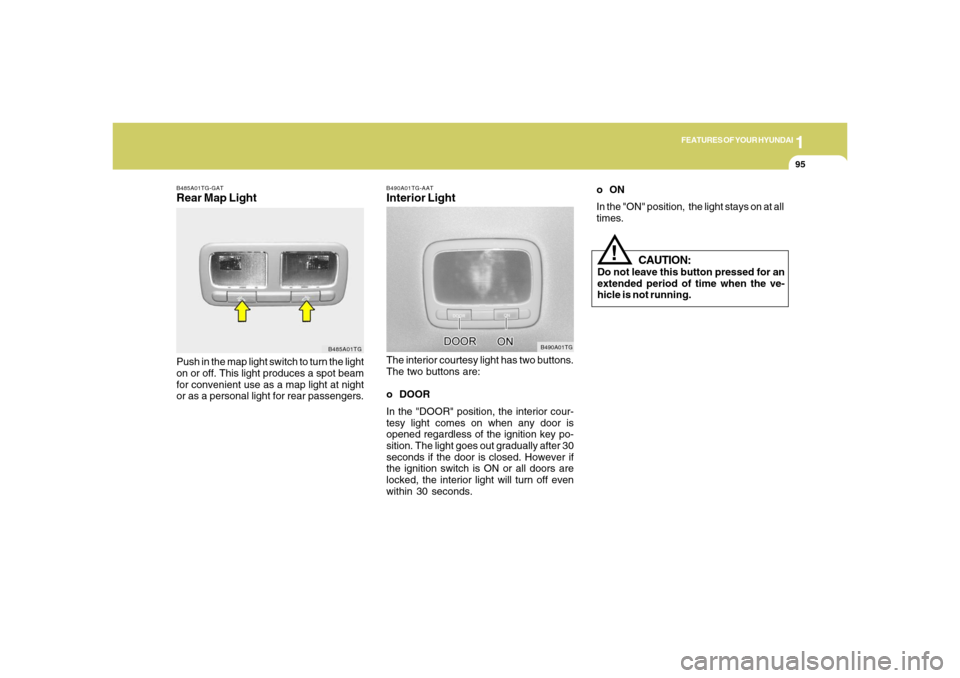
B490A01TG-AATInterior LightThe interior courtesy light has two buttons.
The two buttons are:
o DOOR
In the "DOOR" position, the interior cour-
tesy light comes on when any door is
opened regardless of the ignition key po-
sition. The light goes out gradually after 30
seconds if the door is closed. However if
the ignition switch is ON or all doors are
locked, the interior light will turn off even
within 30 seconds.
B490A01TG
B485A01TG-GATRear Map LightPush in the map light switch to turn the light
on or off. This light produces a spot beam
for convenient use as a map light at night
or as a personal light for rear passengers.
B485A01TG
CAUTION:
Do not leave this button pressed for an
extended period of time when the ve-
hicle is not running.
!
oON
In the "ON" position, the light stays on at all
times.
Page 118 of 307
1FEATURES OF YOUR HYUNDAI
104
!
Integrated HomeLink
® Wireless Con-
trol System
The HomeLink
® Wireless Control System
provides a convenient way to replace up to
three hand-held radio-frequency (RF)
transmitters with a single built-in device.
This innovative feature will learn the radio
frequency codes of most current transmit-
ters to operate devices such as gate op-
erators, garage door openers, entry door
locks, security systems, even home light-
ing. Both standard and rolling code-
equipped transmitters can be programmed
by following the outlined procedures. Ad-
ditional HomeLink
® information can be
found at: www.homelink.com or by calling
1-800-355-3515.
CAUTION:
Before programming HomeLink
® to a
garage door opener or gate operator,
make sure that people and objects are
out of the way of the device to prevent
potential harm or damage. Do not use
HomeLink
® with any garage door opener
that lacks the safety stop and reverse
features as required by U.S. federal
safety standards (this includes any ga-
rage door opener model manufactured
before April 1, 1982). A garage door that
cannot detect an object - signaling the
door to stop and reverse - does not meet
current U.S. federal safety standards.
Using a garage door opener without these
features increases the risk of serious
injury or death.Programming HomeLink
®
NOTE:o When programming a garage door
opener, it is advised to park the ve-
hicle outside of the garage.
o It is recommended that a new battery
be placed in the hand-held transmit-
ter of the device being programmed
to HomeLink
® for quicker training and
accurate transmission of the radio-
frequency signal.
o Some vehicles may require the igni-
tion switch to be turned to the second
(or "accessories") position for pro-
gramming and/or operation of
HomeLink.
o In the event that there are still pro-
gramming difficulties or questions
after following the programming steps
listed below, contact HomeLink
® at:
www.homelink.com or 1-800-355-
3515. Retain the original transmitter of the RF
device you are programming for use in
other vehicles as well as for future
HomeLink
® programming. It is also sug-
gested that upon the sale of the vehicle, the
programmed HomeLink
® buttons be
erased for security purposes.
1. Press and hold the button for more
than 6 seconds. When the compass
memory is cleared a "C" will appear in
the display.
2. To calibrate the compass, drive the
vehicle in 2 complete circles at less than
5 MPH (8 Km/h).
Page 119 of 307

1
FEATURES OF YOUR HYUNDAI
105
Standard Programming
To train most devices, follow these instruc-
tions:
1. For first-time programming, press and
hold the two outside buttons, HomeLink
®
Channel 1 and Channel 3 Buttons, until
the indicator light begins to flash (after
20 seconds). Release both buttons. Do
not hold the buttons for longer than 30
seconds.
2. Position the end of your hand-held trans-
mitter 1-3 inches (5-14 cm) away from
the HomeLink
® buttons while keeping
the indicator light in view.
3. Simultaneously press and hold both
the HomeLink® and hand-held trans-
mitter button. DO NOT release the but-
tons until step 4 has been completed.
4. While continuing to hold the buttons the
red Indicator Status LED will flash slowly
and then rapidly after HomeLink
® suc-
cessfully trains to the frequency signal
from the hand-held transmitter. Release
both buttons.5. Press and hold the just-trained
HomeLink
® button and observe the red
Status Indicator LED. If the indicator
light stays on constantly, programming
is complete and your device should
activate when the HomeLink
® button is
pressed and released.
6. To program the remaining two
HomeLink
® buttons, follow steps 2
through 5.
Rolling Code Programming
Rolling code devices which are "code-
protected" and manufactured after 1996
may be determined by the following:
o Reference the device owner's manual
for verification.
o The handheld transmitter appears to
program the HomeLink Universal Trans-
ceiver but does not activate the device.
o Press and hold the trained HomeLink
button. The device has the rolling code
feature if the indicator light flashes rap-
idly and then turns solid after 2 seconds.To train rolling code devices, follow these
instructions:
1. At the garage door opener receiver
(motor-head unit) in the garage, locate
the "learn" or "smart" button. This can
usually be found where the hanging
antenna wire is attached to the motor-
head unit. Exact location and color of
the button may vary by garage door
opener brand. If there is difficulty locat-
ing the training button, reference the
device owner's manual or please visit
our Web site at www.homelink.com.
2. Firmly press and release the "learn" or
"smart" button (which activates the "train-
ing light").
NOTE:There are 30 seconds in which to initiate
step3.
3. Return to the vehicle and firmly press,
hold for two seconds and then release
the desired HomeLink
® button. Repeat
the "press/hold/release" sequence a
second time to complete the program-
ming. (Some devices may require you
to repeat this sequence a third time to
complete the programming.)
Page 120 of 307
1FEATURES OF YOUR HYUNDAI
106
4. Press and hold the just-trained
HomeLink
® button and observe the red
Status Indicator LED. If the indicator
light stays on constantly, programming
is complete and your device should
activate.
5. To program the remaining two
HomeLink® buttons, follow either steps
1 through 4 above for other Rolling
Code devices or steps 2 through 5 in
Standard Programming for standard
devices.
During programming, your handheld trans-
mitter may automatically stop transmitting.
Continue to press the Integrated
HomeLink
® Wireless Control System but-
ton (note steps 2 through 4 in the Standard
Programming portion of this document)
while you press and re-press ("cycle") your
handheld transmitter every two seconds
until the frequency signal has been learned.
The indicator light will flash slowly and
then rapidly after several seconds upon
successful training.Operating HomeLink
®
To operate, simply press and release the
programmed HomeLink
® button. Activa-
tion will now occur for the trained device
(i.e. garage door opener, gate operator,
security system, entry door lock, home/
office lighting, etc.). For convenience, the
hand-held transmitter of the device may
also be used at any time.
Reprogramming a Single HomeLink
®
Button
To program a new device to a previously
trained HomeLink
® button, follow these
steps:
1. Press and hold the desired HomeLink
®
button. Do NOT release until step 4 has
been completed.
2. When the indicator light begins to flash
slowly (after 20 seconds), position the
handheld transmitter 1 to 3 inches away
from the HomeLink
® surface.
3. Press and hold the handheld transmit-
ter button. The HomeLink
® indicator light
will flash, first slowly and then rapidly.
4. When the indicator light begins to flash
rapidly, release both buttons.
5. Press and hold the just-trainedHomeLink
® button and observe the red
Status Indicator LED. If the indicator
light stays on constantly, programming
is complete and your new device should
activate.
Erasing HomeLink
® Buttons
Individual buttons cannot be erased. How-
ever, to erase all three programmed but-
tons:
1. Press and hold the two outer HomeLink
®
buttons until the indicator light begins to
flash-after 20 seconds.
2. Release both buttons. Do not hold for
longer than 30 seconds.
The Integrated HomeLink
® Wireless Con-
trol System is now in the training (learn)
mode and can be programmed at any time
following the appropriate steps in the Pro-
gramming sections above.
FCC ID: NZLZTVHL3
IC: 4112A-ZTVHL3
Page 140 of 307
1FEATURES OF YOUR HYUNDAI
126
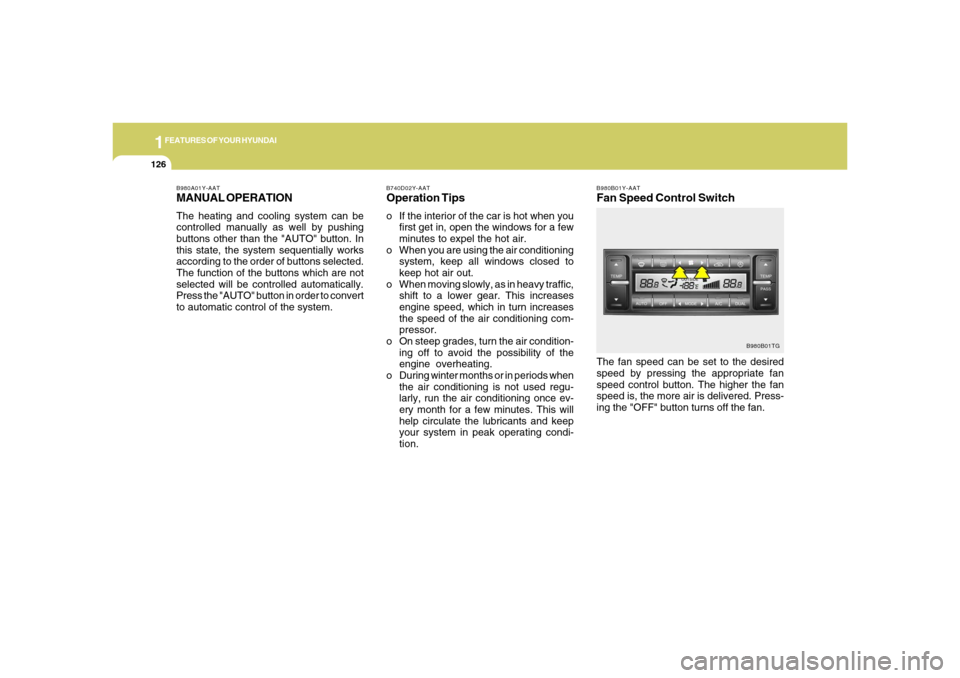
B980B01Y-AATFan Speed Control SwitchThe fan speed can be set to the desired
speed by pressing the appropriate fan
speed control button. The higher the fan
speed is, the more air is delivered. Press-
ing the "OFF" button turns off the fan.
B980B01TG B980A01Y-AAT
MANUAL OPERATIONThe heating and cooling system can be
controlled manually as well by pushing
buttons other than the "AUTO" button. In
this state, the system sequentially works
according to the order of buttons selected.
The function of the buttons which are not
selected will be controlled automatically.
Press the "AUTO" button in order to convert
to automatic control of the system.
B740D02Y-AATOperation Tipso If the interior of the car is hot when you
first get in, open the windows for a few
minutes to expel the hot air.
o When you are using the air conditioning
system, keep all windows closed to
keep hot air out.
o When moving slowly, as in heavy traffic,
shift to a lower gear. This increases
engine speed, which in turn increases
the speed of the air conditioning com-
pressor.
o On steep grades, turn the air condition-
ing off to avoid the possibility of the
engine overheating.
o During winter months or in periods when
the air conditioning is not used regu-
larly, run the air conditioning once ev-
ery month for a few minutes. This will
help circulate the lubricants and keep
your system in peak operating condi-
tion.
Page 150 of 307
1FEATURES OF YOUR HYUNDAI
136
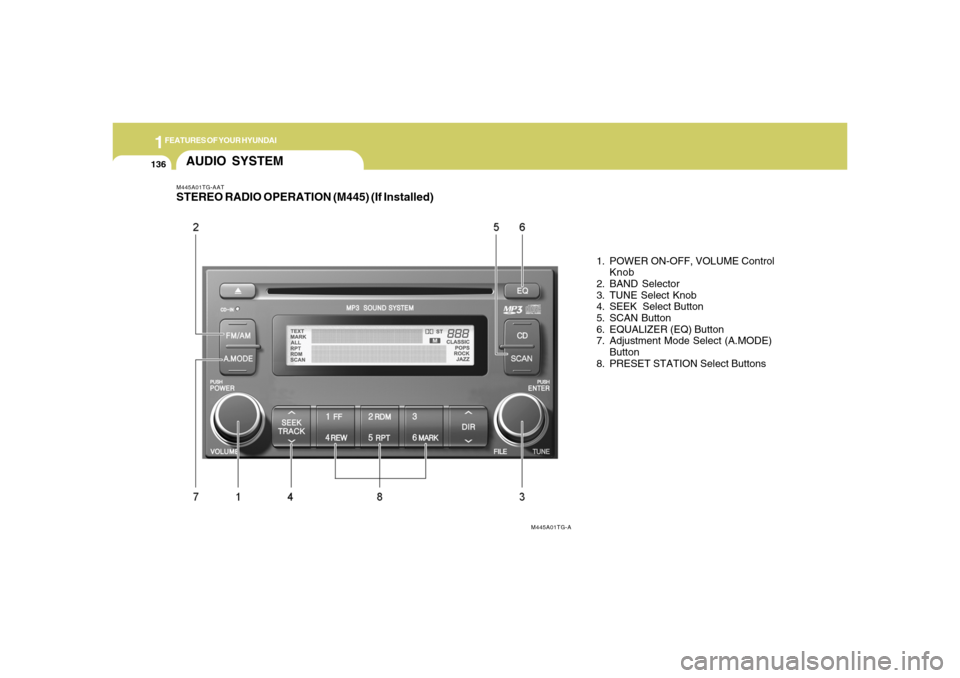
M445A01TG-AATSTEREO RADIO OPERATION (M445) (If Installed)
1. POWER ON-OFF, VOLUME Control
Knob
2. BAND Selector
3. TUNE Select Knob
4. SEEK Select Button
5. SCAN Button
6. EQUALIZER (EQ) Button
7. Adjustment Mode Select (A.MODE)
Button
8. PRESET STATION Select Buttons
AUDIO SYSTEM
M445A01TG-A
Page 152 of 307
1FEATURES OF YOUR HYUNDAI
138
MIDDLE ControlTo increase the MIDDLE, rotate the knob
clockwise, while to decrease the MIDDLE,
rotate the knob counterclockwise.TREBLE ControlTo increase the TREBLE, rotate the knob
clockwise, while to decrease the TREBLE,
rotate the knob counterclockwise.FADER ControlTurn the control knob clockwise to empha-
size rear speaker sound (front speaker
sound will be attenuated).
When the control knob is turned counter-
clockwise, front speaker sound will be
emphasized (rear speaker sound will be
attenuated).BALANCE ControlRotate the knob clockwise to emphasize
right speaker sound (Left speaker sound
will be attenuated).
When the control knob is turned counter-
clockwise, left speaker sound will be em-
phasized (Right speaker sound will be
attenuated).
CAUTION:
o Do not place beverages close to the
audio system. The playback mecha-
nism may be damaged if you spill
them.
o Do not impact on the audio system, or
the playback mechanism could be
damaged.
!
8. PRESET STATION Select ButtonsSix (6) stations for AM, FM1 and FM2
respectively can be preset in the electronic
memory circuit.HOW TO PRESET STATIONSSix AM and twelve FM stations may be
programmed into the memory of the radio.
Then, by simply pressing the band select
button and/or one of the six station select
buttons, you may recall any of these sta-
tions instantly.
To program the stations, follow these steps:
o Press band selector to set the band for
AM, FM1 and FM2.
o Select the desired station to be stored
by seek or manual tuning.
o Determine the preset station select
button you wish to use to access that
station.
o Press the station select button for more
than two seconds. Beep sound will be
heard while depressing the button. You
should then release the button, and
proceed to program the next desired
station. A total of 18 stations can be
programmed by selecting one AM and
two FM station per button.o When completed, any preset station
may be recalled by selecting AM, FM1
or FM2 band and the appropriate sta-
tion button.
Page 157 of 307
1
FEATURES OF YOUR HYUNDAI
1431
FEATURES OF YOUR HYUNDAI
143
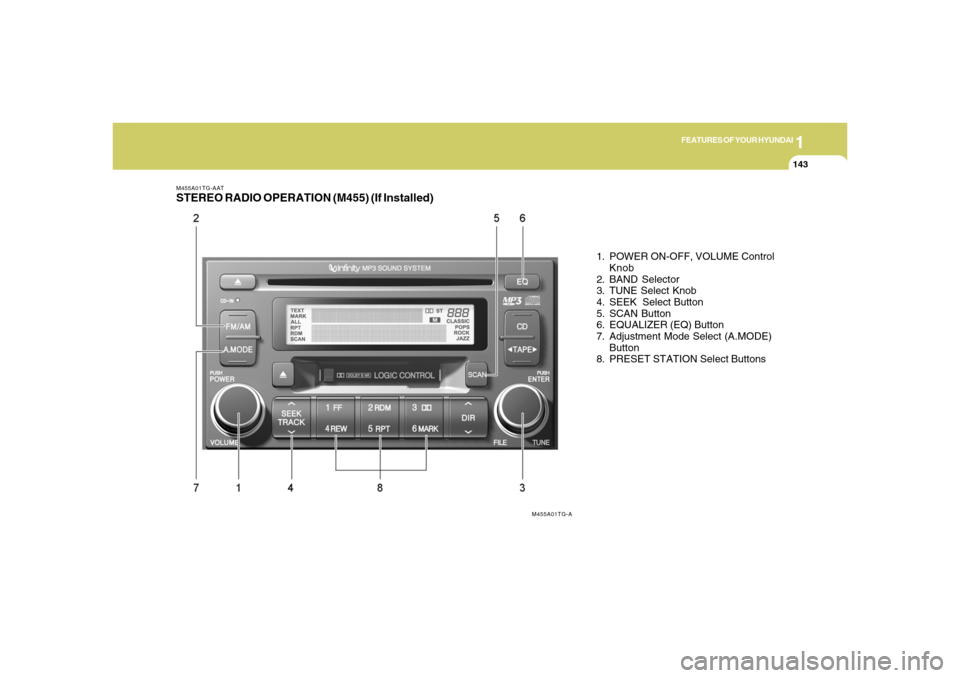
M455A01TG-AATSTEREO RADIO OPERATION (M455) (If Installed)
1. POWER ON-OFF, VOLUME Control
Knob
2. BAND Selector
3. TUNE Select Knob
4. SEEK Select Button
5. SCAN Button
6. EQUALIZER (EQ) Button
7. Adjustment Mode Select (A.MODE)
Button
8. PRESET STATION Select Buttons
M455A01TG-A