fog light Hyundai Azera 2006 Owner's Manual
[x] Cancel search | Manufacturer: HYUNDAI, Model Year: 2006, Model line: Azera, Model: Hyundai Azera 2006Pages: 307, PDF Size: 12.62 MB
Page 13 of 307
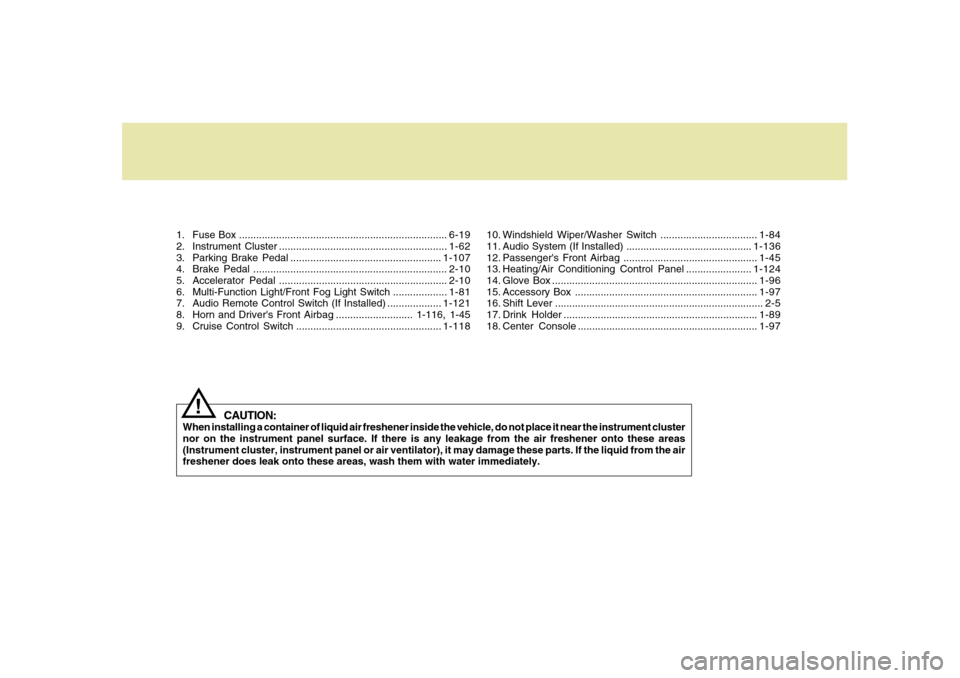
1. Fuse Box .........................................................................6-19
2. Instrument Cluster ...........................................................1-62
3. Parking Brake Pedal .....................................................1-107
4. Brake Pedal ....................................................................2-10
5. Accelerator Pedal ...........................................................2-10
6. Multi-Function Light/Front Fog Light Switch ...................1-81
7. Audio Remote Control Switch (If Installed) ...................1-121
8. Horn and Driver's Front Airbag ........................... 1-116, 1-45
9. Cruise Control Switch ...................................................1-118
CAUTION:
When installing a container of liquid air freshener inside the vehicle, do not place it near the instrument cluster
nor on the instrument panel surface. If there is any leakage from the air freshener onto these areas
(Instrument cluster, instrument panel or air ventilator), it may damage these parts. If the liquid from the air
freshener does leak onto these areas, wash them with water immediately.
!
10. Windshield Wiper/Washer Switch ..................................1-84
11. Audio System (If Installed) ............................................1-136
12. Passenger's Front Airbag ...............................................1-45
13. Heating/Air Conditioning Control Panel .......................1-124
14. Glove Box ........................................................................1-96
15. Accessory Box ................................................................1-97
16. Shift Lever ......................................................................... 2-5
17. Drink Holder ....................................................................1-89
18. Center Console ...............................................................1-97
Page 14 of 307

YOUR VEHICLE AT A GLANCEB255A01TG-AATINDICATOR SYMBOLS ON THE INSTRUMENT CLUSTER* More detailed explanations of these items will be found beginning on page 1-66.
Turn Signal Indicator LightsHigh Beam Indicator LightLow Oil Pressure Warning LightParking Brake/Low Brake Fluid Level
Warning Light
Charging System Warning LightDoor Ajar Warning LightTrunk Lid Open Warning LightLow Fuel Level Warning Light
Low Windshield Washer Fluid Level Warning Light
Seat Belt Warning LightFront Fog Light Indicator LightCheck Engine - Malfunction Indicator Light (MIL)SRS (Airbag) Warning LightABS Service Reminder Indicator (If Installed)
Electronic Stability Control (ESC) Indicator
Lights (If Installed)Cruise Indicator LightCruise SET Indicator Light
Immobilizer Warning Light
Page 77 of 307

1
FEATURES OF YOUR HYUNDAI
63
1. Check Engine - Malfunction Indicator Light (MIL)
2. Low Oil Pressure Warning Light
3. Charging System Warning Light
4. SRS (Airbag) Warning Light
5. Tachometer
6. Turn Signal Indicator Lights
7. High Beam Indicator Light
8. Electronic Stability Control (ESC) Indicator Lights
(If Installed)
9. Automatic Transaxle Position Indicator Light
10. CRUISE Indicator Light
11. Front Fog Light Indicator Light
12. Cruise SET Indicator Light13. Speedometer
14. Low Windshield Washer Fluid Level Warning Light
15. Trunk Lid Open Warning Light
16. Immobilizer Warning Light
17. Coolant Temperature Gauge
18. ABS Service Reminder Indicator (SRI) (If Installed)
19. Door Ajar Warning Light
20. Seat Belt Warning Light (Driver's side)
21. Odometer/Trip Computer
22. Parking Brake/Low Brake Fluid Level Warning Light
23. Low Fuel Warning Light
24. Fuel Gauge
Page 79 of 307

1
FEATURES OF YOUR HYUNDAI
65
1. Tachometer
2. High Beam Indicator Light
3. Turn Signal Indicator Lights
4. Speedometer
5. Front Fog Light Indicator Light
6. Coolant Temperature Gauge
7. Fuel Gauge
8. Charging System Warning Light
9. Parking Brake/Low Brake Fluid Level Warning Light
10. Seat Belt Warning Light (Driver's side)
11. Door Ajar Warning Light
12. SRS (Airbag) Warning Light
13. Check Engine - Malfunction Indicator Light (MIL)14. Low Oil Pressure Warning Light
15. Low Windshield Washer Fluid Level Warning Light
16. ABS Service Reminder Indicator (SRI) (If Installed)
17. CRUISE Indicator Light
18. Trunk Lid Open Warning Light
19. Immobilizer Warning Light
20. Cruise SET Indicator Light
21. Automatic Transaxle Position Indicator Light
22. Odometer/Trip Computer/Warning Text
23. Electronic Stability Control (ESC) Indicator Lights
(If Installed)
24. Low Fuel Warning Light
Page 85 of 307
1
FEATURES OF YOUR HYUNDAI
71
B260N01TG-AAT
Check Engine - Malfunction
Indicator Light (MIL)
This light illuminates when there is a mal-
function of an exhaust gas related compo-
nent and the system is not functioning
properly. This light will also illuminate when
the ignition key is turned to the "ON" position,
and will go out in a few seconds after the
engine is started. If it illuminates while driv-
ing, or does not illuminate when the ignition
key is turned to the "ON" position, take your
car to your nearest authorized Hyundai
dealer and have the system checked.B260A01Y-GAT
Front Fog Light Indicator
Light
This fog indicator light comes on when the
ignition key is turned to the "ON" position
and the front fog light switch is on.
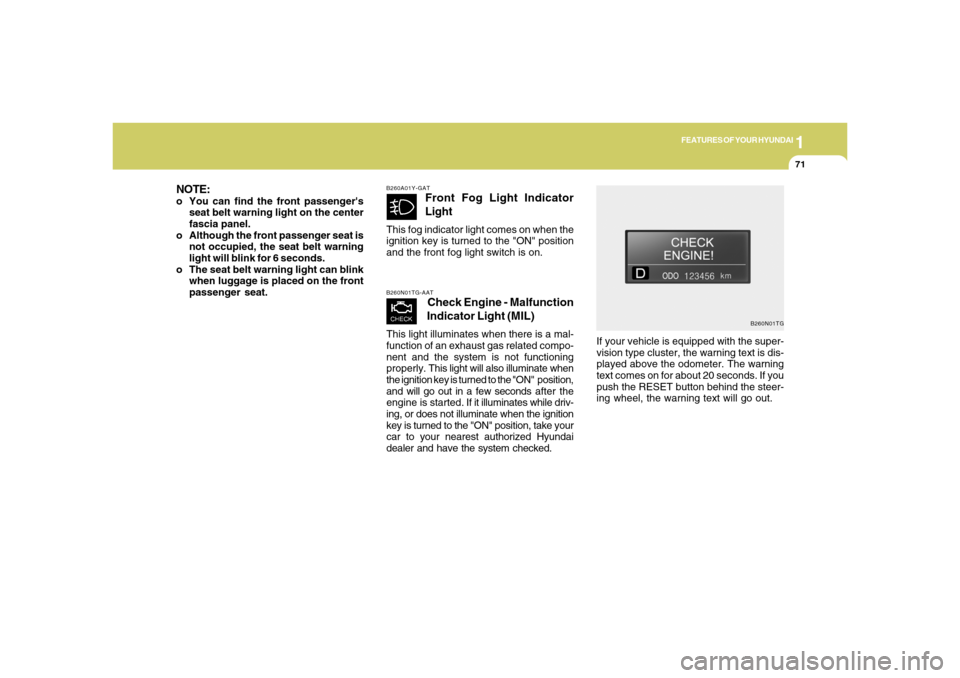
B260N01TG
If your vehicle is equipped with the super-
vision type cluster, the warning text is dis-
played above the odometer. The warning
text comes on for about 20 seconds. If you
push the RESET button behind the steer-
ing wheel, the warning text will go out.
NOTE:o You can find the front passenger's
seat belt warning light on the center
fascia panel.
o Although the front passenger seat is
not occupied, the seat belt warning
light will blink for 6 seconds.
o The seat belt warning light can blink
when luggage is placed on the front
passenger seat.
Page 96 of 307
1FEATURES OF YOUR HYUNDAI82
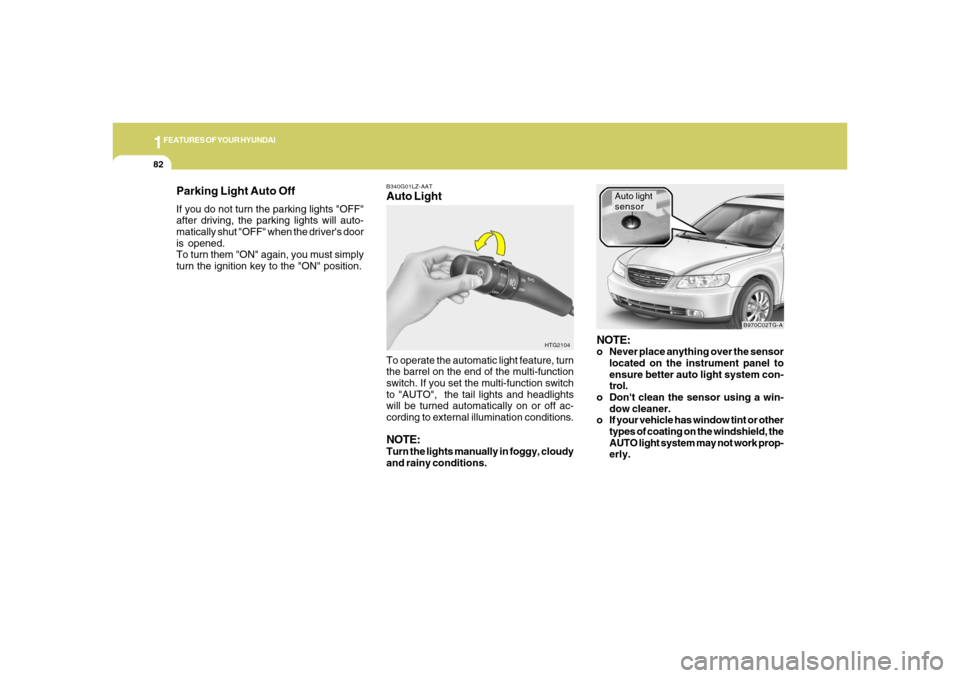
B340G01LZ-AATAuto Light
HTG2104
To operate the automatic light feature, turn
the barrel on the end of the multi-function
switch. If you set the multi-function switch
to "AUTO", the tail lights and headlights
will be turned automatically on or off ac-
cording to external illumination conditions.NOTE:Turn the lights manually in foggy, cloudy
and rainy conditions.
NOTE:o Never place anything over the sensor
located on the instrument panel to
ensure better auto light system con-
trol.
o Don't clean the sensor using a win-
dow cleaner.
o If your vehicle has window tint or other
types of coating on the windshield, the
AUTO light system may not work prop-
erly.
Auto light
sensor
B970C02TG-A
Parking Light Auto OffIf you do not turn the parking lights "OFF"
after driving, the parking lights will auto-
matically shut "OFF" when the driver's door
is opened.
To turn them "ON" again, you must simply
turn the ignition key to the "ON" position.
Page 97 of 307
1
FEATURES OF YOUR HYUNDAI
83
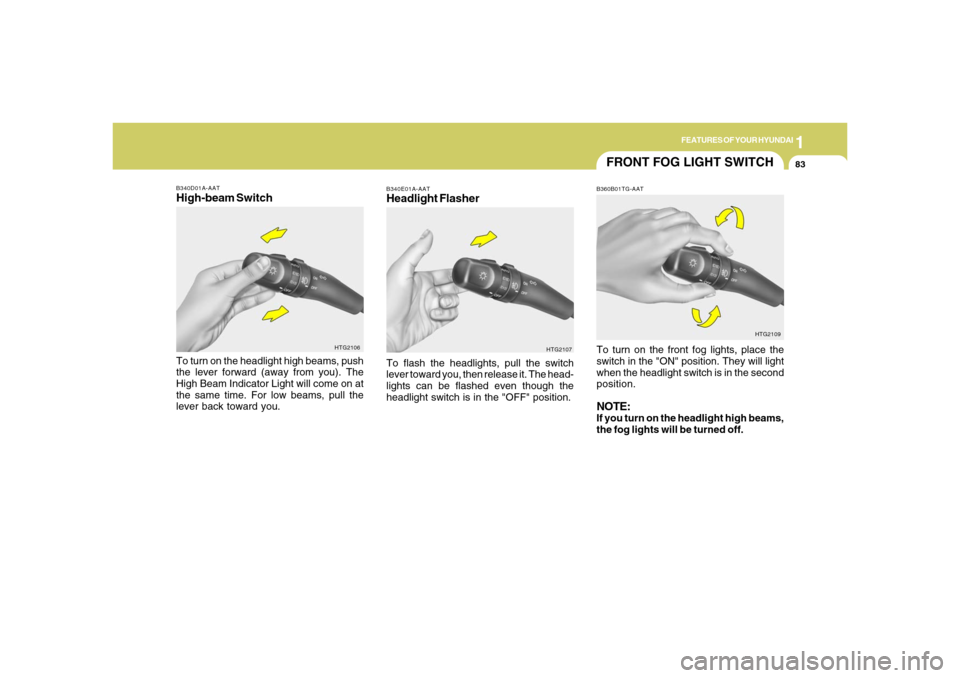
B340D01A-AATHigh-beam SwitchTo turn on the headlight high beams, push
the lever forward (away from you). The
High Beam Indicator Light will come on at
the same time. For low beams, pull the
lever back toward you.
HTG2106
FRONT FOG LIGHT SWITCHB360B01TG-AATTo turn on the front fog lights, place the
switch in the "ON" position. They will light
when the headlight switch is in the second
position.NOTE:If you turn on the headlight high beams,
the fog lights will be turned off.
HTG2109
B340E01A-AATHeadlight FlasherTo flash the headlights, pull the switch
lever toward you, then release it. The head-
lights can be flashed even though the
headlight switch is in the "OFF" position.
HTG2107
Page 141 of 307
1
FEATURES OF YOUR HYUNDAI
1271
FEATURES OF YOUR HYUNDAI
127
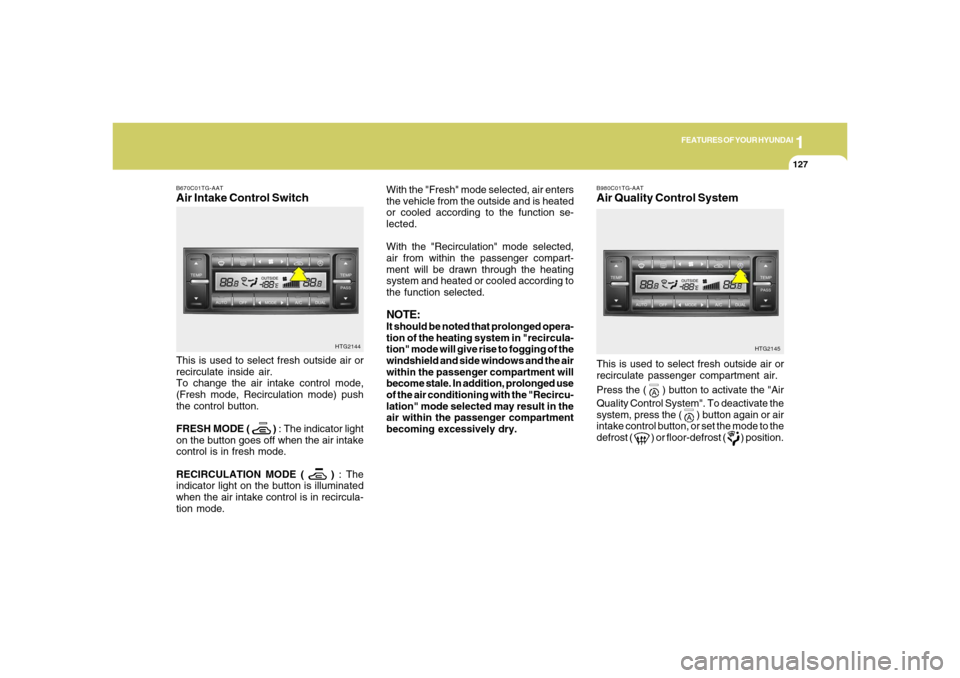
With the "Fresh" mode selected, air enters
the vehicle from the outside and is heated
or cooled according to the function se-
lected.
With the "Recirculation" mode selected,
air from within the passenger compart-
ment will be drawn through the heating
system and heated or cooled according to
the function selected.NOTE:It should be noted that prolonged opera-
tion of the heating system in "recircula-
tion" mode will give rise to fogging of the
windshield and side windows and the air
within the passenger compartment will
become stale. In addition, prolonged use
of the air conditioning with the "Recircu-
lation" mode selected may result in the
air within the passenger compartment
becoming excessively dry.
B670C01TG-AATAir Intake Control SwitchThis is used to select fresh outside air or
recirculate inside air.
To change the air intake control mode,
(Fresh mode, Recirculation mode) push
the control button.
FRESH MODE (
) : The indicator light
on the button goes off when the air intake
control is in fresh mode.
RECIRCULATION MODE (
) : The
indicator light on the button is illuminated
when the air intake control is in recircula-
tion mode.HTG2144
HTG2145
This is used to select fresh outside air or
recirculate passenger compartment air.
Press the (
) button to activate the "Air
Quality Control System". To deactivate the
system, press the (
) button again or air
intake control button, or set the mode to the
defrost (
) or floor-defrost (
) position.
B980C01TG-AATAir Quality Control System
Page 261 of 307
6
DO-IT-YOURSELF MAINTENANCE
24
REPLACEMENT OF LIGHT
BULBSG260A01TG-GATBefore attempting to replace a light bulb,
be sure the switch is turned to the "OFF"
position.
The next paragraph shows how to reach
the light bulbs so they may be changed. Be
sure to replace the burned-out bulb with
one of the same number and wattage
rating.
See page 6-32 for the wattage descrip-
tions.
!
CAUTION:
o Keep the lights out of contact with
petroleum products, such as oil, gaso-
line, etc.
o Be sure to replace the LED type
equipped bulbs with an assembly.
o If you don't have necessary tools, the
correct bulbs and the expertise, con-
sult your authorized Hyundai dealer.
G270A01TG-AATHEADLIGHT AND FRONT FOG LIGHT
CAUTION:The headlight aiming should be checked
by an authorized Hyundai dealer after
replacing the headlight bulbs.
!
FOR MORE INFORMATION
ABOUT YOUR HYUNDAIG250A01A-AATIf you desire additional information about
maintaining and servicing your Hyundai,
you may purchase a factory Shop Manual
at your Hyundai dealer's parts department.
This is the same manual used by dealer-
ship technicians and while it is highly tech-
nical it can be useful in obtaining a better
understanding of your car and how it works.
Page 262 of 307
6
DO-IT-YOURSELF MAINTENANCE
25
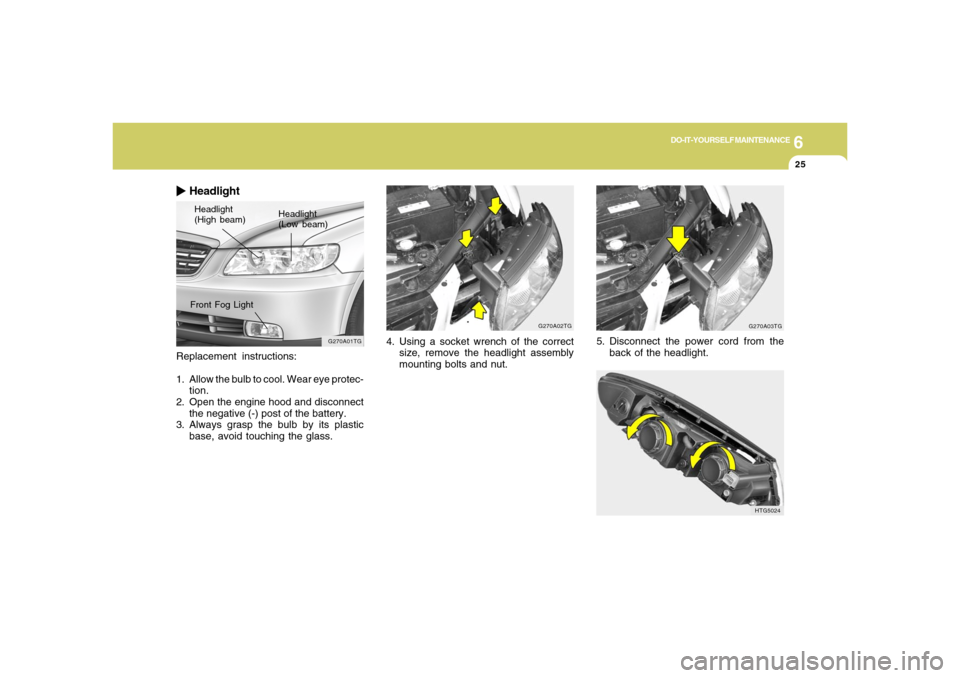
Replacement instructions:
1. Allow the bulb to cool. Wear eye protec-
tion.
2. Open the engine hood and disconnect
the negative (-) post of the battery.
3. Always grasp the bulb by its plastic
base, avoid touching the glass.
HeadlightHeadlight
(High beam)Headlight
(Low beam)
G270A01TG
Front Fog Light
G270A02TG
4. Using a socket wrench of the correct
size, remove the headlight assembly
mounting bolts and nut.
G270A03TG
5. Disconnect the power cord from the
back of the headlight.
HTG5024