headlight bulb Hyundai Azera 2006 Owner's Manual
[x] Cancel search | Manufacturer: HYUNDAI, Model Year: 2006, Model line: Azera, Model: Hyundai Azera 2006Pages: 307, PDF Size: 12.62 MB
Page 95 of 307
1
FEATURES OF YOUR HYUNDAI
81
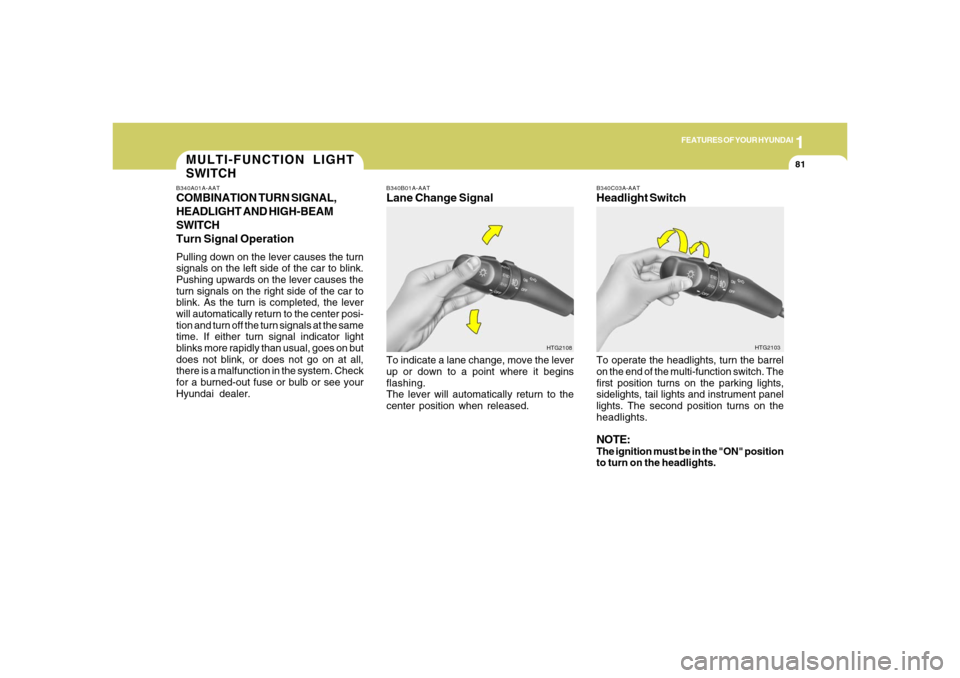
B340B01A-AATLane Change SignalTo indicate a lane change, move the lever
up or down to a point where it begins
flashing.
The lever will automatically return to the
center position when released.
B340C03A-AATHeadlight SwitchTo operate the headlights, turn the barrel
on the end of the multi-function switch. The
first position turns on the parking lights,
sidelights, tail lights and instrument panel
lights. The second position turns on the
headlights.NOTE:The ignition must be in the "ON" position
to turn on the headlights.
HTG2108HTG2103
MULTI-FUNCTION LIGHT
SWITCHB340A01A-AATCOMBINATION TURN SIGNAL,
HEADLIGHT AND HIGH-BEAM
SWITCH
Turn Signal OperationPulling down on the lever causes the turn
signals on the left side of the car to blink.
Pushing upwards on the lever causes the
turn signals on the right side of the car to
blink. As the turn is completed, the lever
will automatically return to the center posi-
tion and turn off the turn signals at the same
time. If either turn signal indicator light
blinks more rapidly than usual, goes on but
does not blink, or does not go on at all,
there is a malfunction in the system. Check
for a burned-out fuse or bulb or see your
Hyundai dealer.
Page 261 of 307
6
DO-IT-YOURSELF MAINTENANCE
24
REPLACEMENT OF LIGHT
BULBSG260A01TG-GATBefore attempting to replace a light bulb,
be sure the switch is turned to the "OFF"
position.
The next paragraph shows how to reach
the light bulbs so they may be changed. Be
sure to replace the burned-out bulb with
one of the same number and wattage
rating.
See page 6-32 for the wattage descrip-
tions.
!
CAUTION:
o Keep the lights out of contact with
petroleum products, such as oil, gaso-
line, etc.
o Be sure to replace the LED type
equipped bulbs with an assembly.
o If you don't have necessary tools, the
correct bulbs and the expertise, con-
sult your authorized Hyundai dealer.
G270A01TG-AATHEADLIGHT AND FRONT FOG LIGHT
CAUTION:The headlight aiming should be checked
by an authorized Hyundai dealer after
replacing the headlight bulbs.
!
FOR MORE INFORMATION
ABOUT YOUR HYUNDAIG250A01A-AATIf you desire additional information about
maintaining and servicing your Hyundai,
you may purchase a factory Shop Manual
at your Hyundai dealer's parts department.
This is the same manual used by dealer-
ship technicians and while it is highly tech-
nical it can be useful in obtaining a better
understanding of your car and how it works.
Page 262 of 307
6
DO-IT-YOURSELF MAINTENANCE
25
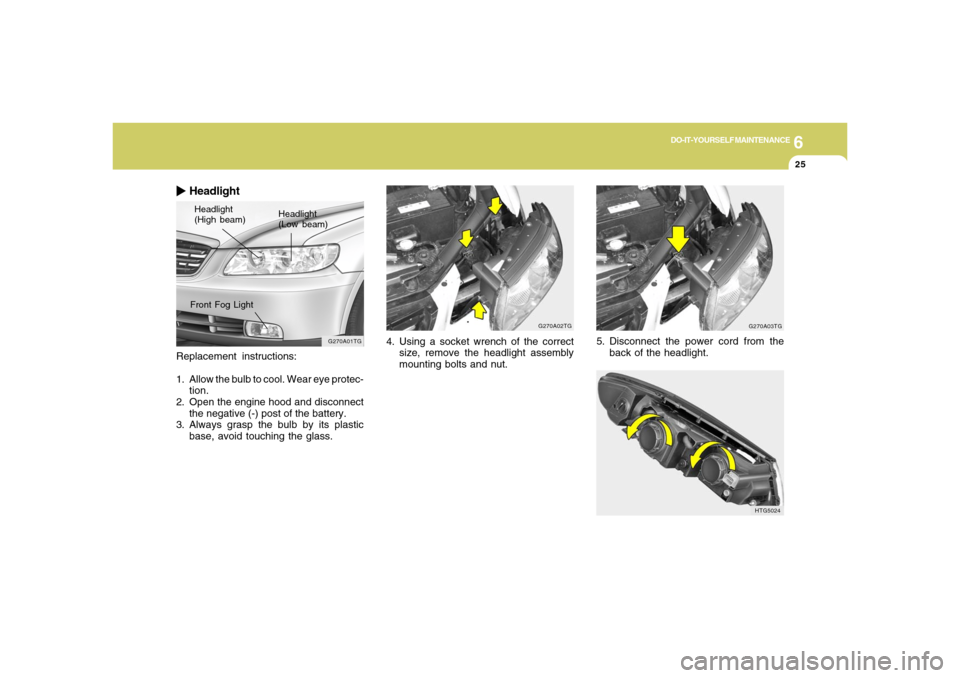
Replacement instructions:
1. Allow the bulb to cool. Wear eye protec-
tion.
2. Open the engine hood and disconnect
the negative (-) post of the battery.
3. Always grasp the bulb by its plastic
base, avoid touching the glass.
HeadlightHeadlight
(High beam)Headlight
(Low beam)
G270A01TG
Front Fog Light
G270A02TG
4. Using a socket wrench of the correct
size, remove the headlight assembly
mounting bolts and nut.
G270A03TG
5. Disconnect the power cord from the
back of the headlight.
HTG5024
Page 263 of 307
6
DO-IT-YOURSELF MAINTENANCE
26
!
WARNING:
This halogen bulb contains gas under
pressure and if impacted could shatter,
resulting in flying fragments. Always
wear eye protection when servicing the
bulb. Protect the bulb against abrasions
or scratches and against liquids when
lighted. Turn the bulb on only when in-
stalling in a headlight. Replace the head-
light if damaged or cracked. Keep the
bulb out of the reach of children and
dispose of the used bulb with care.
G270A03O
HTG5026
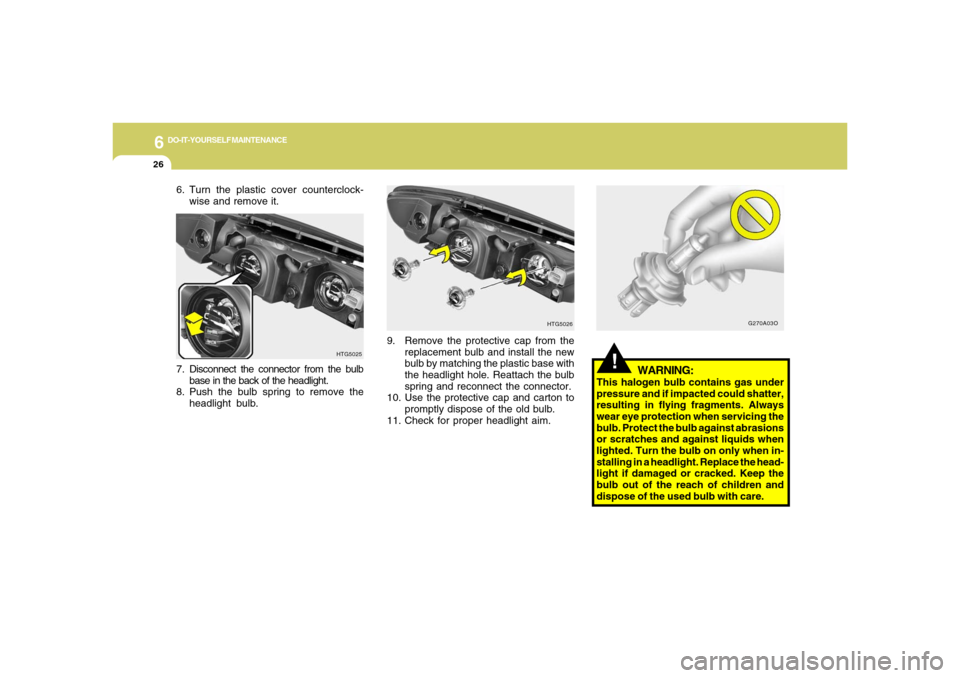
9. Remove the protective cap from the
replacement bulb and install the new
bulb by matching the plastic base with
the headlight hole. Reattach the bulb
spring and reconnect the connector.
10. Use the protective cap and carton to
promptly dispose of the old bulb.
11. Check for proper headlight aim. 7. Disconnect the connector from the bulb
base in the back of the headlight.
8. Push the bulb spring to remove the
headlight bulb.
6. Turn the plastic cover counterclock-
wise and remove it.
HTG5025
Page 269 of 307
6
DO-IT-YOURSELF MAINTENANCE
32
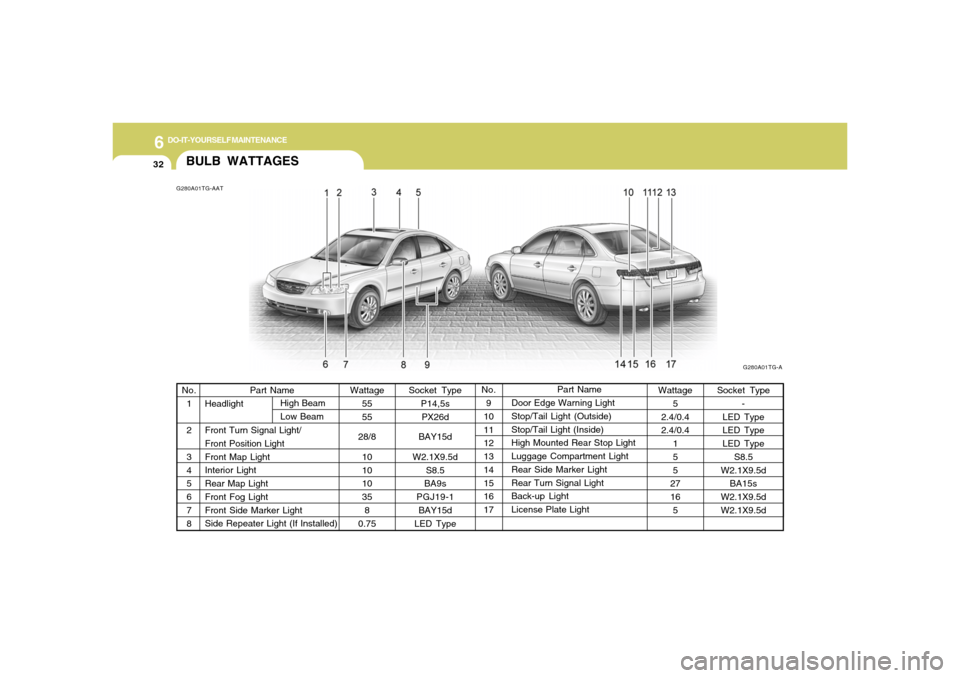
BULB WATTAGESG280A01TG-AAT
G280A01TG-A
Socket Type
P14,5s
PX26d
BAY15d
W2.1X9.5d
S8.5
BA9s
PGJ19-1
BAY15d
LED TypePart Name
Door Edge Warning Light
Stop/Tail Light (Outside)
Stop/Tail Light (Inside)
High Mounted Rear Stop Light
Luggage Compartment Light
Rear Side Marker Light
Rear Turn Signal Light
Back-up Light
License Plate Light Part Name
Headlight
Front Turn Signal Light/
Front Position Light
Front Map Light
Interior Light
Rear Map Light
Front Fog Light
Front Side Marker Light
Side Repeater Light (If Installed) No.
1
2
3
4
5
6
7
8No.
9
10
11
12
13
14
15
16
17 Wattage
55
55
28/8
10
10
10
35
8
0.75Wattage
5
2.4/0.4
2.4/0.4
1
5
5
27
16
5Socket Type
-
LED Type
LED Type
LED Type
S8.5
W2.1X9.5d
BA15s
W2.1X9.5d
W2.1X9.5d High Beam
Low Beam