ignition Hyundai Azera 2008 Service Manual
[x] Cancel search | Manufacturer: HYUNDAI, Model Year: 2008, Model line: Azera, Model: Hyundai Azera 2008Pages: 345, PDF Size: 14.61 MB
Page 101 of 345
1
FEATURES OF YOUR HYUNDAI
87
FRONT/REAR WINDOW
DEFROSTER SWITCH
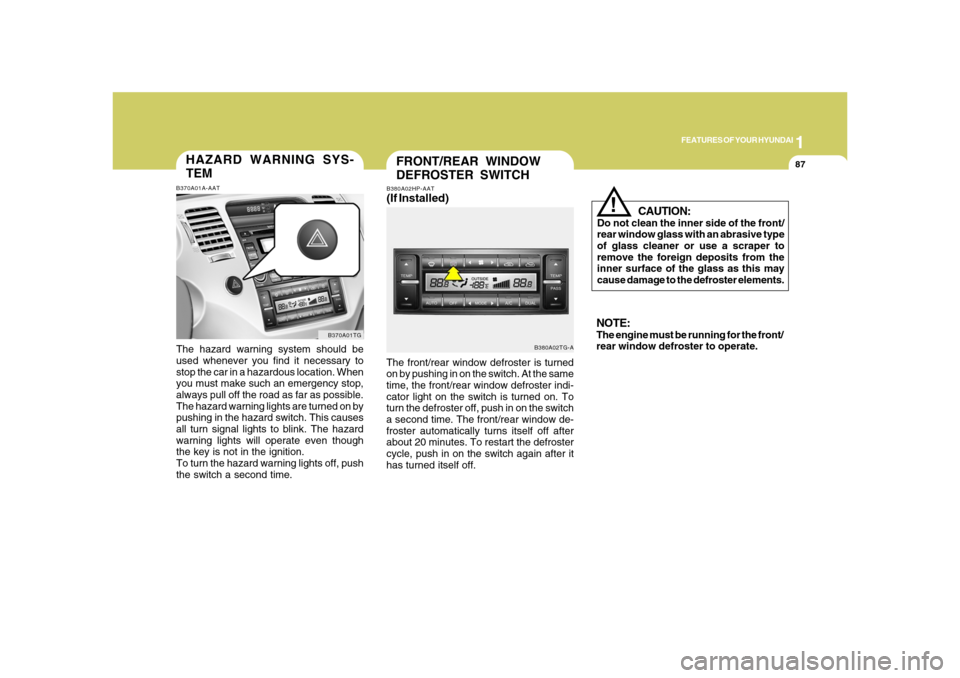
B380A02TG-A B380A02HP-AAT
(If Installed)The front/rear window defroster is turned
on by pushing in on the switch. At the same
time, the front/rear window defroster indi-
cator light on the switch is turned on. To
turn the defroster off, push in on the switch
a second time. The front/rear window de-
froster automatically turns itself off after
about 20 minutes. To restart the defroster
cycle, push in on the switch again after it
has turned itself off.
CAUTION:
Do not clean the inner side of the front/
rear window glass with an abrasive type
of glass cleaner or use a scraper to
remove the foreign deposits from the
inner surface of the glass as this may
cause damage to the defroster elements.
!
NOTE:The engine must be running for the front/
rear window defroster to operate.
HAZARD WARNING SYS-
TEMB370A01A-AATThe hazard warning system should be
used whenever you find it necessary to
stop the car in a hazardous location. When
you must make such an emergency stop,
always pull off the road as far as possible.
The hazard warning lights are turned on by
pushing in the hazard switch. This causes
all turn signal lights to blink. The hazard
warning lights will operate even though
the key is not in the ignition.
To turn the hazard warning lights off, push
the switch a second time.
B370A01TG
Page 106 of 345
1FEATURES OF YOUR HYUNDAI92
!
Auto reverseIf an object or part of the body is detected
while the sunroof is closing automatically,
it will reverse direction, and then stop.
Auto reverse function does not work if a tiny
obstacle is blocked between the sliding
glass and the sunroof sash. You should
always check that all passengers and
objects are away from the sunroof before
closing it.
WARNING:
Be careful that someone’s head, hands
and body are not trapped by a closing
sunroof.Manual slide closePress the TILT UP button on the overhead
console for less than 0.5 second.
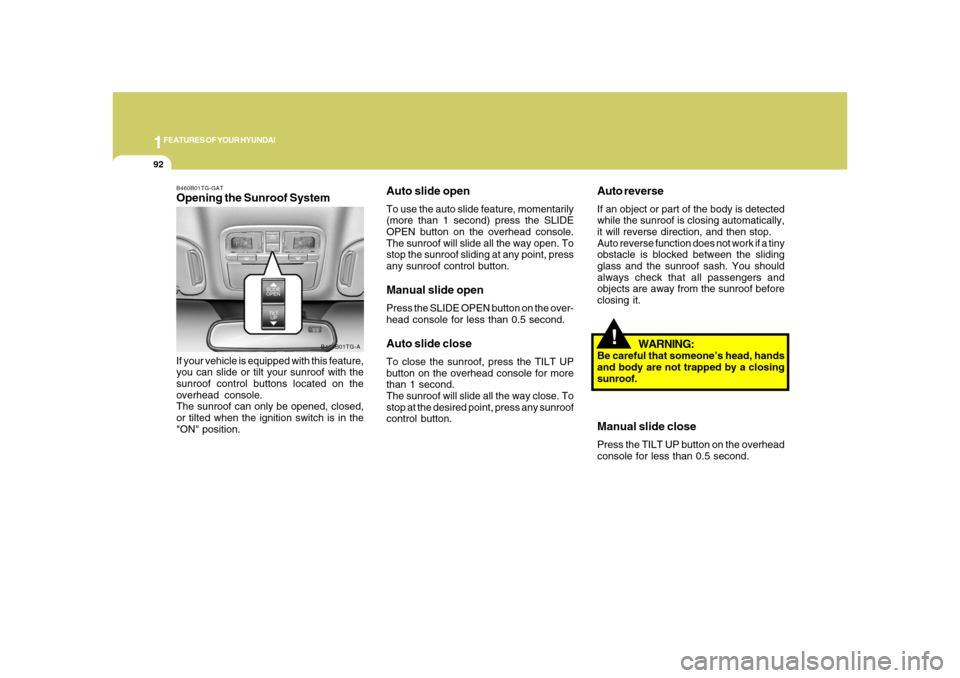
B460B01TG-GATOpening the Sunroof SystemIf your vehicle is equipped with this feature,
you can slide or tilt your sunroof with the
sunroof control buttons located on the
overhead console.
The sunroof can only be opened, closed,
or tilted when the ignition switch is in the
"ON" position.
B460B01TG-A
Auto slide openTo use the auto slide feature, momentarily
(more than 1 second) press the SLIDE
OPEN button on the overhead console.
The sunroof will slide all the way open. To
stop the sunroof sliding at any point, press
any sunroof control button.Manual slide openPress the SLIDE OPEN button on the over-
head console for less than 0.5 second.Auto slide closeTo close the sunroof, press the TILT UP
button on the overhead console for more
than 1 second.
The sunroof will slide all the way close. To
stop at the desired point, press any sunroof
control button.
Page 109 of 345
1
FEATURES OF YOUR HYUNDAI
95
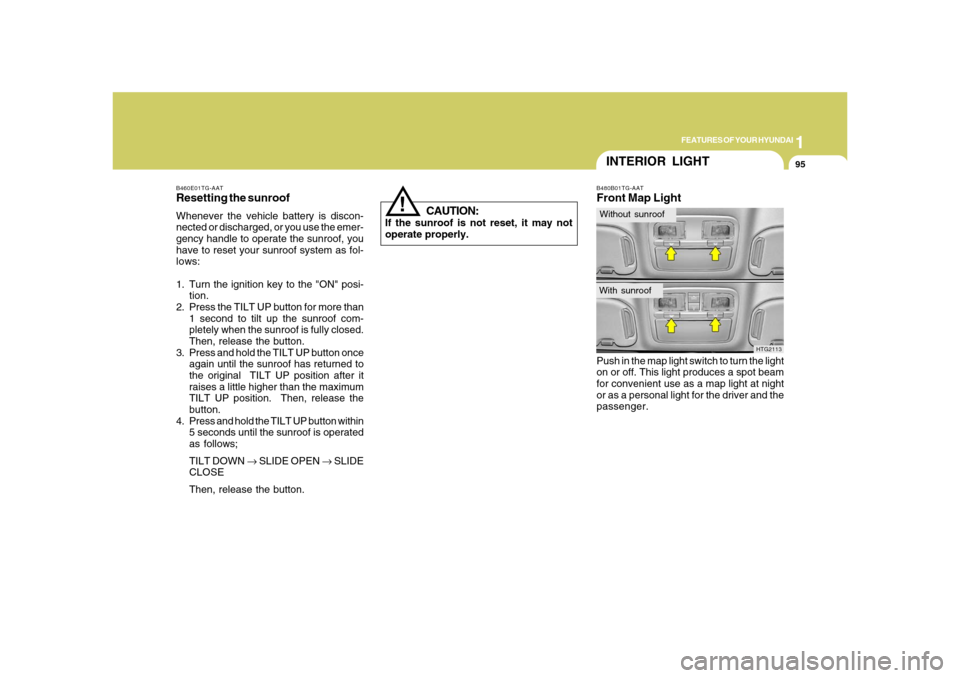
B480B01TG-AATFront Map LightPush in the map light switch to turn the light
on or off. This light produces a spot beam
for convenient use as a map light at night
or as a personal light for the driver and the
passenger.
HTG2113
INTERIOR LIGHTWithout sunroofWith sunroof
!
B460E01TG-AATResetting the sunroofWhenever the vehicle battery is discon-
nected or discharged, or you use the emer-
gency handle to operate the sunroof, you
have to reset your sunroof system as fol-
lows:
1. Turn the ignition key to the "ON" posi-
tion.
2. Press the TILT UP button for more than
1 second to tilt up the sunroof com-
pletely when the sunroof is fully closed.
Then, release the button.
3. Press and hold the TILT UP button once
again until the sunroof has returned to
the original TILT UP position after it
raises a little higher than the maximum
TILT UP position. Then, release the
button.
4. Press and hold the TILT UP button within
5 seconds until the sunroof is operated
as follows;
TILT DOWN → SLIDE OPEN → SLIDE
CLOSE
Then, release the button.
CAUTION:
If the sunroof is not reset, it may not
operate properly.
Page 110 of 345
1FEATURES OF YOUR HYUNDAI96
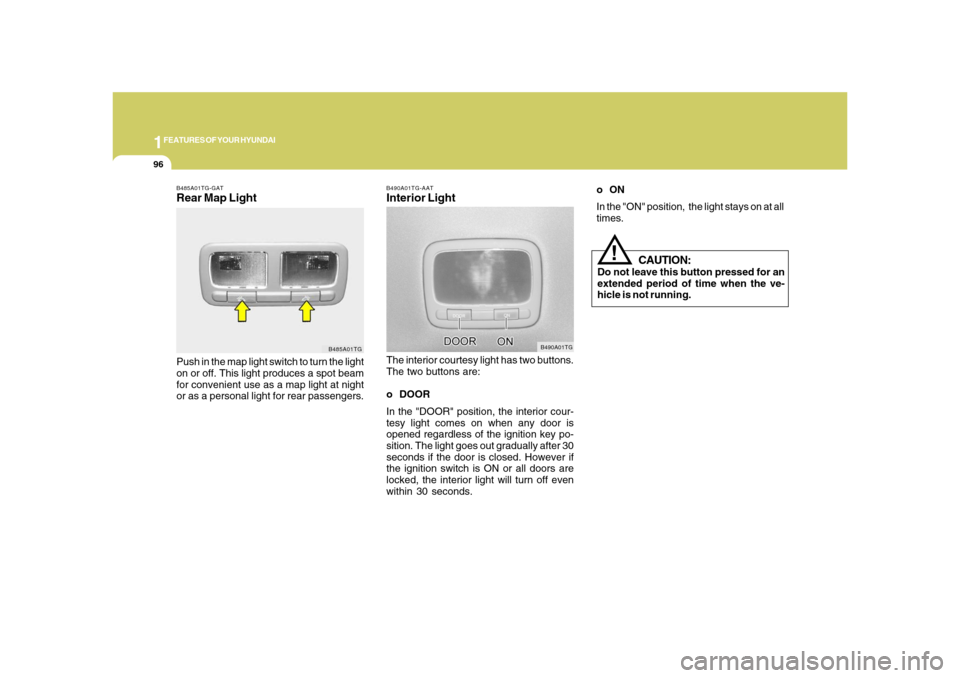
B490A01TG-AATInterior LightThe interior courtesy light has two buttons.
The two buttons are:
o DOOR
In the "DOOR" position, the interior cour-
tesy light comes on when any door is
opened regardless of the ignition key po-
sition. The light goes out gradually after 30
seconds if the door is closed. However if
the ignition switch is ON or all doors are
locked, the interior light will turn off even
within 30 seconds.
B490A01TG
B485A01TG-GATRear Map LightPush in the map light switch to turn the light
on or off. This light produces a spot beam
for convenient use as a map light at night
or as a personal light for rear passengers.
B485A01TG
CAUTION:
Do not leave this button pressed for an
extended period of time when the ve-
hicle is not running.
!
oON
In the "ON" position, the light stays on at all
times.
Page 117 of 345
1
FEATURES OF YOUR HYUNDAI
103
Automatic-Dimming Night Vision
Safety™ (NVS
®) Mirror
The NVS
® Mirror in your vehicle is the most
advanced way to reduce annoying glare in
the rearview mirror during any driving situ-
ation. For more information regarding
NVS
® mirrors and other applications,
please refer to the Gentex website:
www.gentex.com.
CAUTION:
The NVS
® Mirror automatically reduces
glare during driving conditions based
upon light levels monitored in front of the
vehicle and from the rear of the vehicle.
These light sensors are visible through
openings in the front and rear of the
mirror case. Any object that would ob-
struct either light sensor will degrade
the automatic dimming control feature.
!
Automatic-Dimming Function
Your mirror will automatically dim upon
detecting glare from the vehicles traveling
behind you. The auto-dimming function
can be controlled by the Dimming ON/OFF
Button:
1. Pressing the
button turns the auto-
dimming function OFF which is indi-
cated by the green Status Indicator LED
turning off.
2. Pressing the button again turns the
auto-dimming function ON which is in-
dicated by the green Status Indicator
LED turning on.
NOTE:The mirror defaults to the "ON" position
each time the vehicle is started.Compass Function
The Compass can be turned ON and OFF
and will remember the last state when the
ignition is cycled. To turn the display
feature ON/OFF:
1. Press and release the button to turn
the display feature OFF.
2. Press and release the button again
to turn the display back ON.
Additional options can be set with press
and hold sequences of the button and
are detailed below.
There is a difference between magnetic
north and true north. The compass in the
mirror can compensate for this difference
when it knows the Magnetic Zone in which
it is operating. This is set either by the
dealer or by the user. The operating Zone
Numbers for North America are shown in
the figure on the following section.
Z-Nav™ Compass DisplayThe NVS™ Mirror in your vehicle is also
equipped with a Z-Nav™ Compass that
shows the vehicle Compass heading in
the Display Window using the 8 basic
cardinal headings (N, NE, E, SE, etc.).
Page 152 of 345
1FEATURES OF YOUR HYUNDAI
138
M445B01TG-AAT1. POWER ON-OFF Control Knobo The radio unit may be operated when
the ignition key is in the "ACC" or "ON"
position. Press the knob to switch the
power on. The display shows the radio
frequency in the radio mode or CD/MP3
track in either the CD/MP3 mode. To
switch the power off, press the knob
again.
o Push the FM/AM or CD/MP3 to turn on
that function without pushing Power
ON-OFF control knob.VOLUME ControlRotate the knob clockwise to increase the
volume and turn the knob counterclock-
wise to reduce the volume.2. BAND SelectorPressing the band selector FM/AM changes
the AM, FM1 and FM2 bands.
The mode selected is shown on the dis-
play.
3. TUNE (Manual) Select KnobRotate the knob clockwise to increase the
frequency and turn the knob counterclock-
wise to reduce the frequency.4. SEEK Select Button
(Automatic Channel Selection)Press the SEEK select button. When the
(
) side is pressed, the unit will
automatically tune to the next higher
frequency and when the (
) side is
pressed, it will automatically tune to the
next lower frequency.
5. SCAN ButtonWhen you press the button, frequency is
changed and the next channel is received
automatically. To stay on a station, press
the SCAN button again.
6. EQUALIZER (EQ) ButtonPress the EQ button to select the CLAS-
SIC, POPS, ROCK, JAZZ and DEFEAT
MODE for the desired tone quality. Each
press of the button changes the display as
follows;7. Adjustment Mode
Select (A.MODE) ButtonPressing the A.MODE button changes the
BASS, MIDDLE, TREBLE, FADER and
BALANCE mode. The mode selected is
shown on the display. After selecting the
each mode, rotate the VOLUME control
knob clockwise or counterclockwise.BASS ControlTo increase the bass, rotate the knob clock-
wise, while to decrease the bass, rotate the
knob counterclockwise. CLASSIC → POPS → ROCK → JAZZ →DEFEAT
Page 155 of 345
1
FEATURES OF YOUR HYUNDAI
141141
M445D03TG-AAT1. AUDIO/MP3 CD Select Buttono Insert the CD with the label facing up-
ward.
o Insert the CD to start CD playback, dur-
ing radio operation.
o When a disc is in the CD deck, if you
press the CD button, the CD player will
begin playing even if the radio is being
used.
o The CD player can be used when the
ignition switch is in either the "ON" or
"ACC" position.
o Push the CD button to turn on that func-
tion without pushing Power ON-OFF
control knob.NOTE:o Do not stick paper or tape etc., on the
label side or the recording side of any
discs, as it may cause a malfunction.
o The unit cannot play a CDR (Record-
able CD) and CDRW (Rewritable CD)
that is not finalized. Please refer to the
manual of CDR/ CD-RW recorder or
CD-R/CDRW software for more infor-
mation on finalization process.
o Depending on the recording status,
some CD-Rs/CD-RWs may not be
played on this unit.o Playback of MP3 and WMA file for-
mats are supported. Load to play time
for these formats may be longer due
to the compressed nature of these
discs.
2. TRACK UP/DOWNo The desired track on the disc currently
being played can be selected using the
track number.
o Press (
) button once to skip forward
to the beginning of the next track. Press
(
) button once to skip back to the
beginning of the track.
3. FF/REW ButtonIf you want to fast forward or reverse through
the compact disc track, push and hold the
FF or REW button. When you release the
button, the compact disc player will re-
sume playing.4. REPEAT (RPT) Buttono To repeat the track you are currently
listening to, press the RPT button. To
cancel, press it again.o To repeat the music within currently
played folder, press the RPT button for
more than one second. Then it will be
repeated in sequential order within the
currently played folder. To cancel, press
it again. (MP3 CD only)
o If you do not release RPT operation
when the track ends, it will automati-
cally be replayed. This process will be
continued until you push the button
again.
5. RANDOM (RDM) Buttono For listen to the music in random order,
press the RDM Button with beep sound
for more than one second. To cancel,
press it again.
o For listen to the music within the cur-
rently played folder in random order,
press the RDM Button within one sec-
ond. To cancel, press it again within one
second. (If it pressed for more than one
second, it will be played all in random
order.) (MP3 CD only)6. BOOKMARK (MARK) ButtonWhen the CD player unit is operating, the
desired track on the disc can be
bookmarked by using the MARK button.
Page 159 of 345
1
FEATURES OF YOUR HYUNDAI
145145
7. Adjustment Mode Select
(A.MODE) ButtonPressing the A.MODE button changes the
BASS, MIDDLE, TREBLE, FADER and
BALANCE mode. The mode selected is
shown on the display. After selecting the
each mode, rotate the VOLUME control
knob clockwise or counterclockwise.
BASS Control
To increase the BASS, rotate the knob
clockwise, while to decrease the BASS,
rotate the knob counterclockwise.
M455B01TG-AAT1. POWER ON-OFF Control Knobo The radio unit may be operated when
the ignition key is in the "ACC" or "ON"
position. Press the knob to switch the
power on. The display shows the radio
frequency in the radio mode, the tape
direction Indicator in the tape mode or
CD/MP3 track in either the CD/MP3
mode. To switch the power off, press the
knob again.
o Push the FM/AM, TAPE or CD/MP3 to
turn on that function without pushing
Power ON-OFF control knob.VOLUME ControlRotate the knob clockwise to increase the
volume and turn the knob counterclock-
wise to reduce the volume.2. BAND SelectorPressing the band selector FM/AM changes
the AM, FM1 and FM2 bands.
The mode selected is shown on the dis-
play.
3. TUNE (Manual) Select KnobRotate the knob clockwise to increase the
frequency and turn the knob counterclock-
wise to reduce the frequency.4. SEEK Select Button
(Automatic Channel Selection)Press the SEEK select button. When the
(
) side is pressed, the unit will
automatically tune to the next higher
frequency and when the (
) side is
pressed, it will automatically tune to the
next lower frequency.
5. SCAN ButtonWhen you press the button, frequency is
changed and the next channel is received
automatically. To stay on a station, press
the SCAN button again.
6. EQUALIZER (EQ) ButtonPress the EQ button to select the CLAS-
SIC, POPS, ROCK, JAZZ and DEFEAT
MODE for the desired tone quality. Each
press of the button changes the display as
follows;
CLASSIC → POPS → ROCK → JAZZ →DEFEAT
Page 165 of 345
1
FEATURES OF YOUR HYUNDAI
151151
M455F03TG-AAT1. AUDIO/MP3 CD Select Buttono Insert the CD with the label facing up-
ward.
o Insert the CD to start CD playback,
during radio operation or cassette tape
playing.
o When a disc is in the CD deck, if you
press the CD button the CD player will
begin playing even if the radio or cas-
sette player is being used.
o The CD player can be used when the
ignition switch is in either the "ON" or
"ACC" position.
o Push the CD button to turn on that
function without pushing Power ON-
OFF control knob.NOTE:o Do not stick paper or tape etc., on the
label side or the recording side of any
discs, as it may cause a malfunction.
o The unit cannot play a CDR (Record-
able CD) and CDRW (Rewritable CD)
that is not finalized. Please refer to
the manual of CDR/CD-RW recorder
or CD-R/CDRW software for more
information on finalization process.o Depending on the recording status,
some CD-Rs/CD-RWs may not be
played on this unit.
o Playback of MP3 and WMA file for-
mats are supported. Load to play time
for these formats may be longer due
to the compressed nature of these
discs.
2. TRACK UP/DOWNo The desired track on the disc currently
being played can be selected using the
track number.
o Press (
)button once to skip forward
to the beginning of the next track. Press
(
)button once to skip back to the
beginning of the track.
3. FF/REW ButtonIf you want to fast forward or reverse through
the compact disc track, push and hold the
FF or REW button. When you release the
button, the compact disc player will re-
sume playing.
4. REPEAT (RPT) Buttono To repeat the track you are currently
listening to, press the RPT button. To
cancel, press it again.
o To repeat the music within currently
played folder, press the RPT button for
more than one second. Then it will be
repeated in sequential order within the
currently played folder. To cancel, press
it again. (MP3 CD only)
o If you do not release RPT operation
when the track ends, it will automati-
cally be replayed. This process will be
continued until you push the button
again.5. RANDOM (RDM) Buttono For listen to the music in random order,
press the RDM Button with beep sound
for more than one second. To cancel,
press it again.
o For listen to the music within the cur-
rently played folder in random order,
press the RDM Button within one sec-
ond. To cancel, press it again within one
second. (If it pressed for more than one
second, it will be played all in random
order.) (MP3 CD only)
Page 169 of 345
1
FEATURES OF YOUR HYUNDAI
155155
M465B01TG-AAT1. POWER ON-OFF Control KnobThe radio unit may be operated when the
ignition key is in the "ACC" or "ON" posi-
tion. Press the knob to switch the power on.
The LCD shows the radio frequency in the
radio mode, the tape direction indicator in
the tape mode or CD track in either the CD
mode or CD AUTO CHANGER mode. To
switch the power off, press the knob again.VOLUME ControlRotate the knob clockwise to increase the
volume and turn the knob counterclock-
wise to reduce the volume.2. BAND SelectorPressing the button changes the AM, FM1
and FM2 bands.
The mode selected is shown on the dis-
play.3. TUNE Select KnobRotate the knob clockwise to increase the
frequency and turn the knob counterclock-
wise to reduce the frequency.
4. Adjustment mode
select(A.MODE) ButtonPressing the A. MODE button changes the
BASS, MIDDLE, TREBLE, FADER and
BALANCE mode. The mode selected is
shown on the display.
After selecting the each mode, rotate the
VOLUME control knob clockwise or coun-
terclockwise.BASS ControlTo increase the BASS, rotate the knob
clockwise, while to decrease the BASS,
rotate the knob counterclockwise.MIDDLE ControlTo increase the MIDDLE, rotate the knob
clockwise, while to decrease the MIDDLE,
rotate the knob counterclockwise.TREBLE ControlTo increase the TREBLE, rotate the knob
clockwise, while to decrease the TREBLE,
rotate the knob counterclockwise.
FADER ControlRotate the control knob clockwise to em-
phasize rear speaker sound (front speaker
sound will be attenuated).
When the control knob is turned counter-
clockwise, front speaker sound will be
emphasized (rear speaker sound will be
attenuated).BALANCE ControlRotate the knob clockwise to emphasize
right speaker sound (left speaker sound
will be attenuated). When the control knob
is turned counterclockwise, left speaker
sound will be emphasized (right speaker
sound will be attenuated).5. SEEK Select Button (Automatic
Channel Selection)Press the SEEK select button. When the
(
) side is pressed, the unit will auto-
matically tune to the next higher frequency
and when the (
) side is pressed, it
will automatically tune to the next lower
frequency.