ECU Hyundai Azera 2010 User Guide
[x] Cancel search | Manufacturer: HYUNDAI, Model Year: 2010, Model line: Azera, Model: Hyundai Azera 2010Pages: 334, PDF Size: 12.24 MB
Page 49 of 334
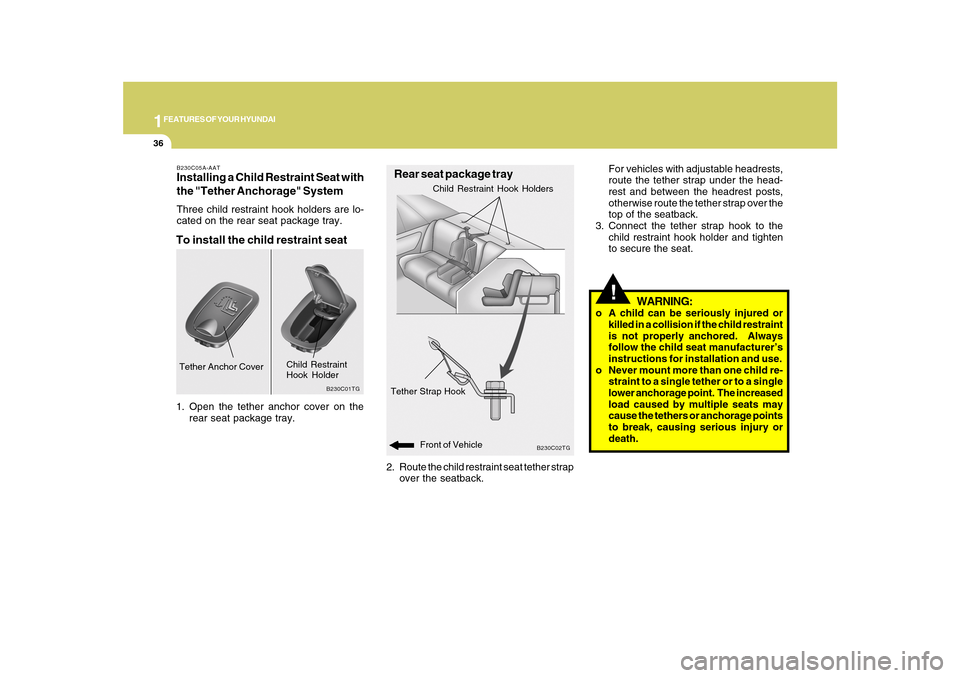
1FEATURES OF YOUR HYUNDAI36
!For vehicles with adjustable headrests,
route the tether strap under the head-
rest and between the headrest posts,
otherwise route the tether strap over the
top of the seatback.
3. Connect the tether strap hook to the
child restraint hook holder and tighten
to secure the seat.
WARNING:
o A child can be seriously injured or
killed in a collision if the child restraint
is not properly anchored. Always
follow the child seat manufacturer’s
instructions for installation and use.
o Never mount more than one child re-
straint to a single tether or to a single
lower anchorage point. The increased
load caused by multiple seats may
cause the tethers or anchorage points
to break, causing serious injury or
death.
2. Route the child restraint seat tether strap
over the seatback.
B230C02TG
Rear seat package trayTether Strap Hook
Child Restraint Hook Holders
B230C05A-AATInstalling a Child Restraint Seat with
the "Tether Anchorage" SystemThree child restraint hook holders are lo-
cated on the rear seat package tray.To install the child restraint seat1. Open the tether anchor cover on the
rear seat package tray.
B230C01TG
Tether Anchor Cover
Child Restraint
Hook Holder
Front of Vehicle
Page 50 of 334
1
FEATURES OF YOUR HYUNDAI
37
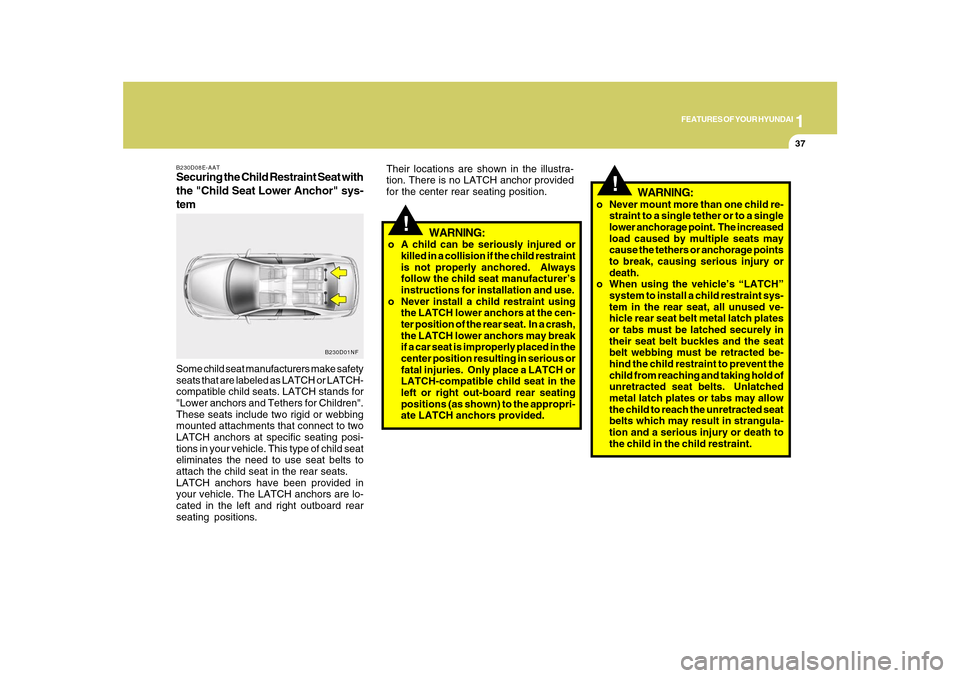
B230D08E-AATSecuring the Child Restraint Seat with
the "Child Seat Lower Anchor" sys-
temSome child seat manufacturers make safety
seats that are labeled as LATCH or LATCH-
compatible child seats. LATCH stands for
"Lower anchors and Tethers for Children".
These seats include two rigid or webbing
mounted attachments that connect to two
LATCH anchors at specific seating posi-
tions in your vehicle. This type of child seat
eliminates the need to use seat belts to
attach the child seat in the rear seats.
LATCH anchors have been provided in
your vehicle. The LATCH anchors are lo-
cated in the left and right outboard rear
seating positions.
B230D01NF
!
WARNING:
o A child can be seriously injured or
killed in a collision if the child restraint
is not properly anchored. Always
follow the child seat manufacturer’s
instructions for installation and use.
o Never install a child restraint using
the LATCH lower anchors at the cen-
ter position of the rear seat. In a crash,
the LATCH lower anchors may break
if a car seat is improperly placed in the
center position resulting in serious or
fatal injuries. Only place a LATCH or
LATCH-compatible child seat in the
left or right out-board rear seating
positions (as shown) to the appropri-
ate LATCH anchors provided.
!
o Never mount more than one child re-
straint to a single tether or to a single
lower anchorage point. The increased
load caused by multiple seats may
cause the tethers or anchorage points
to break, causing serious injury or
death.
o When using the vehicle’s “LATCH”
system to install a child restraint sys-
tem in the rear seat, all unused ve-
hicle rear seat belt metal latch plates
or tabs must be latched securely in
their seat belt buckles and the seat
belt webbing must be retracted be-
hind the child restraint to prevent the
child from reaching and taking hold of
unretracted seat belts. Unlatched
metal latch plates or tabs may allow
the child to reach the unretracted seat
belts which may result in strangula-
tion and a serious injury or death to
the child in the child restraint.
WARNING:
Their locations are shown in the illustra-
tion. There is no LATCH anchor provided
for the center rear seating position.
Page 52 of 334
1
FEATURES OF YOUR HYUNDAI
39
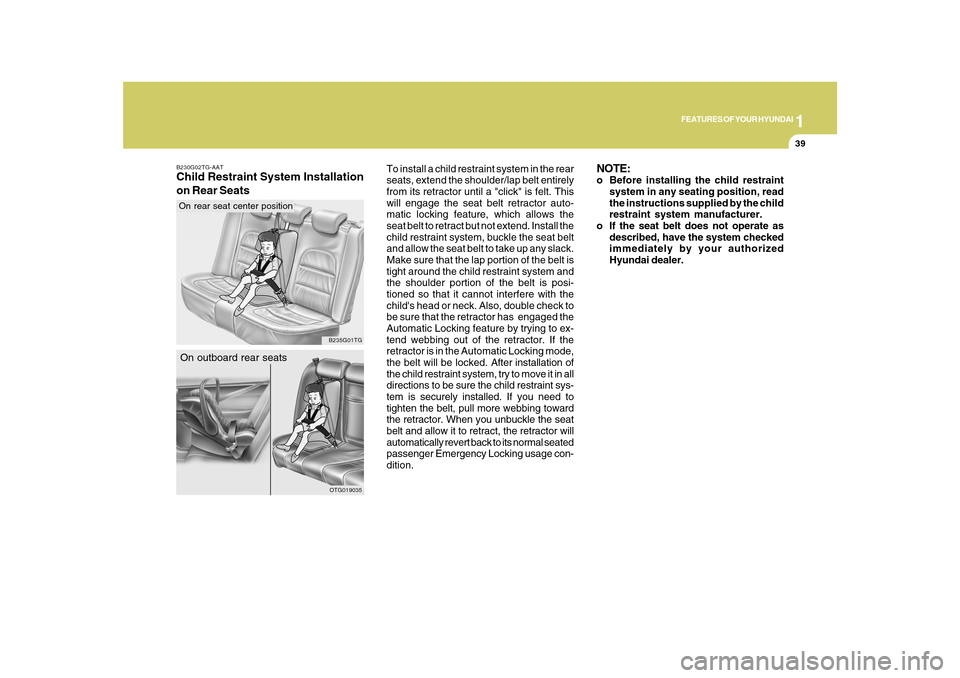
To install a child restraint system in the rear
seats, extend the shoulder/lap belt entirely
from its retractor until a "click" is felt. This
will engage the seat belt retractor auto-
matic locking feature, which allows the
seat belt to retract but not extend. Install the
child restraint system, buckle the seat belt
and allow the seat belt to take up any slack.
Make sure that the lap portion of the belt is
tight around the child restraint system and
the shoulder portion of the belt is posi-
tioned so that it cannot interfere with the
child's head or neck. Also, double check to
be sure that the retractor has engaged the
Automatic Locking feature by trying to ex-
tend webbing out of the retractor. If the
retractor is in the Automatic Locking mode,
the belt will be locked. After installation of
the child restraint system, try to move it in all
directions to be sure the child restraint sys-
tem is securely installed. If you need to
tighten the belt, pull more webbing toward
the retractor. When you unbuckle the seat
belt and allow it to retract, the retractor will
automatically revert back to its normal seated
passenger Emergency Locking usage con-
dition.
B230G02TG-AATChild Restraint System Installation
on Rear Seats
OTG019035
On outboard rear seats
B235G01TG
On rear seat center position
NOTE:o Before installing the child restraint
system in any seating position, read
the instructions supplied by the child
restraint system manufacturer.
o If the seat belt does not operate as
described, have the system checked
immediately by your authorized
Hyundai dealer.
Page 117 of 334
1FEATURES OF YOUR HYUNDAI
104
!
Integrated HomeLink
® Wireless Con-
trol System
The HomeLink
® Wireless Control System
provides a convenient way to replace up to
three hand-held radio-frequency (RF)
transmitters with a single built-in device.
This innovative feature will learn the radio
frequency codes of most current transmit-
ters to operate devices such as gate op-
erators, garage door openers, entry door
locks, security systems, even home light-
ing. Both standard and rolling code-
equipped transmitters can be programmed
by following the outlined procedures. Ad-
ditional HomeLink
® information can be
found at: www.homelink.com or by calling
1-800-355-3515.
CAUTION:
Before programming HomeLink
® to a
garage door opener or gate operator,
make sure that people and objects are
out of the way of the device to prevent
potential harm or damage. Do not use
HomeLink
® with any garage door opener
that lacks the safety stop and reverse
features as required by U.S. federal
safety standards (this includes any ga-
rage door opener model manufactured
before April 1, 1982). A garage door that
cannot detect an object - signaling the
door to stop and reverse - does not meet
current U.S. federal safety standards.
Using a garage door opener without these
features increases the risk of serious
injury or death.Programming HomeLink
®
NOTE:o When programming a garage door
opener, it is advised to park the ve-
hicle outside of the garage.
o It is recommended that a new battery
be placed in the hand-held transmit-
ter of the device being programmed
to HomeLink
® for quicker training and
accurate transmission of the radio-
frequency signal.
o Some vehicles may require the igni-
tion switch to be turned to the second
(or "accessories") position for pro-
gramming and/or operation of
HomeLink.
o In the event that there are still pro-
gramming difficulties or questions
after following the programming steps
listed below, contact HomeLink
® at:
www.homelink.com or 1-800-355-
3515. Retain the original transmitter of the RF
device you are programming for use in
other vehicles as well as for future
HomeLink
® programming. It is also sug-
gested that upon the sale of the vehicle, the
programmed HomeLink
® buttons be
erased for security purposes.
1. Press and hold the button for more
than 6 seconds. When the compass
memory is cleared a "C" will appear in
the display.
2. To calibrate the compass, drive the
vehicle in 2 complete circles at less than
5 MPH (8 Km/h).
Page 119 of 334
1FEATURES OF YOUR HYUNDAI
106
4. Press and hold the just-trained
HomeLink
® button and observe the red
Status Indicator LED. If the indicator
light stays on constantly, programming
is complete and your device should
activate.
5. To program the remaining two
HomeLink® buttons, follow either steps
1 through 4 above for other Rolling
Code devices or steps 2 through 5 in
Standard Programming for standard
devices.
During programming, your handheld trans-
mitter may automatically stop transmitting.
Continue to press the Integrated
HomeLink
® Wireless Control System but-
ton (note steps 2 through 4 in the Standard
Programming portion of this document)
while you press and re-press ("cycle") your
handheld transmitter every two seconds
until the frequency signal has been learned.
The indicator light will flash slowly and
then rapidly after several seconds upon
successful training.Operating HomeLink
®
To operate, simply press and release the
programmed HomeLink
® button. Activa-
tion will now occur for the trained device
(i.e. garage door opener, gate operator,
security system, entry door lock, home/
office lighting, etc.). For convenience, the
hand-held transmitter of the device may
also be used at any time.
Reprogramming a Single HomeLink
®
Button
To program a new device to a previously
trained HomeLink
® button, follow these
steps:
1. Press and hold the desired HomeLink
®
button. Do NOT release until step 4 has
been completed.
2. When the indicator light begins to flash
slowly (after 20 seconds), position the
handheld transmitter 1 to 3 inches away
from the HomeLink
® surface.
3. Press and hold the handheld transmit-
ter button. The HomeLink
® indicator light
will flash, first slowly and then rapidly.
4. When the indicator light begins to flash
rapidly, release both buttons.
5. Press and hold the just-trainedHomeLink
® button and observe the red
Status Indicator LED. If the indicator
light stays on constantly, programming
is complete and your new device should
activate.
Erasing HomeLink
® Buttons
Individual buttons cannot be erased. How-
ever, to erase all three programmed but-
tons:
1. Press and hold the two outer HomeLink
®
buttons until the indicator light begins to
flash-after 20 seconds.
2. Release both buttons. Do not hold for
longer than 30 seconds.
The Integrated HomeLink
® Wireless Con-
trol System is now in the training (learn)
mode and can be programmed at any time
following the appropriate steps in the Pro-
gramming sections above.
FCC ID: NZLZTVHL3
IC: 4112A-ZTVHL3
Page 121 of 334
1FEATURES OF YOUR HYUNDAI
108
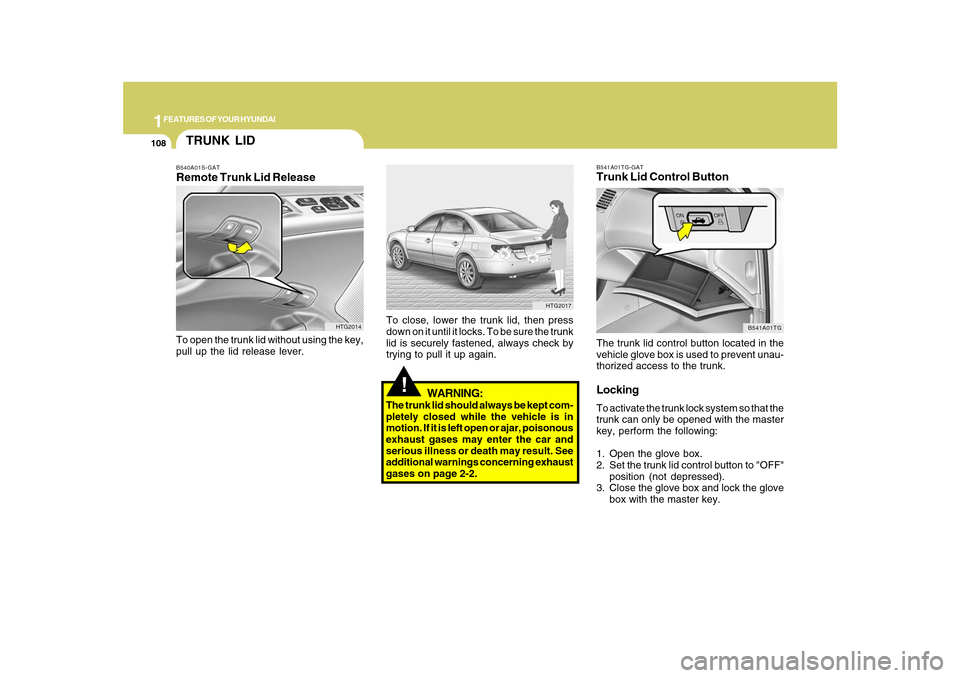
B541A01TG-GATTrunk Lid Control ButtonThe trunk lid control button located in the
vehicle glove box is used to prevent unau-
thorized access to the trunk.LockingTo activate the trunk lock system so that the
trunk can only be opened with the master
key, perform the following:
1. Open the glove box.
2. Set the trunk lid control button to "OFF"
position (not depressed).
3. Close the glove box and lock the glove
box with the master key.
B541A01TG
!
WARNING:
The trunk lid should always be kept com-
pletely closed while the vehicle is in
motion. If it is left open or ajar, poisonous
exhaust gases may enter the car and
serious illness or death may result. See
additional warnings concerning exhaust
gases on page 2-2.To close, lower the trunk lid, then press
down on it until it locks. To be sure the trunk
lid is securely fastened, always check by
trying to pull it up again.
HTG2017
TRUNK LIDB540A01S-GATRemote Trunk Lid ReleaseTo open the trunk lid without using the key,
pull up the lid release lever.
HTG2014
Page 125 of 334
1FEATURES OF YOUR HYUNDAI
112
!
WARNING:
!
WARNING:
- Before refueling always note the
location of the Emergency Gaso-
line Shut-Off, if available, at the gas
station facility.
- Before touching the fuel nozzle or
fuel filler cap, you should eliminate
potentially dangerous static elec-
tricity discharge by touching an-
other metal part of the front of the
vehicle, a safe distance away from
the fuel filler neck, nozzle, or other
gas source.
- Do not get back into a vehicle once
you have begun refueling. Do not
touch, rub or slide against any item
or fabric (polyester, satin, nylon,
etc.) capable of producing static
electricity. Static electricity dis-
charge can ignite fuel vapors re-
sulting in explosion.If you must re-enter the vehicle, you
should once again eliminate poten-
tially dangerous static electricity
discharge by touching a metal part
of the vehicle, away from the fuel
filler neck, nozzle or other gasoline
source.
- When using a portable fuel con-
tainer be sure to place the con-
tainer on the ground prior to refuel-
ing. Static electricity discharge from
the container can ignite fuel vapors
causing a fire. Once refueling has
begun, contact with the vehicle
should be maintained until the filling
is complete. Use only portable fuel
containers designed to carry and
store gasoline.
- Do not use cellular phones around
a gas station or while refueling any
vehicle. Electric current and/or elec-
tronic interference from cellular
phones can potentially ignite fuel
vapors causing a fire. If you must
use your cellular phone use it in a
place away from the gas station.
o After refueling, make sure the fuel
cap is installed securely to prevent
fuel spillage in the event of an acci-
dent.
o Tighten the cap until it clicks, other-
wise the "
"light will illuminate.
o If you open the fuel filler cap during
high ambient temperatures, a slight
"pressure sound" may be heard. This
is normal and not a cause for concern.
Whenever you open the fuel filler cap,
turn it slowly.
o Do not "top off" after the nozzle auto-
matically shuts off when refueling.
o Automotive fuels are flammable/ex-
plosive materials. When refueling,
please note the following guidelines
carefully. Failure to follow these guide-
lines may result in severe personal
injury, severe burns or death by fire or
explosion.
!
WARNING:
Page 126 of 334
1
FEATURES OF YOUR HYUNDAI
113
!
WARNING:
- When refueling always shut the en-
gine off. Sparks produced by elec-
trical components related to the
engine can ignite fuel vapors caus-
ing a fire. Always insure that the
engine is OFF before and during
refueling. Once refueling is com-
plete, check to make sure the fuel
filler cap and door are securely
closed, before starting the engine.
- Do not light any fire around a gas
station. DO NOT use matches or a
lighter and DO NOT SMOKE or leave
a lit cigarette in your vehicle while at
a gas station especially during re-
fueling. Automotive fuel is highly
flammable and can, when ignited,
result in explosion by flames.
- If a fire breaks out during refueling,
leave the vicinity of the vehicle, and
immediately contact the manager
of the gas station or contact the
police and local fire department.
Follow any safety instructions they
provide.
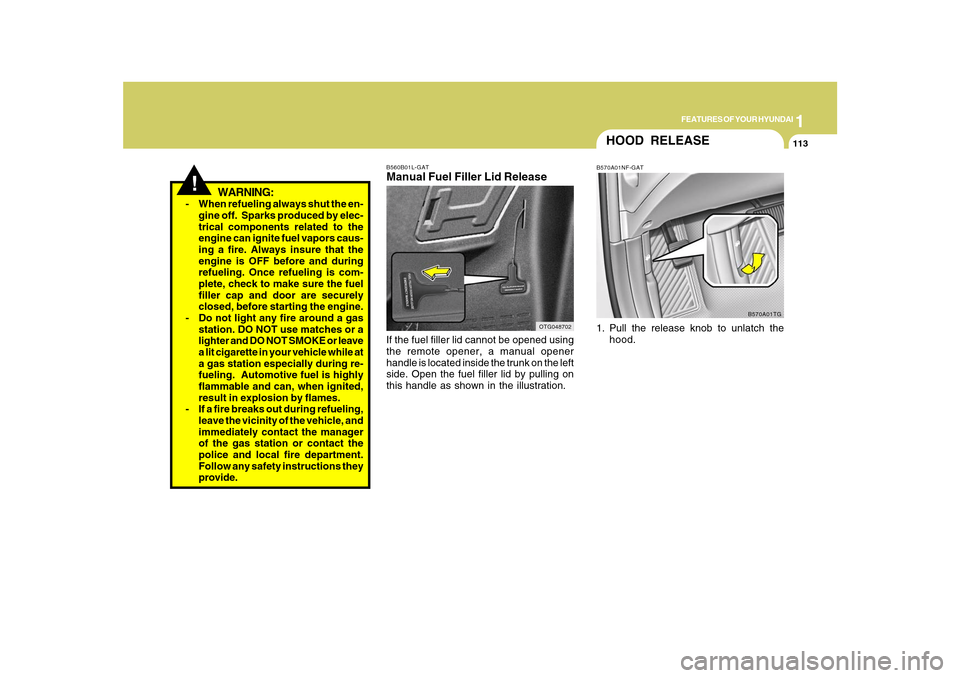
B560B01L-GATManual Fuel Filler Lid ReleaseIf the fuel filler lid cannot be opened using
the remote opener, a manual opener
handle is located inside the trunk on the left
side. Open the fuel filler lid by pulling on
this handle as shown in the illustration.
OTG048702
HOOD RELEASEB570A01NF-GAT1. Pull the release knob to unlatch the
hood.
B570A01TG
Page 130 of 334
1
FEATURES OF YOUR HYUNDAI
117
REAR WINDOW CURTAIN
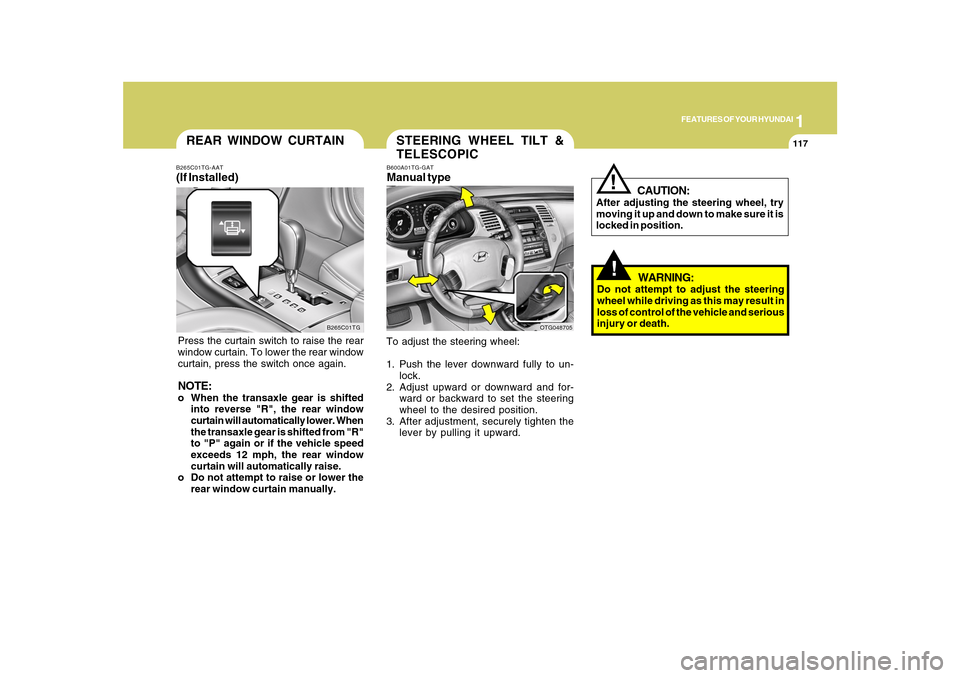
B265C01TG B265C01TG-AAT
(If Installed)Press the curtain switch to raise the rear
window curtain. To lower the rear window
curtain, press the switch once again.NOTE:o When the transaxle gear is shifted
into reverse "R", the rear window
curtain will automatically lower. When
the transaxle gear is shifted from "R"
to "P" again or if the vehicle speed
exceeds 12 mph, the rear window
curtain will automatically raise.
o Do not attempt to raise or lower the
rear window curtain manually.
STEERING WHEEL TILT &
TELESCOPICB600A01TG-GATManual typeTo adjust the steering wheel:
1. Push the lever downward fully to un-
lock.
2. Adjust upward or downward and for-
ward or backward to set the steering
wheel to the desired position.
3. After adjustment, securely tighten the
lever by pulling it upward.
OTG048705
!!
CAUTION:
After adjusting the steering wheel, try
moving it up and down to make sure it is
locked in position.
WARNING:
Do not attempt to adjust the steering
wheel while driving as this may result in
loss of control of the vehicle and serious
injury or death.
Page 207 of 334
2
DRIVING YOUR HYUNDAI
4
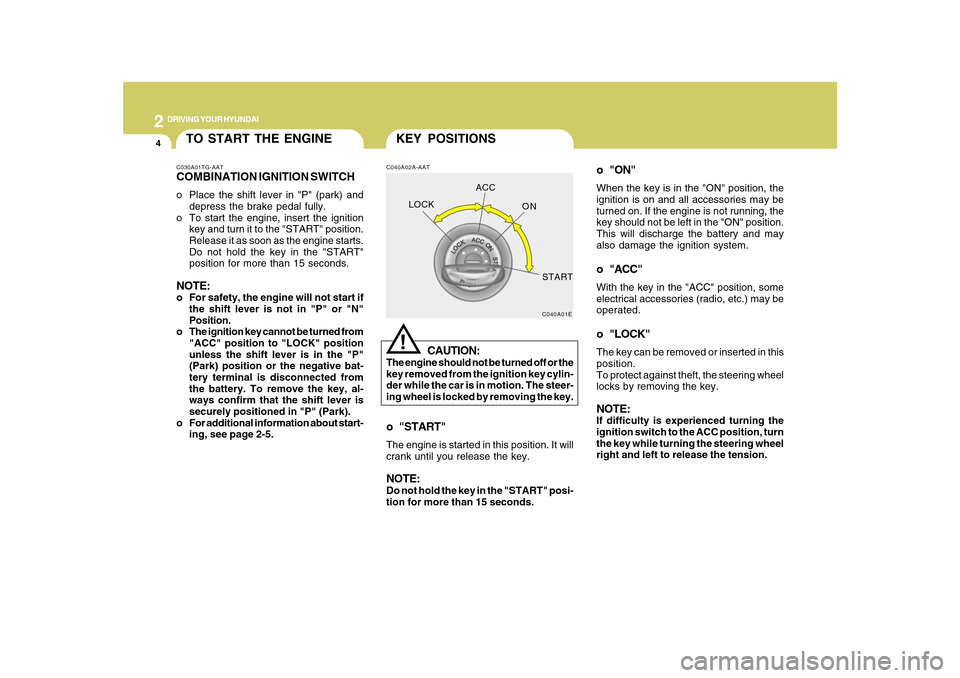
o "ON"When the key is in the "ON" position, the
ignition is on and all accessories may be
turned on. If the engine is not running, the
key should not be left in the "ON" position.
This will discharge the battery and may
also damage the ignition system.o "ACC"With the key in the "ACC" position, some
electrical accessories (radio, etc.) may be
operated.o "LOCK"The key can be removed or inserted in this
position.
To protect against theft, the steering wheel
locks by removing the key.NOTE:If difficulty is experienced turning the
ignition switch to the ACC position, turn
the key while turning the steering wheel
right and left to release the tension.
KEY POSITIONSC040A02A-AAT
CAUTION:
The engine should not be turned off or the
key removed from the ignition key cylin-
der while the car is in motion. The steer-
ing wheel is locked by removing the key.
!
o "START"The engine is started in this position. It will
crank until you release the key.NOTE:Do not hold the key in the "START" posi-
tion for more than 15 seconds.
C040A01E
LOCKACC
ON
START
TO START THE ENGINEC030A01TG-AATCOMBINATION IGNITION SWITCHo Place the shift lever in "P" (park) and
depress the brake pedal fully.
o To start the engine, insert the ignition
key and turn it to the "START" position.
Release it as soon as the engine starts.
Do not hold the key in the "START"
position for more than 15 seconds.NOTE:o For safety, the engine will not start if
the shift lever is not in "P" or "N"
Position.
o The ignition key cannot be turned from
"ACC" position to "LOCK" position
unless the shift lever is in the "P"
(Park) position or the negative bat-
tery terminal is disconnected from
the battery. To remove the key, al-
ways confirm that the shift lever is
securely positioned in "P" (Park).
o For additional information about start-
ing, see page 2-5.