Rear brake Hyundai Azera 2012 Owner's Manual
[x] Cancel search | Manufacturer: HYUNDAI, Model Year: 2012, Model line: Azera, Model: Hyundai Azera 2012Pages: 403, PDF Size: 9.28 MB
Page 11 of 403
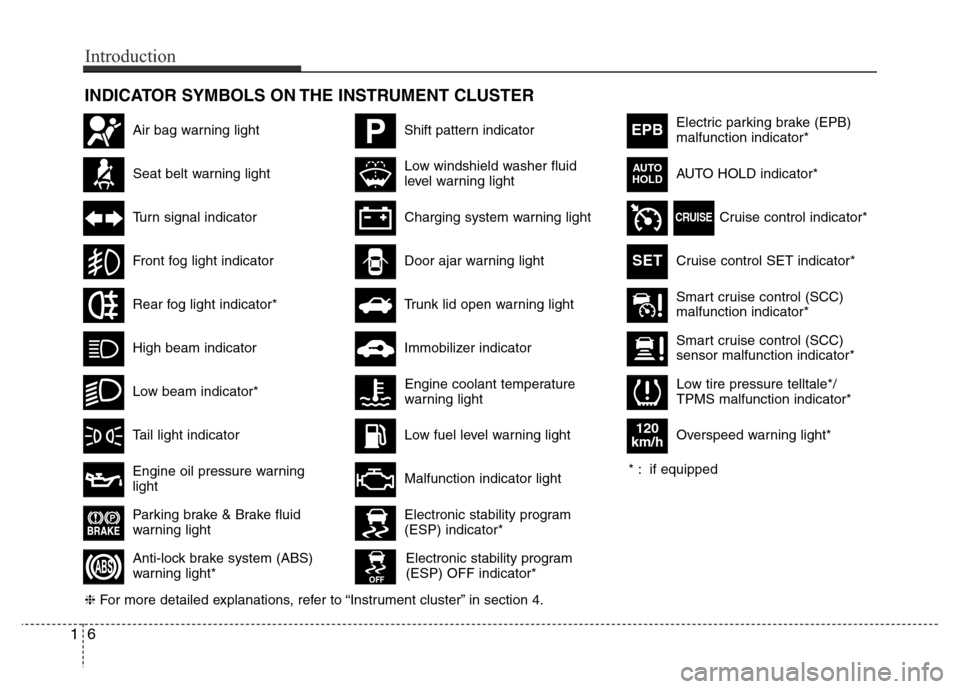
INDICATOR SYMBOLS ON THE INSTRUMENT CLUSTER
Seat belt warning light
High beam indicator
Turn signal indicator
Anti-lock brake system (ABS)
warning light*
Parking brake & Brake fluid
warning light
Engine oil pressure warning
light
Electronic stability program
(ESP) indicator*
Electronic stability program
(ESP) OFF indicator*
Malfunction indicator light
Smart cruise control (SCC)
malfunction indicator*
Smart cruise control (SCC)
sensor malfunction indicator*
Cruise control indicator*
Cruise control SET indicator*
Immobilizer indicator
Low fuel level warning light
❈For more detailed explanations, refer to “Instrument cluster” in section 4.
Charging system warning light
Tail light indicator
Front fog light indicator
Low windshield washer fluid
level warning lightElectric parking brake (EPB)
malfunction indicator*
AUTO HOLD indicator*
EPB
CRUISE
AUTO
HOLD
Engine coolant temperature
warning light
Door ajar warning light
Low tire pressure telltale*/
TPMS malfunction indicator*
PShift pattern indicatorAir bag warning light
Rear fog light indicator*
Overspeed warning light*
120
km/h
SET
* : if equipped
16
Introduction
Low beam indicator*
Trunk lid open warning light
Page 32 of 403
317
Safety features of your vehicle
5. To use the rear seat, lift and pull the
seatback backward. Push back the
seatback firmly until it clicks into place.
Make sure the seatback is locked in
place. When you return the seatback
to its upright position, always be sure it
has locked into position by pushing on
the top of the seatback.
6. Return the rear seat belt to the proper
position.
CAUTION- Rear seat belts
When returning the rear seatbacks
to the upright position, remember
to return the rear shoulder belts to
their proper position. Routing the
seat belt webbing through the rear
seat belt guides will help keep the
belts from being trapped behind or
under the seats.
WARNING- Cargo
Cargo should always be secured to
prevent it from being thrown about
the vehicle in a collision and caus-
ing injury to the vehicle occupants.
Special care of objects should be
taken when placing them in the rear
seats, since those may hit the front
seat occupants in a frontal colli-
sion.
WARNING - Cargo loading
Make sure the engine is off, the
automatic transaxle is in P (Park)
and the parking brake is securely
applied whenever loading or
unloading cargo. Failure to take
these steps may allow the vehicle
to move if the shift lever is inadver-
tently moved to another position.
WARNING - Uprighting
seat
When you return the seatback to its
upright position, hold the seatback
and return it slowly. If the seatback
is returned without holding it, the
back of the seat could spring for-
ward resulting in injury caused by
being struck by the seatback.
WARNING
When you return the rear seatback
to its upright position after being
folded down:
Be careful not to damage the seat
belt webbing or buckle. Do not
allow the seat belt webbing or
buckle to get caught or pinched in
the rear seat. Ensure that the seat-
back is completely locked into its
upright position by pushing on the
top of the seatback. Otherwise, in
an accident or sudden stop, the
seat could fold down and allow
cargo to enter the passenger com-
partment, which could result in
serious injury or death.
Page 94 of 403
Features of your vehicle
18 4
• When pushing down on the front por-
tion (1) of the switch, all vehicle doors
will lock.
• When pushing down on the rear por-
tion (2) of the switch, all vehicle doors
will unlock.
• If the key is in the ignition switch and
front door is opened, the doors will not
lock even though the front portion (1)
of central door lock switch is pressed.
• If the smart key is in the vehicle and
any door is opened, the doors will not
lock even though the front portion(1) of
central door lock switch is pressed.Door lock/unlock features
Impact sensing door unlock system
All doors will automatically unlock when
an impact causes the air bags to deploy.
Speed sensing door lock system
(if equipped)
All doors will automatically lock after the
vehicle speed exceeds 15 km/h (9.3
mph).
Engine off door unlock system
(if equipped)
Without smart key system
All doors will automatically unlock when
the key is removed from the ignition
switch.
With smart key system
All doors will automatically unlock when
the ENGINE START/STOP button is in
the OFF position.
WARNING- Unlocked
vehicles
Leaving your vehicle unlocked can
invite theft or possible harm to you
or others from someone hiding in
your vehicle while you are gone.
Always remove the ignition key,
engage the parking brake, close all
windows and lock all doors when
leaving your vehicle unattended.
WARNING- Unattended
children
An enclosed vehicle can become
extremely hot, causing death or
severe injury to unattended chil-
dren or animals who cannot escape
the vehicle. Furthermore, children
might operate features of the vehi-
cle that could injure them, or they
could encounter other harm, possi-
bly from someone gaining entry to
the vehicle. Never leave children or
animals unattended in your vehicle.WARNING - Doors
• The doors should always be fully
closed and locked while the vehi-
cle is in motion to prevent acci-
dental opening of the door.
Locked doors will also discour-
age potential intruders when the
vehicle stops or slows.
• Be careful when opening doors
and watch for vehicles, motorcy-
cles, bicycles or pedestrians
approaching the vehicle in the
path of the door. Opening a door
when something is approaching
can cause damage or injury.
Page 146 of 403
Features of your vehicle
70 4
Non-operational conditions of
rear parking assist system
The rear parking assist system may
not operate properly when:
1. Moisture is frozen to the sensor. (It will
operate normally when the moisture
has been cleared.)
2. The sensor is covered with foreign
matter, such as snow or water, or the
sensor cover is blocked. (It will operate
normally when the material is removed
or the sensor is no longer blocked.)
3. Driving on uneven road surfaces
(unpaved roads, gravel, bumps, gradi-
ent).
4. Objects generating excessive noise
(vehicle horns, loud motorcycle
engines, or truck air brakes) are within
range of the sensor.
5. Heavy rain or water spray exists.
6. Wireless transmitters or mobile phones
are within range of the sensor.
7. The sensor is covered with snow.
8. Trailer towingThe detecting range may decrease
when:
1. The sensor is stained with foreign mat-
ter such as snow or water. (The sens-
ing range will return to normal when
removed.)
2. Outside air temperature is extremely
hot or cold.
The following objects may not be rec-
ognized by the sensor:
1. Sharp or slim objects such as ropes,
chains or small poles.
2. Objects which tend to absorb the sen-
sor frequency such as clothes, spongy
material or snow.
3. Undetectable objects smaller than 1 m
(40 in.) in height and narrower than 14
cm (6 in.) in diameter.
Rear parking assist system pre-
cautions
• The rear parking assist system may
not sound sequentially depending on
the speed and shapes of the objects
detected.
• The rear parking assist system may
malfunction if the vehicle bumper
height or sensor installation has been
modified or damaged. Any non-factory
installed equipment or accessories
may also interfere with the sensor per-
formance.
• The sensor may not recognize objects
less than 25 cm (9 in.) from the sensor,
or it may sense an incorrect distance.
Use caution.
• When the sensor is frozen or stained
with snow, dirt, or water, the sensor
may be inoperative until the stains are
removed using a soft cloth.
• Do not push, scratch or strike the sen-
sor. Sensor damage could occur.
Page 226 of 403
53
Driving your vehicle
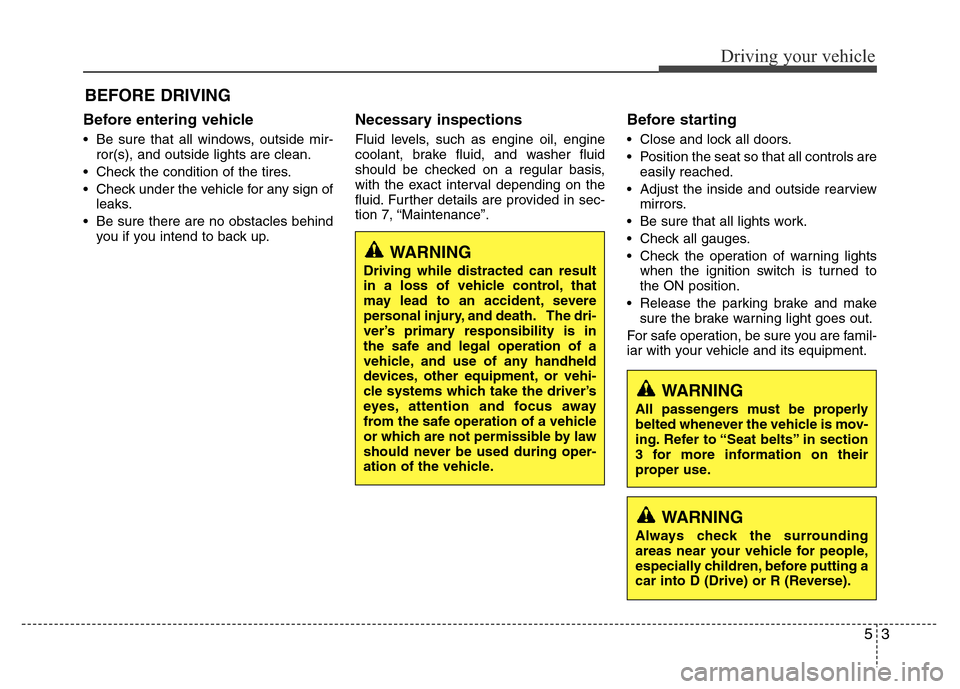
Before entering vehicle
• Be sure that all windows, outside mir-
ror(s), and outside lights are clean.
• Check the condition of the tires.
• Check under the vehicle for any sign of
leaks.
• Be sure there are no obstacles behind
you if you intend to back up.
Necessary inspections
Fluid levels, such as engine oil, engine
coolant, brake fluid, and washer fluid
should be checked on a regular basis,
with the exact interval depending on the
fluid. Further details are provided in sec-
tion 7, “Maintenance”.
Before starting
• Close and lock all doors.
• Position the seat so that all controls are
easily reached.
• Adjust the inside and outside rearview
mirrors.
• Be sure that all lights work.
• Check all gauges.
• Check the operation of warning lights
when the ignition switch is turned to
the ON position.
• Release the parking brake and make
sure the brake warning light goes out.
For safe operation, be sure you are famil-
iar with your vehicle and its equipment.
BEFORE DRIVING
WARNING
All passengers must be properly
belted whenever the vehicle is mov-
ing. Refer to “Seat belts” in section
3 for more information on their
proper use.
WARNING
Always check the surrounding
areas near your vehicle for people,
especially children, before putting a
car into D (Drive) or R (Reverse).
WARNING
Driving while distracted can result
in a loss of vehicle control, that
may lead to an accident, severe
personal injury, and death. The dri-
ver’s primary responsibility is in
the safe and legal operation of a
vehicle, and use of any handheld
devices, other equipment, or vehi-
cle systems which take the driver’s
eyes, attention and focus away
from the safe operation of a vehicle
or which are not permissible by law
should never be used during oper-
ation of the vehicle.
Page 242 of 403
519
Driving your vehicle
In the event of brake failure
If service brakes fail to operate while the
vehicle is in motion, you can make an
emergency stop with the parking brake.
The stopping distance, however, will be
much greater than normal.
Disc brakes wear indicator
Your vehicle has disc brakes.
When your brake pads are worn and new
pads are required, you will hear a high-
pitched warning sound from your front
brakes or rear brakes. You may hear this
sound come and go or it may occur
whenever you depress the brake pedal.
Please remember that some driving con-
ditions or climates may cause a brake
squeal when you first apply (or lightly
apply) the brakes. This is normal and
does not indicate a problem with your
brakes.
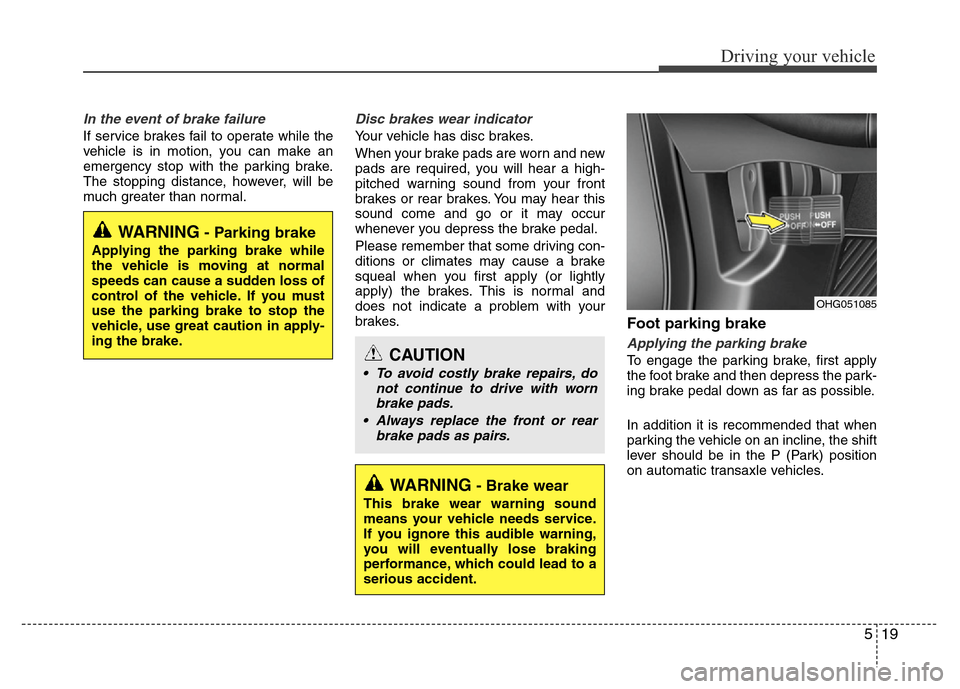
Foot parking brake
Applying the parking brake
To engage the parking brake, first apply
the foot brake and then depress the park-
ing brake pedal down as far as possible.
In addition it is recommended that when
parking the vehicle on an incline, the shift
lever should be in the P (Park) position
on automatic transaxle vehicles.
WARNING- Brake wear
This brake wear warning sound
means your vehicle needs service.
If you ignore this audible warning,
you will eventually lose braking
performance, which could lead to a
serious accident.
CAUTION
• To avoid costly brake repairs, do
not continue to drive with worn
brake pads.
• Always replace the front or rear
brake pads as pairs.
OHG051085
WARNING- Parking brake
Applying the parking brake while
the vehicle is moving at normal
speeds can cause a sudden loss of
control of the vehicle. If you must
use the parking brake to stop the
vehicle, use great caution in apply-
ing the brake.
Page 245 of 403
Driving your vehicle
22 5
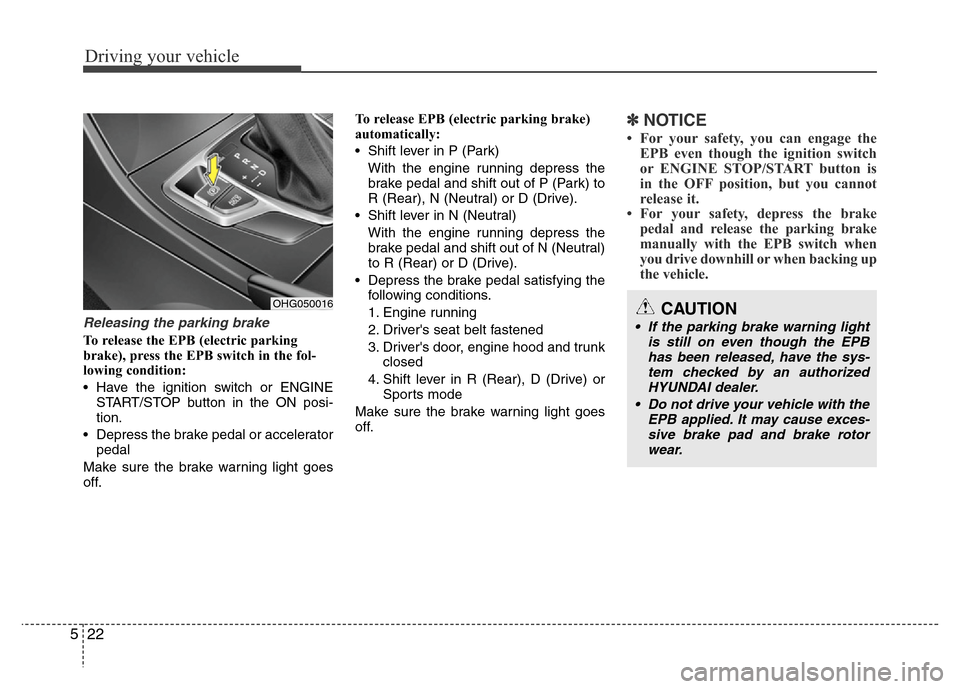
Releasing the parking brake
To release the EPB (electric parking
brake), press the EPB switch in the fol-
lowing condition:
• Have the ignition switch or ENGINE
START/STOP button in the ON posi-
tion.
• Depress the brake pedal or accelerator
pedal
Make sure the brake warning light goes
off.To release EPB (electric parking brake)
automatically:
• Shift lever in P (Park)
With the engine running depress the
brake pedal and shift out of P (Park) to
R (Rear), N (Neutral) or D (Drive).
• Shift lever in N (Neutral)
With the engine running depress the
brake pedal and shift out of N (Neutral)
to R (Rear) or D (Drive).
• Depress the brake pedal satisfying the
following conditions.
1. Engine running
2. Driver's seat belt fastened
3. Driver's door, engine hood and trunk
closed
4. Shift lever in R (Rear), D (Drive) or
Sports mode
Make sure the brake warning light goes
off.
✽NOTICE
• For your safety, you can engage the
EPB even though the ignition switch
or ENGINE STOP/START button is
in the OFF position, but you cannot
release it.
• For your safety, depress the brake
pedal and release the parking brake
manually with the EPB switch when
you drive downhill or when backing up
the vehicle.
OHG050016CAUTION
• If the parking brake warning light
is still on even though the EPB
has been released, have the sys-
tem checked by an authorized
HYUNDAI dealer.
• Do not drive your vehicle with the
EPB applied. It may cause exces-
sive brake pad and brake rotor
wear.
Page 256 of 403
533
Driving your vehicle
Vehicle stability management
(VSM) (if equipped)
This system provides further enhance-
ments to vehicle stability and steering
responses when a vehicle is driven on a
slippery road or a vehicle detects
changes in coefficient of friction between
right wheels and left wheels when brak-
ing.
VSM operation
When the VSM is operating, the steering
wheel may be controlled.
When the vehicle stability management
is operating properly, you can feel a slight
pulsation in the vehicle. This is only the
effect of brake control and indicates noth-
ing unusual.
The VSM does not operate when:
• Driving on bank road such as gradient
or incline
• Driving rearward
• ESP OFF indicator light ( ) remains
illuminated on the instrument cluster
• EPS (Electric Power Steering) indica-
tor light remains illuminated on the
instrument cluster
VSM operation off
If you press the ESP OFF button to turn
off the ESP, the VSM will also cancel and
the ESP OFF indicator light ( ) illumi-
nates.
To turn on the VSM, press the button
again. The ESP OFF indicator light goes
out.
Malfunction indicator
The VSM can be deactivated even if you
don’t cancel the VSM operation by press-
ing the ESP OFF button. It indicates that
a malfunction has been detected some-
where in the EPS (Electric Power
Steering) system or VSM system. If the
ESP indicator light ( ) or EPS warning
light remains on, take your vehicle to an
authorized HYUNDAI dealer and have
the system checked.
✽NOTICE
• The VSM is designed to function
above approximately 15 km/h (9 mph)
on curves.
• The VSM is designed to function
above approximately 30 km/h (18
mph) when a vehicle is braking on a
split-mu road. The split-mu road is
made of surfaces which have different
friction forces.
WARNING
Never press the ESP OFF button
while ESP is operating.
If the ESP is turned off while ESP is
operating, the vehicle may go out of
control.
To turn ESP off while driving, press
the ESP OFF button while driving
on a flat road surface.
Page 258 of 403
535
Driving your vehicle
• Check to be sure the parking brake is
not engaged and that the parking
brake indicator light is out before driv-
ing away.
• Driving through water may get the
brakes wet. They can also get wet
when the car is washed. Wet brakes
can be dangerous! Your car will not
stop as quickly if the brakes are wet.
Wet brakes may cause the car to pull
to one side.
To dry the brakes, apply the brakes
lightly until the braking action returns to
normal, taking care to keep the car
under control at all times. If the braking
action does not return to normal, stop
as soon as it is safe to do so and call
an authorized HYUNDAI dealer for
assistance.
• Do not coast down hills with the car out
of gear. This is extremely hazardous.
Keep the car in gear at all times, use
the brakes to slow down, then shift to a
lower gear so that engine braking will
help you maintain a safe speed.
• Do not "ride" the brake pedal. Resting
your foot on the brake pedal while driv-
ing can be dangerous because the
brakes might overheat and lose their
effectiveness. It also increases the
wear of the brake components.• If a tire goes flat while you are driving,
apply the brakes gently and keep the
car pointed straight ahead while you
slow down. When you are moving
slowly enough for it to be safe to do so,
pull off the road and stop in a safe
place.
• If your car is equipped with an auto-
matic transaxle, don't let your car
creep forward. To avoid creeping for-
ward, keep your foot firmly on the
brake pedal when the car is stopped.
• Be cautious when parking on a hill.
Firmly engage the parking brake and
place the shift lever in P (Park). If your
car is facing downhill, turn the front
wheels into the curb to help keep the
car from rolling. If your car is facing
uphill, turn the front wheels away from
the curb to help keep the car from
rolling. If there is no curb or if it is
required by other conditions to keep
the car from rolling, block the wheels.• Under some conditions your parking
brake can freeze in the engaged posi-
tion. This is most likely to happen when
there is an accumulation of snow or ice
around or near the rear brakes or if the
brakes are wet. If there is a risk that the
parking brake may freeze, apply it only
temporarily while you put the shift lever
in P (Park) and block the rear wheels
so the car cannot roll. Then release the
parking brake.
• Do not hold the vehicle on the upgrade
with the accelerator pedal. This can
cause the transaxle to overheat.
Always use the brake pedal or parking
brake.
Page 273 of 403
Driving your vehicle
50 5
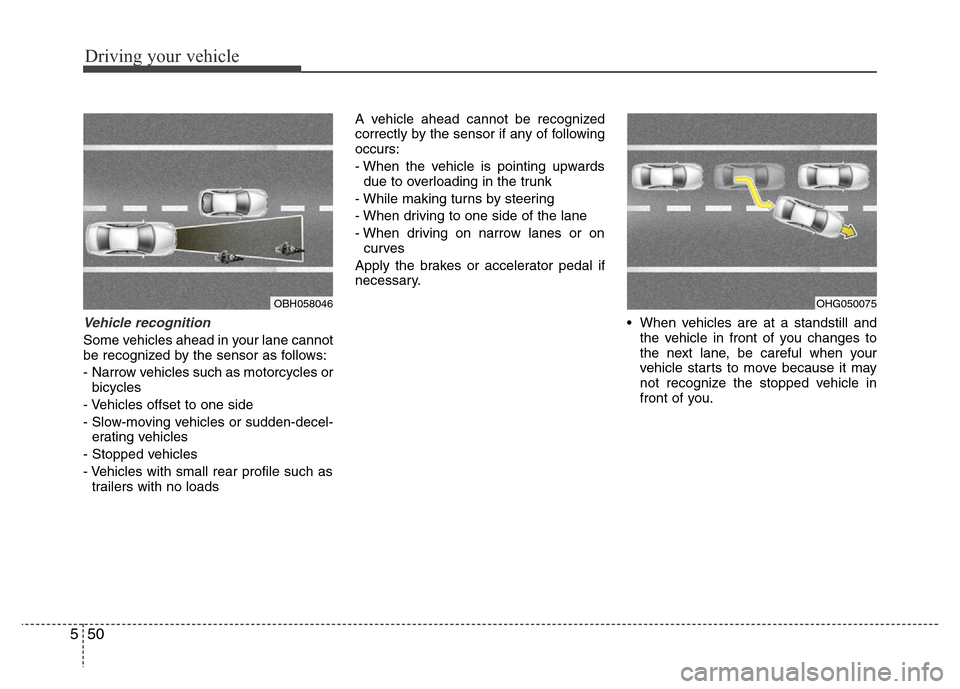
Vehicle recognition
Some vehicles ahead in your lane cannot
be recognized by the sensor as follows:
- Narrow vehicles such as motorcycles or
bicycles
- Vehicles offset to one side
- Slow-moving vehicles or sudden-decel-
erating vehicles
- Stopped vehicles
- Vehicles with small rear profile such as
trailers with no loadsA vehicle ahead cannot be recognized
correctly by the sensor if any of following
occurs:
- When the vehicle is pointing upwards
due to overloading in the trunk
- While making turns by steering
- When driving to one side of the lane
- When driving on narrow lanes or on
curves
Apply the brakes or accelerator pedal if
necessary.
• When vehicles are at a standstill and
the vehicle in front of you changes to
the next lane, be careful when your
vehicle starts to move because it may
not recognize the stopped vehicle in
front of you.
OBH058046OHG050075