PARK Hyundai Azera 2013 User Guide
[x] Cancel search | Manufacturer: HYUNDAI, Model Year: 2013, Model line: Azera, Model: Hyundai Azera 2013Pages: 403, PDF Size: 9.28 MB
Page 90 of 403
Features of your vehicle
14 4
• Lock the doors by pressing the lock
button on the smart key.
After completion of the steps above,
the hazard warning lights will operate
once to indicate that the system is
armed.
If any door, trunk lid or engine hood
remains open, the hazard warning
lights won't operate and theft-alarm
will not arm. After this, if all doors,
trunk lid and engine hood are closed,
the hazard warning lights will blink
once.Using the transmitter
Park the vehicle and stop the engine.
Arm the system as described below.
1. Turn off the engine and remove the
ignition key from the ignition switch.
2. Make sure that all doors, the engine
hood and trunk lid are closed and
latched.
3. Lock the doors by pressing the lock
button on the transmitter.
After completion of the steps above,
the hazard warning lights will blink
once to indicate that the system is
armed.
If any door, trunk lid or engine hood
remains opened, the hazard warning
lights won't operate and theft-alarm will
not arm. After this, if all doors, trunk lid
and engine hood are closed, the haz-
ard warning lights will blink once.
• Do not arm the system until all pas-
sengers have left the vehicle. If the
system is armed while a passen-
ger(s) remains in the vehicle, the
alarm may be activated when the
remaining passenger(s) leave the
vehicle. If any door, trunk lid or
engine hood is opened within 30
seconds after entering the armed
stage, the system is disarmed to
prevent unnecessary alarm.
Theft-alarm stage
The alarm will be activated if any of the
following occurs while the system is
armed.
• A door is opened without using the
transmitter (or smart key).
• The trunk is opened without using the
transmitter (or smart key).
• The engine hood is opened.
The horn will sound and the hazard
warning lights will blink continuously for
approximately 30 seconds. To turn off the
system, unlock the doors with the trans-
mitter (or smart key).
Page 94 of 403
Features of your vehicle
18 4
• When pushing down on the front por-
tion (1) of the switch, all vehicle doors
will lock.
• When pushing down on the rear por-
tion (2) of the switch, all vehicle doors
will unlock.
• If the key is in the ignition switch and
front door is opened, the doors will not
lock even though the front portion (1)
of central door lock switch is pressed.
• If the smart key is in the vehicle and
any door is opened, the doors will not
lock even though the front portion(1) of
central door lock switch is pressed.Door lock/unlock features
Impact sensing door unlock system
All doors will automatically unlock when
an impact causes the air bags to deploy.
Speed sensing door lock system
(if equipped)
All doors will automatically lock after the
vehicle speed exceeds 15 km/h (9.3
mph).
Engine off door unlock system
(if equipped)
Without smart key system
All doors will automatically unlock when
the key is removed from the ignition
switch.
With smart key system
All doors will automatically unlock when
the ENGINE START/STOP button is in
the OFF position.
WARNING- Unlocked
vehicles
Leaving your vehicle unlocked can
invite theft or possible harm to you
or others from someone hiding in
your vehicle while you are gone.
Always remove the ignition key,
engage the parking brake, close all
windows and lock all doors when
leaving your vehicle unattended.
WARNING- Unattended
children
An enclosed vehicle can become
extremely hot, causing death or
severe injury to unattended chil-
dren or animals who cannot escape
the vehicle. Furthermore, children
might operate features of the vehi-
cle that could injure them, or they
could encounter other harm, possi-
bly from someone gaining entry to
the vehicle. Never leave children or
animals unattended in your vehicle.WARNING - Doors
• The doors should always be fully
closed and locked while the vehi-
cle is in motion to prevent acci-
dental opening of the door.
Locked doors will also discour-
age potential intruders when the
vehicle stops or slows.
• Be careful when opening doors
and watch for vehicles, motorcy-
cles, bicycles or pedestrians
approaching the vehicle in the
path of the door. Opening a door
when something is approaching
can cause damage or injury.
Page 95 of 403
419
Features of your vehicle
Shift lever door lock/unlock system
(if equipped)
• All doors will automatically lock when
the shift lever is moved out of P (Park).
• All doors will automatically unlock
when the shift lever is moved into P
(Park).
Driver's door unlock system
(if equipped)
All doors will automatically unlock when
the driver's door is unlocked.
✽NOTICE
You can activate or deactivate the auto
door lock/unlock features in the vehicle.
Refer to "Vehicle Option" in this chap-
ter.
Child-protector rear door lock
The child safety lock is provided to help
prevent children from accidentally open-
ing the rear doors from inside the vehicle.
The rear door safety locks should be
used whenever children are in the vehi-
cle.
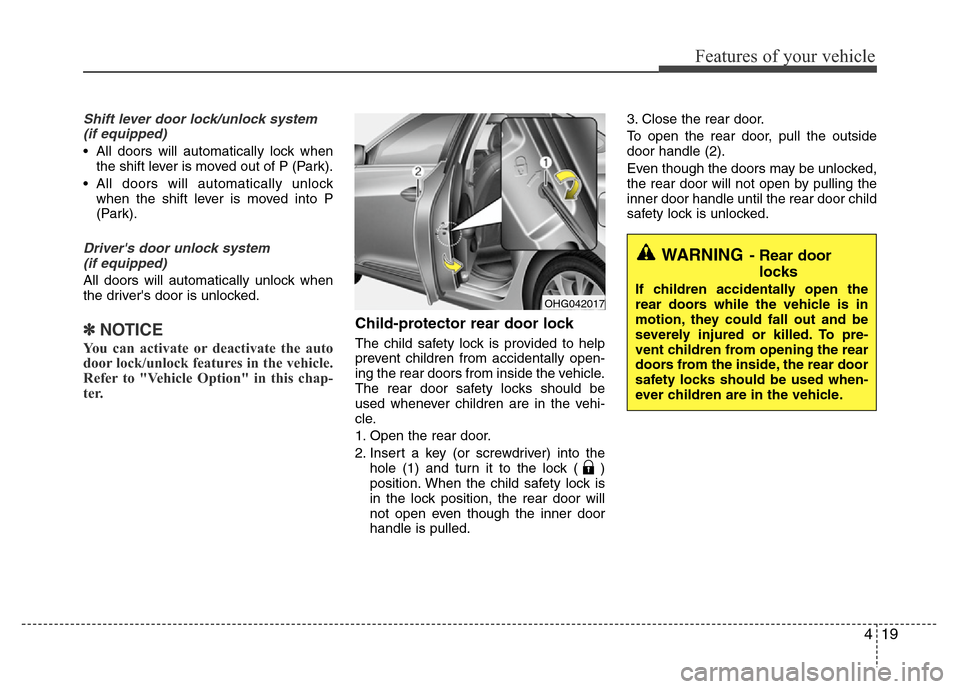
1. Open the rear door.
2. Insert a key (or screwdriver) into the
hole (1) and turn it to the lock ( )
position. When the child safety lock is
in the lock position, the rear door will
not open even though the inner door
handle is pulled.3. Close the rear door.
To open the rear door, pull the outside
door handle (2).
Even though the doors may be unlocked,
the rear door will not open by pulling the
inner door handle until the rear door child
safety lock is unlocked.
WARNING- Rear door
locks
If children accidentally open the
rear doors while the vehicle is in
motion, they could fall out and be
severely injured or killed. To pre-
vent children from opening the rear
doors from the inside, the rear door
safety locks should be used when-
ever children are in the vehicle.OHG042017
Page 102 of 403
Features of your vehicle
26 4
Opening the hood
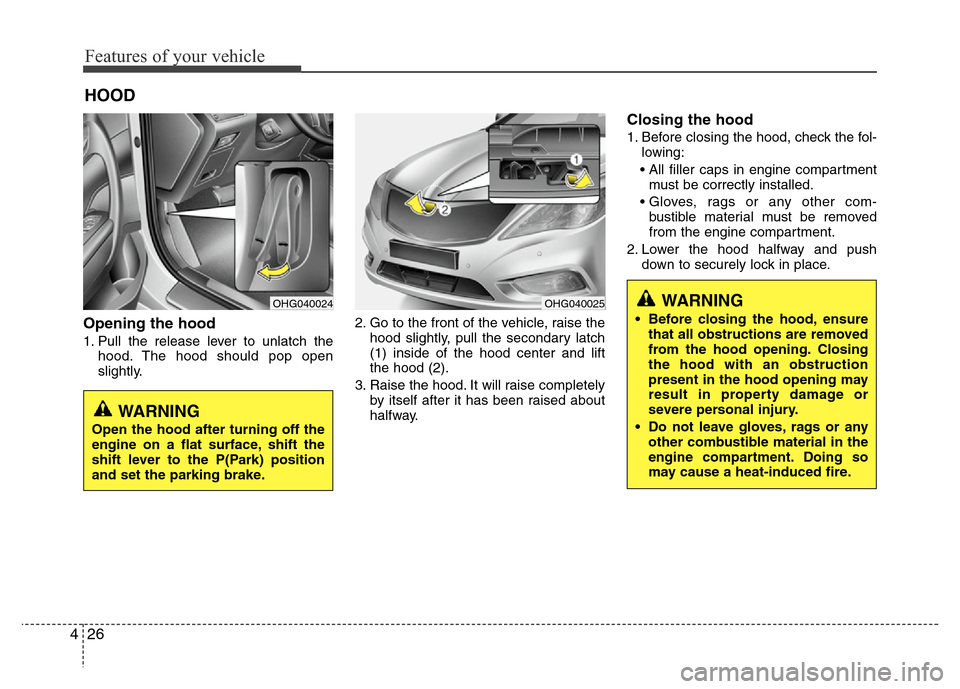
1. Pull the release lever to unlatch the
hood. The hood should pop open
slightly.2. Go to the front of the vehicle, raise the
hood slightly, pull the secondary latch
(1) inside of the hood center and lift
the hood (2).
3. Raise the hood. It will raise completely
by itself after it has been raised about
halfway.
Closing the hood
1. Before closing the hood, check the fol-
lowing:
• All filler caps in engine compartment
must be correctly installed.
• Gloves, rags or any other com-
bustible material must be removed
from the engine compartment.
2. Lower the hood halfway and push
down to securely lock in place.
HOOD
OHG040024OHG040025WARNING
• Before closing the hood, ensure
that all obstructions are removed
from the hood opening. Closing
the hood with an obstruction
present in the hood opening may
result in property damage or
severe personal injury.
• Do not leave gloves, rags or any
other combustible material in the
engine compartment. Doing so
may cause a heat-induced fire.
WARNING
Open the hood after turning off the
engine on a flat surface, shift the
shift lever to the P(Park) position
and set the parking brake.
Page 105 of 403
429
Features of your vehicle
(Continued)
• Do not get back into a vehicle
once you have begun refueling
since you can generate static
electricity by touching, rubbing
or sliding against any item or fab-
ric (polyester, satin, nylon, etc.)
capable of producing static elec-
tricity. Static electricity discharge
can ignite fuel vapors resulting in
rapid burning. If you must re-
enter the vehicle, you should
once again eliminate potentially
dangerous static electricity dis-
charge by touching a metal part
of the vehicle, away from the fuel
filler neck, nozzle or other gaso-
line source.
• When using an approved
portable fuel container, be sure to
place the container on the
ground prior to refueling. Static
electricity discharge from the
container can ignite fuel vapors
causing a fire. Once refueling has
begun, contact with the vehicle
should be maintained until the
filling is complete.
(Continued)WARNING - Refueling dan-
gers
Automotive fuels are flammable
materials. When refueling, please
note the following guidelines care-
fully. Failure to follow these guide-
lines may result in severe personal
injury, severe burns or death by fire
or explosion.
• Read and follow all warnings at
the gas station facility.
• Before refueling note the location
of the Emergency Gasoline Shut-
Off, if available, at the gas station
facility.
• Before touching the fuel nozzle,
you should eliminate potentially
dangerous static electricity dis-
charge by touching another metal
part of the vehicle, a safe dis-
tance away from the fuel filler
neck, nozzle, or other gas source.
(Continued)
(Continued)
Use only approved portable plas-
tic fuel containers designed to
carry and store gasoline.
• Do not use cellular phones while
refueling. Electric current and/or
electronic interference from cel-
lular phones can potentially
ignite fuel vapors causing a fire.
• When refueling, always shut the
engine off. Sparks produced by
electrical components related to
the engine can ignite fuel vapors
causing a fire. Once refueling is
complete, check to make sure the
filler cap and filler door are
securely closed, before starting
the engine.
• DO NOT use matches or a lighter
and DO NOT SMOKE or leave a lit
cigarette in your vehicle while at
a gas station especially during
refueling. Automotive fuel is
highly flammable and can, when
ignited, result in fire.
(Continued)
Page 111 of 403

435
Features of your vehicle
A driver position memory system is pro-
vided to store and recall the driver’s seat,
outside rearview mirror and steering
wheel position or the instrument panel
illumination intensity with a simple button
operation. By saving the desired posi-
tions into the system memory, different
drivers can reposition the positions
based upon their driving preference. If
the battery is disconnected, the position
memory will be erased.
Storing positions into memory
using the buttons on the door
Storing driver’s seat positions
1. Shift the shift lever into P (Park) while
the ignition switch is ON.
2. Adjust the driver’s seat, outside
rearview mirror, steering wheel posi-
tion and instrument panel illumination
intensity comfortable to the driver.
3. Press the SET button on the control
panel. The system will beep once.
4. Press one of the memory buttons (1 or
2) within 5 seconds after pressing the
SET button. The system will beep
twice when memory has been suc-
cessfully stored.
5. "Driver 1(or 2) set is memorized" will
appear on the instrument cluster LCD
display.
DRIVER POSITION MEMORY SYSTEM (IF EQUIPPED)
WARNING
Never attempt to operate the driver
position memory system while the
vehicle is moving.
This could result in loss of control,
and an accident causing death,
serious injury, or property damage.
OHG040033
Page 112 of 403
Features of your vehicle
36 4
Recalling positions from memory
1. Shift the shift lever into P (Park) while
the ignition switch is ON.
2. To recall the position in memory, press
the desired memory button (1 or 2).
The system will beep once, then the
driver’s seat, outside rearview mirror,
steering wheel and the instrument
panel illumination will automatically
adjust to the stored positions.
3. "Driver 1 (or 2) set is changed" will
appear on the instrument cluster LCD
display.
Adjusting the control switch for the dri-
ver’s seat, outside rearview mirror, steer-
ing wheel and the instrument panel illu-
mination while the system is recalling the
stored position will cause the movement
to stop and move in the direction that the
control switch is moved.
Easy access function
(if equipped)
With the shift lever in the P (Park) posi-
tion, the system will move the driver's
seat and steering wheel automatically so
you can comfortably enter and exit the
vehicle.
• Without smart key system
- The steering wheel will move away
from the driver and the seat will move
rearward, when the ignition key is
removed and the driver’s door is
opened.
- The steering wheel will move toward
the driver and the seat will move for-
ward, when the ignition key is insert-
ed.
• With smart key system
- The steering wheel will move away
from the driver and the seat will move
rearward, when the ENGINE START/
STOP button is in the OFF position
and the driver’s door is opened.
- The steering wheel will move toward
the driver and the seat will move for-
ward, when the ENGINE START/
STOP button is in the ACC position.
You can activate or deactivate this fea-
ture. Refer to “Vehicle Option" in this
chapter.
WARNING
Use caution when recalling adjust-
ment memory while sitting in the
vehicle. Push the seat position con-
trol switch to the desired position
immediately if the seat moves too
far in any direction.
Page 113 of 403
437
Features of your vehicle
Power steering
Power steering uses energy from the
engine to assist you in steering the vehi-
cle. If the engine is off or if the power
steering system becomes inoperative,
the vehicle may still be steered, but it will
require increased steering effort.
Should you notice any change in the
effort required to steer during normal
vehicle operation, have the power steer-
ing checked by an authorized HYUNDAI
dealer.
✽NOTICE
If the power steering drive belt breaks
or if the power steering pump malfunc-
tions, the steering effort will greatly
increase.
✽NOTICE
If the vehicle is parked for extended
periods outside in cold weather (below -
10°C/14°F), the power steering may
require increased effort when the engine
is first started. This is caused by
increased fluid viscosity due to the cold
weather and does not indicate a mal-
function.
When this happens, increase the engine
RPM by depressing accelerator until the
RPM reaches 1,500 rpm then release or
let the engine idle for two or three min-
utes to warm up the fluid.
Tilt steering
Tilt steering allows you to adjust the
steering wheel before you drive. You can
also raise it to give your legs more room
when you exit and enter the vehicle.
The steering wheel should be positioned
so that it is comfortable for you to drive,
while permitting you to see the instru-
ment panel warning lights and gauges.
STEERING WHEEL
CAUTION
Never hold the steering wheel
against a stop (extreme right or left
turn) for more than 5 seconds with
the engine running. Holding the
steering wheel for more than 5 sec-
onds in either position may cause
damage to the power steering
pump.
WARNING
• Never adjust the angle of the
steering wheel while driving. You
may lose steering control and
cause severe personal injury,
death or accidents.
• After adjusting, push the steering
wheel both up and down to be
certain it is locked in position.
Page 119 of 403
443
Features of your vehicle
- The mirror will fold or unfold when the
door is locked or unlocked by the but-
ton on the outside door handle.
- The mirror will unfold when you
approach the vehicle (all doors
closed and locked) with a smart key
in possession. (if equipped)
Reverse parking aid function
(if equipped)
While the vehicle is moving backward,
the outside rearview mirror(s) will move
downward to aid reverse parking.
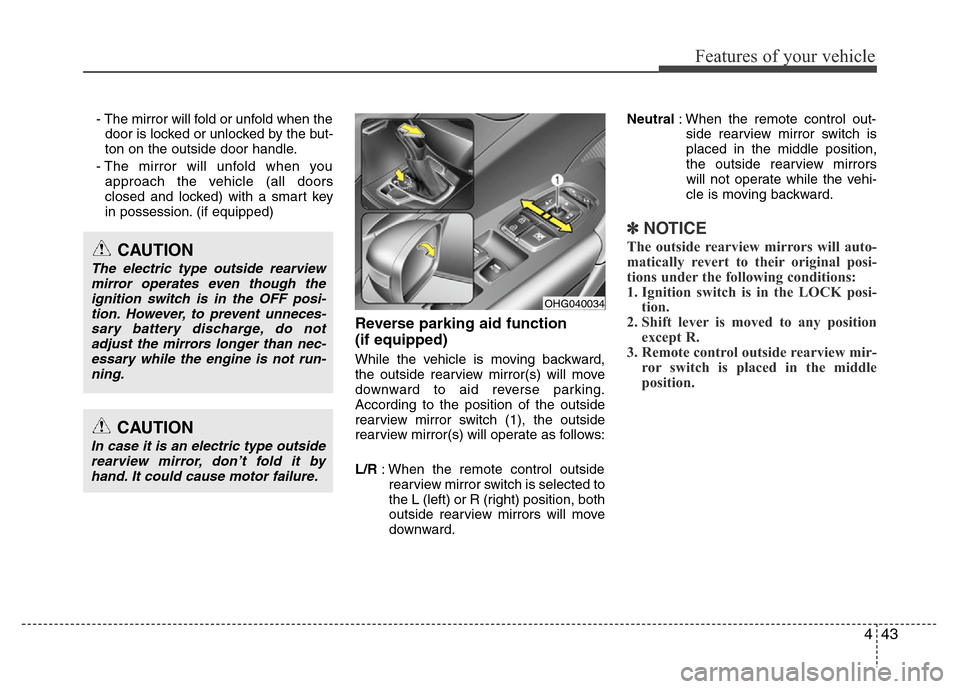
According to the position of the outside
rearview mirror switch (1), the outside
rearview mirror(s) will operate as follows:
L/R: When the remote control outside
rearview mirror switch is selected to
the L (left) or R (right) position, both
outside rearview mirrors will move
downward.Neutral: When the remote control out-
side rearview mirror switch is
placed in the middle position,
the outside rearview mirrors
will not operate while the vehi-
cle is moving backward.
✽NOTICE
The outside rearview mirrors will auto-
matically revert to their original posi-
tions under the following conditions:
1. Ignition switch is in the LOCK posi-
tion.
2. Shift lever is moved to any position
except R.
3. Remote control outside rearview mir-
ror switch is placed in the middle
position.
CAUTION
In case it is an electric type outside
rearview mirror, don’t fold it by
hand. It could cause motor failure.
CAUTION
The electric type outside rearview
mirror operates even though the
ignition switch is in the OFF posi-
tion. However, to prevent unneces-
sary battery discharge, do not
adjust the mirrors longer than nec-
essary while the engine is not run-
ning.
OHG040034
Page 121 of 403
445
Features of your vehicle
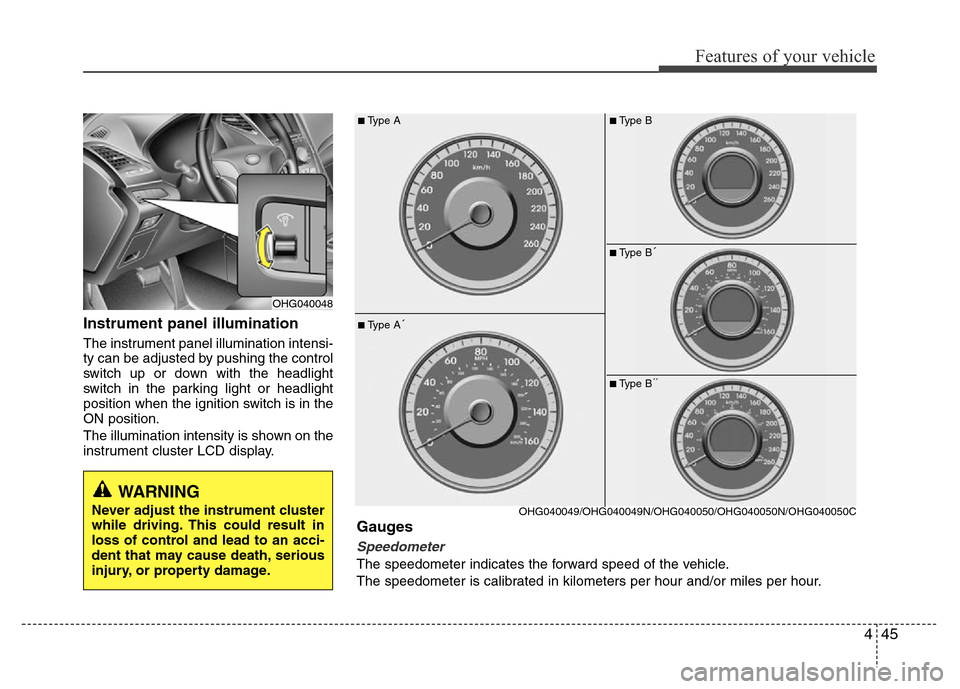
Instrument panel illumination
The instrument panel illumination intensi-
ty can be adjusted by pushing the control
switch up or down with the headlight
switch in the parking light or headlight
position when the ignition switch is in the
ON position.
The illumination intensity is shown on the
instrument cluster LCD display.
OHG040048
■Type A
■Type A´
OHG040049/OHG040049N/OHG040050/OHG040050N/OHG040050C
Gauges
Speedometer
The speedometer indicates the forward speed of the vehicle.
The speedometer is calibrated in kilometers per hour and/or miles per hour.
■Type B
■Type B´
■Type B´´
WARNING
Never adjust the instrument cluster
while driving. This could result in
loss of control and lead to an acci-
dent that may cause death, serious
injury, or property damage.