audio Hyundai Azera 2015 User Guide
[x] Cancel search | Manufacturer: HYUNDAI, Model Year: 2015, Model line: Azera, Model: Hyundai Azera 2015Pages: 473, PDF Size: 11.92 MB
Page 227 of 473
WARNING
• Do not stare at the screen while
driving. Staring at the screen for
prolonged periods of time could
lead to traffic accidents.
• Do not disassemble, assemble, or
modify the audio system. Such
acts could result in accidents,
fire, or electric shock.
• Using the phone while driving
may lead to a lack of attention of
traffic conditions and increase
the likelihood of accidents.
Use the phone feature after park-
ing the vehicle.
• Heed caution not to spill water or
introduce foreign objects into the
device. Such acts could lead to
smoke, fire, or product malfunc-
tion.
(Continued)
(Continued)
• Please refrain from use if the
screen is blank or no sound can
be heard as these signs may indi-
cate product malfunction.
Continued use in such conditions
could lead to accidents(fires,
electric shock) or product mal-
functions.
• Do not touch the antenna during
thunder or lightening as such
acts may lead to lightning
induced electric shock.
• Do not stop or park in parking-
restricted areas to operate the
product. Such acts could lead to
traffic accidents.
• Use the system with the vehicle
ignition turned on. Prolonged use
with the ignition turned off could
result in battery discharge.
4150
Features of your vehicle
Page 228 of 473
(Continued)
• If you want to change the position
of device installation, please
inquire with your place of pur-
chase or service maintenance
center. Technical expertise is
required to install or disassemble
the device.
• Turn on the car ignition before
using this device. Do not operate
the audio system for long periods
of time with the ignition turned off
as such operations may lead to
battery discharge.
• Do not subject the device to
severe shock or impact. Direct
pressure onto the front side of
the monitor may cause damage to
the LCD or touch screen.
(Continued)(Continued)
• When cleaning the device, make
sure to turn off the device and
use a dry and smooth cloth.
Never use tough materials, chem-
ical cloths, or solvents (alcohol,
benzene, thinners, etc.) as such
materials may damage the device
panel or cause color/quality dete-
rioration
• Do not place beverages close to
the audio system. Spilling bever-
ages may lead to system mal-
function.
• In case of product malfunction,
please contact your place of pur-
chase or After Service center.
• Placing the audio system within
an electromagnetic environment
may result in noise interference.
Features of your vehicle
151 4
CAUTION
• Operating the device while driv-
ing could lead to accidents due to
a lack of attention to external sur-
roundings. First park the vehicle
before operating the device.
• Adjust the volume to levels that
allow the driver to hear sounds
from outside of the vehicle.
Driving in a state where external
sounds cannot be heard may lead
to accidents.
• Pay attention to the volume set-
ting when turning the device on.
A sudden output of extreme vol-
ume upon turning the device on
could lead to hearing impairment.
(Adjust the volume to a suitable
levels before turning off the
device.)
(Continued)
Page 229 of 473
✽NOTICE- USING THE
DISCS
• This device has been manufactured
to be compatible with software
bearing the following logo marks.
• Do not clean discs with chemical
solutions, such as record sprays,
antistatic sprays, antistatic liquids,
benzene, or thinners.
• After using a disc, put the disc back
in its original case to prevent disc
scratches.
• Hold discs by their edges or within
the center hole to prevent damages
to disc surfaces.
• Do not introduce foreign substances
into the disc insert/eject slot.
Introducing foreign substances
could damage the device interior.
• Do not insert two discs simultane-
ously.
• When using CD-R/CD-RW discs,
differences in disc reading and
playing times may occur depending
on the disc manufacturer, produc-
tion method and the recording
method as used by the user.
(Continued)(Continued)
• Clean fingerprints and dust off the
disc surface (coated side) with a soft
cloth.
• The use of CD-R/CD-RW discs
attached with labels may result in
disc slot jams or difficulties in disc
removal. Such discs may also result
in noise while playing.
• Some CD-R/CD-RW discs may not
properly operate depending on the
disc manufacturer, production
method and the record method as
used by the user. If problems per-
sist, trying using a different CD as
continued use may result in mal-
functions.
• The performance of this product
may differ depending on the CD-
RW Drive Software.
• Copy-protected CDs such as S-type
CDs may not function in the device.
DATA discs cannot be played.
(However, such discs may still oper-
ate but will do so abnormally.)
(Continued)(Continued)
• Do not use abnormally shaped discs
(8cm, heart-shaped, octagon-
shaped) as such discs could lead to
malfunctions.
• If the disc is straddled on the disc
slot without removal for 10 seconds,
the disc will automatically be re-
inserted into the disc player.
• Only genuine audio CDs are sup-
ported. Other discs may result in
recognition failure (e.g. copy CD-R,
CDs with labels)
4152
Features of your vehicle
Page 230 of 473
✽NOTICE - USING THE USB
DEVICE
• Connect the USB device after turn-
ing on the engine. The USB device
may become damaged if it is
already connected when the igni-
tion is turned on.The USB device
may not operate properly if the car
ignition is turned on or off with the
USB device connected.
• Heed caution to static electricity
when connecting/disconnecting
USB devices.
• Encoded MP3 Players will not be
recognized when connected as an
external device.
• When connecting an external USB
device, the device may not properly
recognize the USB is in some states.
• Only products formatted with
byte/sectors under 64Kbyte will be
recognized.
• This device recognizes USB devices
formatted in FAT 12/16/32 file for-
mats. This device does not recog-
nize files in NTFS file format.
(Continued)(Continued)
• Some USB devices may not be sup-
ported due to compatibility issues.
• Avoid contact between the USB
connector with bodily parts or for-
eign objects.
• Repeated connecting/disconnecting
of USB devices within short periods
of time may result in product mal-
function.
• A strange noise may occur when
disconnecting the USB.
• Make sure to connect/disconnect
external USB devices with the
audio power turned off.
• The amount of time required to rec-
ognize the USB device may differ
depending on the type, size or file
formats stored in the USB. Such
differences in time are not indica-
tions of malfunctions.
• The device only supports USB
devices used to play music files.
• USB images and videos are not sup-
ported.
(Continued)(Continued)
• Do not use the USB I/F to charge
batteries or USB accessories that
generate heat. Such acts may lead
to worsened performance or dam-
age to the device.
• The device may not recognize the
USB device if separately purchased
USB hubs and extension cables are
being used. Connect the USB
directly with the multimedia termi-
nal of the vehicle.
• When using mass storage USB
devices with separate logical drives,
only files saved to the root drive can
be played.
• Files may not properly operate if
application programs are installed
to the USBs.
• The device may not operate nor-
mally if MP3 Players, cellular
phones, digital cameras, or other
electronic devices (USB devices not
recognized as portable disk drives)
are connected with the device.
Features of your vehicle
153 4
Page 231 of 473
(Continued)
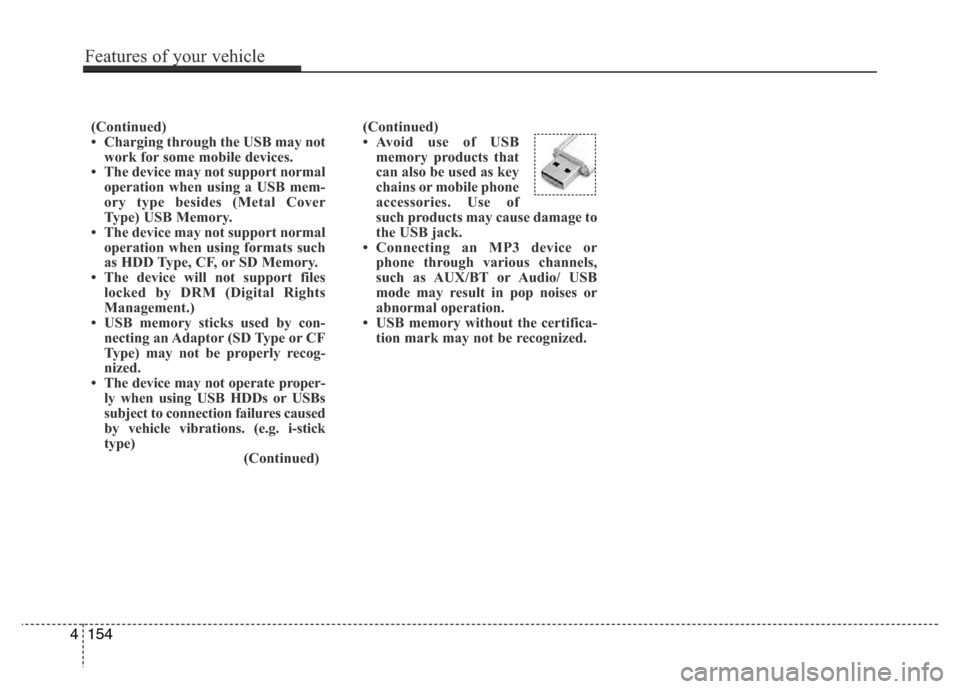
• Avoid use of USB
memory products that
can also be used as key
chains or mobile phone
accessories. Use of
such products may cause damage to
the USB jack.
• Connecting an MP3 device or
phone through various channels,
such as AUX/BT or Audio/ USB
mode may result in pop noises or
abnormal operation.
• USB memory without the certifica-
tion mark may not be recognized. (Continued)
• Charging through the USB may not
work for some mobile devices.
• The device may not support normal
operation when using a USB mem-
ory type besides (Metal Cover
Type) USB Memory.
• The device may not support normal
operation when using formats such
as HDD Type, CF, or SD Memory.
• The device will not support files
locked by DRM (Digital Rights
Management.)
• USB memory sticks used by con-
necting an Adaptor (SD Type or CF
Type) may not be properly recog-
nized.
• The device may not operate proper-
ly when using USB HDDs or USBs
subject to connection failures caused
by vehicle vibrations. (e.g. i-stick
type)
(Continued)
4154
Features of your vehicle
Page 232 of 473
✽NOTICE - USING THE iPod®
DEVICE
•iPod®is a registered trademark of
Apple Inc.
• In order to use the iPod
®while
operating the keys, you must use a
dedicated iPod
®cable. (the cable
that is supplied when purchasing
iPod
®/iPhone products)
• If the iPod®is connected to the
vehicle while it is playing, a high
pitch sound could occur for approx-
imately 1-2 seconds immediately
after connecting. If possible, con-
nect the iPod
®to the vehicle with
the iPod®stopped/paused.
• During ACC ON state, connecting
the iPod
®through the iPod®cable
will charge the iPod®through the
car audio system.
• When connecting with the iPod
®
cable, make sure to fully insert the
jack to prevent communication
interference.
(Continued)(Continued)
• When the EQ features of an exter-
nal device, such as the iPod
®, and
the audio system are both active,
EQ effects could overlap and cause
sound deterioration and distortion.
Whenever possible, turn off the EQ
feature within the external device
upon use by connecting with the
audio system.
• Noise may occur when an iPod
®or
AUX device is connected. When
such devices are not being used, dis-
connect the device for storage.
• When the iPod
®or AUX device
power is connected to the power
jack, playing the external device
may result in noise. In such cases,
disconnect the power connection
before use.
• Skipping or improper operation
may occur depending on the char-
acteristics of your iPod
®/Phone
device.
(Continued)(Continued)
• If your iPhone is connected to both
the Bluetooth
®Wireless Technology
and USB, the sound may not be
properly played. In your iPhone,
select the Dock connector or
Bluetooth
®Wireless Technology to
change the sound output (source).
•iPod
®mode cannot be operated
when the iPod®cannot be recog-
nized due to versions that do not
support communication protocols.
• For fifth generation iPod
®Nano
devices, the iPod®may not be rec-
ognized when the battery level is
low. Please charge the iPod
®for
use.
• Search/play orders shown within the
iPod
®device may differ with the
orders shown within the audio sys-
tem.
• If the iPod
®malfunctions due to an
iPod®device defect, reset the iPod®
and try again. (To learn more, refer
to your iPod®manual)
(Continued)
Features of your vehicle
155 4
Page 233 of 473
(Continued)
• Some iPods may not sync with the
System depending on its version. If
the Media is removed before the
Media is recognized, then the system
may not properly restore the previ-
ously operated mode. (iPad charging
is not supported.)✽NOTICE - USING THE
Bluetooth®Wireless
Technology Audio Mode
•Bluetooth®Wireless Technology Audio
Mode can be used only when a
Bluetooth
®Wireless Technology phone
has been connected.
•Bluetooth
®Wireless Technology Audio
Mode will not be available when con-
necting mobile phones that do not sup-
port this feature.
• While Bluetooth
®Wireless Technology
Audio is playing, if the Bluetooth®
Wireless Technology phone is connect-
ed, then the music will also stop.
• Moving the Track up/down while play-
ing Bluetooth
®Wireless Technology
audio mode may result in pop noises in
some mobile phones.
•Bluetooth
®Wireless Technology stream-
ing audio may not be supported in some
mobile phones.
(Continued)(Continued)
• When returning to Bluetooth
®Wireless
Technology Audio mode after ending a
call, the mode may not automatically
restart in some mobile phones.
• Receiving an incoming call or making an
outgoing call while playing Bluetooth
®
Wireless Technology Audio may result
in audio interference.
4156
Features of your vehicle
Page 234 of 473
✽NOTICE- USING UPON CON-
NECTING
Bluetooth®Wireless
Technology PHONE
• Before connecting the car audio sys-
tem with the mobile phone, check to
see that the mobile phone supports
Bluetooth
®Wireless Technology fea-
tures.
• Even if the phone supports Bluetooth
®
Wireless Technology, the phone will
not be found during device searches if
the phone has been set to hidden state
or the Bluetooth
®Wireless Technology
power is turned off. Disable the hid-
den state or turn on the Bluetooth
®
Wireless Technology power prior to
searching/connecting with the car
audio system.
• If you do not want to automatically
connect yourBluetooth
®Wireless
Technology phone, try the following.
1. Turn off the Bluetooth
®feature in
your mobile phone.
(Continued)(Continued)
-For more information on Bluetooth
®
Wireless Technology features within
your mobile, refer to your mobile
phone user’s manual.
2.Turn off the Bluetooth
®Wireless
Technology feature in your car
audio system.
-To turn off the Bluetooth
®Wireless
Technology feature in your car audio
system, go to [Phone] and
[turn off] the Bluetooth
®Wireless
Technology feature.
• Park the vehicle when connecting the
car audio system with your mobile
phone.
•Bluetooth
®Wireless Technology con-
nection may become intermittently
disconnected in some mobile phones.
Follow these steps to try again.
1.Turn the Bluetooth
®Wireless
Technology function within the
mobile phone off/on and try again.
2.Turn the mobile phone power
Off/On and try again.
(Continued)(Continued)
3.Completely remove the mobile
phone battery, reboot, and then
again.
4.Reboot the audio system and try
again.
5.Delete all paired devices, pair and
try again.
• The Handsfree call volume and quali-
ty may differ depending on the mobile
phone.
•Bluetooth
®Wireless Technology fea-
tures supported within the vehicle are
as follows. Some features may not be
supported depending on your
Bluetooth
®Wireless Technologydevice.
- Answering and placing Bluetooth®
Wireless Technology Handsfree calls
- Menu operation during call (Switch
to Private, Switch to call waiting,
Outgoing volume)
- Download Call History
- Download Mobile Phone book
- Phone book/Call History Auto
Download
(Continued)
SETUP
Features of your vehicle
157 4
Page 235 of 473
Features of your vehicle
158 4
(Continued)
• It is possible to pair up to five
Bluetooth
®Wireless Technology
devices to the car system.
• Only one Bluetooth
®Wireless Technology
device can be connected at a time.
• Other devices cannot be paired while
aBluetooth
®Wireless Technologydevice
is already connected.
• When a Bluetooth
®Wireless Technology
device is being connected, the connection
process cannot be canceled.
•Only Bluetooth
®Wireless Technology
Handsfree and Bluetooth®Wireless
Technology audio related features will
operate within this system.
• Normal operation is possible only for
devices that support Handsfree or
audio features, such as a Bluetooth
®
Wireless Technology mobile phone or a
Bluetooth®Wireless Technology audio
device.
(Continued)(Continued)
• Only one function can be used at a
time between the Bluetooth
®Wireless
Technology Handsfree and Bluetooth®
Wireless Technology audio. (While
playing Bluetooth®Wireless Technology
audio, streaming will end upon enter-
ing the Bluetooth
®Wireless Technology
phone screen.)
• If a connected Bluetooth
®Wireless
Technology device becomes discon-
nected for various reasons, such as
being out of range, turning the device
OFF, or a Bluetooth
®Wireless
Technology communication error,
Bluetooth
®Wireless Technology devices
are automatically searched and con-
nected.
•Bluetooth
®Handsfree is a feature that
enables drivers to practice safe driving.
Connecting the head unit with a
Bluetooth
®phone allows the user to
conveniently make calls, receive calls,
and manage the phone book. Before
using the Bluetooth
®, carefully read the
contents of this user’s manual.
Page 237 of 473
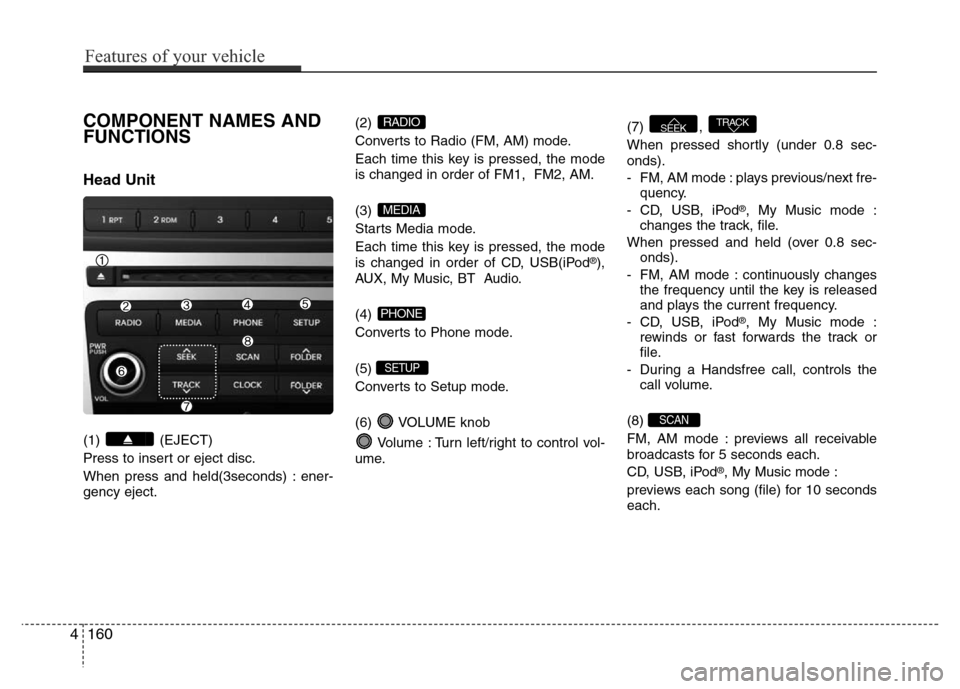
COMPONENT NAMES AND
FUNCTIONS
Head Unit
(1) (EJECT)
Press to insert or eject disc.
When press and held(3seconds) : ener-
gency eject.(2)
Converts to Radio (FM, AM) mode.
Each time this key is pressed, the mode
is changed in order of FM1, FM2, AM.
(3)
Starts Media mode.
Each time this key is pressed, the mode
is changed in order of CD, USB(iPod
®),
AUX, My Music, BT Audio.
(4)
Converts to Phone mode.
(5)
Converts to Setup mode.
(6) VOLUME knob
Volume : Turn left/right to control vol-
ume.(7) ,
When pressed shortly (under 0.8 sec-
onds).
- FM, AM mode : plays previous/next fre-
quency.
- CD, USB, iPod
®, My Music mode :
changes the track, file.
When pressed and held (over 0.8 sec-
onds).
- FM, AM mode : continuously changes
the frequency until the key is released
and plays the current frequency.
- CD, USB, iPod
®, My Music mode :
rewinds or fast forwards the track or
file.
- During a Handsfree call, controls the
call volume.
(8)
FM, AM mode : previews all receivable
broadcasts for 5 seconds each.
CD, USB, iPod
®, My Music mode :
previews each song (file) for 10 seconds
each.
SCAN
TRACKSEEK
SETUP
PHONE
MEDIA
RADIO
4160
Features of your vehicle