audio Hyundai Azera 2015 Owner's Guide
[x] Cancel search | Manufacturer: HYUNDAI, Model Year: 2015, Model line: Azera, Model: Hyundai Azera 2015Pages: 473, PDF Size: 11.92 MB
Page 267 of 473
✽NOTICE
• Bluetooth®Wireless Technology fea-
tures supported within the vehicle are
as follows. Some features may not be
supported depending on your
Bluetooth
®Wireless Technology device.
- Outgoing/Incoming Handsfree calls
- Operations during a call (Switch to
Private, Switch to call waiting, MIC
on/off)
- Downloading Call History
- Downloading Mobile Contacts
-Bluetooth
®Wireless Technology
device auto connection
- Bluetooth Audio Streaming
• Up to five Bluetooth
®Wireless
Technology devices can be paired to
the Car Handsfree system.
• Only one Bluetooth
®Wireless
Technology device can be connected at
a time.
• Other devices cannot be paired while
a Bluetooth
®Wireless Technology
device is connected.
•Only Bluetooth
®Wireless Technology
Handsfree and Bluetooth audio relat-
ed features are supported.
(Continued)(Continued)
• Bluetooth related operations are pos-
sible only within devices that support
Handsfree or audio features, such as a
Bluetooth
®Wireless Technology
mobile phone or a Bluetooth audio
device.
• If a connected Bluetooth
®Wireless
Technology device becomes discon-
nected due to being out of communi-
cation range, turning the device OFF,
or a Bluetooth
®Wireless Technology
communication error, corresponding
Bluetooth
®Wireless Technology
devices are automatically searched
and reconnected.
• If the system becomes unstable due to
communication errors between the
car Handsfree and the Bluetooth
®
Wireless Technology device, reset the
device by turning off and back on
again. Upon resetting Bluetooth
®
Wireless Technology device, the sys-
tem will be restored.
(Continued)(Continued)
• After pairing is complete, a contacts
download request is sent once to the
mobile phone. Some mobile phones
may require confirmation upon
receiving a download request, ensure
your mobile phone accepts the con-
nection. Refer to your phones user’s
manual for additional information
regarding phone pairing and connec-
tions.
4190
Features of your vehicle
Page 268 of 473
![Hyundai Azera 2015 Owners Guide Connecting a Device
Press the key Select
[Phone] Select [Paired Phone List]
1) Connected Phone : Device that is cur-
rently connected
2) Paired Phone : Device that is paired
but not connectedFrom th](/img/35/14466/w960_14466-267.png "Hyundai Azera 2015 Owners Guide Connecting a Device
Press the key Select
[Phone] Select [Paired Phone List]
1) Connected Phone : Device that is cur-
rently connected
2) Paired Phone : Device that is paired
but not connectedFrom th")
Connecting a Device
Press the key Select
[Phone] Select [Paired Phone List]
1) Connected Phone : Device that is cur-
rently connected
2) Paired Phone : Device that is paired
but not connectedFrom the paired phone list, select the
device you want to connect and Select
the button.
Changing Priority
What is Priority?
It is possible to pair up to five Bluetooth®
Wireless Technology devices with the car
audio system. The "Change Priority" fea-
ture is used to set the connection priority
of paired phones.
Press the key Select [Phone]
Select [Paired Phone List]
SETUP
ConnectSETUP
Features of your vehicle
191 4
Page 272 of 473
Answering Calls
Answering a Call
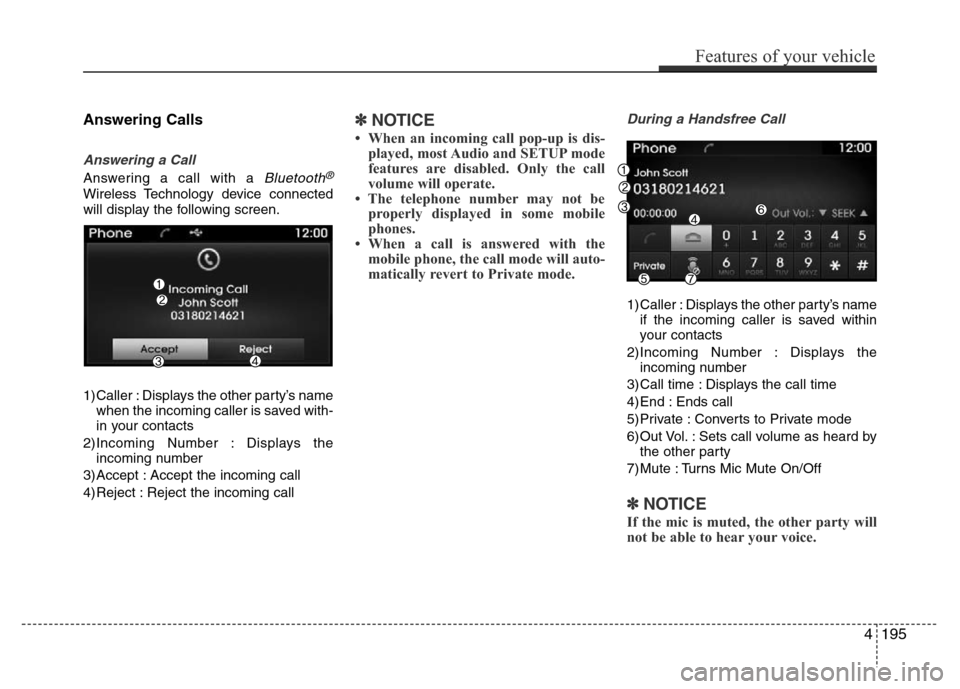
Answering a call with a Bluetooth®
Wireless Technology device connected
will display the following screen.
1) Caller : Displays the other party’s name
when the incoming caller is saved with-
in your contacts
2)Incoming Number : Displays the
incoming number
3) Accept : Accept the incoming call
4) Reject : Reject the incoming call
✽NOTICE
• When an incoming call pop-up is dis-
played, most Audio and SETUP mode
features are disabled. Only the call
volume will operate.
• The telephone number may not be
properly displayed in some mobile
phones.
• When a call is answered with the
mobile phone, the call mode will auto-
matically revert to Private mode.
During a Handsfree Call
1) Caller : Displays the other party’s name
if the incoming caller is saved within
your contacts
2)Incoming Number : Displays the
incoming number
3) Call time : Displays the call time
4) End : Ends call
5) Private : Converts to Private mode
6) Out Vol. : Sets call volume as heard by
the other party
7) Mute : Turns Mic Mute On/Off
✽NOTICE
If the mic is muted, the other party will
not be able to hear your voice.
Features of your vehicle
195 4
Page 274 of 473
✽NOTICE
• Up to 1,000 contacts saved in your
Bluetooth®Wireless Technology phone
can be downloaded into the car con-
tacts. Contacts that have been down-
loaded to the car cannot be edited or
deleted on the phone.
• Mobile phone contacts are managed
separately for each paired Bluetooth
®
Wireless Technology device (max 5
devices x 1,000 contacts each).
Previously downloaded data is main-
tained even if the Bluetooth
®Wireless
Technology device has been discon-
nected.
(However, the contacts and call histo-
ry saved to the phone will be deleted if
a paired phone is deleted.)
• It is possible to download contacts
during Bluetooth streaming audio.
• When downloading contacts, the icon
will be displayed within the status bar.
(Continued)(Continued)
• It is not possible to begin downloading
a contact list when the contact down-
load feature has been turned off with-
in the Bluetooth
®Wireless Technology
device. In addition, some devices may
require device authorization upon
attempting to download contacts. If
downloading does not normally occur,
check the Bluetooth
®Wireless
Technology device settings or the
screen state.
• The contacts download feature may
not be supported in some mobile
phones. For more information of sup-
ported Bluetooth
®devices and func-
tion support, refer to your phone’s
user manual.
Features of your vehicle
197 4
Page 278 of 473
![Hyundai Azera 2015 Owners Guide 4201
Features of your vehicle
Calendar Setting
Press the key Select [Clock/
Calendar] Select [Calendar Settings]
Use the TUNE knob to select the
Month, Day, and Year and press the knob
to change set](/img/35/14466/w960_14466-277.png "Hyundai Azera 2015 Owners Guide 4201
Features of your vehicle
Calendar Setting
Press the key Select [Clock/
Calendar] Select [Calendar Settings]
Use the TUNE knob to select the
Month, Day, and Year and press the knob
to change set")
4201
Features of your vehicle
Calendar Setting
Press the key Select [Clock/
Calendar] Select [Calendar Settings]
Use the TUNE knob to select the
Month, Day, and Year and press the knob
to change settings.
Clock Display
Press the key Select [Clock/
Calendar] Select [Clock Display (Power
off)]
This feature is used to display a clock on
the screen when the audio system is
turned off.SETUP SETUP
Page 279 of 473
![Hyundai Azera 2015 Owners Guide Features of your vehicle
202 4
Bluetooth®Wireless Technology
Setting
Pairing a New Device
Press the key Select
[Phone] Select [Pair Phone]
Bluetooth®Wireless Technology devices
can be paired with t](/img/35/14466/w960_14466-278.png "Hyundai Azera 2015 Owners Guide Features of your vehicle
202 4
Bluetooth®Wireless Technology
Setting
Pairing a New Device
Press the key Select
[Phone] Select [Pair Phone]
Bluetooth®Wireless Technology devices
can be paired with t")
Features of your vehicle
202 4
Bluetooth®Wireless Technology
Setting
Pairing a New Device
Press the key Select
[Phone] Select [Pair Phone]
Bluetooth®Wireless Technology devices
can be paired with the audio system.
For more information, refer to the “Pairing
through Phone Setup” section within
Bluetooth®Wireless Technology.
Viewing Paired Phone List
Press the key Select
[Phone] Select [Paired Phone List]
This feature is used to view mobile
phones that have been paired with the
audio system. Upon selecting a paired
phone, the setup menu is displayed.
For more information, refer to the
“Setting
Bluetooth®Wireless Technology
Connection” section within
Bluetooth®
Wireless Technology.
1) Connect/Disconnect Phone : Connect/
disconnects currently selected phone2) Delete : Deletes the currently selected
phone
3) Change Priority : Sets currently select-
ed phone to highest connection priority
SETUP
SETUP
Page 281 of 473
![Hyundai Azera 2015 Owners Guide Features of your vehicle
204 4
Streaming Audio
Press the key Select
[Phone] Select [Streaming Audio]
When Streaming Audio is turned on, you
can play music files saved in your
Bluetooth®Wireless Tech](/img/35/14466/w960_14466-280.png "Hyundai Azera 2015 Owners Guide Features of your vehicle
204 4
Streaming Audio
Press the key Select
[Phone] Select [Streaming Audio]
When Streaming Audio is turned on, you
can play music files saved in your
Bluetooth®Wireless Tech")
Features of your vehicle
204 4
Streaming Audio
Press the key Select
[Phone] Select [Streaming Audio]
When Streaming Audio is turned on, you
can play music files saved in your
Bluetooth®Wireless Technology device
through the audio system.
Outgoing Volume
Press the key Select
[Phone] Select [Outgoing Volume]
Use the
TUNE knobto adjust the out-
going volume level.
Turning Bluetooth System Off
Press the key Select
[Phone] Select [Bluetooth System Off]
Once
Bluetooth®Wireless Technology is
turned off,
Bluetooth®Wireless Technology
related features will not be supported with-
in the audio system.
SETUP SETUP SETUP
Page 287 of 473
Driving your vehicle
4 5
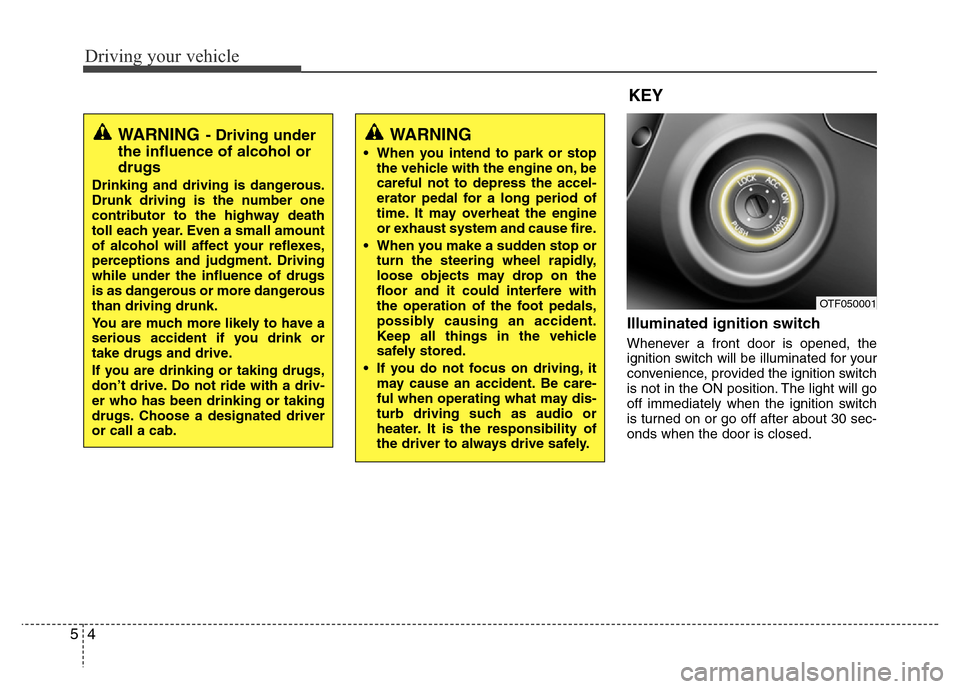
Illuminated ignition switch
Whenever a front door is opened, the
ignition switch will be illuminated for your
convenience, provided the ignition switch
is not in the ON position. The light will go
off immediately when the ignition switch
is turned on or go off after about 30 sec-
onds when the door is closed.
OTF050001
WARNING
• When you intend to park or stop
the vehicle with the engine on, be
careful not to depress the accel-
erator pedal for a long period of
time. It may overheat the engine
or exhaust system and cause fire.
• When you make a sudden stop or
turn the steering wheel rapidly,
loose objects may drop on the
floor and it could interfere with
the operation of the foot pedals,
possibly causing an accident.
Keep all things in the vehicle
safely stored.
• If you do not focus on driving, it
may cause an accident. Be care-
ful when operating what may dis-
turb driving such as audio or
heater. It is the responsibility of
the driver to always drive safely.
WARNING- Driving under
the influence of alcohol or
drugs
Drinking and driving is dangerous.
Drunk driving is the number one
contributor to the highway death
toll each year. Even a small amount
of alcohol will affect your reflexes,
perceptions and judgment. Driving
while under the influence of drugs
is as dangerous or more dangerous
than driving drunk.
You are much more likely to have a
serious accident if you drink or
take drugs and drive.
If you are drinking or taking drugs,
don’t drive. Do not ride with a driv-
er who has been drinking or taking
drugs. Choose a designated driver
or call a cab.
KEY
Page 424 of 473
Maintenance
42 7
Battery recharging
Your vehicle has a maintenance-free,
calcium-based battery.
• If the battery becomes discharged in a
short time (because, for example, the
headlights or interior lights were left on
while the vehicle was not in use),
recharge it by slow charging (trickle)
for 10 hours.
• If the battery gradually discharges
because of high electric load while the
vehicle is being used, recharge it at 20-
30A for two hours.
Reset items
Items should be reset after the battery
has been discharged or the battery has
been disconnected.
• Auto up/down window (See section 4)
• Sunroof (See section 4)
• Driver position memory system
(See section 4)
• Trip computer (See section 4)
• Climate control system
(See section 4)
• Clock (See section 4)
• Audio (See section 4)
WARNING
• Before performing maintenance
or recharging the battery, turn off
all accessories and stop the
engine.
• The negative battery cable must
be removed first and installed
last when the battery is discon-
nected.
• We recommend that the system
be serviced by an authorized
HYUNDAI dealer.
CAUTION
• Keep the battery away from water
or any liquid.
• We recommend that you use
parts for replacement from an
authorized HYUNDAI dealer.
WARNING- Recharging
battery
When recharging the battery,
observe the following precautions:
• The battery must be removed
from the vehicle and placed in an
area with good ventilation.
• Do not allow cigarettes, sparks,
or flame near the battery.
• Watch the battery during charg-
ing, and stop or reduce the charg-
ing rate if the battery cells begin
gassing (boiling) violently or if
the temperature of the electrolyte
of any cell exceeds 49°C (120°F).
(Continued)
(Continued)
• Wear eye protection when check-
ing the battery during charging.
• Disconnect the battery charger in
the following order.
1. Turn off the battery charger main
switch.
2. Unhook the negative clamp from
the negative battery terminal.
3. Unhook the positive clamp from
the positive battery terminal.
Page 437 of 473
755
Maintenance
If the headlights or other electrical com-
ponents do not work and the fuses are
OK, check the fuse panel in the engine
compartment. If a fuse is blown, it must
be replaced.
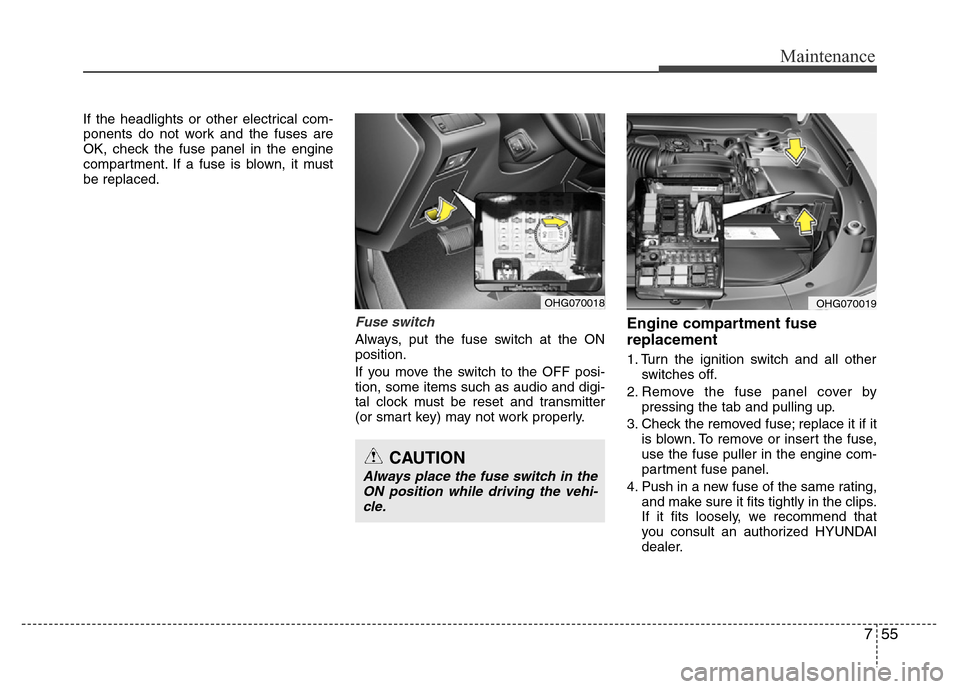
Fuse switch
Always, put the fuse switch at the ON
position.
If you move the switch to the OFF posi-
tion, some items such as audio and digi-
tal clock must be reset and transmitter
(or smart key) may not work properly.
Engine compartment fuse
replacement
1. Turn the ignition switch and all other
switches off.
2. Remove the fuse panel cover by
pressing the tab and pulling up.
3. Check the removed fuse; replace it if it
is blown. To remove or insert the fuse,
use the fuse puller in the engine com-
partment fuse panel.
4. Push in a new fuse of the same rating,
and make sure it fits tightly in the clips.
If it fits loosely, we recommend that
you consult an authorized HYUNDAI
dealer.
OHG070018OHG070019
CAUTION
Always place the fuse switch in the
ON position while driving the vehi-
cle.