height Hyundai Azera 2015 User Guide
[x] Cancel search | Manufacturer: HYUNDAI, Model Year: 2015, Model line: Azera, Model: Hyundai Azera 2015Pages: 473, PDF Size: 11.92 MB
Page 54 of 473
Safety features of your vehicle
38 3
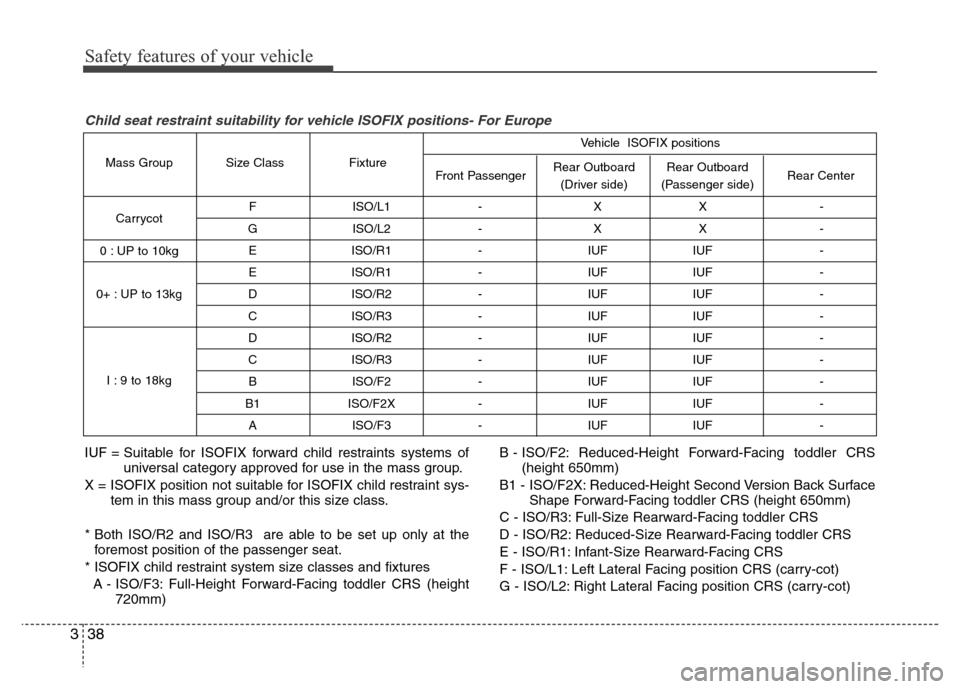
F ISO/L1 - X X -
G ISO/L2 - X X -
E ISO/R1 - IUF IUF -
E ISO/R1 - IUF IUF -
D ISO/R2 - IUF IUF -
C ISO/R3 - IUF IUF -
D ISO/R2 - IUF IUF -
C ISO/R3 - IUF IUF -
B ISO/F2 - IUF IUF -
B1 ISO/F2X - IUF IUF -
A ISO/F3 - IUF IUF -
Rear Outboard
(Passenger side) Rear Outboard
(Driver side) Front Passenger Fixture Size Class Mass Group
Carrycot
0 : UP to 10kg
0+ : UP to 13kg
I : 9 to 18kgRear Center Vehicle ISOFIX positions
IUF = Suitable for ISOFIX forward child restraints systems of
universal category approved for use in the mass group.
X = ISOFIX position not suitable for ISOFIX child restraint sys-
tem in this mass group and/or this size class.
* Both ISO/R2 and ISO/R3 are able to be set up only at the
foremost position of the passenger seat.
* ISOFIX child restraint system size classes and fixtures
A - ISO/F3: Full-Height Forward-Facing toddler CRS (height
720mm)B - ISO/F2: Reduced-Height Forward-Facing toddler CRS
(height 650mm)
B1 - ISO/F2X: Reduced-Height Second Version Back Surface
Shape Forward-Facing toddler CRS (height 650mm)
C - ISO/R3: Full-Size Rearward-Facing toddler CRS
D - ISO/R2: Reduced-Size Rearward-Facing toddler CRS
E - ISO/R1: Infant-Size Rearward-Facing CRS
F - ISO/L1: Left Lateral Facing position CRS (carry-cot)
G - ISO/L2: Right Lateral Facing position CRS (carry-cot)
Child seat restraint suitability for vehicle ISOFIX positions- For Europe
Page 76 of 473
Safety features of your vehicle
60 3
Additional safety precautions
•Never let passengers ride in the
cargo area or on top of a folded-
down back seat.All occupants should
sit upright, fully back in their seats with
their seat belts on and their feet on the
floor.
•Passengers should not move out of
or change seats while the vehicle is
moving.A passenger who is not wear-
ing a seat belt during a crash or emer-
gency stop can be thrown against the
inside of the vehicle, against other
occupants, or out of the vehicle.
•Each seat belt is designed to
restrain one occupant.If more than
one person uses the same seat belt,
they could be seriously injured or killed
in a collision.
•Do not use any accessories on seat
belts.Devices claiming to improve
occupant comfort or reposition the seat
belt can reduce the protection provided
by the seat belt and increase the
chance of serious injury in a crash.
•Passengers should not place hard
or sharp objects between them-
selves and the air bags.Carrying
hard or sharp objects on your lap or in
your mouth can result in injuries if an
air bag inflates.•Keep occupants away from the air
bag covers.All occupants should sit
upright, fully back in their seats with
their seat belts on and their feet on the
floor. If occupants are too close to the
air bag covers, they could be injured if
the air bags inflate.
•Do not attach or place objects on or
near the air bag covers.Any object
attached to or placed on the front or
side air bag covers could interfere with
the proper operation of the air bags.
•Do not modify the front seats.
Modification of the front seats could
interfere with the operation of the sup-
plemental restraint system sensing
components or side air bags.
•Do not place items under the front
seats.Placing items under the front
seats could interfere with the operation
of the supplemental restraint system
sensing components and wiring har-
nesses.
•Never hold an infant or child on your
lap.The infant or child could be seri-
ously injured or killed in the event of a
crash. All infants and children should
be properly restrained in appropriate
child safety seats or seat belts in the
rear seat.
Adding equipment to or modifying
your air bag-equipped vehicle
If you modify your vehicle by changing
your vehicle's frame, bumper system,
front end or side sheet metal or ride
height, this may affect the operation of
your vehicle's air bag system.
WARNING
• Sitting improperly or out of posi-
tion can cause occupants to be
shifted too close to a deploying
air bag, strike the interior struc-
ture or be thrown from the vehicle
resulting in serious injury or
death.
• Always sit upright with the seat-
back in an upright position, cen-
tered on the seat cushion with
your seat belt on, legs comfort-
ably extended and your feet on
the floor.
Page 121 of 473
Features of your vehicle
44 4
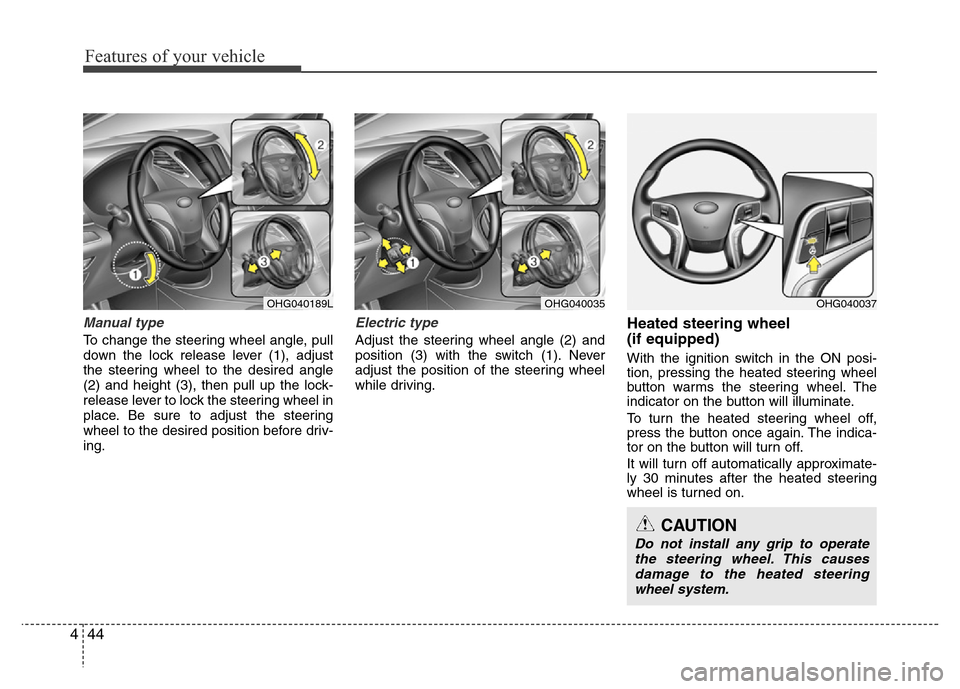
Manual type
To change the steering wheel angle, pull
down the lock release lever (1), adjust
the steering wheel to the desired angle
(2) and height (3), then pull up the lock-
release lever to lock the steering wheel in
place. Be sure to adjust the steering
wheel to the desired position before driv-
ing.
Electric type
Adjust the steering wheel angle (2) and
position (3) with the switch (1). Never
adjust the position of the steering wheel
while driving.
Heated steering wheel
(if equipped)
With the ignition switch in the ON posi-
tion, pressing the heated steering wheel
button warms the steering wheel. The
indicator on the button will illuminate.
To turn the heated steering wheel off,
press the button once again. The indica-
tor on the button will turn off.
It will turn off automatically approximate-
ly 30 minutes after the heated steering
wheel is turned on.
OHG040189LOHG040035OHG040037
CAUTION
Do not install any grip to operate
the steering wheel. This causes
damage to the heated steering
wheel system.
Page 164 of 473
487
Features of your vehicle
Non-operational conditions of
rear parking assist system
The rear parking assist system may
not operate properly when:
1. Moisture is frozen to the sensor. (It will
operate normally when the moisture
has been cleared.)
2. The sensor is covered with foreign
matter, such as snow or water, or the
sensor cover is blocked. (It will operate
normally when the material is removed
or the sensor is no longer blocked.)
3. Driving on uneven road surfaces
(unpaved roads, gravel, bumps, gradi-
ent).
4. Objects generating excessive noise
(vehicle horns, loud motorcycle
engines, or truck air brakes) are within
range of the sensor.
5. Heavy rain or water spray exists.
6. Wireless transmitters or mobile phones
are within range of the sensor.
7. The sensor is covered with snow.
8. Trailer towingThe detecting range may decrease
when:
1. The sensor is stained with foreign mat-
ter such as snow or water. (The sens-
ing range will return to normal when
removed.)
2. Outside air temperature is extremely
hot or cold.
The following objects may not be rec-
ognized by the sensor:
1. Sharp or slim objects such as ropes,
chains or small poles.
2. Objects which tend to absorb the sen-
sor frequency such as clothes, spongy
material or snow.
3. Undetectable objects smaller than 1 m
(40 in.) in height and narrower than 14
cm (6 in.) in diameter.
Rear parking assist system pre-
cautions
• The rear parking assist system may
not sound sequentially depending on
the speed and shapes of the objects
detected.
• The rear parking assist system may
malfunction if the vehicle bumper
height or sensor installation has been
modified or damaged. Any non-factory
installed equipment or accessories
may also interfere with the sensor per-
formance.
• The sensor may not recognize objects
less than 25 cm (9 in.) from the sensor,
or it may sense an incorrect distance.
Use caution.
• When the sensor is frozen or stained
with snow, dirt, or water, the sensor
may be inoperative until the stains are
removed using a soft cloth.
• Do not push, scratch or strike the sen-
sor. Sensor damage could occur.
Page 169 of 473
Features of your vehicle
92 4
✽NOTICE
1. The warning may not sound sequen-
tially depending on the speed and
shapes of the objects detected.
2. The parking assist system may mal-
function if the vehicle bumper height
or sensor installation has been modi-
fied. Any non-factory installed equip-
ment or accessories may also interfere
with the sensor performance.
3. Sensor may not recognize objects less
than 30 cm from the sensor, or it may
sense an incorrect distance. Use with
caution.
4. When the sensor is frozen or stained
with snow or water, the sensor may be
inoperative until the stains are
removed using a soft cloth.
5. Do not push, scratch or strike the sen-
sor with any hard objects that could
damage the surface of the sensor.
Sensor damage could occur.
✽NOTICE
This system can only sense objects with-
in the range and location of the sensors,
it can not detect objects in other areas
where sensors are not installed. Also,
small or slim objects, or objects located
between sensors may not be detected.
Always visually check in front and
behind the vehicle when driving.
Be sure to inform any drivers in the
vehicle that may be unfamiliar with the
system regarding the systems capabili-
ties and limitations.
Self-diagnosis
When you shift the gear to the R
(Reverse) position and if one or more of
the below occurs you may have a mal-
function in the rear parking assist sys-
tem.
• You don't hear an audible warning
sound or if the buzzer sounds intermit-
tently.
If this occurs, we recommend that the
system be checked by an authorized
HYUNDAI dealer.
WARNING
Your new vehicle warranty does not
cover any accidents or damage to
the vehicle or injuries to its occu-
pants related to a parking assist
system. Always drive safely and
cautiously.
WARNING
Pay close attention when the vehi-
cle is driven close to objects on the
road, particularly pedestrians, and
especially children. Be aware that
some objects may not be detected
by the sensors, due to the objects
distance, size or material, all of
which can limit the effectiveness of
the sensor. Always perform a visual
inspection to make sure the vehicle
is clear of all obstructions before
moving the vehicle in any direction.
(blinks)
• is displayed. (if equipped)
Page 313 of 473
Driving your vehicle
30 5
Anti-lock brake system (ABS)
(if equipped)
The ABS continuously senses the speed
of the wheels. If the wheels are going to
lock, the ABS system repeatedly modu-
lates the hydraulic brake pressure to the
wheels.
When you apply your brakes under con-
ditions which may lock the wheels, you
may hear a “tik-tik’’ sound from the
brakes, or feel a corresponding sensation
in the brake pedal. This is normal and it
means your ABS is active.
In order to obtain the maximum benefit
from your ABS in an emergency situa-
tion, do not attempt to modulate your
brake pressure and do not try to pump
your brakes. Press your brake pedal as
hard as possible or as hard as the situa-
tion warrants and allow the ABS to con-
trol the force being delivered to the
brakes.
✽NOTICE
A click sound may be heard in the
engine compartment when the vehicle
begins to move after the engine is start-
ed. These conditions are normal and
indicate that the anti-lock brake system
is functioning properly.
• Even with the anti-lock brake system,
your vehicle still requires sufficient
stopping distance. Always maintain a
safe distance from the vehicle in front
of you.
• Always slow down when cornering.
The anti-lock brake system cannot pre-
vent accidents resulting from exces-
sive speeds.
• On loose or uneven road surfaces,
operation of the anti-lock brake system
may result in a longer stopping dis-
tance than for vehicles equipped with a
conventional brake system.
(Continued)
• On roads where the road surface
is pitted or has different surface
height.
The safety features of an ABS (or
ESC) equipped vehicle should not
be tested by high speed driving or
cornering. This could endanger the
safety of yourself or others.
WARNING
ABS (or ESC) will not prevent acci-
dents due to improper or danger-
ous driving maneuvers. Even
though vehicle control is improved
during emergency braking, always
maintain a safe distance between
you and objects ahead. Vehicle
speeds should always be reduced
during extreme road conditions.
The braking distance for cars
equipped with an anti-lock braking
system (or Electronic Stability
Control system) may be longer than
for those without it in the following
road conditions.
During these conditions the vehicle
should be driven at reduced
speeds:
• Rough, gravel or snow-covered
roads.
• With tire chains installed.
(Continued)
Page 338 of 473
555
Driving your vehicle
CAUTION
The smart cruise control system
may not operate temporarily due to
electrical interference.
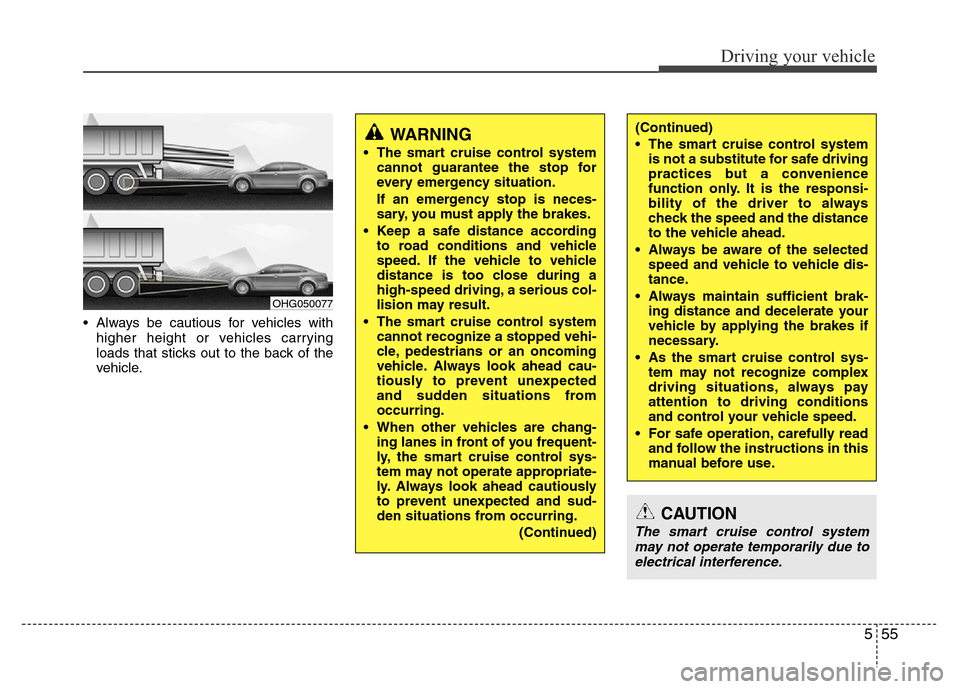
• Always be cautious for vehicles with
higher height or vehicles carrying
loads that sticks out to the back of the
vehicle.
OHG050077
WARNING
• The smart cruise control system
cannot guarantee the stop for
every emergency situation.
If an emergency stop is neces-
sary, you must apply the brakes.
• Keep a safe distance according
to road conditions and vehicle
speed. If the vehicle to vehicle
distance is too close during a
high-speed driving, a serious col-
lision may result.
• The smart cruise control system
cannot recognize a stopped vehi-
cle, pedestrians or an oncoming
vehicle. Always look ahead cau-
tiously to prevent unexpected
and sudden situations from
occurring.
• When other vehicles are chang-
ing lanes in front of you frequent-
ly, the smart cruise control sys-
tem may not operate appropriate-
ly. Always look ahead cautiously
to prevent unexpected and sud-
den situations from occurring.
(Continued)
(Continued)
• The smart cruise control system
is not a substitute for safe driving
practices but a convenience
function only. It is the responsi-
bility of the driver to always
check the speed and the distance
to the vehicle ahead.
• Always be aware of the selected
speed and vehicle to vehicle dis-
tance.
• Always maintain sufficient brak-
ing distance and decelerate your
vehicle by applying the brakes if
necessary.
• As the smart cruise control sys-
tem may not recognize complex
driving situations, always pay
attention to driving conditions
and control your vehicle speed.
• For safe operation, carefully read
and follow the instructions in this
manual before use.
Page 345 of 473
Driving your vehicle
62 5
Non-operating condition
Outside rearview mirror may not alert
the driver when:
- The outside rearview mirror housing is
damaged or covered with debris.
- The window is covered with debris.
- The windows are severely tinted.DRIVER'S ATTENTION
The driver must be cautious in the
below situations for the system may
not detect other vehicles or objects in
certain circumstances.
- Curved roads, tollgates, etc.
- The surrounding of the sensor is
polluted with rain, snow, mud, etc
- The rear bumper near the sensor is
covered or hidden with a foreign
matter such as a sticker, bumper
guard, bicycle stand etc.
- The rear bumper is damaged or the
sensor is out of place.
- The height of the vehicle is altered
such as when the trunk is loaded
with heavy objects, or there is low
tire pressure etc.
- Bad weather such as heavy rain or
snow.
- A fixed object is near such as a
guardrail, tunnel, human and animal
etc.
- Metal substances are near the vehi-
cles such as in a construction area.
- A big vehicle is near such as a bus or
truck.
- A motorcycle or bicycle is near.
(Continued)(Continued)
- A flat trailer is near.
- If the vehicle has started at the same
time as the vehicle next to you and
has accelerated.
- When the other vehicle passes by at
a higher rate of speed.
- When changing lanes.
- When going down or up a steep road
where the height of the lane is differ-
ent.
- When the other vehicle drives very
close.
- When a trailer or carrier is installed.
- When the temperature of the rear
bumper is high.
- When the sensors are covered by a
wall or a pillar of a parking lot.
- When your vehicle is backing up, if
the detected vehicle also backs up.
- Small objects like shopping carts
and strollers.
- If there is a vehicle with decreased
ride height (lowered).
- When the vehicle is close to another
vehicle.
- When the vehicle in the next lane
moves two lanes away from you OR
when the vehicle two lanes away
moves to the next lane from you.
Page 430 of 473
Maintenance
48 7
Wheel replacement
When replacing the metal wheels for
any reason, make sure the new
wheels are equivalent to the original
factory units in diameter, rim width
and offset.Tire traction
Tire traction can be reduced if you
drive on worn tires, tires that are
improperly inflated or on slippery
road surfaces. Tires should be
replaced when tread wear indicators
appear. To reduce the possibility of
losing control, slow down whenever
there is rain, snow or ice on the road.
Tire maintenance
In addition to proper inflation, correct
wheel alignment helps to decrease
tire wear. If you find a tire is worn
unevenly, we recommend that the
wheel alignment be checked by an
authorized HYUNDAI dealer.
When you have new tires installed,
make sure they are balanced. This
will increase vehicle ride comfort and
tire life. Additionally, a tire should
always be rebalanced if it is removed
from the wheel.
WARNING
A wheel that is not the correct
size may adversely affect wheel
and bearing life, braking and
stopping abilities, handling
characteristics, ground clear-
ance, body-to-tire clearance,
snow chain clearance,
speedometer and odometer cal-
ibration, headlight aim and
bumper height.
(Continued)
• The ABS works by comparing
the speed of the wheels. Tire
size can affect wheel speed.
When replacing tires, all 4 tires
must use the same size original-
ly supplied with the vehicle.
Using tires of a different size
can cause the ABS (Anti-lock
Brake System) and ESC
(Electronic Stability Control) (if
equipped) to work irregularly.
Page 431 of 473
749
Maintenance
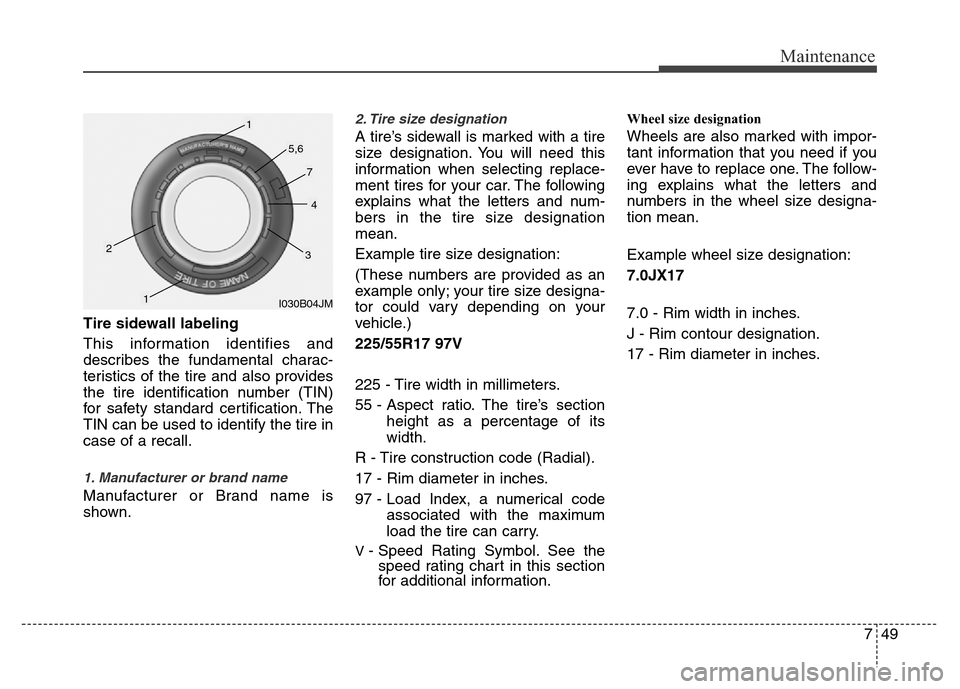
Tire sidewall labeling
This information identifies and
describes the fundamental charac-
teristics of the tire and also provides
the tire identification number (TIN)
for safety standard certification. The
TIN can be used to identify the tire in
case of a recall.
1. Manufacturer or brand name
Manufacturer or Brand name is
shown.
2. Tire size designation
A tire’s sidewall is marked with a tire
size designation. You will need this
information when selecting replace-
ment tires for your car. The following
explains what the letters and num-
bers in the tire size designation
mean.
Example tire size designation:
(These numbers are provided as an
example only; your tire size designa-
tor could vary depending on your
vehicle.)
225/55R17 97V
225 - Tire width in millimeters.
55 - Aspect ratio. The tire’s section
height as a percentage of its
width.
R - Tire construction code (Radial).
17 - Rim diameter in inches.
97 - Load Index, a numerical code
associated with the maximum
load the tire can carry.
V - Speed Rating Symbol. See the
speed rating chart in this section
for additional information.
Wheel size designation
Wheels are also marked with impor-
tant information that you need if you
ever have to replace one. The follow-
ing explains what the letters and
numbers in the wheel size designa-
tion mean.
Example wheel size designation:
7.0JX17
7.0 - Rim width in inches.
J - Rim contour designation.
17 - Rim diameter in inches.
I030B04JM
1
1
23
4
5,6
7