trunk Hyundai Azera 2015 Owner's Guide
[x] Cancel search | Manufacturer: HYUNDAI, Model Year: 2015, Model line: Azera, Model: Hyundai Azera 2015Pages: 473, PDF Size: 11.92 MB
Page 312 of 473
529
Driving your vehicle
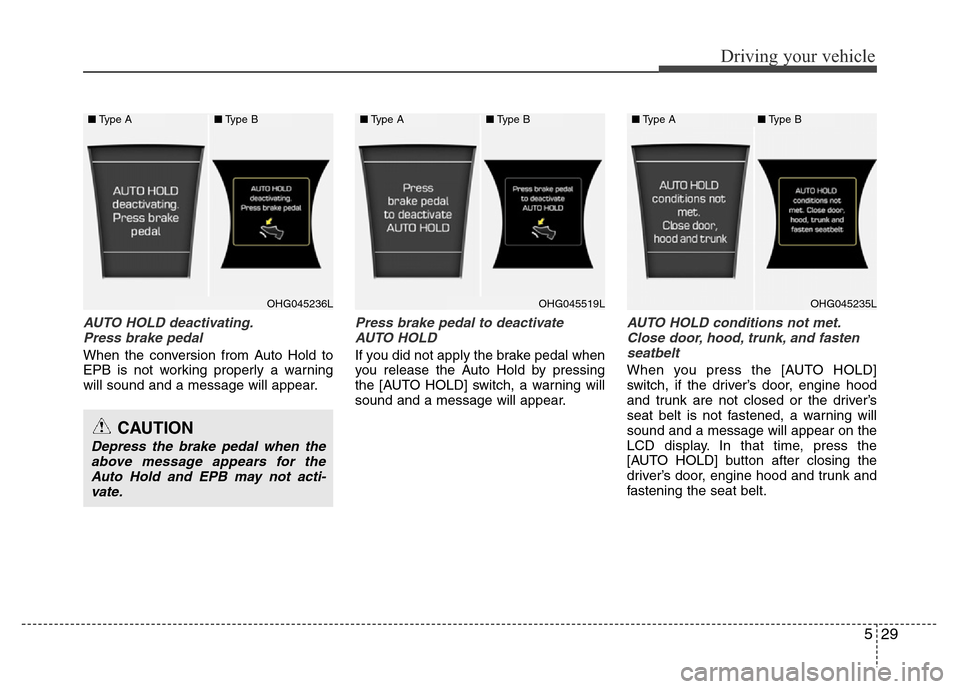
AUTO HOLD deactivating.
Press brake pedal
When the conversion from Auto Hold to
EPB is not working properly a warning
will sound and a message will appear.
Press brake pedal to deactivate
AUTO HOLD
If you did not apply the brake pedal when
you release the Auto Hold by pressing
the [AUTO HOLD] switch, a warning will
sound and a message will appear.
AUTO HOLD conditions not met.
Close door, hood, trunk, and fasten
seatbelt
When you press the [AUTO HOLD]
switch, if the driver’s door, engine hood
and trunk are not closed or the driver’s
seat belt is not fastened, a warning will
sound and a message will appear on the
LCD display. In that time, press the
[AUTO HOLD] button after closing the
driver’s door, engine hood and trunk and
fastening the seat belt.
CAUTION
Depress the brake pedal when the
above message appears for the
Auto Hold and EPB may not acti-
vate.
■Type A■Type B
OHG045236LOHG045235L
■Type A■Type B
OHG045519L
■Type A■Type B
Page 337 of 473
Driving your vehicle
54 5
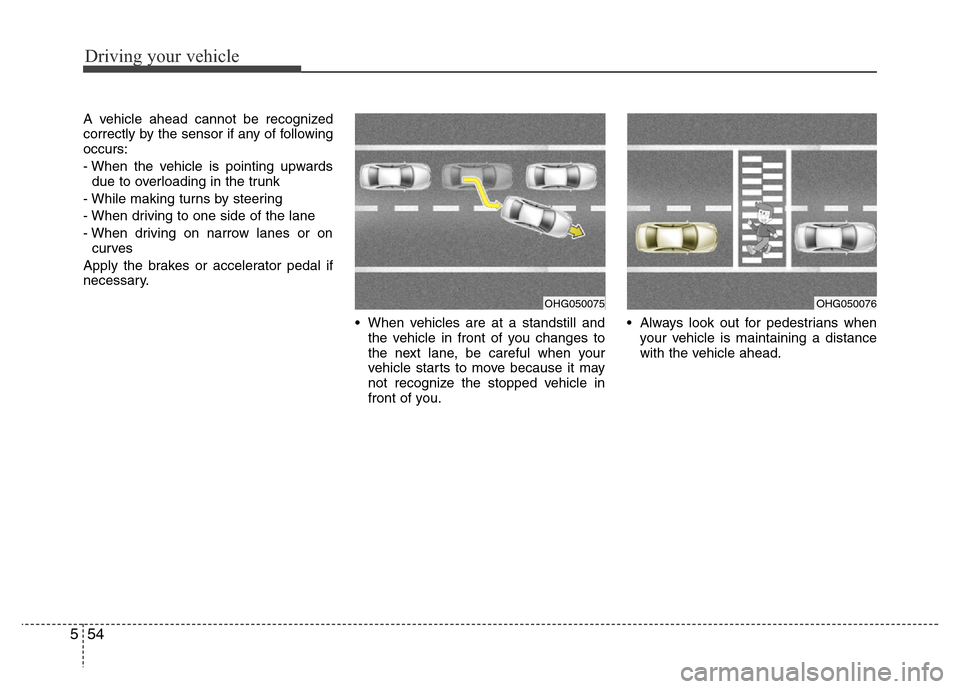
A vehicle ahead cannot be recognized
correctly by the sensor if any of following
occurs:
- When the vehicle is pointing upwards
due to overloading in the trunk
- While making turns by steering
- When driving to one side of the lane
- When driving on narrow lanes or on
curves
Apply the brakes or accelerator pedal if
necessary.
• When vehicles are at a standstill and
the vehicle in front of you changes to
the next lane, be careful when your
vehicle starts to move because it may
not recognize the stopped vehicle in
front of you.• Always look out for pedestrians when
your vehicle is maintaining a distance
with the vehicle ahead.
OHG050075OHG050076
Page 345 of 473
Driving your vehicle
62 5
Non-operating condition
Outside rearview mirror may not alert
the driver when:
- The outside rearview mirror housing is
damaged or covered with debris.
- The window is covered with debris.
- The windows are severely tinted.DRIVER'S ATTENTION
The driver must be cautious in the
below situations for the system may
not detect other vehicles or objects in
certain circumstances.
- Curved roads, tollgates, etc.
- The surrounding of the sensor is
polluted with rain, snow, mud, etc
- The rear bumper near the sensor is
covered or hidden with a foreign
matter such as a sticker, bumper
guard, bicycle stand etc.
- The rear bumper is damaged or the
sensor is out of place.
- The height of the vehicle is altered
such as when the trunk is loaded
with heavy objects, or there is low
tire pressure etc.
- Bad weather such as heavy rain or
snow.
- A fixed object is near such as a
guardrail, tunnel, human and animal
etc.
- Metal substances are near the vehi-
cles such as in a construction area.
- A big vehicle is near such as a bus or
truck.
- A motorcycle or bicycle is near.
(Continued)(Continued)
- A flat trailer is near.
- If the vehicle has started at the same
time as the vehicle next to you and
has accelerated.
- When the other vehicle passes by at
a higher rate of speed.
- When changing lanes.
- When going down or up a steep road
where the height of the lane is differ-
ent.
- When the other vehicle drives very
close.
- When a trailer or carrier is installed.
- When the temperature of the rear
bumper is high.
- When the sensors are covered by a
wall or a pillar of a parking lot.
- When your vehicle is backing up, if
the detected vehicle also backs up.
- Small objects like shopping carts
and strollers.
- If there is a vehicle with decreased
ride height (lowered).
- When the vehicle is close to another
vehicle.
- When the vehicle in the next lane
moves two lanes away from you OR
when the vehicle two lanes away
moves to the next lane from you.
Page 379 of 473
What to do in an emergency
22 6
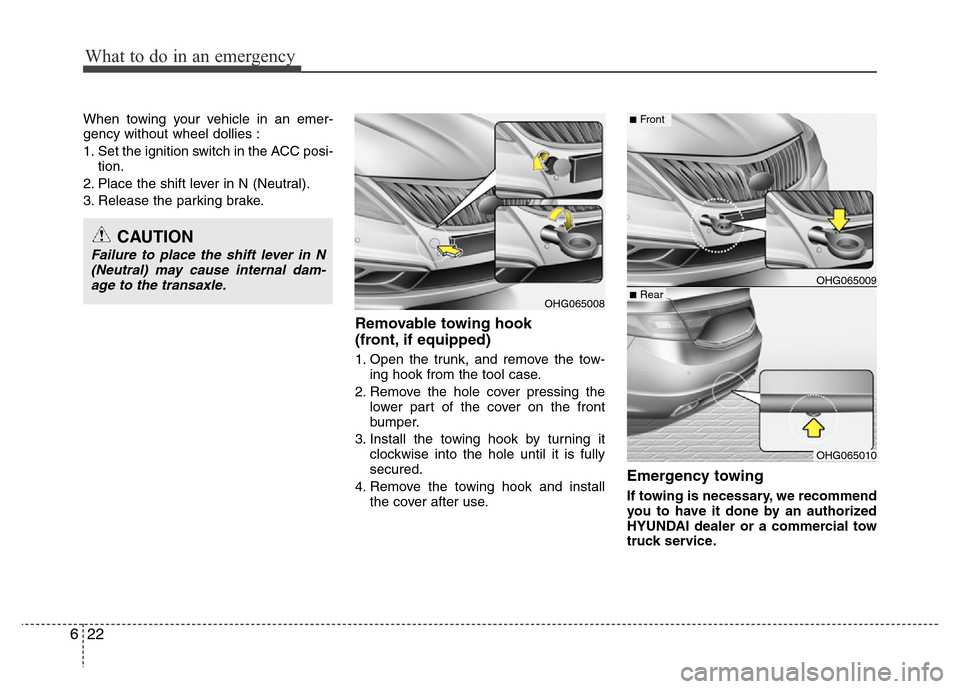
When towing your vehicle in an emer-
gency without wheel dollies :
1. Set the ignition switch in the ACC posi-
tion.
2. Place the shift lever in N (Neutral).
3. Release the parking brake.
Removable towing hook
(front, if equipped)
1. Open the trunk, and remove the tow-
ing hook from the tool case.
2. Remove the hole cover pressing the
lower part of the cover on the front
bumper.
3. Install the towing hook by turning it
clockwise into the hole until it is fully
secured.
4. Remove the towing hook and install
the cover after use.
Emergency towing
If towing is necessary, we recommend
you to have it done by an authorized
HYUNDAI dealer or a commercial tow
truck service.
OHG065008
OHG065009■Rear
CAUTION
Failure to place the shift lever in N
(Neutral) may cause internal dam-
age to the transaxle.
■Front
OHG065010
Page 441 of 473
759
Maintenance
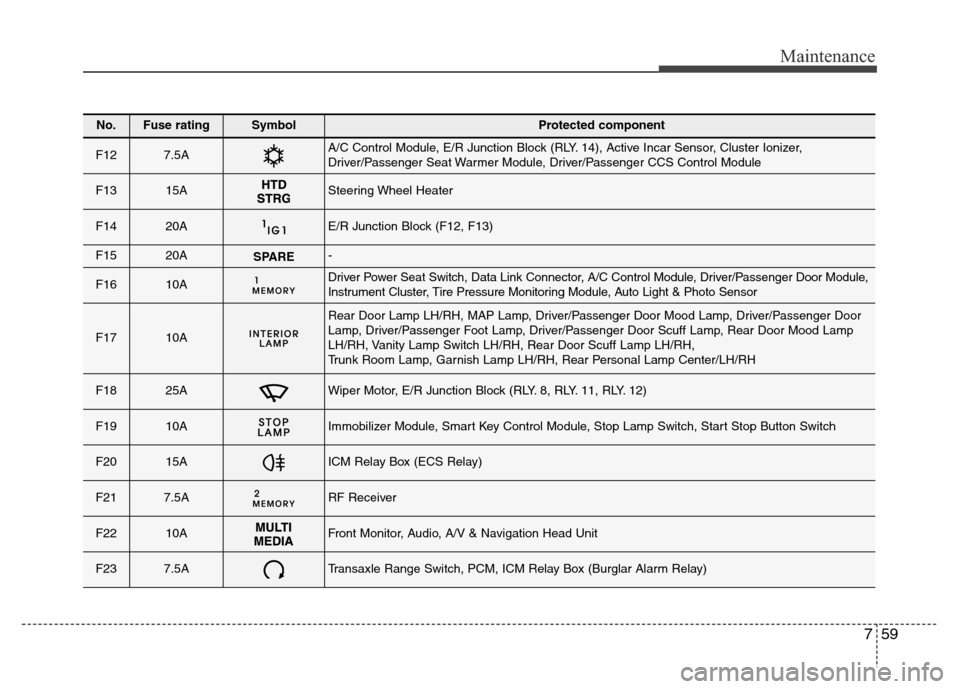
No.Fuse ratingSymbol Protected component
F127.5AA/C Control Module, E/R Junction Block (RLY. 14), Active Incar Sensor, Cluster Ionizer,
Driver/Passenger Seat Warmer Module, Driver/Passenger CCS Control Module
F1315ASteering Wheel Heater
F1420AE/R Junction Block (F12, F13)
F1520ASPARE-
F1610ADriver Power Seat Switch, Data Link Connector, A/C Control Module, Driver/Passenger Door Module,
Instrument Cluster, Tire Pressure Monitoring Module, Auto Light & Photo Sensor
F1710A
Rear Door Lamp LH/RH, MAP Lamp, Driver/Passenger Door Mood Lamp, Driver/Passenger Door
Lamp, Driver/Passenger Foot Lamp, Driver/Passenger Door Scuff Lamp, Rear Door Mood Lamp
LH/RH, Vanity Lamp Switch LH/RH, Rear Door Scuff Lamp LH/RH,
Trunk Room Lamp, Garnish Lamp LH/RH, Rear Personal Lamp Center/LH/RH
F1825AWiper Motor, E/R Junction Block (RLY. 8, RLY. 11, RLY. 12)
F1910AImmobilizer Module, Smart Key Control Module, Stop Lamp Switch, Start Stop Button Switch
F2015AICM Relay Box (ECS Relay)
F217.5ARF Receiver
F2210AFront Monitor, Audio, A/V & Navigation Head Unit
F237.5ATransaxle Range Switch, PCM, ICM Relay Box (Burglar Alarm Relay)
Page 442 of 473
Maintenance
60 7
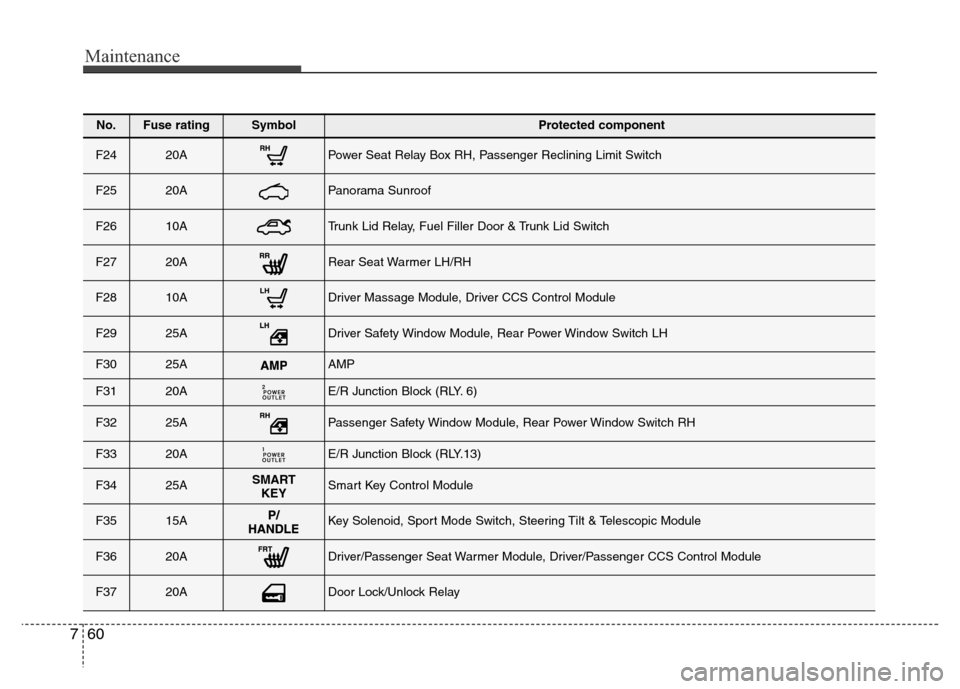
No.Fuse ratingSymbol Protected component
F2420APower Seat Relay Box RH, Passenger Reclining Limit Switch
F2520APanorama Sunroof
F2610ATrunk Lid Relay, Fuel Filler Door & Trunk Lid Switch
F2720ARear Seat Warmer LH/RH
F2810ADriver Massage Module, Driver CCS Control Module
F2925ADriver Safety Window Module, Rear Power Window Switch LH
F3025AAMP
F3120AE/R Junction Block (RLY. 6)
F3225APassenger Safety Window Module, Rear Power Window Switch RH
F3320AE/R Junction Block (RLY.13)
F3425ASMART
KEYSmart Key Control Module
F3515AKey Solenoid, Sport Mode Switch, Steering Tilt & Telescopic Module
F3620ADriver/Passenger Seat Warmer Module, Driver/Passenger CCS Control Module
F3720ADoor Lock/Unlock Relay
Page 452 of 473
Maintenance
70 7
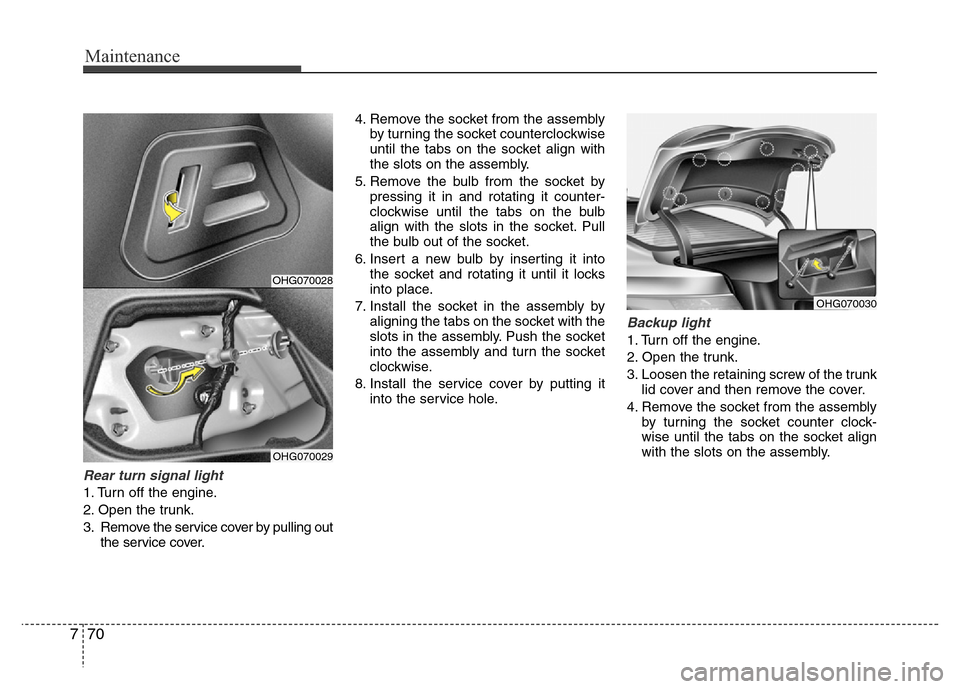
Rear turn signal light
1. Turn off the engine.
2. Open the trunk.
3. Remove the service cover by pulling out
the service cover.4. Remove the socket from the assembly
by turning the socket counterclockwise
until the tabs on the socket align with
the slots on the assembly.
5. Remove the bulb from the socket by
pressing it in and rotating it counter-
clockwise until the tabs on the bulb
align with the slots in the socket. Pull
the bulb out of the socket.
6. Insert a new bulb by inserting it into
the socket and rotating it until it locks
into place.
7. Install the socket in the assembly by
aligning the tabs on the socket with the
slots in the assembly. Push the socket
into the assembly and turn the socket
clockwise.
8. Install the service cover by putting it
into the service hole.
Backup light
1. Turn off the engine.
2. Open the trunk.
3. Loosen the retaining screw of the trunk
lid cover and then remove the cover.
4. Remove the socket from the assembly
by turning the socket counter clock-
wise until the tabs on the socket align
with the slots on the assembly.
OHG070028
OHG070029
OHG070030
Page 453 of 473
771
Maintenance
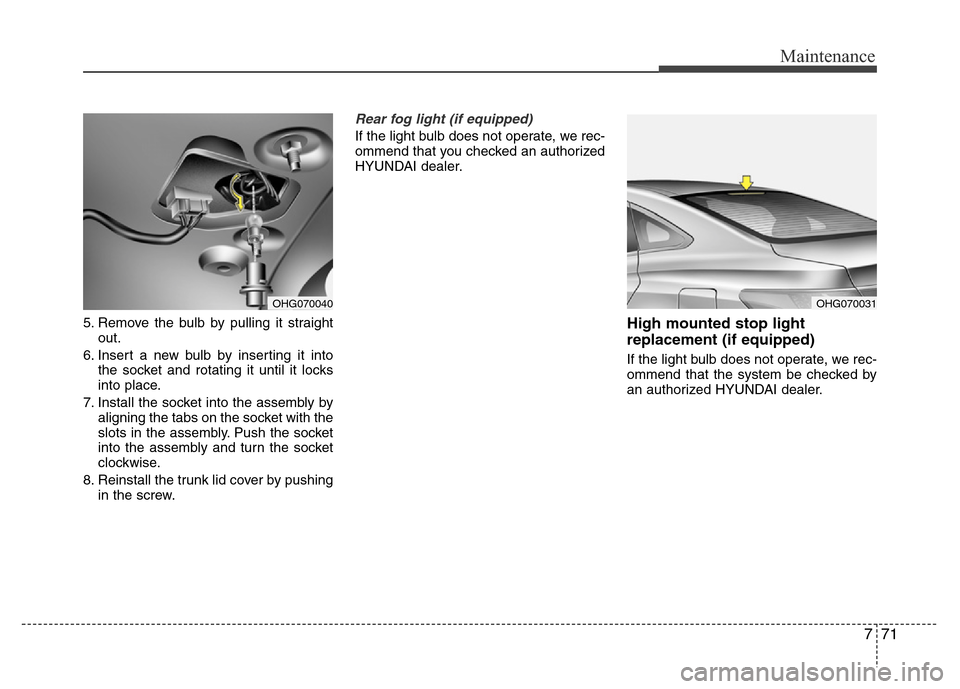
5. Remove the bulb by pulling it straight
out.
6. Insert a new bulb by inserting it into
the socket and rotating it until it locks
into place.
7. Install the socket into the assembly by
aligning the tabs on the socket with the
slots in the assembly. Push the socket
into the assembly and turn the socket
clockwise.
8. Reinstall the trunk lid cover by pushing
in the screw.
Rear fog light (if equipped)
If the light bulb does not operate, we rec-
ommend that you checked an authorized
HYUNDAI dealer.
High mounted stop light
replacement (if equipped)
If the light bulb does not operate, we rec-
ommend that the system be checked by
an authorized HYUNDAI dealer.
OHG070040OHG070031