warning light Hyundai Azera 2015 Manual PDF
[x] Cancel search | Manufacturer: HYUNDAI, Model Year: 2015, Model line: Azera, Model: Hyundai Azera 2015Pages: 473, PDF Size: 11.92 MB
Page 318 of 473
535
Driving your vehicle
ESC OFF usage
When driving
• ESC should be turned on for daily driv-
ing whenever possible.
• To turn ESC off while driving, press the
ESC OFF button while driving on a flat
road surface.
Never press the ESC OFF button while
ESC is operating (ESC indicator light
blinks).
If ESC is turned off while ESC is operat-
ing, the vehicle may slip out of control.
✽NOTICE
• When operating the vehicle on a
dynamometer, ensure that the ESC is
turned off (ESC OFF light illuminat-
ed).
• Turning the ESC off does not affect
ABS or brake system operation.
CAUTION
Driving with varying tire or wheel
sizes may cause the ESC system to
malfunction. When replacing tires,
make sure they are the same size as
your original tires.
WARNING
The Electronic Stability Control sys-
tem is only a driving aid; use pre-
cautions for safe driving by slowing
down on curved, snowy, or icy
roads. Drive slowly and don’t
attempt to accelerate whenever the
ESC indicator light is blinking, or
when the road surface is slippery.
WARNING
Never press the ESC OFF button
while ESC is operating.
If the ESC is turned off while ESC is
operating, the vehicle may go out of
control.
To turn ESC off while driving, press
the ESC OFF button while driving
on a flat road surface.
Page 319 of 473
Driving your vehicle
36 5
Vehicle stability management
(VSM) (if equipped)
This system provides further enhance-
ments to vehicle stability and steering
responses when a vehicle is driven on a
slippery road or a vehicle detects
changes in coefficient of friction between
right wheels and left wheels when brak-
ing.
VSM operation
When the VSM is operating, the steering
wheel may be controlled.
When the vehicle stability management
is operating properly, you can feel a slight
pulsation in the vehicle. This is only the
effect of brake control and indicates noth-
ing unusual.
The VSM does not operate when:
• Driving on bank road such as gradient
or incline
• Driving rearward
• ESC OFF indicator light ( ) remains
illuminated on the instrument cluster
VSM operation off
If you press the ESC OFF button to turn
off the ESC, the VSM will also cancel and
the ESC OFF indicator light ( ) illumi-
nates.
To turn on the VSM, press the button
again. The ESC OFF indicator light goes
out.
Malfunction indicator
The VSM can be deactivated even if you
don’t cancel the VSM operation by press-
ing the ESC OFF button. It indicates that
a malfunction has been detected some-
where in VSM system. If the ESC indica-
tor light ( ) remains on, we recom-
mend that the system be checked by an
authorized HYUNDAI dealer.
✽NOTICE
• The VSM is designed to function
above approximately 15 km/h (9 mph)
on curves.
• The VSM is designed to function
above approximately 30 km/h (18
mph) when a vehicle is braking on a
split-mu road. The split-mu road is
made of surfaces which have different
friction forces.
WARNING
• The Vehicle Stability Management
system is not a substitute for
safe driving practices but a sup-
plementary function only. It is the
responsibility of the driver to
always check the speed and the
distance to the vehicle ahead.
Always hold the steering wheel
firmly while driving.
• Your vehicle is designed to acti-
vate according to the driver’s
intention, even with the VSM
installed. Always follow all the
normal precautions for driving at
safe speeds for the conditions –
including driving in inclement
weather and on a slippery road.
• Driving with varying tire or wheel
sizes may cause the VSM system
to malfunction. When replacing
tires, make sure they are the
same size as your original tires.
Page 320 of 473
537
Driving your vehicle
Hill-start assist control (HAC)
(if equipped)
A vehicle has the tendency to slip back
on a steep hill when it starts to go after
stopping. The Hill-start Assist Control
(HAC) prevents the vehicle from slipping
back by operating the brakes automati-
cally for about 2 seconds. The brakes are
released when the accelerator pedal is
depressed or after about 2 seconds.
✽NOTICE
• The HAC does not operate when the
transaxle shift lever is in the P (Park)
or N (Neutral) position.
• The HAC activates even though the
ESC is off but it does not activate
when the ESC has malfunctioned.
Good braking practices• Check to be sure the parking brake is
not engaged and that the parking
brake indicator light is out before driv-
ing away.
• Driving through water may get the
brakes wet. They can also get wet
when the car is washed. Wet brakes
can be dangerous! Your car will not
stop as quickly if the brakes are wet.
Wet brakes may cause the car to pull
to one side.
To dry the brakes, apply the brakes
lightly until the braking action returns to
normal, taking care to keep the car
under control at all times. If the braking
action does not return to normal, stop
as soon as it is safe to do so and we
recommend that you call an authorized
HYUNDAI dealer.
• Do not coast down hills with the car out
of gear. This is extremely hazardous.
Keep the car in gear at all times, use
the brakes to slow down, then shift to a
lower gear so that engine braking will
help you maintain a safe speed.
• Do not "ride" the brake pedal. Resting
your foot on the brake pedal while driv-
ing can be dangerous because the
brakes might overheat and lose their
effectiveness. It also increases the
wear of the brake components.
WARNING
The HAC is activated only for about
2 seconds, so when the vehicle is
starting off always depress the
accelerator pedal.
WARNING
• Whenever you leave or park your
vehicle, always set the parking
brake as far as possible and fully
engage the vehicle's transaxle
into the P (Park) position. If the
parking brake is not fully
engaged, the vehicle may move
inadvertently and injure yourself
and others.
• All vehicles should always have
the parking brake fully engaged
when parking to avoid inadver-
tent movement of the car which
can injure occupants or pedestri-
ans.
Page 322 of 473
539
Driving your vehicle
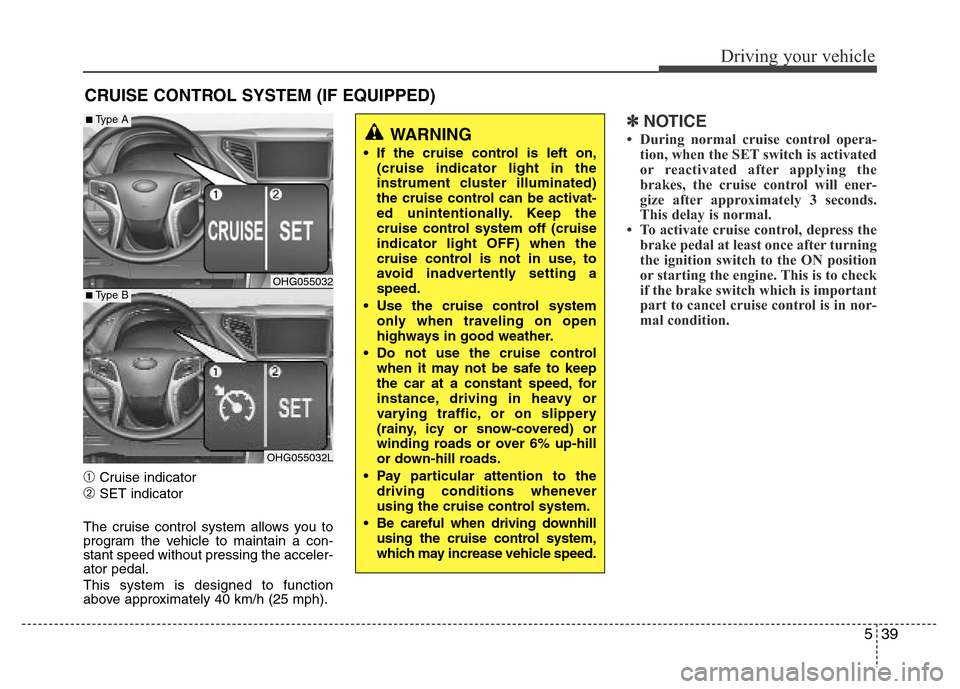
➀Cruise indicator
➁SET indicator
The cruise control system allows you to
program the vehicle to maintain a con-
stant speed without pressing the acceler-
ator pedal.
This system is designed to function
above approximately 40 km/h (25 mph).
✽NOTICE
• During normal cruise control opera-
tion, when the SET switch is activated
or reactivated after applying the
brakes, the cruise control will ener-
gize after approximately 3 seconds.
This delay is normal.
• To activate cruise control, depress the
brake pedal at least once after turning
the ignition switch to the ON position
or starting the engine. This is to check
if the brake switch which is important
part to cancel cruise control is in nor-
mal condition.
CRUISE CONTROL SYSTEM (IF EQUIPPED)
WARNING
• If the cruise control is left on,
(cruise indicator light in the
instrument cluster illuminated)
the cruise control can be activat-
ed unintentionally. Keep the
cruise control system off (cruise
indicator light OFF) when the
cruise control is not in use, to
avoid inadvertently setting a
speed.
• Use the cruise control system
only when traveling on open
highways in good weather.
• Do not use the cruise control
when it may not be safe to keep
the car at a constant speed, for
instance, driving in heavy or
varying traffic, or on slippery
(rainy, icy or snow-covered) or
winding roads or over 6% up-hill
or down-hill roads.
• Pay particular attention to the
driving conditions whenever
using the cruise control system.
• Be careful when driving downhill
using the cruise control system,
which may increase vehicle speed.
OHG055032
OHG055032L
■Type A
■Type B
Page 326 of 473
543
Driving your vehicle
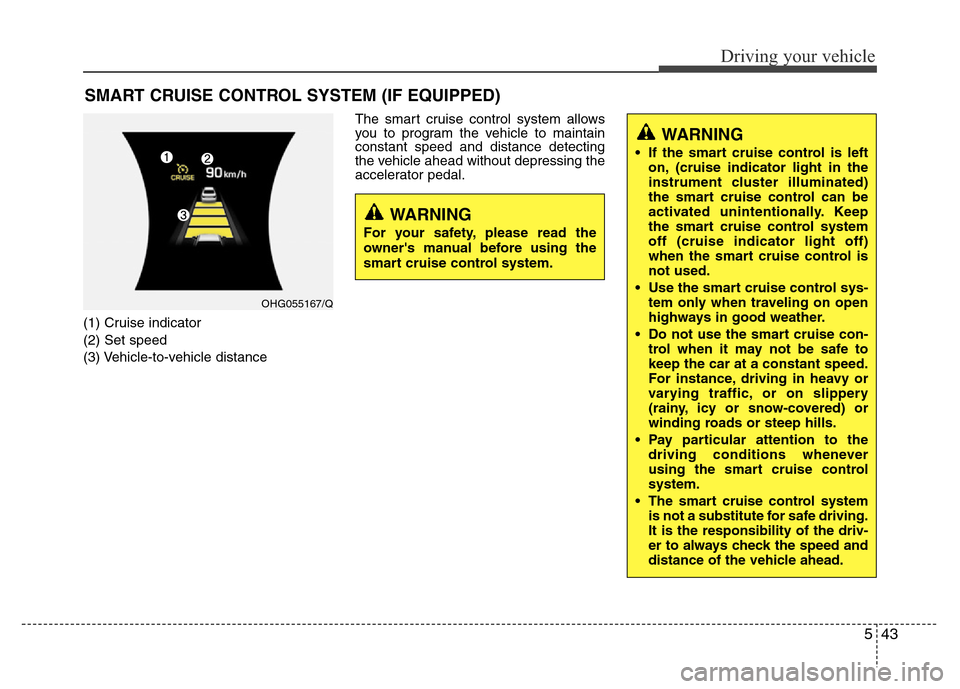
(1) Cruise indicator
(2) Set speed
(3) Vehicle-to-vehicle distanceThe smart cruise control system allows
you to program the vehicle to maintain
constant speed and distance detecting
the vehicle ahead without depressing the
accelerator pedal.
SMART CRUISE CONTROL SYSTEM (IF EQUIPPED)
WARNING
• If the smart cruise control is left
on, (cruise indicator light in the
instrument cluster illuminated)
the smart cruise control can be
activated unintentionally. Keep
the smart cruise control system
off (cruise indicator light off)
when the smart cruise control is
not used.
• Use the smart cruise control sys-
tem only when traveling on open
highways in good weather.
• Do not use the smart cruise con-
trol when it may not be safe to
keep the car at a constant speed.
For instance, driving in heavy or
varying traffic, or on slippery
(rainy, icy or snow-covered) or
winding roads or steep hills.
• Pay particular attention to the
driving conditions whenever
using the smart cruise control
system.
• The smart cruise control system
is not a substitute for safe driving.
It is the responsibility of the driv-
er to always check the speed and
distance of the vehicle ahead.
WARNING
For your safety, please read the
owner's manual before using the
smart cruise control system.
OHG055167/Q
Page 334 of 473
551
Driving your vehicle
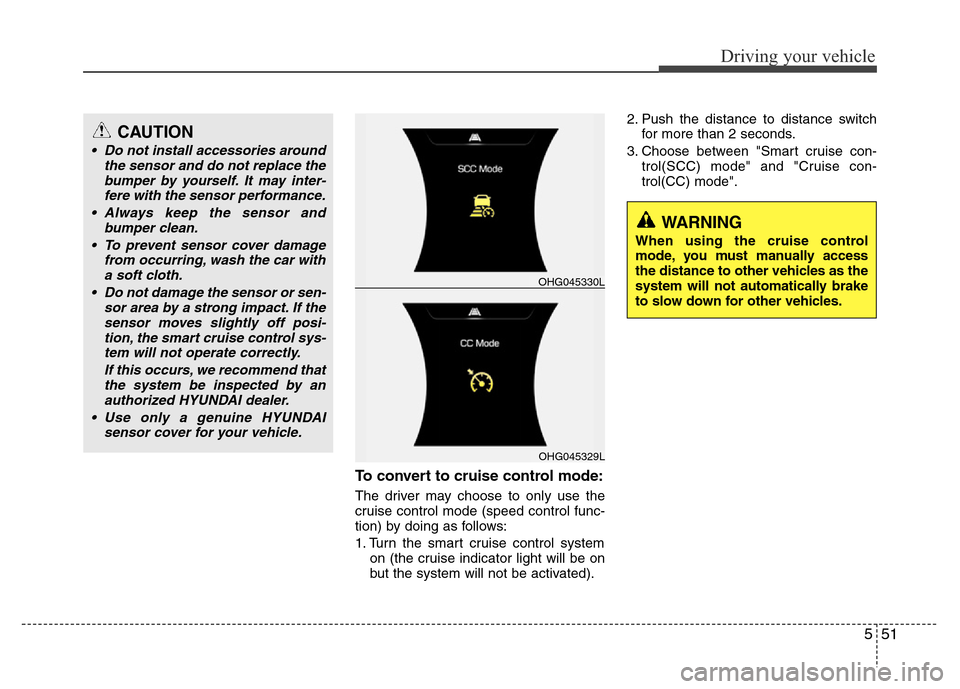
To convert to cruise control mode:
The driver may choose to only use the
cruise control mode (speed control func-
tion) by doing as follows:
1. Turn the smart cruise control system
on (the cruise indicator light will be on
but the system will not be activated).2. Push the distance to distance switch
for more than 2 seconds.
3. Choose between "Smart cruise con-
trol(SCC) mode" and "Cruise con-
trol(CC) mode".
OHG045329L
OHG045330L
WARNING
When using the cruise control
mode, you must manually access
the distance to other vehicles as the
system will not automatically brake
to slow down for other vehicles.
CAUTION
• Do not install accessories around
the sensor and do not replace the
bumper by yourself. It may inter-
fere with the sensor performance.
• Always keep the sensor and
bumper clean.
• To prevent sensor cover damage
from occurring, wash the car with
a soft cloth.
• Do not damage the sensor or sen-
sor area by a strong impact. If the
sensor moves slightly off posi-
tion, the smart cruise control sys-
tem will not operate correctly.
If this occurs, we recommend that
the system be inspected by an
authorized HYUNDAI dealer.
• Use only a genuine HYUNDAI
sensor cover for your vehicle.
Page 340 of 473
557
Driving your vehicle
BSD (Blind Spot Detection) / LCA
(Lane Change Assist)
Operating conditions
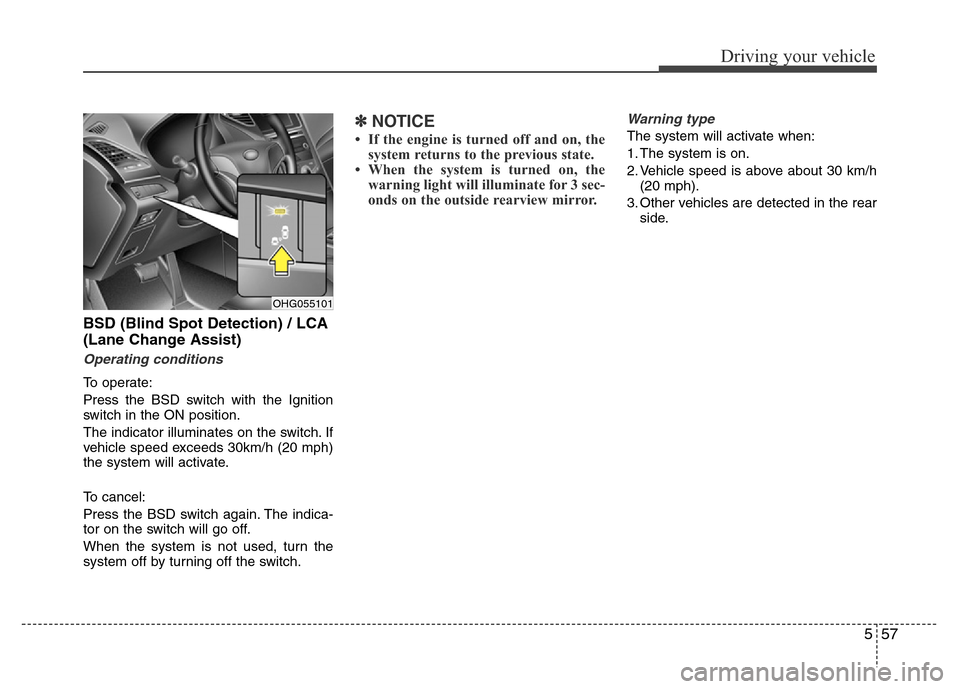
To operate:
Press the BSD switch with the Ignition
switch in the ON position.
The indicator illuminates on the switch. If
vehicle speed exceeds 30km/h (20 mph)
the system will activate.
To cancel:
Press the BSD switch again. The indica-
tor on the switch will go off.
When the system is not used, turn the
system off by turning off the switch.
✽NOTICE
• If the engine is turned off and on, the
system returns to the previous state.
• When the system is turned on, the
warning light will illuminate for 3 sec-
onds on the outside rearview mirror.
Warning type
The system will activate when:
1. The system is on.
2. Vehicle speed is above about 30 km/h
(20 mph).
3. Other vehicles are detected in the rear
side.
OHG055101
Page 341 of 473
Driving your vehicle
58 5
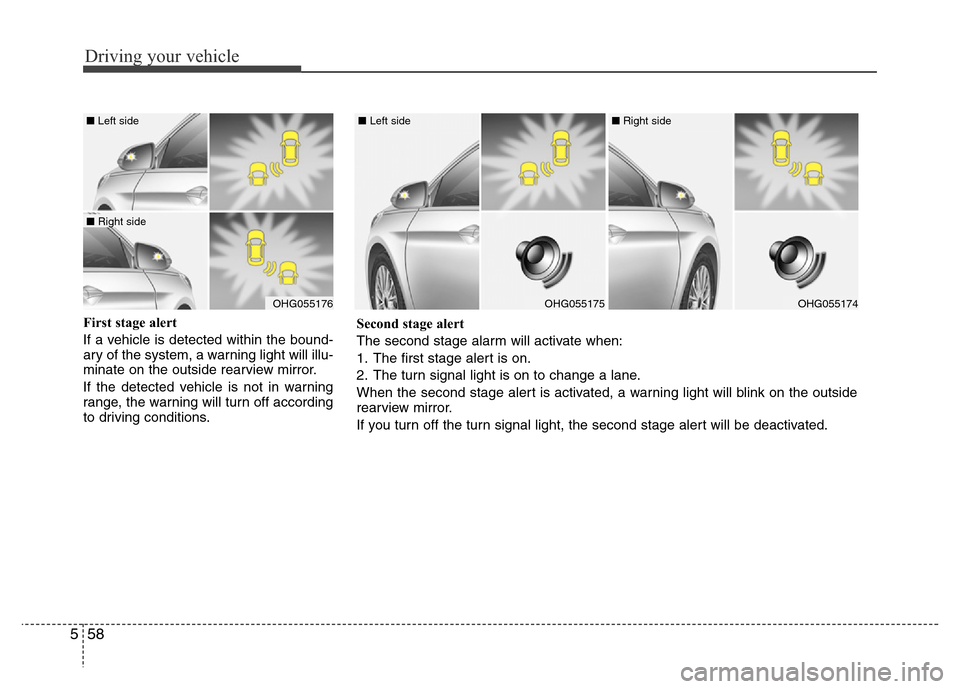
First stage alert
If a vehicle is detected within the bound-
ary of the system, a warning light will illu-
minate on the outside rearview mirror.
If the detected vehicle is not in warning
range, the warning will turn off according
to driving conditions.
OHG055176
■ Left side
■ Right side
OHG055175
■ Left side
OHG055174
■ Right side
Second stage alert
The second stage alarm will activate when:
1. The first stage alert is on.
2. The turn signal light is on to change a lane.
When the second stage alert is activated, a warning light will blink on the outside
rearview mirror.
If you turn off the turn signal light, the second stage alert will be deactivated.
Page 342 of 473
559
Driving your vehicle
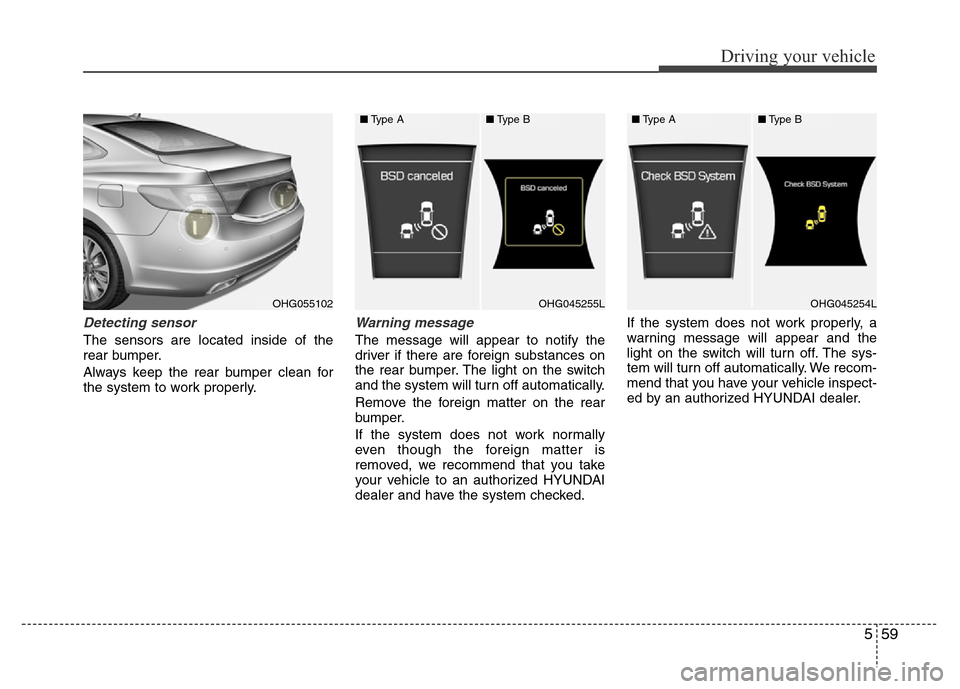
Detecting sensor
The sensors are located inside of the
rear bumper.
Always keep the rear bumper clean for
the system to work properly.
Warning message
The message will appear to notify the
driver if there are foreign substances on
the rear bumper. The light on the switch
and the system will turn off automatically.
Remove the foreign matter on the rear
bumper.
If the system does not work normally
even though the foreign matter is
removed, we recommend that you take
your vehicle to an authorized HYUNDAI
dealer and have the system checked.If the system does not work properly, a
warning message will appear and the
light on the switch will turn off. The sys-
tem will turn off automatically. We recom-
mend that you have your vehicle inspect-
ed by an authorized HYUNDAI dealer.
OHG055102OHG045255LOHG045254L
■Type A■Type B■Type A■Type B
Page 343 of 473
Driving your vehicle
60 5
RCTA (Rear Cross Traffic Alert)
Operating conditions
To operate:
Go to the User Settings Mode (Driving
Assist) and select RCTA (Rear Cross
Traffic Alert) on the LCD display (For
more details, refer to "LCD Display" in
chapter 4.). The system will turn on and
standby to activate. The system will acti-
vate when vehicle speed is below
10km/h (6.2mph) with the shift lever in R
(Reverse).
✽NOTICE
The RCTA (Rear Cross Traffic Alert)
detecting range is about 0.5m ~ 20m. A
vehicle will be detected if the vehicle
speed is 4km/h ~ 36km/h within the
detecting range. However, the detecting
range may change under different con-
ditions. Always pay attention to the sur-
roundings.
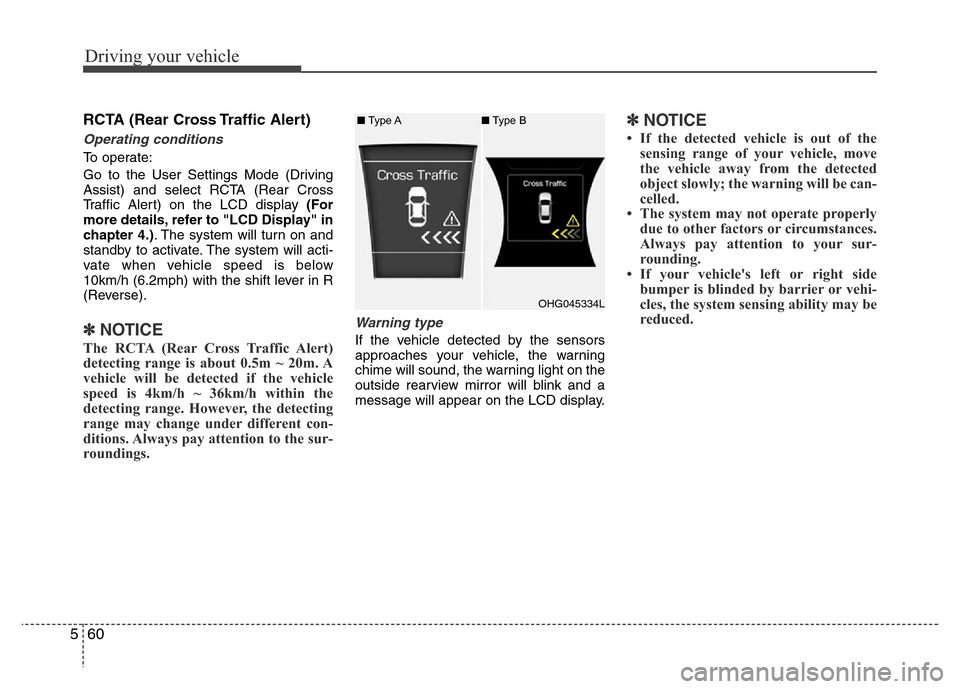
Warning type
If the vehicle detected by the sensors
approaches your vehicle, the warning
chime will sound, the warning light on the
outside rearview mirror will blink and a
message will appear on the LCD display.
✽NOTICE
• If the detected vehicle is out of the
sensing range of your vehicle, move
the vehicle away from the detected
object slowly; the warning will be can-
celled.
• The system may not operate properly
due to other factors or circumstances.
Always pay attention to your sur-
rounding.
• If your vehicle's left or right side
bumper is blinded by barrier or vehi-
cles, the system sensing ability may be
reduced.
OHG045334L ■Type A■Type B