change wheel Hyundai Azera 2015 Owner's Manual
[x] Cancel search | Manufacturer: HYUNDAI, Model Year: 2015, Model line: Azera, Model: Hyundai Azera 2015Pages: 473, PDF Size: 11.92 MB
Page 21 of 473
35
Safety features of your vehicle
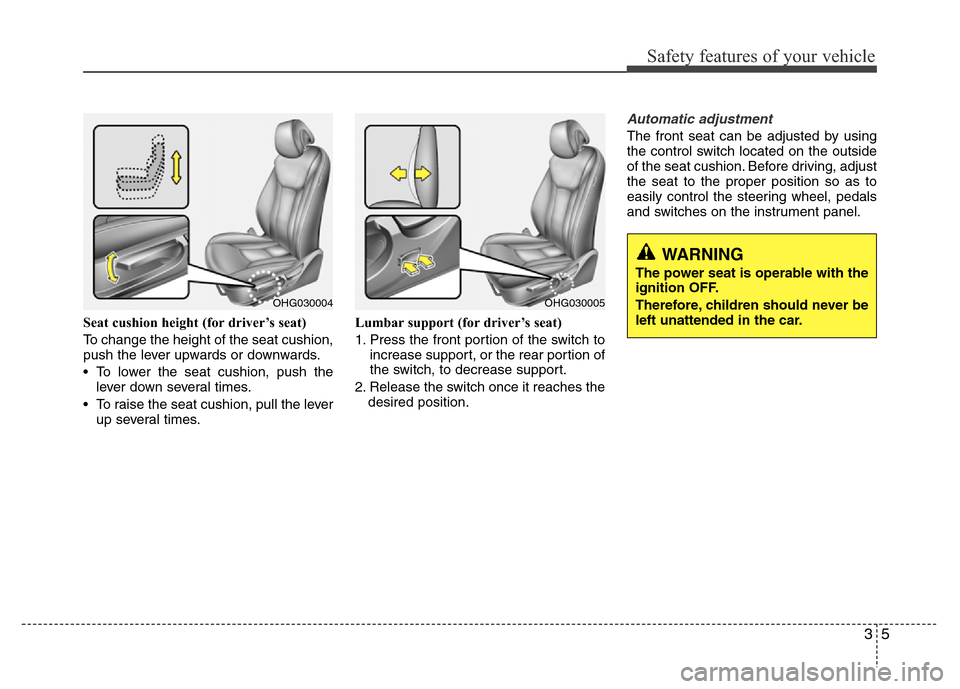
Seat cushion height (for driver’s seat)
To change the height of the seat cushion,
push the lever upwards or downwards.
• To lower the seat cushion, push the
lever down several times.
• To raise the seat cushion, pull the lever
up several times.Lumbar support (for driver’s seat)
1. Press the front portion of the switch to
increase support, or the rear portion of
the switch, to decrease support.
2. Release the switch once it reaches the
desired position.
Automatic adjustment
The front seat can be adjusted by using
the control switch located on the outside
of the seat cushion. Before driving, adjust
the seat to the proper position so as to
easily control the steering wheel, pedals
and switches on the instrument panel.
WARNING
The power seat is operable with the
ignition OFF.
Therefore, children should never be
left unattended in the car.
OHG030004OHG030005
Page 120 of 473
443
Features of your vehicle
Power steering
Power steering uses energy from the
engine to assist you in steering the vehi-
cle. If the engine is off or if the power
steering system becomes inoperative,
the vehicle may still be steered, but it will
require increased steering effort.
Should you notice any change in the
effort required to steer during normal
vehicle operation, we recommend that
the system be checked by an authorized
HYUNDAI dealer.
✽NOTICE
If the power steering drive belt breaks
or if the power steering pump malfunc-
tions, the steering effort will greatly
increase.
✽NOTICE
If the vehicle is parked for extended
periods outside in cold weather (below -
10°C/14°F), the power steering may
require increased effort when the engine
is first started. This is caused by
increased fluid viscosity due to the cold
weather and does not indicate a mal-
function.
When this happens, increase the engine
RPM by depressing accelerator until the
RPM reaches 1,500 rpm then release or
let the engine idle for two or three min-
utes to warm up the fluid.
Tilt steering
Tilt steering allows you to adjust the
steering wheel before you drive. You can
also raise it to give your legs more room
when you exit and enter the vehicle.
The steering wheel should be positioned
so that it is comfortable for you to drive,
while permitting you to see the instru-
ment panel warning lights and gauges.
STEERING WHEEL
CAUTION
Never hold the steering wheel
against a stop (extreme right or left
turn) for more than 5 seconds with
the engine running. Holding the
steering wheel for more than 5 sec-
onds in either position may cause
damage to the power steering
pump.
WARNING
• Never adjust the angle of the
steering wheel while driving. You
may lose steering control and
cause severe personal injury,
death or accidents.
• After adjusting, push the steering
wheel both up and down to be
certain it is locked in position.
Page 121 of 473
Features of your vehicle
44 4
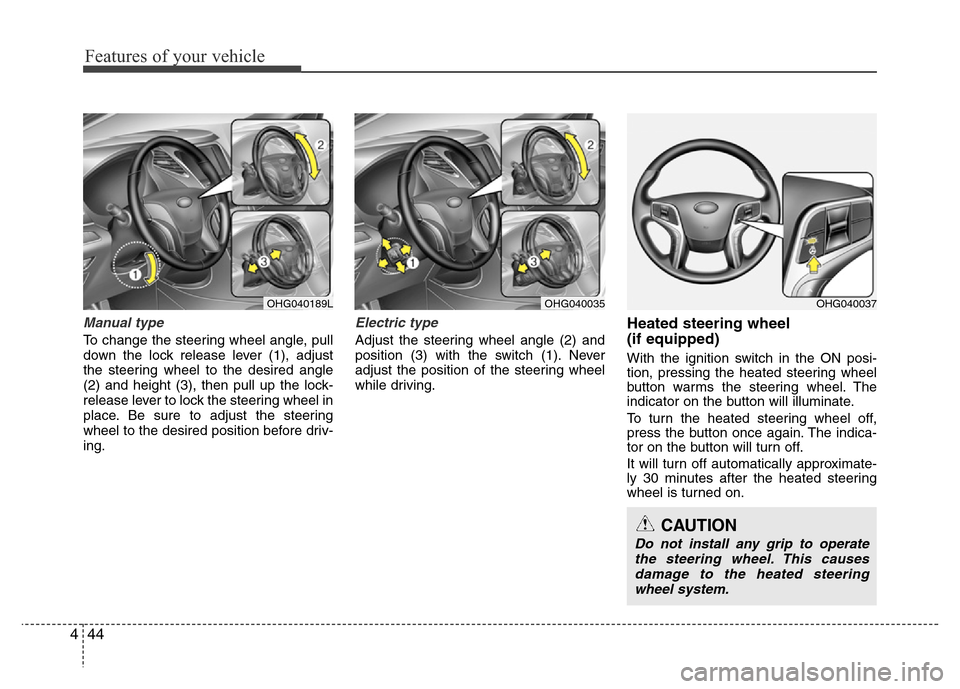
Manual type
To change the steering wheel angle, pull
down the lock release lever (1), adjust
the steering wheel to the desired angle
(2) and height (3), then pull up the lock-
release lever to lock the steering wheel in
place. Be sure to adjust the steering
wheel to the desired position before driv-
ing.
Electric type
Adjust the steering wheel angle (2) and
position (3) with the switch (1). Never
adjust the position of the steering wheel
while driving.
Heated steering wheel
(if equipped)
With the ignition switch in the ON posi-
tion, pressing the heated steering wheel
button warms the steering wheel. The
indicator on the button will illuminate.
To turn the heated steering wheel off,
press the button once again. The indica-
tor on the button will turn off.
It will turn off automatically approximate-
ly 30 minutes after the heated steering
wheel is turned on.
OHG040189LOHG040035OHG040037
CAUTION
Do not install any grip to operate
the steering wheel. This causes
damage to the heated steering
wheel system.
Page 139 of 473
Features of your vehicle
62 4
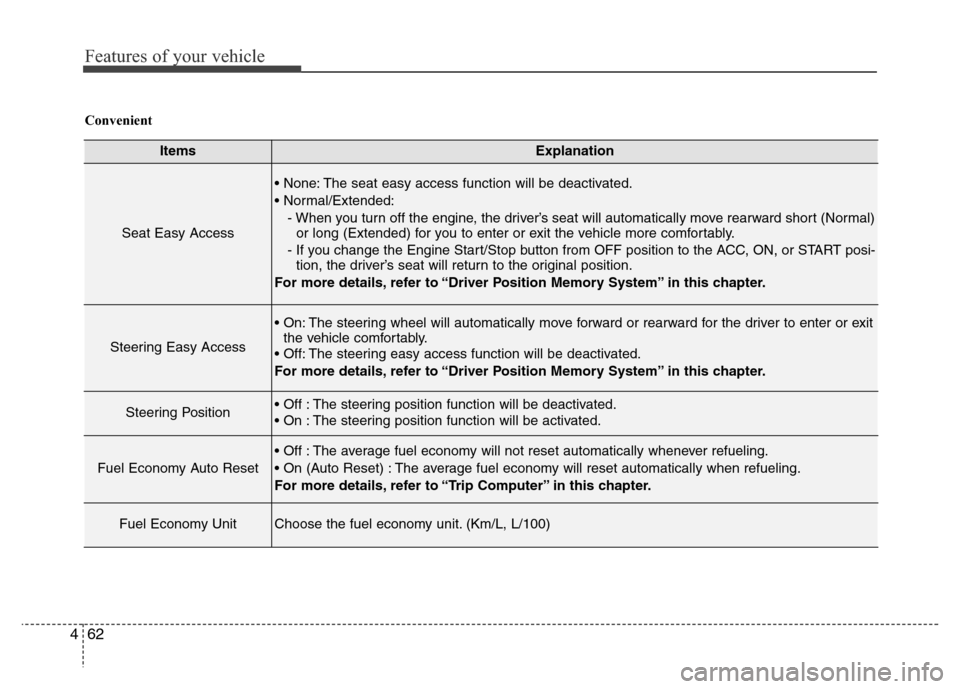
ItemsExplanation
Seat Easy Access
• None: The seat easy access function will be deactivated.
• Normal/Extended:
- When you turn off the engine, the driver’s seat will automatically move rearward short (Normal)
or long (Extended) for you to enter or exit the vehicle more comfortably.
- If you change the Engine Start/Stop button from OFF position to the ACC, ON, or START posi-
tion, the driver’s seat will return to the original position.
For more details, refer to “Driver Position Memory System” in this chapter.
Steering Easy Access
• On: The steering wheel will automatically move forward or rearward for the driver to enter or exit
the vehicle comfortably.
• Off: The steering easy access function will be deactivated.
For more details, refer to “Driver Position Memory System” in this chapter.
Steering Position• Off : The steering position function will be deactivated.
• On : The steering position function will be activated.
Fuel Economy Auto Reset
• Off : The average fuel economy will not reset automatically whenever refueling.
• On (Auto Reset) : The average fuel economy will reset automatically when refueling.
For more details, refer to “Trip Computer” in this chapter.
Fuel Economy UnitChoose the fuel economy unit. (Km/L, L/100)
Convenient
Page 141 of 473
Features of your vehicle
64 4
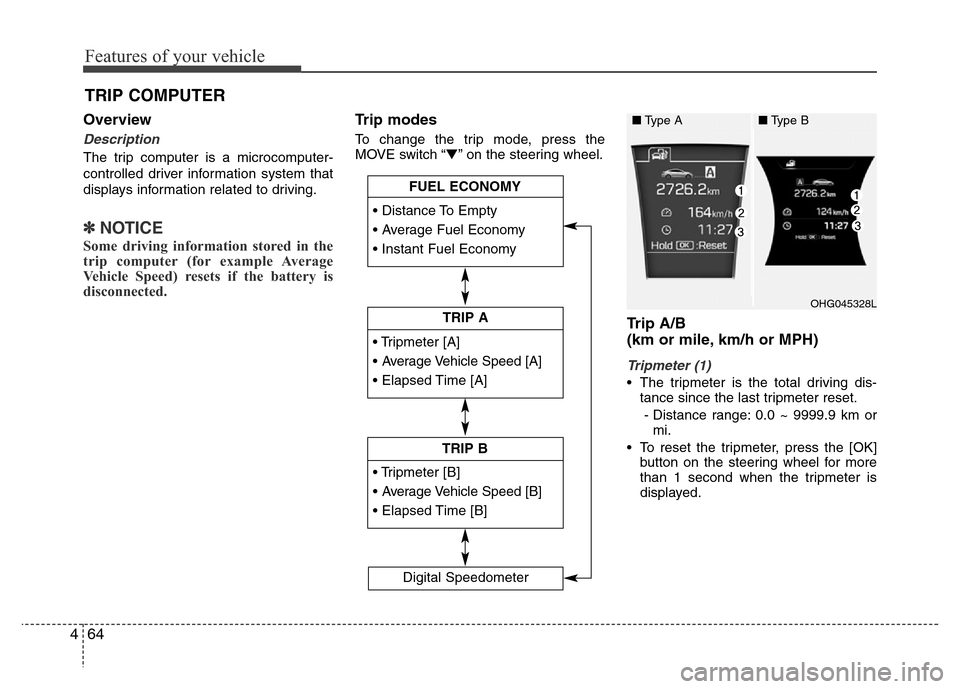
Overview
Description
The trip computer is a microcomputer-
controlled driver information system that
displays information related to driving.
✽NOTICE
Some driving information stored in the
trip computer (for example Average
Vehicle Speed) resets if the battery is
disconnected.
Trip modes
To change the trip mode, press the
MOVE switch “▼” on the steering wheel.
Trip A/B
(km or mile, km/h or MPH)
Tripmeter (1)
• The tripmeter is the total driving dis-
tance since the last tripmeter reset.
- Distance range: 0.0 ~ 9999.9 km or
mi.
• To reset the tripmeter, press the [OK]
button on the steering wheel for more
than 1 second when the tripmeter is
displayed.
TRIP COMPUTER
• Tripmeter [A]
• Average Vehicle Speed [A]
• Elapsed Time [A]
TRIP A
• Tripmeter [B]
• Average Vehicle Speed [B]
• Elapsed Time [B]
TRIP B • Distance To Empty
• Average Fuel Economy
• Instant Fuel Economy
FUEL ECONOMY
Digital Speedometer
OHG045328L
■Type A■Type B
Page 157 of 473
Features of your vehicle
80 4
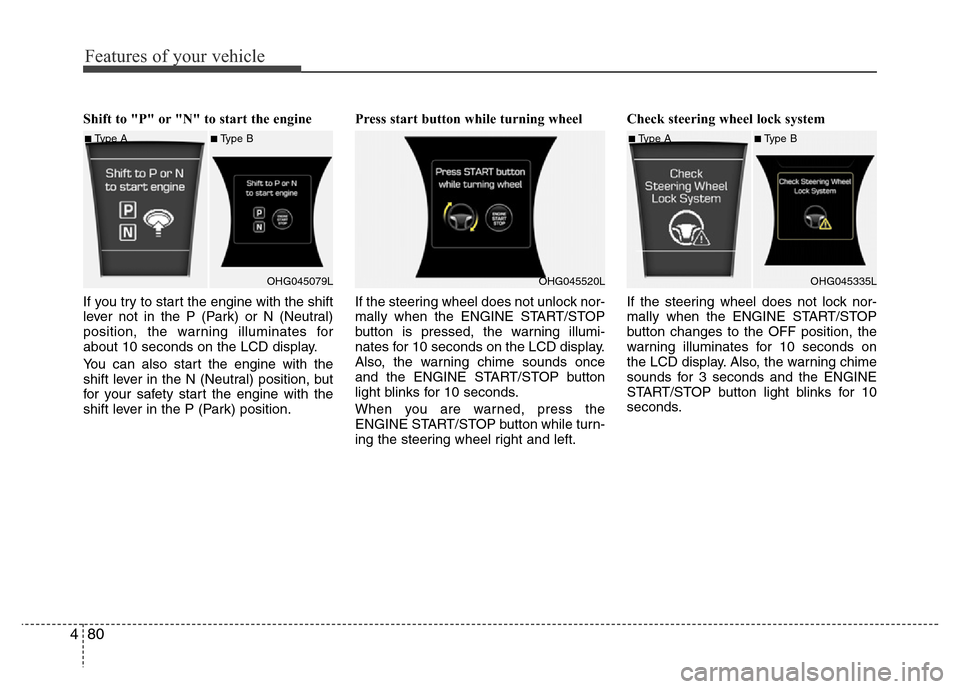
Shift to "P" or "N" to start the engine
If you try to start the engine with the shift
lever not in the P (Park) or N (Neutral)
position, the warning illuminates for
about 10 seconds on the LCD display.
You can also start the engine with the
shift lever in the N (Neutral) position, but
for your safety start the engine with the
shift lever in the P (Park) position.Press start button while turning wheel
If the steering wheel does not unlock nor-
mally when the ENGINE START/STOP
button is pressed, the warning illumi-
nates for 10 seconds on the LCD display.
Also, the warning chime sounds once
and the ENGINE START/STOP button
light blinks for 10 seconds.
When you are warned, press the
ENGINE START/STOP button while turn-
ing the steering wheel right and left.Check steering wheel lock system
If the steering wheel does not lock nor-
mally when the ENGINE START/STOP
button changes to the OFF position, the
warning illuminates for 10 seconds on
the LCD display. Also, the warning chime
sounds for 3 seconds and the ENGINE
START/STOP button light blinks for 10
seconds.
■Type A■Type B
OHG045079L
OHG045520L
■Type A■Type B
OHG045335L
Page 188 of 473
4111
Features of your vehicle
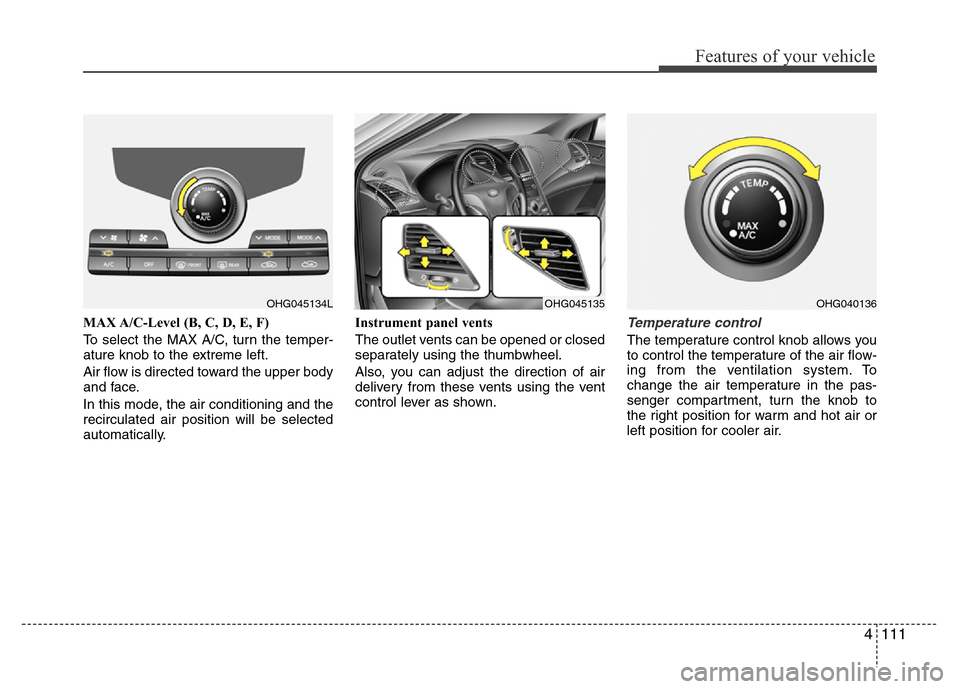
MAX A/C-Level (B, C, D, E, F)
To select the MAX A/C, turn the temper-
ature knob to the extreme left.
Air flow is directed toward the upper body
and face.
In this mode, the air conditioning and the
recirculated air position will be selected
automatically.Instrument panel vents
The outlet vents can be opened or closed
separately using the thumbwheel.
Also, you can adjust the direction of air
delivery from these vents using the vent
control lever as shown.Temperature control
The temperature control knob allows you
to control the temperature of the air flow-
ing from the ventilation system. To
change the air temperature in the pas-
senger compartment, turn the knob to
the right position for warm and hot air or
left position for cooler air.
OHG045134LOHG040136OHG045135
Page 239 of 473
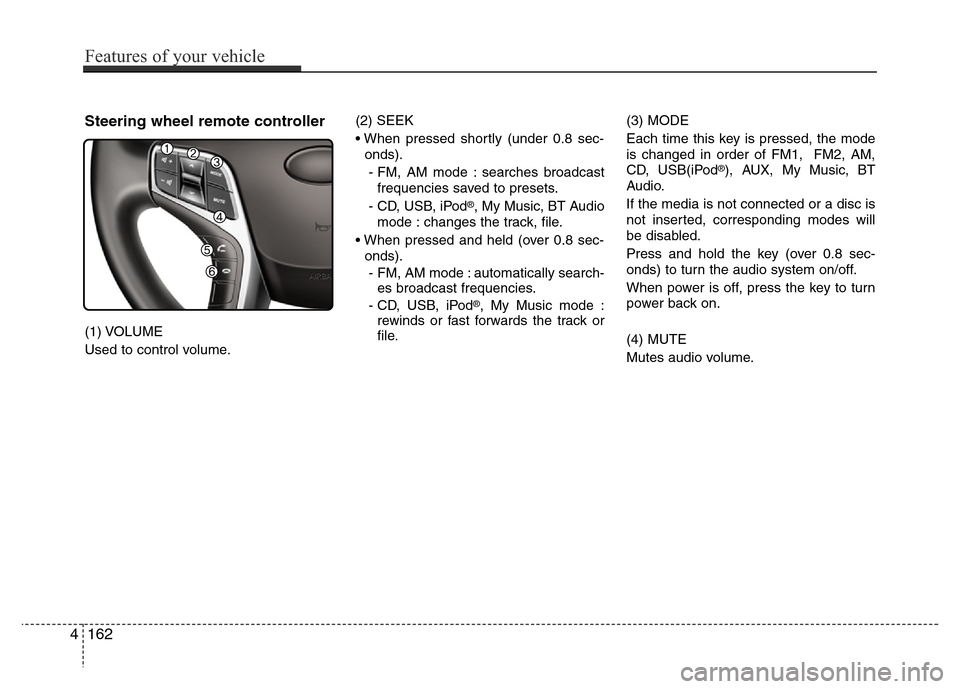
Steering wheel remote controller
(1) VOLUME
Used to control volume.(2) SEEK
• When pressed shortly (under 0.8 sec-
onds).
- FM, AM mode : searches broadcast
frequencies saved to presets.
- CD, USB, iPod
®, My Music, BT Audio
mode : changes the track, file.
• When pressed and held (over 0.8 sec-
onds).
- FM, AM mode : automatically search-
es broadcast frequencies.
- CD, USB, iPod
®, My Music mode :
rewinds or fast forwards the track or
file.(3) MODE
Each time this key is pressed, the mode
is changed in order of FM1, FM2, AM,
CD, USB(iPod
®), AUX, My Music, BT
Audio.
If the media is not connected or a disc is
not inserted, corresponding modes will
be disabled.
Press and hold the key (over 0.8 sec-
onds) to turn the audio system on/off.
When power is off, press the key to turn
power back on.
(4) MUTE
Mutes audio volume.
4162
Features of your vehicle
Page 290 of 473
57
Driving your vehicle
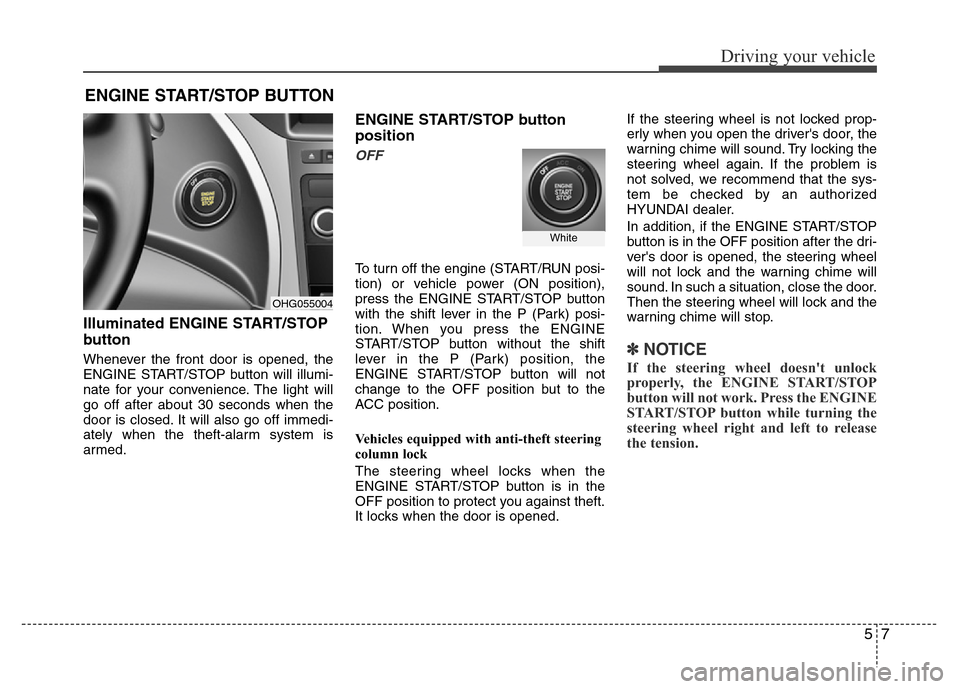
Illuminated ENGINE START/STOP
button
Whenever the front door is opened, the
ENGINE START/STOP button will illumi-
nate for your convenience. The light will
go off after about 30 seconds when the
door is closed. It will also go off immedi-
ately when the theft-alarm system is
armed.
ENGINE START/STOP button
position
OFF
To turn off the engine (START/RUN posi-
tion) or vehicle power (ON position),
press the ENGINE START/STOP button
with the shift lever in the P (Park) posi-
tion. When you press the ENGINE
START/STOP button without the shift
lever in the P (Park) position, the
ENGINE START/STOP button will not
change to the OFF position but to the
ACC position.
Vehicles equipped with anti-theft steering
column lock
The steering wheel locks when the
ENGINE START/STOP button is in the
OFF position to protect you against theft.
It locks when the door is opened.If the steering wheel is not locked prop-
erly when you open the driver's door, the
warning chime will sound. Try locking the
steering wheel again. If the problem is
not solved, we recommend that the sys-
tem be checked by an authorized
HYUNDAI dealer.
In addition, if the ENGINE START/STOP
button is in the OFF position after the dri-
ver's door is opened, the steering wheel
will not lock and the warning chime will
sound. In such a situation, close the door.
Then the steering wheel will lock and the
warning chime will stop.
✽ NOTICE
If the steering wheel doesn't unlock
properly, the ENGINE START/STOP
button will not work. Press the ENGINE
START/STOP button while turning the
steering wheel right and left to release
the tension.
ENGINE START/STOP BUTTON
OHG055004
White
Page 292 of 473
59
Driving your vehicle
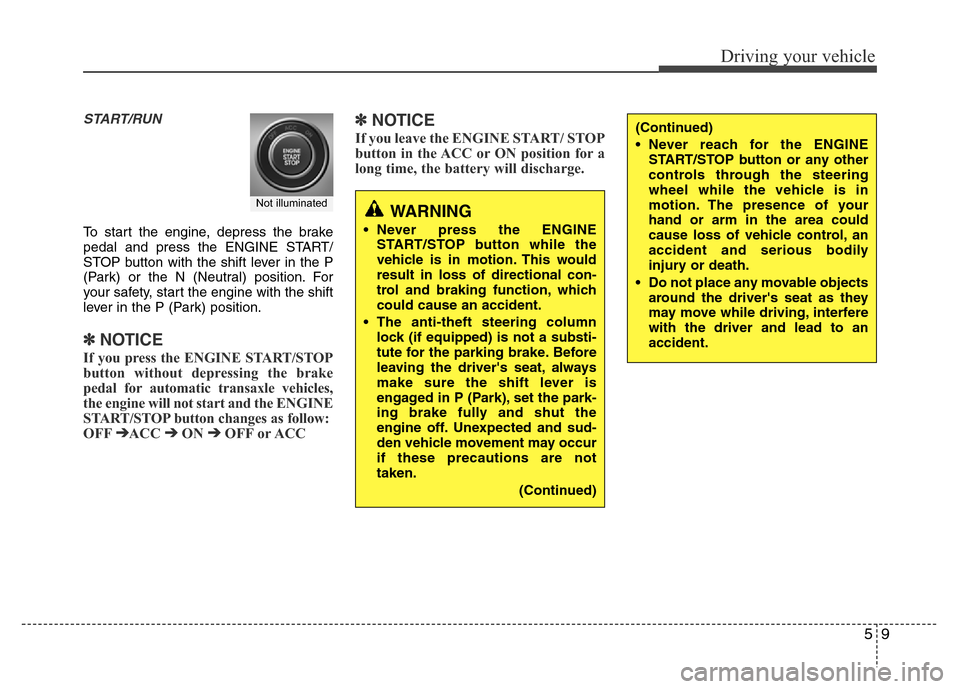
START/RUN
To start the engine, depress the brake
pedal and press the ENGINE START/
STOP button with the shift lever in the P
(Park) or the N (Neutral) position. For
your safety, start the engine with the shift
lever in the P (Park) position.
✽ NOTICE
If you press the ENGINE START/STOP
button without depressing the brake
pedal for automatic transaxle vehicles,
the engine will not start and the ENGINE
START/STOP button changes as follow:
OFF
➔ACC ➔ON ➔OFF or ACC
✽ NOTICE
If you leave the ENGINE START/ STOP
button in the ACC or ON position for a
long time, the battery will discharge.
WARNING
• Never press the ENGINE
START/STOP button while the
vehicle is in motion. This would
result in loss of directional con-
trol and braking function, which
could cause an accident.
• The anti-theft steering column
lock (if equipped) is not a substi-
tute for the parking brake. Before
leaving the driver's seat, always
make sure the shift lever is
engaged in P (Park), set the park-
ing brake fully and shut the
engine off. Unexpected and sud-
den vehicle movement may occur
if these precautions are not
taken.
(Continued)
(Continued)
• Never reach for the ENGINE
START/STOP button or any other
controls through the steering
wheel while the vehicle is in
motion. The presence of your
hand or arm in the area could
cause loss of vehicle control, an
accident and serious bodily
injury or death.
• Do not place any movable objects
around the driver's seat as they
may move while driving, interfere
with the driver and lead to an
accident.
Not illuminated